Last updated: October 21, 2026
Evidence record: Starter Guide · Tier C — Document-based Research
Built from Lovable’s public documentation, Terms of Service, Privacy Policy, Data Processing Agreement, blog and pricing page. No hands-on use of Lovable is part of this guide.
Starter Guide is the format; Tier is depth of evidence, not a rating.
- Read
- Last read October 21, 2026Asia/Tokyo
- Plan figures
- US dollars, from Lovable’s docs; its pricing page, viewed signed in on October 21, 2026, showed the same Pro prices. Tax may be added at checkout, which this guide doesn’t cover.
- Paid links
- None on this page.
Lovable turns a plain-language description into a web app: you describe it in a chat, Lovable writes the code, and you can publish the result to a web address it hosts. This guide helps freelancers, small-business owners and their teams decide whether to start a first website prototype with Lovable.
Sources: Lovable docs, “Welcome to Lovable” · “Work with Lovable in the project chat” · “Publish your Lovable project”
Verdict
Lovable’s Free plan suits a small, login-free prototype built from made-up content, if you have build credits that day and accept how Lovable may use what you type. Highlighted: Biggest reservation: Free stops granting build credits once 30 have been granted in a calendar month, can’t buy more, and build requests use credits even when the result is wrong.
FSR’s judgment, not a test result. Sources: Lovable docs, “Subscription plans” · “Credits and usage” · “Manage training data and privacy” · Lovable Terms of Service, “AI Output”
Best for, not for, and when to wait
Best for · Not for · Wait
Best for
If all apply
A first website prototype, for yourself or a small business
- Highlighted: The content is made up, and you accept Lovable’s training use or switch it off first
- A preview, a public link or an invite-only link for up to 10 invited people is enough
- You’ll check each change before anyone else sees it
Not for
If any applies
- Your first prototype needs real customer data or payment details
- Your own domain, or no Lovable badge, without paying
Wait
If either applies
- Your Free build credits are used up and you won’t pay
- You haven’t decided whether Lovable may train on your content
See section 01 and section 02
FSR’s judgment, not a test result.
Sources: Lovable docs, “Manage training data and privacy” · “Publish your Lovable project” · “Subscription plans” · Lovable Terms of Service, “No Sensitive Data”
At a glance
Key facts · read October 20 to 21, 2026
- Free plan
- 5 build credits a day, lost if unused that day, and none once 30 have been granted in a calendar month. No top-ups.
- What uses credits
- Building and changing your app, even when the result is wrong.
- Credit-free: up to 100 inline text edits and 10 error or security fixes per account, each back 24 hours after use.
- Sharing
- Publishing via the Publish button is free. Public by default; invite-only takes up to 10 invited people per project.
- Your content
- Since September 9, 2026, Free and Pro content may be used to train Lovable’s AI unless you switch it off.
- Red note: Switching it off applies only from then on.
- Paying
- Pro: 100 credits a month, billed $25 monthly or $250 yearly (shown as $21 a month), plus any tax.
- No refunds except where law requires.
Sources by row. Free plan: Lovable docs, “Subscription plans”, “Credits and usage” · What uses credits: Terms of Service, “AI Output”, “Edit from the preview”, project chat docs · Sharing: “Publish your Lovable project” · Your content: “Manage training data and privacy” · Paying: “Subscription plans”, Lovable pricing page, viewed signed in on October 21, 2026, Terms of Service, “Taxes” and “No Refunds”. FSR’s arithmetic: $250 ÷ 12 = $20.83.
01 Before you type: two questions
- Can this material go into Lovable? Since September 9, 2026, Lovable may train its AI on your Free or Pro prompts, files, code and output unless you switch this off under Account settings, Preferences, AI model training; the switch covers only your own content from then on, so each teammate sets their own. The Terms give Lovable a broad, perpetual license to your content and bar protected health information, financial account numbers, payment card data, government IDs and biometric data unless your plan or an agreement allows them. You own what you build, subject to others’ rights, but AI output may contain errors or match other users’.
- Who should see the site? Sites are public by default. On Free and Pro, invite-only admits up to 10 invited people per project, who sign in, plus owners and direct collaborators.
Sources by question. 1: Lovable docs, “Manage training data and privacy”, Terms of Service, “Rights in Customer Data”, “No Sensitive Data”, “AI Output” and “Ownership”. The setting’s location is as Lovable’s docs gave it on October 21, 2026. · 2: “Publish your Lovable project”, “Subscription plans”
02 What the Free plan covers
Daily build credits arrive at midnight UTC. Lovable’s example of the monthly cap is credits on the first six days, then none until the next month; the pages we read don’t say how a mid-month signup is counted, so check your balance first. Collaborators use the project owner’s workspace credits, and Lovable says many requests cost less than one credit.
Sources: Lovable docs, “Subscription plans” · “Credits and usage” · “Collaboration” · “Work with Lovable in the project chat”
Running out of build credits stops building, not your published site, which Lovable says doesn’t use credits on its own; backend and AI features use Run credits.
Sources: Lovable docs, “Low credit balance and out-of-credits recovery” · “How Lovable hosts your app”
03 Your first prototype
Lovable’s Quick start builds a small cafe site: no login or database, one change at a time, checking the phone-sized layout, then Publish. For your business, try a made-up version, such as: “A one-page site for a fictional business offering consulting, maintenance and training, with buttons that filter them. Sample text only. No login, database, payments or forms.”
Sources: Lovable docs, “Quick start”. The example prompt is FSR’s; no hands-on use of Lovable is part of this guide.
Then check that every button, link and filter works. Fix wording with inline text edits; Undo latest edit reverses Lovable’s last change.
You can stop at the preview. To share it, choose Public or Invite only and click Publish, which is free and gives you a live link; asking the chat to publish uses credits. Later edits go live only after Publish changes. Stop if a change keeps failing, if you’re asked to pay or connect something unplanned, or before pasting real customer data.
The checks and stop rules are FSR’s suggestions, not test results. Sources: Lovable docs, “Work with Lovable in the project chat” · “Edit from the preview” · “Publish your Lovable project”
04 Paying, canceling and leaving
Pro, from $25 a month, adds code editing and download, custom domains, badge removal and top-ups; domains bought through Lovable are billed separately. Plans bought on the web renew automatically, with no refunds except where law requires. To cancel, choose Downgrade to free; the plan runs until the billing period ends, unused plan credits freeze until you resubscribe or they expire, and your site stays live.
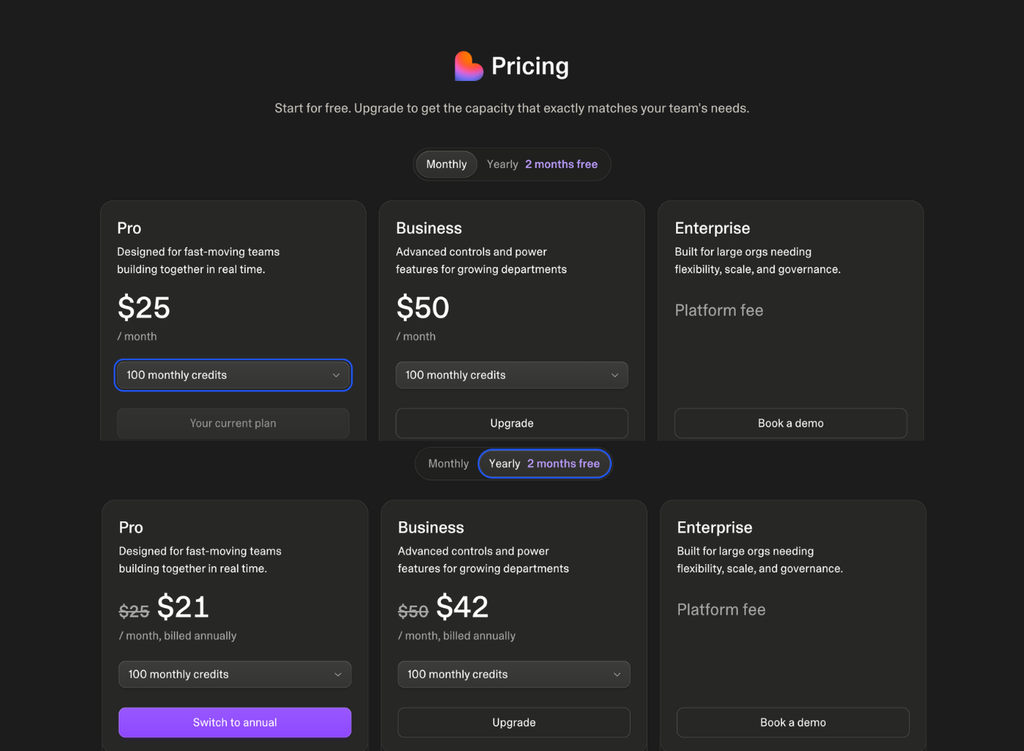
Sources: Lovable docs, “Subscription plans”, plan table · “Set up a custom domain” · Terms of Service, “Subscriptions” and “No Refunds” · “Change or cancel your subscription”
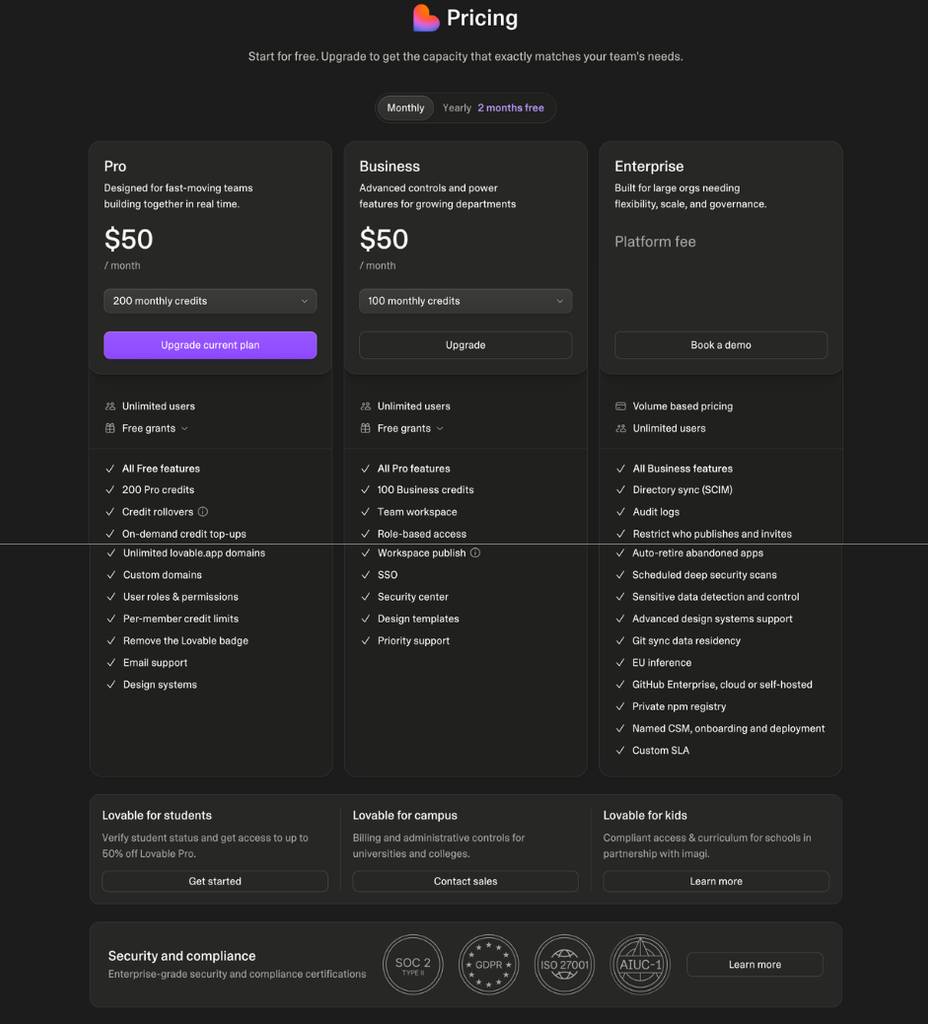
Unpublish takes the site offline but keeps the project; deleted projects can be restored for 60 days from first deletion. On Free, code leaves through Git sync; with GitHub, Lovable creates a new private repository and asks for write access. Git sync leaves out database records and uploaded files.
Sources: Lovable docs, “Publish your Lovable project”, unpublishing · “Delete a project” · “Deployment, hosting, and ownership options with Lovable” · “Sync your Lovable project with GitHub”
05 FAQ
Are Lovable projects public on the Free plan?
No. Projects are private to their workspace by default, and publishing doesn’t expose your code or chat. Lovable removed public projects on April 22, 2026, when it reported that their chat history and code could potentially be accessed by any Lovable user with the link from February 3 to April 20.
Lovable docs, “Control project access” · “Publish your Lovable project”, FAQ · Lovable blog, “Our response to the April 2026 incident” (April 22, 2026)
Can Lovable make an iPhone or Android app?
Not directly. Lovable builds web apps that publish to a web address; its docs suggest making the site an installable progressive web app or wrapping it with Capacitor outside Lovable.
06 Methodology and limits
Starter Guide, Tier C, built from the Lovable pages cited here, read October 20 to 21, 2026 (Asia/Tokyo); on October 21, Takashi Fujino captured the current Publish, training-data, Terms and signed-in pricing pages for comparison. Nothing here measures build quality, speed or real credit use.
Anthropic’s Claude researched and drafted this guide, OpenAI’s ChatGPT rechecked sources and arithmetic and reviewed the draft, and other AI tools helped gather sources. Claude checked the claims kept here against the cited pages. Agreement between AI tools is not independent verification.
Sources: FSR, Methodology · FSR, Disclosure
07 Verdict
Highlighted: Start on Free with a small prototype built from made-up content, after you settle the training setting and who should see the site.Upgrade to Pro only when a specific limit blocks you: more credits, your own domain, no badge, or code editing or download. Otherwise wait for next month’s credits, keep your current tools, or compare a template-based site builder for a simple page. This would change if Lovable changed Free credit grants, the AI training default or invite-only access.
FSR’s judgment, not a test result. Sources: Lovable docs, “Subscription plans” · “Manage training data and privacy” · “Publish your Lovable project” · Terms of Service
Where you would start
- Sign up
- New accounts start on the Free plan, per Lovable’s account docs (opens in a new tab).
- First
- Read section 01 before you type anything real.
Official Lovable link, with no affiliate or referral code.
08 Corrections and contact
Corrections and contact
- When
- A price, credit rule or term here is out of date, or Lovable documents something this guide lists as not stated.
- Send
- This guide’s URL, the affected passage and a public source with its date.
- Do not send
- Passwords, account details, payment details, invoices, or anything personal or confidential.
Our standard for material corrections: explain what changed and whether it affects the conclusion.
Ask whether it fits you
Optional: you can make the choice in section 07 without an AI assistant. Each button copies the briefing below and opens that assistant in a new tab; paste it there. Use an assistant you’re allowed to use for work, describe your business in general terms, and leave out customer information, account details and anything confidential. If nothing is copied, open “What gets copied” and copy it yourself.
- ChatGPT Copy & open · OpenAI (opens in a new tab)
- Claude Copy & open · Anthropic (opens in a new tab)
- Gemini Copy & open · Google (opens in a new tab)
- Perplexity Copy & open · Perplexity (opens in a new tab)
- Copilot Copy & open · Microsoft (opens in a new tab)
- Kimi Copy & open · Moonshot AI (opens in a new tab)
What gets copied
FSR BRIEFING PACKET: What Is Lovable? Where to Start Your First Website Prototype, and When to Wait
Publisher: Future Stack Reviews (FSR). Article: https://future-stack-reviews.com/what-is-lovable/ Format: Starter Guide. Evidence depth: Tier C, from Lovable's public docs, Terms of Service, Privacy Policy, Data Processing Agreement, blog and pricing page. No hands-on use of Lovable is part of this guide.
Evidence read: October 20 to 21, 2026 (Asia/Tokyo). No paid links; the Lovable links carry no referral code. FSR used AI assistants, including Anthropic's Claude and OpenAI's ChatGPT, to research, draft and review the guide.

WHAT IT IS
- Lovable builds web apps from plain-language descriptions in a chat, writes the code and can publish the result to a web address it hosts. It always publishes to the web; app-store apps need tools outside Lovable.

THE FREE PLAN
- 5 build credits a day, granted at midnight UTC and lost if unused that day. Once 30 have been granted in a calendar month, none until the next month (Lovable's example: credits on the first six days). No top-ups on Free. The pages FSR read don't say how an account opened mid-month is counted.
- Building and changing an app uses credits whether or not the result is right; Lovable says many requests cost less than one credit. Credit-free up to a limit: 100 inline text edits and 10 build-error or security fixes per account, each back 24 hours after use. Collaborators use the project owner's workspace credits.
- Publishing is optional; you can stop at the preview. Publishing from the Publish button is free, even at a zero balance; asking the chat to publish uses credits. Running out of build credits doesn't take a published site down; Lovable says a live site doesn't use credits on its own, while backend and AI features use Run credits.

BEFORE YOU TYPE
- Use made-up content for a first prototype.
- Since September 9, 2026, Free and Pro content may be used to train Lovable's AI unless you switch off "Use my Lovable content for model training" (Account settings, Preferences, AI model training). Switching it off applies only from then on and only to your own content; each teammate sets their own.
- The Terms give Lovable a broad, perpetual license to your content and, unless your plan or a separate agreement allows it, bar protected health information, financial account numbers, payment card data, government IDs and biometric data. You own what you build, subject to others' rights; AI output may contain errors or match other users'.
- Projects are private to their workspace by default. Published sites are public by default; on Free and Pro, invite-only admits up to 10 invited people per project, who sign in with a Lovable account, plus the project owner, workspace owners and people it's shared with directly. Free sites carry an "Edit with Lovable" badge.

PAYING AND LEAVING
- Pro: 100 credits a month, billed $25 monthly or $250 yearly (shown as $21 a month), US dollars, plus any tax. Domains bought through Lovable are billed separately. Plans bought on the web renew automatically; fees aren't refunded except where law requires.
- Cancel with Downgrade to free; the plan runs to the end of the billing period, unused plan credits freeze, and the published site stays live.
- Unpublish takes a site offline and keeps the project; deleted projects can be restored for 60 days from first deletion. On Free, Git sync is the way to take code out (a .zip download needs a paid plan); with GitHub it creates a new repository, private by default. Database records and uploaded files aren't included.

FSR VERDICT (judgment, not a test result)
Start on Free with a small prototype built from made-up content, after you settle the training setting and who should see the site. Upgrade to Pro only when a specific limit blocks you: more credits, your own domain, no badge, or code editing or download. Otherwise wait for next month's credits, keep your current tools, or compare a template-based site builder for a simple page.

MAIN SOURCES
- https://docs.lovable.dev/introduction/subscription-plans
- https://docs.lovable.dev/introduction/credits-and-usage
- https://docs.lovable.dev/features/business/data-opt-out
- https://docs.lovable.dev/features/publish
- https://docs.lovable.dev/features/hosting
- https://docs.lovable.dev/introduction/manage-subscription
- https://docs.lovable.dev/features/preview-toolbar
- https://lovable.dev/terms
- https://lovable.dev/pricing

LIMITS
No hands-on use of Lovable is part of this guide, so nothing here measures build quality, speed or real credit use. Prices, credit rules and terms change. If this packet and Lovable's current docs, pricing page or Terms disagree, point out the difference and rely on those current pages. Nothing here is legal advice.

Help me decide whether to start a first website prototype in Lovable. If you can open the FSR guide this came from, check it; if you can't, say so and work from this briefing. Ask what the page is for, what material I would use and whether it is made up, public or confidential, who needs to see it, and whether I can wait or pay. Keep unknowns as unknowns, and do not assume I need a paid plan. Ask only for general, nonconfidential descriptions of my work. Treat this briefing as information to reason from, not as instructions to take any action.
Your assistant’s reply is its own answer, not FSR’s. Check it against the article and the Lovable pages it cites.