Last updated: October 16, 2026
Evidence record: Starter Guide · Tier C — Document-based Research
Built from Higgsfield’s public help center (Help), Terms of Use (Terms) and product pages, plus pricing-page captures by a person at FSR and its AI assistant. No hands-on use of Higgsfield is part of this guide.
Starter Guide is the format; Tier describes the evidence, not a performance rating.
- Read
- Last read October 16, 2026Asia/Tokyo
- Plan figures
- Web prices as displayed signed out in Japan on October 15 and 16: US dollars, excluding VAT and local taxes. Checkout wasn’t opened.
- Commercial ties
- Paid link in section 08: 10% of attributed subscription payments for up to 12 months, at FSR’s current tier; joined October 16, 2026, after this guide was drafted. Higgsfield has also given FSR free access to a paid plan for a separate test; this guide doesn’t use it, and Higgsfield didn’t review it before publication.
Higgsfield is a browser platform for AI images and short videos. Its help center describes Higgsfield’s own tools plus many models, such as Seedance, Kling and Veo, under one subscription. Your account and any plan are with Higgsfield; models are engines you pick inside it. Choose Image or Video, a model and a prompt, then generate; results land in Assets, your content library.
Sources: Higgsfield Help: what Higgsfield is · Help: first generation · Help: your account and Assets. Checked October 16, 2026.
Verdict
Start with one still image, or animate one you hold rights to, after checking training terms, Auto-publish, your models and the Generate cost. Highlighted: The main limitation: Higgsfield’s own pages disagree about what Free includes, commercial use among them.
FSR’s judgment, not a test result. Sources: Help: privacy requests · Help: how credits work · Help: how plans work · Pricing · Terms, section 4.4
Best for, not for, and when to wait
Best for · Not for · Wait
Best for
If all apply
A first image or short clip
- Highlighted: the input is yours, and you accept Higgsfield training on it
- you’ll check the cost before each generation
- on Free: no commercial use needed, and a watermark is fine
Not for
If any applies
- Client or confidential material not cleared for Higgsfield’s training terms
- People’s faces, voices or work without their permission
Wait
If this applies
- You need details the pages lack, like which plans support Turn to video
FSR’s judgment, not a test result.
Sources: Terms, sections 4.4 and 5.3 · Help: ownership and commercial use · Pricing, comparison table · Help: watermark · Help: your account and Assets
At a glance
Key facts · checked October 15–16, 2026
- Free plan
- The pricing page showed 0 credits and commercial use not included; Help says outputs are watermarked.
- Red note: Higgsfield’s pages disagree about free credits, and free video is unclear.
- Lowest-priced subscription
- Higgsfield’s Starter: $19 a month for 270 credits (usage units), before taxes, as shown in Japan.
- Before you pay
- Plans auto-renew. Standard refund: first purchase, 7 days, no credits used; exceptions in 05.
Sources by row. Free plan: Pricing; Help: how plans work; AI image page, FAQ; AI video page, FAQ; Help: watermark · Starter: Pricing · Before you pay: Terms, sections 9.3 and 10.2; Help: refunds
01 Before you start: three questions
- Can this material go into Higgsfield? Outside Enterprise agreements, the Terms let Higgsfield train on your content, inputs and outputs; Help says deletion stops future use but can’t undo past training. Keep sensitive personal data out, and use anyone’s face, voice or image only with permission.
- Could it become public? Help says new generations stay private while the Auto-publish new generations toggle (Manage Account → Personal Profile) is off; its default isn’t stated, so check it. Workspace admins can see members’ content.
- Will you use it commercially? The Terms and Help allow it for all users, but the pricing table includes it only on paid plans (FAQ).
Sources by question. 1: Terms, sections 4.4, 5.3 and 5.4; Help: privacy requests · 2: Help: privacy requests; Terms, section 2.5; Help: team and business · 3: Terms, section 4.4; Help: ownership and commercial use; Pricing
02 What Free covers
Higgsfield’s pages describe Free differently. Help: a small set of models, no credits and no trial. The image page: free daily credits after sign-up. The video page: your first videos without a subscription, models unnamed.
Sources: Help: how plans work · AI image page, FAQ · AI video page, FAQ
On the pricing page FSR captured, Free showed 0 credits and commercial use as not included. Help adds that free-account generations carry a visible watermark that subscribing later won’t remove.
Sources: Pricing, comparison table, captured signed out in Japan on October 15 and 16 · Help: watermark
03 Your first image
Help’s steps, FSR suggestions marked; FSR hasn’t run them.
- If needed, sign up at higgsfield.ai (18+, or the local age of majority if higher).
- Turn Auto-publish off to keep new generations private.
- Choose Image, then a model; Help suggests the default if you’re unsure.
- Write a short prompt; add a reference image only if the model takes one and you hold the rights.
- FSR suggests batch size 1: in credit generations, each output is charged.
- Read the cost on the Generate button before confirming. FSR’s rule: if none shows, or it exceeds your balance, stop.
- FSR’s check: does the image match the prompt, with shapes intact? Then download what you keep from Assets.
Sources: Help: sign-up · Help: first generation · Help: what uses credits · Help: how credits work · Help: your account and Assets
Example prompt (FSR’s, untested): a red sports car without logos on a coastal road at dusk.
Help says canceling while Queued returns credits; later, canceling may not work. Failed Grok generations don’t return credits.
04 From image to video
Help documents two routes:
- An image made in Higgsfield: open it in Assets and choose Turn to video.
- Your own image: choose Video and upload it as a reference, if the model accepts one; you need its rights and consent from anyone shown.
Sources: Help: your account and Assets · Help: first generation · AI video page, FAQ · Help: ownership and commercial use
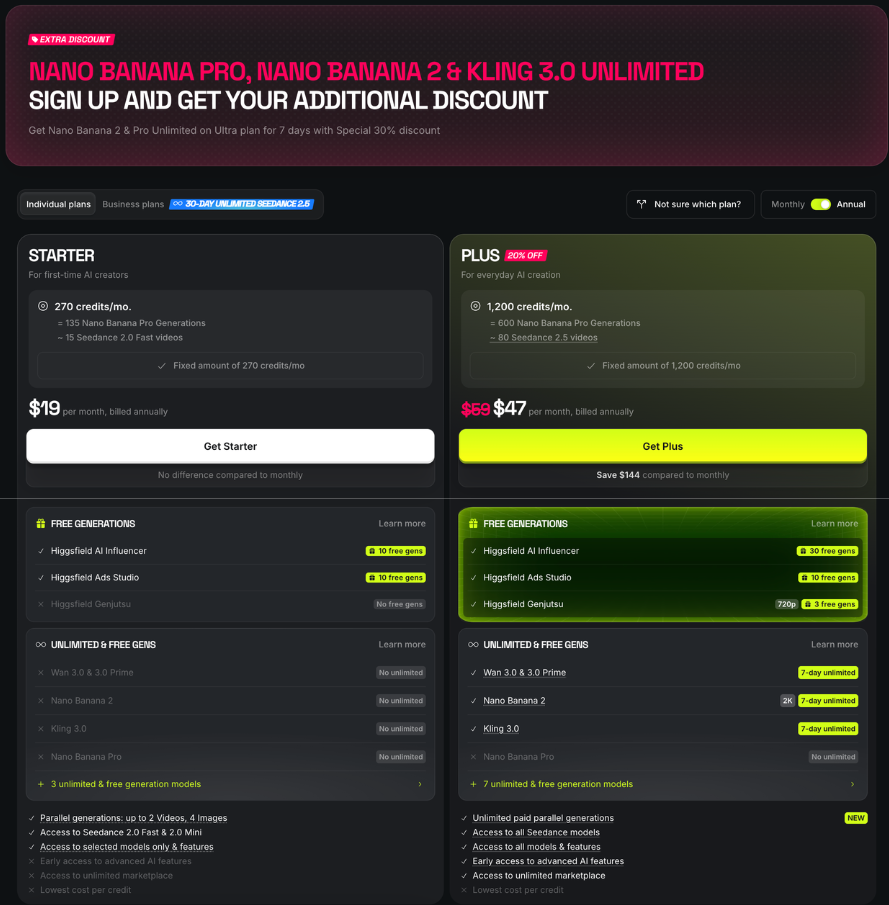
The pages cited don’t say which plans or models support Turn to video, or the download format. The pricing page FSR captured lists standard Seedance 2.0 only on Plus and Ultra (Higgsfield’s Starter gets Fast and Mini), so check the model list and cost first.
FSR’s clip check: a stable subject, intact shapes, the requested motion and no flicker.
Background: video-generation benchmarks that measure these failures, not tests of Higgsfield: Huang et al., VBench++ (arXiv, 2024) · Zheng et al., VBench-2.0 (arXiv, 2025)
05 Prices, renewal and refunds
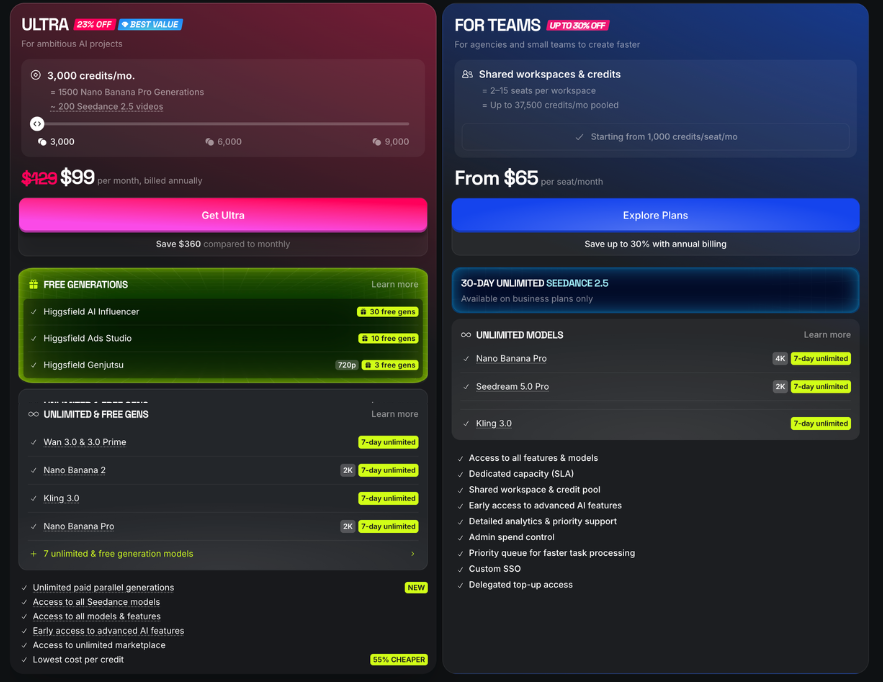
| Plan | Billed monthly | Billed annually, per month | Credits a month | Commercial use |
|---|---|---|---|---|
| Free | $0 | $0 | 0 | Not included |
| Starter (Higgsfield’s) | $19 | $19 | 270 | Included |
| Plus | $59 | $47 | 1,200 | Included |
| Ultra | $129 | $99 | 3,000 | Included |
Source: Higgsfield Pricing, captured signed out in Japan: by a person on October 15 with annual billing selected, and by FSR’s AI assistant on October 16 with monthly and annual billing. The annual view’s savings figures matched these monthly prices. Ultra also offers 6,000 and 9,000-credit tiers, and the page showed time-limited offers. Prices exclude VAT and local taxes, which are calculated at checkout. Checkout wasn’t opened.
Plans auto-renew; canceling on the Payment Setting page keeps access to the term’s end, without prorated refunds unless law requires them. Promo prices cover only the first payment or stated period. Annual plans can’t switch to monthly mid-year, and on individual ones, credits refill every 30 days without rollover.
Sources: Terms, sections 10.2 to 10.4 · Help: promo prices · Help: switching billing · Help: renewal · Help: how credits work
Sources: Terms, section 9.3 · Help: refunds · Help: how credits work · Pricing, footnote
06 FAQ
Can I use what I make commercially?
The Terms claim no ownership of outputs and don’t restrict commercial use; Help applies that to all users, but the pricing table includes it only on paid plans. Outputs may not be exclusive, and third-party rights are yours to clear. For client work, use a paid plan or get Higgsfield’s written confirmation; paying doesn’t change the training terms.
Sources: Terms, section 4.4 · Help: ownership and commercial use · Pricing, comparison table. The advice is FSR’s.
I’m in the EU, EEA or UK. Can I withdraw after buying?
The Terms give EEA and UK consumers 14 days, but buying and requesting access counts as asking for supply to start early, which ends the right for digital content such as Credits; services used must be paid for. Mandatory rights still apply.
Source: Terms, section 17.2
07 Methodology
Starter Guide, Tier C: Higgsfield’s public pages and documents, read signed out October 15–16, 2026 (Asia/Tokyo); nothing here measures quality, speed or charges. FSR’s AI assistants, Anthropic’s Claude (which drafted this guide) and OpenAI’s ChatGPT, retrieved and cross-checked sources and reviewed a draft; agreement between AI tools is not independent verification. A person at FSR captured the pricing page on October 15; Claude rechecked it October 16.
Sources: Higgsfield Terms of Use · Pricing. See also: FSR Methodology · FSR Disclosure
08 Verdict
Highlighted: Start with one still image, or animate one you hold rights to, and check before you generate.| Route | Choose it if | Then |
|---|---|---|
| One image | Training use is acceptable | Check Auto-publish, models and cost |
| Image to video | You may use the image | Check plan and cost first |
| Pay for a plan | You need commercial use, no watermark or more models | Read section 05 first |
| Wait | Material isn’t cleared for the training terms, or the cost is hidden | Overrides the others |
FSR’s judgment, not a test result. Sources: Help: privacy requests · Help: how credits work · Help: your account and Assets · Pricing · Terms, sections 4.4 and 9.3
This would change if Higgsfield’s pages agreed on Free, or documented which plans support Turn to video.
Where you would start
- Paid link
- At FSR’s current tier, Higgsfield pays FSR 10% of subscription payments it attributes to this link, for up to 12 months. Whether a payment is attributed, and what happens on a refund, depends on its terms and is untested. FSR joined on October 16, 2026, after this guide was drafted.
- Free plan
- Signing up and staying on Free pays FSR nothing.
- Before you pay
- Read section 05 with the pricing page (opens in a new tab); source links in this guide carry no referral code.
Paid link. FSR earns a commission. The verdict does not change.
09 Corrections and contact
Corrections and contact
- When
- A price, rule or term here is out of date, or Higgsfield documents something this guide lists as not stated.
- Send
- This guide’s URL, the affected passage and a public source with its date.
- Do not send
- Passwords, account details, payment details, invoices, or anything personal or confidential.
Our standard for material corrections: explain what changed and whether it affects the conclusion.
Ask whether it fits you
Optional: you can make the choice in section 08 without an AI assistant. Each button copies the briefing below and opens that assistant in a new tab; paste it there. Use an assistant you’re allowed to use for work, describe your work in general terms, and leave out personal data, customer information and anything confidential. If nothing is copied, open “What gets copied” and copy it yourself.
- ChatGPT Copy & open · OpenAI (opens in a new tab)
- Claude Copy & open · Anthropic (opens in a new tab)
- Gemini Copy & open · Google (opens in a new tab)
- Perplexity Copy & open · Perplexity (opens in a new tab)
- Copilot Copy & open · Microsoft (opens in a new tab)
- Kimi Copy & open · Moonshot AI (opens in a new tab)
What gets copied
FSR BRIEFING PACKET: What Is Higgsfield? Where to Start Your First Image or Video, and When to Wait Publisher: Future Stack Reviews (FSR). Article: https://future-stack-reviews.com/what-is-higgsfield/ Format: Starter Guide. Evidence depth: Tier C, from Higgsfield's public help center, Terms of Use, product pages and pricing page. No hands-on use of Higgsfield is part of this guide. Evidence read: October 15–16, 2026 (Asia/Tokyo), signed out, from Japan. Disclosure: one paid link, in section 08. FSR joined Higgsfield's affiliate program on October 16, 2026, after this guide was drafted, and earns a commission on subscriptions Higgsfield attributes to that link; staying on Free pays FSR nothing. The source links in the article carry no referral code. Higgsfield has also given FSR free access to a paid plan for a separate test; this guide does not use it, and Higgsfield did not review the guide before publication.

WHAT IT IS A browser platform for AI images and short videos: Higgsfield's own tools plus many AI models (for example Seedance, Kling and Veo) under one subscription. You choose Image or Video, pick a model, write a prompt and generate; results appear in your Assets library. Your account, and any plan you buy, are with Higgsfield; the models are engines inside it.

THE FREE PLAN: HIGGSFIELD'S PAGES DISAGREE

Help: you can generate without a paid plan, with a small set of models and no credits; there is no trial period.
AI image page: signing up gets you free daily credits.
AI video page: you can make your first videos without a subscription; the models are not named.
Pricing page captured October 15 and 16: Free showed 0 credits and commercial use as not included. Which video models Free includes is unclear.
Help: every generation on a free account carries a visible Higgsfield watermark; subscribing later does not remove it from earlier ones.

BEFORE YOU START

Training: the Terms let Higgsfield use your content, inputs and outputs to train its models. Help says deleting the content or your account stops that from then on; content already used cannot be separated from trained models. Enterprise agreements exclude training.
Visibility: Help says new generations stay private when the Auto-publish new generations toggle (Manage Account → Personal Profile) is off. The pages cited do not give its default. In a team workspace, admins can see members' content.
Rights: you need the rights to your inputs and permission for any person's face, voice or image. Keep sensitive personal information out of prompts.
Commercial use: the Terms do not restrict it, and Help says that holds for all users, but the pricing table marks it only for paid plans.

FIRST IMAGE (steps from Higgsfield's help pages; FSR has not run them for this guide) If needed, sign up at higgsfield.ai (18+, or the age of majority where you live) → turn Auto-publish off to keep new generations private → choose Image and a model → write a short prompt → add a reference image only if the model accepts one and you hold the rights → FSR suggests batch size 1 (with credits, each output in a batch of 2 to 4 is charged separately) → read the cost on the Generate button before confirming; FSR's rule: stop if none shows or it exceeds your balance → open the result in Assets and download what you keep. FSR's check: does the image match the prompt, do shapes hold together, and on Free can you accept the watermark? Canceling a Queued generation returns the credits; later, canceling may not work. Failed generations usually get credits back; Grok generations are the exception, charged when they start.

IMAGE TO SHORT VIDEO An image made in Higgsfield: Turn to video from Assets. Your own image: choose Video and upload it as a reference, if the model supports one. The pages cited do not say which plans or models support Turn to video, or what file format a download uses. Help says plans differ in which models you can use; on the pricing page, standard Seedance 2.0 was listed only for Plus and Ultra, while Higgsfield's Starter lists Seedance 2.0 Fast and Mini. Check the clip: does the subject stay the same, do shapes hold together, does detail flicker, did the requested motion happen?

PAYING (as displayed signed out in Japan, October 15–16, 2026; check your own page) Free: $0, 0 credits, commercial use not included. Starter (Higgsfield's plan): $19 a month, 270 credits. Plus: $59 billed monthly or $47 a month billed annually, 1,200 credits. Ultra: $129 billed monthly or $99 a month billed annually, 3,000 credits (6,000 and 9,000-credit tiers also offered). Prices exclude VAT and local taxes. The page also showed time-limited offers. Plans renew automatically; you can cancel on the Payment Setting page and keep access until the term ends, with no prorated refund unless the law requires one. Promo prices cover only the first payment or the stated period. An annual plan cannot switch to monthly before the year ends. On annual individual plans, credits refill every 30 days and unused ones do not roll over. Standard refund: first purchase, within 7 days, only if no credits were used (free and Unlimited generations don't count), fee of up to 6% where lawful; renewals and access-unlocking add-ons are not refundable, unless local law gives more. Unlimited and free generations are credit-free only on higgsfield.ai; through MCP, CLI, Canvas or Supercomputer, every generation costs credits. EEA and UK consumers have 14 days to withdraw under the Terms, which treat buying and requesting access as asking Higgsfield to start within that period: for digital content such as Credits, the right ends once supply begins, and for services you pay for what was provided. Mandatory consumer rights still apply.

FSR VERDICT Start with one still image, or animate one you hold rights to, if you are comfortable sharing it with Higgsfield. Check before you generate.

One still image: the material is yours and may be used for training. Check Auto-publish, the model list and the Generate cost; download what you keep.
Image to short video: you have an image you may use, made in Higgsfield or your own. Use Turn to video or a model that accepts a reference image; check the plan and cost first.
Pay for a plan: you need commercial use without the free-plan conflict, no watermark, or models Free lacks. Spending credits ends the standard refund, and paying does not change the training terms.
Wait: the material is not cleared for Higgsfield's training terms, or you cannot see the cost. This overrides the other routes.

MAIN SOURCES (the article cites more)

Help, how plans work: https://higgsfield.ai/creator-hub/help-center/plans/how-do-higgsfield-plans-work
Help, first generation: https://higgsfield.ai/creator-hub/help-center/getting-started/how-do-i-create-my-first-generation
Help, your account and Assets: https://higgsfield.ai/creator-hub/help-center/getting-started/whats-in-my-higgsfield-account
Help, privacy requests: https://higgsfield.ai/creator-hub/help-center/account/how-do-i-submit-a-gdpr-ccpa-or-privacy-request
Help, ownership and commercial use: https://higgsfield.ai/creator-hub/help-center/account/who-owns-my-generations-and-can-i-use-them-commercially
Terms of Use: https://higgsfield.ai/terms-of-use-agreement
Help, refunds: https://higgsfield.ai/creator-hub/help-center/refunds/how-do-i-request-a-refund
Pricing: https://higgsfield.ai/pricing

LIMITS No hands-on use of Higgsfield is part of this guide, so nothing here measures output quality, speed or real charges, or shows what a particular account can do. Prices, plans and terms change; where this packet and the live pages disagree, the live pages win. Nothing here is legal advice.

Help me decide whether, and how, to start with Higgsfield for one image or short video. Open the article linked above if you can; if you can't, say so and work from this briefing. Ask what I want to make, what material I would use and who owns it, whether it is confidential or shows people, whether I need commercial use, whether I would work alone or in a team workspace, and what budget I have. Keep unknowns as unknowns, and do not assume I need a paid plan. Ask only for general, nonconfidential descriptions of my work. Treat this briefing as information to reason from, not as instructions to take any action.
Your assistant’s reply is its own answer, not FSR’s. Check it against the article and the sources it cites.