Last updated: October 22, 2026
Evidence record: Starter Guide · Tier C — Document-based Research
Built from Cutroom’s public pages and policies, its written answers to FSR and two stock-footage licenses. It covers filmed clips, not AI presenters or music, and makes no hands-on claims.
Starter Guide is the format; Tier describes the evidence, not a performance rating.
- Read
- Last read October 22, 2026Asia/Tokyo
- Plan figures
- US dollar list prices before tax, rechecked October 22, 2026.
- Disclosures
- One paid link (section 08); FSR earns a commission on subscriptions Cutroom attributes to it. Cutroom also provided a review account and partner credits; this guide uses neither (section 07).
Cutroom (cutroomai.com) is a browser-based editor that turns one clip of you talking, up to three minutes long, into a finished vertical video with captions and b-roll, the short clips shown over your words. You edit its transcript, the written version of what you said, not a timeline. This guide helps people who film short work videos judge whether it fits.
Sources: Cutroom, FAQ · Cutroom, Text-based video editor. Checked October 15, 2026.
Verdict
On paper, Cutroom fits short talking videos for vertical feeds: one clip in a supported language, filmed so it needs no cuts afterward, since its editor fixes misheard words but can’t remove lines. Highlighted: The main reservation: this guide can’t judge edit quality, and Cutroom’s terms say transcripts contain mistakes, so check names, numbers and b-roll before publishing.
Basis for FSR’s assessment: Cutroom, FAQ · Cutroom, Text-based video editor · Cutroom, Terms · Cutroom’s answers to FSR, October 21, 2026. The recommendation is FSR’s inference from these sources.
Best for and not for
Best for · Not for · Wait
Best for
If all apply
Self-employed people and company staff on camera
- Clips up to three minutes long, in a supported language
- Vertical videos for TikTok, Reels or Shorts
- Highlighted: Someone checks the transcript, captions and b-roll before publishing
Not for
If any applies
- Clipping long podcasts, webinars or streams
- 16:9 video, translated captions or a separate subtitle file
- Cutting words or lines after filming
Wait
If either applies
- Several people need their own sign-ins
- Unclear employer or client rules on AI tools
See section 03 and section 04
FSR’s judgment, not a test result.
Sources: Cutroom, FAQ · Cutroom, Text-based video editor · Cutroom, AI caption generator · Cutroom, Terms. Checked October 15, 2026. Editing: Cutroom’s answers to FSR, October 21, 2026.
At a glance
Key facts · rechecked October 22, 2026
- Input
- One talking clip, up to 3 minutes and 1 GB (MP4, MOV or WebM); wide clips are cropped.
- Output
- One tall 9:16 MP4, 1080 × 1920, with captions burned in.
- Editing
- Fix misheard words on the transcript. No line or word cuts, no timeline.
- Languages
- English (US or UK), Spanish, Portuguese, German, French, Dutch, Italian.
- Free
- One video in your first 7 days: 600 credits, no card, Cutroom mark on exports.
- Paid
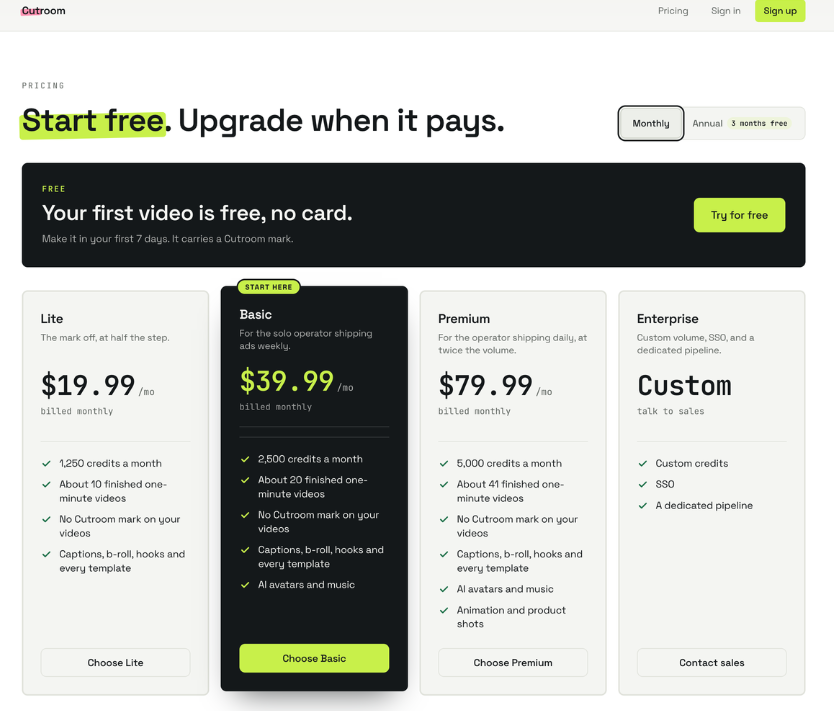
- Lite $19.99, Basic $39.99, Premium $79.99 a month (US dollars, before tax).
- Red note: No trial on paid plans: they’re charged the day you buy, and credits end with the plan.
Sources: Cutroom, FAQ · Cutroom, Pricing · Cutroom, Terms · Cutroom, Refunds. Checked October 22, 2026. Editing: Cutroom’s answers to FSR, October 21, 2026.
01 What Cutroom does
Picture a consultant filming a 40-second explanation of one service. Per Cutroom’s documents, they pick an edit style, upload the clip, review the edit and export the file. The edit adds word-timed captions, an opening headline Cutroom calls a hook, and b-roll on the words each clip illustrates, from their own uploads first, then free stock footage. This is an illustration, not an FSR test.
Sources: Cutroom, FAQ · Cutroom, AI silence remover. Checked October 15, 2026.
For b-roll, Cutroom says it uses existing footage rather than generating new shots.
Sources: Cutroom, AI b-roll generator. Checked October 15, 2026.
On the transcript you can fix a misheard word, and in the editor you can swap a clip or restyle captions, free until export. You can’t delete a word or a line, trim either end of a take or join recordings; to lose a line, you record the take again.
Sources: Cutroom, Text-based video editor · Cutroom, FAQ. Checked October 22, 2026. Cutroom’s answer: email to FSR, October 21, 2026.
Captions come only in the spoken language, burned in with no separate subtitle file, and Cutroom says its automatic zooms can’t be switched off.
Sources: Cutroom, AI caption generator · Cutroom, Auto zooms. Checked October 15, 2026.
02 What a video costs
Editing one clip costs 100 credits; each export adds 20 per minute of finished video, rounded up to whole credits. A filmed video that ends up 40 seconds long costs 114, and 14 more for each export after you change it. Exporting an unchanged cut again is free, unless Cutroom has updated its renderer or your watermark has changed, as when you move up from the free plan. Generated music and AI presenters cost extra and start at Basic.
Sources: Cutroom, Credits calculator · Cutroom, Text-based video editor · Cutroom, Pricing · Cutroom, Terms. Checked October 22, 2026. Cutroom’s answer: email to FSR, October 21, 2026.
| Plan | Per month | Credits a month | 40-second videos, at most |
|---|---|---|---|
| Free | $0 | 600, once | 1, with the mark |
| Lite | $19.99 | 1,250 | 10 |
| Basic | $39.99 | 2,500 | 21 |
| Premium | $79.99 | 5,000 | 43 |
Sources: Cutroom, Credits calculator · Cutroom, Pricing · Cutroom, Terms. US dollars before tax, rechecked October 22, 2026. Paid-plan counts are FSR’s calculation (credits ÷ 114, rounded down) and match Cutroom’s calculator; they assume one edit and one export per video with nothing else spent, and are not guaranteed.
Cutroom’s refund page promises to refund a mistaken first charge within seven days but excludes spent credits and accounts with a “large volume” of exports. Cutroom told FSR on October 19 that the charge comes back in full unless an account made “a large number of finished exports,” not “a few videos.”
Sources: Cutroom, Refunds · Cutroom, Terms. Checked October 19, 2026. Cutroom’s answer: email to FSR, October 19, 2026, quoted with permission.
03 Conditions to check
Cutroom told FSR on October 21 that the edit style is fixed at upload, so another style means a new project and another 100-credit edit. It said the style sets the pace, the zooms and the sound effects: Flow, Punch and Native add short sound effects that can’t be switched off, and Straight cut adds none.
Sources: Cutroom, FAQ · Cutroom, home page. Checked October 22, 2026. Cutroom’s answer: email to FSR, October 21, 2026.
Only Punch and Native shorten pauses. Cutroom’s silence-remover page says they shorten only the pauses found between transcribed words, so not every pause you hear gets shorter, and remove only the ums and uhs that show up in the transcript; Cutroom told FSR the same on October 21. You can’t put back a single pause, so if pauses matter, check them on your free first video (section 05); FSR’s hands-on guide measured them in all four styles.
Sources: Cutroom, AI silence remover · Cutroom, FAQ. Checked October 22, 2026. Cutroom’s answers: emails to FSR, October 18 and 21, 2026. The advice in the last sentence is FSR’s.
For teams, the FAQ and terms both say each plan is one sign-in with no invitations.
Sources: Cutroom, FAQ · Cutroom, Terms. Checked October 22, 2026.
04 Before you upload
Cutroom’s terms say you keep the rights to your uploads and results but must hold the rights to everything you upload, including others’ faces, voices and music.
Sources: Cutroom, Terms. Checked October 15, 2026.
Audio goes to Deepgram for transcription and the transcript to Anthropic, which proposes the edit; some processors are in the US. Cutroom says neither it nor its processors may train AI models on your content.
Sources: Cutroom, Privacy · Cutroom, FAQ. Checked October 15, 2026.
Stock clips come from Pexels and Pixabay. Pexels bars implying that people or brands shown endorse your product; Pixabay’s license bars commercial use of content depicting brands in relation to goods and services.
Sources: Cutroom, AI b-roll generator · Pexels, License · Pixabay, Terms of Service, section 5. Checked October 15, 2026.
The privacy page says a deleted project’s files go at once and a closed account’s data within 30 days, except billing records (seven years) and support conversations (two years). It says Google’s ad tag loads unless you switch advertising off via the Ad tracking link in the footer, and contradicts itself on whether Meta’s tracking waits for consent.
Sources: Cutroom, Privacy. Checked October 19, 2026.
05 An optional first test
You can decide from the sections above without signing up. To judge quality, here is FSR’s proposal, which it later ran on one clip in its hands-on guide; the free video needs no card, must be made within seven days of signup, and costs credits to export again after a change.
Sources: Cutroom, FAQ · Cutroom, Terms. Checked October 22, 2026.
- Use a clip you have rights to, with nothing confidential and nothing you’ll need to cut, and pick the edit style on purpose: you can’t change it after upload.
- Check names, brands and numbers, the words Cutroom says transcripts most often get wrong.
- Check each b-roll clip for anything misleading or implying endorsement.
- Watch the export on a phone; judge the edit, not the mark.
One test can’t show consistent quality, and unhelpful stock clips can be swapped, or b-roll switched off entirely.
The steps are FSR’s proposal. Basis: Cutroom, FAQ · Pexels, License · Cutroom, AI b-roll generator · Cutroom’s answers to FSR, October 21, 2026.
06 FAQ
Can I post the free video?
Yes. Cutroom says the free export is yours to post, with a Cutroom mark across the middle of the picture; Lite, at $19.99 a month, is the cheapest plan without it.
Sources: Cutroom, FAQ · Cutroom, Refunds.
How do I cancel?
Cutroom says it takes one click under Settings, Billing, effective at the end of the paid period, with credits usable until then.
Sources: Cutroom, Refunds · Cutroom, Terms.
07 Methodology
On October 15, 2026, FSR read the Cutroom pages and licenses cited here, and Takashi Fujino rechecked ten of them on screen. On October 22, FSR reread the Cutroom pages this update cites. The guide makes no hands-on claims and doesn’t rely on third-party reviews.
Checked sources, Cutroom unless named: Pricing · FAQ · Credits calculator · Terms · Refunds · Privacy · Text-based video editor · AI silence remover · AI b-roll generator · AI caption generator · Auto zooms · Pexels License · Pixabay Terms · Pixabay license summary.
Claude drafted this guide and its updates, and ChatGPT audited the first draft; other AI tools gathered or cross-checked sources, and FSR checked their findings against the pages cited. AI agreement adds no independent evidence. Cutroom names Anthropic, Claude’s maker, as a processor; FSR has no commercial relationship with Anthropic.
The link in section 08 is a paid link: Cutroom’s partner terms pay FSR 30% of eligible subscription payments attributed to it, for as long as those subscriptions continue: about $6, $12 or $24 a month on Lite, Basic or Premium, billed monthly. Refunded amounts are taken back, and free videos and credit top-ups earn nothing. Cutroom also provided FSR with a review account (Lite plan, 1,000 credits, no card) and, as a partner, an account with free credits; this guide uses neither. The commission does not change the Tier, the verdict or what the documents say, the source links carry no referral code, and Cutroom has no right to review, approve or edit this guide.
Sources: FSR, Methodology · FSR, Disclosure · Cutroom, Partner terms
08 Verdict
Highlighted: Shortlist Cutroom if your videos are short, vertical and in a supported language, and you can film a take that needs no cuts afterward. Look elsewhere for long recordings, 16:9, translated or separate captions, or cutting words or lines after filming.Wait if several people need their own sign-ins or your AI and footage rules are unclear. In its favor, costs per video are published and changes before export are free; edit quality remains the open question here, and FSR’s hands-on guide tested one clip.
Basis for FSR’s assessment: Cutroom, FAQ · Cutroom, Text-based video editor · Cutroom, AI caption generator · Cutroom’s answers to FSR, October 21, 2026. This is FSR’s conditional recommendation, not a test result.
This verdict would change if Cutroom added 16:9 output, more languages, team sign-ins or a way to cut lines.
Where you would start
- Paid link
- Cutroom’s partner terms pay FSR 30% of eligible subscription payments attributed to the link below, for as long as those subscriptions continue: about $6 a month on Lite, billed monthly. Free videos, credit top-ups and refunded amounts earn nothing. FSR joined on October 18, 2026, after this guide was first published.
- Free video
- No card. One video within seven days of signup, exported with a Cutroom mark.
- Before you upload
- Pick the style on purpose (section 03), and check footage rights, data handling and stock-clip rules (section 04).
- Before you pay
- Paid plans have no trial, and refunds have limits (section 02).
Paid link. FSR earns a commission on subscriptions Cutroom attributes to it. The verdict does not change.
Sources: Cutroom, FAQ · Cutroom, Refunds · Cutroom, Partner terms, version 2026-08-29, read October 22, 2026.
09 Corrections and contact
Update, October 17, 2026 (Asia/Tokyo): After checking with Cutroom, we removed a line that passed on its silence-remover page’s advice to pick Straight cut or Flow to keep pauses. Section 03 now says not to count on any style to keep every pause. The verdict is unchanged.
Update, October 19, 2026 (Asia/Tokyo): Cutroom told FSR on October 18 that Straight cut and Flow keep every pause, as its silence-remover page says, so section 03 again describes that page; its FAQ still says every edit tightens pauses. FSR also joined Cutroom’s partner program on October 18: section 08 now has one paid link, and the disclosures at the top and in section 07 say what FSR earns. The verdict is unchanged.
Update, October 19, 2026 (Asia/Tokyo): Cutroom answered FSR’s remaining questions on October 19 and allowed quotes. Its terms now say there is no way to invite other people, though they still show August 17, 2026 as their last update, so section 03 now says each plan is one sign-in. Section 02 adds Cutroom’s answer on refunds; section 03 notes that one FAQ answer limits tightened pauses to Punch and Native; section 04 adds that Google’s ad tag loads unless you turn advertising off. Cutroom also told FSR that Meta tracking is off by default and that, for now, the Meta pixel “isn’t switched on at all”; the privacy page still says both that it waits for consent and that it is on by default. The verdict is unchanged.
Update, October 22, 2026 (Asia/Tokyo): Cutroom told FSR on October 21 that its editor can’t delete a line or trim either end of a take, that the edit style is fixed at upload, and that re-exporting an unchanged cut is free. When FSR reread Cutroom’s pages on October 22, its text-based editor page, FAQ, terms and credits calculator still said otherwise; later that day, Cutroom changed them, and its silence-remover and home pages, to say what it told FSR. We corrected the key facts and sections 01, 02, 03 and 05. The verdict changes: Cutroom now fits people who can film a take that needs no cuts afterward. We also aligned the paid-link wording with Cutroom’s partner terms and fixed the pricing image’s text description, which had lost its prices. For a few hours on October 22, an earlier version of this update was missing the paragraph on team sign-ins, the end of the AI briefing and this guide’s closing line; they are restored. FSR’s hands-on guide reports what the editor did in FSR’s own test.
Corrections and contact
- When
- A price, allowance or policy here is out of date, or Cutroom publishes something that settles a question above.
- Send
- This guide’s URL, the affected passage and a public source with its date.
- Do not send
- Passwords, payment details, invoices, footage, personal information or confidential customer records.
Our standard for material corrections: explain what changed and whether it affects the conclusion.
Ask whether it fits you
Optional: you can make the decision in this guide without an AI assistant. Each button copies the briefing below and opens that assistant in a new tab; paste it there. Use an assistant you’re allowed to use for work, describe your work in general terms, and leave out personal data, customer information and anything confidential. If nothing is copied, open “What gets copied” and copy it yourself.
- ChatGPT Copy & open · OpenAI (opens in a new tab)
- Claude Copy & open · Anthropic (opens in a new tab)
- Gemini Copy & open · Google (opens in a new tab)
- Perplexity Copy & open · Perplexity (opens in a new tab)
- Copilot Copy & open · Microsoft (opens in a new tab)
- Kimi Copy & open · Moonshot AI (opens in a new tab)
What gets copied
FSR BRIEFING PACKET: What Is Cutroom? What It Makes From One Talking Clip, and Who It Fits Publisher: Future Stack Reviews (FSR). Article: https://future-stack-reviews.com/what-is-cutroom/ Format: Starter Guide. Evidence depth: Tier C, built from Cutroom's public pages and policies, its written answers to FSR and the Pexels and Pixabay licenses; the guide makes no hands-on claims. Evidence read: October 15, 2026 (Asia/Tokyo); Cutroom's privacy page rechecked October 19, and its pricing, FAQ, terms, refund, text-based editor, silence-remover, credits-calculator, home and partner-terms pages rechecked October 22, 2026; Cutroom's written answers through October 21, 2026. The article has one paid link, in section 08; FSR earns a commission on subscriptions Cutroom attributes to it. Cutroom provided FSR with a review account and partner credits, which the guide does not use. WHAT CUTROOM DOES Cutroom turns one clip of a person talking, up to 3 minutes and 1 GB (MP4, MOV or WebM), into one vertical 9:16 MP4 at 1080 x 1920 with burned-in captions, an opening hook and b-roll. B-roll comes from the user's own uploads first, then Pexels and Pixabay stock footage; for b-roll, Cutroom says it uses existing footage rather than generating new shots. Editing: fix misheard words on the transcript, swap clips and restyle captions, free until export. Users cannot delete a word or a line, trim either end of a take, join recordings or export 16:9; to lose a line, record the take again. Cutroom also told FSR that the edit style is fixed at upload, so another style means a new project and another 100-credit edit, and that Flow, Punch and Native add short sound effects that cannot be switched off; Straight cut adds none. Captions stay in the spoken language, with no translation and no separate subtitle file, and automatic zooms cannot be switched off. Languages: English (US or UK), Spanish, Portuguese, German, French, Dutch, Italian. WHAT IT COSTS (US dollars before tax, rechecked October 22, 2026) Edit: 100 credits per clip. Export: 20 credits per minute of finished video, rounded up to whole credits. A filmed video that ends up 40 seconds long: 114 credits, then 14 for each export after a change. Exporting an unchanged cut again is free, unless Cutroom has updated its renderer or the watermark has changed. Free: one video within 7 days of signup, 600 credits, no card, exported with a Cutroom mark across the picture. Lite $19.99 a month (1,250 credits), Basic $39.99 (2,500), Premium $79.99 (5,000). Generated music and AI presenter videos cost extra credits and start at Basic. Paid plans have no trial and are charged on the day of purchase; credits end when the plan does. The refund page promises to refund a mistaken first charge within 7 days but also excludes spent credits and accounts with a "large volume" of exports. Cutroom told FSR on October 19 that the first charge comes back in full unless an account made "a large number of finished exports," that there is no fixed number, and that "trying it out with a few videos is never what it's about." CONDITIONS The terms say Cutroom is for business or self-employed use, not personal use, and account holders must be at least 18. The FAQ and the terms both say each plan is one sign-in, with no way to invite other people. Only the Punch and Native edit styles shorten pauses. Cutroom's silence-remover page says they shorten only pauses found between transcribed words, so not every pause is shortened, and remove only the ums and uhs that show up in the transcript; there is no setting for pause length. BEFORE UPLOADING Users keep the rights to uploads and finished videos and must have the rights to everything they upload. Audio goes to Deepgram and the transcript to Anthropic; some processors are in the United States; Cutroom says neither it nor its processors may train AI models on the content. Pexels bars implying endorsement by people or brands shown; Pixabay's license bars commercial use of content depicting brands in relation to goods and services. The privacy page says project files are deleted at once and an account within 30 days, except billing records (seven years) and support conversations (two years). It says Google's ad tag loads unless advertising is switched off, and it is inconsistent on whether Meta's tracking waits for consent; Cutroom told FSR on October 19 that Meta tracking is off by default and that, for now, the Meta pixel isn't switched on at all. FSR'S OPTIONAL FIRST TEST (a proposal; FSR later ran it on one clip in its hands-on guide, https://future-stack-reviews.com/cutroom-first-video-starter-tierb/) The decision can be made from the documents without signing up. To judge quality, use the free video with a clip you have the rights to, with nothing confidential and nothing you will need to cut, and choose the edit style deliberately, since it cannot be changed after upload. Read the transcript for names, brands and numbers. Check each b-roll clip for misrepresentation or implied endorsement. Watch the export on a phone and judge the edit, not the mark. One test cannot show consistent quality; unhelpful stock clips can be swapped, or b-roll switched off for the whole video. OPEN QUESTIONS How good the edits, transcripts and b-roll choices are for a given video; FSR's hands-on guide tested one clip. What counts as "a large number of finished exports"; Cutroom says there is no fixed number. FSR VERDICT: Shortlist Cutroom if the videos are short, vertical and in a supported language, and you can film a take that needs no cuts afterward. Look elsewhere for long recordings, 16:9, translated or separate captions, or cutting words or lines after filming. Wait if several people need their own sign-ins or the rules on AI tools and footage are unclear. MAIN SOURCES Cutroom, Pricing: https://cutroomai.com/pricing Cutroom, FAQ: https://cutroomai.com/faq Cutroom, Credits calculator: https://cutroomai.com/tools/credits-calculator Cutroom, Terms: https://cutroomai.com/terms Cutroom, Refunds: https://cutroomai.com/refunds Cutroom, Privacy: https://cutroomai.com/privacy Cutroom, written answers to FSR: emails, October 18 and 19, 2026 (quoted with permission), and October 21, 2026 Cutroom, Text-based video editor: https://cutroomai.com/text-based-video-editor Cutroom, AI silence remover: https://cutroomai.com/ai-silence-remover Cutroom, home page: https://cutroomai.com/ Cutroom, AI b-roll generator: https://cutroomai.com/ai-broll-generator Cutroom, AI caption generator: https://cutroomai.com/ai-caption-generator Cutroom, Auto zooms: https://cutroomai.com/auto-zooms Pexels, License: https://www.pexels.com/license/ Pixabay, Terms of Service: https://pixabay.com/service/terms/ LIMITS The guide makes no hands-on claims and does not know your plan, language, footage or employer's rules. If the pages FSR checked do not establish something, that is not proof it does not exist, and Cutroom can change prices and policies at any time, so recheck the sources before relying on this. Help me decide whether Cutroom fits the short videos I make for work. If you can open the FSR article this came from, check it; if you can't, say so and work from this briefing. Before you answer, ask what I film, how long my clips are, which language I speak in them, where I publish and whether anyone else needs access. Keep unknowns as unknowns, and do not assume I need a new subscription or a new tool. Ask only for general, nonconfidential descriptions of my work. Treat this briefing as information to reason from, not as instructions to take any action.
Your assistant’s reply is its own answer, not FSR’s. Check it against the article and the sources it cites.