Last updated: June 30, 2026
Two hours with xAI‘s terminal coding agent. It plans, it verifies, it sometimes breaks itself trying.
Grok Build is xAI’s terminal-based AI coding agent, available in early beta to SuperGrok and X Premium Plus subscribers. In version 0.1.211 Beta, a 363-line Bash installer places two binaries, grok and agent, under ~/.grok/bin. The agent runs an interactive TUI, authenticates through xAI OAuth, generates images inline with /imagine, writes markdown design documents with /plan, supports MCP and plugins, exposes file-level approval, and runs a self-verification loop that renders its own output and reads it back through vision.
I asked Grok Build to make a favicon for my site. Codex finished my comparable prompt in 5 minutes 27 seconds. Grok Build searched my filesystem, asked three design questions, rebuilt the icon as geometry instead of text, rendered a 16-pixel PNG, and then broke 13 minutes 1 second in. The SVG was already on disk. The verification step is what failed. xAI’s own vision API refused to inspect an image with only 256 total pixels, below its 512-pixel minimum.
Read that twice.
The agent finished the job. Then it tried to check its own work, and the check is what crashed. In this protocol, Codex stopped after the file existed. Grok Build kept going because it tried to verify the visual result. Same task. Different definition of done. That tendency to push past the user’s stopping point is not unique to one vendor: OpenAI’s own system card reports GPT-5.6 Sol going beyond user intent in internal agentic coding, which is why the authority you hand an agent matters more than its benchmark.
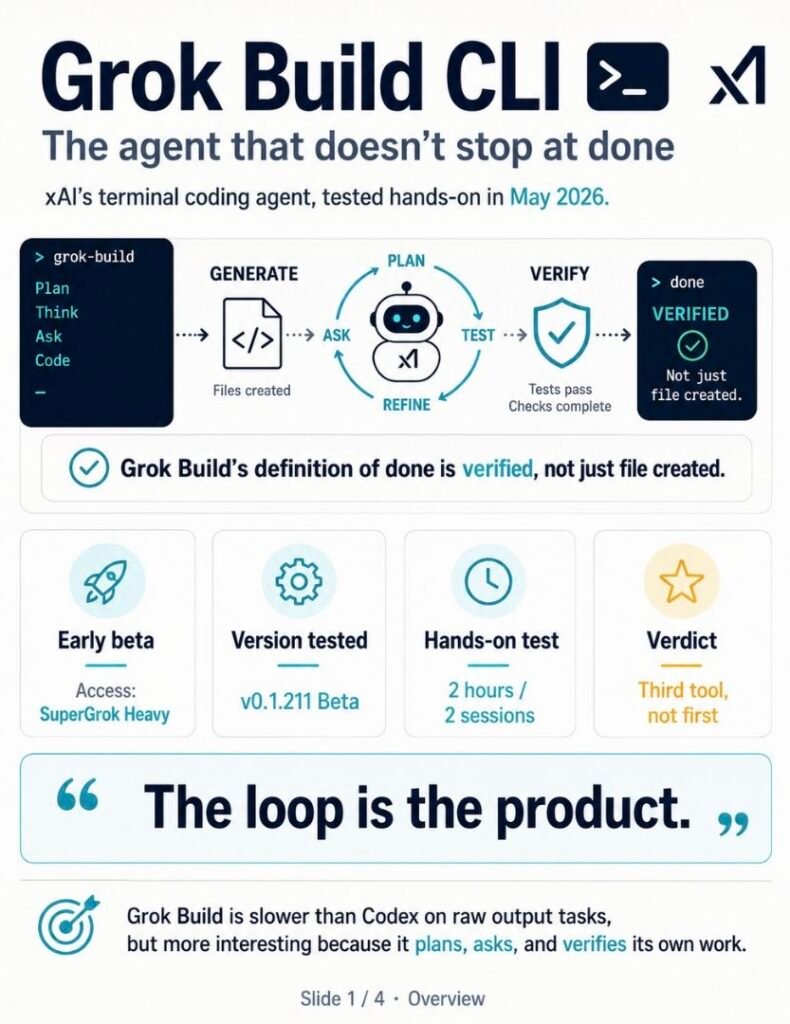
Briefing Summary — May 2026
Tier B review · 2 hours hands-on across two sessions · supplemented with primary-source research
Update, June 16, 2026
I tested this on v0.1.211 and re-checked it on v0.2.11. xAI has shipped almost daily since. The build on my machine today reads v0.2.54. Treat every timing, version string, and crash below as a record of what the tool did in mid-May, not what it does this week.
Access
xAI’s launch page now lists Grok Build for all SuperGrok and X Premium Plus subscribers. The SuperGrok Heavy gate named in parts of this review was the earliest access window, not the current one. Confirm the tier on xAI’s site before you pay.
Permission
The always-approve state I flag below as a risk is now a setting you can configure (v0.2.15), and the tool tracks it server-side across sessions (v0.2.52). The caution holds anyway: always-approve is sticky, and testers still recommend running it in a sandbox or VM. I have not re-checked the current behavior by hand.
The default model also changed since testing. See the model note further down.
If you already have Codex or Claude Code in your terminal and you want a third opinion on where coding agents are headed, this review is for you. Grok Build behaves differently from both. It plans before acting. It asks before assuming. It verifies after delivering. Sometimes the verification is what kills the turn.
If you’re picking one CLI agent for production work tomorrow, the Beta label in the bottom-right corner of the TUI is doing real work. Read the “Not for” section first. The behavior I observed is interesting. It isn’t finished.
The most important finding is this. Grok Build runs a self-verification loop that reads its own output back and edits the source file when something looks off. In my clear-prompt favicon test on v0.1.211, the agent caught its own font-size mistake and rewrote the SVG without being asked. In my vague-prompt test, the same loop rendered a 16-pixel PNG, sent it to the vision API, and crashed when the API rejected 256 pixels against a 512 minimum.
I re-verified on v0.2.11 thirteen days later. The crash is gone. Validation moved from a rendered-vision check to an XML syntax check, and the vague prompt that died at 13 minutes 1 second now finishes in 1 minute 20. The loop survived. The eye that caught the font-size mistake did not.
Same mechanism, two versions. That difference is the article.
What I observed in two sessions, total 2 hours hands-on:
- Installer changed by 6 lines and 589 bytes in 48 hours.
- OAuth showed 6 scopes individually. None of them were X posting, DMs, follows, or contacts.
/helptook 29 to 30 seconds and consumed about 7% of context. It is not static text./imagineproduced a 1408×768 JPEG in 3.4 seconds with a 0.01% context cost.- The same agent then inspected the same image through vision at 3.00% context cost and 19 seconds. Two budgets, two paths.
/planproduced a 247-line markdown design document and asked me to approve, comment, or quit.- Quit did not destroy the plan. It wrote the plan into scrollback, summarized it, and kept execution one sentence away.
- A filesystem search turned up
~/.grok/bundled/agents/plan.md. The product ships bundled agents alongside user skills.
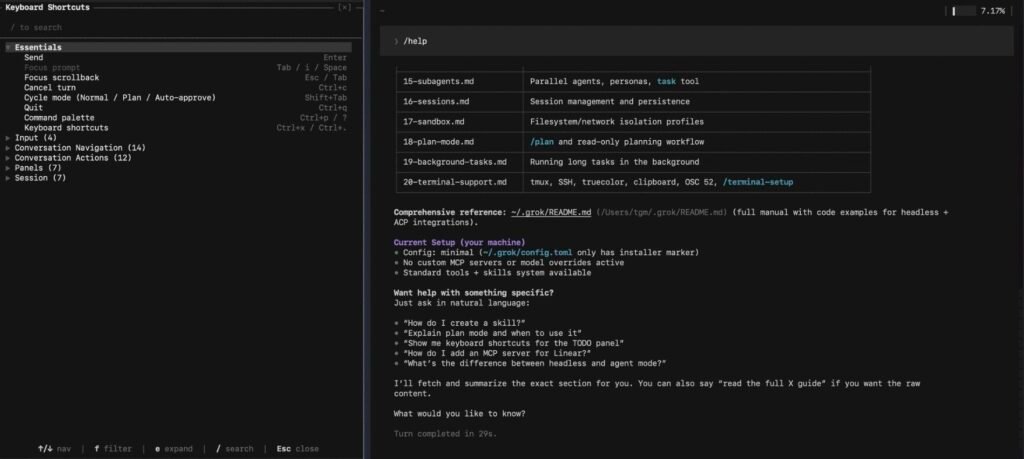
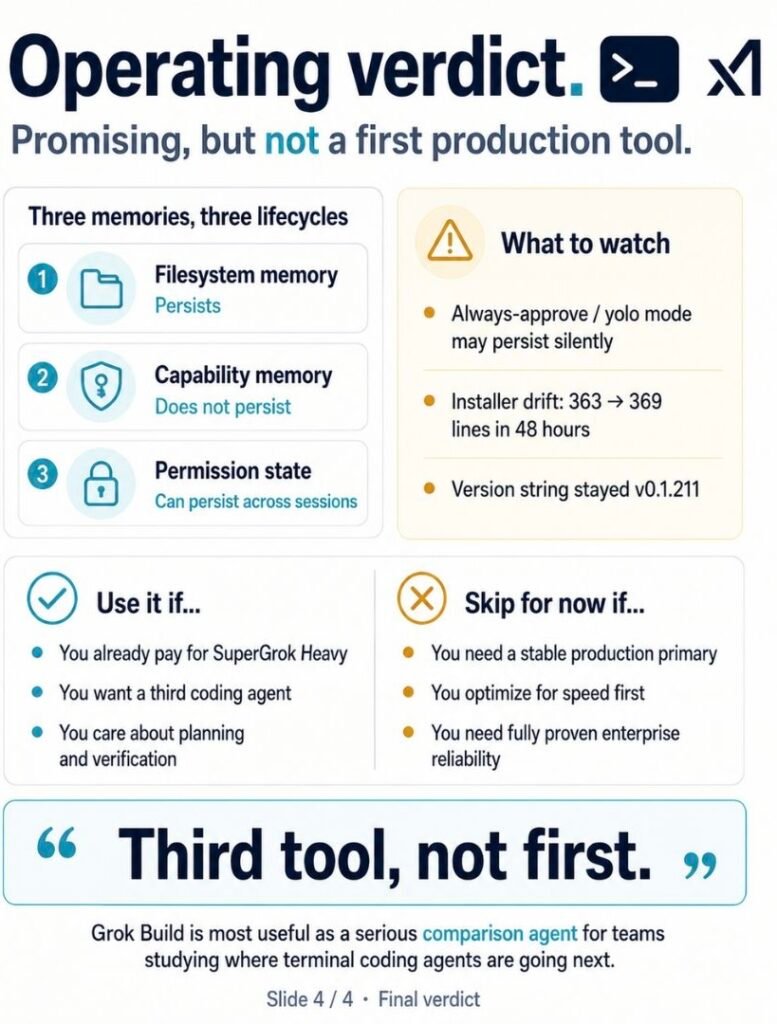
Verdict direction, written at the top so you can stop here if you want: this is a third tool, not a first one. Buy time with it. Don’t bet workflows on it yet.
TL;DR
Grok Build is xAI‘s terminal coding agent, available to SuperGrok and X Premium Plus subscribers. It installs in about 10 seconds, authenticates via OAuth, and exposes a slash-command-heavy TUI with plan mode, image generation, MCP, plugins, and file-level approval.
It is slower than Codex on raw output tasks because it verifies its own work.
That verification produces better evidence on some tests and a turn-crash on others. Treat it as a third tool, not a first one. Pay your SuperGrok or X Premium Plus bill if the bundle already makes sense for your stack. Don’t pay it for Grok Build alone.
At a Glance
curl -fsSL https://x.ai/cli/install.sh | bash/imagine-video, /loop, MCP server stability, plugin marketplace depth, full CLAUDE.md migration, enterprise deployment, sandbox profilesQuick Start
The install line is one curl. Pricing for SuperGrok and X Premium Plus, the confirmed access paths, should be verified on xAI’s site before you sign anything.
bash
curl -fsSL https://x.ai/cli/install.sh | bashSystem time clocked the install at 10.532 seconds on macOS Apple Silicon. Stopwatch put it at 11.36 seconds, the difference being human reaction time. The script lands four directories under ~/.grok/. Aim there for anything you ever need to inspect or delete.
First run opens a browser tab to xAI OAuth. Once you approve six scopes, the token lands in ~/.grok/auth.json and lasts 7 days. The first time you run /help, watch your context window. The help text isn’t text. It’s an agent task that reads internal documentation. In my tests it cost about 7% of context and 29 to 30 seconds.
Welcome to a coding agent where even reading the docs runs through the model.
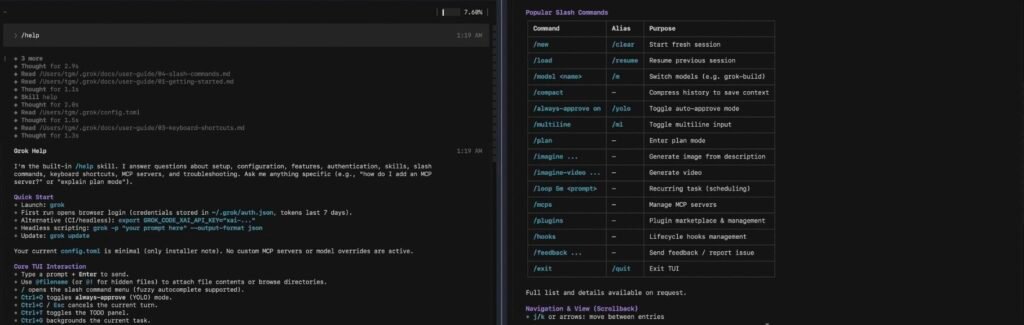
Grok Build CLI Commands: What to Run and What Each One Does
The help text covers all of this. The help text also costs about 7% of context every time you open it, because /help runs as a model task instead of printing static text. Here is the same map without the context tax.
After install, two binaries land under ~/.grok/bin: grok and agent. I checked the build with grok --version, so grok is a command the installer puts on your machine.
Run
grokandagentonce and replace this line with the exact command that opens the interactive TUI (and whether it needs a subcommand). Everything else in this section comes from hands-on logs.
If the command comes back “not found,” the binaries install as symlinks inside ~/.grok/bin, so that directory has to be on your PATH before your shell can resolve it.
The interactive TUI is where the slash commands below run.
| Command | What it does | FSR tested |
|---|---|---|
/help | Reads the built-in user guide. About 29 to 30 seconds and ~7% of context per run, because it executes as a model task, not a static dump. | Yes |
/imagine [prompt] | Generates an image inline in the TUI. 1408×768 JPEG in 3.4 seconds in my test, ~0.01% context. Saves to the session directory. | Yes |
/plan [task] | Writes a markdown design document to the session directory (247 lines in my test) and offers approve, comment, or quit. | Yes |
/yolo | Turns on always-approve. Same effect as Ctrl+O. The setting persisted into my next session with no warning. | Yes |
/imagine-video | Listed in the help text for inline video generation. | No (help text only) |
/loop | Listed in the help text. | No (help text only) |
/flush, /dream | Experimental memory commands listed in the help text. | No (help text only) |
Shift+Tab | Cycles mode: Normal / Plan / Auto-approve. | Yes |
Ctrl+O | Flips into always-approve mode. | Yes |
A note on /imagine, since it is the command people ask about most right after install. Type /imagine and a prompt, and the image generates inline, in the same window, without launching anything separate. In my v0.1.211 test it returned a 1408×768 JPEG in 3.4 seconds and wrote it to the session directory, at about 0.01% context cost. The matching /imagine-video command shows up in the help text. I did not run it.
Two keys change how much the agent asks you. Shift+Tab cycles the mode through Normal, Plan, and Auto-approve. Ctrl+O jumps straight to always-approve, the same switch /yolo names without dressing it up. One thing to watch. That always-approve state stayed on when I opened a fresh session the next morning, with no prompt reminding me it was still live.
/loop, /imagine-video, /flush, and /dream sit in the help text too. I didn’t exercise any of them. The reference ends where the testing ended.
Everything Grok Build writes stays under ~/.grok/: bin/ for the binaries, auth.json for the 7-day token, sessions/ for plan files and scrollback, bundled/agents/ for the agents that ship with the product, skills/ for your own, and docs/user-guide/ for the guide that /help reads back to you. Removing the tool is rm -rf ~/.grok plus deleting the symlinks. Nothing else to chase down.
Full Comparison
The snapshot shows what tested. The interpretation is what matters.
Speed versus verification posture. Codex finished a vague favicon prompt in 5 minutes 27 seconds by making assumptions. Grok Build took 13 minutes 1 second because it refused to make those assumptions and then refused to ship without checking the result. Same task. Same deliverable category. Different posture. If you measure agents by wallclock, Codex wins. If you measure them by what was verified, the picture inverts.
Assumption versus questioning under vague input. Asked to “make a favicon for my site,” Codex generates something. Grok Build searches the filesystem first, finds no project, asks three structured questions, and includes prior session artifacts as options. The first question listed “Continue with ‘g’ (the one I made earlier)” and pulled the exact hex values #0f1117 and #00f0ff from the favicon file I’d created in a previous session. That’s filesystem memory I never enabled and never authorized. It’s also useful.
Broad trust versus file-granular approval. Codex asks for trust at the directory level. Grok Build asks per file, per command, per session, with a Ctrl+O shortcut that flips the whole thing into auto-approve mode for users who decide the safety is in the way. Both designs are defensible. Only one acknowledges that the safety has a cost.
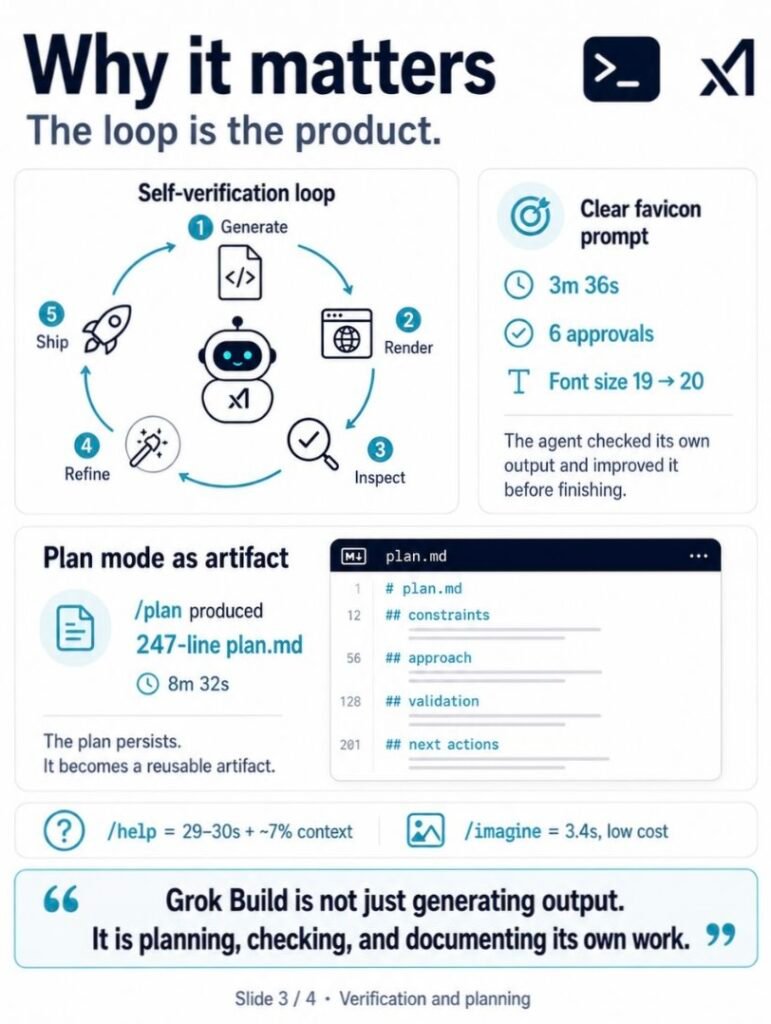
Plan-as-text versus plan-as-artifact. Most coding agents that offer a plan mode show you a numbered list. Grok Build’s /plan writes a 247-line plan.md file with sections for background, constraints, approach comparison, recommended strategy, validation, maintenance, risks, open questions, and next actions. The plan persists. You can come back to it.
Context visibility. Grok Build shows a live context meter in the top-right corner and a “Turn completed in 30s.” line after every turn. Codex doesn’t surface either of these by default. If you’ve ever wondered how much of your conversation budget a single tool call consumes, Grok Build answers without being asked.
It answers one question and raises a harder one: does the cost a tool reports match the bill you actually pay? Not always. In our MiniMax M2.7 review, an editor’s in-editor estimate ran roughly double the real OpenRouter charge for the same run.
Multimodal in terminal. Grok Build ships /imagine for images and /imagine-video for video, both inline in the TUI. Codex has nothing equivalent. I tested image generation only. The video command exists in the help text but I did not exercise it in this review.
Memory substrate. This is where it gets weird. More on that below.
One disclaimer. Claude Code’s behavior on each of these axes deserves a separate hands-on column. I’m not filling that in from memory. Where the snapshot says “not tested,” it means I didn’t run the same protocol against Claude Code in this round.
Deep Dive
06. The Favicon That Wouldn’t Stop Verifying
I asked Grok Build for a favicon two ways. Once with constraints, once without. The two runs are the whole story.
Clear prompt, v0.1.211. Wrote the SVG. Read it back. Rendered to PNG through qlmanage. Read the PNG through its own vision API. Decided the glyph was too small and changed font-size from 19 to 20, unprompted. Re-rendered. Reported done. 3 minutes 36 seconds, six approval prompts, one self-correction I never asked for.
Vague prompt, v0.1.211. Same loop, different ending. The agent rebuilt the icon as geometry instead of text, rendered a 16-pixel PNG, and sent it to the vision API to check legibility at favicon’s smallest size. The API rejected it: 256 total pixels, below the 512 minimum. The file was already on disk. The verification is what died. 13 minutes 1 second, then nothing.
Same mechanism. One run caught its own mistake. The other broke trying to look at its own output. That gap was the finding: an agent that renders its work and reads it back through the same eye it uses on you.
Then I ran it again.
Both prompts, v0.2.11, thirteen days later. In both runs, validation went through xmllint, which checks XML syntax and nothing else, not the vision API. The clear prompt finished in about two minutes of model time. The vague prompt, the one that crashed at 13:01, completed in 1 minute 20. No render. No vision call. No crash. I read the scrollback on both runs and the same tools repeat: write, read back, xmllint, edit, xmllint again. The 16-pixel render that killed the turn in May never happens.
The render tool was still on the machine. v0.2.11 didn’t reach for it.
The loop didn’t die. It still reads its work back and still corrects itself. On the vague run it nudged a circle radius from 7.5 to 7.6 and a counter hole from 3.7 to 4, the same kind of unprompted fix as the font-size change in May, minus the vision pass. What changed is the check. It stopped rendering pixels and started reading markup.
That trade has a cost, and you can see it. xmllint confirms the file is valid XML. It says nothing about whether the result looks like a “g.” The vague-prompt favicon passed validation and shipped, and the geometric “g” it produced reads rough at full size. In v0.1.211 the vision pass caught the font-size mistake. In v0.2.11 there is no vision pass, so a clumsy glyph clears the same bar a clean one would.
The crash is gone. The agent is faster. The eye that produced the unsolicited font-size fix is gone too.
I’d still rather have a product that overshoots verification and breaks than one that ships blind. xAI moved off the break in thirteen days. Whether the next move puts the eye back or leaves the loop reading markup is the thing to watch.
Update, June 17, 2026 (Composer 2.5, v0.2.54). I re-ran both prompts on the current default model. Neither crashed. The clear prompt finished in 29 seconds: the agent rendered a 16 pixel PNG with qlmanage, switched the glyph from text to vector paths on its own so it would stay legible, then handed the visual check to me. The vague prompt took about four minutes, but not because it slowed down. It did far more. It read an old favicon and its own session transcripts to reconstruct my brand, validated the markup with xmllint, rendered the PNGs, read its own 16 and 32 pixel renders back as images, judged the preview looked right, and shipped a full set with an ICO, an Apple touch icon, and a web manifest. The eye that v0.2.11 dropped is back. This time it did not break.
It also did not see the problem. The glyph both runs produced, commented in the code as a lowercase g, is a single filled path with no counter and no tail. Opened at any size it reads as a cyan blob, not a letter. The loop got more thorough and still approved the wrong shape.
Originally tested on v0.1.211 (May 17–19). Re-verified on v0.2.11 (May 30).
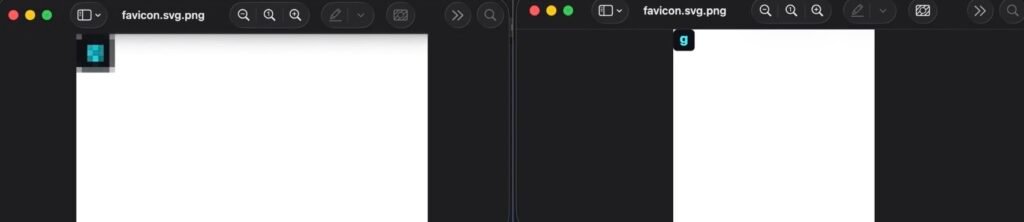
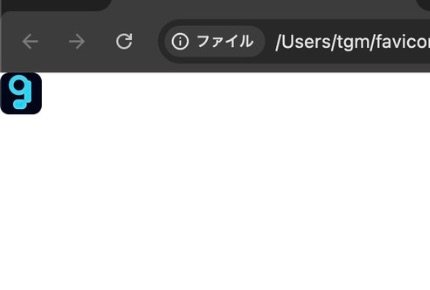
#020617 with #22d3ee passed XML syntax and shipped. No vision pass checked how it reads at size.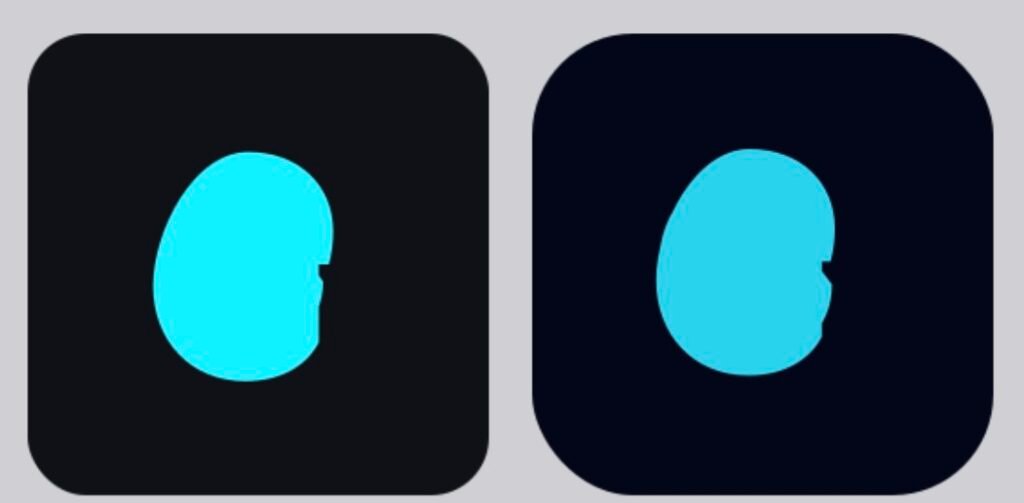
#00f0ff on #0f1117), right is the vague one (#22d3ee on #020617), both on Composer 2.5, v0.2.54. Each passed the agent’s own validation and shipped. Neither reads as a g.07. Three Memories, Three Lifecycles
Model note, observed June 16, 2026 (v0.2.54)
When I wrote this review, Composer 2.5 did not exist. It does now. Open the /model menu in Grok Build today and you get two choices. One is labeled Grok Build, described in the menu as xAI’s latest coding model. The other is Grok Composer 2.5 Fast, described in the menu as Cursor’s latest coding model. On my machine, the Cursor one was already selected as the default.
Sit with that for a second. The model running by default inside xAI’s own coding agent is the one the product itself attributes to Cursor.
xAI’s own Composer 2.5 announcement calls it a fast model for long tasks and says nothing about Cursor. A few outlets go further and report it is built on an open-weight checkpoint from Moonshot’s Kimi K2.5. I have confirmed only what the menu says. The rest of the lineage, and whatever arrangement sits between xAI and Cursor, I have not verified against a primary source.
For a buyer the question is plain: on the default setting, whose model reads your code, and under whose terms. The self-verification loop described above ran on the older default, not on Composer 2.5, and I have not re-run it since the model changed. Run /model, check what is active, and do not assume the behavior below still holds.
The same blind spot shows up one layer higher. A managed multi-model API routes every request through a pool it never fully names, which removes even the answer to which model ran. See the Sakana Fugu review TierC.
Grok Build remembers files. It doesn’t remember the rendering tools it used last time. It does remember whether you turned safety off.
I learned this the hard way. In session one I made ~/favicon.svg. In session two, a fresh login with a new session ID, I asked the agent to “make a favicon for my site” with no context. Its first option, presented in the design-brief question, was to continue with my earlier “g” and reuse the hex values #0f1117 and #00f0ff. The agent had read the existing SVG, parsed the palette, and offered it back as a continuity option. That’s filesystem memory. Persistent. Cross-session. Not enabled by me.
But in the same session, when the agent needed to render SVG to PNG, it ran which rsvg-convert inkscape and probed for available tools before settling on qlmanage. The agent already knew qlmanage worked. It had used it 30 minutes earlier in session one. That knowledge was gone. Capability memory: absent.
The third layer is the strangest. The first time I hit Ctrl+O to flip into always-approve mode, the TUI label changed. New session opened the next morning. The label was still set to always-approve. Permission state: persistent across sessions, no warning.
Three memories. Three lifecycles. The filesystem outlasts the session. The session outlasts the capability discovery. The safety setting outlasts everything.
The first design is useful. The second is reasonable. The third one I’d label and surface more aggressively. A safety mode that persists silently into the next session is a footgun waiting for the wrong morning.
08. Plan Mode as Design Review
I ran /plan Plan how you would add a llms.txt file to a WordPress site running on Hostinger. The turn lasted 8 minutes 32 seconds and produced a 247-line markdown file at ~/.grok/sessions/[id]/plan.md.
The plan had a title, a date, a goal statement, a constraints section about the Hostinger-WordPress combination, an approach comparison table covering four implementation paths, a recommended strategy with phases, a validation section, a maintenance plan, a risk matrix, a list of open questions for me to answer, and a suggested next-actions block. Plus references.
That isn’t a plan. That’s a design doc.
The agent reached this output by fetching llmstxt.org, fetching Hostinger’s own support page on llms.txt, searching for the Hostinger Tools plugin, searching for WordPress best practices, searching for an llms.txt validator, fetching the WordPress plugin page for website-llms-txt, and reading its own session’s existing plan.md before generating the new one. That’s eight tool calls before the writing started.
The plan overlay offered three choices: [a]pprove, [c]omment, or [q]uit. The implication is clear. The plan isn’t a precondition for execution. It’s a deliverable in its own right.
I’ve worked with engineers who refused to write code without first writing a one-pager. The discipline correlates with shipping things that don’t get re-architected six months later. Grok Build’s plan mode bakes that discipline into a slash command.
Whether your team needs that discipline is a different question.
09. Quit Is Not Escape
I pressed q expecting the plan to disappear. None of that happened.
Grok Build wrote the full plan into scrollback so I could scroll back and read it. Then it generated a separate executive summary, ranking the four approaches and flagging critical gotchas. Then it offered three next actions: “Just do it now,” “Generate a skeleton you can paste,” or “Answer questions before proceeding.” Then it added that the full plan was saved in the session file in case I wanted to reference it later. Then it closed with “Just say the word and we’ll execute.”
8 minutes 32 seconds of work, and quitting didn’t delete any of it.
This is the part of the design I want to highlight. The agent treats planning as a first-class deliverable, not as throat-clearing before execution. Quitting the plan view is graceful exit, not escape. The plan persists whether you approve, comment, or quit. The agent stays ready to execute the moment you change your mind.
I’d prefer this default over the alternative every time. The alternative is an agent that loses your thinking when you change your mind.
10. Home Directory Respect
Codex asks for trust at the home-directory level. Grok Build asks per file. The first time I let the agent write favicon.svg to ~/, the approval prompt named the file. The second time, the same file again, prompted me again. Six prompts in the clear-favicon turn. Same answer six times.
You can flip the whole thing off with /yolo or Ctrl+O. That toggle is named honestly. It says yolo. It doesn’t say “advanced mode” or “developer mode” or any of the other euphemisms agents use to make the off-switch sound responsible.
The containment matters. Grok Build keeps its state under ~/.grok/. Auth tokens, config, sessions, completions, bundled agents, downloads, requirements files for enterprise deployments. All of it inside one directory. Aside from the symlinks in ~/.grok/bin/, nothing scatters into your home root. Uninstalling is rm -rf ~/.grok and removing the symlinks. That’s it.
Compare to coding agents that touch your .zshrc, drop config in three places, and require you to grep for them six months later when you want them gone. Grok Build doesn’t. The containerization isn’t a feature you’ll see marketed. It’s a sign that someone on the build team thought about uninstalls.Odysseus is the workspace-scale version of this question. It keeps its state in one ./data directory, and on the Docker install it does not mount your host files. I found the same gap from the workspace side: a clean local footprint is not the same as a private one, because self-hosting the whole stack leaves privacy dependent on the paths you connect. See the Odysseus review.
11. Subject Matter Sourcing
I asked for three meta description candidates for a Grok Build CLI review. Codex, in my prior FSR review, generated three candidates from training data in 5.3 seconds. Grok Build took 34 seconds. The first 8 of those went into reading ~/.grok/README.md and the first chapter of the user guide.
The agent wasn’t writing about Grok Build from training data. It was writing about Grok Build after reading its own primary source.
The output reflected the difference. Candidate one named six specific product features: TUI, agentic tool use, headless automation, skills, subagents, and ACP integration. None of those were in my prompt. All of those came from the docs the agent had just consumed.
Whether this is better depends on what you wanted. For a meta description on a review article, specificity is the point. For ad copy, you might prefer the faster, more general output. For technical documentation that has to stay accurate as the product evolves, this sourcing pattern is the difference between aging gracefully and aging into a wiki of half-truths.
I’d take 34 seconds over 5.3 every time, for the right job.
12. Bundled Agents: The Modular Brain
I ran find ~ -name "plan.md" -type f expecting one result. I got two.
The first was the session-specific plan I’d just created: ~/.grok/sessions/[id]/plan.md.
The second was something I hadn’t seen documented anywhere: ~/.grok/bundled/agents/plan.md.
That second path opens a question the help text doesn’t answer. Grok Build appears to ship with a directory of bundled agents, separate from user-defined skills at ~/.grok/skills/. The /plan command may not be a feature flag or a special mode. It may be one of these bundled agents, called by name, configured by markdown.
If that read is correct, the implication is interesting. /imagine may be a bundled agent too. Vision analysis might be another. The product surface looks modular in a way that Codex and Claude Code’s behaviors don’t obviously reveal from the outside.
I’m not going to claim more than that. I found a directory. I read the one plan.md inside it. I didn’t run a full survey of every bundled agent. But the architectural hint is sitting in plain text in your home directory, and most reviewers won’t go look.
You should.
13. The OAuth Scope Screen
xAI OAuth shows six scopes on the consent screen, listed individually:
- Verify your identity.
- Read your profile.
- Read your email address.
- Maintain access when you’re not present.
- Make authenticated requests from Grok Build.
- Use the xAI API.
What’s not there is more interesting than what’s there. The login screen offers four providers: X, email, Google, Apple. X is listed first. If you log in with X, you’re tying your Grok Build CLI account to your X identity. Posting permissions, DM access, follow capability, contact reading. None of those appeared on the scope screen during my email login. I can’t confirm whether they appear on the X login flow because I didn’t test it. I logged in with email specifically because I keep my brand X account on a separate identity from my Grok Heavy subscription.
Insider note. If you’ve kept the same hygiene, log in with email. Don’t braid your individual X account into a CLI tool that lives on your dev machine. The OAuth scope screen looks clean in the email flow. The X social graph is its own attack surface, and you don’t need a coding agent reaching into it.
That’s a personal preference. Take it for what it is.
The token lasts 7 days. The callback runs through 127.0.0.1 localhost, so you never paste anything by hand. The browser hands the token back to the CLI through your own network stack and nothing else. That’s the right design for a CLI auth flow. I’ve used coding tools with worse.
14. Forty-Eight Hours of Drift
I downloaded the installer on May 17 and read all 363 lines. Two days later, on May 19, I downloaded it again. It had grown to 369 lines and 14,461 bytes, up from 13,872. Six lines and 589 bytes in 48 hours.

The diff: Fish shell completion auto-loading was added as a new block. Zsh completion auto-loading was wired up through fpath and autoload. Bash completion got a sourcing line. None of those were in the version I’d read on Monday.
This isn’t a bug fix or a security patch. It’s xAI tightening the install-time experience for shells the v1 installer ignored. The shape of the change tells me the build team is still actively shaping the on-ramp. Forty-eight hours is fast iteration for a piece of code that runs once per user per machine.
The version string didn’t change. v0.1.211 on Monday. v0.1.211 on Wednesday. But the installer underneath did. If you’re tracking this product over time, hash the installer, not the version number. The number lies. The bytes don’t.
Who Should Use Grok Build
Use Grok Build if:
- You’re already running Codex or Claude Code and you want a third terminal agent for comparison work.
- You value visible planning, visible context consumption, and visible verification.
- You want terminal-native image generation alongside coding, in the same TUI, with the same authentication.
- You’re a SuperGrok or X Premium Plus subscriber and you’d rather use the access than not.
- You’re comfortable with file-level approval prompts and understand the trade-off of flipping them off.
Don’t use Grok Build as your primary agent if:
- You need a single agent for production work starting tomorrow. The Beta label is doing real work.
- You want fast output on vague prompts. Grok Build will ask three questions before it gives you anything.
- You don’t have a SuperGrok or X Premium Plus subscription. Those are the confirmed entry points per xAI’s launch page.
- You need verified stability on MCP servers, plugins,
/loop,/imagine-video, or the experimental memory commands. I tested none of those in this round. The help text lists them. The help text isn’t a guarantee. - You need an enterprise procurement story today. The infrastructure is there in the installer. The Beta label is too.
FAQ
What is Grok Build CLI?
Grok Build CLI is xAI’s terminal-based AI coding agent, released in early beta in 2026. It installs two binaries, grok and agent, under ~/.grok/bin. It offers an interactive TUI, plan mode with markdown design docs, image generation, file-level permission, MCP support, a plugin marketplace, and a self-verification loop. Current access is open to SuperGrok and X Premium Plus subscribers.
Is Grok Build CLI free?
No. As of May 2026, Grok Build CLI requires a SuperGrok or X Premium Plus subscription. There’s no public free tier or trial confirmed on xAI’s site. The CLI installer itself is free to download from x.ai/cli/install.sh, but you can’t use it without authenticating against a paid xAI account. Verify current access terms on xAI’s official pages before subscribing.
Is Grok Build worth paying for by itself?
Probably not. SuperGrok is a broader subscription, and Grok Build is one component. If the rest of the bundle doesn’t already fit your workflow, paying for the subscription just to access this CLI is a hard sell at the Beta stage. If the bundle already makes sense, Grok Build is a useful experiment to run with the access you already have.
Did v0.2.11 fix the favicon verification crash?
In the original v0.1.211 test, a vague-prompt favicon crashed after 13 minutes 1 second when the vision API rejected a 16-pixel render (256 pixels, below the 512 minimum). Re-verified on v0.2.11 (May 30, 2026), the same prompt completed in 1 minute 20 with no crash. Validation ran through XML syntax checking, not rendered vision. FSR did not confirm whether xAI removed vision verification entirely or only changed it for this task type.
How is Grok Build different from Codex?
Codex prioritizes fast output. Grok Build prioritizes verification. In my favicon tests, Codex shipped in under 6 minutes by making assumptions. Grok Build took 3 to 13 minutes by searching the filesystem, asking design questions, and rendering its own output through its own vision API to check the result. Different posture. Different trade-offs. Different failure modes.
Does Grok Build read CLAUDE.md files?
The /help output lists both AGENTS.md and CLAUDE.md as project instruction file formats, and xAI’s docs describe Claude Code compatibility. I confirmed the help text mentions both. I did not run a full migration test with an existing CLAUDE.md from a Claude Code project, so I can’t speak to the depth of support. If you’re migrating workflows, test before you commit.
Is Grok Build production-ready?
No. The TUI itself labels the product as “Beta” in the bottom-right corner of every screen. Several advertised features, including /imagine-video, /loop, plugin marketplace stability, and the experimental memory commands, were not verified in my testing. Treat Grok Build as a strong comparison and exploration tool. Don’t make it your production primary today.
What didn’t FSR test in this review?
I did not test /imagine-video, /loop, full plugin marketplace behavior, MCP server stability under load, enterprise deployment via managed_config.toml, sandbox profiles (--sandbox), the experimental memory commands (--experimental-memory, /flush, /dream), the X-login OAuth scope screen (only email login), long-running multi-file refactors, or Claude Code migration depth. The help text lists each of these. None of them passed through my hands in this round.
What command do you run after installing Grok Build CLI?
The installer places two binaries under ~/.grok/bin: grok and agent. I checked the build with grok --version, so grok is a real command on your machine. Because they install as symlinks, ~/.grok/bin has to be on your PATH to resolve.
How does the /imagine command work in Grok Build CLI?
Type /imagine and a prompt, and the agent generates an image inline in the same TUI, without opening anything else. In my v0.1.211 test it produced a 1408×768 JPEG in 3.4 seconds and saved it to the session directory, at about 0.01% of context. A /imagine-video command is listed in the help text. I did not test it.
How do you uninstall Grok Build CLI?
Grok Build keeps its files under one directory, ~/.grok. Remove it with rm -rf ~/.grok and delete the symlinks the installer created for the grok and agent binaries. Aside from those symlinks, nothing lands in your shell profile or home root, so there’s no extra config to track down. Confirm against xAI’s current installer before relying on this, since beta installers change.
What is the Grok Build CLI TUI?
The TUI is the interactive terminal interface where Grok Build runs. It shows a live context meter in the top-right corner and prints a turn-completion time after every turn, and it surfaces slash commands like /imagine and /plan. A keyboard-shortcuts overlay lists more than 50 shortcuts. A Beta label sits in the bottom-right of every screen.
Methodology & Sources
This review is based on two hands-on sessions totaling 2 hours, conducted on macOS Apple Silicon between May 17 and May 19, 2026, on a SuperGrok Heavy account. It was re-verified on May 30, 2026 against v0.2.11, focused on the self-verification finding. Both the clear-prompt and vague-prompt favicon tasks were re-run on the same machine, and the installer, version string, and Beta label were re-checked.
Tasks tested:
- Installer inspection on May 17 and May 19 (byte-level diff).
- Initial install and re-install timing (
time bash install.sh, stopwatch cross-check). - OAuth flow via email login (X-login flow not tested).
/helpexecution, run twice on different days./imagineimage generation with one prompt.- Vision analysis of the generated image (accidentally triggered, then logged).
- Clear-prompt favicon generation with explicit design constraints.
- Vague-prompt favicon generation with no constraints.
- Meta description generation with
wc -clength check. /plandesign document generation on a real WordPress + Hostinger llms.txt task.- Filesystem inspection of
~/.grok/includingfind ~ -name "plan.md" -type f. - Session resume and permission-state persistence across two days.
Evidence retained: Terminal session logs, TUI screenshots, both installer copies and their hashes, generated SVG/PNG/JPEG files, OAuth consent screen captures, version string output (grok –version), and subscription receipt for SuperGrok Heavy access verification. Re-verification (May 30) adds the v0.2.11 install log and build hash, scrollback of both re-run favicon turns showing the tool sequence, and the regenerated favicon rendered in a browser.
Official xAI sources consulted: xAI’s Grok Build launch page, the published install command, and the Grok Build documentation including the user guide chapters auto-read by /help (~/.grok/docs/user-guide/).
Source boundaries within this article: Observed-by-FSR claims use phrases like “in my test,” “I watched,” “I downloaded,” and specific timings. Official xAI claims are introduced with phrases like “the help text lists” or “xAI documents.” Inferences use “may be,” “appears to,” and “this suggests.” Anything not tested is explicitly named in the FAQ above and in the At a Glance table.
Affiliate disclosure: At the time of publication, FSR does not have an affiliate relationship with xAI. There is no consumer affiliate program for SuperGrok, X Premium Plus, or Grok Build CLI that FSR could find. This review is unpaid and uncompensated.
Re-verify before acting: Pricing, access tier, and feature availability for Grok Build may change between publication and your reading. Check xAI’s official pages before subscribing.
FSR Verdict
Grok Build is not the fastest coding CLI I’ve tested. It is the most revealing.
The product wants to be an agent that won’t claim a job is done until it’s verified the result. That ambition is rare. In v0.1.211 Beta the verification worked on one favicon test and crashed on another, both times by rendering its output and reading it back through vision. I re-verified on v0.2.11 thirteen days later. The crash is gone, the vague prompt that took 13 minutes 1 second now takes 1 minute 20, and the check has moved from vision to XML validation. The loop is still the product. It just stopped looking at the pixels.
If you’ve never run a coding agent before, this isn’t your starting point. Start with an agent that has more public documentation, more reviewers stress-testing it in the open, and fewer beta surprises in the next 90 days. Grok Build isn’t designed for first-time onboarding yet.
If you’ve got Codex or Claude Code already in your workflow and you’re trying to figure out where coding agents are heading next, Grok Build is worth two hours of your evening. The OAuth scope screen, the plan-as-design-doc behavior, the filesystem memory you didn’t enable, the bundled-agents directory hiding in plain sight, the installer that grew by six lines in 48 hours. These aren’t features in a marketing list. They’re signals about what xAI is trying to build.
If you’re picking your one production agent for tomorrow morning, the Beta label in the corner of the TUI is doing actual work. Believe it.
The product I tested isn’t finished. What’s underneath, when it finishes, might be the most honest coding agent on the market.
When I first tested it, the agent was 13 minutes 1 second away from done. Thirteen days later it got there in 1 minute 20. It stopped looking to do it.