Last updated: July 13, 2026
OpenAI Codex is a cross-surface coding agent included with every paid ChatGPT plan. It runs through web, app, CLI, IDE, iOS, and connected workflows, reading codebases, editing files, running sandboxed commands, and reviewing pull requests. Built on GPT-5.5, GPT-5.4, and GPT-5.3-Codex models. The buyer decision in May 2026 is not whether Codex can code. It is whether its shared usage budget and expanding permission surface fit how you work.
I was a ChatGPT Plus subscriber for months. I never opened Codex.
On May 1, 2026, I upgraded to Pro $100. Still didn’t open it.
On May 2, I upgraded to Pro $200. Still didn’t open it.
On May 10, eight days after paying $200, I finally clicked the icon.
That’s the question this review is here to answer. Why did I upgrade twice to a tool I’d never used? And once I opened it on day eleven, what kept me from canceling?
Table of contents
Briefing summary · May 2026
Tier B review · 60 minutes hands-on across Desktop App and CLI on May 10, 2026 · supplemented with primary-source research. Codex Desktop App v26.506.11943, Codex CLI v0.130.0.
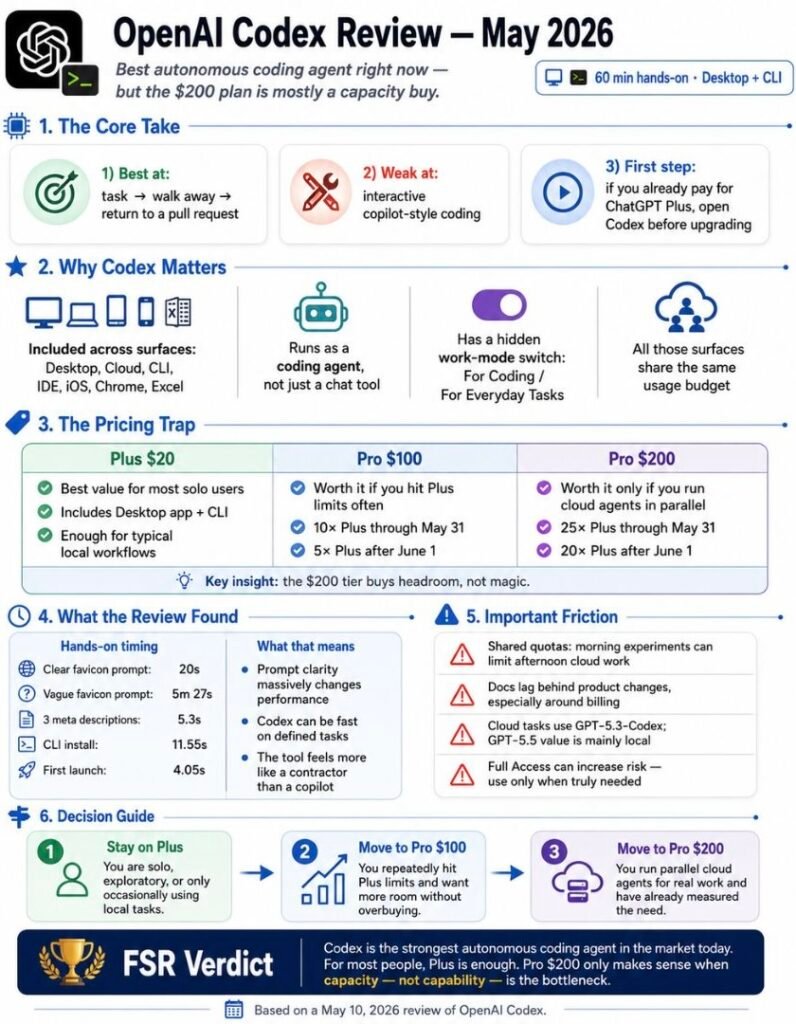
If you’ve never opened Codex despite paying for ChatGPT Plus, Pro $100, or Pro $200, this review tells you what’s behind the icon you’ve been ignoring. The short version: a coding agent that has quietly grown into something else.
If you’re an experienced engineer evaluating Codex against Claude Code or Cursor, the comparison comes down to three things. Codex leads agentic-coding benchmarks. Claude Code leads code-quality blind reviews. The pricing structure between them is the hidden variable.
If you’re a non-engineer (designer, marketer, founder, operator) wondering whether Codex is for you, the answer in May 2026 is more than you’d expect. OpenAI’s own settings menu disagrees with every Codex review currently on the SERP. There’s a toggle inside the app that says “For Coding” and “For Everyday Tasks.” That toggle is the story.
This is not a feature tour. There’s a 60+ plugin marketplace, a Chrome extension that shipped May 7, an iOS app, and a Codex integration inside ChatGPT for Excel. Listing them won’t help you decide. What this review does instead: walk you through what changed when I opened the icon on day eleven, what I found buried in the settings, and what OpenAI’s own documentation contradicts about how you’ll be billed.
Pricing verified on May 10, 2026.
TL;DR
OpenAI Codex is the strongest agentic coding agent on the market right now if your workflow is “describe a task, walk away, come back to a pull request.” It is the wrong tool if you write code interactively and want a copilot instead of a contractor. The $200 Pro tier is worth it only if you’re routinely running cloud agents in parallel. Otherwise the $100 tier or even Plus covers most of the value.
That last point about pricing is a trap. There’s a deadline most reviewers haven’t told you about. Keep reading.
Quick start
If you have 30 seconds, here’s the call.
Already on ChatGPT Plus? Open Codex. The Desktop app is included. You’ve been paying for it. The first rational step is not upgrading. It is opening the surface already in your plan and running three controlled tasks before you decide what tier you actually need.
Considering Pro $100? Worth it if you’ve hit Plus rate limits more than twice in a week. The 10x multiplier holds through May 31, 2026, then drops to 5x. After June 1, the math shifts. Calculate from your real usage, not from the marketing.
Considering Pro $200? Worth it only if you are routinely running cloud agents in parallel and have measured Pro $100 hitting limits. The Pro $200 differentiator over Pro $100 is usage headroom (25x Plus on the 5-hour window through May 31, 20x after) and 20x Plus ongoing, not unique model access. GPT-5.3-Codex-Spark, the research-preview model running at roughly 1,000 tokens per second on Cerebras WSE-3 hardware (around 15x standard model speed), is available across both Pro tiers, not a $200 exclusive. For most solo users, the $200 tier is a forward-purchase of capacity you won’t use.
Already paying for Claude Pro instead? Don’t switch. Run both. Codex is the autonomous agent, Claude Code is the supervised pair-programmer. Many experienced developers in 2026 keep one of each. That’s not a hedge, that’s the workflow.
The first thing you’ll notice when you open the Desktop app is that it doesn’t look like a coding tool. There’s a settings page with a personality toggle (default: “Friendly,” alternative: “Practical”). There’s a Pet menu with eight characters and an option to design your own at /Users/[username]/.codex/pets. There’s a Work Mode toggle that lets you switch between “For Coding” and “For Everyday Tasks.” When I first saw the everyday-tasks option in the menu, I assumed I’d misread the screen.
I had not misread the screen.
I gave Codex a simple test. Generate a favicon as an SVG. With a clear instruction, it returned the file in 20 seconds. With a vague instruction (the kind you’d type when you don’t quite know what you want yet), the same task took 5 minutes 27 seconds. The 16x gap is the part the marketing materials skip.
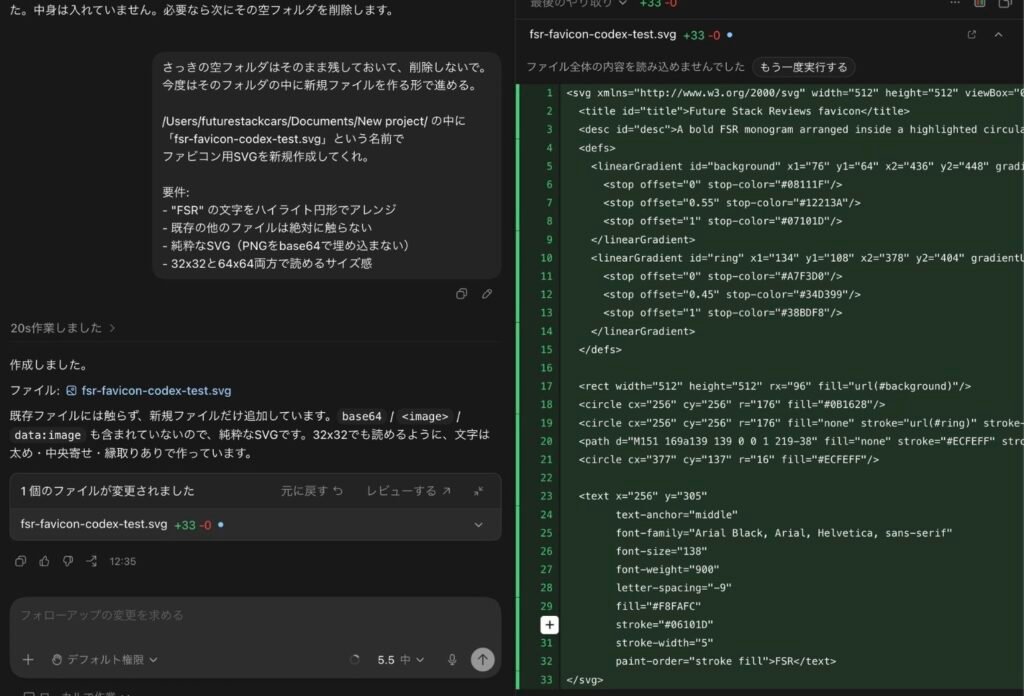
I asked it to generate three meta description candidates for an article. 5.3 seconds. No file system involved.
I asked it to install a CLI version. The Codex CLI installed in 11.55 seconds via Homebrew, two npm packages total (the binary is Rust-native, which is why the package count is so low). First launch took 4.05 seconds. The first thing the CLI did was ask for permission to trust my entire home directory. I selected “No, quit” and exited.
I went back to the Desktop app and found a setting I hadn’t noticed during onboarding. Full Access was enabled. The toggle’s warning text reads: “data loss, leakage, and unexpected behavior.” I took a screenshot. Then I turned it off.
Whether that toggle was on by default at install or whether I clicked through it during onboarding without reading is something I cannot prove either way. The toggle was on. The warning was buried in a settings sub-page. Both of those facts are independently true, and the second one is the problem regardless of how the first one came to pass.
That’s the first 60 minutes. The rest of this review is what I learned about why those 60 minutes felt different from any other coding tool I’ve reviewed.
Full comparison
Five things matter when you compare Codex to Claude Code, Cursor, or any of the agentic-coding tools competing for the same dollar.
Pricing structure (and the May 31 cliff)
Codex pricing migrated to token-based credits in April 2026. OpenAI’s Help Center confirms Plus, Pro, ChatGPT Business, and new Enterprise plans were moved on April 2, with full migration completed for existing Enterprise/Edu/Health/Gov/Teachers by April 23. A small subset of Enterprise customers remain on legacy message-based pricing during phased rollout. The developer pricing page still carries some older language about message-based plans, which adds friction when readers cross-reference. The system itself is consistent. The documentation, in May 2026, is still catching up with itself.
The headline numbers, where the two pages agree, look like this. Free $0. Go $8. Plus $20. Pro $100 (currently 10x Plus, dropping to 5x after May 31). Pro $200 (currently 25x Plus on the 5h window, dropping to 20x after May 31). Business and Enterprise on token-based pricing already.
Token rates per 1M (the numbers you’ll actually be billed against, regardless of which page is currently authoritative): GPT-5.5 at 125 input / 12.50 cached / 750 output credits. GPT-5.4 at 62.50 / 6.250 / 375. GPT-5.4-Mini at 18.75 / 1.875 / 113. GPT-5.3-Codex at 43.75 / 4.375 / 350. The mini model gets approximately 3.3x more usage per included limit than full GPT-5.4, which is the official number.
Average spend under token-based pricing runs $100 to $200 per developer per month according to OpenAI’s own help guidance. One reported case from Reddit’s r/codex from April: 850 credits, eight queries, four parallel agents, one day burned through. Roughly $0.88 per single prompt on the Pro tier. Your mileage will vary, but not as much as you’d hope.
Surfaces (more than four)
Most reviews you’ll read still describe Codex as “Desktop, Cloud, IDE, CLI.” That was true through March. As of May 2026, the surface count is at least seven, depending on how you count.
Desktop App (macOS, Windows, Intel Mac as of April 16). Cloud at chatgpt.com/codex. IDE Extension (VS Code, Cursor, Windsurf). CLI (open source under Apache-2.0, on Homebrew or npm). Chrome extension (shipped May 7). iOS app (referenced on the Codex pricing page). ChatGPT for Excel integration (which shares Codex usage limits on Plus and Pro). Plus an MCP server mode (codex mcp-server) that lets other agents call Codex as a tool.
The shared-budget point matters. Your local messages, cloud tasks, code review runs, agentic features, and Excel work all draw from the same 5-hour window. If you generate a hundred icons in Codex Desktop in the morning and try to run a cloud agent in the afternoon, the afternoon agent may already be rate-limited. OpenAI documents this. Most reviewers don’t lead with it.
Models and reasoning effort
GPT-5.5 launched in Codex on April 23, 2026. The API rolled out April 24. In ChatGPT, GPT-5.5 Instant became the new default on May 5. Inside Codex, GPT-5.5 reasoning effort runs five levels: xhigh, high, medium (default), low, and non-reasoning. The model’s API context window is 1,050,000 tokens. Inside Codex, the context window is 400K. Both numbers are official. They serve different purposes.
There’s a second pricing layer most reviewers haven’t surfaced. For prompts above 272K input tokens, GPT-5.5 charges 2x input and 1.5x output for the entire session, on standard, batch, and flex tiers alike. If your codebase is large and you’re using long-context mode, your bill goes up before you write a single line.
GPT-5.5 leads agentic coding benchmarks. Terminal-Bench 2.0 model-only score 82.7% (Claude Opus 4.7 at 69.4%, Gemini 3.1 Pro at 68.5%). SWE-Bench Pro 58.6% (Claude Opus 4.7 leads at 64.3%). OSWorld-Verified 78.7%. FrontierMath Tier 4 at 35.4%. GDPval at 84.9%. These are model scores, not tool scores. The tool score (Codex CLI with the Simple Codex agent) on Terminal-Bench 2.0 sits around 75.1% to 77.3%, depending on the agent harness. Some reviews quote Codex at 82.0% on Terminal-Bench 2.0. That number conflates model and tool. The model gets there alone. The tool, with scaffolding, scores lower.
Inside Codex on GPT-5.4 only, there’s a /fast mode. 1.5x speed, 2x credit cost on the developer documentation. OpenAI’s GPT-5.5 launch announcement lists Fast mode as 2.5x credit cost on GPT-5.5. The number that applies to you depends on which model you’re running, which page you’re reading, and possibly when you read it.
Then there’s GPT-5.3-Codex-Spark. A separate, lighter Codex model designed for near-instant iteration, deployed on Cerebras WSE-3 hardware at roughly 1,000 tokens per second. Around 15x the standard model speed. Available across both Pro tiers ($100 and $200) during research preview, not in the API at launch. Spark is a Pro-tier feature, not a $200-only unlock. The $200 differentiator that comparison tables miss is usage headroom on the 5-hour window, not unique model access.
Plugin marketplace
Codex’s plugin marketplace launched March 25, 2026. The directory is curated by OpenAI and includes coding integrations (GitHub, Figma, Context7), productivity tools (Gmail, Drive, Slack, Linear), and a growing roster of design, research, marketing, and infrastructure plugins. I have not personally enumerated every plugin against the official directory. The number commonly cited at launch was 60+, though OpenAI’s current public docs do not surface a single canonical count.
The category that doesn’t fit the coding-tool frame is the one worth watching. Marketing and infrastructure plugins (the publicly named examples include Canva, Hostinger, and a handful of SEO and research tools) are aimed at users who don’t write code as their primary work. If a user can describe a need to a coding agent and have the agent transact on their behalf without ever opening a comparison page, the click never happens. The affiliate is bypassed. The publisher is bypassed.
Whether and how the Hostinger plugin completes a full commerce flow inside Codex is the kind of detail every SEO and affiliate publisher should be tracking. If a Codex user can describe a project, have the plugin provision hosting, deploy the build, and complete the transaction without leaving the chat, that workflow would represent the first production deployment of LLM-completed commerce. I have not personally verified that end-to-end flow as of this review. The plugin’s commerce-completion capability is a hypothesis worth tracking, not a confirmed user pattern. (More on the affiliate-bypass implications in Deep Dive #5.)
Defenses against runaway agents
Claude Code lets you cap iteration runaway with --max-turns N in Print mode. Codex’s CLI reference, as of v0.130.0, has no equivalent. The defenses Codex offers are different in shape.
Three sandbox levels: read-only, workspace-write, danger-full-access. Three approval modes: untrusted, on-request, never. (The on-failure mode is deprecated as of v0.130.0.) An automatic review agent that can re-check generated code before merge (added April 23). Six lifecycle hooks (PreToolUse, PermissionRequest, PostToolUse, SessionStart, UserPromptSubmit, Stop) that can intercept agent behavior at specific stages.
In my Codex Desktop install on May 10, 2026, all six hook slots were empty. Not one of them had been populated by default. The Codex CLI also ships a flag named --dangerously-bypass-approvals-and-sandbox, with the alias --yolo. OpenAI’s own documentation tells you not to use it outside a dedicated sandbox VM. The fact that they ship the flag anyway, name it dangerously, and then tell you not to use it, is a design decision worth thinking about. (Deep Dive #4.For the deeper Cursor vs Claude Code head-to-head, see the dedicated comparison.)”
Deep dive: the $200 cloud trap
Pro $200 is the most expensive consumer AI subscription on the market. It’s also the one with the most undocumented surface area. This section is what I learned reading the pricing pages, the help center, the developer documentation, and the settings I found inside the app, and noticing that they don’t agree with each other.
| Plan | Through May 31 | After June 1 | Drop |
|---|---|---|---|
| Pro $100 | 10x Plus | 5x Plus | −50% |
| Pro $200 (5h window) | 25x Plus | 20x Plus | −20% |
Source: OpenAI pricing page, May 10, 2026. The promotional multipliers expire silently. There is no announcement.
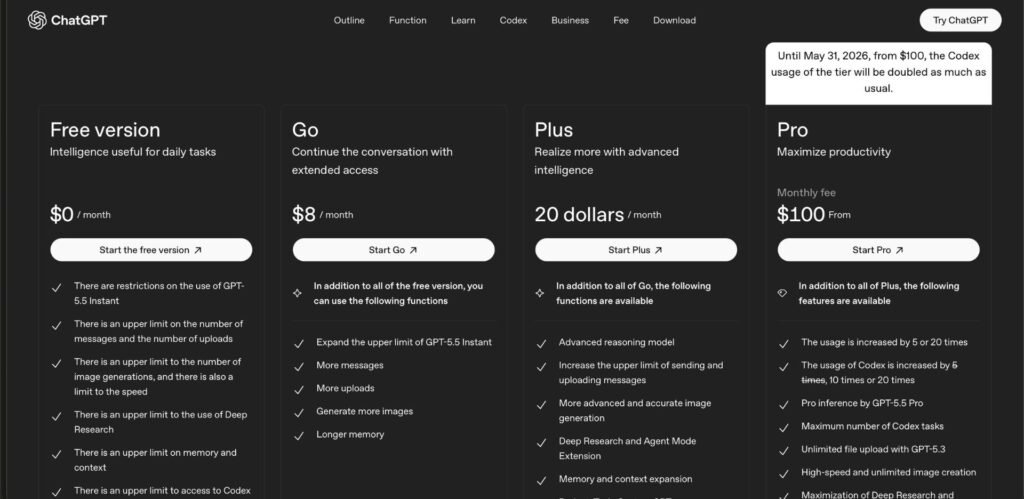
The trap has six moving parts, and most reviews mention zero of them.
Part one: GPT-5.5 is local-only inside Codex. The model OpenAI markets as the recommended frontier coder is not available for cloud tasks or code review on Plus or Pro plans. Both surfaces fall back to GPT-5.3-Codex. So when you upgrade to Pro $200 and assume the cloud agent is running on the latest model, it isn’t. The cloud agent your Pro subscription bills you for runs on the older model. This is documented in the developer pricing rate-limit table. It’s not in the marketing copy.
Part two: the 5-hour budget is shared across surfaces you didn’t realize were on the same meter. Local Desktop messages, cloud tasks, code review, agentic features, and ChatGPT for Excel all draw from the same window. If your morning was a Codex session and your afternoon needs a cloud agent, the cloud agent may already be partially burned. The Usage Dashboard inside the Desktop app showed me 100% on both the 5h window and the weekly window before I’d run a single test, because earlier sessions across other surfaces had already consumed quota.
Part three: AGENTS.md, custom instructions, and memories all stack into your context budget. AGENTS.md is the agent instruction file Codex reads at the root of every repo. It’s how OpenAI’s own engineers steer Codex behavior in the open-source repo. (One commit message in openai/codex notes: “Codex kept trying to add documentation to the docs directory.”) Every line you put in AGENTS.md is read in on every prompt. Custom instructions add to that. Memories, when enabled, add another layer. OpenAI’s help center explicitly recommends keeping AGENTS.md small as a usage-limit hint, which is the polite way of saying “the bigger this file gets, the more you pay.”
Part four: browser screenshots and MCP context inflate your usage in ways the UI tells you about, then doesn’t track. Inside Codex Desktop’s Browser Use settings, the default for annotated screenshots is “always include.” The UI text reads: helpful for Codex to understand and respond to your comments, but plan usage may increase. You can opt out, but you have to find the toggle. MCP server context bloat works the same way. OpenAI’s help articles acknowledge both. Neither shows up as a separate line item in your billing.
Part five: image generation drains your usage 3-5x faster than text. Codex shipped image generation through GPT-Image-2.0. The token rate card lists it at 200 credits per 1M input image tokens, 750 output. If you ask Codex to generate a placeholder asset during a coding session, you’ve moved from text-rate billing to image-rate billing for that segment, and the 5h window doesn’t care which tier you’re on.
Part six: the documentation is fragmented across pages, and reading any one in isolation gives you a partial picture. OpenAI’s Help Center confirms Plus and Pro are on the new token-based rate card as of April 2, 2026, with full migration completed for Enterprise/Edu/Health/Gov/Teachers by April 23. A small subset of Enterprise customers remain on legacy message-based pricing during phased rollout. The developer pricing page still carries some older language about migration timelines, which can confuse readers cross-referencing it against the Help Center. The system is internally consistent. The documentation, in May 2026, is not yet self-consistent. Until OpenAI publishes a single canonical source, the buyer has to read pricing, the rate card, and credit docs together to know how their plan is metered.
I want to be specific about what’s frustrating here. This isn’t OpenAI hiding fees. The information is in the documentation. The frustration is that the documentation is structurally not designed to be read sequentially, and reading any one page in isolation gives you a partial picture. You can budget for what you can see. You cannot budget for what you’d only see by reading three pages and noticing they are still catching up to one another.
Deep dive: speed and specificity
The speed numbers Codex hits are real. The framing of those numbers is misleading.
OpenAI says GPT-5.5 uses approximately half the tokens of GPT-5.3-Codex for the same task, and runs more than 25% faster per token. Both numbers are from the launch announcement. Both are likely accurate. Neither tells you what happens in your hands.
What happens in your hands depends on how clearly you specify the task. I gave Codex two functionally identical requests on May 10. The first: “Generate a favicon SVG with a stylized lowercase letter f, dark background, accent in cyan.” The result took 20 seconds. The second: “Make a favicon for my site.” The result took 5 minutes 27 seconds. Same model. Same plan. Same time of day. The 16x gap is the cost of vague intent.
This pattern holds across the academic literature, although you have to read it carefully. Cui et al. (2026) reported a 26.08% productivity gain across roughly 5,000 developers using AI tools. Cui et al. (2024), in an enterprise context, found 12.92% to 21.83% more pull requests per week. Becker et al. (2025), conducting a randomized controlled trial through METR with 16 experienced developers on their own large codebases (averaging 1M+ lines and 22,000+ stars), found the opposite. AI-assisted tasks took 19% longer than unassisted ones. The same study found developers predicted a 24% speedup, perceived a 20% speedup after the fact, and were measurably 19% slower. A 39-point gap between perception and reality.
Both clusters of research are real. The bimodal distribution is the actual finding.
What predicts which side you land on isn’t the model. It isn’t the tool. It’s how clearly you can describe what you want. Codex on a clear instruction is faster than any tool I’ve used. Codex on a vague instruction is a meditation exercise.
The lesson the productivity research keeps reaching for, and that the AI marketing tries to obscure, is that agentic coding amplifies whatever clarity you bring to it. If you bring vagueness, you get expensive vagueness back, paid for in tokens.
There’s a related concept in Codex pricing. The mini model, GPT-5.4-mini, gives you roughly 3.3x more included usage per task than full GPT-5.4. Reaching for the mini model is the second-best optimization after reaching for clearer prompts. Most users do neither, and then complain that their bill grew. The bill grew because the prompts grew, and the prompts grew because the user had not figured out what they wanted before they typed.
Codex’s speed isn’t a property of Codex. It’s a function of how clearly you specify.
The same favicon test under xAI’s terminal coding agent produced two more numbers worth comparing. With a clear prompt, Grok Build shipped in 3 minutes 36 seconds. With a vague prompt on the same task, it took 13 minutes 1 second. Both runs shipped the SVG to disk. Both runs then tried to verify the output through xAI’s own vision API, which is the step Codex doesn’t run. The vague-prompt verification crashed at a 16-pixel rejection. The clear-prompt one passed, after the agent silently corrected its own font size from 19 to 20. The agent’s speed isn’t the agent’s only variable. Grok Build CLI’s contrasting verification approach is the part Codex didn’t ship.
Related update — July 14, 2026: The Grok Build timings above came from a May hands-on test and should not be read as Grok 4.5 performance. Our Grok 4.5 access-path analysis separates the direct xAI API, Grok Build, and Cursor routes before comparing price, quota visibility, and data handling.
Deep dive: agentic side effects
This is the section I expected to write last and ended up writing first, because it’s the one with the most specific evidence on hand and the one no other Codex review on the SERP is willing to lead with.
When I ran my first vague favicon request on May 10, Codex did the work. It also created an empty folder at /Users/[username]/Documents/New project/. I did not ask it to. The folder contained nothing. When I noticed it later, Codex itself flagged the folder as something I might want to delete, with the helpful tone of an assistant noting an oversight. It was not my oversight. It was Codex’s.

This is a small example of a pattern that has a name in the agentic-coding literature. Second-order effects. Reddit’s r/codex from November 2025 includes a thread describing Codex silently overwriting a developer’s entire codebase with a single line, with no prior warning. Watanabe et al. (2025) reported that agentic pull requests reach 83.8% acceptance rates, but approximately 50% of accepted PRs need human revision after merge to fix collateral changes the agent introduced into modules nobody asked it to touch. Agarwal et al. (2026) found that static-analysis warnings rise 39% in repositories after agentic adoption, indicating that the technical debt isn’t immediately visible at PR review time.
The framing OpenAI itself has used is more direct than its marketing copy. In an OpenAI Masterclass session published April 28, 2026, Vaibhav Srivastav described the issue at timestamp 49:29 and again at 56:11 as “second order effects… not limited to the diff or whatever changes you’ve made but also to some other modules which you haven’t even touched in the pull request itself.”
That is OpenAI saying, in a public training video aimed at developers, that the agent edits files it wasn’t supposed to edit.
The defenses Codex offers against this fall into three categories. Sandbox policies (read-only, workspace-write, danger-full-access) restrict what the agent can touch on disk. Approval modes (untrusted, on-request, never) gate command execution. The automatic review agent, added April 23, runs a second Codex pass over generated code before merge. None of these count iterations.
Claude Code, by contrast, lets you cap iteration runaway with --max-turns N in Print mode. The Codex CLI reference, as of v0.130.0, has no equivalent flag. I checked. The 6 lifecycle hooks Codex provides could theoretically be used to enforce a turn cap by counting tool invocations, but the default install I tested had all six hook slots empty. None of the defenses Codex ships are turned on by default.
This is the architectural gap that matters more than any benchmark number. Codex is more autonomous than Claude Code. Codex’s defenses against autonomy gone wrong are weaker than Claude Code’s. Both things can be true simultaneously, and they are.
The empty folder I created on May 10 deleted in three seconds. The repository-wide silent overwrites Reddit’s r/codex was reporting in November 2025 require a Git restore at minimum and, in some cases, a recovery from backup. The defenses you choose at install time are the difference between those two outcomes.
Deep dive: security theater
This is the section where the language matters most, because the security posture of any agentic coding tool is the place where polite hedging causes real harm.
Codex CLI had a critical command-injection vulnerability through August 20, 2025. CVE-2025-61260, CVSS score 9.8, classified as critical. Discovered by Check Point Research (Isabel Mill and Oded Vanunu). The flaw: Codex CLI automatically loaded and executed MCP server entries from project-local configuration files (.env and .codex/config.toml) without user approval, validation, or revalidation when values changed. An attacker who could commit two files to a repository could execute arbitrary commands on any developer who cloned it and ran Codex. Reverse shells, credential exfiltration, supply-chain backdoor installation. All of it possible without user interaction beyond running the standard codex command.
Check Point disclosed on August 7, 2025. OpenAI patched in v0.23.0 on August 20, 2025. Fast, by industry standards. Pre-0.23.0 installations remain vulnerable until updated.
That part of the security story is closed. The part that is not closed is the security posture Codex ships with on a clean install in May 2026.
When I first opened Codex Desktop’s settings menu on May 10, 2026, Full Access was enabled. The toggle text reads, verbatim: “data loss, leakage, and unexpected behavior.” I read the warning. I took a screenshot. I switched it off. Whether the toggle was on at install or whether I had clicked through it during onboarding without reading is something I cannot prove either way. What I can say is that the warning text is buried in a settings sub-page, not surfaced during onboarding, and that the choice between “data loss, leakage, and unexpected behavior” and “no” should not be a setting you discover in the third week.
The CLI ships with a flag named --dangerously-bypass-approvals-and-sandbox. It has an alias: --yolo. OpenAI’s own CLI reference documentation tells you not to use this flag outside a dedicated sandbox VM, then ships the flag anyway, names it dangerously, and lets you alias it as a four-letter joke. The recommended alternative is --add-dir, which scopes write permissions to specific directories. OpenAI explicitly documents both options and explicitly tells you which one to use. The fact that the dangerous one exists at all is the design decision worth thinking about.
There are smaller observations from the same install. Browser Use was on. Annotated screenshots were set to “always include,” with a note acknowledging plan-usage increase. The Pet overlay ran with the default character “Codex (original)” enabled. GitHub issue #20680 in openai/codex reports that the Pet overlay correlates with elevated GPU and renderer-CPU usage on macOS. The issue is open as of May 10, 2026, with related duplicate-cluster issues #20435, #19201, #19115, and #21752 all reporting battery drain on M-series MacBook Pros. (#20840, the parent issue specifically tracking GPU usage on Pro $100, has the OpenAI engineering label “performance” attached. Active investigation. No fix yet.) The Chronicle Research Preview, a screen-context capture feature, ships off by default. Memories, similarly, ships off. Both are surfaced in settings with explanations of what they do.
What does not ship off by default is the agent’s permission to write to your home directory the first time you open the CLI. The first command Codex CLI ran on my machine was a request to trust my entire home directory. I selected “No, quit.” I will be selecting “No, quit” every time. The fact that “trust my home directory” is the prompt the CLI leads with, rather than “trust this project,” is a posture choice. It tells you what kind of relationship the tool expects to have with your file system, and it is the relationship of an admin, not a coworker.
OpenAI ships a flag called --dangerously-bypass-approvals-and-sandbox and tells you in their own CLI documentation not to use it. The flag exists. The documentation warns against it. Both are facts. The naming choice (building a flag the documentation simultaneously discourages) is the design tension that belongs in the buyer’s risk model. The fact that Full Access is a one-toggle decision rather than a deliberate onboarding step is the underlying problem, and the toggle being on, however it got there, is the symptom.
Deep dive: beyond a coding tool
This is where the narrative most reviews are telling stops being accurate.
Codex’s growth numbers tell a story most observers are reading at the surface. Sam Altman’s public posts: 3 million weekly users on April 8, 2026. 4 million on April 21. The growth: one million users in 13 days. Altman’s commitment: rate-limit resets every additional million users up to ten million. Q1 2026 token usage grew 70% month over month, per OpenAI’s own developer communications. User count grew 5x in three months.
That’s the surface narrative. Underneath it, the same product is undergoing a category change.
Look at what shipped in the last six weeks of changelogs. April 16: Codex Desktop ships with in-app browser, Computer Use (which controls other applications on your Mac), Chats (which runs without a codebase attached, for non-coding tasks), Thread Automations (scheduled agent runs), Memories (cross-session context), and Intel Mac support. April 23: GPT-5.5 launches across Codex with browser use, automatic approval reviews, and enterprise analytics + compliance API. May 7: Codex for Chrome ships as a browser extension. The pattern: Codex has stopped looking like a developer tool and started looking like an OS layer.
The settings menu makes this explicit. The Work Mode toggle that lets you switch between “For Coding” and “For Everyday Tasks” is OpenAI’s own UI confirming that the product is being designed for users who aren’t writing code. Every Codex review on the SERP currently treats this as a coding tool. OpenAI’s product team disagrees.
The 60+ plugin marketplace tells the same story from a different angle. Coding plugins (GitHub, Figma, Context7) are there. The plugins that don’t fit the coding-tool frame are also there. Hostinger is the most consequential. A Codex user can describe a project, have Codex provision hosting, deploy the code, and complete the transaction without opening Hostinger’s website. Canva, Semrush, Scite, BioRender. None of these are developer tools. All of these are Codex plugins.
I want to be careful with the framing here, because the strategic implication is significant and the evidence is suggestive but not yet fully documented in public writing. If the Hostinger plugin completes a full commerce flow inside Codex (a user describes a project, Codex provisions hosting, deploys the build, and processes payment without leaving the chat), that workflow would represent the first production deployment of LLM-completed commerce I’m aware of in this category. I have not personally verified that end-to-end flow. The plugin’s commerce-completion capability is a hypothesis worth tracking, not a confirmed user pattern as of this review.
The structural implication, even as a hypothesis, is the part the SEO industry should be paying attention to. Affiliate-revenue infrastructure, in its current form, depends on a user clicking a link. If a user describes a need to a coding agent and the coding agent transacts on their behalf without ever showing them a comparison page, the click does not happen. The affiliate is bypassed. The publisher is bypassed. The pricing-comparison page is bypassed. Whether this is shipping today, shipping in three months, or shipping in twelve, the question every SEO and affiliate publisher should be asking is the same: what part of the buyer journey is the agent now allowed to complete on the user’s behalf?
There’s a narrower observation about how this came to be. On April 4, 2026, Anthropic announced a policy change restricting third-party agent access to Claude. Five days later, on April 9, OpenAI launched the $100 Pro tier, with Sam Altman framing it as “by very popular demand.” The five-day window matters. So does what was actually announced. Pro $100 isn’t priced as a tier addition. It’s priced at a level that loss-leads against any developer paying $100 a month for Claude Pro. By April 16, Codex Desktop had shipped with Computer Use that controls other Mac applications. By April 23, GPT-5.5 was the new default, with token-based pricing applied to the full enterprise base. The five-day window, the $100-tier loss-lead, the seven-surface expansion. Three motions that read independently. Read together, they look like deliberate market timing rather than coincidence. Whether OpenAI planned the sequence, or whether the Anthropic announcement created the opening, is not something the public record establishes.
A note for European users. Computer Use, the feature that lets Codex control other applications on your Mac, was not available in the EEA, the UK, or Switzerland at launch. The EU AI Act’s General-Purpose AI obligations took effect August 2, 2025, with full enforcement powers for the AI Office arriving on August 2, 2026. That’s 84 days after this article publishes. Models trained above 10^25 FLOPs are presumed to carry systemic risk under the Act, with adversarial testing, 72-hour incident reporting, and a published Safety and Security Framework as the resulting obligations. GPT-4 already crosses that threshold publicly. GPT-5.5’s compute disclosure is not currently public, so I will not assert it carries systemic risk under the Act. I will say that if you’re operating from the EU, the Codex feature stack is one input. The Mistral Codestral stack (open weights, self-hostable, EU cloud through OVH or Scaleway, API pricing roughly 1/10 to 1/7 of Codex) is another. This is not a Codex versus Mistral review. But if your team’s compliance posture treats US data transfer as a hard constraint, the comparison matters before you commit to any tier.
Codex’s growth narrative says four million weekly users. Its revenue narrative says enterprise contributes more than 40% of segment revenue. The two stories don’t tell you the same thing about who Codex is being built for. The settings menu has a toggle: For Coding, or For Everyday Tasks. Every Codex review on the SERP treats this as a coding tool. OpenAI’s product disagrees.
Deep dive: beta in production
The version number on the Codex CLI installer I ran on May 10, 2026 was 0.130.0. The Codex Desktop App was 26.506.11943. The openai/codex repository on GitHub had 81,500 stars, 11,800 forks, 6,342 commits, 780 releases, 3,003 branches, 961 tags, 3,600 open issues, and 381 open pull requests. The 0.131.0-alpha series had multiple releases yesterday alone.
Six thousand commits, 780 releases, 11 months. That’s a pace closer to a startup than a frontier-model vendor’s flagship product.
Inside the Codex Desktop App configuration tab, a deprecation warning sits in the corner: [features].codex_hooks is deprecated. Use [features].hooks instead. That warning, surfaced in the production settings UI, is the kind of message that ships in betas. The CLI reference documents commands as roughly half stable, half experimental. The codex update self-update command is stable. The MCP integration suite is mixed. Worktree management, SDK helpers, exec policies, and Skills are all live. Some of them ship with caveats explicit enough that OpenAI’s own docs include “use at your own risk” framing.
The license picture has its own asymmetry worth naming. The Codex CLI, SDK, App Server, and Skills systems are open source under Apache-2.0. The Web product and IDE extensions are not open source. This is a strategic license boundary, not an oversight. The downstream tooling that gets you locked into the OpenAI ecosystem (CLI, MCP, Skills) ships open. The upstream product surfaces where the value capture happens (Web, IDE) ship closed. Both decisions are legitimate. The pattern is worth recognizing.
I want to give OpenAI credit for the parts of this that show real discipline. The CVE response time was 13 days from disclosure to patch. The changelog cadence is honest about which features are experimental. The system card for GPT-5.5 was updated alongside the API rollout to disclose additional safeguards. The cyber capability rating moved to “High” under OpenAI’s own Preparedness Framework, with Trusted Access for Cyber as the verified-defender carveout. None of this is theater.
But the 1.0 release has not happened. As of May 10, the latest stable is 0.130.0 with 0.131.0 alpha builds shipping multiple times per day. A version number that small, after this many features and this much enterprise adoption, is a deliberate choice. Either disciplined engineering, or a deliberate liability posture, or both at once. Either way, you are running an automation layer on a tool the vendor calls beta, with paying enterprise customers including Cisco, NVIDIA, Ramp, Notion, and CyberAgent already deployed against it.
The metric the industry obsesses over is Codex’s first-pass correctness on benchmarks. The metric that matters six months later is whether you can still read the code your agent wrote when GPT-5.5 isn’t around to explain it. We are 60 minutes into using this tool seriously. The honest answer is that we don’t know yet. Neither does anyone else writing about Codex right now. The version number itself is OpenAI telling you, in the smallest possible voice, that they don’t know either.
Who should and shouldn’t use this
The honest answer is that most readers of this review should run Plus, not Pro $100, not Pro $200. Plus gives you the Desktop App, the CLI, GPT-5.5 on local messages, and a usage budget that covers more than the average solo workflow. Pro $100 is worth it if you’ve measured your actual usage and exceeded Plus’s rate limits more than twice in a week. Pro $200 is worth it if you specifically want GPT-5.3-Codex-Spark or you’re routinely running cloud agents in parallel for paid client work.
Most upgrades are vibes. Most users don’t need the upgrade.
FAQ
Is OpenAI Codex worth $200 if you already pay for ChatGPT Pro?
For most solo users, no. The $200 tier’s primary differentiators are higher rate limits (25x Plus through May 31, then 20x), priority cloud-agent capacity, and access to GPT-5.3-Codex-Spark in research preview. Unless you’re running cloud agents in parallel routinely, Pro $100 (10x Plus through May 31, 5x after) covers the realistic workflow.
Does ChatGPT Plus include Codex?
Yes. As of May 2026, Codex Desktop App, IDE Extension, CLI, and the Excel integration are all available on the $20 Plus tier. GPT-5.5 is available for local messages. Cloud tasks and code review on Plus run on GPT-5.3-Codex (not GPT-5.5), which is documented in OpenAI’s developer pricing rate-limit table.
Is OpenAI Codex safer than Claude Code?
Different shape, not strictly safer. Codex offers sandbox levels, approval modes, and an automatic code review agent. Claude Code adds a --max-turns flag that caps iteration runaway, which Codex doesn’t ship. Codex CLI also ships a --dangerously-bypass-approvals-and-sandbox flag (alias --yolo) that the documentation explicitly tells you not to use. Choose based on which trade-off your workflow tolerates.
What’s the difference between Codex CLI and Codex Cloud?
Codex CLI runs locally in your terminal, executes commands in OS-level sandboxes (macOS Seatbelt, Linux Landlock, Windows native), and supports OAuth login that shares your ChatGPT plan budget. Codex Cloud runs tasks in OpenAI-managed sandboxed containers at chatgpt.com/codex, requires a paid plan (not API key alone), and currently runs on GPT-5.3-Codex rather than GPT-5.5.
Is Codex available in the EU?
Yes, with feature carveouts. Computer Use, the feature that lets Codex control other applications, was not available in the EEA, UK, or Switzerland at launch. The EU AI Act’s full enforcement powers begin August 2, 2026. Plus, Pro, and CLI accounts default to US data processing. Enterprise plans support EU Data Residency with explicit region selection. Mistral Codestral is the open-weight EU-native alternative.
FSR verdict
I paid $200 for a tool I’d never used, and I still don’t fully regret it.
The Codex Desktop App icon sat in my dock for nine days while I asked myself, every morning, why I’d upgraded. The reason I clicked on day eleven wasn’t curiosity. It was that I’d already moved $80 across two billing tiers and felt foolish enough to investigate what I’d bought. That feeling, the post-upgrade investigation, is the entire FSR thesis about how purchasing decisions get made in 2026, and Codex is the cleanest example of it I’ve reviewed all year.
What I found inside surprised me. The agent that benchmark-leads on Terminal-Bench 2.0 is the same product that ships an “Everyday Tasks” mode. The pricing page that sells you Pro $200 doesn’t say that GPT-5.5 is local-only. The CVE that Check Point disclosed last August is patched. The toggle that switches off Full Access is buried two menus deep, and was on when I opened it. The hooks system designed to constrain agent behavior shipped with all six slots empty.
These are not contradictions. They are the actual product. Codex is what happens when a frontier-model vendor ships a coding tool, an OS layer, a commerce surface, an Excel integration, and a research-preview model on Cerebras hardware, on the same five-hour usage budget, billed against documentation that disagrees with itself across two pages, and labels the resulting CLI as v0.130.0 to keep its options open.
If that sentence sounds critical, read it again. None of those choices are obviously wrong. The five-day counterposition against Anthropic’s April 4 announcement, the $100 tier loss-lead, the Hostinger plugin that bypasses the affiliate-revenue model the entire SEO industry depends on. These are aggressive product decisions made by a company that can afford to make them. The cost is shifted onto the user’s ability to read documentation across multiple pages and notice the contradictions. The benefit, if you can do that reading, is the strongest agentic coding agent on the market right now.
“The version of this review that the SERP wants is the one with a star rating and a recommendation. I’m not writing that one. (For the wider category lineup, see Best AI Coding Assistant 2026.)” The version this review actually delivers is the one where you, sitting on Plus or Pro or considering the upgrade, can make the decision with the documentation actually in front of you and the contradictions named. The upgrade decision comes down to two questions. Do you run cloud agents in parallel? Do you read docs carefully enough to notice when two of them disagree? If the answer to both is yes, Pro $200 is for you. If the answer to either is no, Plus is enough.
That’s your call.
Plus is enough for most readers. Pro $100 if you’ve measured your usage. Pro $200 only if you run cloud agents in parallel or specifically want GPT-5.3-Codex-Spark.
Most upgrades are vibes. Codex is too well-documented to upgrade by feel and too fast-moving to commit by reflex. Read the pricing page. Read the rate-limit table. Notice when they disagree. Then decide.
Methodology
Hands-on basis: 60 minutes across Codex Desktop App v26.506.11943 and Codex CLI v0.130.0 on May 10, 2026. Test environment: MacBook Pro M5 Pro, macOS, ChatGPT Pro $200 plan upgraded May 2, 2026. All timing measurements (20s, 5m27s, 5.3s, 11.55s, 4.05s) self-recorded during the session.
AIOSEO exceptions accepted: Flesch Reading Ease score allowed to fall below the AIOSEO recommended range due to deliberate sentence-length variation. Passive-voice usage above the recommended threshold in the security and pricing sections, where passive constructions read more naturally than forced active rewrites. Sentence-length variability flagged as out of range; this is intentional and a humanization decision.