
Forty-two percent of all new code pushed to production in 2026 involves an AI coding assistant. The market hit $6 billion this year and shows no sign of decelerating. But here is a number you will not find on any vendor’s landing page: in a controlled study of experienced open-source maintainers, AI assistance made them 19% slower.
That gap between marketing and field evidence is why this guide exists.
BRIEFING SUMMARY — APRIL 2026
Twelve coding assistants. Three vibe coding platforms. Every price confirmed on the official page, not copied from a competitor’s blog.
If you write code for a living:
Cursor ($20/mo) for daily multi-file work. Claude Code ($20/mo Pro) when you need a 1-million-token context window for deep architectural refactoring. GitHub Copilot ($10/mo) if your team already lives inside GitHub and you need the lowest-friction option that finance will approve without a meeting.
If you manage a team with security requirements:
Tabnine ($39/user/mo) is the only major tool offering air-gapped, on-premise deployment at every paid tier. GitHub Copilot Business ($19/user/mo) for organizations that prioritize IP indemnity and predictable billing.
If you do not write code and want to build an app anyway:
Lovable ($25/mo) generates full-stack React applications with Supabase backends. It reached $200M ARR in eight months for a reason.
If you are a junior developer:
Read the section on who should NOT use these tools before you spend a dollar. The learning-debt evidence is ugly.
What Every “Best AI Coding Assistant” Article Gets Wrong
Most ranking articles test a fresh prompt on a blank project, screenshot the output, and declare a winner. That workflow has almost nothing in common with professional software engineering.
The strongest piece of counter-evidence in this entire category comes from a randomized controlled trial published in late 2025. Researchers gave experienced open-source maintainers (people working inside their own mature repositories) access to AI coding tools and measured the result. The AI group completed tasks 19% slower than the control group, despite the developers themselves predicting they would be faster. The effect was not subtle. It was statistically significant and replicated across multiple task types.
A separate large-scale field study across Microsoft, Accenture, and a Fortune 100 company told a more optimistic story: a 26.1% increase in completed tasks. But the gains concentrated among newer and more junior developers working on scoped, well-defined problems. Senior engineers on complex, ambiguous tasks saw little benefit.
Stack Overflow’s 2025 developer survey filled in the rest. Forty-six percent of developers said they distrust AI code accuracy. Only 3.9% of professional developers rated AI as handling complex tasks “very well.” Positive sentiment toward AI coding tools dropped from above 70% in 2023 to 60% in 2025.
THE NUMBERS THAT MATTER
- 19% slower — Experienced maintainers with AI, working in their own repos (RCT, 2025)
- 26.1% more tasks — Junior/mid developers on scoped problems (Microsoft/Accenture study)
- 46% distrust — Developers who do not trust AI code accuracy (Stack Overflow 2025)
- 3.9% — Rate AI as “very well” on complex tasks (Stack Overflow 2025)
- 12.3% — Copy-pasted code exceeding refactored code for the first time (GitClear, 211M lines)
- 17% learning loss — Measured skill reduction after AI-assisted coding (skill formation study)
The pattern is clear. AI coding assistants compress the easy part of programming: boilerplate, API lookups, repetitive patterns, greenfield scaffolding. The hard part (understanding legacy systems, preserving architecture, debugging emergent behavior, making safe changes inside a long-lived codebase) still sits with the human. The industry keeps selling “typing faster” as “engineering faster.” Those are not the same thing.
And then there is the code quality question. GitClear analyzed 211 million changed lines across thousands of repositories and found that in 2024, copy-pasted code (12.3%) exceeded moved/refactored code (9.5%) for the first time in the dataset’s history. Duplicate-block prevalence rose to 6.66%, up from 0.45% in 2022. The share of newly added lines that required revision within 30 days climbed 20-25% over the 2021 baseline. This does not prove AI code is bad. It suggests that teams leaning heavily on AI generation are accumulating duplication and churn at a rate that should worry any engineering leader thinking beyond the current quarter.
None of this means AI coding assistants are useless. It means that an honest guide needs to evaluate them on axes that most articles ignore: large-repo reliability, review and debug overhead, privacy posture by plan tier, deployment options, maintainability risk, and who should not be using them at all.
Here is what that evaluation looks like when applied to the 12 tools and 3 platforms that matter in April 2026.
The 4 Categories You Need to Understand Before Choosing
The biggest mistake in this market is comparing tools that solve different problems. A terminal-native CLI agent and a browser-based prototype builder are not competing for the same job. The 2026 market breaks into four distinct segments, and understanding which one you belong in is more important than any feature comparison table.
Autocomplete-First (Inline Code Completion)
These tools operate as extensions inside your existing IDE. They watch you type and suggest the next line, the next function, or the next block. They are optimized for low-latency, synchronous assistance. Think of a passenger who reads the map while you drive. They do not take the wheel.
GitHub Copilot, Tabnine, Amazon Q Developer, JetBrains AI Assistant, and Sourcegraph Cody live here. The advantage is low friction: install an extension, keep your editor, keep your workflow. The limitation is that they struggle with complex, multi-file autonomous operations because they communicate with the IDE through an extension API rather than controlling it directly.
Agent-First (Autonomous Multi-File Editing)
This is the power-user segment. Instead of suggesting the next line, these tools take a natural language instruction, formulate a multi-step plan, read the necessary files, and execute coordinated changes across your project. To do this effectively, they need either a hard fork of VS Code (giving them direct access to the terminal and memory) or a terminal-native CLI architecture.
Cursor, Windsurf, Cline, and Claude Code live here. The tradeoff is real: Cursor and Windsurf fork VS Code, which gives them raw speed but introduces lock-in risk. If a critical VS Code security extension breaks on the fork, you have a problem. Claude Code sidesteps the issue entirely by running in the terminal. No GUI, no visual diff, no inline autocomplete. It trades convenience for a 1-million-token context window that can ingest 30,000 lines of code in a single session.
Autonomous (Full Task Execution Without Human Coding)
Devin is alone in this category for a reason. It does not assist. It executes. Hand it a Jira ticket, and it spins up an isolated cloud VM, opens a browser, reads documentation, writes code, runs tests, and submits a pull request while you are offline. The human becomes a reviewer, not a participant. Devin is not the only autonomous AI agent — we reviewed Manus AI, another contender in this space.
The appeal is obvious. The failure mode is also obvious: when a task is poorly defined, Devin lacks the engineering judgment to stop and ask for clarification. It digs deeper into incorrect solutions in a closed, unsupervised loop. At $500/month for the Team plan, that failure mode is expensive.
Vibe Coding (Natural Language to Full App)
This is the fastest-growing and most misunderstood segment. Lovable, Bolt.new, v0, and Replit Agent do not generate code files for a developer to integrate. They generate deployed, working applications from a natural language description. The target user is not an engineer. It is a founder, a product manager, or a designer who has never opened a terminal.
Sixty-three percent of vibe coding users are non-developers. These platforms are not replacing coding assistants. They are creating an adjacent market by lowering the barrier to software creation to near zero. The uncomfortable reality, known as the “technical cliff,” is that they handle the first 80% of an application brilliantly and the last 20% catastrophically. That last 20% is where professional engineers come in, using tools from the Agent-First category to clean up what the vibe coders built.
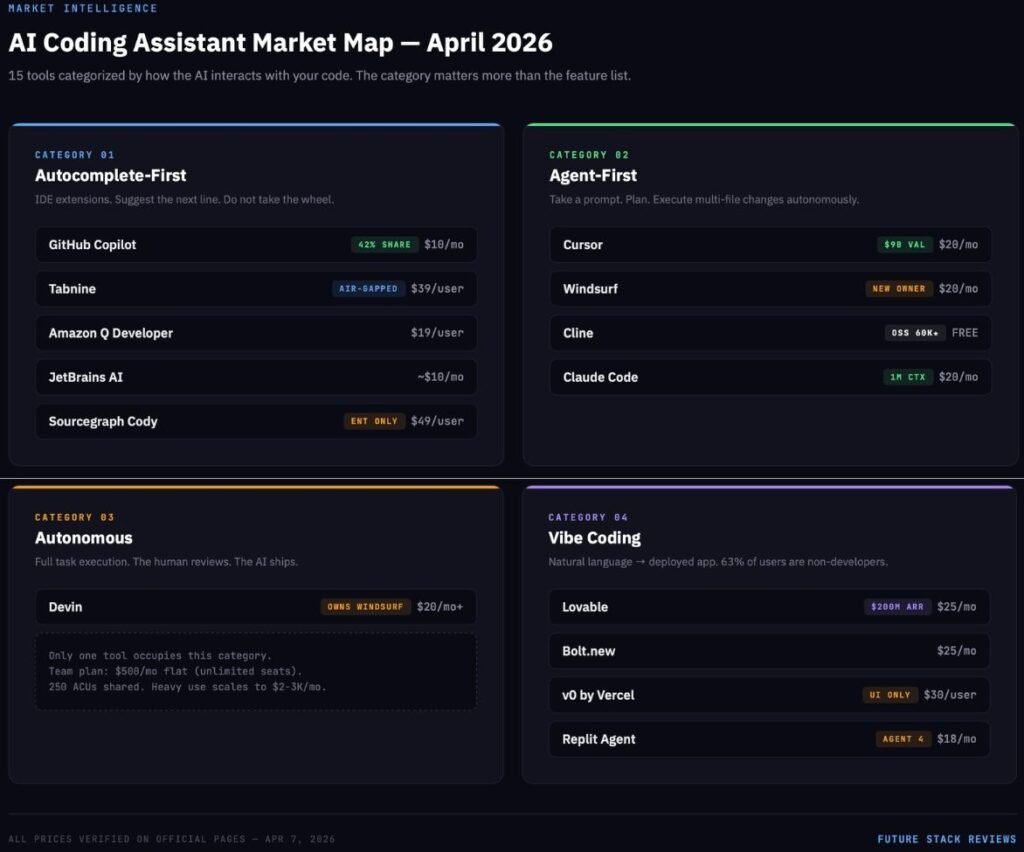
The 12 AI Coding Assistants That Actually Matter in 2026
What follows is an honest breakdown of every tool worth considering. “Best for” and “Not for” are based on publicly verified pricing, developer sentiment from X in Q1 2026, security documentation we actually read, and controlled studies where they exist. Marketing copy was ignored.
1. GitHub Copilot
What it is: The industry default. An IDE extension with the largest model marketplace and the only tool offering an autonomous Issue-to-PR coding agent inside the GitHub ecosystem.
Best for: Teams already embedded in GitHub who need the lowest-friction, finance-approved option. Enterprise organizations that require IP indemnity and compliance documentation without a procurement headache.
Not for: Developers doing complex multi-file refactoring who need the AI to control the terminal and file system directly. Copilot operates as a guest inside your editor, not the owner of it.
Pricing (verified April 7, 2026):
| Tier | Price | Premium Requests |
|---|---|---|
| Free | $0 | 50/month |
| Pro | $10/mo | 300/month |
| Pro+ | $39/mo | 1,500/month |
| Business | $19/user/mo | 300/user/month |
| Enterprise | $39/user/mo | 1,000/user/month |
Additional premium requests at $0.04 each. All tiers access the same model lineup: Claude Opus 4.6, GPT-5.4, Gemini 3.1 Pro, Grok Code Fast 1, and more.The GPT-5.x series powering Copilot shares its foundation with ChatGPT, which we reviewed separately.
The honest take: Copilot holds roughly 42% market share and sits inside 90% of the Fortune 100. Its moat is not intelligence. Every competitor accesses the same frontier models. Its moat is institutional trust. Microsoft provides the IP indemnity, the SOC 2 reports, and the procurement path that large organizations demand.
The problem is that Copilot’s architecture limits what it can do. As an extension, it asks the IDE for permission to read files and run terminal commands through an inter-process communication layer. That makes inline completions smooth but multi-file autonomous refactoring slow and unreliable compared to AI-native editors that control the event loop directly. In a benchmark shared by a developer on X in Q1 2026, Cursor’s Composer mode hit 68% task success rate on complex refactoring versus 51% for Copilot, a gap that widens as project complexity increases.
And then there was the PR ads incident. In March 2026, GitHub was caught injecting advertisements into Copilot-generated pull requests. The backlash was immediate. The most viral AI coding tweet of Q1, with nearly 2,000 likes. GitHub disabled the feature within days. The episode crystallized a growing sentiment: Microsoft optimizes Copilot for margin, not for the developer. Whether that cynicism is fair, it is now part of the product’s reputation.
For a focused guide on the seven strongest alternatives and when to stay on Copilot, see our GitHub Copilot Alternatives breakdown.
Supported IDEs: VS Code, Visual Studio, JetBrains, Neovim, Vim, Xcode, Eclipse, Zed
2. Cursor
What it is: An AI-native IDE built as a proprietary fork of VS Code. The dominant tool in the Agent-First category, with multi-model credit pools and the Composer feature for orchestrating changes across dozens of files simultaneously.
Best for: Solo developers and small teams doing complex, multi-file work who want the AI deeply embedded in their editing experience. Power users willing to learn a new tool in exchange for a material productivity jump.
Not for: Teams locked into a specific VS Code extension ecosystem that may break on the fork. Organizations that need predictable monthly costs. Cursor’s credit-based billing has caught heavy users off guard with high bills.
Pricing (verified April 7, 2026):
| Tier | Price | Key Feature |
|---|---|---|
| Hobby | $0 | Limited Agent requests, limited Tab completions |
| Pro | $20/mo | Extended Agent limits, frontier models, Cloud agents |
| Pro+ | $60/mo | 3x usage on all OpenAI, Claude, Gemini models |
| Ultra | $200/mo | 20x usage, priority access to new features |
| Teams | $40/user/mo | Shared chats, SAML/OIDC SSO, privacy controls |
| Enterprise | Custom | SCIM, audit logs, pooled usage |
The honest take: Cursor raised $900 million at a $9 billion valuation in 2025. That is not hype. It reflects a product that meaningfully changed how a large number of developers work. Composer mode, which lets you modify 10+ files simultaneously with a unified visual diff, is unmatched as of April 2026. The integration of the Supermaven autocomplete engine delivers a 72% code acceptance rate, the highest in the industry.
The problems are also real. On X in Q1 2026, the two most common complaints were quota exhaustion (heavy users burning through Pro credits in days) and resource leaks (CPU hitting 200% during long agent sessions). One widely shared post described a developer’s boss vibe-coding an entire product in Cursor, producing what the cleanup engineer called a “buggy AI slop product” that took longer to fix than it would have taken to build from scratch. Multiple developers reported switching back to standard VS Code specifically because Cursor’s agent-first UI redesign made it feel less like an IDE and more like an AI control panel.
The deeper risk is architectural. Cursor is a proprietary fork. If Microsoft ships native AI event-loop hooks into standard VS Code — something that becomes more plausible every quarter. Cursor’s core advantage narrows. And Cursor explicitly states that all AI requests route through its own AWS backend, even if you configure your own API key. For privacy-sensitive teams, that is a hard stop.
For developers evaluating other options, see our Best Cursor Alternatives 2026 guide.
Cursor and Claude Code are the two dominant tools in the Agent-First segment. For a direct head-to-head comparison, see our Cursor vs Claude Code analysis.
Supported IDEs: Cursor only (proprietary VS Code fork)
3. Windsurf (formerly Codeium)
What it is: An AI-native IDE powered by the Cascade context engine and the proprietary SWE-1.5 model. Now owned by Cognition (makers of Devin) after one of the most dramatic acquisition sagas in recent tech history.
Best for: Developers who want an agentic IDE experience at a competitive price point with predictable billing. Teams that value persistent session memory across coding sessions.
Not for: Enterprise buyers worried about corporate stability. Windsurf changed ownership three times in 2025. Anyone who needs a mature plugin ecosystem. Windsurf’s VS Code fork has less community extension coverage than Cursor’s.
Pricing (verified April 7, 2026; changed March 19, 2026):
| Tier | Price | Cascade Usage |
|---|---|---|
| Free | $0 | Light (daily/weekly quota) |
| Pro | $20/mo | Standard |
| Max | $200/mo | Heavy |
| Teams | $40/user/mo | Standard |
| Enterprise | Custom | Custom |
All plans include unlimited Tab autocomplete. Extra usage at API price. Hybrid deployment available on Enterprise only.
The honest take: The Windsurf story is the wildest in the AI coding space. In April 2025, OpenAI offered $3 billion to acquire the company (then called Codeium). The deal collapsed in July after IP tensions with Microsoft. Google then paid $2.4 billion to hire CEO Varun Mohan, co-founder Douglas Chen, and the core R&D team into Google DeepMind. Cognition (makers of Devin) acquired the remaining Windsurf IP, product, brand, and team for an undisclosed amount, inheriting $82 million in ARR and 350+ enterprise clients.
What this means for you as a user is genuine uncertainty. Cognition now controls both Devin (autonomous SWE) and Windsurf (agentic IDE), creating potentially the most vertically integrated AI development stack in the market. But the integration path is unclear. Will Cognition merge the two products? Will Windsurf’s lightweight editor identity survive, or will it be consumed by Devin’s heavier autonomous architecture? No one outside Cognition knows.
On the product itself: Windsurf’s Cascade engine maintains persistent memory of your actions across sessions, which is something no other tool does as well. If you rename a variable, Cascade autonomously updates dependencies across the project. The SWE-1.5 model (available on Pro and above) is competitive. On X, developers consistently praise the cost-performance ratio. But the March 2026 price increase from $15 to $20 for Pro, plus the shift from a credit system to daily/weekly quotas, drew complaints from users who felt blindsided.
For a head-to-head comparison of these two AI-native IDEs on real costs, security, and design philosophy, see our Cursor vs Windsurf comparison.
Supported IDEs: Windsurf IDE (VS Code fork) + plugins for 40+ IDEs
4. Cline
What it is: A free, open-source VS Code extension (Apache-2.0 license) that acts as a fully autonomous coding agent. You bring your own API keys and pay the model provider directly. No middleman, no markup, no subscription.
Best for: Cost-conscious developers who want full transparency over what they spend and which models they use. Power users who want to run local models through Ollama for complete offline operation. Anyone with subscription fatigue.
Not for: Teams that need centralized admin controls, usage dashboards, or enterprise governance. Cline is a power tool, not an enterprise platform.
Pricing: Free. Users pay only their own API costs directly to providers (Anthropic, OpenAI, Google, etc.). Running local models via Ollama costs nothing beyond hardware.
The honest take: Cline hit 60,000 stars on GitHub and 5 million+ developers worldwide by April 2026. Those numbers tell a story: a meaningful percentage of serious developers decided they would rather manage their own API keys than pay a 2-5x markup through a commercial wrapper.
The reason is simple. The “magic” in AI coding is increasingly in the model, not the shell around it. When Cline points at Claude Opus 4.6 through a direct API key, the raw intelligence gap versus Cursor or Windsurf (which also use Claude Opus 4.6) shrinks dramatically. What you lose is polish: no visual diff interface, no cloud background agents, no centralized team billing. What you gain is absolute cost transparency (you see exactly what each task costs in tokens), the ability to switch models mid-task, and first-class MCP (Model Context Protocol) support that turns Cline into a full ecosystem with curated servers for CI/CD, cloud monitoring, and project management.
Models likeDeepSeek and MiniMax M2.7 also work well with Cline for cost-conscious workflows — M2.7 matches Claude Opus on bug detection at 1/17th the input token price.
The word “free” deserves a caveat. Running frontier models through API keys adds up. Heavy Cline users report spending $50-100/month on API calls. Local models via Ollama eliminate that cost but require 24GB+ VRAM minimum for usable performance, and the intelligence gap between a local model and Claude Opus 4.6 remains significant. The honest framing is: Cline is free if you have the hardware. It is cheap if you are disciplined about model selection. It is not free if you default to frontier models for every task.
Supported IDEs: VS Code only (extension)
5. Claude Code
What it is: Anthropic’s terminal-native CLI agent. No GUI, no visual editor, no inline autocomplete. You type commands. It reads your entire codebase (up to 1 million tokens, roughly 30,000 lines), reasons about it, and executes changes directly on the file system.
Best for: Developers who live in the terminal and need deep architectural reasoning. Large-scale refactoring, repository-wide migrations, and complex debugging where context window size is the bottleneck. The right tool when the problem is hard and the codebase is large.
Not for: Daily, iterative feature work where you want inline suggestions while you type. Developers who rely on visual diffs and GUI-based code review. Anyone who finds the terminal intimidating.
Pricing (verified April 7, 2026):
| Plan | Price | Claude Code Access |
|---|---|---|
| Free | $0 | Not included |
| Pro | $17/mo (annual) / $20/mo (monthly) | Included |
| Max 5x | $100/mo | Included, 5x usage |
| Max 20x | $200/mo | Included, 20x usage |
Heavy agentic workflows on Pro will hit rate limits quickly. Developers on X consistently report needing Max 5x ($100/mo) or higher for sustained use.
The honest take: Claude Code is the best tool in this guide for a specific class of problem, and a poor choice for everything else.
The specific class: you have a large, complex codebase. You need to understand how 15 interconnected modules interact before making a change. You need the AI to hold the entire context in memory, not chunk it through lossy RAG retrieval but actually hold it. Claude Opus 4.6 scores 78.3% on the MRCR v2 benchmark at 1 million tokens. GPT-5.4 scores 36.6%. Gemini 3.1 Pro scores 25.9%. That is not a marginal lead. It is a different capability class.
On SWE-bench Verified, Claude Opus 4.6 scores 80.9%, the highest of any model. In practical terms, this means Claude Code can reliably execute 50-file architectural migrations without losing track of dependencies. (For a deeper look at Claude’s capabilities beyond coding, see our full Claude AI review.) No other tool in this guide can make that claim with a straight face.
The “everything else” caveat matters just as much. Claude Code has no GUI. No visual diff. Zero inline autocomplete. You cannot tab-complete a function signature. For the 90% of coding that is routine — writing a new endpoint, styling a component, fixing a typo. Claude Code is overkill at best and friction at worst. The developers on X who love it use it as an escalation tool: Cursor for daily work, Claude Code when the problem demands it.
The rate limit complaints are persistent and loud. At the $20/mo Pro tier, multiple developers on X described hitting limits within hours. One called it “the biggest scam.” Another said builders are “just giving up on it.” The $100/mo Max 5x tier alleviates this, but at that price point you are spending more than Cursor Pro, Copilot Pro, and Windsurf Pro combined.
For a detailed breakdown of how Claude Code compares to its closest competitor, read our Cursor vs Claude Code comparison.
Supported IDEs: Terminal/CLI — works with any text editor or IDE
6. Tabnine
What it is: The enterprise privacy specialist. The only major AI coding assistant that offers fully air-gapped, on-premise, zero-code-retention deployment at every paid tier. Built for organizations where code leaving the building is not an option.
Best for: Regulated industries (finance, defense, healthcare, government) where compliance requirements eliminate every cloud-dependent competitor. Teams that need GDPR, SOC 2, and ISO 27001 certification with auditable AI usage.
Not for: Individual developers looking for the cheapest or most powerful AI assistant. Tabnine’s $39/user/mo starting price is a 2-4x premium over GitHub Copilot, and its raw model intelligence is not the selling point.
Pricing (verified April 7, 2026):
| Tier | Price | Key Feature |
|---|---|---|
| Code Assistant | $39/user/mo (annual) | Completions, chat, all LLMs, flexible deployment |
| Agentic Platform | $59/user/mo (annual) | + Autonomous agents, Tabnine CLI, MCP tools |
| Enterprise | Custom | Air-gapped, VPC, custom models |
When using Tabnine-provided LLM access, token consumption is billed at provider cost + 5% handling fee. Using your own on-prem LLM endpoint incurs no additional usage charges.
The honest take: Tabnine is not trying to win the benchmark wars. It is winning procurement wars in a segment that the flashier tools cannot even enter.
The deployment flexibility is the product. SaaS, VPC, on-premises, or fully air-gapped. You choose where your code lives. Zero code retention means nothing is stored, nothing is trained on, nothing is shared. Every paid tier includes IP indemnification (subject to terms). For a CISO at a bank or a defense contractor, this is not a nice-to-have. It is the only option that passes legal review.
The Agentic Platform tier ($59/user/mo) adds autonomous agents with MCP governance controls — including integration with Git, Jira, Confluence, Docker, and CI/CD systems. It also adds a terminal-native CLI. This positions Tabnine to compete with Cursor and Claude Code on agentic capabilities while maintaining its privacy-first architecture.
The honest gap: if your organization does not have regulatory constraints on code processing, Tabnine’s premium is hard to justify on capability alone. GitHub Copilot Business at $19/user/mo offers more polish, a larger community, and deeper GitHub integration. The $20-40/seat premium for Tabnine is specifically the price of deployment control.
Supported IDEs: VS Code, JetBrains IDEs, Eclipse, Vim, Neovim
7. Amazon Q Developer
What it is: AWS’s coding assistant, deeply integrated with the AWS ecosystem. Specialized in Java and .NET legacy code transformation at scale.
Best for: Teams building on AWS infrastructure who want an AI assistant that understands their cloud environment natively. Organizations with large Java/.NET codebases that need automated modernization.
Not for: Developers working outside the AWS ecosystem. The tool’s value proposition drops sharply if you are not on AWS.
Pricing (verified April 7, 2026):
| Tier | Price | Key Limits |
|---|---|---|
| Free | $0 | 50 agent requests/mo, 1,000 LOC/mo for Java transforms |
| Pro | $19/user/mo | Expanded agent requests, 4,000 LOC/mo, IP indemnity |
Extra lines of code beyond Pro allocation: $0.003/line. LOC allocations pool at the AWS payer-account level.
The honest take: Amazon Q Developer occupies a clear niche and fills it well. If your infrastructure is on AWS, the tool understands your cloud context in a way that Copilot, Cursor, and Claude Code simply do not. The Java/.NET transformation capability is a genuine differentiator for enterprises sitting on millions of lines of legacy code.
The privacy model has a subtlety worth flagging. On the Free tier, data collection is opt-out, meaning your code is used for model improvement unless you actively disable it. On the Pro tier, data collection is automatically opted out. This is exactly the kind of plan-specific privacy difference that most comparison articles fail to mention. If your organization is evaluating the Free tier for a pilot, read the data handling terms first.
The security track record deserves mention. In 2025, a threat actor exploited an inappropriately scoped GitHub token and injected malicious code into the Amazon Q Developer VS Code extension’s release process. AWS disclosed the incident and remediated it, but the episode reinforces a broader point: AI coding assistants are a new attack surface, not just a productivity tool.
Supported IDEs: VS Code, JetBrains IDEs, CLI
8. JetBrains AI Assistant
What it is: AI assistance built directly into the JetBrains IDE ecosystem: IntelliJ IDEA, PyCharm, WebStorm, GoLand, and every other JetBrains product. Includes Junie, a coding agent that went GA in April 2025.
Best for: Developers who already use JetBrains IDEs and refuse to switch. Java, Kotlin, and JVM-ecosystem developers who need AI that understands their framework-specific patterns.
Not for: Developers on VS Code or other editors. JetBrains AI is tightly coupled to the JetBrains ecosystem and offers only a limited VS Code extension in public preview.
Pricing (verified April 7, 2026):
| Tier | Price (Individual) | AI Credits / 30 days |
|---|---|---|
| AI Free | $0 | 3 |
| AI Pro | ~$10/mo | 10 |
| AI Ultimate | ~$30/mo | 35 |
| AI Enterprise | ~$60/user/mo | Maximum quota |
1 AI credit ≈ $1 equivalent of cloud model usage. AI Pro is bundled into All Products Pack subscriptions. Enterprise tier includes on-premises, cloud, or hybrid deployment with BYOK (bring your own key) support.
The honest take: JetBrains AI is the least discussed tool in this guide and one of the most pragmatic choices for a specific audience. If you have spent years configuring IntelliJ IDEA or PyCharm to your exact specifications — custom key bindings, inspection profiles, framework-specific plugins. Switching to Cursor or Windsurf means abandoning all of that. JetBrains AI lets you stay.
The Junie agent (recommended on the AI Ultimate tier at ~$30/mo) defaults to Gemini 3 Flash for responsiveness and supports multi-model routing. The Enterprise tier includes on-premises deployment with SOC 2 certification and BYOK support for connecting your own AI providers, making it one of the few tools that competes with Tabnine on deployment control for JetBrains-native teams.
The limitation is ecosystem lock-in in reverse. JetBrains AI exists to serve JetBrains users. If you ever leave the JetBrains ecosystem, the AI goes with it.
Supported IDEs: All JetBrains IDEs, Android Studio, VS Code (limited preview)
9. Sourcegraph Cody
What it is: An AI assistant built on top of Sourcegraph’s code intelligence platform. Its differentiator is org-wide code graph context, the ability to search and understand code across hundreds of distributed repositories simultaneously.
Best for: Large engineering organizations with sprawling, multi-repo microservice architectures where understanding cross-service dependencies is the primary bottleneck.
Not for: Individual developers or small teams. Sourcegraph pivoted to enterprise-only pricing in 2026. The Free and Pro individual tiers that previously existed are no longer available on the pricing page.
Pricing (verified April 7, 2026):
| Tier | Price |
|---|---|
| Enterprise Search | $49/user/mo |
This is a significant shift. As recently as mid-2025, Sourcegraph offered a $9/mo Pro tier for individuals. That tier no longer appears on the official pricing page.
The honest take: Sourcegraph Cody solves a problem that no other tool on this list addresses: “How does this function in Service A affect the behavior of Service B, which is in a completely different repository?” For organizations with 50+ microservices, that question is answered dozens of times a day. Cody’s server-side code graph indexes the entire organization and provides context that goes far beyond what a single-repo tool can offer.
At $49/user/mo and enterprise-only pricing, the tool has clearly decided that individual developers and small teams are not its market. This is a procurement decision for engineering VPs, not a credit card purchase for a solo developer.
Supported IDEs: VS Code, JetBrains IDEs, Visual Studio
10. Devin
What it is: The only fully autonomous AI software engineer. Receives a task (Jira ticket, GitHub issue, Slack message), spins up an isolated cloud VM, writes code, runs tests, and submits a pull request with minimal human intervention.
Best for: Engineering teams with well-defined, repetitive tasks: bug-fix backlogs, migration scripts, documentation updates, CI/CD maintenance. Teams where a human engineer’s time costs more than Devin’s compute.
Not for: Ambiguous, creative, or architecturally complex work. Indie developers who cannot justify $500+/month. Anyone who needs tight, synchronous control over the coding process.
Pricing (verified April 7, 2026):
| Plan | Price | ACUs Included | ACU Rate |
|---|---|---|---|
| Core | $20/mo (pay-as-you-go) | 9 ACUs | $2.25/ACU |
| Team | $500/mo | 250 ACUs | $2.00/ACU |
| Enterprise | Custom | Custom | Custom |
1 ACU (Agent Compute Unit) ≈ 15 minutes of active Devin work. Core supports up to 10 concurrent sessions; Team and Enterprise are unlimited. All plans include unlimited user seats.
The honest take: Devin 2.0’s price drop from $500/month to a $20 entry point was the most significant pricing move in this market in 2025. It made autonomous coding accessible to individual developers for the first time.
But the $20 entry is misleading for serious use. Nine ACUs at $2.25 each buys roughly 2.25 hours of active Devin work per month. A team relying on Devin for real workload needs the Team plan at $500/month (250 ACUs ≈ 62.5 hours). The critical detail that most articles miss: Team plan seats are unlimited. A 50-developer organization pays the same $500/month as a 5-developer team. The constraint is not headcount but ACU consumption. At 250 shared ACUs, each of those 50 developers gets roughly 75 minutes of Devin work per month at baseline. If teams need more, additional ACUs cost $2.00 each, and real-world bills can climb to $2,000-3,000/month for heavy usage.
That premium is justifiable only if Devin consistently replaces human engineering hours. On well-scoped tasks (bug fixes, test writing, routine migrations), it does. On ambiguous tasks, it does not. The core failure mode is what developers call the “rabbit hole”: Devin encounters an undefined edge case, lacks the judgment to stop and ask for clarification, and instead attempts increasingly complex incorrect fixes in a closed, unsupervised loop — compounding technical debt while burning ACUs.
Cognition’s acquisition of Windsurf in July 2025 is strategically interesting. Cognition now controls both the lightweight IDE (Windsurf) and the heavyweight autonomous agent (Devin). If they successfully integrate the two — letting developers escalate directly from interactive editing to autonomous delegation within a single environment — the result could be the most vertically integrated AI development stack in the market.
Supported IDEs: Devin IDE (browser-based), Slack, GitHub integration, Devin API
11. Google Gemini Code Assist
What it is: Google’s AI coding assistant, powered by Gemini 2.5 Pro and Flash, with deep Google Cloud/GCP integration and a 1-million-token context window (2M planned).
Best for: Teams building on Google Cloud who want native GCP integration. Organizations evaluating a long-term bet on Google’s Gemini model ecosystem.
Not for: Developers outside the Google Cloud ecosystem. Teams that need agentic multi-file editing. Gemini Code Assist’s agent mode is still in preview and lags behind Cursor and Windsurf in maturity.
Pricing (verified April 7, 2026):
| Tier | Annual Price | Monthly Price |
|---|---|---|
| Individual/Free | $0 | $0 |
| Standard | $19/user/mo | $22.80/user/mo |
| Enterprise | $45/user/mo | $54/user/mo |
Standard users have a 1,000 request/day limit; Enterprise users have 2,000/day.
The honest take: Gemini Code Assist is Google’s answer to GitHub Copilot, and the comparison is instructive. Both target enterprise teams. Both offer compliance documentation and organizational controls. But Copilot has the GitHub ecosystem advantage (Issues, PRs, Actions), while Gemini Code Assist has the GCP advantage (Cloud Console integration, Vertex AI pipeline access).
The 1-million-token context window via Gemini 2.5 Pro is competitive with Claude Code, but the retrieval accuracy at that scale is substantially lower. Claude Opus 4.6 retrieves relevant information from a 1M-token context with 78.3% accuracy; Gemini 3.1 Pro manages 25.9%. That is not a rounding error. It means Gemini Code Assist is better suited for broad codebase awareness than for precision retrieval tasks.
Google’s acquisition of Windsurf’s founders and the $2.4 billion technology license from Codeium signal that Google is serious about closing the gap in agentic coding capabilities. Whether that translates into product improvements in 2026 or 2027 remains to be seen.
Supported IDEs: VS Code, IntelliJ, PyCharm, WebStorm, Android Studio
Cursor vs GitHub Copilot: The Head-to-Head That Everyone Searches For
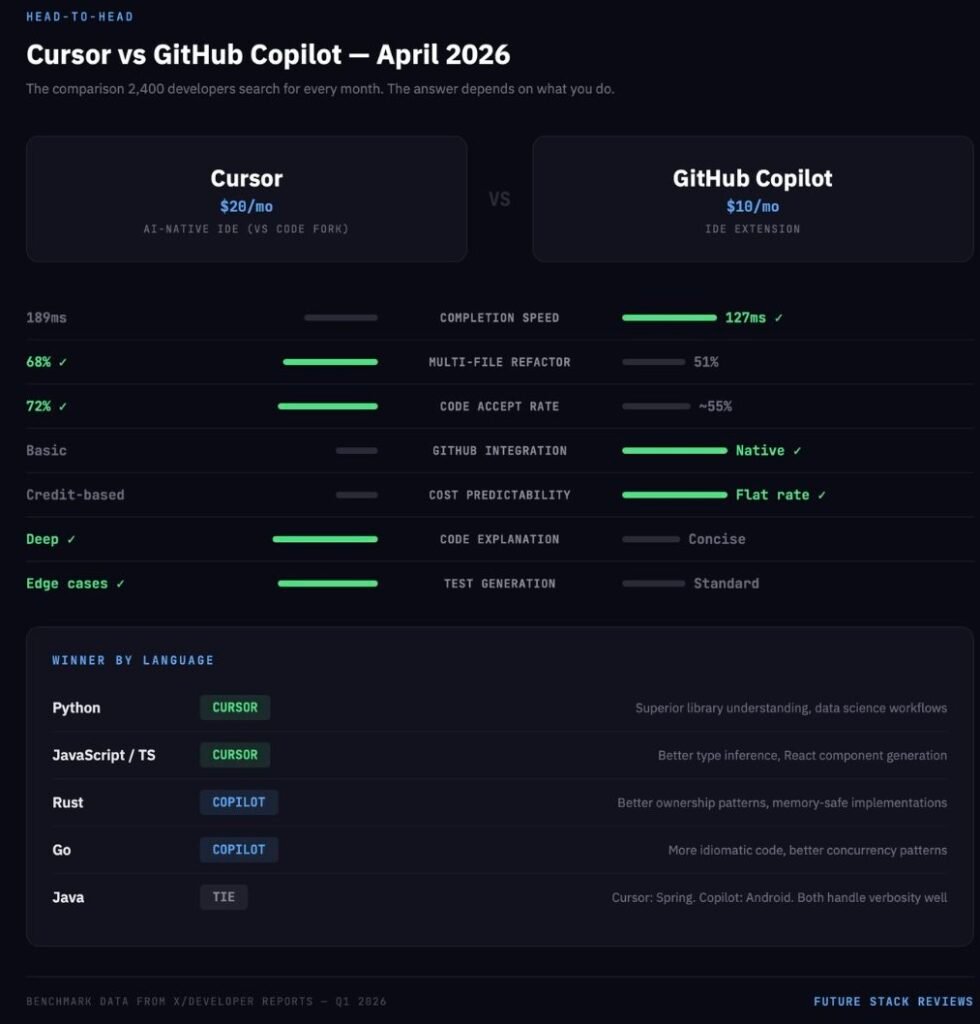
This section exists because “cursor vs copilot” has a search volume of 2,400 with a keyword difficulty of 3. Beyond the SEO opportunity, it is the question that most working developers are actually trying to answer in April 2026. The answer depends entirely on what you do.
Feature-by-Feature
| Feature | Cursor | Copilot | Winner |
|---|---|---|---|
| Inline completion speed | 189ms average | 127ms average | Copilot |
| Completion relevance | File history analysis | Project pattern + GitHub data | Copilot |
| Multi-file editing | Composer — true multi-file orchestration | Workspace — visualization with limited execution | Cursor |
| Code explanation | Architectural insights, detailed | Function-level, concise | Cursor |
| Test generation | Comprehensive, edge cases included | Standard coverage patterns | Cursor |
| GitHub integration | Basic | Deep (Issues, PRs, Actions, Agents) | Copilot |
| Pricing predictability | Credit-based, variable | Flat-rate per tier | Copilot |
By Language
Python: Cursor. Superior library understanding and data science workflow support. Copilot is better for quick Django/Flask boilerplate.
JavaScript/TypeScript: Cursor. Better type inference and React component generation across files. Copilot has a slight edge in Next.js-specific optimizations.
Rust: Copilot. Better understanding of ownership patterns and borrowing semantics. Cursor provides better explanations but generates less idiomatic code.
Go: Copilot. More idiomatic Go and better grasp of concurrency patterns. Cursor’s refactoring tools are stronger but sometimes deviate from Go conventions.
Java: Tie. Cursor is better at Spring framework implementations. Copilot is better at Android development patterns.
Who Is Switching — and Why
From Copilot to Cursor: Senior developers who hit the ceiling on Copilot’s multi-file capabilities. Teams working on complex, interconnected codebases where Composer’s orchestration saves hours per week. Developers frustrated by Copilot’s quality regressions in late 2025 as GitHub cycled through underlying models.
From Cursor to Copilot: Developers who prefer unobtrusive, predictable assistance over agentic control. Teams already deeply invested in the GitHub ecosystem where Copilot’s native integration with Issues, PRs, and Actions creates a workflow advantage that Cursor cannot match. Developers burned by Cursor’s credit-based billing surprises who want flat-rate predictability.
The trend on X in Q1 2026 is clear: Cursor is winning the agentic power-user segment. Copilot is retaining the enterprise steady-state segment. Both are losing individual cost-conscious users to Cline.
For a deeper comparison of all seven alternatives, see our Best Cursor Alternatives 2026 guide.
The Vibe Coding Revolution: Lovable vs Bolt.new vs v0
This section covers the fastest-growing segment of the AI coding market. “Vibe coding tools” hit a search volume of 2,800 in April 2026 with a keyword difficulty of 19 — high enough to be meaningful, low enough for a well-constructed article to rank.
What Vibe Coding Actually Is
The term was coined by Andrej Karpathy to describe a workflow where users prompt an AI to generate complete applications, accepting the output without necessarily understanding every line of code. By 2026, the concept matured into a $4.7 billion market category.
The critical insight that most coverage misses: vibe coding platforms are not competing with Cursor and Copilot. They are creating new software creators. Sixty-three percent of vibe coding users are non-developers: founders, designers, product managers, and marketing teams who could never have built a React application before these tools existed. Lovable reached $200 million in ARR in eight months by serving this exact demographic.
The Technical Cliff
Vibe coding tools excel at the first 80% of an application: the UI, the routing, the standard database schema. They fail at the last 20%. When a vibe-coded application gains traction and needs complex distributed logic, custom API integrations, or performance tuning, the natural language interface breaks down. The AI begins overwriting its own logic. Security vulnerabilities accumulate. Up to 30% of generated snippets contain basic flaws like XSS or SQL injection. The code becomes bloated, unmaintainable spaghetti that ignores established design patterns.
This is not a reason to avoid vibe coding. It is a reason to understand the workflow:
Phase 1 — The Vibe: A non-technical founder uses Lovable or Bolt.new to generate an MVP, test the market, and validate the concept. No engineering sprint required.
Phase 2 — The Handoff: The repository is exported to GitHub. Lovable and Bolt both output standard React and Node.js code, avoiding lock-in.
Phase 3 — The Hardening: A professional engineer opens the repo in Cursor or uses Claude Code to refactor the bloated logic, implement proper security, write tests, and prepare the application for production scale.
Vibe coding is not replacing engineers. It is shifting their role from “translate wireframes into boilerplate” to “harden AI-generated prototypes for production.”
The Three Platforms
Lovable ($25/mo Pro) The most complete vibe coding platform. Generates full-stack React applications with integrated Supabase backends (authentication, databases, and storage included). The code quality is the highest among the three, closest to what a human would write. The Business tier at $50/month covers unlimited users on a shared credit pool, making it the most cost-efficient option for teams by a wide margin. One-click deployment and GitHub export eliminate lock-in fears. The limitation: backend integration beyond Supabase requires manual guidance.Once exported, these apps need reliable hosting — we compared options in our Hostinger review.
Bolt.new ($25/mo Pro) The developer’s vibe coding tool. Runs in the browser using StackBlitz’s WebContainer technology, a full Node.js environment with no local setup. Supports React, Vue, and Svelte, giving it framework flexibility that Lovable and v0 lack. The code quality is functional but rigid. Token consumption spikes during debugging, making costs less predictable than Lovable. Best for developers who want to prototype quickly and then modify the generated code directly.
v0 by Vercel ($30/user/mo Team) Not an app builder. A UI component generator. v0 produces the cleanest, most maintainable React components of the three: proper shadcn/ui patterns, strong TypeScript typing, sensible component decomposition. But it generates frontend only. No backend, no database, no authentication. If you have an existing Next.js codebase and need beautiful UI components fast, v0 is the best tool. If you need a full application, look elsewhere.
The Security and Privacy Fault Line Nobody Talks About
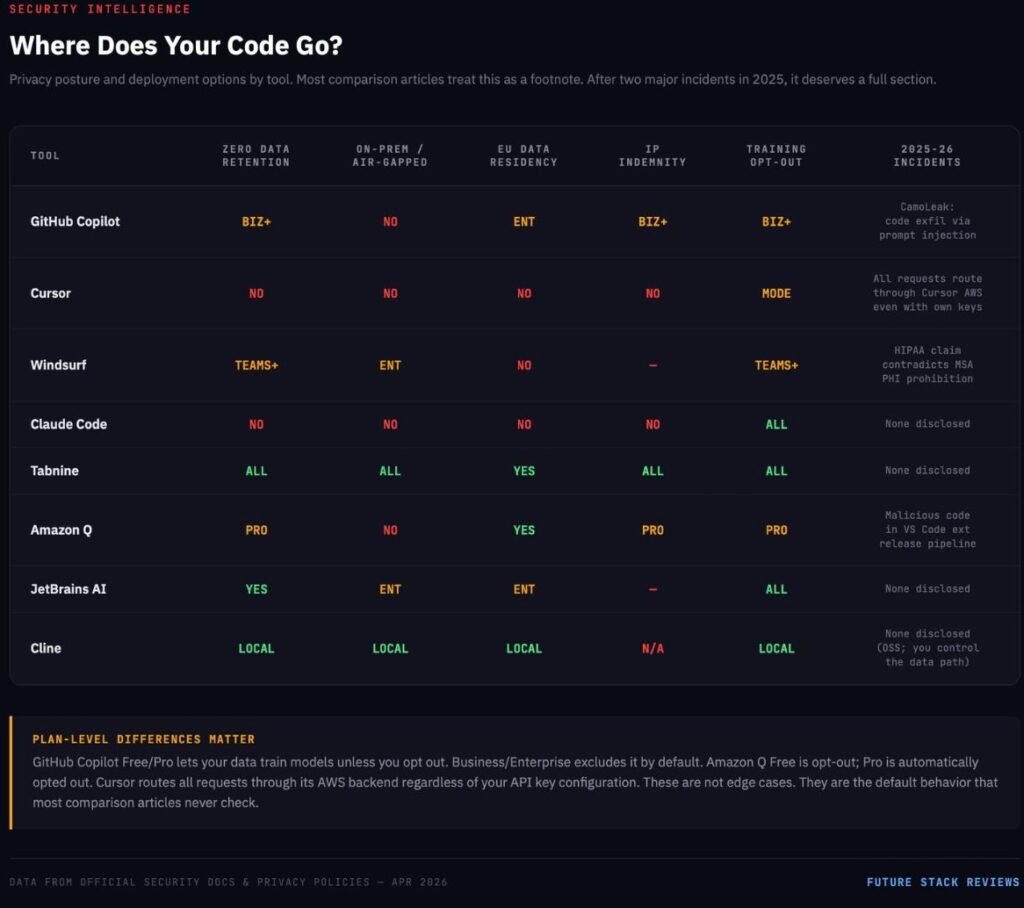
This section is the one that separates this guide from every other “best AI coding assistant” article on the internet. Most articles treat security as a footnote. After two major incidents in 2025-2026, it deserves its own section.
The Incidents
⚠ SECURITY INCIDENTS — 2025-2026
Two major incidents confirmed that AI coding assistants are a new attack surface, not just a productivity tool. These are not theoretical risks. They shipped to production.
Amazon Q Developer VS Code Extension (2025): A threat actor exploited an inappropriately scoped GitHub token to inject malicious code into the extension’s official release pipeline. AWS disclosed the incident and remediated it. Separately, AWS acknowledged prompt-injection vulnerabilities in Amazon Q Developer that could enable dangerous commands or DNS-based data exfiltration under certain conditions.
GitHub Copilot CamoLeak (2025): Researchers disclosed a method to exfiltrate private source code and secrets from private repositories via prompt injection and image proxying in Copilot Chat. GitHub mitigated the issue by disabling image rendering in Copilot Chat. Even if you treat this as a patched vulnerability, it destroys the narrative that AI coding assistants are “just like autocomplete, only smarter.” They are a new attack surface.
Where Your Code Goes
This is the question every team should ask and most do not:
GitHub Copilot: Prompts and outputs are processed through GitHub’s systems and model providers. On Free/Pro/Pro+ plans, interaction data can be used to train and improve GitHub AI models unless the user opts out. Business and Enterprise tiers exclude data from training by default. Content exclusion (preventing specific files from being sent to the AI) is a Business/Enterprise feature only. The cloud coding agent ignores content exclusions entirely.
Cursor: All AI requests route through Cursor’s AWS backend, even if you configure your own OpenAI API key. Requests can include recently viewed files, conversation history, and relevant code. There is no self-hosted server deployment option.
Windsurf: Cloud tiers process AI requests on Windsurf-managed servers. Automated zero data retention is available on Teams and Enterprise tiers. Hybrid deployment is Enterprise-only.
Claude Code: Processed through Anthropic’s infrastructure. Model training is opt-out on all plans. No self-hosted option for the consumer product.
Tabnine: SaaS, VPC, on-premises, or fully air-gapped. Zero code retention at every paid tier. No training on customer code. This is the widest deployment flexibility in the market.
Cline: Whatever you choose. If you run local models via Ollama, nothing leaves your machine. If you use cloud APIs, your code goes to the model provider under their terms. Full control, full responsibility.
The HIPAA Contradiction
Windsurf’s security page states it is “maintained as HIPAA compliant” and may entertain a Business Associate Agreement for significant implementations. Its own Master Service Agreement says the service is “not designed to process personal data on the customer’s behalf” and tells customers not to share Protected Health Information.
That kind of contradiction is exactly what procurement teams need to catch — and exactly what most “best tool” articles fail to interrogate.
The EU AI Act
The EU AI Act becomes enforceable in August 2026. For AI coding assistants classified as high-risk systems, it mandates transparency in AI-generated outputs, human oversight mechanisms, incident reporting, and compliance documentation. Non-compliance risks fines up to 35 million euros or 7% of global revenue.
Of the tools in this guide, only Tabnine, JetBrains AI Enterprise, Amazon Q Developer (via AWS EU regions), and GitHub Copilot Enterprise (via Azure EU data residency) currently offer EU data residency options. Cursor and Claude Code process data exclusively in the US, presenting compliance challenges for European organizations.
The Real Cost of AI Coding (Beyond the Pricing Page)
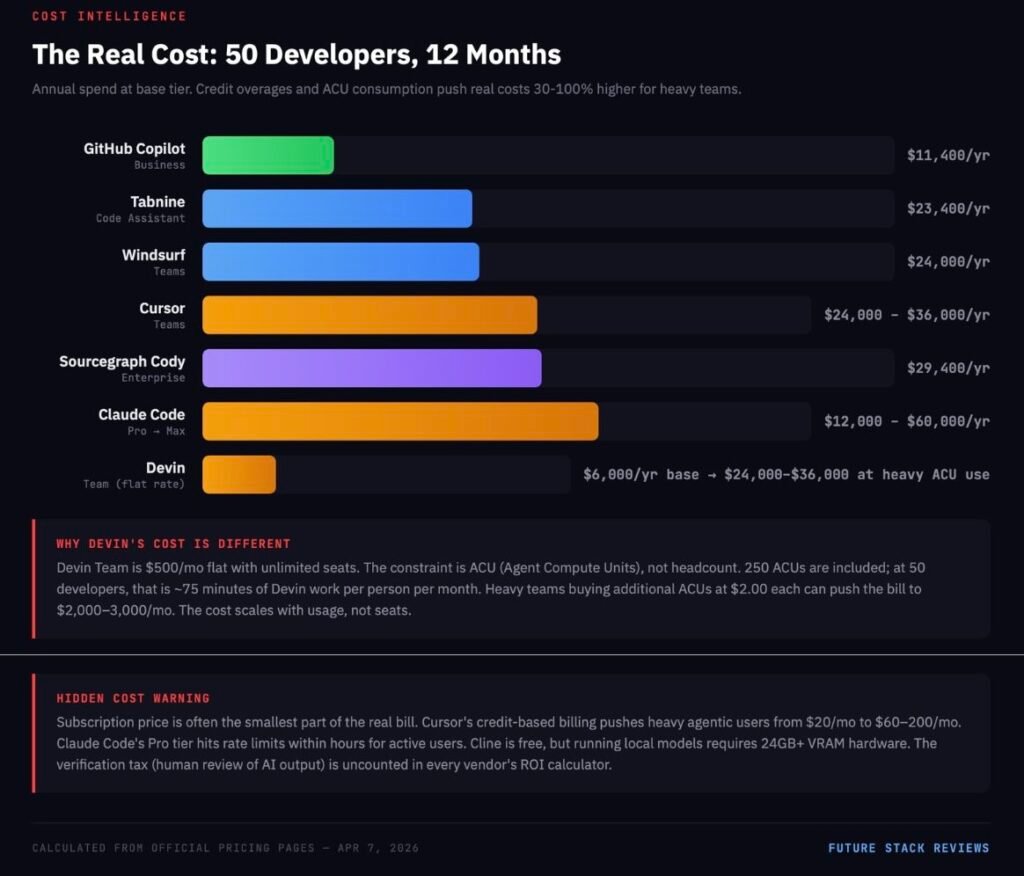
The subscription price is often the smallest part of the real bill.
The 50-Developer Cost Comparison
| Tool | Tier | Monthly Cost (50 devs) | Notes |
|---|---|---|---|
| GitHub Copilot | Business | $950 | Flat rate, most predictable |
| Cursor | Teams | $2,000+ | Base $2,000; heavy agentic users push to $3,000+ via credit overages |
| Windsurf | Teams | $2,000 | Base cost with standard Cascade usage |
| Claude Code | Pro | $1,000+ | Base $1,000; heavy users hit rate limits and upgrade to Max ($5,000-$10,000) |
| Tabnine | Code Assistant | $1,950 | Plus potential LLM token fees at provider cost + 5% |
| Devin | Team | $500 (flat, unlimited seats) | 250 ACUs/month shared; additional at $2.00/ACU. Realistic heavy use: $2,000-3,000/mo |
| Sourcegraph Cody | Enterprise | $2,450 | Enterprise-only pricing |
| Lovable | Business | $50 | Unlimited users, shared 100 credits. Not a coding assistant — included for context |
The Hidden Costs Nobody Quantifies
Verification tax: Every line of AI-generated code requires human review. Research explicitly notes that AI can introduce errors or reduce code quality if developers rely on it without inspection. The “saved minute” in generation can return as debugging, rewrite, or incident-response time.
AI code debt: GitClear’s repository-scale data shows increasing duplication and decreasing refactoring discipline in AI-heavy codebases. The lines are being written faster. They are also being revised faster, suggesting lower initial quality.
Skill debt: A study on skill formation found that AI assistant use reduced measured learning by 17% on follow-up assessments. No time was saved on the initial task. The non-AI group scored higher across all experience levels. For junior developers, this is the most dangerous hidden cost in the entire category.
Infrastructure costs for “free” tools: Cline is free, but running local models effectively requires 32GB+ RAM and a GPU with 24GB+ VRAM. The self-hosting break-even point for local vs. cloud API is approximately 6.8 million tokens per month — below that, cloud APIs are cheaper.
Who Should NOT Use AI Coding Assistants
This section is the one that most guides are afraid to write.
Senior maintainers working on mature codebases. The controlled study found a 19% slowdown for this exact population. If your primary value is deep system understanding and careful, context-sensitive changes, the AI may introduce friction rather than remove it. The assistant optimizes for generation speed. Your job optimizes for correctness.
Junior developers using AI as a substitute for reasoning. The learning evidence is direct: no meaningful time gain on the initial task, but a 17% reduction in measured skill formation on follow-up assessments. Used as a tutor with deliberate constraints (“explain this error before showing me the fix”), AI can be valuable. Used as a crutch (“just fix it”), it erodes the competence that makes a junior developer eventually worth their salary.
Teams deploying to high-responsibility environments. Developers themselves are the clearest signal here. Stack Overflow found that 76% of developers do not plan to use AI for deployment and monitoring. Sixty-nine percent do not plan to use it for project planning. That instinct is rational. The tools are optimized for code generation, not for the operational judgment that determines whether generated code is safe to ship.
Organizations that cannot verify AI output. If your team does not have the expertise to review what the AI produces, the AI is not saving you time. It is creating unreviewed technical debt with a confident interface.
The Stack Recommendation (Based on Who You Are)
Twelve tools is too many to evaluate from scratch. Here is a decision framework based on your actual situation.
Solo developer building a SaaS product: Cursor ($20/mo) + Claude Code ($20/mo Pro). Cursor for daily coding velocity. Claude Code for the hard problems: the architectural migrations, the complex debugging sessions, the moments where you need the AI to hold your entire codebase in memory.
Frontend developer (React/Next.js): GitHub Copilot Pro ($10/mo) + v0 ($30/mo Team) for component generation. Copilot handles the daily inline completions. v0 produces the cleanest React components in the market when you need to build a new UI section quickly.
Backend / infrastructure engineer: Cline (free + API costs) + Cursor ($20/mo). Cline’s terminal-native workflow aligns with backend development. Cursor provides depth when you need to refactor complex service logic across multiple files.
Full-stack team of 5: Cursor Teams ($40/user/mo) + GitHub Copilot Pro ($10/mo for juniors). Cursor’s Composer mode benefits senior developers on complex tasks. Copilot’s lower friction and gentler learning curve helps junior members contribute without the credit-anxiety of Cursor’s billing model.
Enterprise team with strict security requirements: Tabnine Agentic Platform ($59/user/mo) for air-gapped environments. GitHub Copilot Enterprise ($39/user/mo) if cloud processing is acceptable with Microsoft’s compliance framework.
Non-technical founder who wants to build an app: Lovable ($25/mo) to generate the MVP. When the product gains traction and needs professional hardening, export the codebase to GitHub and bring in a developer using Cursor or Claude Code for Phase 3.
What Comes Next
The AI coding assistant market is consolidating. Cognition now controls both Devin and Windsurf. Google hired Windsurf’s founders and licensed its technology. Cursor raised at a $9 billion valuation. The smaller players are being absorbed or priced out.
Three trends will define the next 12 months:
Context windows will stop being a differentiator. Claude Opus 4.6’s 1-million-token window is dominant today. But Gemini has 2 million tokens in the pipeline, and every major model provider is racing to match. Within a year, every serious tool will offer million-token context. The competition will shift to what the model does with that context: retrieval accuracy, reasoning depth, and multi-step planning quality.
Agentic coding will get a trust problem. As autonomous agents handle more complex tasks, the failure modes become more expensive. The industry needs standardized evaluation frameworks for agentic reliability, something like SWE-bench but focused on failure-mode severity rather than task completion rate. Until that exists, teams will continue to over-trust agents on easy tasks and under-trust them on hard ones.
Vibe coding will force a redefinition of “developer.” When a product manager can ship an MVP without writing code, the boundary between “technical” and “non-technical” blurs. The demand for traditional full-stack developers may decrease. The demand for engineers who can harden, secure, and scale AI-generated code will increase. The skillset shifts from “build from scratch” to “fix what the AI built.”
The same shift is happening in video production, where tools like HeyGen let non-editors create professional content.
The tools are real. The productivity gains are real — for the right tasks, the right users, and the right codebases. The hype is also real, and it obscures the fact that the hard parts of software engineering have not gotten any easier.
Choose your tools based on your actual workflow, not on a benchmark screenshot. Verify the pricing on the official page, not on a competitor’s blog. And read the privacy documentation before your code ends up somewhere you did not intend.
FSR VERDICT
There is no single best AI coding assistant in 2026. There is a best tool for your category, your team size, your security requirements, and your tolerance for risk. Cursor leads the Agent-First segment. Copilot leads enterprise adoption. Tabnine leads privacy. Cline leads cost transparency. Claude Code leads raw reasoning depth. Lovable leads vibe coding. Devin leads autonomous execution.
The tools that win the next 12 months will not be the ones with the highest benchmark scores. They will be the ones with predictable pricing, honest security documentation, and the self-awareness to tell you when not to use them.
