Last updated: August 27, 2026
Document review only. Future Stack Reviews did not install, purchase, subscribe to, or operate either product for this briefing. This is a billing, entitlement, and contract audit. It contains no speed figure, no benchmark, and no code-quality judgment, and it does not name a better product.
Cognition renamed the Windsurf desktop IDE to Devin Desktop on 2 June 2026. The Windsurf name stays on its JetBrains plugin and on legacy accounts, domains, and file paths. Cursor kept its name; its parent, Anysphere, became a wholly owned SpaceX subsidiary on 14 August 2026. Both products list a $20 individual plan. On the public pages read on 27 August 2026, neither states the absolute model usage that price includes.
Verdict in one line: the two $20 plans cannot be normalized from public pages alone, so identify the account’s billing regime, meter, included allowance, and overage path before comparing anything.
What this does not mean. A missing public number is not proof that the plan is poor value, that buyers receive surprise invoices, or that the figure is unavailable anywhere. Both vendors expose usage inside the authenticated product, and Enterprise quantities sit in order forms. The finding is about what can be budgeted before purchase, not about product quality.
The short answer
Cursor Pro, $20 per month. Two usage pools that reset with the billing cycle. Full per-model token rates published. Absolute pool size not published on the reviewed public pages.
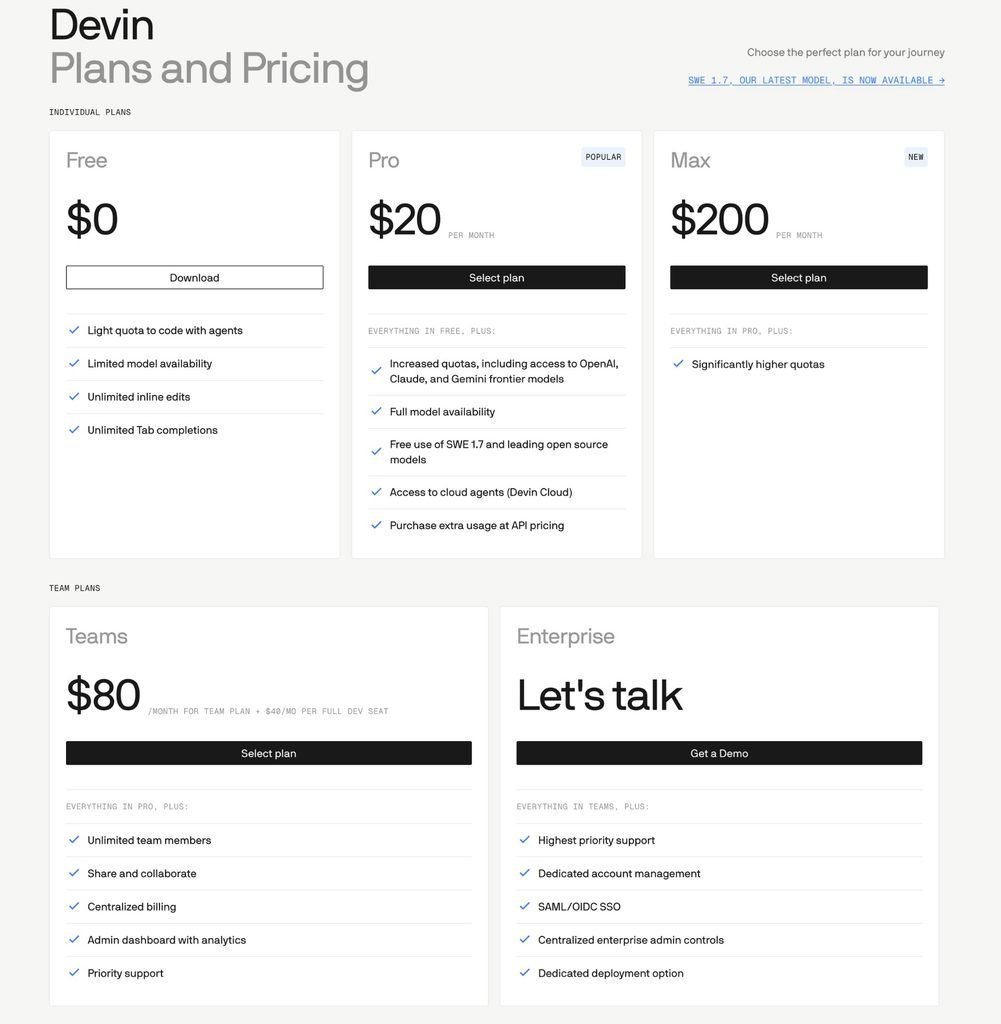
Devin Pro, $20 per month. A daily and weekly allowance covering Devin sessions, Devin CLI, and Devin Desktop. Overage funded by prepaid credits that roll over. No per-unit rate card and no absolute allowance published on the reviewed public pages.
Result: neither plan can be converted into a monthly forecast without account-side measurement or a written answer from the vendor.
This briefing answers
- Which billing regime and meter govern an account
- What each public page does and does not publish about included usage
- What each vendor commits to in writing at the limit and at termination
- Which questions have to go to the vendor before a renewal
This briefing does not test
- Code quality, speed, or agent behavior
- What either product will cost you next month
- Whether a migration succeeds in practice
- Whether either vendor meets a specific regulatory obligation
Table 1 · What a new buyer can read from the public pages
| Plan | Price | Usage unit | Absolute amount included | Refresh | At the limit |
|---|---|---|---|---|---|
| Cursor Hobby | Free | Limited Agent requests | Not published | Not stated | Not stated |
| Cursor Pro | $20/mo, $16 annual | Two pools, priced per million tokens | Not published | Monthly, no rollover | On-demand at API rates, or upgrade |
| Cursor Pro Plus | $60/mo, $48 annual | Same two pools | Stated only as 3x Pro | Monthly, no rollover | Same |
| Cursor Ultra | $200/mo, $160 annual | Same two pools | Stated only as 20x Pro | Monthly, no rollover | Same |
| Devin Free | Free | Limited usage | Not published | Not stated | Not stated |
| Devin Pro | $20/mo | Quota, then prepaid credits | Not published | Daily and weekly | Credits continue work uninterrupted |
| Devin Max | $200/mo | Quota, then prepaid credits | Stated only as significantly larger | Weekly, no daily cap | Same |
| Devin Teams | $80/mo floor, $40 per full seat | Per-seat quota plus shared credits | Full seat stated as Pro-equivalent | Daily and weekly per full seat | Shared credit pool |
Read from cursor.com/pricing, cursor.com/docs/models-and-pricing, devin.ai/pricing, and docs.devin.ai/admin/billing/self-serve on 27 August 2026. Amber cells mark fields with no absolute published value. Cursor annual figures were captured in a browser from the annual view of the pricing page.
On this briefing
Contents
What was renamed, and what was not
The rename was scoped to the desktop application, not to the Windsurf name.
Cognition’s FAQ states that on 2 June 2026 Windsurf became Devin Desktop, delivered as a regular over-the-air update, and that plans, pricing, extensions, settings, and in-progress work carried over. The same FAQ says the Windsurf JetBrains plugin is not affected by the change and will keep its name.
Several other surfaces kept Windsurf naming as well. Legacy Windsurf Enterprise customers continue to log in through Windsurf domains. Update checks go to update.windsurf.com and binaries come from windsurf-stable.codeiumdata.com. The ~/.codeium/ configuration directory is documented as unchanged in this release. The desktop binary itself did change name, appearing as Devin.app, Devin.exe, or devin, which Cognition flags as the most important item for device management teams to action.
Devin Desktop is also one product in a family of four: Devin Cloud, Devin Desktop, Devin CLI, and Devin Review. They are not interchangeable in a billing comparison. Devin Cloud remains a separate SKU. Devin Pro’s quota is documented as covering Devin sessions, Devin CLI, and Devin Desktop.
Cursor’s name did not change. Its owner did, on 14 August 2026, and Cursor’s model documentation now lists SpaceXAI alongside OpenAI, Anthropic, and Google as a model provider.
Sources: Devin Docs, Devin Desktop FAQ (read 27 August 2026) · Devin Docs, Self-serve plans (read 27 August 2026) · Cursor Docs, Models & Pricing (read 27 August 2026)
Identify your billing regime first
Before comparing a price, establish which billing regime governs the account. Both vendors run more than one, and the public pricing pages describe only what a new buyer is sold today.
A billing regime here means the combination of plan, meter, and rate schedule that an account is actually on. These are not the same kind of object, and the article does not treat them as equivalent.
Sources: Cursor Docs, Models & Pricing (read 27 August 2026) · Cursor Help, Max Mode on legacy plans · Cursor, Cursor Start announcement · Devin Docs, Devin Desktop FAQ (read 27 August 2026) · Devin Docs, Self-serve plans (read 27 August 2026) · Devin Docs, Enterprise billing (read 27 August 2026) · Cognition, Platform Terms of Service, section 14
Table 2 · Documented billing regimes, and the account-side check for each
| Vendor | Regime | Type | Meter | Check this in your account |
|---|---|---|---|---|
| Cursor | Pro / Pro Plus / Ultra | Current plan | Two token-priced pools | Plan name appears on the current public pricing page |
| Cursor | Start | Current plan, India only | Cursor Models pool only | Billed in INR at ₹649, tax inclusive |
| Cursor | Legacy request-based plans | Legacy plan | Requests | Max Mode is available only here |
| Cursor | Legacy Enterprise Auto | Rate schedule | Flat per million tokens | Public page states it applies until 7 September 2026 |
| Cursor | Enterprise | Contract | Precommitted Usage | Quantities live in the Order Form, not on any public page |
| Cognition | Free / Pro / Max / Teams | Current plan | Quota, then on-demand credits | Settings and Plans shows quota and credit balance |
| Cognition | Legacy Windsurf plans | Legacy plan | Prompt-based credits, unchanged | Login still routed through Windsurf domains |
| Cognition | Legacy ACU Core | Migrated legacy plan | Remaining on-demand credits | Core users were moved to the Free plan |
| Cognition | Enterprise | Contract | Agent Compute Units | ACU rate is set in the order form, not published |
Plan, rate schedule, and contract are different objects and are labeled separately above. A separate clause in Cognition’s Platform Terms preserves Exafunction, Inc. as the counterparty for some users who originally enrolled under that entity, which is a contract question rather than a billing regime.
What Cursor publishes, and what it leaves out
Cursor publishes the marginal price of a token in detail and does not publish the size of the pool those tokens are drawn from.
Model usage sits in two pools that reset with the monthly billing cycle. The Cursor Models pool covers Cursor Grok 4.6, Grok 4.5, and Composer 2.5. The Other Models pool covers third-party models at each model’s API price. Cursor exposes both balances inside the authenticated editor settings and usage dashboard.
The rate card is granular. Composer 2.5 is listed at $0.50 input and $2.50 output per million tokens, Claude Opus 5 at $5.00 and $25.00, and Claude Fable 5 at $10.00 and $50.00. On Teams and Enterprise plans, third-party model requests also carry a Cursor Token Rate of $0.25 per million tokens, and the documentation states this applies to included usage, on-demand usage, and bring-your-own-key usage alike. First-party Cursor models are exempt.
The plans table publishes availability rather than quantity. Pro, Pro Plus, and Ultra each show both pools as included. Pro Plus is described as three times Pro’s agent limits and Ultra as twenty times, both relative to a base the reviewed pages do not state.
FSR’s own Cursor pricing briefing, published on 15 August 2026, recorded third-party allowances of $20, $70, and $400 on this page. The page read on 27 August 2026, in both English and Japanese, shows only Included and Not included in those cells. FSR cannot establish when the page changed, only that both readings are recorded with their dates.
The closest public substitute for a denominator is Cursor’s own guidance. It places daily Tab users inside included usage, limited agent users often inside it, daily agent users at $60 to $100 of total monthly usage, and power users running multiple agents above $200. Those are vendor estimates rather than FSR measurements, and they describe expected consumption, not what Pro covers before on-demand billing starts.
One further line from the Data Use page belongs in any cost model. Cursor states that even when a customer supplies their own API key, requests still route through Cursor’s backend, because that is where final prompt building happens.
Sources: Cursor Docs, Models & Pricing (read 27 August 2026) · Cursor, Pricing (read 27 August 2026) · Cursor, Data Use and Privacy Overview, last updated 15 July 2026
What Devin publishes, and what it leaves out
Cognition publishes the meter’s behavior in unusual detail and does not publish its size.
The billing documentation separates two populations by unit. Enterprise customers consume Agent Compute Units against the volume named in their order form. Self-serve customers consume their plan’s included quota first, then draw from prepaid on-demand credits. Enterprise ACUs are described as distinct from self-serve quota and credits, and as priced per the customer’s order form.
For self-serve, the quota is described by shape. Pro and Teams full seats carry a daily and a weekly allowance, and the documentation adds that the daily allowance is more than one seventh of the weekly so that weekend work does not cost the week’s capacity. Max drops the daily cap and uses a larger weekly allowance. No absolute value appears for Free, Pro, Max, or a full seat on any of the three billing pages.
Two absolute figures do appear, and neither is an allowance. Windows sessions are stated to consume approximately nine percent more than equivalent Linux sessions. And a session sleeps automatically after roughly 0.1 ACUs of inactivity, after which it stops consuming.
The documentation is also specific about non-consumption, and the caveat matters. Aside from the few units required to keep the virtual machine running, Devin is stated not to consume while waiting for a reply, waiting for a test suite, or setting up and cloning repositories.
Sources: Devin Docs, Usage (read 27 August 2026) · Devin Docs, Self-serve plans (read 27 August 2026) · Devin Docs, Enterprise billing (read 27 August 2026) · Devin, Plans and Pricing (read 27 August 2026)
A full seat and a flex seat buy different things
On Devin Teams, editor access is attached to a seat type, and the two seat types are not two prices for the same thing.
A full seat costs $40 per month, is billed as a fixed recurring line item, and includes a daily and weekly quota equivalent to the Pro plan plus access to Devin Desktop. A flex seat has no fixed monthly seat charge, is unlimited in number, draws entirely from the team’s shared pool of on-demand credits, and does not include Devin Desktop access.
The $80 minimum interacts with that. A Teams account with no full seats pays $80 and receives $80 of on-demand credits. One full seat means $40 of credits. Two full seats clear the minimum with no included credits, and from there the bill is forty dollars for each full seat. On the Teams plan, credits are shared across all members with no per-member balance, so any teammate can draw from the same pool.
Cursor’s paid tiers do not gate the editor. Its Hobby plan is free and includes limited agent requests and access to Composer, and the paid individual tiers are described in terms of extended agent limits, frontier model access, cloud agents, and Bugbot on usage-based billing.
The consequence for a per-seat comparison is narrow and concrete. A $40 Cursor Teams seat and a $40 Devin full seat both cost forty dollars, but only one of them is a price for editor access. A team costing exercise has to separate editor entitlement from usage funding before the two numbers mean anything next to each other.
Sources: Devin Docs, Self-serve plans (read 27 August 2026) · Cursor, Pricing (read 27 August 2026)
Rollover, caps, and the limit
Budget exposure is controlled by three separate rules, and the two vendors answer all three differently.
Rollover. Cursor states that both usage pools reset with the monthly billing cycle, and its Pricing Policy adds that Enterprise Precommitted Usage not consumed within the Service Term does not roll over. Cognition states that self-serve on-demand credits roll over month to month and that purchased credits never expire. Plan quota is a separate object from credits and refreshes on its own daily or weekly cycle.
Caps. Cursor’s Pricing Policy grants account administrators the authority to establish hard limits or caps on usage for the organization. Cognition documents an organization-level ACU limit on Enterprise and states that all Devin activity stops once the limit is reached, with users shown a message to contact the enterprise admin. Enterprise per-user caps are configured through usage tiers, identity-provider group mappings, and per-member overrides. On self-serve, admins can set auto-reload thresholds and default session spending limits from Settings and Usage.
Exhaustion. Cursor states that when included usage runs out a user can add on-demand usage at the same API rates billed in arrears, or upgrade, and that requests are never downgraded in quality or speed. Cognition states that on-demand credits keep the user working without interruption once the allowance is spent. What happens when the credits themselves run out is documented for two features specifically: Automations stop running and Devin Review switches to its smart diff viewer.
The asymmetry a buyer should carry forward is that Cursor’s hard stop is something an administrator configures, while Cognition’s Enterprise organization limit is a documented stopping behavior, and Cognition’s documented self-serve behavior at the allowance boundary is continuation rather than interruption.
Sources: Cursor Docs, Models & Pricing (read 27 August 2026) · Cursor, Pricing Policy · Devin Docs, Self-serve plans (read 27 August 2026) · Devin Docs, Enterprise billing (read 27 August 2026)
One Cursor rate carries an expiry date
Cursor’s Auto mode has three settings: Cost, Balance, and Intelligence. The current documentation states that all three bill at the list price of whichever model the request is routed to, and that third-party models routed by Auto also incur the Cursor Token Rate on Teams and Enterprise plans.
Beneath that sits an older arrangement under the heading Legacy Enterprise Auto. The page states that until 7 September 2026, Enterprise Auto pricing is set per million tokens regardless of which model is used, listed as $1.25 input, $1.25 cache write, $0.25 cache read, and $6.00 output.
Any comparison article written before August is likely to present that flat rate as Auto’s normal pricing. On the page as it reads today, it is a legacy schedule with a date attached. What the page states is that the rate applies until that date. It does not state how existing enterprise contracts are handled afterward, and this briefing does not infer that.
Source: Cursor Docs, Models & Pricing (read 27 August 2026)
Both vendors publish a processor list
Both companies publish who processes customer data, in different documents and different formats, and the same model provider group appears on both.
Cursor publishes a Trust Center subprocessor list. SpaceXAI appears there as an Inference Provider located in the US, described as a provider of proprietary AI models via API, with a link to x.ai. It sits in the same category and carries the same one-line description as OpenAI, Anthropic, Google Gemini, Fireworks, Baseten, Databricks, and Together. Amazon Web Services is named as the primary host, primarily in a US region with some latency-critical services in Europe and Singapore. Turbopuffer handles code indexing and is listed as US only. Together is the single entry with a stated zero data retention agreement.
Cognition publishes its list inside its Data Processing Addendum, last updated 23 July 2026, as Appendix C. Eleven entities cover core processing, logging, and support, including Microsoft Azure, AWS, Google Cloud, Auth0, Datadog, Zendesk, Decagon for support chat, and Agumbe, described as Cognition India, for support workflow. A second table covers model providers engaged when personal data is submitted as input: OpenAI, Anthropic, Microsoft Azure, Google Vertex, and then Databricks, xAI, and Snowflake, each marked as applying only if enabled in Devin Desktop.
So xAI is in both processor chains. In Cursor’s case it is the parent group, listed as one inference provider among several. In Devin Desktop’s case it is a conditional processor that a user or administrator enables. That is a scope difference worth stating precisely, because the two arrangements produce different questions for a security review.
The transfer instruments differ too. Cognition’s DPA incorporates the EU Standard Contractual Clauses for Modules 2 and 3, the UK Addendum, Swiss provisions, and Brazil SCCs, and states a fifteen-day advance notice and objection window for new subprocessors. Cursor’s Privacy and Data Governance page links its own DPA and states that all sub-processors are covered by appropriate data processing agreements. FSR did not open Cursor’s DPA for this briefing, so its transfer provisions are not compared here.
Regional residency is the reverse. Cursor documents a residency program that Cognition’s reviewed pages do not match: US-only residency covering inference, processing, and storage, with EU and Iceland inference-only coverage available on request, a stated ten percent uplift on model pricing for eligible models under the US-only option, and a published list of what falls outside the guarantee, including SSO through WorkOS, codebase indexing, bring-your-own-key, custom models reached through a gateway, MCP servers and external integrations, Bugbot, shared links, and cloud agents triggered from Slack or the web. Cognition’s reviewed pages document dedicated deployment with data stored in the customer’s own tenant, which is a different control rather than a weaker one.
Sources: Cursor Trust Center, Subprocessors (read 27 August 2026) · Cognition, Data Processing Agreement, last updated 23 July 2026 · Cursor Docs, Privacy and Data Governance (read 27 August 2026) · Devin Docs, Enterprise security (read 27 August 2026)
Where the documents differ, and why
An earlier version of this briefing treated several of these as contradictions. Read against the primary sources, most are scope differences, and labeling them as conflicts would misstate what a buyer needs to check.
Training rules are consistent once the setting is read. Cursor’s Terms state that Anysphere will not use Content to train, or allow any third party to train, any AI models unless the customer has explicitly agreed. The Data Use page then describes the mechanism: with Privacy Mode enabled, customer data is not used for training by Cursor and zero data retention agreements are maintained with providers; with Privacy Mode off, Cursor may use and store codebase data, prompts, editor actions, and code snippets to improve its features and train its models. Privacy Mode is documented as on by default for Enterprise teams. Those statements do not conflict. The open question is what the setting’s state is on a given account and whether toggling it is the explicit agreement the Terms describe.
Cognition’s training rules are tiered. The Platform Terms state that Cognition may use Customer Data for model training, that paid subscribers may opt out, and that on Teams only an administrator may exercise the opt-out, with Zero Data Retention enabled with model providers after an opt-out. The enterprise security page states that by default Cognition does not train its models on customer data or code. The DPA adds that subprocessors are subject to equivalent restrictions preventing Customer Data from being used for training. These describe different tiers and different agreement layers, not opposite defaults for one account.
One genuine document mismatch remains, and it is small. Cursor’s rules documentation states that project rules must use the .mdc extension and that a plain .md file in .cursor/rules is ignored by its rules system. Devin CLI’s configuration import documentation lists both .cursor/rules/*.md and .cursor/rules/*.mdc as import sources, with all imports enabled by default. Whether an imported plain .md instruction then changes agent behavior at runtime has not been tested by FSR and is marked as inference, not observation.
One agreement-precedence rule is worth knowing. Cognition’s DPA states that where the Agreement and the DPA conflict, the DPA takes precedence unless the Agreement expressly overrides particular DPA terms. A buyer reading only the Platform Terms is reading one layer of a stack.
Sources: Cursor, Terms of Service, last updated 13 August 2026, section 1.3 · Cursor, Data Use and Privacy Overview, last updated 15 July 2026 · Cursor Docs, Privacy and Data Governance (read 27 August 2026) · Cognition, Platform Terms of Service, section 3.3.1 · Devin Docs, Enterprise security (read 27 August 2026) · Cognition, Data Processing Agreement, sections 4 and 5 · Cursor Docs, Rules · Devin CLI Docs, Configuration Import (read 27 August 2026)
Cancellation, refunds, and deletion
Both vendors publish terms for leaving, and the structures are close to identical.
Both state that fees are generally non-refundable. Both then create a pro rata refund right that only the vendor can trigger, applying where the vendor terminates a subscription for a reason other than a terms violation. Cognition adds the condition that the subscription was purchased through its website. Neither creates a pro rata refund for a customer who cancels. Both put the cancellation deadline in capital letters, and Cursor requires cancellation at least 24 hours before renewal.
Both reserve the same discretion over data at termination, stating that they may at their option delete Content or Customer Data associated with the account.
Cognition’s DPA then supplies something the Terms do not. It states that upon termination Cognition will direct each subprocessor to delete Customer Data within thirty days, unless prohibited by law, and its transfer appendix gives the retention period as the term of the agreement plus thirty days. That is a published retention commitment for personal data under the DPA. It is not the same as a product-level promise that every repository, session artifact, configuration file, backup, or log is exportable or deleted on that schedule, and it should not be read as one.
Cursor’s newest surface raises a separate question. Origin, its code hosting product, began rolling out on 17 August 2026 in early beta to paid plans, with enterprise administrators able to opt out. The Origin pages reviewed do not state what happens to Origin-hosted repositories after a subscription lapses or an administrator disables Origin. Cursor’s Terms separately state that Beta Services are intended for evaluation rather than production use, are not fully supported, and are provided without warranty, support, maintenance, or storage of any kind. A procurement reviewer evaluating Origin as a place to keep source code should read the missing cancellation paragraph and the Beta Services clause together.
Sources: Cursor, Terms of Service, sections 1.6, 4.1, 4.4, and 9 · Cognition, Platform Terms of Service, sections 5.3, 7.1, and 7.2 · Cognition, Data Processing Agreement, section 11 and Appendix A · Cursor Changelog, Origin Code Hosting, 17 August 2026
What the reviewed pages do not answer
Silence counts as evidence only when the pages and the date are recorded. The following were not found within the source table in the Methodology, all read on 27 August 2026.
Table 3 · Evidence gaps and where the answer lives
| Question | Public answer | Where it lives instead | Volatility |
|---|---|---|---|
| Absolute included allowance, either vendor | None | Authenticated usage screens; Order Form for Enterprise | High |
| Does annual billing change Cursor’s included allowance | Not stated | Vendor confirmation before an annual commitment | Medium |
| Per-unit rate card for Devin | Not found on the four billing and pricing pages searched | Enterprise order form | Medium |
| A regional residency program from Cognition | Not found on the pages searched; dedicated deployment documented instead | Account team | Medium |
| Origin repositories after cancellation | Not found on the Origin pages searched | Vendor confirmation; read alongside the Beta Services clause | High |
| Whether Cursor rule activation metadata survives import | Not documented by either vendor | Hands-on test | Low |
| Mid-term downgrade and proration | Not found in either vendor’s terms as searched | Billing support | Medium |
Each row is scoped to the pages listed in the Methodology source table and to the date 27 August 2026. None of these rows is a claim that the information does not exist anywhere.
Five document checks and one measurement
Five of these are answerable from a document or a settings screen. The sixth requires running work through the product and reading the meter.
Check 1. Name your billing regime. Open billing settings and record the plan name, price, billing interval, and first subscription date. If the plan name does not appear on the vendor’s current public pricing page, the public comparison may not describe your account.
Check 2. Name your meter. For Cursor, record which pool your typical work draws from and whether the Cursor Token Rate applies to your plan. For Devin, record whether your account is metered in plan quota, on-demand credits, or Enterprise ACUs, and on a Teams account whether each seat is full or flex.
Check 3. Establish the training state. Open the setting rather than the policy page. On Cursor that is Privacy Mode. On Devin that is the Data Controls page, and on a Teams account only an administrator can change it.
Check 4. Establish the counterparty. Read the opening paragraph of the terms governing your account. Legacy Devin Desktop and Windsurf users should check specifically whether their license was assigned from Exafunction, Inc. to Cognition AI, Inc. Any Master Services Agreement or Order Form overrides the public terms, and Cognition’s DPA takes precedence over its Agreement unless the Agreement expressly overrides it.
Check 5. Confirm the cap. Cursor’s organization caps are configured by an administrator. Devin’s Enterprise organization limit stops activity when reached, and self-serve auto-reload and session spending limits are set under Settings and Usage. Confirm which of these is actually switched on.
Measurement 6. Read the denominator off the product. Cursor shows both pools in editor settings and on the usage dashboard. Devin shows current usage, quota remaining, and credit balance under Settings and Plans. Capture the state at the start of a cycle, run the work you actually do, and capture it again. This is the only step that produces a number you can budget against.
Everything still blank after those six goes to the vendor in writing before a renewal or a purchase order.
Sources: Cursor Docs, Models & Pricing (read 27 August 2026) · Cursor, Pricing Policy · Devin Docs, Usage (read 27 August 2026) · Devin Docs, Self-serve plans (read 27 August 2026) · Cognition, Platform Terms of Service, section 14 · Cognition, Data Processing Agreement, preamble
When this is the wrong comparison
This briefing compares two desktop products on billing, entitlement, and contract. Four buying situations are outside it.
If the requirement is a terminal-native agent rather than an editor, neither of these is the shortlist. If the requirement is a code assistant that lives inside an existing GitHub workflow with institutional procurement behind it, that is a different roster. If the requirement is autocomplete quality above all else, this briefing measures nothing relevant to it. And if an Order Form or Master Services Agreement is already signed with either vendor, that document governs and the public pages examined here do not.
There is also a buyer this article cannot serve at all: anyone who needs a determination about a specific regulatory obligation. This is a document audit, not a compliance opinion, and it states no conclusion about any party’s compliance with any law, regulation, or license.
Source: FSR editorial scope statement. No vendor claim is made in this section.
FAQ
Is Windsurf now Devin Desktop?
The desktop IDE is. Cognition renamed Windsurf to Devin Desktop on 2 June 2026 as an over-the-air update, stating that plans, pricing, extensions, and settings carried over. The same FAQ states the Windsurf JetBrains plugin is unaffected and keeps its name.
Source: Devin Docs, Devin Desktop FAQ
How much usage does Cursor Pro include?
The page reviewed on 27 August 2026 does not state an absolute value. Both usage pools are marked as included without a quantity, and Pro Plus and Ultra are described only as three times and twenty times Pro’s agent limits. Balances appear in editor settings and the usage dashboard.
Source: Cursor Docs, Models & Pricing
How much usage does Devin Pro include?
No absolute value appears on the self-serve billing page. Pro carries a daily and weekly allowance covering Devin sessions, Devin CLI, and Devin Desktop, and Cognition states only that the daily allowance is more than one seventh of the weekly. Remaining quota appears under Settings and Plans.
Source: Devin Docs, Self-serve plans
What happens after the included usage runs out?
On Cursor, a user can add on-demand usage billed in arrears at the same API rates or upgrade the plan, and the documentation states requests are never downgraded in quality or speed. On Devin self-serve, prepaid on-demand credits continue the work without interruption.
Sources: Cursor Docs, Models & Pricing · Devin Docs, Self-serve plans
Does a free Devin Teams flex seat include Devin Desktop?
No. Cognition states that flex seats are free, unlimited in number, draw entirely from the team’s shared on-demand credit pool, and do not include Devin Desktop access. A full seat costs $40 per month and includes a Pro-equivalent daily and weekly quota plus Devin Desktop access.
Source: Devin Docs, Self-serve plans
How do I tell whether I am on legacy pricing?
On Cursor, Max Mode availability indicates a legacy request-based plan. On Devin, Cognition states that existing plans and pricing continue unchanged for legacy Windsurf customers, and that legacy Core plan users were migrated to the Free plan with remaining on-demand credits.
Sources: Cursor Help, Max Mode on legacy plans · Devin Docs, Self-serve plans
Methodology and source table
Evidence tier. Tier C. Document review only. FSR did not install, purchase, subscribe to, or operate either product for this briefing.
Access date. All pages were read on 27 August 2026 unless the table states otherwise.
Evidence method. Three methods are distinguished below. Fetched means the page was retrieved and read in full during this task. Browser means the page was opened in a browser by FSR and captured. Extract means the relevant passage was obtained through a search index rather than a full page retrieval, in which case the quoted wording is what appeared in that extract.
Canonical source list · all read 27 August 2026
| # | Document | Method | Stated last-updated date |
|---|---|---|---|
| 1 | Cursor, Pricing, monthly and annual views | Browser | None printed |
| 2 | Cursor Docs, Models & Pricing | Fetched | None printed |
| 3 | Cursor Docs, Models & Pricing, Japanese edition | Browser | None printed |
| 4 | Cursor, Changelog including Origin and Google Workspace entries | Fetched | Entries dated 3 to 19 Aug 2026 |
| 5 | Cursor, Terms of Service | Browser and full text | 13 August 2026 |
| 6 | Cursor, Data Use and Privacy Overview | Fetched | 15 July 2026 |
| 7 | Cursor Docs, Privacy and Data Governance | Fetched | None printed |
| 8 | Cursor Trust Center, Subprocessors | Browser | None printed |
| 9 | Cursor Docs, Rules | Extract | None printed |
| 10 | Cursor, Pricing Policy | Extract | 21 May 2026 |
| 11 | Cursor Help, Max Mode on legacy plans | Extract | None printed |
| 12 | Cursor, Cursor Start India announcement | Extract | None printed |
| 13 | Devin, Plans and Pricing | Fetched | None printed |
| 14 | Devin Docs, Devin Desktop FAQ | Fetched | None printed |
| 15 | Devin Docs, Usage | Browser | None printed |
| 16 | Devin Docs, Self-serve plans | Browser | None printed |
| 17 | Devin Docs, Enterprise billing | Browser | None printed |
| 18 | Devin Docs, Enterprise security | Browser | None printed |
| 19 | Devin Docs, Security at Cognition | Extract | None printed |
| 20 | Devin CLI Docs, Configuration Import | Fetched | None printed |
| 21 | Cognition, Platform Terms of Service | Browser and full text | 30 June 2026 |
| 22 | Cognition, Data Processing Agreement | Fetched | 23 July 2026 |
Twenty-two documents. Every absence statement in this briefing is scoped to this list and to 27 August 2026. Comparison articles, listicles, review aggregators, and social posts were not used as a basis for any statement about either product.
Not opened. Cursor’s Data Processing Addendum at cursor.com/terms/dpa, authenticated dashboards, checkout screens, invoices, Order Forms, Master Services Agreements, cancellation interfaces, and Cognition’s Acceptable Use Policy. Each limit is stated in the section it affects.
Corrections and update notes. Two items apply to earlier FSR coverage.
Update note, not a correction. FSR’s briefing “Cursor Pricing in 2026: Plans, Usage Limits, and What the Public Pages Do Not Quantify,” published 15 August 2026, recorded published third-party allowances of $20, $70, and $400 on Cursor’s Models and Pricing page. The same page read on 27 August 2026, in English and Japanese, shows only Included and Not included in those cells. FSR has no evidence that the 15 August reading was incorrect and is not retracting it. Both readings stand with their dates, and readers relying on the earlier figures should recheck the page.
Correction. FSR’s April 2026 comparison of these two products, published at this URL, described the Windsurf side as holding a stronger European data residency position and described its training and retention posture in terms the current documentation does not support. Reviewed on 27 August 2026, Cursor publishes a regional residency program and Cognition’s reviewed pages do not, while Cognition publishes a DPA carrying EU, UK, Swiss, and Brazil transfer instruments and a thirty-day post-termination deletion direction. The April characterization should not be relied on. That article has been replaced by this one.
Disclosure. This is a Tier C briefing. FSR does not place affiliate links in Tier C briefings. This page carries none, and FSR receives nothing from a Cursor or Devin subscription.
Corrections and source queries: [email protected]
Verdict
This document audit cannot identify a product winner, and it does not try to.
What it establishes is narrower. Cursor gives a buyer more public information about marginal model rates. Cognition gives a buyer more public information about quota cadence, credit rollover, and seat entitlement. Neither public source set exposes the absolute included quantity that would let the two $20 plans be normalized before purchase.
Every relative figure on both sides multiplies a base the reviewed pages do not state: three times, twenty times, five times, significantly larger, more than one seventh. That is workable for a buyer who can run a cycle and measure. It is not workable for a budget that must name a number before access.
So the recommendation is a procedure. Name your billing regime. Name your meter. Open the training setting rather than the training policy. Check which legal entity your agreement names, particularly if you were a Windsurf customer before June. Confirm the cap is actually switched on. Then run one cycle and read the denominator off the product.
The $20 on both pricing pages is the easiest number to compare and the last one that should decide anything.
Contact Future Stack Reviews
Take the seven questions to the vendor
This briefing ends where a vendor email begins. These are the seven items the public pages could not settle. Send them before a renewal or a purchase order, and ask for written answers.
- The included allowance for our plan, stated with its unit
- The marginal rate once that allowance is spent
- The control that caps spend, and at which administrative level it applies
- The current training state on our account, and who can change it
- The retention period for our data after termination, and the export path
- Whether annual billing changes the included allowance
- The legal entity our agreement names, and whether any assignment has occurred
FSR produces structural audits of AI and SaaS products for technical buyers. We want to hear about a specific entitlement, billing surface, or contract clause you need examined; a correction, sent with the source that contradicts what is published here; or a vendor response, which we publish alongside the original finding.
Vendor documentation in this category changes weekly. If a page cited here now reads differently, send it. Corrections are published with the date and the source. Vendors: correction requests are handled the same way as reader corrections.
Tier C briefing. Last evidence recheck 27 August 2026. Next scheduled recheck 8 September 2026. Document review only, with no hands-on testing, purchase, subscription, or measurement. Ownership, pricing, plan entitlements, model availability, and contract terms all require rechecking before purchase. This briefing contains no affiliate links. Future Stack Reviews is an independent publication operated by 合同会社Future Stack, Osaka, Japan, and is not affiliated with any vendor named here. Nothing in this briefing is legal, tax, or compliance advice, and it states no conclusion about any party’s compliance with any law, regulation, or license.