
Every AI video comparison you’ll find right now was written before April 2026. That matters because the leaderboard shifted hard in Q1 — and most of what you’ve read is already wrong. We tested Runway Gen-4.5 and Pika 2.5 on real projects, tracked the Elo data, and broke down what each dollar actually buys you.
What Runway Gen-4.5 Actually Gives You in 2026
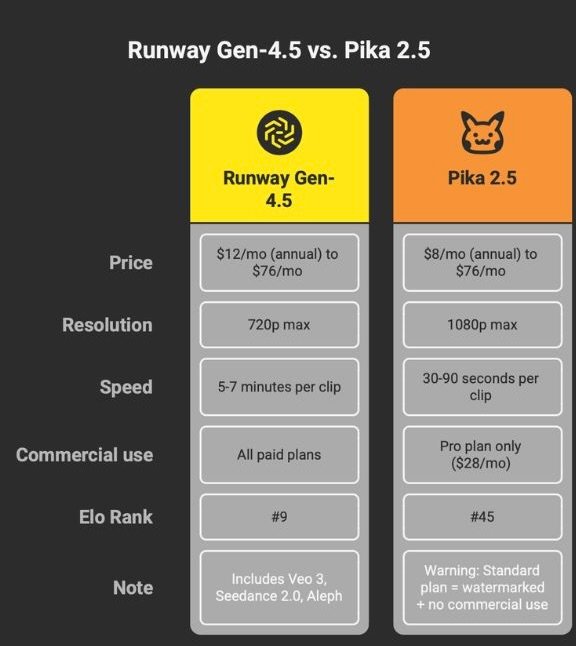
Runway isn’t a single model anymore. When you pay for a Runway subscription in April 2026, you’re getting access to Gen-4.5, Google’s Veo 3 and Veo 3.1, Seedance 2.0 from ByteDance, Act-Two for performance-driven character animation, and Aleph for text-prompted video editing on existing footage. Aleph doesn’t generate video from scratch — it transforms footage you already have. No other consumer-facing video AI tool offers this range of generation and editing capabilities under a single login.
The Standard plan costs $15 per month ($12 on annual billing) and gives you 625 credits. Sounds reasonable until you do the math. A single 5-second Gen-4.5 clip at 720p costs roughly 60 credits. That’s about 10 clips per month. Maybe 25 seconds of total footage. If you’re producing anything beyond quick tests, you’ll burn through your allocation in a single afternoon.
So you look at the Unlimited plan at $95 per month ($76 on annual billing). The name suggests you can generate without limits. The reality: Unlimited access runs through what Runway calls “Explore Mode” — a relaxed-rate queue where generation times stretch past 15 minutes per clip during peak hours. You’re paying a premium for the privilege of waiting in line. The fast-generation priority queue still burns credits on top of your subscription fee. Runway discloses the “relaxed rate” on their pricing page, but the word “Unlimited” does a lot of heavy lifting in the opposite direction.
On quality: Runway Gen-4.5 sat at #1 on the Artificial Analysis video Elo leaderboard when it launched in December 2025. By April 2026, it’s around #9. This isn’t because Gen-4.5 got worse — the frontier moved. Chinese-developed models flooded the top ranks and pushed everything else down. Gen-4.5 produces the same output it did four months ago. The competition just got that much better, that fast.
One more thing. Runway is currently facing litigation over alleged DMCA copyright violations related to its training data sourcing. The lawsuits were filed in early 2026 in California federal courts. They’re ongoing and unresolved. This doesn’t affect your ability to use the tool today, but if you’re building commercial workflows around Runway output, it’s a variable worth tracking.
What Pika 2.5 Actually Gives You in 2026
Pika’s pitch is speed and creative tools. Generation times run between 30 and 90 seconds for most clips — significantly faster than Runway’s standard queue. The effects ecosystem is where Pika separates itself: Pikaffects applies physics-based visual effects to footage (squish, melt, explode), Pikaswaps handles face and object replacement, Pikaframes interpolates between keyframe images, and Pikaformance adds lip-sync and vocal performance to still images. For social content creators who need volume and visual variety, this toolkit does things that Runway doesn’t attempt.
Pika 2.5 also outputs at 1080p natively. Runway Gen-4.5 maxes out at 720p. If resolution matters for your distribution channels — and on Instagram or TikTok it increasingly does — that’s a practical edge.
Now read the pricing page carefully, because this is where Pika loses people.
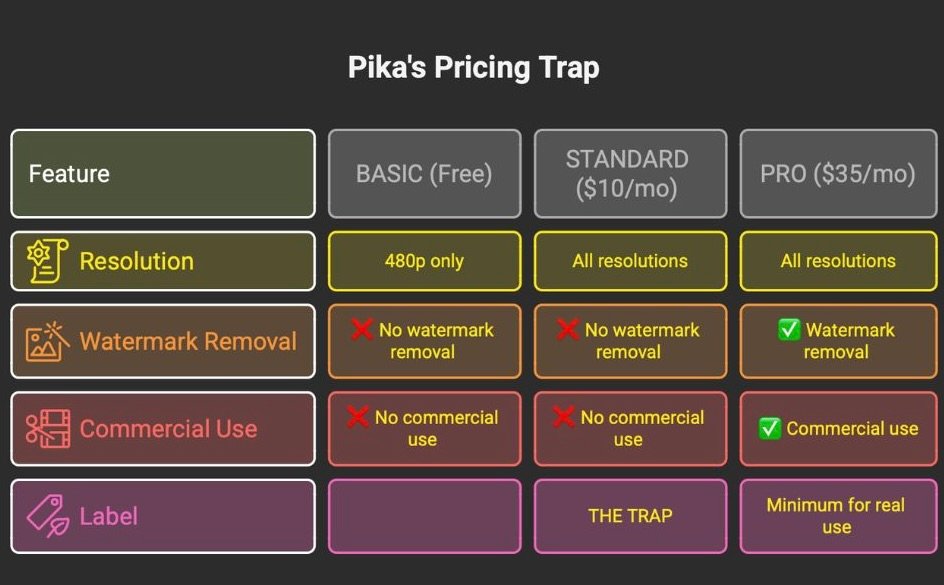
The $10 Trap. Pika’s Standard plan costs $10 per month ($8 on annual billing) and gives you 700 credits with access to all resolutions and most features. Looks like a deal. But the pricing page puts an ❌ next to two critical items: “Download videos with no watermark” and “Commercial use.” The Standard plan does not remove watermarks. It does not grant commercial rights. You are paying $10/month for watermarked, personal-use-only output. If you want to use Pika-generated content in any monetized context — client work, branded content, ads, YouTube — you need the Pro plan at $35 per month ($28 annual). That’s not $8 vs Runway’s $12. That’s $28 vs $12 on annual billing, and at that price point the value comparison flips.
Pika carries a 1.6 out of 5 rating on Trustpilot. That number needs context. Trustpilot ratings for SaaS tools skew heavily negative because satisfied users rarely leave reviews while frustrated users actively seek out complaint platforms. A 1.6 doesn’t mean 84% of users hate Pika. It does mean there’s a meaningful volume of people who felt strongly enough about billing issues, credit disputes, or unmet expectations to write about it publicly. Read the specific complaints rather than the aggregate score.
On the Elo leaderboard, Pika 2.5 sits in the mid-40s for text-to-video and around #35 for image-to-video. Those rankings reflect performance on photorealism benchmarks — the kind of test where Pika was never trying to compete. Pika’s strength is creative social effects: the kind of output that doesn’t score well on “does this look like real footage” tests but stops people from scrolling on TikTok.
Runway vs Pika: The Real Cost Per Video
Forget the monthly subscription prices. Here’s what each platform actually charges you per clip.
For a 5-second clip at 720p (all prices on annual billing):
Runway Standard ($12/mo, 625 credits): 60 credits per clip. Roughly $1.15 per clip. About 10 clips before you’re out for the month.
Pika Pro ($28/mo, 2,300 credits): 20 credits for a 720p clip. Roughly $0.24 per clip. Over 100 clips per month at this resolution.
Pika Pro is cheaper per clip by a wide margin. But remember: you need Pro to get watermark-free output with commercial rights. On the Standard plan, Pika’s per-clip cost is lower on paper, but the output comes watermarked and restricted to personal use.
Hidden cost structures make this murkier. Runway credits do not roll over between billing cycles. If you generate 6 clips this month and save the remaining credits for a big project next month, those credits are gone. Pika’s credit consumption varies by feature — a standard generation costs less than a Pikaffects transformation, which costs less than a Pikatwists style transfer at 1080p (80 credits for 5 seconds). The credit numbers on pricing pages don’t map cleanly to real-world usage.
The Elephant in the Room: This Debate Is Already Outdated
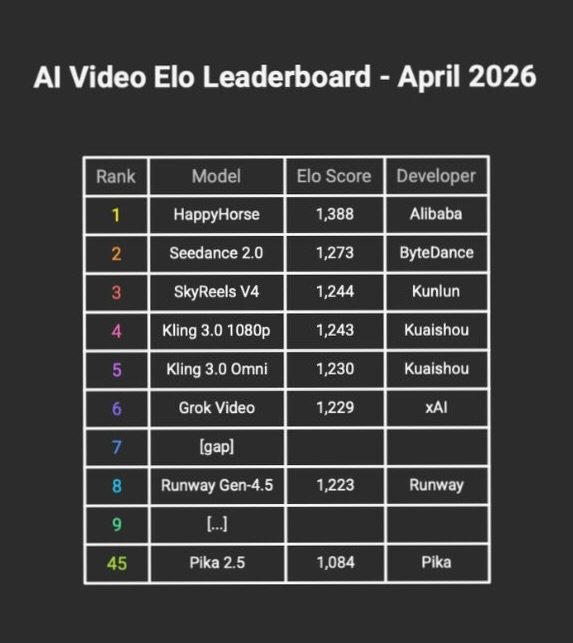
Pull up the Artificial Analysis video model Elo leaderboard and count. Five of the top ten models are Chinese-developed: HappyHorse from Alibaba, Seedance 2.0 from ByteDance, SkyReels V4 from Kunlun, and two variants of Kling 3.0 from Kuaishou. Twelve months ago the top ten was dominated by American labs. That’s no longer the case.
And here’s the part that breaks the “Runway vs Pika” framing entirely: Runway already hosts Seedance 2.0 — a Chinese-developed model — on its own platform as a first-party generation option. When someone tells you to “switch from Runway to Chinese models,” they’re suggesting something Runway itself is already doing. The idea that you have to choose between Western and Chinese AI video tools is a false binary that the platforms themselves have moved past.
The operational consensus among power users on X has landed on what people are calling the “multi-tool meta.” Nobody building serious video content is asking “which one tool should I use.” They’re asking which combination of tools produces the best output for the least cost across different project types. A title sequence might use Runway for cinematic coherence. B-roll might come from Kling 3.0 for raw photorealism. Social cuts might run through Pika for speed and effects.
For reference: Kling 3.0’s API access starts at $9.80 for 100 units. If you’re evaluating video AI options and you haven’t looked at Kling yet, you’re working with an incomplete picture. One caveat for agency and enterprise users: Chinese-developed tools come with data transfer, privacy policy, and brand safety considerations that may need legal review before deployment in client-facing work.
Who Should Use What
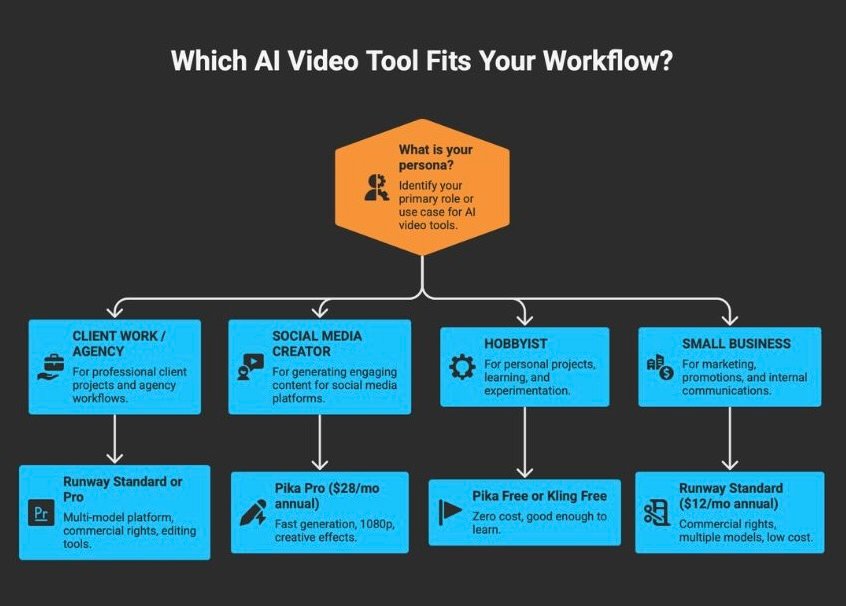
If you produce video for clients or run an agency: Runway is the current best option — not because Gen-4.5 is the best model (it isn’t, by Elo), but because the platform gives you multiple generation and editing models in one workspace with clear commercial licensing on all paid plans. Workflow integration matters more than benchmark scores when you’re billing hours. The Act-Two pipeline for character animation and Aleph for footage editing are capabilities no competitor matches at this price point.
If you create social content at volume: Pika Pro at $35 per month ($28 annual). The 30-90 second generation time, native 1080p output, and effects suite are built for the create-post-iterate cycle that social platforms reward. Do not buy the Standard plan for commercial work. It doesn’t include commercial rights or watermark removal. Pro is the floor.
If you’re experimenting: Start with Pika’s free tier (80 credits/month, 480p only) to understand what AI video generation can and can’t do. Kling Creative Studio also offers a free tier worth testing. There is no reason to pay $12 or $35 per month while you’re still figuring out whether AI video fits into anything you actually do.
If you run a small business and need occasional video: Runway Standard at $15 per month ($12 annual). You get commercial usage rights, access to multiple models, and enough credits for 8-10 short clips per month. The ceiling is low, but the floor includes everything you legally need to use the output in a business context.
For avatar-based video content, neither Runway nor Pika is the right tool — that’s HeyGen’s territory. If your workflow is more about editing existing footage than generating new clips, Descript handles that better than either platform. For template-driven video creation without the generation learning curve, InVideo AI is worth a look. For a broader view of avatar video options, we broke down 8 Synthesia alternatives covering different price points and use cases. If you’re cutting long-form content into shorts, OpusClip is purpose-built for that workflow.
FAQ
Is Runway’s Unlimited plan actually unlimited?
In quantity, yes. In speed, no. The Unlimited plan gives you uncapped generations through Explore Mode, which runs at a “relaxed rate.” During peak usage, that means 15+ minutes per generation. Priority-speed generation still costs credits on top of your subscription. Unlimited refers to how many clips you can queue, not how fast you get them.
Can I use Pika Standard plan videos commercially?
No. Pika’s pricing page marks the Standard plan with ❌ for both “Commercial use” and “Download videos with no watermark.” The minimum plan with commercial rights and watermark-free downloads is Pro at $35/month ($28 annual).
What’s the best free AI video generator in 2026?
There’s no single best option, but Kling Creative Studio’s free tier currently offers the most capable generation at zero cost. Pika’s free tier (80 credits/month, 480p only) works for basic experimentation. Both have limitations on output quality and volume.
Is Runway Gen-4.5 still the best AI video model?
By Elo ranking, no. Gen-4.5 dropped from #1 in December 2025 to around #9 as of April 2026 — not because the model degraded, but because newer models (particularly Kling 3.0, Seedance 2.0, and HappyHorse) raised the benchmark ceiling. Runway’s advantage in 2026 is the platform and its multi-model access, not any single model.
Five of the top ten video AI models are now developed in China, and one of them runs inside Runway’s own platform. Most people searching “Runway vs Pika” are comparing two options in a market that already moved past two options. The pricing and features above will help you pick between them if that’s the decision you’re making today. But if you’re spending real money on AI video in 2026, build a stack — don’t marry a single tool.
Last updated: April 2026. Pricing verified against official pages on April 10, 2026. Elo rankings from Artificial Analysis Text-to-Video Leaderboard.
