Last updated: June 6, 2026

Tier A review. 28 days of paid Pro use. 12,137 credits consumed. 14 production visualizations across 4 published Future Stack Reviews articles.
What Napkin AI actually is
Napkin AI is a web-based visual-generation editor operated by Second Layer, Inc. that turns written text, imported documents, and prompts into editable diagrams, charts, and infographics. It is not a presentation builder. It is not a whiteboard substitute. The buyer decision sits on whether stateful, branded visual assets justify a credit-metered subscription when Plus stops at 10,000 monthly credits and Pro starts at 30,000.
I paid $264 for the Annual Pro plan, billed in JPY on April 9, 2026.
Twenty-eight days into the first billing cycle I had burned 12,137 credits across 14 visualizations spanning four published reviews on Future Stack Reviews. Plus tier caps at 10,000 credits per month. Pro caps at 30,000. There is no public tier between them.
The next 6,000 words explain whether $264 was the right call, where Napkin earns its $22 monthly price tag for my workflow, where it does not, and what 28 days of operational use revealed that no shorter review can show you. They also disclose the verification gaps I could not close before publication, because that disclosure is part of what makes a review worth reading.
BRIEFING SUMMARY — May 2026
Tier A review · 28 days of paid Pro use · 12,137 credits consumed · 14 production visualizations across 4 FSR articles · Pricing verified May 7, 2026, re-verified June 6, 2026 · Credit-billing model corrected June 6, 2026 (see section 05.2).
If you generate fewer than 8 visuals per month, Plus tier at $9 per month annual is right-sized for most readers. Skip Pro.
If you publish 8 to 25 visuals per month and need branded output, Pro is the safer call. Plus may or may not allow credit top-ups (Napkin’s public documentation conflicts on this point, which I detail in section 05.1) and the 10,000-credit ceiling is real. Crossing it mid-cycle on Plus has no public bridge path.
If your procurement team needs SOC 2, ISO 27001, or a dedicated DPA, Napkin is not your tool yet based on the public materials reviewed in this article. Wait for the next funding round and recheck the compliance posture in 6 to 12 months.
If you operate in EU markets with strict GDPR data residency requirements, Napkin’s US-only data residency and the absence of a dedicated EU representative in the public privacy policy are open questions you need answered before purchase.
Best for: solo operators publishing 8 to 25 visuals per month. Content creators reusing visuals across distribution channels. Consultants needing branded diagram output. Teams running multi-tool stacks where Napkin is the visual generation layer.
Not for: enterprise procurement teams with public-evidence requirements. Diagram-as-code teams. Live-collaboration whiteboard teams. Heavy diffusion-image generation use cases. EU buyers with strict residency requirements.
Funded by Accel and CRV with $10M Seed reported in 2024 secondary sources. Founded by Pramod Sharma (CEO) and Jerome Scholler (CTO) under Second Layer, Inc., headquartered at 626 Jay Street, Los Altos, CA. Team size as of May 2026 per the public about page: 14 people.
TL;DR
Pro Annual at $264 per year is the floor, not the ceiling.
Plus is too small the moment you cross 10,000 credits per month. The top-up situation on Plus is unresolved in Napkin’s public documentation. The plan-comparison help article lists optional credit top-ups only under Pro. The pricing FAQ uses broader language about purchasing additional credits. I am on Pro and could not test Plus top-up behavior in my own account, so this article frames it as a documentation conflict, not as settled fact.
The usage band from 10,000 to 30,000 credits per month has no public middle tier. You either pay Plus and hope you stay under, or pay Pro and accept that some months you will not consume the full 30,000.
Output quality is solid for content publishers. Generation latency is acceptable. The deterministic layout layer is the most coherent stateful visual generation I have used in production, and that statement is doing work because the alternatives are mostly not even trying to solve this problem.
Trust documentation is early-stage. Enterprise buyers should keep waiting.
Quick Start (30 seconds)
- Free tier: 500 credits per week. Light experimentation, brand testing, single-shot tests. Watermarked exports. Resets weekly, no rollover.
- Plus at $9 per month annual ($12 per month monthly): 10,000 credits per month. Watermark removed. PPT and SVG export unlocked. Three custom brand styles. Bold icon set.
- Pro at $22 per month annual ($30 per month monthly): 30,000 credits per month. Exclusive design templates. Unlimited custom brand styles. Custom font upload (
.ttfonly). Optional credit top-ups (publicly advertised on Pro per the plan-comparison help article). - Browsing AI Suggestions, importing a file, and exporting are all free. The charge fires when you commit a visual by turning text into a finished layout, and it scales with how much text the visual displays, around 2.7 credits per displayed word in June 6 2026 testing. This corrects an earlier description, detailed in section 05.2.
- Effects cost a flat 100 credits per application, regardless of size. I confirmed this on June 6 2026: an Effect on an 11-word visual and on a 43-word visual both cost exactly 100.
- Pro is the only Napkin tier that publicly advertises credit top-ups. Whether Plus users can purchase top-ups is unresolved in Napkin’s public documentation, which I detail in section 05.1.
A note on first impressions. I signed up to Pro Annual on April 9 and was generating my first production visual within roughly 7 minutes of payment. The onboarding does not fight you. There is no tutorial overlay, no checklist, no “complete your profile” friction. You paste text, you click visualize, you pick a layout. The interface respects that you are an adult.
That is not the same as saying everything is intuitive. It is saying the team made a deliberate choice not to slow you down. Worth noting because most paid AI tools assume the opposite.
Full Comparison
The cleanest way to think about Napkin’s price tag is to compare it against the closest paid alternatives doing related work. The trick is that those tools are not really substitutable. They are adjacent products that buyers sometimes confuse for each other.
| Tool | Monthly (annual billing) | Best fit | Credit / pricing model | Free tier |
|---|---|---|---|---|
| Whimsical | $10 | Team brainstorming, wireframes, sticky notes | Per-board limits | Yes, limited boards |
| Excalidraw Plus | $6 | Hand-drawn diagrams, open-source ethos | Unlimited (OSS core) | Yes, full OSS |
| Mermaid Chart | $7 | Diagrams as code, Markdown native, version control | Per-diagram limits | Yes, limited diagrams |
| Lucidchart | $9 | Enterprise governance, SSO, compliance | Per-document | Limited |
| Gamma | $9 to $10 | Presentation generation, document-style decks | AI token credits | Yes, watermarked |
| Napkin Pro | $22 | Stateful asset generation for content publishers | Per-action credits | Yes, 500 weekly |
Napkin’s $22 puts it at the top of that list. Whimsical at $10 is less than half. Excalidraw at $6 is roughly a quarter. The premium is real. The premium also reflects a different product category, even when the surface looks similar.
Napkin handles a workflow none of the other five handle cleanly. It turns written prose into branded, exportable, editable diagrams that retain structure across iterations. The output is not a slide deck. It is not a flowchart. It is not a hand-drawn whiteboard. It is a visual asset designed for publishing alongside written work, and that asset category did not really exist as a productized SaaS until Napkin shipped it.
Side note: I have argued elsewhere that this category does not have a stable name yet, which is part of why Napkin’s marketing copy occasionally feels confused. They are inventing the language and selling the product at the same time. That is hard.
That said, the premium needs to earn its keep. Buyers should ask whether stateful asset generation is actually their use case, or whether a $6 Excalidraw subscription would solve about 80 percent of the problem at less than a third of the cost.
The 5-archetype decision matrix
After 28 days of operational use, here is how I would route different buyer types.
1. Solo blogger or consultant publishing weekly long-form content with embedded visuals. Napkin Pro. Stateful structure plus repeat-export friendliness wins. The $264 per year amortizes across 50-plus visuals per year easily. This is the archetype Napkin was built for, and the archetype this review’s workflow falls into.
2. Five-person product team running brainstorms. Whimsical. Real-time multi-cursor collaboration matters more than aesthetic polish. Napkin’s collaboration story is Brand ID sharing and asset reuse, not simultaneous co-editing.
3. Markdown-first developer team documenting architecture. Mermaid Chart. Diagrams as code integrates with PR review and version control. Napkin will feel like a foreign object in that workflow. Engineers who care about diagrams as code generally do not want their architecture documents living in someone else’s cloud editor.
4. Enterprise organization with SSO, audit logs, and a procurement process. Lucidchart. Not glamorous. Mature compliance posture. Napkin does not yet publish equivalent evidence based on the materials I reviewed.
5. Educator producing weekly slide decks for class. Gamma. Presentation-first software beats diagram-first for that workflow. Napkin’s strength is asset generation, not slide flow.
Napkin fits archetype 1 with precision. It does not fit the other four cleanly. If you are not archetype 1, the pricing question I am about to walk through is not your problem because you should not be buying this in the first place.
“The cleanest way to think about Napkin’s price tag is to compare it against the closest paid alternatives doing related work. I’ve covered similar buyer-decision traps in the visual tools category, where surface-feature parity hides materially different pricing logic.”
Close this tab. Save the $264.
Deep Dive
This is the long section. If you skipped to here, that is fine, but understand that the pricing recommendation in the TL;DR is downstream of everything below.
The 10,000-to-30,000 architectural gap
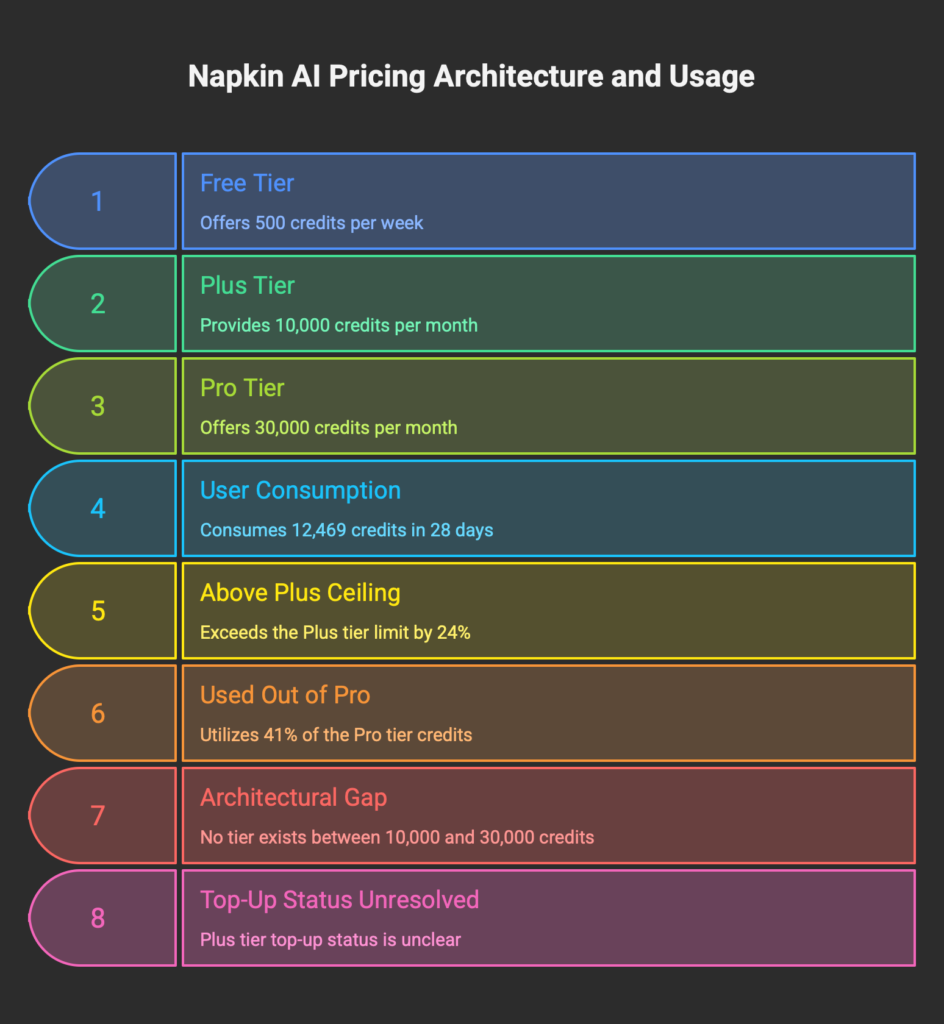
Napkin’s public tiers leave a hard economic gap between 10,000 and 30,000 monthly credits.
Plus at 10,000 credits per month. Pro at 30,000. No public tier in between. No 15,000-credit option for $14. No 20,000-credit option for $17. The pricing architecture funnels active publishers toward Pro because there is no other place to land.
I have seen this shape before. Cursor’s pricing follows a similar pattern: a marketed entry tier (Hobby) that experienced users almost never use in production, and a recommended tier (Pro) where the actual workflow lives. The entry tier exists for marketing positioning. The recommended tier is where the product is sold.
Napkin’s version of this shape works the same way structurally. Plus exists to anchor the price. Pro is where serious publishing workflows land.
Here is the math from my account. As of the moment I wrote this section, my Pro account showed 17,531 credits remaining out of 30,000 with two days left in the cycle.
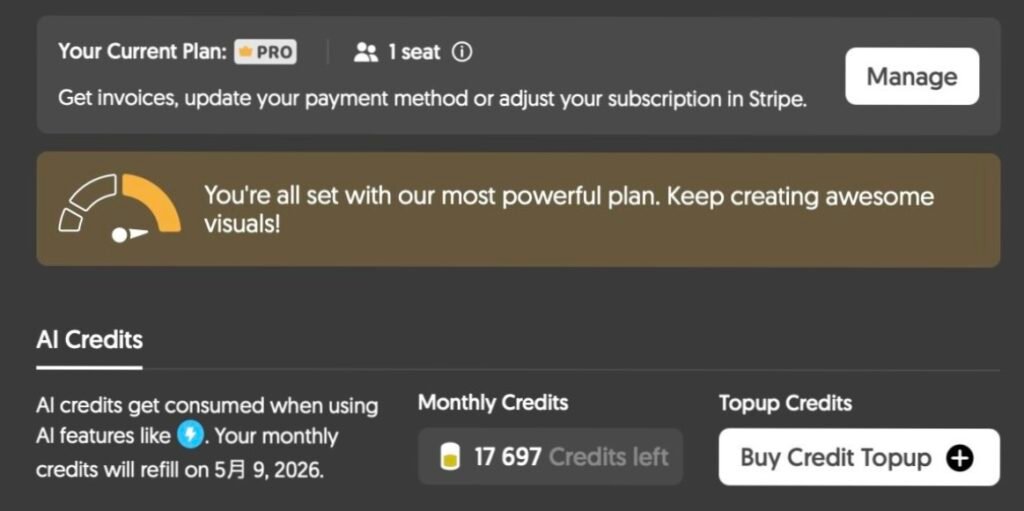
That means I had consumed 12,469 credits in 28 days. Round it to 12,500 for cleaner arithmetic. Plus tier caps at 10,000.
If I had bought Plus instead of Pro, I would have hit the cap somewhere around day 22 of the first cycle and lost the ability to generate or save new visuals for the final week. Whether I could have purchased Plus top-ups to bridge the gap is the most important unresolved question in this article.
The Plus top-up question (documentation conflict)
Napkin’s plan-comparison help article (“What’s the difference between Plus and Pro plans?”, published August 29, 2025) lists “Optional credit top-ups” as a Pro-tier benefit, with no equivalent line under Plus.
Napkin’s public pricing FAQ on the pricing page uses broader language. It states that if users exhaust their credits, they can purchase additional credits “at any time,” without specifying which plans this applies to.
These two statements do not resolve cleanly from outside the product. The plan-comparison article reads as Pro-exclusive. The pricing FAQ reads as universal.
I am on Pro. I cannot test Plus top-up behavior in my own account without downgrading and risking my workflow. I did not contact Napkin support to confirm before publication because I wanted this review to reflect what a buyer would see during a normal pre-purchase research process, not what a buyer would see after dedicated outreach.
The honest framing is that Napkin’s public tiers leave the 10,000-to-30,000 band uncovered, and the available bridge mechanism (top-ups) has unresolved plan eligibility based on the public documentation as of May 7, 2026. Pro buyers know they can top up. Plus buyers do not get a clean answer from the public surface.
That uncertainty is itself a buyer signal. If you are going to publish at scale and you cannot tell from Napkin’s website whether you can buy your way out of a Plus cap mid-cycle, the safest path is to start on Pro and downgrade later if Plus turns out to be enough. The cost of being wrong is higher in the Plus-fails-mid-cycle direction than in the over-paid-by-$13-per-month direction.
That is not a pricing trap in the conspiratorial sense. It is an architectural gap with documentation drift. Plan for it.
Generation is free, commitment bills (and the help-center shorthand is incomplete)
Correction, June 6 2026. An earlier version of this section said credits were charged at the save or export step, at a flat rate of roughly 166 per save. I re-tested in the current app on June 6, and the original framing was wrong on two counts. The charge does not fire at export, and it is not flat. I am leaving the correction visible instead of quietly editing the numbers, because the way a tool meters your money is exactly what a review exists to get right. Whether the billing changed since my April testing or I read the trigger wrong the first time is not something I can settle from outside the product. The corrected version follows.
Napkin’s official help center says credits are consumed for visual generation and are charged at “approximately one credit per word selected.” The per-word direction turned out to be right. The trigger and the flat rate I originally reported did not.
Here is what April looked like. I generated two visuals, one from a 70-word prompt and one from a 700-word import, and saw 166 credits move on each. At the time I read that as a flat fee charged at export. The retest reframes it: both visuals displayed a comparable amount of text once Napkin laid them out, so a per-output rate produces the same number on both, which is what I saw. The flatness was a coincidence of two similarly sized outputs, not a flat fee.
What the June retest actually shows. Three steps I expected to cost credits do not. Browsing the AI Suggestions, importing a file, and exporting the finished visual (PNG, SVG, PDF, or PPT) each moved my balance by zero. You can paste, import, cycle through layout after layout, and download the result without spending anything on those steps.
The charge fires at one moment: when you commit a visual, meaning when you turn your text into a finished layout by selecting one. Exporting a visual I had already committed cost nothing, which is the cleanest proof that export is not the trigger.
The amount scales with how much text ends up displayed in the finished visual. Two tests on the same Pro account, same day: a visual showing 11 words cost 30 credits, and a visual showing 43 words cost 118. Both land at about 2.7 credits per displayed word. Two data points are not a billing contract, so treat 2.7 as an observed rate rather than a published one, but the proportional shape is clear, and it is not the flat per-save fee I described before. You also cannot read the cost off Napkin’s “one credit per word” line, because you cannot predict displayed words from what you paste.

That part matters for a budget. Napkin condenses long input. I pasted a roughly 150-word, twelve-step process, and the tool collapsed it into a five-node visual showing 43 words, then charged for the 43, not the 150. A verbose source that Napkin summarizes costs less than its word count suggests. Plan from the words that survive into the visual, not from the size of what you paste.
Restyling is where the meter keeps running. Switching the layout or the branding on a finished visual charged me again, on the order of 51 credits on a mid-size visual, with the content and structure unchanged. I did not map the exact swap rate, so read that 51 as a single observation. Napkin’s flowchart announcement describes changing layouts and branding “without regenerating.” The visual does survive the switch intact. Your credit balance does not.
The part worth keeping is that browsing and iterating stay free. The bad first suggestion goes to the discard pile for nothing, and you only pay when you commit to one. Most AI tools charge per generation and punish you for iterating; Napkin charges at commit and scales it to output. So the capacity math in the earlier version rested on the wrong unit. For Pro’s 30,000 monthly credits at roughly 2.7 credits per displayed word, you are looking at something on the order of 11,000 displayed words of finished visuals per month, before any restyling or Effects. A month of small, sparse flowcharts stretches much further than a month of dense, text-heavy infographics. Counting saves per month, the way I did before, hides that.
Effects: separate price, separate workflow
Effects launched on April 29, 2026, and I learned about the launch via email on April 29 itself. Worth noting because most product launches I see lead with in-app announcements and treat email as secondary. Napkin’s communication channel ordering ran the other way for this release.
Effects let you re-style an existing visualization with a preset aesthetic. The preset library is broader than the launch announcement suggested. As of May 7, 2026, the Effects panel in my Pro account shows at least 20 styles plus a Custom slot:
Realistic, Skeuomorphic, Blueprint Review, Working Doc, Ink Story, Sticky Notes, Thin Wax, Pencil Draft, Board Brief, Marker Workshop, Watercolor Concept, Ink Print, Dark Stage, Whiteboard, Clean Deck, Press Print, Origami, Low Poly, Soft Pitch, plus Custom.
Each Effect application costs a flat 100 credits, regardless of input size. I confirmed this on June 6 2026 by applying a Custom effect to two visuals of very different sizes, an 11-word flowchart and a 43-word infographic, and both charged exactly 100. That makes Effects a different billing shape from generation: the generation cost scales with displayed text (see section 05.2), while the Effect cost stays flat. The Custom slot, where you write a free-form prompt describing the aesthetic you want, also costs 100 credits per application. The Custom path is not premium-priced, which is interesting because Custom almost certainly invokes more variable compute under the hood than a preset lookup.

300 Effect applications per month is the ceiling on a Pro account at 30,000 credits, before you spend a credit on anything else. In practice you will not spend all of Pro on Effects, but the math tells you where the constraint lives.
The editability tradeoff
Napkin’s documentation describes Effects as preserving the visual structure and content. That is true at the frame level. The visualization keeps its layout, its node arrangement, its conceptual structure.
It is also true that once you apply an Effect to a visualization, the styled element is no longer individually editable in the same way it was before. Napkin’s official Effects help page states that applied elements become part of the styled image. You can undo. You can switch the Effect off and recover the editable nodes. You can re-edit the underlying structure and reapply the Effect. But you cannot tweak the typography of a single node inside an applied Effect without backing out of the styling pass.
Both statements are true simultaneously. The structure persists. Per-node editability does not.
This changes how production workflow operates. Build the structure first while everything is still editable. Apply Effects last as a styling pass. If you discover a typo or want to refine a label after Effects are applied, you have to switch the Effect off, edit, and reapply. The 100-credit cost re-fires on the reapplication.
Effects are powerful. Effects are also where the compute economics of running a styling layer leak into the user-facing pricing model. Worth knowing before you fall in love with the Realistic preset.
The 3GB-to-1GB memory observation
Two weeks ago, Napkin’s browser tab was a memory hog in my Chrome session.
I checked Chrome’s task manager during a heavy editing session in late April 2026 and watched the Napkin tab climb past 3 GB. Three gigabytes for a single browser tab running a visual editor. I closed it and reopened it and the number came back down, but it climbed again over time during the same session.
I noted it as a potential pain point. Wrote it into my Tier A notes file. Planned to test it more carefully before publication.
When I ran the test on May 7, 2026, the same Napkin tab during active AI Suggestion generation was sitting at 1.02 GB. ChatGPT in the same browser session was using 1.47 GB. WindowServer (macOS itself) was at 1.09 GB.
Napkin was lighter than ChatGPT. By a meaningful margin.

That is roughly a 65 percent reduction in tab memory usage over two weeks of elapsed time. I did not see a Napkin release note explaining the change. There is no public changelog to consult. The tab simply got lighter.
Multiple explanations are possible. The team shipped an optimization. My session was lighter because I had fewer visualizations open at the time of measurement. Chrome’s memory accounting changed. Something in the rendering path got fixed. I cannot attribute the change to a specific cause from the outside.
What I can say is that the trajectory in my measurements was positive, and that buyers comparing tools by browser overhead should not assume Napkin is the heavyweight. As of early May 2026, in my measurements, it was not. ChatGPT was heavier in the same workflow.
If you are evaluating Napkin against alternatives and someone tells you “Napkin is bloated,” ask them when they tested it. The answer will probably be “a few weeks ago.” Things move fast in this category.
Why it’s called Second Layer
Napkin AI is operated by Second Layer, Inc.
That naming is at least suggestive of a strategic frame, even if the article should not claim founder intent without a direct quote. Here is the frame the name fits.
The Layer 1 of generative AI is the foundation-model commodity. OpenAI’s models. Google’s Gemini. Anthropic’s Claude. Mistral. The frontier labs ship foundation models, and every product built on top of those models lives downstream of decisions made at the foundation layer.
Napkin’s privacy policy confirms the company uses both OpenAI and Gemini as AI generation sub-processors. That is not unusual. Most AI-powered SaaS products rent compute from frontier labs. The question is what the SaaS layer adds on top.
Napkin’s Layer 2, in this frame, is its layout engine. The technology that takes structured input and produces a consistent, manipulable visual layout. That layer is proprietary. It is not OpenAI. It is not Gemini. It is the part of Napkin the frontier labs cannot replicate by shipping a better foundation model.
If Napkin has a moat, it is not the LLM call. It is the structured layout layer that survives iteration.
Layer 3, in this frame, is the user document. Your saved visuals, your Brand Studio settings, your exported assets. The output side of the system.
Naming the company “Second Layer” reads as a strategic statement. Foundation models will keep improving. OpenAI’s capabilities in 2027 will dwarf its 2026 capabilities. That is a tide Napkin cannot stop and does not need to stop. What Napkin needs is a layer that the rising tide does not erode. The structured layout part is the candidate for that layer.
This is also why the Effects launch is interesting from a strategy perspective. Effects use a styling layer that is increasingly Layer 1 territory. As frontier labs ship better generative imaging, Effects compute commodifies and the differentiation argument weakens. The structured layout part of Napkin does not have that exposure. The Effects part might.
Watch where Napkin invests engineering hours over the next 12 months. If they double down on the layout engine, they are betting on the moat. If they double down on Effects, they are betting on a feature that frontier labs may eventually commoditize.
I would bet on the moat. I do not work at Napkin. Take the prediction at exactly the value of an outside guess.
The recursion test (importing this review’s outline into Napkin)
This is the part of the review that almost did not make it in because it felt too cute, but the data was too good to skip.
I exported the outline of this very review as a 700-word Markdown file. Headings, bullet points, a comparison table, and the BRIEFING SUMMARY block. I imported the file into Napkin via the “By importing a file” entry mode.
The first AI Suggestion came back in 31.22 seconds. It was a six-column comparison table titled “Napkin AI Plan Comparison.” Three rows for the three tiers. Columns for Monthly Cost, Weekly Credits, Best For, Not For, Credit Top-ups, and Custom Branding.
The layout layer got the structure right.
The semantic extraction layer got the labels wrong.
The “Weekly Credits” column header was incorrect. The source MD specified that Free is 500 weekly credits and Plus and Pro are 10,000 and 30,000 monthly credits. Napkin’s extraction layer flattened all three into a single “Weekly Credits” header, presumably by aligning to the Free tier’s unit. The “Not For” column also misfired, repeating “Enterprise buyers” across multiple rows when the source MD’s Not For statement was a document-level summary, not a per-tier attribute.
When I switched to a different AI Suggestion (a tree-style mind map), the same input produced an accurate visual. “500 weekly credits” for Free. “10,000 monthly credits” for Plus. “30,000 monthly credits” for Pro. Clean per-tier descriptions with no semantic flattening.
Same input. Same Napkin instance. Two different outputs. The layout layer produced both consistently. The extraction layer was not consistent across them.
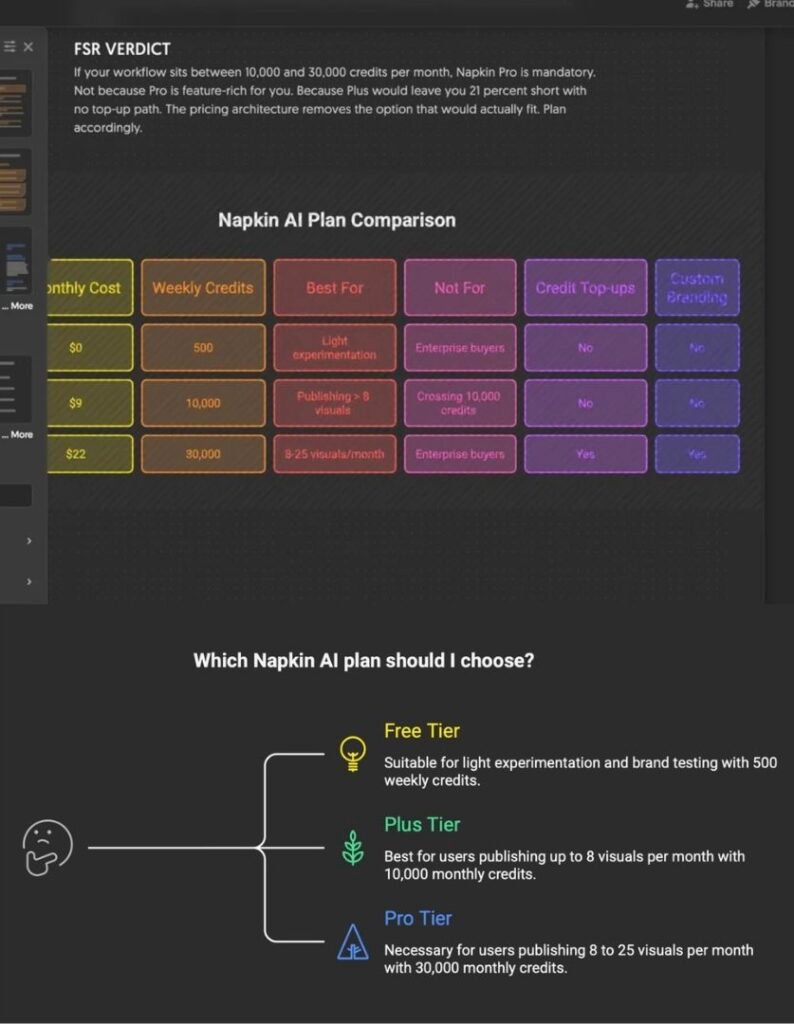
This is the Layer 1 versus Layer 2 distinction made visible inside a single test.
The layout engine is the moat candidate. The semantic content extraction is still rough at the edges. If you are evaluating Napkin for a use case where the AI’s interpretation of your input matters more than the layout itself, test multiple suggestions before you commit. The first one is not always the right one.
Side note: this is also where Napkin’s free-iteration billing model earns extra credibility. I burned zero credits exploring the multiple suggestions. The bad output went to the discard pile without costing me anything. Committing the good output cost 166 credits; the discarded suggestions cost nothing. (For why that 166 is a per-output figure and not a flat per-save fee, see the correction in section 05.2.) If I had been paying per generation, I would have eaten the cost of the bad first suggestion plus the cost of the good second suggestion. Napkin’s billing model rewards the audit the AI requires. That is rare in AI tooling and worth paying for.
I asked Napkin to visualize a review of Napkin. The result told me more about the product than three weeks of normal usage had. Recursion as a review technique. Recommend.
Trust infrastructure status (what exists, what does not, what could not be verified)
Enterprise buyers ask different questions than solo operators. This section is for the enterprise buyers, with the absence claims softened to reflect what I could and could not verify from public materials as of May 7, 2026.
What exists (verified in public Napkin materials):
- Privacy Policy, public, current.
- Terms and Conditions, published at /terms-conditions/, current.
- Named Data Protection Officer in the privacy policy: Erwan Martin ([email protected]).
- Disclosed sub-processor list, published inside the Privacy Policy itself, including Google Cloud (infrastructure), OpenAI (AI generation), Gemini (AI generation), Intercom (support), Sendgrid (transactional email), Mailmodo (marketing email), Sentry (error monitoring), Google Analytics, and Stripe (payments).
- Privacy Policy clause stating user content is not used for AI model training. A separate clause covers anonymized AI feature interaction data, which may be used for product improvement unless the user opts out from account settings. Content and interaction data are treated as different categories.
- Pricing FAQ page. Help Center with 49 articles covering subscription, billing, and feature documentation.
What I could not verify in public Napkin materials (May 7, 2026):
- Public SOC 2 Type II report. Not found.
- Public ISO 27001 certification. Not found.
- Public DPA template available without negotiation. Not found.
- EU Representative listed under GDPR Article 27. Not visible in the public privacy policy I reviewed.
- Public roadmap.
- Public changelog (release notes for the product).
- Napkin-specific public status page. The subdomain
napkinai.statuspage.ioredirects to Atlassian’s generic Statuspage product page rather than to a Napkin incident-history view, so I could not confirm a Napkin-specific public status page exists. - Dedicated security or trust page.
I want to be careful with the absence list. Failure to find public evidence is not the same as absence. Napkin may have private SOC 2 reports available under NDA. Napkin may have a DPA template they share on request. Napkin may publish a status page at a different URL I did not discover. The honest framing is that the public surface I reviewed does not provide this evidence to a buyer doing pre-purchase research from outside the procurement loop.
“Public verification gaps like these are common across SaaS vendor evaluation. I documented similar verification gaps in a hosting comparison, where one provider’s email-related deadline was buried inside terms-of-service language that public reviews routinely missed.”
What this means for enterprise buyers
If your procurement team requires SOC 2 Type II or ISO 27001 evidence as a public artifact, Napkin will not pass that gate based on the materials I reviewed. There is no public document to point to. The product runs on Stripe billing, the data sits on Google Cloud, the AI processing routes through OpenAI and Gemini. These are reputable sub-processors. They are also not the same thing as a Napkin-specific public compliance posture.
If your legal team requires a signed DPA before Napkin sees production data, you will need to reach out and request one. There is no public template I could evaluate.
If you sell into EU markets and your privacy reviewer asks for the named EU Representative under GDPR Article 27, you will not find it in the privacy policy I reviewed as of May 7, 2026. That is an open compliance question for any vendor processing EU personal data through US infrastructure.
EU AI Act Article 50, scheduled to apply from August 2, 2026 based on European Commission timing as of early 2026, will require AI-generated visual content to be labeled as artificially generated in certain contexts. Recent reporting suggests provisional revisions to AI Act timing are in motion, so the exact effective date and scope are subject to legislative confirmation. Plus and Pro users can remove the Napkin watermark from exports, but watermark removal at the tool level does not interact with AI Act labeling obligations, which sit at the publisher level. Buyers operating in EU jurisdictions need to plan for labeling at their own publication layer, not assume the tool handles it.
None of this disqualifies Napkin for solo operators or small teams. Most readers of this review do not need SOC 2.
For the buyers who do, the answer is “not yet, based on what I could verify publicly.” Wait for the next funding round, recheck the compliance posture in 6 to 12 months, ask the question again then.
What the research says about visual comprehension
Napkin’s value proposition is that visuals communicate faster than text. The research broadly agrees with that, with caveats that buyers should know.
The strongest meta-analytic evidence I am willing to cite directly is Noetel et al. (2022) in Educational Research Review, which conducted a meta-meta-analysis covering hundreds of underlying studies and found that combining text and visual encoding produces a substantial learning effect. For context, most educational interventions land in modest effect-size ranges. Visual augmentation of text is one of the more reliable comprehension boosters in the educational research literature.
Counter-evidence exists. Kolloffel et al. (2009) is a frequently cited example showing cases where diagrams alone underperformed text-plus-arithmetic combinations. Visuals are not a free lunch for every concept. Some ideas are linguistic in nature and a diagram flattens the wrong dimension.
There is also a fluency-bias concern that buyers should hold in mind even when the comprehension data is favorable. Polished AI-generated visuals can create a sense of comprehension that is not always backed by actual understanding. Readers see a clean diagram, feel like they understand the underlying concept, and overestimate their grasp of the material. The visual is doing comprehension theater rather than comprehension itself. Aesthetic polish and conceptual depth are not the same thing, and tools that make visuals look professional faster also make this gap easier to hide.
What this means for buyers: Napkin produces visuals that are aesthetically polished enough to trigger the fluency-bias risk if used carelessly. The same property that makes the output useful for content publishing (it looks professional) is the property that makes it risky for technical communication where the reader needs to actually understand the underlying material, not just feel like they do.
Use Napkin for visuals that supplement explanation, not replace it. The dual-coding effect is real. The fluency-bias risk is also real. Both can hold simultaneously, and the second is harder to detect than the first.
This is not a Napkin-specific risk. It is a generative-visual-tools risk. Napkin is just one of the tools where the polish is high enough that the risk surfaces.
Who should buy Pro
After 28 days, here are the buyer profiles where Pro Annual at $264 per year is the right call based on this workflow’s experience.
Solo content publishers producing 8 to 25 visuals per month. This is the archetype Napkin’s pricing ceiling fits comfortably. The 30,000-credit ceiling holds at this output rate. The Brand Studio features (custom fonts, unlimited custom styles, exclusive design templates) save time on every visual, and the time savings amortize fast.
Consultants and advisors who deliver branded diagrams to clients. The Custom Branding feature (called Brand Studio in the app, Custom Branding on the pricing page, custom styles in the FAQ, and Custom Brands in the help center, which is itself a documentation problem we will get to) lets you maintain a single visual identity across deliverables. The Brand ID share feature, advertised as a Pro benefit, lets you push your brand kit to collaborators or junior team members. That is a real workflow improvement at $22 per month.
Multi-tool stack operators where Napkin is the visual layer. If your stack is ChatGPT for drafting, Claude for editing, Notion for documentation, and Napkin for visuals, the 30,000-credit ceiling protects you on heavy-output months. Plus may constrain you, and the top-up situation on Plus is unresolved in public docs. Pro keeps the ceiling open.
Teams of 2 to 5 sharing a single Pro seat for asset production. Napkin’s pricing is per-seat, but a small team where one person owns the visual production can run on a single Pro account efficiently. Brand ID sharing closes the gap for collaborators who need read access without their own seat.
Buyers who need clearly advertised credit top-ups. Top-ups are publicly listed as a Pro plan feature in Napkin’s plan-comparison help article. Whether Plus users can also purchase top-ups is unresolved in the public documentation as of May 7, 2026. If your monthly usage is unpredictable and you want a known mid-cycle escape hatch, Pro is the safer choice.
If you fit two or more of those profiles, Pro pays for itself inside the first billing cycle.
A note on API access
The Napkin API is currently described in the public developer documentation as an invitation-only developer preview, not intended for production or mission-critical use. If you are evaluating Napkin specifically for API integration into automated content pipelines, do not assume Pro buys you production-ready API access. The public documentation does not describe API as a clearly Pro-gated production feature, and the preview language indicates the integration surface is still maturing. Confirm directly with Napkin support before committing a production pipeline build.
Who should not buy Pro
This section is more important than the previous one, because Napkin’s marketing will not write it for you.
You generate fewer than 8 visuals per month. Plus tier at $108 per year saves you $156 versus Pro Annual. The features you lose at Plus (exclusive design templates, custom font upload, unlimited custom styles, publicly advertised credit top-ups) do not matter much if you are producing one visual per week.
You have not yet generated a single visual on the Free tier. Try the product for two weeks before paying anything. Free is 500 credits per week, which is enough to produce one production-quality visual every few days. If you cannot find a use case in two weeks of free usage, paying for Pro will not change that.
Your company’s procurement gate requires public SOC 2 or ISO 27001 evidence. Stop. Napkin does not appear to publish either based on the materials I reviewed as of May 7, 2026. You will fail the gate. The product is good. The publicly verifiable compliance posture is not enterprise-ready yet. Wait.
You are an EU-based business with strict GDPR data residency requirements. Napkin’s data residency per the privacy policy is US. The EU Representative under Article 27 is not visible in the public privacy policy I reviewed. If your privacy team flags vendor selection on residency, Napkin will not pass.
You expected unlimited diffusion-style image generation. Effects cost a flat 100 credits per application, which I confirmed on June 6 2026 across two different-sized visuals. 30,000 credits per month equals 300 applications maximum. If your workflow is “generate 50 illustrations per day, every day,” Napkin is the wrong tool. You want a dedicated image-generation product with a different pricing structure.
You wanted real-time collaboration as the primary feature. Napkin’s collaboration story is Brand ID sharing and asset reuse. It is not multi-cursor co-editing. If you need three teammates editing the same diagram simultaneously, buy Whimsical or FigJam. Napkin is not optimized for that workflow.
You are evaluating Napkin against Excalidraw and the answer is “Excalidraw is good enough.” Honor that intuition. Excalidraw at $6 per month covers the hand-drawn diagram use case with no AI dependency, no per-credit anxiety, no terminology drift across product surfaces, and no compliance question marks. If 80 percent of what you need fits Excalidraw, save the $192 per year that the Pro upgrade would cost you and put it toward something else.
You are an API-first buyer expecting production-ready integration. Napkin’s API is currently in invitation-only developer preview based on public documentation. It is not described as production-ready, and Pro does not unlock a production-grade API tier. Wait for the API to exit preview, or evaluate other tools.
If any of those seven profiles describe you, close this tab and skip Pro. Napkin is not your tool right now.
FAQ
Should I pick Plus or Pro?
If your monthly usage is under 10,000 credits, choose Plus at $9 per month annual. If it exceeds 10,000, the safer call is Pro at $22 per month annual. Plus’s top-up status is unresolved in Napkin’s public documentation, so the bridge mechanism for crossing 10,000 mid-cycle is unclear from the buyer’s side. Starting on Pro and downgrading later is lower risk than starting on Plus and getting stuck.
Can Plus users purchase credit top-ups?
Napkin’s public documentation conflicts on this point. The plan-comparison help article lists optional credit top-ups under Pro only. The pricing FAQ uses broader language about purchasing additional credits “at any time.” I am on Pro and could not test Plus top-up behavior in my own account. As of May 7, 2026, this is unresolved in the public surface. Confirm with Napkin support before relying on Plus top-ups for production capacity planning.
How do Effects consume credits?
Each Effect application costs a flat 100 credits, regardless of input size. I confirmed this on June 6 2026 by applying a Custom effect to two visuals of very different sizes, an 11-word flowchart and a 43-word infographic, and both charged exactly 100. That makes Effects a different billing shape from generation: the generation cost scales with displayed text (see section 05.2), while the Effect cost stays flat.This applies to all 20-plus preset styles (Realistic, Origami, Watercolor Concept, and so on) and the Custom prompt slot equally. A Pro account at 30,000 credits per month can apply up to 300 Effects before any other credit consumption.
When does Napkin charge credits, and how much?
In June 6 2026 testing on a Pro account, browsing suggestions, importing a file, and exporting the result (PNG, SVG, PDF, PPT) all cost zero. The charge fires when you commit a visual by turning text into a finished layout, not at save or export. The amount tracks displayed text, not source length: an 11-word visual cost 30 credits and a 43-word visual cost 118, about 2.7 credits per displayed word. Restyling a finished visual is billed again.
Can I use Napkin offline?
No. Napkin requires an active internet connection. The mobile experience is read-only in browser as of May 7, 2026. Editing and creation require a desktop browser session.
Is Custom Branding shareable across teammates?
Pro accounts get a Brand ID that can be shared with collaborators using the Import Brand function. Plus accounts have three custom brand styles per Napkin’s pricing page but do not include the publicly advertised Brand ID share. If team brand consistency matters, Pro is the right tier.
Does Napkin train AI models on my content?
According to Napkin’s privacy policy as of May 7, 2026, user content is not used for AI model training. A separate provision covers anonymized AI feature interaction data, which may be used for product improvement unless the user opts out from account settings. Content and interaction data are treated as separate categories, and the opt-out is content-independent.
Does Napkin have SOC 2 or ISO 27001 certification?
I could not find a public SOC 2 Type II report or ISO 27001 certification in Napkin’s public materials reviewed for this article. Failure to find public evidence is not the same as absence. Napkin may make private compliance reports available under NDA. Procurement teams that require public evidence will not pass Napkin through that gate based on the public surface as of May 7, 2026.
Is the Napkin API production-ready?
The public Napkin API documentation describes the API as an invitation-only developer preview, explicitly not for production or mission-critical use as of May 7, 2026. Pro tier does not change that classification. Buyers planning automated pipelines on Napkin should wait for the API to exit preview or confirm production status with Napkin support before building.
Methodology and verification gaps
This section exists because a Tier A review should disclose what it did, what it could not do, and where the reader should bring their own skepticism.
Methodology
- Account: paid Pro Annual subscription, signed up April 9, 2026, active through publication.
- Usage period: April 9, 2026 to May 7, 2026 (28 days).
- Credit consumption tracked via Napkin’s account settings credit balance.
- Generated 14 production visualizations across four published Future Stack Reviews articles during the period.
- Tested two distinct generation paths (describe-an-idea, file-import) with documented credit deltas.
- June 6 2026 retest: re-ran credit-delta tests across browsing, file import, committing a visual, exporting, applying an Effect, and layout or branding swaps, on the same Pro account. Findings corrected in section 05.2.
- Memory measurements taken via Chrome’s task manager on May 7, 2026, with comparison values for ChatGPT and macOS WindowServer in the same browser session.
- Effects panel inspected directly. 20-plus presets plus Custom slot enumerated from the in-product UI.
- Pricing values verified on Napkin’s pricing page on May 7, 2026, and re-verified June 6, 2026 (Free, Plus, and Pro tiers and credit amounts unchanged).
- Help center articles consulted: “What’s the difference between Plus and Pro plans?” (August 29, 2025) and the Effects FAQ (date as published).
- Privacy Policy and Terms reviewed at the URLs published by Napkin as of May 7, 2026.
- Sub-processor list extracted from the Privacy Policy text directly.
- Account screenshots and dashboard captures retained for the credit-delta tests.
Verification gaps that remain open at publication
- Plus credit top-up eligibility: unresolved in public documentation. The plan-comparison help article reads as Pro-exclusive. The pricing FAQ uses broader language. I did not contact Napkin support to confirm because I wanted this review to reflect a normal pre-purchase research process. Buyers who need certainty should ask support directly.
- Public compliance evidence: I could not find a public SOC 2 Type II report, ISO 27001 certification, dedicated DPA template, dedicated security page, public roadmap, public changelog, or Napkin-specific public status page in the materials I reviewed. Absence of public evidence is not proof of absence.
- EU Representative under GDPR Article 27: not visible in the public privacy policy I reviewed.
- EU AI Act Article 50 effective date and scope: nominally August 2, 2026 per European Commission timing as of early 2026, but recent reporting suggests provisional revisions are in motion. Subject to legislative confirmation.
- API plan gating: the public Napkin API documentation describes the API as invitation-only developer preview. The pricing page does not explicitly gate API access to Pro. Whether API access is plan-gated or invitation-gated is not fully clear from public materials.
- Credit billing model (updated June 6 2026): the earlier “166 on first save, flat” reading was wrong. A retest showed the charge fires at commit, not at save or export, and scales with displayed text at roughly 2.7 credits per displayed word (30 credits for an 11-word visual, 118 for a 43-word visual). Browsing, import, and export were free; layout and branding swaps were billed. Effects were re-tested separately and charged a flat 100 per application regardless of visual size (an 11-word and a 43-word visual both cost 100). The exact generation constant rests on a small number of measurements. See the correction in section 05.2.
These gaps are flagged because a buyer doing pre-purchase research deserves to know what the article could not pin down. A future revision of this review may close some of them. Until then, treat the affected sections as “as observed” rather than “as proven.”
FSR VERDICT
If your workflow sits between 10,000 and 30,000 credits per month, Napkin Pro is the safer call. Not because Pro is feature-rich for you. Because Plus’s top-up situation is unresolved in Napkin’s public documentation, which means the mid-cycle escape hatch on Plus is unclear, and the cost of being wrong on capacity planning is higher than the cost of paying $13 per month more than necessary. Plan accordingly.
If your workflow is below 10,000 credits per month, Plus at $9 monthly annual is right-sized and the correct answer for most readers. Skip Pro. Skip the upsell. Save $156 per year.
If your workflow is enterprise procurement with public SOC 2, ISO 27001, or DPA requirements, Napkin is not yet your tool based on what I could verify publicly. Come back in 6 to 12 months and recheck.
The structured layout layer is the moat candidate. The Layer 2 strategy is the bet behind the company name. The Effects launch on April 29, 2026 is a feature that changes the editability model. The pricing architecture leaves a hard 10,000-to-30,000 gap, and the documentation around bridging that gap is conflicted. Once you understand the constraint, it stops being a surprise and becomes a production budget.
I paid $264 for the Annual Pro plan on April 9, 2026, and 28 days later I am still on it, still using it, still building the visual layer of every Future Stack Reviews article on top of it. The product earns its $22 per month for me.
That does not mean it earns its $22 per month for you.
Read the “Who should not buy Pro” section twice. If any line in there fits your situation, skip the upgrade. Plus is right-sized for most readers of this review. Pro is right-sized for the working publisher who has already learned the hard way that Plus runs out somewhere around day 22 of a productive month, and who would rather pay $13 per month more than negotiate the documentation conflict around top-ups.
If that publisher is you, you already knew the answer before you started reading. The 28 days I just described are your next 28 days. Welcome to the gap. It is fine in here. The visuals are good.