Last updated: August 22, 2026
An Intercom alternative is not cheaper because its AI rate is lower. It is cheaper only if it replaces the same support work and its billing behavior fits how your team operates. This document-first briefing compares seven alternatives by what their own documentation establishes, what it leaves to a sales conversation, and which unanswered question matters most for each one. No product was tested.
Verdict in one sentence. Decide which layer you are replacing, then treat every question the documentation leaves open as a line item for the order form rather than a detail to settle after the first invoice.
Built from pages and documents published by each vendor and read on 22 and 23 August 2026. Every source cited below was opened and read directly; no figure in this briefing rests on a search-result summary. No account, no purchase, no invoice, no dashboard access, and no product testing on any product named here. Where the documentation left a question open, this briefing says so and names the page rather than inferring the answer. Tier describes evidence depth, not product quality.
Written for
- Support and CX operations leads running an actual migration or renewal
- Finance and procurement approvers asked to authorize a usage-based AI line
- Teams holding quotes from two or more of these vendors
- Teams who can supply at least one month of their own conversation history
Not written for
- Readers who want an interface walkthrough or a feature tour
- Readers ranking AI answer quality; nothing here is tested
- Readers looking for one winner without supplying their own volume data
- Anyone expecting a single all-in monthly figure per product
At a glance
| Products covered | Zendesk Suite, Salesforce Agentforce, Gorgias, Zoho Desk with Zia Agents, Crisp, Tidio, Chatwoot |
| Baseline | Intercom with the Fin AI Agent. The company renamed itself Fin in 2026; Intercom remains the helpdesk product name |
| Billable units in use | Outcome, automated resolution, automated interaction plus ticket, action, conversation, credit, token |
| What “monthly allowance” means | At least three different objects across these products: a granted quantity, an expiring allocation, and a usage threshold that only draws on a balance once exceeded |
| Documents an automatic stop at the AI limit | Crisp, by default, with escalation to human operators. Chatwoot, as a failed action with any configured fallback |
| Documents a buyer-set cap | Intercom Pro, Crisp Pay-As-You-Go billing limits, Zendesk pre-tier pause setting, Zoho prepaid Agent Wallet |
| One thread, two meters, stated by the vendor | Gorgias, in its own billing documentation, on the current pricing model |
| Same vendor, two seat prices, same day | Intercom, on intercom.com and fin.ai, captured minutes apart |
| Widest published multiplier range in one document | Salesforce. The Flex Credits Rate Card runs from 3 credits to 250,000 credits per billed unit |
| Bring your own model key | Zoho supports OpenAI, Gemini and Claude keys you supply, and OpenAI through its own managed connection. Crisp states its model list is curated and external keys are not supported |
| Currency | Zoho publishes Japanese price books in yen for both the helpdesk and the AI platform. Salesforce offers a six-currency converter including yen. Zendesk states four currencies, not including yen. Intercom states US dollars only |
| Affiliate posture | This is a Tier C briefing. FSR does not place affiliate links in Tier C briefings. This page carries none |
On this briefing
Contents
Which layer are you replacing
Three purchases are usually treated as one decision. They can be evaluated separately.
The first is the helpdesk: inbox, seats, messenger, help center, routing, channels. The second is the AI agent that runs on top of it. The third is the contracting counterparty, which for Intercom now includes a pending change of ownership.
Several vendors sell the AI layer as a product that runs on someone else’s helpdesk. Intercom’s pricing page carries a fourth card headed “Already have a helpdesk?”, offering the Fin AI Agent with no seats required. Fin’s pricing FAQ names Salesforce, HubSpot, Freshworks, Dixa, Front, Zoho, Sprinklr and Gorgias as platforms Fin can be used with, and adds that further platforms are supported; its guarantee page separately admits Zendesk customers to a program. Tidio sells a Lyro AI Agent plan described as an agent for Zendesk, Salesforce, or any other help desk software. Zendesk sells Forethought AI agents alongside its own.
What follows from that is narrow. On the documented platform combinations, a buyer can change the helpdesk without changing the AI agent, or the reverse. It does not follow that an existing AI contract carries over automatically. Fin’s pricing page routes the non-Intercom path to Contact sales and states a 50-outcome monthly minimum, which describes a fresh procurement step rather than a transfer.
Crisp publishes the clearest description of the opposite approach. Its own Intercom migration guide states that in Crisp, AI is not a separate add-on and Hugo sits inside the conversation workflow. Whether that is an advantage depends entirely on which layer you wanted to change.
So the first question is not which product is cheaper. It is which of the three layers is actually being replaced, because the answer changes what has to be migrated, retrained and renegotiated.
Sources: Intercom, accessed 23 August 2026 · Fin, accessed 22 and 23 August 2026 · Fin, accessed 23 August 2026 · Tidio, accessed 23 August 2026 · Zendesk, accessed 23 August 2026 · Crisp Knowledge Base, updated 3 May 2026
What an Intercom bill is made of
Price the thing you are leaving before comparing anything to it. On the pages read for this briefing, a workspace on the latest pricing model that buys the optional add-ons can carry four separately metered lines plus channel usage.
Seats. On the annual view of intercom.com, Essential is $29, Advanced $85 and Expert $132 per seat per month. Advanced includes 20 free Lite seats and Expert includes 50.
Fin outcomes. From $0.99 per outcome. Fin’s pricing FAQ lists four billable outcome types: a Resolution, a Procedure handoff and a Disqualification are $0.99 each, and a Qualification is $9.99. At most one outcome is charged per conversation, and no charge applies when a conversation is passed to the team without an outcome. Standalone Fin carries a 50-outcome monthly minimum.
Pro conversations. The optional Pro add-on bills on conversation volume rather than seats or outcomes: $99 a month covers up to 1,000 conversations, then $0.12 per conversation from 1,001 to 5,000, $0.10 from 5,001 to 50,000 with the tier starting at $579, and $0.06 from 50,001 to 100,000 with the tier starting at $5,079. Above that, Intercom directs buyers to sales.
Operator credits. Operator ships with Pro and includes 2,000 credits a month. Usage above the inclusion is billed at $0.01 per credit as a separate invoice line.
Two conditions attach to Pro and both narrow the claim. Pro is not available on Legacy pricing plans, and it is available only for workspaces hosted in the US, EU and AU regions.
Channel usage sits outside all four. Intercom’s pricing page states that all plans include unlimited live chat, support email, in-app chats, banners and tooltips, and that email campaigns, SMS, WhatsApp and phone are pay as you go.
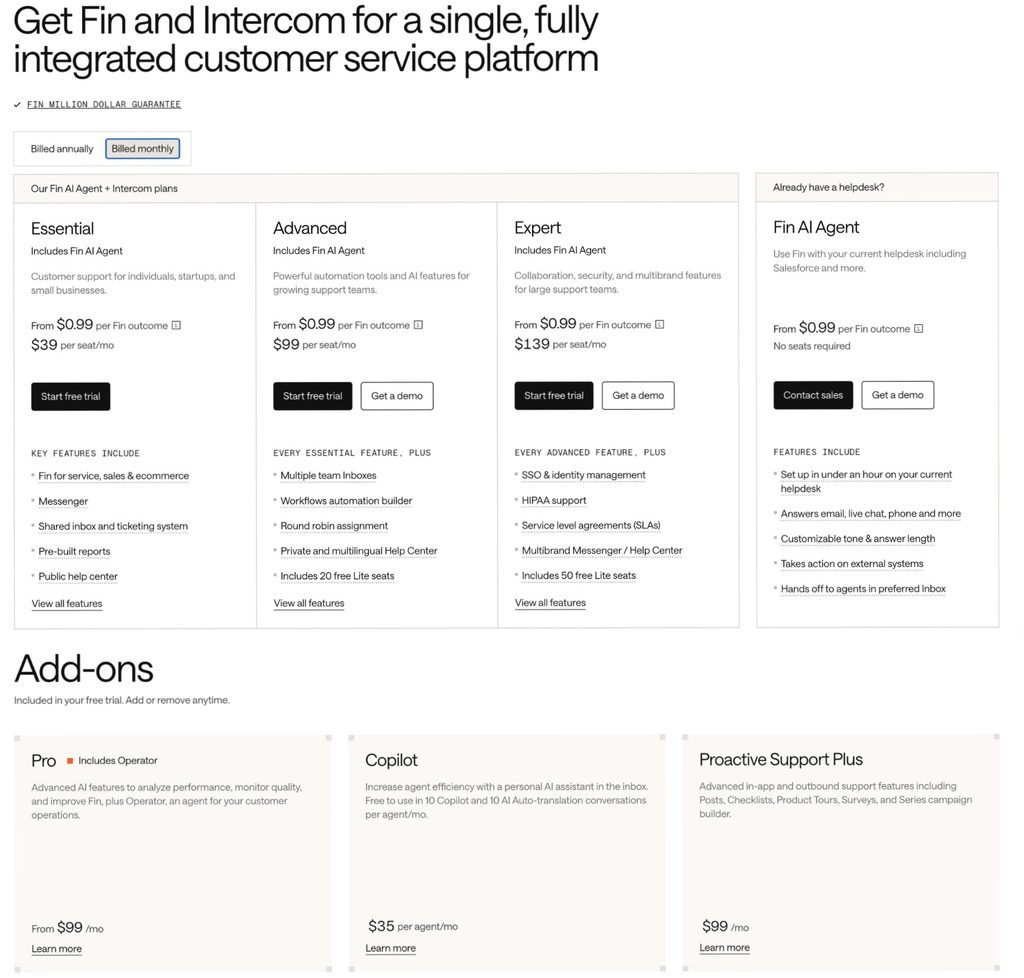
Two vendor pages, two entry seat prices, same day
| intercom.com/pricing, Billed annually selected | Essential, $29 per seat per month |
| fin.ai/pricing, Fin with the Intercom helpdesk | $19 per helpdesk seat per month |
Both captures were taken minutes apart on 23 August 2026 in the same browser. The fin.ai card carries no billing-cadence toggle. Neither page explains the difference. Status: OPEN CONFLICT. Confirm which figure appears on your own order form or checkout before modeling seat cost.
A second pair does resolve. Copilot shows $29 per agent per month on intercom.com and $35 per user per month on fin.ai. Intercom’s Copilot help article states that unlimited usage is $35 a month per teammate and is reduced to $29 when paying yearly. Both figures are correct for different cadences; neither pricing page prints the cadence beside its own Copilot line.
Sources: Intercom, accessed 23 August 2026 · Fin, accessed 22 and 23 August 2026 · Intercom Help, accessed 23 August 2026 · Intercom Help, accessed 23 August 2026
Five questions a pricing page should answer
A unit price is one input. To turn a pricing page into a forecast, five things have to be established, and they are independent of each other.
One. What consumes a unit. The event, the channel it applies to, the inactivity window, and whether a human reply cancels the charge.
Two. What the included allowance converts into. An allowance stated in credits or dollars is not a forecast until you know what one unit of work consumes, and until you know what kind of object the allowance itself is.
Three. What happens at the limit. Continue and bill, upgrade the plan, pause the AI, or fail the action and return the work to a person. These are four different outcomes and they carry different risks.
Four. Whether you can change that behavior. A default the buyer can override is a different commercial object from one they cannot.
Five. Whether the charged events can be retrieved. An invoice you cannot reconcile against an event list is an invoice you have accepted on trust.
Vendors answer these on different surfaces. Some answer on the pricing card. Some answer in a help center article three clicks away. Some answer in a rate card PDF linked from the bottom of the page. Some answer on the same page, below a headline that says the product is free. None of those is inherently wrong, but the difference decides how much of your model you can build before you talk to anyone.
One pattern is worth naming before the tables. The answer to question three is almost never on the pricing page. Across the eight products in this briefing, the pricing page told a buyer what happens at the limit in zero cases. Where the answer exists, it is in a help center article or a rate card. That is not a scandal; it is a research instruction.
Source: framework built from the billing definitions cited in sections 08 to 14 of this briefing. No vendor endorses this framework.
What each vendor’s documentation answers
The table below records what the named sources established on the dates given. It is a record of documentation, not of product behavior. Where a cell says “not stated,” it refers to the sources listed in the Methodology and nothing more.
| Product | Unit stated | Allowance converts to | Behavior at limit | Control stated | Where the AI rate lives |
|---|---|---|---|---|---|
| Intercom, Fin outcomes | Outcome, four types | No monthly inclusion stated | Not stated on the pricing page | Page states configurable alerts and limits | Plan card and pricing FAQ |
| Intercom, Pro | Conversation, by channel rule | First 1,000 inside the $99 fee | Metering ends for the cycle once a cap is hit | Hard cap and alerts at 50, 80, 100 percent | Help center article |
| Zendesk Suite | Automated resolution, verified tier only | Counts per agent per month, and an annual ceiling | Pre-tier document describes allow-overage or pause | Pre-tier document describes the choice | Plan comparison table, not the plan cards |
| Salesforce, Flex Credits | Action, prompt, resolution, row, megabyte, hour | 100,000 credits per $500, then a multiplier per usage type | Buying-model tabs describe drawdown, arrears or true-up | Digital Wallet alerts described | A three-page rate card PDF |
| Salesforce, Conversations | Conversation, at a multiplier of 1 | Entitlement set on the Order Form | Rate card states no rollover past the Order End Date | Not stated | A separate rate card PDF. No dollar figure in either place |
| Gorgias | Automated interaction, and a ticket | Included interactions printed per tier | Per-unit fee applies past the limit | Not stated on the pages read | Plan card, with the AI Agent toggle on |
| Zoho Zia Agents | Token | Published credit-per-token ratio and a per-million-token rate, by model tier | Not stated on the pages read | Prepaid Agent Wallet, reloadable | The pricing page, in a table below the headline |
| Crisp | AI credit, in dollars, token-based | Vendor estimates roughly $0.05 to $0.10 per handled conversation | Hugo stops answering and conversations escalate to humans | Pay-As-You-Go with buyer-set billing limits | Help center, not the pricing page |
| Tidio | Lyro conversation | Quotas set by slider | Not stated on the pricing page for standard plans | Custom limits listed on Plus and Premium | Calculator returns a total, not a unit rate |
| Chatwoot | Captain AI credit | One credit per message on the current fixed model configuration | Action is not executed and any available fallback runs | Top-up. No cap setting described | $20 per 1,000 additional credits, on the pricing page |
Checked on 22 and 23 August 2026 against the sources listed in the Methodology, all of which were opened directly. Gorgias captured with Annual selected and Add AI Agent enabled. Intercom captured with Billed annually selected. Salesforce captured with US Dollar selected. Zoho captured from the Japanese price books. Section 05 names what remains open.
Five entries deserve a note, because a large amount of writing on this topic gets them backwards.
Zendesk’s per-resolution rate is published. It is not on the four plan cards. It appears in the comparison table that opens from the pricing page, in rows headed Committed automated resolutions and Pay-as-you-go resolutions. Pricing Zendesk from the cards alone leaves out the variable half of the bill.
Salesforce publishes more arithmetic than any other vendor here, and it is the only one that publishes a formal rate card. Five worked examples on the page convert actions into credits into monthly dollars, and a linked page serves two PDFs assigning a multiplier to every billable usage type across five product families. Section 09 sets out what those documents contain and where they stop.
Crisp answers more of the five questions than any other vendor in this set, but almost none of it is on the pricing page. The consumption estimate, the exhaustion behavior, the opt-in continuation and the buyer-set billing limit are all in one help center article. A buyer comparing pricing pages side by side would conclude that Crisp publishes the least. The opposite is closer to true.
Zoho publishes its meter on the pricing page, under a headline that reads free, and the headline is accurate. The agent platform is free. The model usage is not, and the page says so in the same breath. What that means for a forecast is that the free thing and the metered thing are cleanly separated, and only one of them scales with your volume. Section 14 sets out the split.
And the word “allowance” is not one object. At Zendesk it is an allocation that expires annually and is capped at 10,000 per year. At Zoho and Crisp it is a monthly quantity that does not roll over. At Salesforce it is an entitlement that must be used before the Order End Date. At Chatwoot it is none of those: the monthly free credits are a usage threshold rather than a grant, and the balance you hold is only reduced when a month’s usage exceeds that threshold. Four products, four different meanings for the same word on the same kind of line item. Section 13 sets out the Chatwoot version, because it is the one most likely to be misread.
Sources: Zendesk, accessed 23 August 2026 · Fin, accessed 22 and 23 August 2026 · Intercom Help, accessed 23 August 2026 · Gorgias, accessed 23 August 2026 · Salesforce Agentforce & Data 360 Rate Cards, accessed 23 August 2026 · Zoho Zia Agents, accessed 23 August 2026 · Crisp Knowledge Base, accessed 23 August 2026 · Chatwoot User Guide, updated 10 December 2025 · Tidio, accessed 23 August 2026
The doors this briefing did not open
Where the documentation left a question unanswered, it usually pointed somewhere. Naming that destination is more useful than guessing at the answer, so this section lists the exact next click. Treat it as the shortlist of things to read or ask before signing.
| Product | The unanswered question | Where to go next |
|---|---|---|
| Salesforce | The dollar price of one Conversation | Neither the pricing page nor the Conversations Rate Card states one. The card gives a multiplier of 1 against an entitlement set on the Order Form, and the page directs existing Conversations customers to their Account Executive |
| Salesforce | The Customer 360 Platform multipliers | The Flex Credits Rate Card prints “TBA” against Salesforce Record Operation and Salesforce Process Invocation |
| Salesforce | Whether Agentforce Voice bills by action or by minute | Footnote 1 of the rate card says the Agentforce Voice Minutes usage type may apply instead for certain customers, and links onward |
| Zendesk | The allowance size under the resolution-tier model introduced 18 May 2026 | The resolution-tier support article describes the tiers but does not state an allowance figure |
| Zendesk | Which of the two documented resolution platforms a new account joins | Each pre-tier article carries a link headed “You can check which version your account is using” |
| Gorgias | Whether a spend cap or pause exists | Not signposted on the pricing page or the two billing help articles read |
| Zoho | What the agent does when the Agent Wallet reaches zero | The pricing page describes pre-loaded credits and reloading but does not describe the behavior at zero balance |
| Zoho | Cost per support conversation | The pricing page carries two interactive calculators, one of which offers “Support ticket resolution” as a use case. FSR did not run them, and the page labels all outputs as estimates |
| Tidio | Standard-plan behavior at a quota limit | Not signposted on the pricing page. Custom limits appear as a Plus and Premium feature |
| Chatwoot | Whether purchased credits are exempt from the plan-downgrade adjustment | The credits guide states that a downgrade decreases total credits by the difference in monthly free allowance. It does not say whether credits you bought are protected |
| Chatwoot | Whether one credit per message still holds | The guide says so as of its stated update date and adds that this will change as more model options are supported. Confirm in the product before modeling |
| Chatwoot | Captain AI economics on self-hosted deployments | The self-hosted plans page states Captain AI availability by tier but no credit allowance or rate |
| Intercom, Fin outcomes | The exact stop behavior once an outcome limit is reached | The pricing page states that alerts and limits are configurable but does not describe what the limit does |
| All eight | Whether charged events can be exported at event level | Zendesk publishes ticket fields for resolution type, resolution tier and channel group. Chatwoot states that failed AI actions are logged internally for audit. For the rest, ask in writing |
Compiled from the sources listed in the Methodology on 22 and 23 August 2026. Each row is a document-state observation. Several of these questions may have published answers on pages this briefing did not open; the point of the table is to tell you which door to try, not to assert that the room is empty.
One row was removed during research and the reason is worth stating. An earlier version of this briefing listed the Crisp pricing FAQ item headed “Will I pay more for some features?” as the likely home of the credit-exhaustion rules. It is not. Expanded, that item covers optional paid extras such as paid integrations, additional contacts and inboxes above twenty agents. The exhaustion rules live in the help center article cited in section 11.
Sources: Salesforce Agentforce & Data 360 Rate Cards, accessed 23 August 2026 · Zendesk Support, accessed 22 August 2026 · Zendesk Support, accessed 23 August 2026 · Zoho Zia Agents, accessed 23 August 2026 · Crisp, accessed 23 August 2026 · Chatwoot User Guide, updated 10 December 2025 · Chatwoot, accessed 23 August 2026 · Tidio, accessed 23 August 2026 · Gorgias, accessed 23 August 2026
A spend cap moves the cost, it does not remove it
It is tempting to treat a hard cap as the safe option and continued billing as the risky one. That framing does not survive contact with a support operation, and two vendors in this set say so in their own documentation.
Crisp’s help center describes what happens when included Hugo credits are consumed: Hugo stops answering automatically and incoming conversations are escalated to human operators until credits are available again. Chatwoot’s credits guide describes the same shape from the other end: when an AI action is triggered without enough credits, the action is not executed, any available fallback runs, and the example it gives is transferring the conversation directly to an agent.
That is the whole argument. The AI charge stops. The contacts do not. They arrive at a human queue, during exactly the traffic spike that exhausted the credits.
So a cap has a second price, and it is paid by a different department: longer response times, overtime or temporary staffing, thinner coverage outside business hours, more escalations, and SLA exposure. Not every cap works the same way. Intercom’s Pro cap ends metering for the Pro reporting line without disabling Fin itself, so no work moves. Read which kind you are buying.
Continued billing can be the rational choice. It is rational when the billable event is contractually defined, the rate is fixed at your volume, alerts are documented and tested, and the charged events can be exported and disputed. Under those four conditions an overage is a forecast variance, not a surprise. Crisp’s Pay-As-You-Go is a clean version of the opt-in: it is off by default, it is enabled deliberately, and it carries a billing limit the buyer sets. Zoho’s Agent Wallet is a different clean version: a prepaid balance you reload, which bounds the spend by construction rather than by a setting.
There is a third case that gets less attention, and Salesforce publishes it. Under the Pre-Commit buying model, the page states that usage is billed monthly in arrears with a true-up at term end if usage falls below the commitment. That is a floor rather than a ceiling: the exposure is not overuse, it is underuse of a baseline you agreed to. A team that caps its own AI aggressively on a committed contract can end the term paying for capacity it deliberately declined to consume.
So the question is not whether a product stops. It is which failure mode your operation can absorb. A team with strict budget authority and elastic staffing should prefer a cap. A team with fixed staffing and an SLA should prefer contracted overage with alerting, and should spend its negotiating effort on the event definition rather than on the rate. A team on a committed baseline should model the floor as carefully as the ceiling.
Two numbers belong in any model that includes a cap: the AI overage it avoids, and the cost of the work the cap hands back to people.
Sources: Crisp Knowledge Base, accessed 23 August 2026 · Chatwoot User Guide, updated 10 December 2025 · Intercom Help, accessed 23 August 2026 · Zoho Zia Agents, accessed 23 August 2026 · Salesforce, accessed 23 August 2026. The staffing consequences described in the fourth paragraph are FSR analysis, not vendor statements, and are not drawn from any tested deployment.
One thread can touch two meters
Three products in this set document a case where a single customer thread consumes more than one billing unit. The mechanisms are different and so is the strength of the evidence.
Gorgias states it directly. Its billing documentation says an automation fee and a ticket fee may apply to the same ticket only when the ticket is entirely resolved by AI Agent, without human intervention. If AI Agent responds and then hands over to a human, only the ticket fee applies.
The same documentation adds a case that has nothing to do with the AI agent. Gorgias says you are charged only an automation fee when an automation feature other than AI Agent, such as Flows, Order Management or Article Recommendations, resolves a customer inquiry without a human being involved. A shopper who reads a suggested help article and never speaks to anyone can therefore produce an automation fee. That is the single most useful sentence in the Gorgias documentation for anyone building a forecast, and it appears in none of the comparison articles this briefing checked.
Intercom presents a weaker but real version. The Pro add-on counts a conversation when a teammate, a workflow or Fin replies, and Intercom states that Pro conversation usage includes both Fin-handled and teammate-handled conversations. So on a workspace that buys Pro, one Fin-resolved chat or email conversation can appear in both the outcome ledger and the Pro conversation ledger. That is ledger overlap, not proof of two incremental charges: the first 1,000 Pro conversations sit inside the $99 flat fee, and the two lines purchase different things.
Salesforce documents the same shape across credit types. The Conversations Rate Card states that use of certain Agentforce features may also consume Einstein Requests and Data Services Credits. The Flex Credits Rate Card carries a footnote saying that prompt multipliers apply in addition to the Agentforce Actions usage types, which are consumed by all product types. In both documents the vendor is telling you that one interaction can draw on more than one pool.
A related case, on a different axis. Chatwoot’s credits guide lists six kinds of AI action that each draw a credit: assistant responses, Copilot lookups, editor actions, label suggestions, any workflow or automation that triggers a model call, and audio transcription. Two of those are agent-facing rather than customer-facing. A single customer thread in which an agent asks Copilot a question, rephrases a draft, and lets the system suggest a label can consume several credits without the customer ever seeing an AI reply.
One vendor documents the reverse, and it is worth knowing. Crisp’s help center states that workflows are not billed as Hugo usage and do not consume Hugo credits. A team that routes deterministic paths through workflows rather than through the AI agent is deliberately keeping work off the meter. Note that this is the opposite of the Chatwoot rule above, where a workflow that triggers a model call does draw a credit. The difference is whether the workflow calls a model, and it is worth confirming for whichever product you choose.
A meter that sits outside the product entirely. Zoho’s Zia Agents pricing page states that creating and deploying agents is free but that API access is restricted to the service subscription you hold, and directs buyers to check the API charges of whichever apps the agent touches. A free agent that calls a paid API on every conversation has a cost; it is just not on the agent’s invoice.
Cohort matters on all of them. Gorgias documents a legacy model for accounts created before 28 May 2025 that have not subscribed to AI Agent and upgraded to Shopping Assistant skills, under which a ticket counts toward one meter or the other and not both. Intercom’s Pro add-on is unavailable on Legacy pricing plans. Salesforce’s prompt multipliers apply to Agentforce 1 Edition customers and to Agentforce for Sales, Service and Industries customers, and to products that no longer use Einstein Requests. Comparing two quotes without first establishing which cohort each account sits in compares two different products.
Sources: Gorgias Help Center, accessed 22 August 2026 · Gorgias Help Center, accessed 22 August 2026 · Intercom Help, accessed 23 August 2026 · Salesforce Agentforce & Data 360 Rate Cards, accessed 23 August 2026 · Chatwoot User Guide, updated 10 December 2025 · Crisp Knowledge Base, accessed 23 August 2026 · Zoho Zia Agents, accessed 23 August 2026
Zendesk: two resolution platforms, one pricing page
Seats. Support Team is $19 per agent per month on annual billing and $25 on monthly. Suite Team is $55 annual and $69 monthly. Suite Professional is $115 annual and $149 monthly. Suite Enterprise plus Copilot is quote-only.
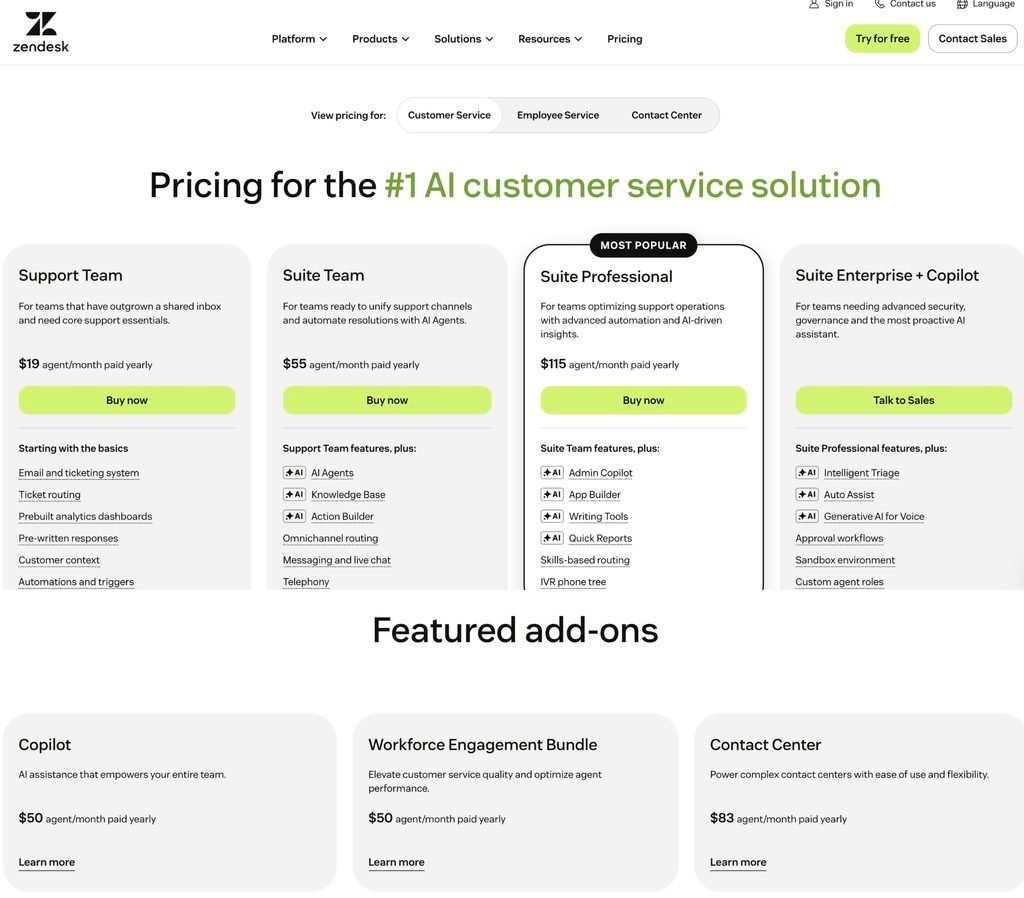
The AI meter, as the pricing page presents it. The comparison table that opens from the pricing page carries a row headed “Included automated resolutions (up to 10k per year)” showing 5 automated resolutions per agent per month on Support Team and Suite Team, and 10 on Suite Professional. Directly beneath it, two rows give the rate: Committed automated resolutions at $1.50 and Pay-as-you-go resolutions at $2.00, identical across the three plans.
The complication. Zendesk documents two resolution platforms. A support article titled for the platform prior to resolution tiers describes the allocation model above and states that customers on that platform remain there until they move to resolution tiers. A second article describes the resolution-tier platform introduced on 18 May 2026, under which an Assisted escalation and a Contained resolution do not draw on the allowance and only a Verified resolution does, each evaluated after a 72-hour window with no customer follow-up. That second article does not state an allowance figure.
The pricing page and its comparison table do not say which of the two platforms the figures describe, and the pricing FAQ links to the earlier article on both the US and Japanese pages. That is a routing observation, not an accusation: the destination article is applicable to unmigrated accounts and says so, and it carries a link for checking which version an account uses. What a prospective buyer cannot determine from the pricing surface is which cohort a new account joins. Put that question in writing before you model anything.
The one place a vendor here documents event-level evidence. Zendesk’s usage documentation states that tickets carry a Resolution type field, a Resolution tier field with values Assisted escalation, Contained resolution or Verified resolution, and a Channel group field with Digital and Voice values, and that these fields can be used in custom reports. The same article states that deleting a ticket with an automated resolution does not undo the consumption. For finance, the first half is the reconciliation path and the second half is the reason to reconcile.
Three more meters are easy to miss. The pricing FAQ states that App Builder, Action Builder and Voice are billed on consumption above plan allowances. The comparison table puts numbers on the first: custom workflows through Action builder run to 40,000 actions a month and 480,000 a year on the two Team tiers, and 100,000 a month and 1.2 million a year on Suite Professional, with Action credits listed as an add-on on all three. Quality Assurance requires the QA add-on on all three plans, and AI agents for voice require Zendesk voice.
Add-ons. Copilot, the Workforce Engagement Bundle and Contact Center are priced separately at $50, $50 and $83 per agent per month on annual billing.
Two dates. Zendesk announced on 23 June 2026 that AI agents Essential and legacy AI agent functionality enter maintenance mode on 31 August 2026, after which technical development stops except for critical bug fixes and support for breaking changes, and that the functionality is removed on 10 December 2026. The same notice says that because pricing is tied to outcomes, changes in the number of automated resolutions may affect overall usage and associated costs. Both modal verbs are the vendor’s own and both should be preserved.
Currency. The pricing FAQ states support for USD, EUR, GBP and BRL. The Japanese page carries the same statement and quotes the same US dollar figures, which means a Japanese buyer is quoted, invoiced and exposed to exchange movement in a currency the vendor does not localize. Zoho, by contrast, publishes yen price books for both its helpdesk and its AI platform.
Sources: Zendesk, accessed 23 August 2026 · Zendesk Japan, accessed 23 August 2026 · Zendesk Support, edited 19 August 2026 · Zendesk Support, accessed 22 August 2026 · Zendesk Support, accessed 23 August 2026 · Zendesk Support, 23 June 2026
Salesforce: two rate cards, twenty months apart
Salesforce publishes the most complete pricing documentation in this set and the least complete answer to the simplest question in it.
The consumption tracks. The pricing page shows three cards. Salesforce Foundations is $0. Flex Credits are $500 per 100,000 credits, described as pay per action. Conversations is described as pay per conversation and carries no dollar figure at all; instead the card reads that it is for existing Agentforce Conversations customers, who should contact their Account Executive.
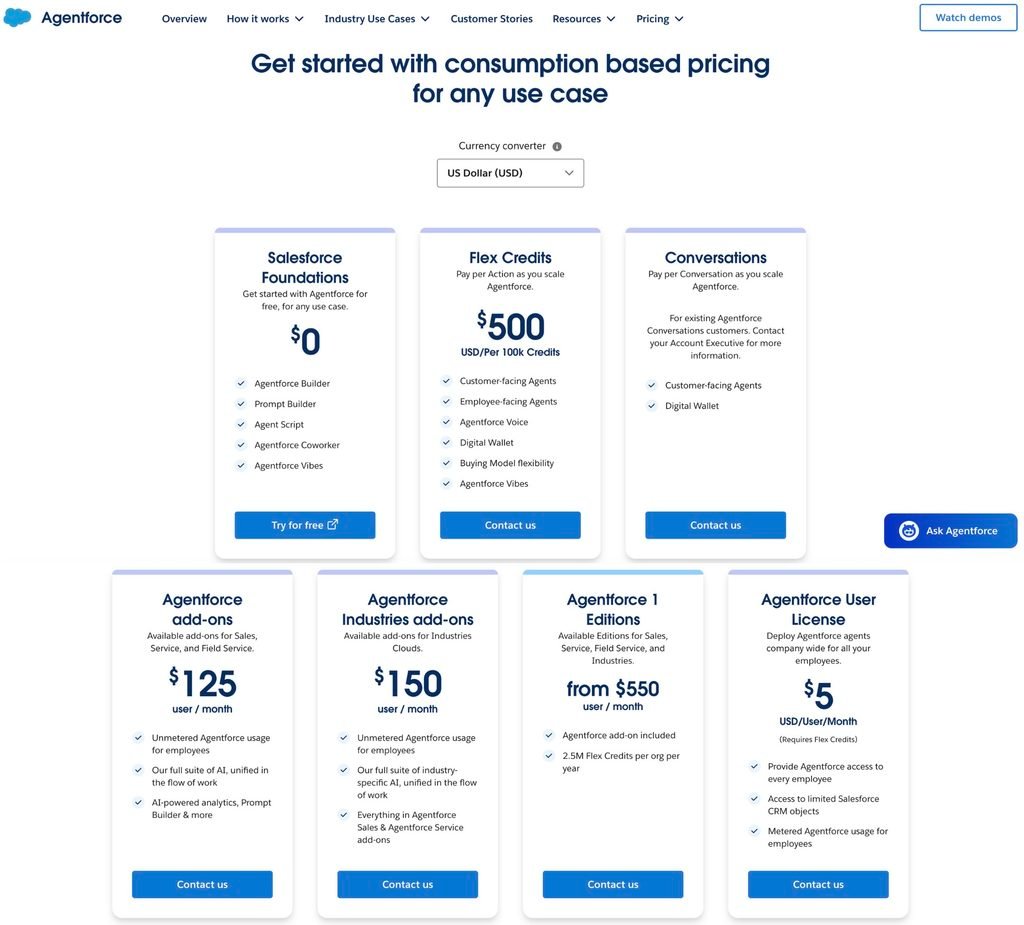
Per-user licensing runs alongside. Agentforce add-ons at $125 per user per month for Sales, Service and Field Service. Industries add-ons at $150. Agentforce 1 Editions from $550 per user per month, with the Agentforce add-on included and 2.5 million Flex Credits per org per year. An Agentforce User License at $5 per user per month, which the card notes requires Flex Credits.
Three buying models, three different exposures. Pre-Purchase buys a set amount of usage for the contract term, paid upfront, with usage drawing down from the balance. Pre-Commit commits to a baseline with no upfront payment, is billed monthly in arrears, and trues up at term end if usage falls below the commitment. PayGo has no upfront commitment and is billed monthly in arrears. The page notes that Pre-Commit is widely available later this year, so as of the access date one of the three is not yet generally available.
The rate cards are where the pricing actually lives. A button below the plan cards leads to a page headed Agentforce and Data 360 Rate Cards. It serves two PDFs, and the difference between them is the finding.
Two rate cards from one page
| Flex Credits Rate Card | Three pages. Multipliers for five product families. Printed line: updated as of 18 August 2026 |
| Agentforce Conversations Rate Card | One page. One usage type, at a multiplier of 1. Printed line: updated as of December 2024, with a 2024 copyright notice |
Neither document states a dollar price for a Conversation. The Conversations card describes a multiplier applied to an entitlement quantity set on the Order Form, and states that Conversations must be used before the Order End Date with no rollover permitted. If you are quoted on the Conversations track, the rate you pay does not appear in any public Salesforce document this briefing located.
What the Flex Credits Rate Card contains. Multipliers are given per usage type, separately for production and sandbox environments. Agentforce standard and custom actions consume 20 credits in production and 16 in sandbox. Standard and custom voice actions consume 30 and 24. Prompts consume 2, 4 or 16 depending on tier. Under Service, a Help Agent Resolution consumes 400 credits in production and 0 in sandbox. Under Speech Foundations, speech to text consumes 150 credits per hour of transcription, text to speech 6,000 per million characters, and translation 4,000 per million characters. Personalization decisioning consumes 100 credits per thousand decisions.
FSR arithmetic. At the pricing page’s own rate of $500 per 100,000 credits, one credit is $0.005. On that basis a standard action is $0.10, a voice action is $0.15, a Help Agent Resolution is $2.00, an hour of transcription is $0.75, and a million characters of text to speech is $30.00. These are conversions of published multipliers at a published credit price. They are not rates Salesforce prints, and a contracted account may buy credits at a negotiated price. Note in particular that the figure of two dollars, widely repeated as a per-conversation rate, matches a Help Agent Resolution on the Flex Credits track rather than anything on the Conversations track.
The largest multipliers are not in the Agentforce table. The Data 360 section of the same rate card uses volume-based tiers that reset on the first day of each calendar month, with a base tier up to 300,000 credits and three further tiers above it. At the base tier, Data 360 Unification consumes 75,000 credits per million rows processed and Data 360 Real-Time Pipeline consumes 250,000 credits per million combined events, API and actions. Against a standard action at 20 credits, those are roughly 3,750 and 12,500 times larger per billed unit. Every worked example on the pricing page carries a line saying it excludes Data 360 credits and other consumption services. The rate card is where you find out what that exclusion is worth, and the page that serves it is titled for Agentforce and Data 360 together.
A rate card with blanks. The Customer 360 Platform section lists two usage types, Salesforce Record Operation and Salesforce Process Invocation, and prints TBA in the multiplier column for both. The document also states that usage types, tiers and associated multipliers may be updated from time to time, and that changes to tiers will be treated as multiplier changes.
One page inconsistency, now explained. The pricing page publishes five worked examples. In Examples 1 through 4 the Flex Credit cost column recomputes correctly at $0.005 per credit: 40 credits at $0.20, 60 at $0.30, 100 at $0.50 and 20 at $0.10. Example 5 shows 120 Flex Credits with a Flex Credit cost of US$0.15. At the same rate, 120 credits are $0.60, and the row’s monthly total of US$180 for 36,000 credits recomputes correctly. The rate card independently confirms that a standard voice action is 30 credits, which at $0.005 is exactly $0.15. So the cell appears to show the cost of one voice action rather than the four-action use case. This is an inconsistency in a public worked example. It is not evidence about how Salesforce bills.
What an included allowance actually buys. Agentforce 1 Editions include 2.5 million Flex Credits per org per year. FSR arithmetic against the rate card: that is 125,000 standard actions, or 6,250 Help Agent Resolutions, for the whole organization for a whole year. A support operation resolving more than about 17 cases a day through the Help Agent would exhaust the annual inclusion of an edition that starts at $550 per user per month.
Currency. The pricing page carries a currency converter offering US dollar, Australian dollar, British pound, euro, Japanese yen and Swedish krona. Whether that reflects billing currency or display conversion is not stated on the page.
Counterparty note. On 15 June 2026 Salesforce announced a definitive agreement to acquire Fin, the company formerly named Intercom, for approximately $3.6 billion, with closing expected in the fourth quarter of Salesforce’s fiscal year 2027 subject to conditions and regulatory clearance. It is signed, not closed. A buyer concerned about vendor concentration should note the pending transaction while treating the products and contracts as separate until it completes.
Sources: Salesforce, accessed 23 August 2026 · Salesforce Agentforce & Data 360 Rate Cards, accessed 23 August 2026 · Salesforce, 15 June 2026 · Intercom Blog, 15 June 2026
Gorgias: ticket fee and automation fee
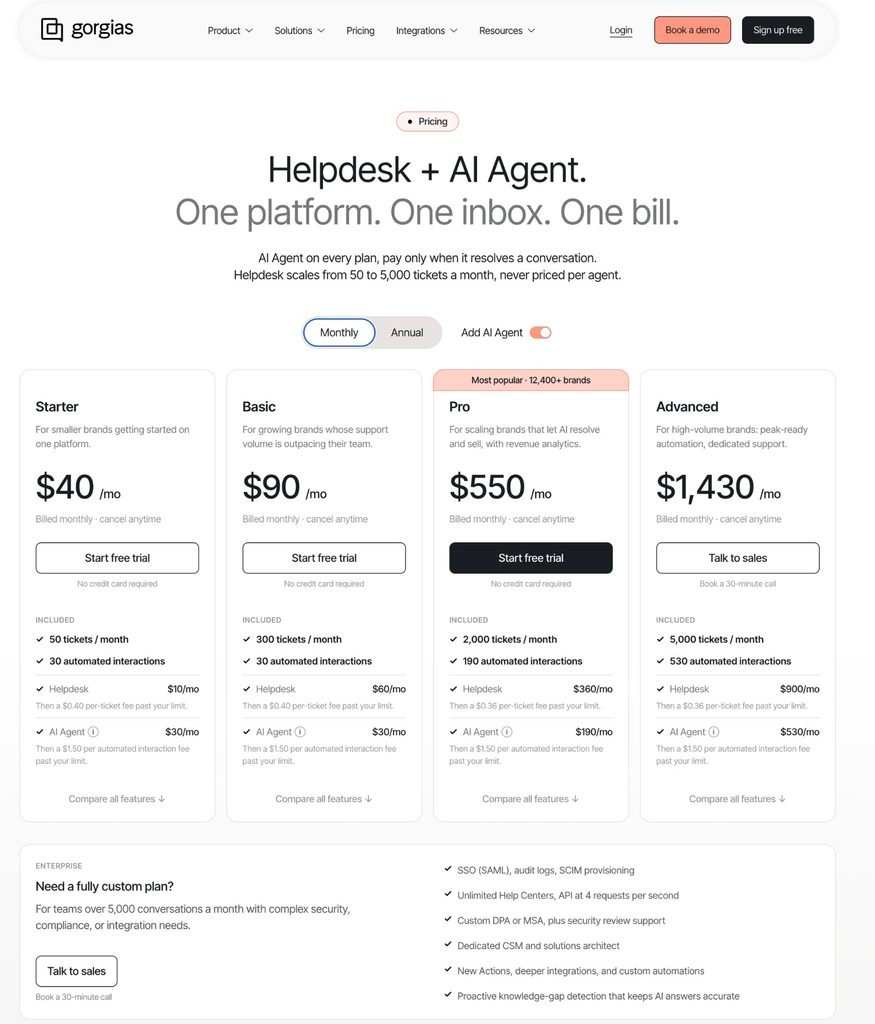
Gorgias prices by ticket volume rather than seats, and it prints the AI line separately from the helpdesk line on every card once the Add AI Agent toggle is on.
| Plan | Displayed monthly price | Included | Helpdesk line | AI Agent line |
|---|---|---|---|---|
| Starter | $40, monthly billing only | 50 tickets, 30 automated interactions | $10, then $0.40 per ticket | $30, then $1.50 per interaction |
| Basic | $77, $924 billed annually | 300 tickets, 30 automated interactions | $50, then $0.40 per ticket | $27, then $1.50 per interaction |
| Pro | $471, $5,652 billed annually | 2,000 tickets, 190 automated interactions | $300, then $0.36 per ticket | $171, then $1.50 per interaction |
| Advanced | $1,227, $14,724 billed annually | 5,000 tickets, 530 automated interactions | $750, then $0.36 per ticket | $477, then $1.50 per interaction |
Captured with the Annual toggle selected and Add AI Agent enabled on 23 August 2026. The page renders different figures on the Monthly toggle and with the AI Agent toggle off. Archive the toggle state alongside any quote.
FSR arithmetic · implied in-bundle rate
| Starter | $30 ÷ 30 interactions = $1.00 |
| Basic | $27 ÷ 30 = $0.90 |
| Pro | $171 ÷ 190 = $0.90 |
| Advanced | $477 ÷ 530 = $0.90 |
| Published overage | $1.50 on every tier |
This is a division inside a bundled annual price, not a marginal rate published by Gorgias, and it should not be used as a contracted unit price. It is useful for one purpose: on the three tiers above Starter, the published overage sits about 67 percent above the implied in-bundle rate, which is where the negotiation is.
The dual-meter rule and the non-AI automation fee are set out in section 07 and are the reason a Gorgias forecast cannot be built from ticket volume alone.
Enterprise limits worth reading before a migration. The Enterprise card lists SSO with SAML, audit logs, SCIM provisioning, unlimited Help Centers, an API at 4 requests per second, and a custom DPA or MSA. That API ceiling constrains one component of migration throughput; export format, attachments, transformations, retries and implementation capacity also affect elapsed time.
Sources: Gorgias, accessed 23 August 2026 · Gorgias Help Center, accessed 22 August 2026
Crisp: workspace pricing and Hugo
| Plan | Price per month, per workspace | Seats included | AI credits included | Customer profiles |
|---|---|---|---|---|
| Free | $0 | 2 | None | 100 |
| Mini | $45 | 4 | $5 | 5,000 |
| Essentials | $95 | 10 | $25 | 50,000 |
| Plus | $295 | 20 or more | $75 | 200,000 |
Additional agents are $10 a month. Enterprise is custom. A 14-day trial covers all features.
Figures as displayed on the plan comparison table on 23 August 2026, in US dollars, on the monthly view. Crisp’s help center confirms the same credit amounts by plan.
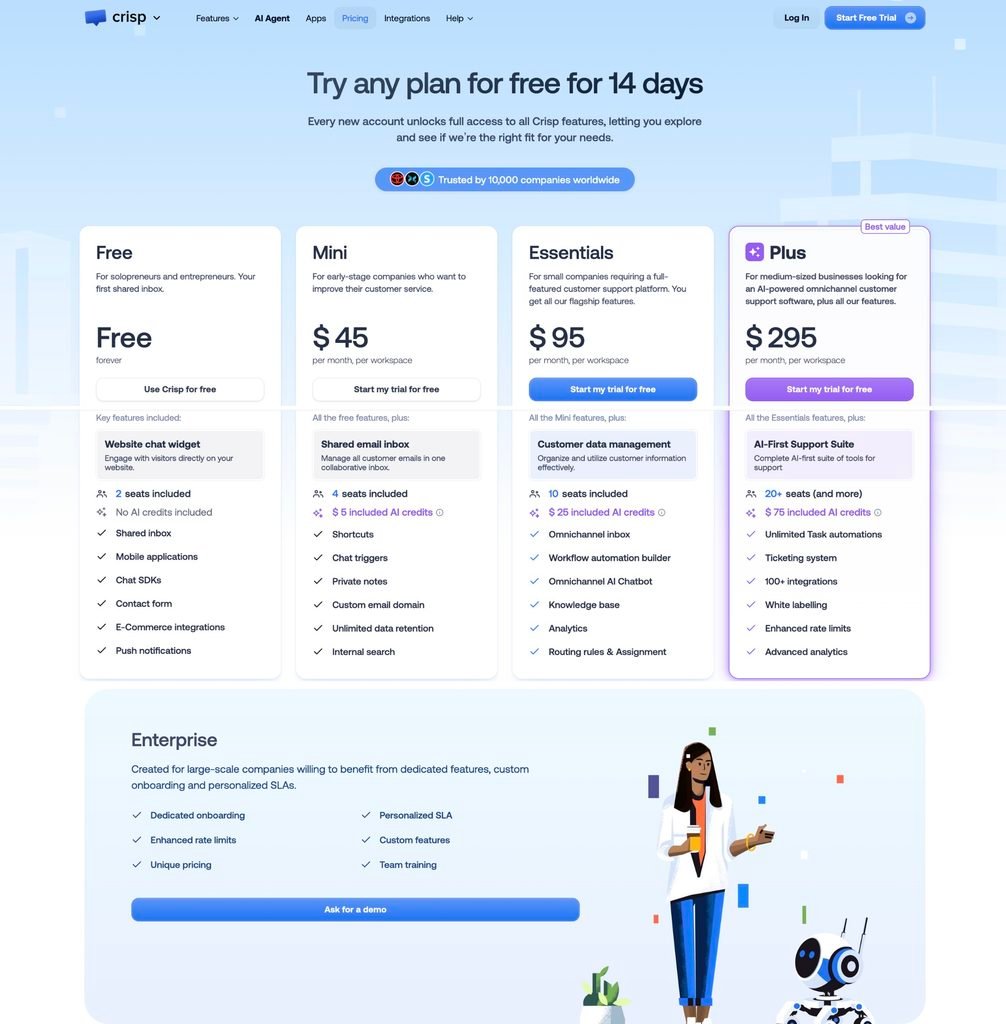
The base subscription does not scale with conversation volume. Pricing is per workspace, not per seat, the comparison table carries an Unlimited conversations row, and the page states you pay a single consistent price regardless of how many conversations you have each month. Seats, AI credits and enterprise terms still vary by plan, so the fixed layer is the workspace subscription rather than the whole bill.
The AI meter is token-based, and Crisp says what that means. The help center states that a Hugo conversation is not billed per message; it covers the exchange from the first AI-handled message until the conversation is resolved, routed or escalated. Usage varies with message length, conversation depth, knowledge size, language, model choice and the number of Hugo replies. Crisp gives an average of roughly $0.05 to $0.10 per full Hugo-handled conversation and describes it as an estimate rather than a rate.
What happens at zero. By default, once included credits are consumed, Hugo stops answering and incoming conversations escalate to human operators until credits are available again. To continue, a buyer enables Pay-As-You-Go from AI Agent, Billing, Pay As You Go, and sets billing limits. Of the eight products here, this is the clearest published version of the choice: safe by default, opt in to continue, with a ceiling you set.
Two conditions on that control. Crisp states that Pay-As-You-Go may remain unavailable while a workspace is in a trial period, and separately that trial, testing, training and Playground usage all consume credits. A team evaluating Crisp on a trial can therefore exhaust its credits and have no documented way to continue until the trial ends. Plan the evaluation around that.
Credits reset on the fourth. The help center states that credits reset every billing cycle, currently on the fourth of the month, and a separate article states that unused monthly credits do not roll over. Any budget model built on calendar months will be off by three days.
One meter you can route around. Crisp states that workflows are not billed as Hugo usage and do not consume Hugo credits. Deterministic paths can therefore be moved off the AI meter deliberately.
Model choice, region and provenance. Hugo supports model families from OpenAI, Anthropic, Google and Mistral, plus a Crisp-hosted option, with the auto-selected model named on the settings page. A Region setting offers Default or European Union processing where the selected model supports it, and a Crisp-hosted fallback model can be enabled for provider outages. Crisp also states plainly that you cannot connect your own model or an external provider API key; the selection is curated. Of the products in this briefing, that makes Crisp the one that publishes the most about which model answers your customers and the one that gives you the least control over sourcing it.
Two operational limits. Website crawling is capped at 2,000 pages per domain on Essentials and Plus. And Crisp states that Hugo is not trained on other conversations in your inbox; it uses the resources you provide plus the current conversation context.
The annual price is not on the pricing page. Crisp’s pricing FAQ states that yearly payment mode is enabled inside the Crisp app after you have subscribed, and a help center article describes the same switch from Settings, Billing Settings, Plans and Subscriptions, with the workspace billed for the full year at the next renewal. Every figure above is a monthly figure, and any annual discount is not published where a buyer comparing vendors would encounter it. Wire transfer is listed as a payment method for eligible yearly plans only.
Discounts are plan-gated. Startup and non-profit programs are described as available on Essentials and Plus only and are reviewed manually. Discount codes are described as applicable to Essentials and Plus and not to Mini.
Region. The comparison table lists EU-Hosted and a Data Processing Agreement under Data and Security, and the model settings add a per-model EU processing option. For a buyer with an EU residency requirement, those two rows do more work than any price on the page.
Sources: Crisp, accessed 23 August 2026 · Crisp Knowledge Base, accessed 23 August 2026 · Crisp Knowledge Base, updated 4 May 2026 · Crisp Knowledge Base, updated 27 July 2026 · Crisp Knowledge Base, accessed 23 August 2026
Tidio: three quotas and a calculator
Tidio runs three quotas in parallel and publishes a calculator that adds them together.
The three quotas. Billable conversations, Lyro AI conversations, and visitors reached with Flows. Each has its own slider and its own price. Starter is $24.17 a month with 100 billable conversations. Growth starts at $49.17 from 250. Plus starts at $300 a month plus monthly usage. Premium is contact-priced. Self-serve plans carry 10 seats.
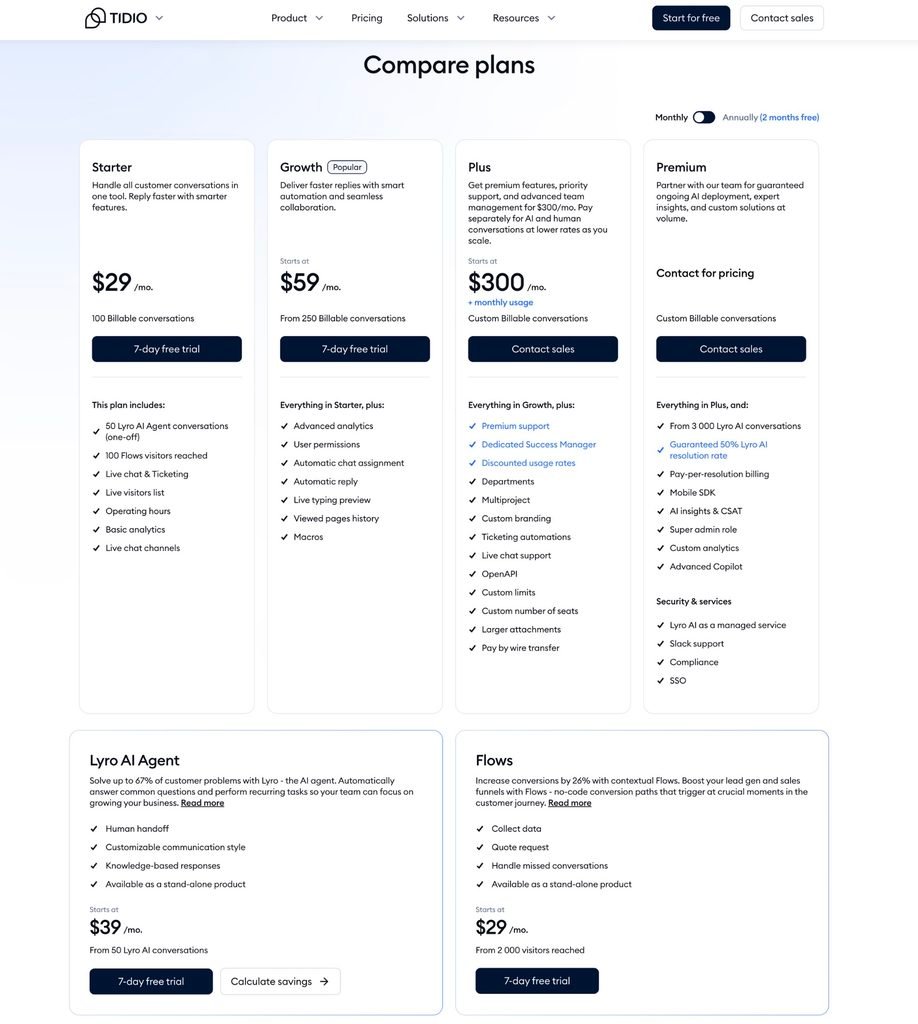
The definitions are the clearest in this set. A billable conversation is any live chat, ticket, email or social channel conversation that includes a message from a human agent, and Tidio states that responses from Flows and the Lyro AI Agent are not counted as agent replies. A Lyro conversation is a customer interaction with at least one reply from the AI agent.
What follows, stated narrowly. An AI-only interaction does not consume the human-agent quota. A thread that later receives a human reply can meet both definitions and consume both. The quotas are separate, not mutually exclusive.
The calculator shows the distance between the headline and the bill. With the sliders at 800 billable conversations, 100 Lyro AI conversations and 10,000 Flows visitors, the page returns a Growth Plan at $132.50, Lyro AI Agent at $62.50 and Flows at $57.50. FSR arithmetic: those three lines sum to the $252.50 total the page displays. The Growth card on the same page reads “Starts at $49.17.” The two figures describe different quantities. The card shows the entry package at 250 billable conversations; the calculator total reflects the selected workload across three quotas.
Reset is not calendar-based. Tidio states that the Lyro limit refreshes 30 days from the moment you make the payment. Free and Starter include 50 Lyro conversations as a one-off rather than a monthly allowance.
Where limits appear. Custom limits are listed as a feature of Plus and Premium. Premium adds pay-per-resolution billing and a guaranteed 50 percent Lyro AI resolution rate. Standard-plan behavior at a quota limit is not stated on the pricing page and is the question to put to Tidio in writing.
Sources: Tidio, accessed 23 August 2026
Chatwoot: cloud or your own servers
Chatwoot describes itself in its own footer as an alternative to Intercom and Zendesk, and it is the only option here that can run on hardware you control.
Cloud. Hacker is $0 for up to 2 agents, with 500 conversations a month, live chat only, no Captain AI and 30 days of retention. Startups is $19 per agent per month billed annually with 300 Captain AI credits and 1 year of retention. Business is $39 with 500 credits and 2 years. Enterprise is $99 with 800 credits and 3 years. Additional credits are $20 per 1,000. Conversations on paid tiers are marked unlimited with a footnote that unlimited usage is subject to the fair use policy.
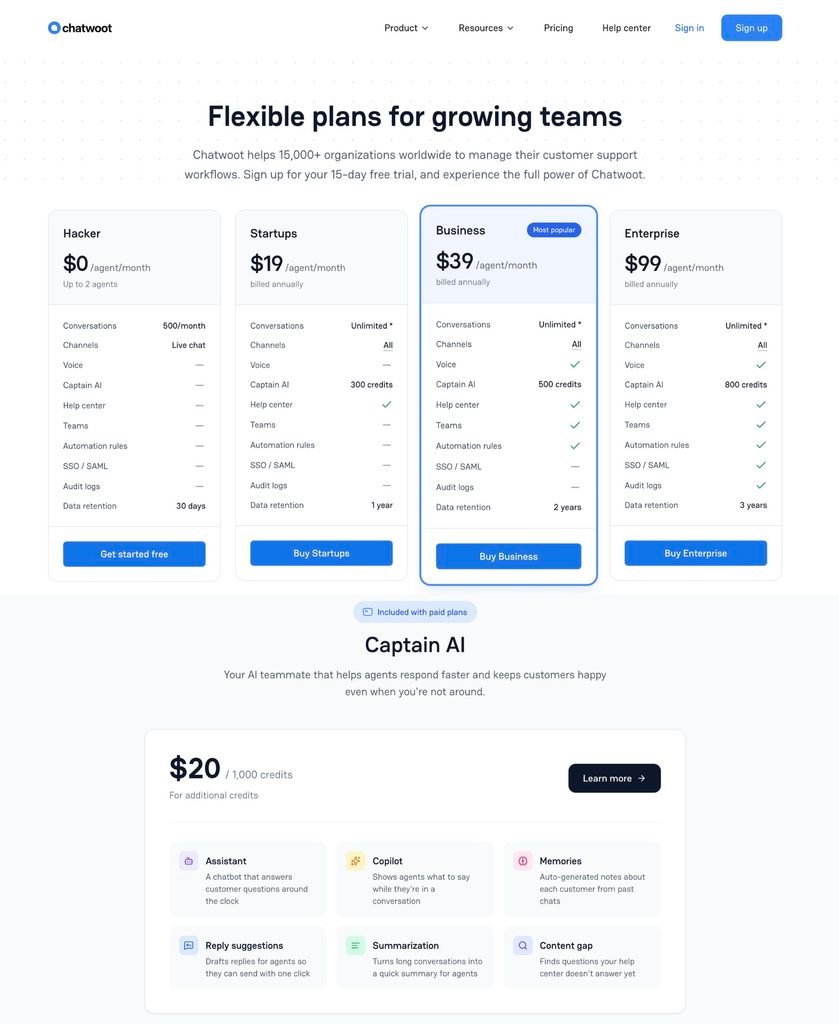
What consumes a credit. The credits guide lists assistant responses, Copilot lookups, editor actions such as rephrase, summarise and suggest a reply, label suggestions, any workflow or automation that triggers a model call, and audio transcription. It states that all actions currently consume one credit per message because a single fixed model configuration is supported, and that this will change as more model options are added. The article carries a stated update date of 10 December 2025, so confirm the current rate in the product rather than treating that line as durable.
What the monthly allowance actually is. This is the part most likely to be misread, and Chatwoot spells it out. The monthly free credits are not added to your balance each month. They are a threshold. At renewal, if the month’s usage was below the free allowance, nothing is deducted and usage resets to zero. If usage exceeded the allowance, the excess is deducted from your total credit balance. The guide’s own example: a balance of 1,500 credits, usage of 600, a free allowance of 500, giving an overage of 100 and a new balance of 1,400.
Two consequences of that design
| Unused allowance is lost | A month spent below the free allowance leaves the balance unchanged rather than larger. Light months do not bank credit for heavy ones |
| A downgrade reduces the balance | The guide states that moving from Business to Startups decreases total credits by 200, the difference in monthly free allowance. It does not say whether credits you purchased are exempt from that adjustment |
The second point is the one to raise in writing, because the pricing page separately states that Captain AI credits are non-refundable. Whether a downgrade can reduce a balance you paid for is not settled by either document.
What else does and does not reset. Usage resets to zero only at monthly renewal. It does not reset on a top-up, a plan change, or a change in seat count, so a mid-cycle top-up does not restart the usage clock.
What happens at zero. The guide describes a credit failure: the action is not executed, any available fallback runs, and the example given is transferring the conversation directly to an agent. It adds that the failed action is logged internally for audit, which is the only statement in this briefing from any vendor that failed AI events are recorded at all.
Self-hosted. Community Edition is free forever and hosts on your infrastructure. On the self-hosted comparison table, Community Edition shows a dash against Captain AI, voice calls, custom branding, agent capacity, roles and permissions, SSO and SAML, SLA policies, and priority support. Premium Support at $19 per agent per month billed annually enables Captain AI, voice calls, custom branding, agent capacity, roles and permissions, and priority support, while still showing a dash against SSO and SLA policies. Enterprise Edition at $99 per agent per month carries everything, with a dedicated account manager and video or voice support available for subscriptions with 20 or more agents on annual contracts.
The free-plus-AI combination is not on the page. If the reason to self-host is free AI support, that configuration does not appear in the self-hosted plan table. Captain AI requires a paid self-hosted tier, and the credit rules described above are documented for the cloud product.
Two facts that decide some shortlists before price does. Chatwoot states that Chatwoot Cloud runs on AWS with servers located in the United States. And refund terms are asymmetric: cloud plans are refunded pro rata on cancellation date, Captain AI credits are non-refundable because they are usage-based, self-hosted Premium Support is refundable on time remaining, and self-hosted Enterprise plans are not refundable because they include dedicated setup and onboarding.
What it takes to run. The self-hosted FAQ states a Linux server with PostgreSQL and Redis, S3 or S3-compatible storage for file uploads, and at least 4 GB of RAM and 2 CPU cores for production. Captain AI connects to OpenAI’s GPT models. Eligible open source projects and nonprofits can request the Startups plan without charge by email.
Sources: Chatwoot User Guide, updated 10 December 2025 · Chatwoot, accessed 23 August 2026 · Chatwoot, accessed 23 August 2026
Zoho Desk: free agents, metered models
Zoho splits the bill in a way none of the others do, and it says so on the face of the page. The agent platform is free. The model that powers the agent is metered. Both statements are on the same screen, and only the second one scales with your volume.
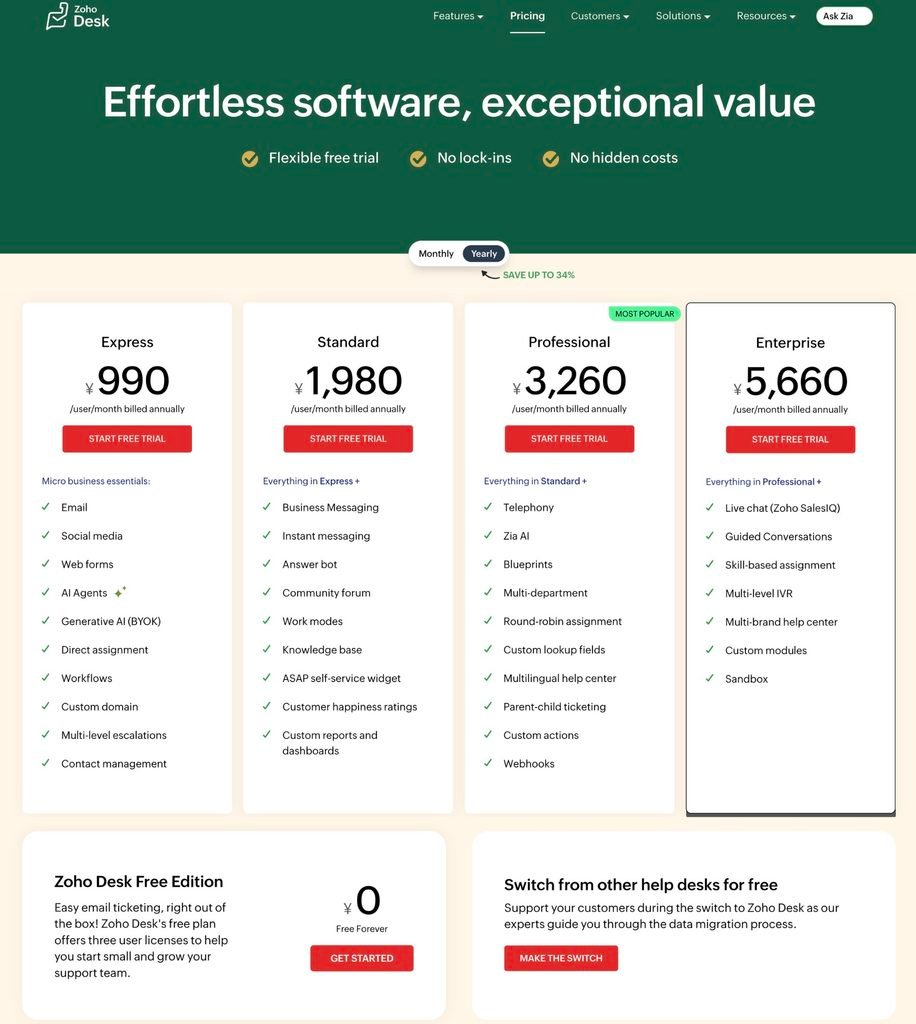
Seats, from the Japanese price book. Express is ¥990 per user per month billed annually, Standard ¥1,980, Professional ¥3,260 and Enterprise ¥5,660. A Free edition covers three user licenses. The page states that applicable local taxes will be charged, and that annual billing saves up to 34 percent against monthly. Light users cost ¥850 per light agent per month on Professional and Enterprise, with Enterprise including 50 free light users.
Where the AI sits in the helpdesk plans. AI Agents and generative AI with bring-your-own-key appear at Express, the entry paid tier. Answer bot appears at Standard. Zia AI appears at Professional. Live chat through Zoho SalesIQ and Guided Conversations appear at Enterprise. A good deal of third-party writing places both Zia and the Answer bot at Enterprise only; the vendor’s own page for this region does not.
The AI platform is free. The tokens are not. The Zia Agents pricing page leads with a zero and states that you pay only for LLM usage, with Zoho-hosted models free up to 30 million tokens a month and external models charged at vendor-set prices. Below that, the same page prints the meter.
| Standard tier | Pro tier | |
|---|---|---|
| Models | Qwen 14B, Qwen 3.5 35B MoE, GLM 4.7 Flash | GLM 5 |
| Free tokens | 30 million per month | 20 million per month |
| Over-limit charge | ¥140 per 1 million tokens | ¥420 per 1 million tokens |
| Credit consumption | 1 credit per 1,000 tokens | 3 credits per 1,000 tokens |
Captured from the Japanese Zia Agents pricing page on 23 August 2026. The page states that the Pro tier is available on request in the US and India data centers only, and that local taxes such as VAT and GST are charged in addition. Zoho publishes separate regional price books; confirm the figures for your own region and currency.
FSR arithmetic · what the Zoho figures imply
| One credit is worth the same on both tiers | Standard: 1M tokens is 1,000 credits at ¥140. Pro: 1M tokens is 3,000 credits at ¥420. Both work out to ¥0.14 per credit |
| The Pro tier costs three times as much per token | ¥420 against ¥140 for the same million tokens |
| The free allowance is worth more on Pro despite being smaller | 30 million Standard tokens is ¥4,200 of value. 20 million Pro tokens is ¥8,400 |
| The signup credit converts cleanly | The page offers ¥700 of credits at signup, which buys 5 million Standard-tier tokens or about 1.67 million Pro-tier tokens |
These are conversions of figures printed on the page, not rates Zoho states. Converting tokens into support conversations still requires a sample of your own answers, because token count depends on message length, context and model.
Two ways to bring a model, and they are not equivalent. Bring Your Own Key lets you obtain an API key from your preferred vendor and connect it; Zoho charges nothing on its side and your vendor bills you directly. The Zoho Key System gives you a managed connection through Zoho’s own vendor partnerships, billed at the vendor’s standard token rates with no Zoho platform fee and settled through the Agent Wallet. The difference that matters: the page states that the key system currently supports OpenAI, while its FAQ names OpenAI, Gemini and Claude as models you can connect with your own key. If you want Claude or Gemini through Zoho’s managed billing, that is not the documented path.
The control. Usage past the free allowance draws on a prepaid Agent Wallet with credits you load and reload, so spend is bounded by the balance rather than by a setting you have to remember. Free token limits for Zoho-hosted models reset on the first of each month. What the agent does once the wallet reaches zero is not stated on the page, and it is the question to establish before relying on the wallet as a ceiling.
One boundary on the word free. The same page states that while creating and deploying agents is free, API access is restricted to the service subscription you hold, and directs buyers to check the API charges of the apps the agent works alongside. The agent is free; the calls it makes into your other systems are governed by whatever you already pay for those systems.
Two calculators, not run here. The pricing page carries interactive calculators for both the key system and bring-your-own-key paths, with eight use cases each including support ticket resolution. FSR did not run them, and the page labels every output an estimate.
Sources: Zoho Zia Agents, accessed 23 August 2026 · Zoho Desk, Japanese price book, accessed 23 August 2026
Replacement scope: what each covers
A cheaper meter on a product that replaces less of the work is not cheaper. This table records what the pages read established about replacement scope. It is not a feature inventory and it is not complete.
| Product | Priced by | Native channels named on the page | Self-host | Notable plan gates |
|---|---|---|---|---|
| Intercom | Seat, plus usage | Live chat, email, in-app, phone, SMS, WhatsApp, Messenger | No | SSO, HIPAA and SLAs on Expert; Lite seats free on Advanced and Expert |
| Zendesk Suite | Seat, plus usage | Email, messaging and live chat, telephony, social and business channels | No | SLAs, skills-based routing, light agents, HIPAA and data center location on Professional; sandbox as an add-on |
| Salesforce Agentforce | Action or user | Not established in this pass; Service Cloud scope was not captured | No | Agentforce User License requires Flex Credits; Pre-Commit not yet widely available |
| Gorgias | Ticket volume, never per agent | Email, chat, social, voice and SMS as named on the plan cards | No | SSO with SAML, audit logs and SCIM on Enterprise; API at 4 requests per second |
| Zoho Desk | Seat, plus token usage | Email, social, web forms, instant messaging, telephony, live chat at Enterprise | No | Answer bot at Standard, Zia AI at Professional, SalesIQ live chat and sandbox at Enterprise; light users on Professional and above; Zia Agents Pro model tier in US and India data centers only |
| Crisp | Workspace | Chat, contact form, email, Telegram, Messenger, X, Instagram, SMS, Viber, phone, LINE, WhatsApp Business | No | Ticketing, white label and 100 plus integrations on Plus; EU-hosted; startup and discount programs on Essentials and Plus only |
| Tidio | Three quotas | Live chat, ticketing, email, social, live video calls | No | SSO and compliance on Premium; departments and OpenAPI on Plus |
| Chatwoot | Agent seat | Live chat on Hacker, all channels on paid tiers, voice | Yes | Captain AI on paid tiers only, cloud and self-hosted alike; SSO and SAML on Enterprise only |
Compiled from the pricing and comparison pages listed in the Methodology, 22 and 23 August 2026. The Salesforce cell is marked not established because this pass captured the Agentforce pricing surface and not the Service Cloud product page. Migration effort, historical data export, reporting continuity, integration replacement and implementation labor are outside the scope of any document-first briefing and are not represented here.
Sources: Intercom, accessed 23 August 2026 · Zendesk, accessed 23 August 2026 · Salesforce, accessed 23 August 2026 · Gorgias, accessed 23 August 2026 · Zoho Desk, accessed 23 August 2026 · Zoho Zia Agents, accessed 23 August 2026 · Crisp, accessed 23 August 2026 · Tidio, accessed 23 August 2026 · Chatwoot, accessed 23 August 2026
Run one month through each rule
The units are not equivalent, so a headline-rate comparison cannot produce an answer. A workload replay can, and the work is mechanical.
Take one historical month of your own conversations. For each conversation, record nine fields.
- Channel: chat, email, social, voice
- Whether the AI delivered a substantive answer rather than a greeting or a clarifying question
- Whether the customer explicitly asked for a person
- Whether a teammate was assigned or joined without the customer asking
- Whether the customer came back within 72 hours, and separately after 72 hours on the same thread
- Whether an automation other than the AI agent closed it, such as a flow, an order action or a help article marked useful
- Whether the conversation was outbound, and whether the customer replied
- For voice, whether the call was answered
- How many agent-facing AI actions the thread consumed: copilot questions, rephrases, summaries, label suggestions, transcriptions
For a token-metered product, add input and output token counts from a representative sample of your real answers, measured on the model tier available in your region. For a credit-metered platform, add the data operations each answer triggers, because those can carry multipliers several thousand times larger than the answer itself. For any product where a deterministic workflow is free and an AI answer is not, record which of your current flows could be moved off the meter, and confirm whether a workflow that calls a model still counts.
Then build cost in four layers rather than three.
Four layers
| Fixed platform | Base subscription at the seat or ticket count you will actually hold, seat minimums, light-user seats, required onboarding, per-seat AI add-ons, local taxes, and the annual versus monthly difference |
| Variable AI | Billable events from your own month multiplied by the contracted rate, plus any second meter that fires on the same thread, plus any meter that fires on a non-AI automation, plus agent-facing AI actions, plus any data or platform usage type the answer triggers, plus API charges on the systems the agent calls into |
| Human fallback | The staffing cost of the contacts that reach people if a cap engages or the AI declines to answer, priced at your loaded hourly cost and your peak-hour coverage |
| Control and reconciliation | What kind of object the allowance is, whether it expires, the reset date if it is not the first of the month, overage rate, whether spend stops or the commitment grows, what a mid-term plan change does to a balance, any true-up below a committed baseline, reversal rules, and whether you can retrieve the events behind the invoice |
Report effective cost per 1,000 inbound conversations rather than price per resolution. Then move four assumptions and check whether the ranking survives: repeat-contact rate, human-assignment rate, automation share, and answer length. A product can be cheapest in the expected case and most expensive when one of those moves, and that result is the useful output of the exercise.
The procurement gate. Before signature, require the controlling commercial document to state the exact billable event, the inactivity or reopen window, whether a human handoff reverses or preserves the AI unit, whether one thread can consume more than one meter or more than one credit type, whether agent-facing AI actions are metered, what kind of object the allowance is and whether it expires or resets, the reset date, the default behavior at exhaustion, every configurable cap or automatic upgrade setting, the overage or next-tier rate, what a mid-term plan change does to a purchased balance, any true-up obligation below a committed baseline, what stops when spend stops, and whether charged events can be exported and disputed. For a self-serve purchase there is no order form, so capture the pricing page and the checkout state on the day you buy, set whatever usage limit the product offers, and reconcile the first invoice against the underlying conversation list.
Source: method built from the billing definitions cited in sections 02 and 08 to 14. No vendor endorses this model, and no part of it has been tested against an account.
Questions buyers ask
Can I keep Fin and replace only the Intercom helpdesk?
Fin’s pricing page sells the AI agent with no seats required for use with a current helpdesk, and names Salesforce, HubSpot, Freshworks, Dixa, Front, Zoho, Sprinklr and Gorgias among supported platforms. That path routes to Contact sales and carries a 50-outcome monthly minimum, so treat it as a new procurement rather than a transfer of your existing terms.
What happens when the AI credits run out?
It depends on the product, and the answer is rarely on the pricing page. Crisp stops Hugo by default and escalates conversations to human operators. Chatwoot’s guide describes a failed action with any configured fallback running, such as transfer to an agent. Intercom’s Pro cap ends metering without disabling Fin. For the rest, section 05 names the page to open.
Is a free AI agent really free?
Zoho’s Zia Agents platform is free and the page says so accurately, but the language model is metered and the free token allowance is capped per month. The same page adds that API access to the apps the agent works alongside is bounded by the subscriptions you already hold. The agent is free; the work it does is not.
Does a monthly allowance mean the same thing everywhere?
No. Zendesk’s allocation expires annually and is capped at 10,000 per year. Zoho and Crisp reset monthly with no rollover. Salesforce requires use before the Order End Date. Chatwoot’s free credits are a usage threshold rather than a grant, and only overage above it draws on your balance. Read the definition, not the number.
Can changing plans reduce credits I already paid for?
On Chatwoot this is an open question. The credits guide states that downgrading from Business to Startups decreases total credits by 200, the difference in monthly free allowance, and does not say whether purchased credits are exempt. The pricing page separately states that Captain AI credits are non-refundable. Ask before you buy a large top-up.
What does Agentforce cost per conversation?
Neither Salesforce’s pricing page nor its Conversations Rate Card states a dollar figure. The card gives a multiplier of 1 against an entitlement set on the Order Form. On the Flex Credits track, a Help Agent Resolution consumes 400 credits, which at the published credit price is $2.00. That is a different unit on a different track.
Is a hard cap always the safer choice?
No. A cap ends the AI charge but not the contacts, which then reach human agents during the traffic spike that triggered it. And on a committed baseline such as Salesforce Pre-Commit, using less than you committed triggers a true-up at term end. Price the floor and the ceiling before choosing.
Can one customer thread consume two billing units?
Gorgias states that an automation fee and a ticket fee may apply to the same ticket when it is entirely resolved by AI Agent without human intervention. Salesforce states that certain features may also consume Einstein Requests and Data Services Credits. Chatwoot meters agent-facing actions such as copilot lookups and summaries alongside customer-facing replies.
Where is Zendesk’s per-resolution rate published?
In the plan comparison table that opens from the pricing page, in rows headed Committed automated resolutions at $1.50 and Pay-as-you-go resolutions at $2.00. It is not printed on the four plan cards. The same table does not state which of Zendesk’s two documented resolution platforms those figures describe.
Can I bring my own model API key?
Zoho lets you connect your own key for OpenAI, Gemini or Claude at no charge on its side, and offers a managed connection that its page says currently supports OpenAI. Crisp states the opposite plainly: its model list is curated and you cannot connect an external provider key. For the other products, this was not established in this pass.
Which bill in a currency other than US dollars?
Zoho publishes Japanese price books in yen for both the helpdesk and the AI platform, and states that local taxes are charged in addition. Salesforce’s pricing page offers a converter with six currencies including yen. Zendesk states support for four currencies not including yen, and its Japanese page quotes US dollars. Intercom states billing in US dollars only.
Does data residency change the shortlist?
For some buyers it decides it. Chatwoot states that its cloud runs on AWS with servers in the United States. Crisp lists EU-Hosted and offers a per-model European Union processing region. Intercom’s Pro add-on is available only in the US, EU and AU regions. Zoho’s Pro model tier is available on request in its US and India data centers only. Check residency before checking price.
What should appear in the order form?
The exact billable event, the inactivity and reopen window, whether human handoff reverses the AI unit, whether one thread can consume more than one meter, whether agent-facing AI actions are metered, what kind of object the allowance is and when it resets, the default at exhaustion, every cap setting, the overage rate, what a plan change does to a purchased balance, and whether charged events can be exported and disputed.
Methodology
This is a Tier C briefing: built from primary documents, with no account, no purchase, no invoice, no dashboard access, and no product testing on any product named here. Tier describes evidence depth, not product quality.
What was opened and read. Every source cited in this briefing was opened and read directly. No figure rests on a search-result summary. The list: the Intercom pricing page; the Fin pricing and guarantee pages; the Intercom help center articles on the Pro add-on and on Copilot included and unlimited usage; the Zendesk pricing page in English and Japanese, including the plan comparison table opened from it; the Zendesk support articles on the automated resolutions platform prior to resolution tiers, on managing and monitoring usage on that platform, on automated resolution tiers, and the removal notice for AI agents Essential and legacy functionality; the Salesforce Agentforce pricing page including its three Buying Models tabs and its currency converter, the Agentforce and Data 360 Rate Cards page, and the two PDFs it serves; the Gorgias pricing page and its billing and legacy-pricing help articles; the Crisp pricing page including its expanded FAQ, four Crisp help center articles covering Hugo pricing and billing, troubleshooting, model configuration and the billing category index, and the Crisp Intercom migration guide; the Tidio pricing page and calculator; the Chatwoot cloud and self-hosted pricing pages and the Chatwoot user guide article on how AI credits work in Captain; and the Zoho Desk and Zia Agents pricing pages.
What was not opened. The Zendesk account-version check linked from each pre-tier article. The Salesforce Help pages on usage types and Voice Minutes linked from the rate card. The two Zoho Zia Agents calculators, whose outputs the page labels as estimates. Section 05 lists these as open questions rather than absences.
Page state. Several pages render differently depending on a toggle. Gorgias figures were captured with Annual selected and Add AI Agent enabled. Intercom seat figures were captured with Billed annually selected. Salesforce figures were captured with US Dollar selected. Zendesk figures include both annual and monthly columns as printed in the comparison table. Tidio figures were captured from the plan cards and from the calculator at the slider positions stated in section 12. Zoho figures were captured from the Japanese price books. Region, currency selection and toggle state change these numbers; check the state of the page you are reading.
Document versions. The Salesforce Flex Credits Rate Card carries the printed line “Updated as of August 18, 2026.” The Agentforce Conversations Rate Card carries “Updated as of December 2024” and a 2024 copyright notice. The Chatwoot credits guide carries a stated update date of 10 December 2025 and includes a line saying the one-credit-per-message rule will change as more model options are supported. Rate cards and help articles are versioned documents; the version that governs an account is the one referenced by that account’s order form or in force at the time of use.
Claim discipline. Wording of the form “not stated on the pages read” is a statement about those sources on those dates. It is not a statement that a product lacks a capability or that no published answer exists. Where the two could be confused, section 05 names the specific page a reader should open next.
Arithmetic. Calculations labeled FSR arithmetic are conversions of published figures, not vendor-published rates. They are: the Gorgias implied in-bundle rate and its ratio to the published overage; the conversion of Salesforce rate card multipliers at the pricing page’s stated credit price; the recomputation of Salesforce’s five worked examples; the conversion of the Agentforce 1 Editions annual credit inclusion into standard actions and Help Agent Resolutions; the sum of the three Tidio calculator lines; and the four Zoho conversions in section 14. The Chatwoot balance example in section 13 is the vendor’s own worked example, not FSR arithmetic.
A figure this briefing could not locate. A price of two US dollars per Agentforce conversation is widely reported. FSR did not locate it on the Agentforce pricing page or in either rate card. The Flex Credits Rate Card does assign 400 credits to a Help Agent Resolution, which at the pricing page’s stated credit price is $2.00. That is a different unit on a different track. Confirm any conversation rate against your own quote.
A correction made during research. An earlier draft recorded the Crisp pricing FAQ item headed “Will I pay more for some features?” as the likely home of the credit-exhaustion rules. Expanded, that item covers optional paid extras rather than AI credits. The exhaustion rules are in the help center article cited in section 11, and the tables in sections 04 and 05 were rebuilt accordingly.
What is deliberately absent. No cross-vendor cost ranking, because the billing units are not equivalent without a workload model. No answer-quality assessment, because nothing was tested. No comparison of published resolution rates, because none of these vendors publishes a denominator or a measurement method. No Salesforce Service Cloud seat prices, because that page was not captured. No United States or European Zoho figures, because the pages read were the Japanese price books. No migration or implementation cost estimates. No negotiated rates.
Open conflicts preserved. intercom.com and fin.ai displayed different entry seat prices minutes apart on 23 August 2026. Zendesk documents two resolution platforms and its pricing surface does not say which the printed figures describe. Salesforce’s two rate cards carry version dates twenty months apart. Chatwoot’s credits guide states that a plan downgrade reduces total credits without saying whether purchased credits are exempt, while its pricing page states that credits are non-refundable. None of these is resolved here.
Correction notice. This briefing replaces the article published at this address on 16 April 2026, which compared per-resolution rates across vendors as if the units were equivalent. It was withdrawn rather than amended.
Affiliate posture. This is a Tier C briefing. FSR does not place affiliate links in Tier C briefings. This page carries none, and FSR receives nothing from a subscription to any product named here. FSR received no compensation, product access, or advance material from any vendor named in this briefing.
Verdict
The comparison a buyer is handed is a rate comparison. It is the wrong one, and not because rates are unimportant. It is wrong because a rate is the last of five things you need, and the other four sit on different pages, in different documents, and sometimes behind a sales call.
Decide the layer first. Replacing the helpdesk, replacing the AI agent, and changing counterparty are three purchases, and on the documented combinations they can be made separately.
Then establish, per candidate and per plan, what consumes a unit, what the allowance converts into and what kind of object it is, what happens at the limit, whether you can change that, and whether the charged events can be retrieved. Section 04 records how far each vendor’s documentation takes you. Section 05 names the next page to open where it stops.
Three vendors make the lesson concrete, in three directions. Salesforce prints a credit price, five worked examples and a rate card covering five product families, and a buyer on the Conversations track still cannot find what one conversation costs. Crisp prints almost nothing on its pricing page and then answers the exhaustion question, the consumption estimate and the control setting in a single help center article. Zoho prints a zero on its AI page and the meter directly beneath it, and both are accurate. Volume of published pricing is not the same as an answerable price, a headline is not the same as a bill, and the pricing page is not where the answer usually lives.
Then price both failure modes. A cap protects the invoice by handing work to the queue. Contracted overage protects the queue by exposing the invoice. A committed baseline exposes you to paying for capacity you did not use. None is safer in the abstract, and the right answer depends on which your operation can absorb during a peak.
Do not sign until the billable event, the exhaustion rule, and the event-export right are all written into the controlling document. Everything else in a support platform can be renegotiated at renewal. Those three decide what the first invoice says.
Contact
Corrections, and help applying this to your own numbers
If something here has changed
Prices, allowances, toggles, rate card versions and billing definitions in this category move without notice. If a figure no longer matches the vendor’s page, or a document has been revised since 23 August 2026, send it and FSR will check it against the source. Corrections are published on the article with a dated note. Reporting one costs nothing and is not treated as a sales inquiry.
Working with FSR directly
A public briefing stops where your own data begins. FSR takes on a limited amount of document and quote work for buyers in this category:
- Running the workload replay in section 16 against your own conversation history
- Reading a quote, an order form or a rate card against the billing definitions in this briefing
- A deeper document audit of one product, or of a shortlist
- Tracking a vendor’s pricing and rate card changes after you sign
This is document and contract analysis. It is not implementation, configuration or managed service work. Scope and fees depend on the product set and the depth of evidence required, and are quoted when you write in. Say what you are deciding and by when, and you will get a direct answer on whether FSR is the right help.
Where the line sits.Advisory work is for buyers only. It does not change a Tier, a verdict, or whether a product is covered.
Account identifiers are redacted before anything is published, and no client is named without written agreement.
Read next
Related briefings
Alternatives briefings compare replacement candidates across one category. Tier B briefings are hands-on tested with account-based evidence. Tier C briefings are document-first, with no hands-on testing.
Alternatives Replacement candidates across one category
Zendesk Alternatives in 2026: Compare the AI Billing Rule, Not the Price Per Resolution
The companion briefing. It settles which event each vendor bills; this one settles how far each vendor’s documentation takes you.
CallRail Alternatives in 2026: Compare the Meter, Not the Monthly Price
The same instruction applied to a different category: read the meter before the monthly price.
Tier B Hands-on tested, account-based evidence
A credit meter tested on a real account, which is the thing section 04 can only describe from the outside.
Claude Academy Review: Two Things Called a Badge, and Only One Has a Specification
One word, two objects, and only one of them specified. The pattern section 04 finds in the word allowance.
Tier C Document-first, no hands-on testing
JivoChat: What a Buyer Can and Cannot Establish From the Public Documents
The same question asked of one live chat vendor: what the public documents establish, and where they stop.
Zendesk AI Pricing in 2026: Two Billing Models, One Unpublished Rate Card
Section 08’s subject examined on its own. Two billing architectures running at once, and a rate card that is not published.
Future Stack Reviews is an independent structural audit publication operated by 合同会社Future Stack, Osaka, Japan. This briefing is document-first research for procurement and integration decisions. It is not legal, tax, or financial advice, and it does not assess any organization’s regulatory compliance. Product terms and prices change without notice; verify against the linked primary sources before acting.
Article last updated: 23 August 2026. All pricing tables last checked: 23 August 2026. Salesforce Flex Credits Rate Card version: 18 August 2026. Agentforce Conversations Rate Card version: December 2024. Chatwoot AI credits guide version: 10 December 2025.