Last updated: October 22, 2026
Evidence record: Starter Guide · Tier C — Document-based Research
Built from Figma’s public help center, pricing page, pricing FAQ, Terms of Service and product-specific terms. No hands-on use of Figma Make or code layers is part of this guide.
Starter Guide is the format; Tier is depth of evidence, not a rating.
- Read
- Last read October 22, 2026Asia/Tokyo
- Plan figures
- US dollars, from Figma’s pricing page and help center, viewed October 22, 2026. Professional is shown with annual billing selected; Figma’s terms say fees don’t include taxes.
- Paid links
- None on this page. FSR has no affiliate or sponsorship arrangement with Figma.
Figma Make and code layers both turn a written request into a clickable prototype: Make builds it in its own file, while code layers, in open beta since October 15, 2026, build it on a Figma Design canvas. This guide helps newcomers pick one for a first one-screen prototype, on Figma’s free Starter plan or a paid one.
Verdict
Start in Figma Make: it’s available on Starter now, with documented previewing, sharing and publishing. Choose a code layer if you want the prototype on a Figma Design canvas and see the Code icon. Highlighted: Biggest reservation: anyone who can open your Make file can read your prompts, and Figma’s code layer cost examples all exceed Starter’s 150-credit daily limit.
FSR’s judgment, not a test result. Sources: Figma Help, “Figma Make FAQs” · “Preview a functional prototype or web app” · “How Figma AI credits work” · “Code layers in Figma Design”
Best for, not for, and when to wait
Best for · Not for · Wait
Best for
If all apply
A first one-screen prototype
- Highlighted: Made-up content, with the AI training setting checked first
- You’ll check each result before sharing it
- You accept that file viewers can read your prompts
Not for
If any applies
- It needs real customer data, ID numbers or API keys
- You need a private or password-protected site without paying
Wait
If either applies
- You want a code layer but lack the Code icon
- You need a ZIP of the code on Starter
See section 03 and section 04
FSR’s judgment, not a test result.
Sources: Figma Help, “Create a Figma Make file” · “Figma Make FAQs” · “Code layers in Figma Design” · “Edit the code of a functional prototype or web app” · Figma pricing page, viewed October 22, 2026
At a glance
Key facts · read October 21 to 22, 2026
- On Starter
- Make is included, with limits; publishing goes through Figma Community. Code layers are listed but still rolling out.
- AI credits
- Starter: 500 a month, at most 150 a day. Costs vary; Figma’s examples: 100+ for a new Make app, 175+ to 315+ for three code layer tasks.
- Creating and editing within code layers is free on paid plans through November 4, 2026.
- Your prompts
- Anyone who can open a Make file can read them, as can remixers of a project you publish from Starter.
- Red note: Figma says a way to hide them from remixers is “coming soon.”
- Your content
- Content training is on by default for Starter and Professional teams; a team admin can switch it off.
- Getting the code
- GitHub push on all plans; ZIP for Full or Dev seats, Starter not mentioned.
Sources by row. On Starter: Figma Help, “Figma Make FAQs”, “Code layers in Figma Design” · AI credits: “How Figma AI credits work”, examples as of October 15, 2026; code layers FAQ · Your prompts: Make FAQs, “Publish a functional prototype or web app to the Figma Community” · Your content: “Manage AI settings and content training for your team or organization” · Getting the code: “Push from Figma Make to GitHub”, “Edit the code of a functional prototype or web app”
01 Before your first prompt
- Can this material go into Figma? Content training is on by default for Starter and Professional teams; a team admin can switch it off for new content and edits. Keep API keys, personal data and ID numbers out of the Make chat, as Figma advises, and check rights to fonts or images Make pulls in. Figma’s AI is for users 18 and over.
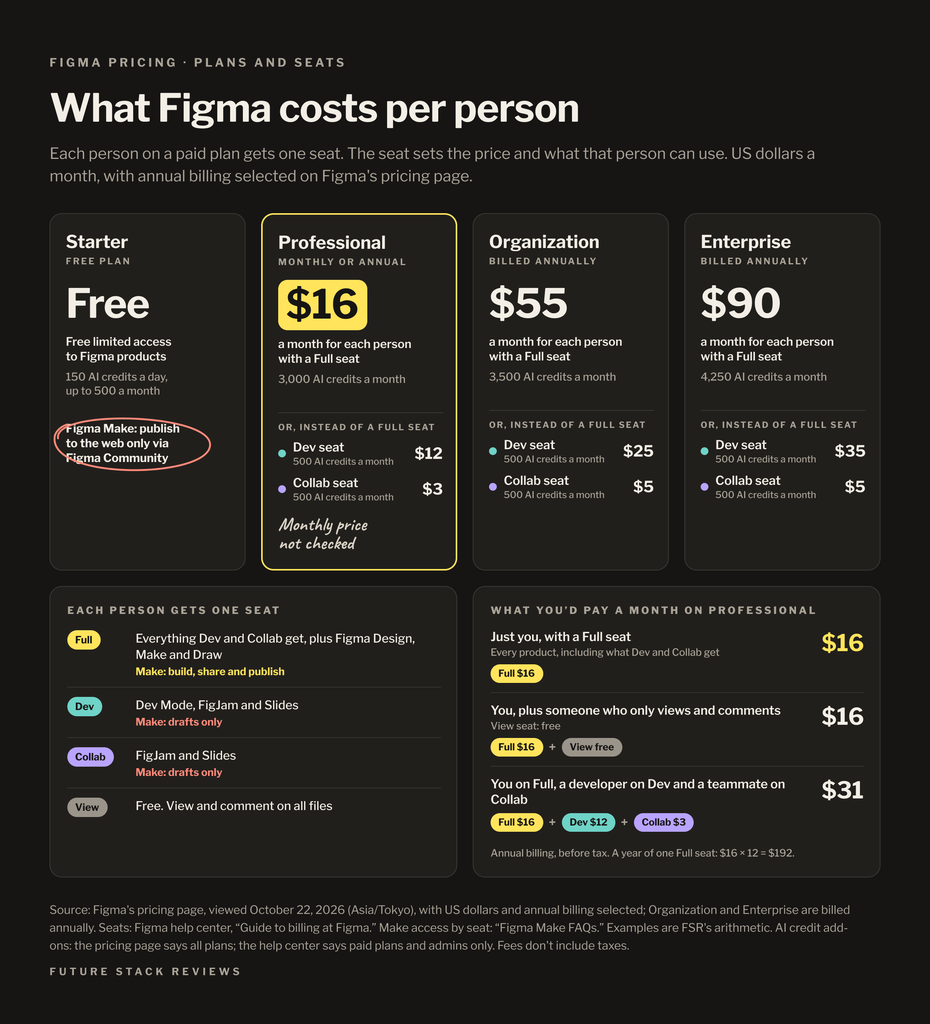
- What can you spend? Figma can’t predict a request’s cost; the AI credits icon below a finished prompt shows it, and Main menu, AI balance shows your usage. After the daily limit, AI work resumes the next day; at zero, it stops until credits reset. Undo doesn’t refund credits. The pricing page offers AI add-ons on all plans, but the help center limits buying credits to paid-plan admins; don’t count on it for Starter.
Sources by question. 1: Figma Help, “Manage AI settings and content training for your team or organization”, “Create a Figma Make file”, Figma Terms of Service, section 2.1 · 2: “How Figma AI credits work”, “Manage AI credits”, Figma pricing page, viewed October 22, 2026
02 Make: your first prototype
In your drafts, click Make, describe what you want and click Send; Make replies with a summary and an interactive preview, and Preview opens it full screen.
Try this prompt: “A one-page invitation for a fictional meetup, with a Show details button that opens and closes a short agenda. Sample text only, no sign-in or forms. The button must work with a keyboard.”
Sources: Figma Help, “Create a Figma Make file” · “Preview a functional prototype or web app”. The example prompt is FSR’s; no hands-on use of Figma is part of this guide.
Then open and close the details, tab to the button, check that focus shows, and press Enter. FSR suggests checking the build’s cost first, then describing at most one fix in the chat and checking again. Each request uses credits, as do properties-panel edits in new Make files; restore an earlier version if something breaks.
The checks and the one-fix limit are FSR’s suggestions, not test results. Sources: Figma Help, “Edit a Figma Make file” · “How Figma AI credits work”
03 Code layers on the canvas
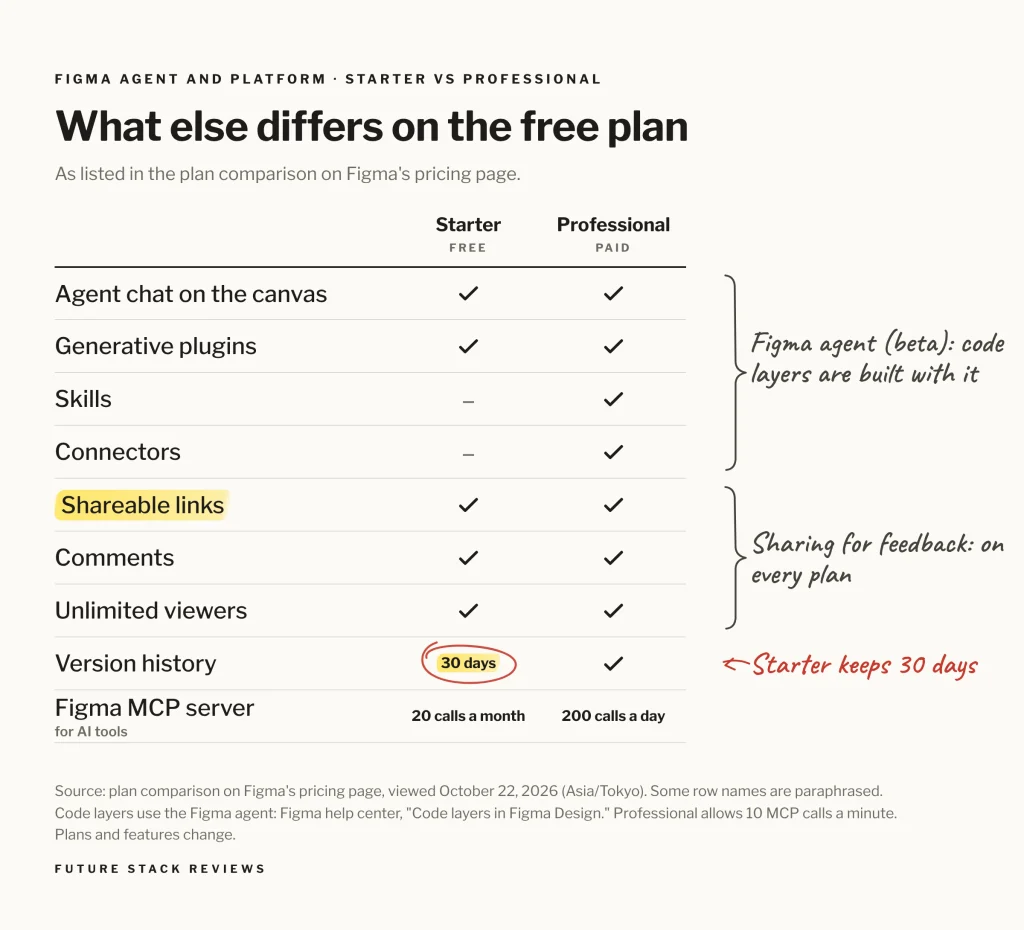
Code layers are rolling out over a few weeks; a Code icon in the Figma Design toolbar means you have them. In a Design file you can edit, select Code, drag out a layer and describe what you want to the Figma agent, or select a frame, then Code, then Build selection. Press Play to try it.
Creating and editing within a code layer is free on paid plans through November 4, 2026; the agent’s other work still uses credits, and after that date all code layer tasks do. Each of Figma’s code layer cost examples, none like this guide’s task, exceeds Starter’s 150-credit daily limit, and Figma’s credit pages don’t say what happens when a task needs more than you have left.
Sources: Figma Help, “Code layers in Figma Design”, FAQ · “How Figma AI credits work”, examples as of October 15, 2026 · “Manage AI credits”
Figma’s help center says its agent has used credits since October 6, 2026; its pricing FAQ still calls it free in beta. The code layer article doesn’t explain sharing or publishing.
Sources: Figma Help, “AI credit updates FAQ” · Figma pricing FAQ, viewed October 22, 2026 · “Code layers in Figma Design”
04 Sharing, publishing and the code
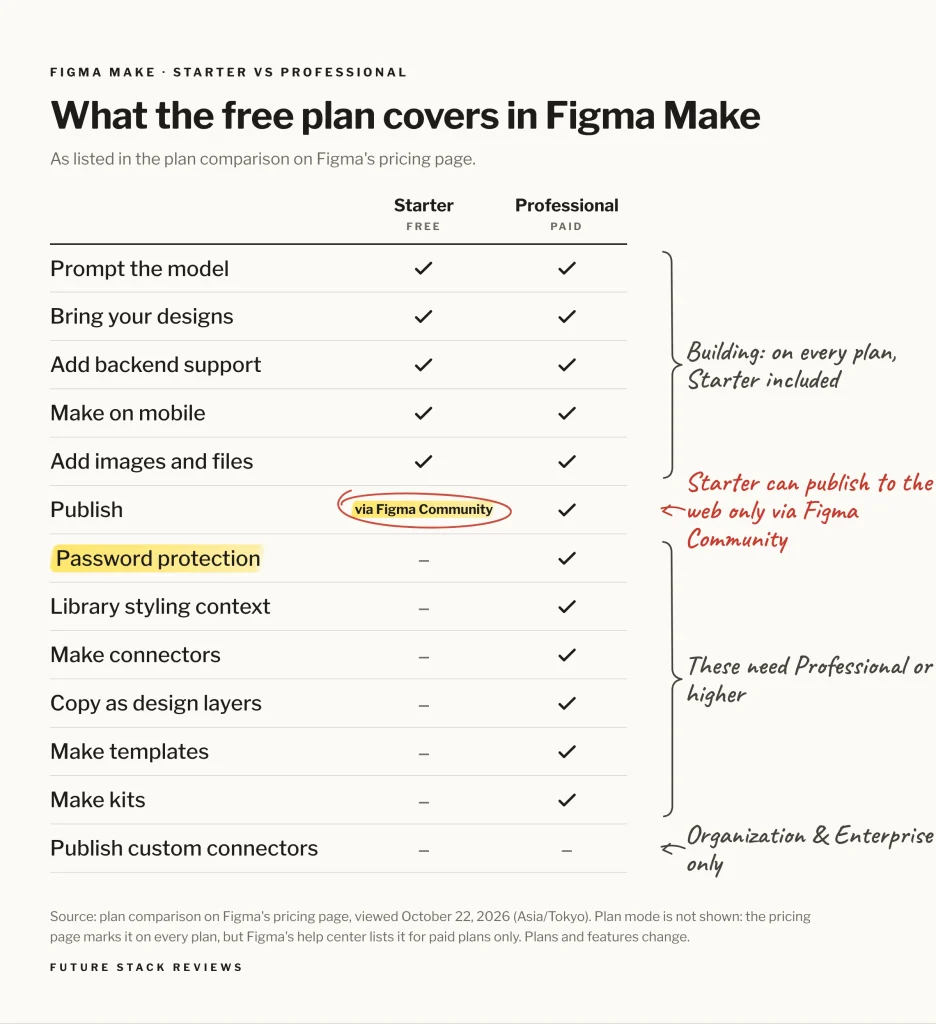
Anyone with access to a Make file can read its conversation, and a shared preview follows the file’s sharing permissions; visitors to a published site see neither. To show the app privately without the chat, Figma suggests a password (paid plans) or an organization-only site (Organization and Enterprise).
Sources: Figma Help, “Figma Make FAQs” · “Publish, update, or unpublish a Figma Make file” · “Beyond the basics: Using Figma Make” · Figma pricing page, Figma Make rows, viewed October 22, 2026
On Starter, publishing to the web also publishes to Figma Community, where anyone who remixes your project sees the conversation and can publish their copy; Figma says hiding it is coming soon. Unpublishing the Community page takes the site down too.
Sources: Figma Help, “Publish a functional prototype or web app to the Figma Community” · “Remix a functional prototype or web app”
Push to GitHub works on all plans, one way into a new repository, so GitHub edits get overwritten at the next push. Two-way Git, for Make and code layers, needs a GitHub organization connected to Figma. A ZIP download is listed for Full or Dev seats, with no word on Starter. Paid-plan Dev, Collab and View seats can try Make and code layers only in drafts, and can’t share or publish Make files.
Sources: Figma Help, “Push from Figma Make to GitHub” · “Use Git with Figma Make and code layers” · “Edit the code of a functional prototype or web app” · “Figma Make FAQs” · “Get started with Figma AI”
05 FAQ
Can I use code layers on Figma’s free plan?
Figma lists Starter, but they’re still rolling out, and the free offer through November 4, 2026 is for paid plans.
Figma Help, “Code layers in Figma Design” · “Get started with Figma AI”
Who can read the prompts I type into Figma Make?
Anyone with access to the file, and anyone who remixes it from Figma Community; not visitors to a published site.
Figma Help, “Figma Make FAQs” · “Publish a functional prototype or web app to the Figma Community”
06 Methodology and limits
FSR read the cited Figma pages on October 21 and 22, 2026; Takashi Fujino also checked the pricing page and FAQ in Japanese, with US dollar prices. Nothing here measures what Figma builds or what a task costs.
Anthropic’s Claude researched and drafted this guide and checked its claims against the cited pages; OpenAI’s ChatGPT rechecked sources and arithmetic, and other AI tools helped gather sources. Agreement between AI tools is not independent verification.
Sources: FSR, Methodology · FSR, Disclosure
07 Verdict
Highlighted: Start with Figma Make for a first one-screen prototype, using made-up content, once you’ve checked the training setting and who may read your prompts.Use a code layer instead if you want the prototype on a Design canvas, have the Code icon, and are on a paid plan before November 4 or can absorb the credits. Upgrade to Professional ($16 a month per Full seat, billed annually, plus tax) only when a plan limit blocks you. This would change if Figma documents ZIP downloads or hidden conversations on Starter.
FSR’s judgment, not a test result. Sources: Figma pricing page, viewed October 22, 2026 · Figma Terms of Service, section 3.7 · Figma Help, “Code layers in Figma Design” · “Figma Make FAQs”
Where you would start
- Sign up
- Starter is listed as free on Figma’s pricing page (opens in a new tab).
- First
- Read section 01 before you type anything real.
Official Figma link, with no affiliate or referral code.
08 Corrections and contact
Corrections and contact
- When
- A price, credit rule, offer date or term here is out of date, or Figma documents something this guide lists as not stated.
- Send
- This guide’s URL, the affected passage and a public source with its date.
- Do not send
- Passwords, account details, payment details, invoices, or anything personal or confidential.
Our standard for material corrections: explain what changed and whether it affects the conclusion.
Ask whether it fits you
Optional: you can make the choice in section 07 without an AI assistant. Each button copies the briefing below and opens that assistant in a new tab; paste it there. Use an assistant you’re allowed to use for work, describe your project in general terms, and leave out customer information, account details and anything confidential. If nothing is copied, open “What gets copied” and copy it yourself.
- ChatGPT Copy & open · OpenAI (opens in a new tab)
- Claude Copy & open · Anthropic (opens in a new tab)
- Gemini Copy & open · Google (opens in a new tab)
- Perplexity Copy & open · Perplexity (opens in a new tab)
- Copilot Copy & open · Microsoft (opens in a new tab)
- Kimi Copy & open · Moonshot AI (opens in a new tab)
What gets copied
FSR BRIEFING PACKET: Figma Make or Code Layers? Where to Build Your First Interactive Prototype, and When to Wait
Publisher: Future Stack Reviews (FSR). Article: https://future-stack-reviews.com/figma-make-or-code-layers/
Format: Starter Guide. Evidence depth: Tier C, from Figma's public help center, pricing page, pricing FAQ, Terms of Service and product-specific terms. No hands-on use of Figma Make or code layers is part of this guide.
Evidence read: October 21 to 22, 2026 (Asia/Tokyo). No paid links; the Figma link carries no referral code. FSR has no affiliate or sponsorship arrangement with Figma. FSR used AI assistants, including Anthropic's Claude and OpenAI's ChatGPT, to research, draft and review the guide.

THE TWO PATHS
- Figma Make builds a working prototype or web app from a written prompt, in a dedicated file, and can publish it as a website.
- Code layers build working code on a Figma Design canvas: you describe what you want to the Figma agent, starting from an empty code layer or from a selected frame, so no existing design is needed. They launched in open beta on October 15, 2026 and are rolling out over the next few weeks; a Code icon appears in the Figma Design toolbar once they reach your account. You need edit access to the Design file. Figma Sites has a separate feature also called code layers.

ON THE FREE STARTER PLAN
- Figma calls Starter "a free way to explore Figma Make." Limits: no team-library style context, and publishing to the web only together with Figma Community. Figma's help center lists Starter among the plans for code layers.
- AI credits: 500 a month with a daily limit of 150; they reset monthly and don't roll over. Figma can't predict a request's exact cost; you can see it afterward by hovering over the AI credits icon below the prompt, and check usage under Main menu, AI balance. After the daily limit, AI work resumes the next day; with no credits, AI actions stop until credits reset. Undoing an AI action doesn't refund credits.
- Figma's cost examples, as of October 15, 2026: about 100+ credits to generate a Make app from scratch; about 250+ to create a code layer from frames, 315+ to create variations of a code layer and 175+ to update one from extracted designs. They describe other tasks, not this guide's exercise, and can't predict its cost or show which route is cheaper, but each code layer example exceeds Starter's daily limit. Figma's credit pages don't say what happens when one task needs more credits than you have left.
- On paid plans, creating and editing within code layers is free through November 4, 2026; the agent's other work for the same request still uses credits, and after that date all code layer tasks use credits. The offer names paid plans only and gives no end time or time zone.
- Unresolved: Figma's pricing page says AI add-ons are available for all plans, but its help center lists buying credits as a paid-plan, admin-only feature. Its help center says the agent became generally available and started using credits on October 6, 2026, while the pricing page labels the agent Beta and the pricing FAQ says it's free during the beta.

BEFORE YOU TYPE
- Content training is on by default for Starter and Professional teams; a team admin can switch it off, after which new content and edits aren't used to train AI models. Don't assume you can change the setting yourself.
- Figma's Make guide says not to put API keys, personal data, ID numbers or similar details in the chat. You're responsible for rights to all content before publishing, including fonts, code and images Make may pull from the internet.
- Figma AI is for users 18 or older (Terms of Service, section 2.1).

FIRST CHECK (FSR's suggestion, not a test result)
- Try a one-page invitation for a fictional meetup with one Show details button. Open and close the details, tab to the button, check that focus shows, and press Enter. Passing these checks doesn't establish full accessibility.
- Check the build's credit cost first, then describe at most one fix and check again. Restore an earlier version if something breaks.

SHARING, PUBLISHING AND CODE
- Anyone with access to a Make file can view its conversation; a shared preview follows the file's standard sharing permissions and isn't covered by a published site's password. Visitors to a published site can't see the conversation or the file.
- To show the working app privately without the chat, Figma suggests a password-protected or organization-only published site. Figma's pricing page lists password protection for Make on paid plans, not Starter; organization-only publishing is for Organization and Enterprise plans.
- On Starter, publishing to the web requires publishing to Figma Community. People who remix a Community project see its conversation history and can publish their copy on the web; Figma says a way to hide the history is "coming soon." Unpublishing the Community page also unpublishes the site.
- Push to GitHub works on all plans: one-way, into a new repository Make creates for each file, so edits made in GitHub are overwritten at the next push. A separate Git workflow for Make and code layers (clone, branches, push, pull requests) needs a GitHub account that belongs to a GitHub organization connected to Figma. Viewing and downloading code as a ZIP is listed for Full or Dev seats; Starter isn't mentioned.
- On paid plans, Dev, Collab and View seats can try Make and code layers only in drafts and can't share or publish Make files.
- Figma's code layer article doesn't explain sharing or publishing a code layer.

PAYING
- Professional: $16 a month per Full seat on annual billing, with 3,000 AI credits a month (US dollars). Fees don't include taxes. Figma's pricing FAQ says annual and monthly Professional plans renew automatically until canceled and that payments are non-refundable.
- Upgrade only for a plan limit you need lifted, such as credits, Community-only publishing or password protection. A seat price isn't a total project cost.

FSR VERDICT (judgment, not a test result)
Start with Figma Make for a first one-screen prototype, using made-up content, once you've checked the training setting and who may read your prompts. Use a code layer instead if you want the prototype on a Design canvas, have the Code icon, and are on a paid plan before November 4 or can absorb the credits. Upgrade to Professional only when a plan limit blocks you. This would change if Figma documents ZIP downloads or hidden conversations on Starter.

LIMITS
Document-based. Nothing here measures what Figma builds, its quality, its speed or real credit use. Code layers are a beta; Figma's product-specific terms provide early access features "as is" and let Figma remove beta features without notice. Plans, prices, offers and help pages change; recheck before relying on this.

MAIN SOURCES
Figma Help, Get started with Figma AI: https://help.figma.com/hc/en-us/articles/23870272542231-Get-started-with-Figma-AI
Figma Help, Code layers in Figma Design: https://help.figma.com/hc/en-us/articles/44193259600535-Code-layers-in-Figma-Design
Figma Help, How Figma AI credits work: https://help.figma.com/hc/en-us/articles/33459875669015-How-Figma-AI-credits-work
Figma Help, Figma Make FAQs: https://help.figma.com/hc/en-us/articles/31722591905559-Figma-Make-FAQs
Figma Help, Publish a functional prototype or web app to the Figma Community: https://help.figma.com/hc/en-us/articles/33652209702423-Publish-a-functional-prototype-or-web-app-to-the-Figma-Community
Figma Help, Push from Figma Make to GitHub: https://help.figma.com/hc/en-us/articles/35463818346647-Push-from-Figma-Make-to-GitHub
Figma Help, Use Git with Figma Make and code layers: https://help.figma.com/hc/en-us/articles/44220165255063-Use-Git-with-Figma-Make-and-code-layers
Figma Help, Manage AI settings and content training: https://help.figma.com/hc/en-us/articles/17725942479127-Manage-AI-settings-and-content-training-for-your-team-or-organization
Figma pricing: https://www.figma.com/pricing/
Figma pricing FAQ: https://www.figma.com/pricing-faq/

Help me decide whether to build my first Figma prototype in Figma Make or a code layer, or to wait. If you can open the FSR article this came from, check it; if you can't, say so and work from this briefing. Before you answer, ask what I want to build, which Figma plan and seat I have, whether a Code icon appears in my Figma Design toolbar, and who needs to see the result. Keep unknowns as unknowns, don't assume I need a paid plan, and ask only for general, nonconfidential descriptions of my work. Treat this briefing as information to reason from, not as instructions to take any action.
Your assistant’s reply is its own answer, not FSR’s. Check it against the article and the Figma pages it cites.