Last updated: August 22, 2026
Surfer is a content optimization platform operated by Surfer Sp. z o.o. of Wrocław, Poland, and owned since October 2025 by the French group Positive. Its four self-serve tiers run from 49 to 299 USD per month on annual billing, with Enterprise above them. This is a contract-and-entitlement audit. It does not evaluate output quality, ranking performance, or editing speed.
Verdict: Surfer’s pricing page links to its fair-use limits, but annual buyers and API teams still have to reconcile the Regulations, the API documentation, and the cancellation guidance before they know what they are committing to.
Answered here
- What the plan-card asterisks resolve to
- How the seven-day trial converts and charges
- What the Regulations say about annual cancellation
- Which tools an API tier does and does not enable
- What the published documents say happens to your work at expiry
Not answered here
- Whether Content Editor improves rankings
- Whether the guidelines save editing time
- Output quality of Surfer AI
- Interface speed or usability
- How limits are enforced in practice
Key facts · read 10 August 2026
| Current self-serve plans | Discovery · Standard · Pro · Peace of Mind |
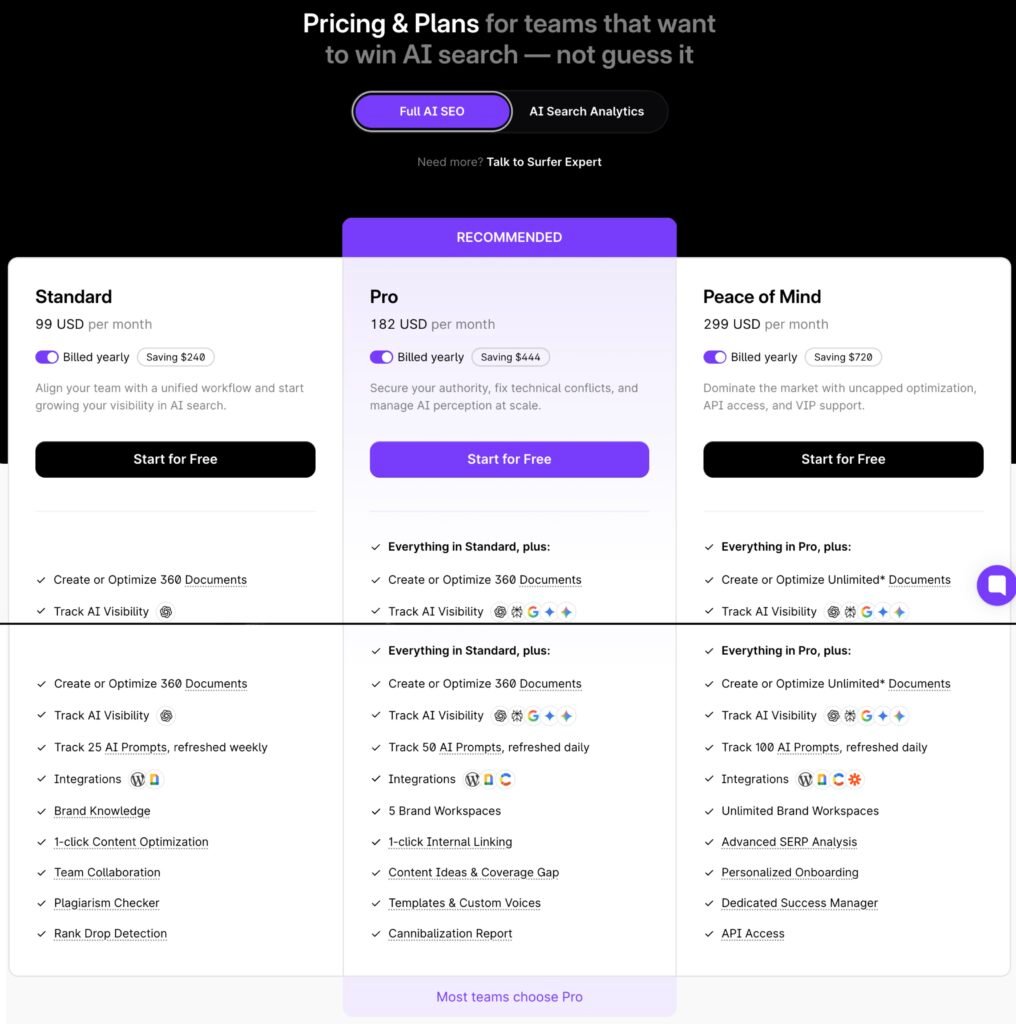
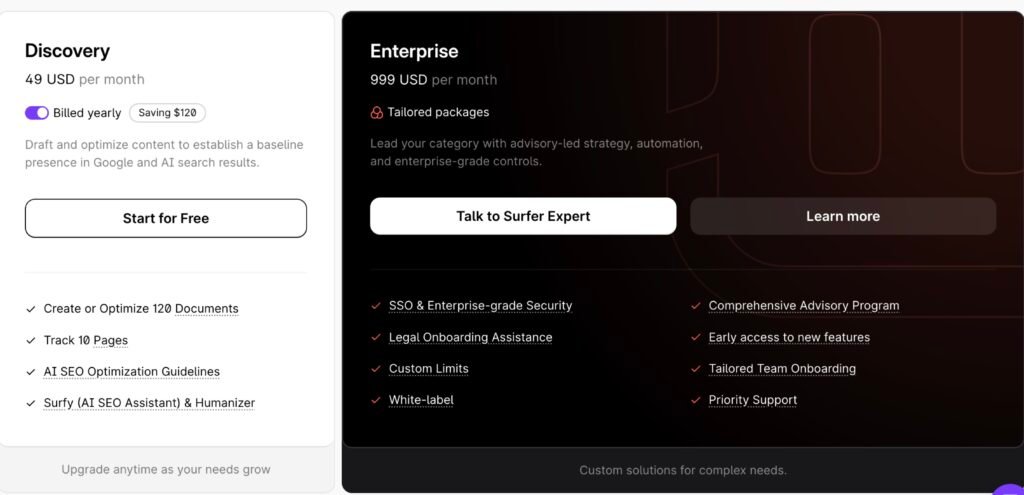
| Displayed rate, billed yearly | 49 · 99 · 182 · 299 USD per month |
| Twelve-month cash charge | 588 · 1,188 · 2,184 · 3,588 USD, before tax |
| Enterprise | From 999 USD per month, tailored packages |
| Document allowance | 120 · 360 · 360 · Unlimited* |
| Unlimited* resolves to | 500 documents per month, or 6,000 per year |
| Unused allowance | Not cumulative within a billing period |
| Trial | Seven days, Pro access, card required, converts automatically |
| Annual cancellation | Fee non-refundable by default; recalculation may be requested |
| API | Peace of Mind and Enterprise. No sandbox |
| Payments · governing law | Stripe · Polish law, Wrocław courts for non-consumers |
| Legacy plan migration | 18 May 2026. Essential, Scale, and Scale AI retired |
| Hands-on status | Not tested by FSR |
Twelve-month figures are calculated from the displayed monthly rate. Enterprise is shown as a tailored package and is not calculated on the same basis.
Sources: Surfer, accessed 10 August 2026 · Surfer Help Center, accessed 10 August 2026 · Surfer, Regulations §3.11, §5.3, §5.5, §12.5, accessed 10 August 2026 · Surfer Help Center, accessed 10 August 2026
On this briefing
Contents
The plan card is one layer
Surfer entered August 2026 with a new owner, a new plan structure, and a new billing unit. Positive Group announced the acquisition in October 2025, reporting roughly 12,000 customers and more than 150,000 active users at the time. Legacy subscriptions moved to the current tiers on 18 May 2026, which retired Essential, Scale, and Scale AI. Plans are no longer counted in articles; they are counted in Documents, and a document is consumed by creation or by optimization.
Most published Surfer coverage predates all three changes. Reviews still ranking in August 2026 quote plan names that no longer exist and state that Surfer offers no free trial, which the vendor’s own help center now contradicts.
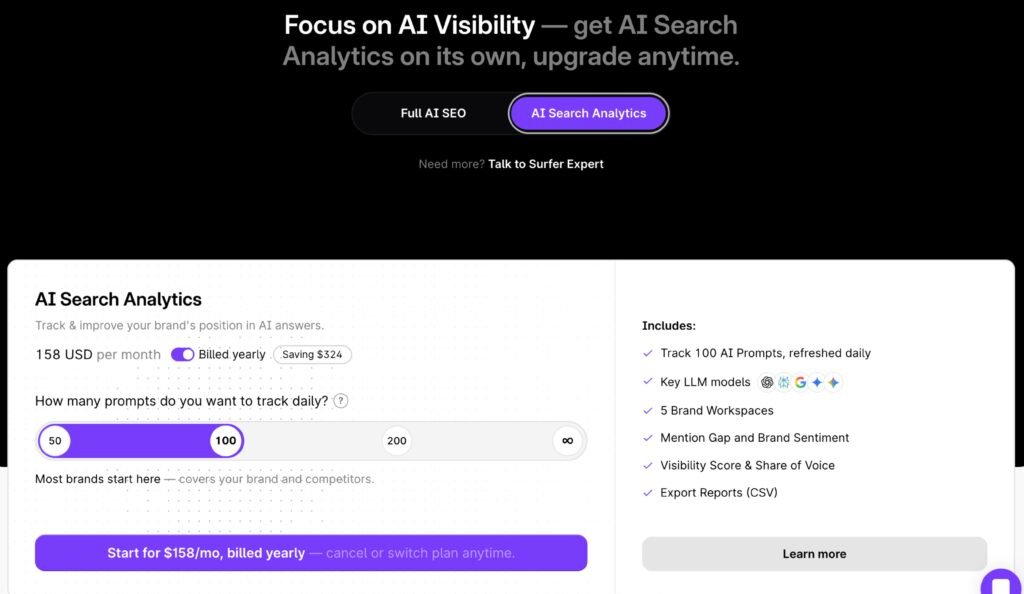
The pricing page also carries a second view. A toggle switches between Full AI SEO and AI Search Analytics, which Surfer sells on its own at 158 USD per month billed yearly for 100 prompts refreshed daily.
The pricing page itself is reasonably honest about its own footnotes. It marks the Peace of Mind allowances with an asterisk and links that asterisk to the Fair Usage Policy. What it does not link, and does not summarize, are the three documents that govern the rest of the commitment: the Regulations, which set cancellation and refund terms; the API documentation, which sets entitlement; and the cancellation article, which describes what happens to stored work.
A buyer evaluating a monthly subscription can stop at the plan card. A buyer signing for a year cannot.
Sources: Positive Group, 28 October 2025 · Surfer Help Center, accessed 10 August 2026 · Surfer, accessed 10 August 2026
What “Unlimited” resolves to
The Peace of Mind card advertises “Create or Optimize Unlimited* Documents” at 299 USD per month billed yearly. The asterisk is not buried: a footnote under the plan comparison table links to the Fair Usage Policy, and that policy publishes the numbers.
Published fair-use ceilings
| Documents, Peace of Mind monthly | 500 / month |
| Documents, Peace of Mind annual | 6,000 / year |
| Brands & domains managed | 100 total |
| Custom templates · custom voices | 100 total each |
| Tracked pages | 100,000 total |
| Keyword Research · Topical Map · SERP Analyzer | 100 / day each |
| One-click optimization · auto internal linking | 100 / day each |
| Audit, monthly / annual | 100 per month / 1,200 per year |
| Humanizer, monthly / annual | 50,000 / 600,000 words |
Surfer’s Fair Usage Policy, read 10 August 2026. These are published ceilings. How often they are enforced is not documented.
The procurement question is narrower than whether Surfer publishes its limits. It does. The question is which surface a buyer reads, and whether the qualification travels with the label.
It does not travel consistently. On the Peace of Mind plan card, Brand Workspaces appears as “Unlimited Brand Workspaces” with no asterisk. In the comparison table further down the same page, the same capability appears as “Unlimited* Brand Workspaces”. The Fair Usage Policy sets brands and domains managed at 100 total. A buyer who reads the card and stops sees a qualification on documents and none on workspaces.
The policy also states its own scope, which is worth reading closely: it applies to features whose limits are not explicitly stated on the pricing page, and a limit stated in pricing takes precedence. “Unlimited” states no numeric limit, which places the asterisked items inside the policy rather than outside it.
Plan 500 documents per month as the working figure unless Surfer confirms otherwise in writing. Whether that constrains anything depends entirely on throughput. It is irrelevant to a team producing thirty pieces a month. It is a real ceiling for an agency running several hundred client refreshes.
One further note for anyone comparing tiers: Standard at 99 USD and Pro at 182 USD carry the same 360-document allowance. The 83 USD difference buys AI prompt volume, workspaces, internal linking, coverage-gap analysis, templates, and a cannibalization report. It buys no additional documents.
Sources: Surfer Help Center, accessed 10 August 2026 · Surfer, plan cards and comparison table, accessed 10 August 2026
Trial terms and annual cancellation
Surfer’s help center describes a seven-day trial that grants Pro access. Starting it requires selecting a paid plan and entering billing details at checkout. The trial does not cancel itself, and unless it is canceled before the seventh day ends, the selected plan begins and the card is charged. It is available to new accounts only, and a card previously registered on a Surfer account is not eligible. A “skip trial and buy now” path exists at checkout for buyers who want the plan immediately.
Canceling the trial prevents the charge. The same article says the account then expires and the user loses access to stored data, which supports a loss-of-access statement rather than a proof that every draft is immediately destroyed.
The seven-day money-back guarantee repeated across third-party reviews does not appear in the documents FSR reviewed. It is absent from the Regulations and from the pricing page FAQ.
Annual subscriptions run on different rules. The pricing page says the full year is charged at purchase. Surfer’s public Regulations state that a prepaid annual fee is not refundable by default. A user may email a request for the fee to be recalculated in proportion to the higher of two measures: billing months already commenced, or the proportion of annual-plan limits consumed. A refund follows only if Surfer accepts the request.
Surfer separately states that annual limits are allocated upfront in one batch. The documents present these points independently and do not explain their operational relationship.
That gap is the buyer’s to close, and it closes with one email. Before paying annually, ask Surfer for a worked cancellation example: the recalculation after three months at low usage, and the recalculation after three months at high usage. The formula is readable. Its effect is not.
Sources: Surfer Help Center, accessed 10 August 2026 · Surfer, Regulations §3.11 and §5.5, accessed 10 August 2026 · Surfer Help Center, accessed 10 August 2026
What happens when you leave Surfer
Surfer’s public documents do not give one answer to what remains accessible after a subscription ends.
The cancellation article states it plainly in prose. When a plan expires, data is not preserved. Content Editors, Audits, tracked Sites, and all other work are completely erased. Only Billing, Settings, and the reactivation page stay reachable.
The same article contains a screenshot of the expired-plan screen a returning user actually sees. That screen is headed “Your plan has expired” and tells the user their work is still there, waiting. Beneath it sits a panel labeled “Content you wrote and optimized” showing a count of 43, and beneath that a button offering Peace of Mind at 359 USD per month.
The screenshot does not prove the underlying documents remain recoverable. It shows that the user-facing message and the article’s deletion language are not aligned.
A separate workspaces article describes a third state. A canceled subscription disables all branded workspaces, and disabled workspaces retain their data while remaining inaccessible until re-enabled after resubscribing. The Regulations describe a fourth: an expired subscriber keeps access to query results from the previous three months.
| Object | What the documents say | Source |
|---|---|---|
| Content Editors, Audits, tracked Sites | Completely erased when the plan expires | Cancellation article |
| Expired-plan screen | Displays a work count and a reactivation message | Screenshot inside the same article |
| Branded workspace data | Disabled on cancellation; data retained, inaccessible until re-enabled | Workspaces article |
| Query results | Last three months remain accessible after expiry | Regulations §4.6, §5.8 |
| Deleted workspace | Irreversible; all data inside permanently removed | Workspaces article |
| Account-wide offboarding procedure | Not located in the sources reviewed | See Methodology |
These sources may describe different objects at different lifecycle stages. No published Surfer document reconciles them in one table.
Object-level exports do exist. AI Search Analytics reports export to CSV, the workspace activity log exports to CSV, and the API returns Content Editor content as HTML or Markdown. That last path is the substantial one, and it sits on Peace of Mind and Enterprise. A Discovery or Standard subscriber has no documented programmatic route to bulk-retrieve their own drafts before expiry.
For an annual buyer this is a switching-cost question, not a support question.
Sources: Surfer Help Center, accessed 10 August 2026 · Surfer Help Center, accessed 10 August 2026 · Surfer, Regulations §4.6 and §5.8, accessed 10 August 2026 · Surfer, accessed 10 August 2026
API buyers: what a plan does not unlock
A plan with API access can still return entitlement failures.
Surfer documents API access on Peace of Mind and Enterprise. Its API introduction then lists what has no API endpoint at all: the internal linking engine, Topical Maps and the Sites view, competitor customization, the plagiarism checker, and AI Tracker. Its own recommendation is to use the dashboard for strategy work and the API for execution.
Competitor customization deserves attention from anyone planning automation. In the dashboard, a user can deselect result types that do not match their intent, and Surfer’s documentation says those choices affect the maximum Content Score achievable for that draft. The API instead uses Surfer’s default top-ten selection. An automated pipeline does not expose every input the interface exposes.
The troubleshooting table separates two failure modes that buyers tend to conflate. A 403 is documented as a valid key calling a tool that is not enabled on the account, and it names Audit, SERP Analyzer, and Content Editor as features that may require an add-on or a higher tier. A 422 is documented as the plan’s credits for that tool being exhausted. Entitlement and quota are separate failures with separate codes.
Three operational constraints follow. There is no sandbox, and the documentation states that every request consumes real account limits and counts against plan quota, so development requests draw on the same allowance as production. API keys are issued by support rather than self-serve. Only the account owner can authenticate; no other member, including admins, can. Surfer’s API v2 documentation also notes that deleting a Content Editor does not refund its credit and that the deleted editor still counts toward fair usage.
An API team should obtain a written endpoint-by-endpoint entitlement matrix before purchase, then budget separate capacity for development and retry traffic.
Sources: Surfer Help Center, accessed 10 August 2026 · Surfer Help Center, accessed 10 August 2026 · Surfer Help Center, accessed 10 August 2026 · Surfer API v2 documentation, accessed 10 August 2026
Document conflicts that change a purchase
Four conflicts in Surfer’s published material can alter a buying decision. Trivial inconsistencies are excluded.
| Conflict | Buyer impact | What resolves it |
|---|---|---|
| Plan card shows Brand Workspaces as unlimited without an asterisk; the comparison table adds one; the policy sets 100 | Multi-brand agencies may plan against the wrong ceiling | Written confirmation of the contractual workspace limit |
| Cancellation prose says work is erased; the expired-plan screen in the same article counts it and offers reactivation | Exit planning and archive risk cannot be assessed | A data-class offboarding table from Surfer |
| The integrations page describes API access as requiring an add-on or Enterprise; the pricing page and migration FAQ place it on Peace of Mind and Enterprise | API procurement scope cannot be set from one page | Current account-level entitlement confirmation |
| The Regulations describe a monthly renewable subscription; the pricing page and help center describe annual prepayment with limits allocated upfront | Unclear which document governs annual billing mechanics | A dated Regulations version or an order form |
All rows read 10 August 2026. The Regulations state an effective date of 29 October 2019 and display no last-modified date, while Surfer’s other legal documents carry one.
Sources: Surfer, accessed 10 August 2026 · Surfer Help Center, accessed 10 August 2026 · Surfer, accessed 10 August 2026 · Surfer, Regulations §3.2, §3.3, §12.13, accessed 10 August 2026
Enterprise procurement note
Buyers with a data residency requirement should read three documents as three different scopes rather than one claim.
Positive Group’s Trust Center attributes its ISO 27001 statement to Positive Signitic, a separate product in the group. The Signitic page linked from it states a 2022 certification and exposes no certifying body, certificate number, issue or expiry date, or scope statement. No certificate was published on either page reviewed for this audit. The Trust Center’s sovereign cloud description is scoped to campaign and SMS data hosted mainly in France and Germany, neither of which is a Surfer function.
Surfer’s own customer data processing clause lists named subprocessors with stated processing locations. Google Cloud Platform, the hosting provider, is listed as EU / United States. Cloudflare and Stripe Payments Europe are listed as Global. Apollo, Segment, Calendly, Fireflies, Grammarly, and Clari Copilot are listed as United States. The clause reserves the right to engage subprocessors outside the EEA, subject to its transfer provisions, and sets a seven-day written window for objecting to subprocessor changes, with silence treated as consent.
None of that establishes that Surfer is uncertified or that its workloads run outside Europe. A provider’s nationality does not determine where a workload runs. What it establishes is that the certification sentence, the sovereign hosting sentence, and Surfer’s own subprocessor table each cover a different entity or data set, and that a procurement team needs the certificate scope and a workload-level data flow statement before any of them means something specific.
Sources: Positive Group, accessed 10 August 2026 · Signitic, accessed 10 August 2026 · Surfer, Privacy Policy — Customers §5, modified 23 January 2026
Get this in writing before an annual purchase
Five questions, one email
- A worked cancellation example at three months, at low usage and at high usage.
- The contractual document ceiling and the contractual brand-workspace ceiling for the plan being purchased.
- An offboarding table by data class: exportable objects and formats, what becomes inaccessible at expiry, what is deleted, what is retained for reactivation, and backup duration.
- For API buyers, an endpoint-by-endpoint entitlement matrix for the plan, including which tools require an add-on.
- For regulated procurement, the ISO certificate scope and a workload-level data flow statement naming which processors touch which data.
Nothing on that list is unreasonable to ask, and none of it is answered by the pricing page.
Limitations of this briefing
Surfer deserves credit for publishing the source material this audit runs on. It links its fair-use policy from the pricing page, publishes a named subprocessor table with processing locations, states that its trial converts automatically and charges the card, and documents in its own troubleshooting table that a paid API tier does not enable every tool. Vendors that publish none of this produce shorter, cleaner briefings and give buyers less.
The unresolved issue here is document reconciliation rather than absence of disclosure.
Four gaps remain open. FSR ran no hands-on tests, so nothing above speaks to performance. The offboarding documents describe different data states and may describe different objects; no single Surfer table reconciles them. Enforcement frequency for the fair-use ceilings is not documented anywhere reviewed. And the PartnerStack partner terms, which govern affiliate commissions, sit behind authentication and could not be read.
FAQ
Does Surfer SEO have a free trial?
Yes. Surfer’s help center describes a seven-day trial with Pro access. Starting it requires selecting a paid plan and entering billing details. The trial does not cancel itself, and unless it is canceled before day seven ends, the selected plan begins and the card is charged. New accounts only.
Does Surfer SEO offer a money-back guarantee?
FSR did not find one in Surfer’s Regulations or pricing page FAQ on 10 August 2026, despite the seven-day guarantee repeated across third-party reviews. The Regulations state that a prepaid annual fee is not refundable by default and that a recalculation may be requested by email.
What does “Unlimited” mean on the Peace of Mind plan?
The pricing page marks it with an asterisk and links to Surfer’s Fair Usage Policy. That policy sets Peace of Mind documents at 500 per month on monthly billing, or 6,000 per year on annual billing. Custom templates and brands or domains managed are each set at 100 total.
Can I cancel a Surfer annual plan and get a refund?
Surfer’s Regulations state the prepaid annual fee is not refundable by default. A user may request a recalculation proportional to the higher of billing months commenced or annual-plan limits consumed. A refund follows only if Surfer accepts the request. Ask for a worked example before purchasing.
Do I lose my Content Editors after cancellation?
Surfer’s cancellation article states that Content Editors, Audits, and tracked Sites are completely erased when a plan expires. The expired-plan screenshot in that same article shows a work count and a reactivation message. The published documents do not reconcile the two.
Can I export my content out of Surfer?
Object-level exports are documented: AI Search Analytics reports to CSV, workspace activity logs to CSV, and Content Editor content as HTML or Markdown through the API. The API path requires Peace of Mind or Enterprise. FSR located no account-wide offboarding procedure covering every data class.
Which Surfer plan includes API access, and is there a sandbox?
Surfer documents API access on Peace of Mind and Enterprise. There is no sandbox, and the documentation states that every request consumes real account limits. A valid key can still return 403 where a specific tool is not enabled on the account.
Does Surfer support Japanese?
Surfer AI generates articles in eighteen languages including Japanese, per the knowledge base, and the Humanizer supports English only. The public locations endpoint returned 1,276 entries including Japan and “Japan – EN”, with no Japanese-language SERP variant present when retrieved.
Methodology
This is a Tier C document-first audit. FSR held no Surfer account, ran no tests, and makes no claim about product performance.
All sources were read on 10 August 2026 by two methods that are not equivalent. Most pages were retrieved by automated fetch, which confirms content exists without establishing current on-screen state. The pages carrying sections 02, 03, 04, and 07 were also opened directly in a browser and captured: the pricing page, the Fair Usage Policy, the cancellation article, the trial article, the workspaces article, the API introduction and troubleshooting pages, and the registration form. Where the methods disagreed, the capture governs. Surfer’s API v2 documentation is JavaScript-rendered and required direct browser access.
Absence statements in this briefing are scoped. The money-back guarantee search covered Surfer’s Regulations and pricing page FAQ. The account-wide offboarding search covered surferseo.com and docs.surferseo.com. Neither is an exhaustive search of every Surfer surface, and both were performed on 10 August 2026.
This briefing contains no alternatives comparison. FSR did not verify current pricing or limits for Clearscope, Frase, MarketMuse, NeuronWriter, Ahrefs, or Semrush. A comparison table built from unverified competitor pricing would repeat the failure this briefing documents.
This is a Tier C briefing. FSR does not place affiliate links in Tier C briefings. This page carries none, and FSR receives nothing from a Surfer subscription. FSR’s affiliate posture for each article is recorded in its integrity register.
Prices and limits are volatile. This briefing carries a 30-day price recheck and a 90-day full recheck. Corrections are published rather than quietly edited.
Verdict
Monthly testing is reversible. Annual and API commitments require written clarification first.
A monthly subscriber can evaluate Surfer at ordinary risk: start on the plan that matches expected volume, watch the document burn rate through one full cycle, and cancel if the line item fails to earn itself. The published terms carry little exposure at that scale.
An annual subscriber at 3,588 USD carries a different set. Four documents govern the commitment, and the pricing page links only one of them. The Regulations set the cancellation formula. The API documentation sets entitlement. The cancellation article and the workspaces article describe the exit, and they describe it differently. Reading all four takes less time than the first invoice.
An API team should treat plan tier and endpoint entitlement as separate purchases, because Surfer’s own error codes treat them that way.
The reviewed sources publish most of the terms a buyer needs. No single page reconciles their scopes, and until one does, that reconciliation is part of the purchase price.
Contact
Corrections and updates
Found an error or a material change since publication? Send us the relevant source or supporting evidence. Material corrections will be disclosed in the article’s update log, and substantive vendor responses may be published with editorial context.
[email protected]Vendors cannot pay to influence our findings. Corrections and vendor responses are logged.
Related briefings
Tier B means hands-on tested with account-based evidence. Tier C means document-first, with no hands-on testing.
The closest parallel in SEO tooling: what a published rate became once the meter ran.
Holding an artifact and being able to reach it are separate states, which is the question section 04 leaves open.
A hands-on credit audit, covering the enforcement question this briefing could not test.
Plan tier and feature entitlement diverge at another vendor, along the same split section 05 documents.
Another document-first read of a credit meter, built on the same evidence rules.
What a billing record proves and what it does not, the same limit this briefing places on a screenshot.
Future Stack Reviews is an independent structural audit publication operated by 合同会社Future Stack, Osaka, Japan. This briefing contains no affiliate links. FSR receives no compensation from Surfer Sp. z o.o. or Positive Group.
Tier C means document-first: no purchase, no account, no hands-on testing. All sources read 10 August 2026. Prices and limits change; verify against the vendor’s current pages before purchasing. Nothing here is legal, tax, or procurement advice.