Last updated: July 26, 2026
Disclosure. Future Stack Reviews paid for the account described here at standard rates. This article contains no affiliate or referral links, and Future Stack Reviews earns nothing if you buy from Hostinger after reading it.
Hostinger renewal pricing is the non-promotional rate charged once an initial prepaid term ends. On the Business Web Hosting account inspected on 26 July 2026, the 12-month, 24-month and 48-month renewal options all carried the same monthly rate. A longer renewal fixed that rate for longer. It did not lower it. That is a ratio, so it travels: the term discount that made the first purchase attractive was worth nothing at renewal. This is one dated account observation, not a general Hostinger pricing rule.
Every amount below is in Japanese yen, because that is what this account was charged. Hostinger sets its regional price lists separately rather than converting one into another, so its US figures are different numbers, not exchanged ones. When Future Stack Reviews recorded the US page, the equivalent 48-month plan was listed at $181.92 with a renewal rate of $16.99 per month; the same plan on the Japanese page was ¥22,512 with a renewal rate of ¥1,899 per month. Neither pair converts into the other at any plausible market rate.
Running the yen figures through an exchange rate would produce a third set of prices that no buyer is ever charged, so this briefing does not do it. The findings that matter are ratios and structures, and those hold in any currency: a renewal at 3.28 times the first-term price, and three renewal terms priced identically per month.
Verdict in one line: at first purchase the long term is a discount worth taking if you expect to stay past roughly month 20, and at renewal it is a price lock rather than a discount, so 12 months is the flexibility-first default.
- Buyers with a stay horizon beyond roughly 20 months and cash available to prepay
- Buyers who want today’s rate fixed against future repricing
- Buyers who already keep and test their own downloaded backups
- Unproven projects that may change platform inside 20 months
- Buyers treating a multi-year prepayment as recoverable after the refund window
- Buyers who need speed or uptime evidence, which this briefing does not provide
| Item | Value |
|---|---|
| Account billing currency and purchase date | Japanese yen, 12 January 2026 |
| Plan label in hPanel | Business Web Hosting |
| Initial 12-month payment | ¥6,948, or ¥579 per month |
| 12-month renewal displayed | ¥22,788, or ¥1,899 per month |
| 48-month renewal displayed | ¥91,152, or ¥1,899 per month |
| One-month renewal displayed | ¥2,099 per month |
| 48-month offer in checkout | ¥22,512, or ¥469 per month |
| Charge timing before expiry | 14 days hosting and email, 27 days domain |
| Server and backup location | Malaysia and Singapore |
| Refund window | 30 days from the transaction date, which includes a renewal processing date |
| Renewal against first term | 3.28x for the same twelve months |
| Tax basis | All figures exclude tax, as displayed |
Observation references are listed in the Methodology. Prices vary by account, region, plan version and date, and Hostinger states that available renewal periods can change. See the note on currency below before comparing these figures with a US or EU price list.
Three renewal terms, one rate
The billing-period selector on this account’s hosting subscription offered four options. Three of them carried the same price.
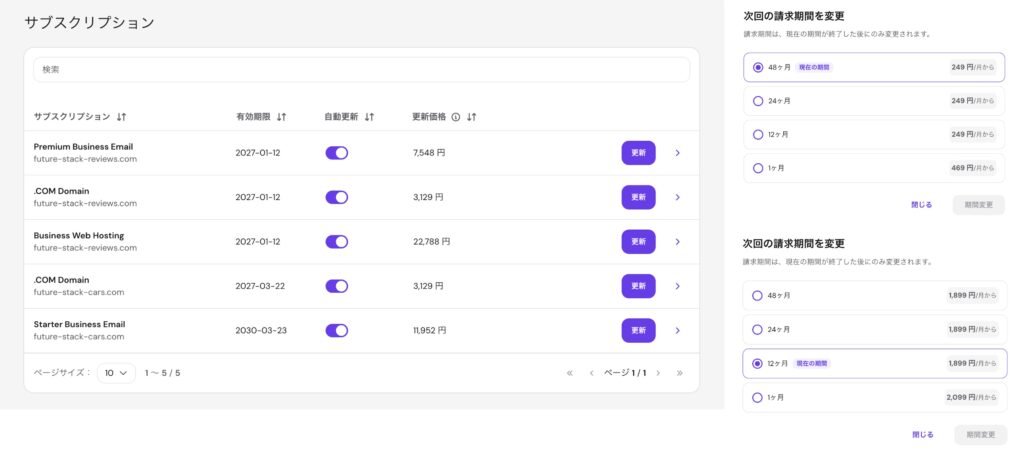
Starter Business Email quotes 249 yen a month at 48, 24 and 12 months, and 469 yen
at one month. Business Web Hosting quotes 1,899 yen a month at 48, 24 and 12 months,
and 2,099 yen at one month. The badge marking the current period sits on 48 months
for one and 12 months for the other, so the rate is flat regardless of which term
the subscription is already on. On the left, the same four amounts appear in one
column of the subscription list with nothing indicating the period each one covers.
Captured 26 July 2026.
| Subscription | 48 / 24 / 12 months | 1 month |
|---|---|---|
| Business Web Hosting | ¥1,899 / mo | ¥2,099 / mo |
| Premium Business Email | ¥629 / mo | ¥939 / mo |
| Starter Business Email | ¥249 / mo | ¥469 / mo |
| .COM domain | ¥3,129 / yr at 36 / 24 / 12 | not offered |
Rates as shown in each subscription’s billing-period dialogue, excluding tax. Each hosting and email figure is prefixed “from”; no upper bound is published. Available terms differ by product: the domain offered 36, 24 and 12 months, with no one-month option.
Hosting, both email subscriptions and the domain each showed a flat rate across their multi-year options. Only the one-month option cost more, and only where a one-month option existed.
Two limits on that finding. It comes from one account on one date, so it describes what this account displayed rather than what Hostinger charges everywhere. And Hostinger’s own documentation states that available renewal periods can change.
Sources: FSR account observation, hPanel billing-period dialogues, 26 July 2026 · Hostinger renewal-period documentation, supplied to FSR July 2026
First term against second term
This account paid ¥6,948 for its first twelve months in January 2026. The 12-month renewal displayed in July 2026 was ¥22,788. Both figures cover twelve months of the same subscription on the same account, at 3.28 times the price.
The renewal screen does not compare the two. Nothing in hPanel places the original invoice next to the renewal quote, so a buyer has to remember what they paid.
One qualification worth stating plainly. Both amounts refer to the same account and the same subscription label. Future Stack Reviews did not test whether the underlying entitlements changed between January and July, so the comparison is of price against price, not of price against measured value.
Sources: FSR account observation, hPanel payment history and subscription detail panel, 25 to 26 July 2026
Which decision you are actually making
A first purchase and a renewal look like the same choice presented twice. On this account’s numbers they are not.
At first purchase, the term is a discount. The 48-month checkout offer was ¥22,512, an effective ¥469 per month. The 12-month route this account took cost ¥6,948, an effective ¥579 per month, with everything after that priced at the renewal rate.
Two arithmetic paths follow from those figures.
| Route | Running total | Crosses ¥22,512 at |
|---|---|---|
| 12 months, then monthly renewals at ¥2,099 | ¥21,641 at month 19, ¥23,740 at month 20 | month 20 |
| 12 months, then one 12-month renewal at ¥22,788 | ¥29,736 for 24 months of service | the moment that renewal is charged, during month 12 |
Inference from observed figures. It combines a January 2026 price this account paid with a July 2026 checkout offer, so the two sides come from different promotional cycles. It excludes tax, add-ons, the time value of money, future price changes, refunds and downgrade credits.
Under either route the threshold sits well inside two years. A project expected to end within about 19 months cost less on the shorter start. A project expected to run longer cost less on the 48-month term.
What the threshold does not capture is the size of being wrong. The 48-month route commits ¥22,512 against ¥6,948, and Hostinger’s refund policy covers 30 days from the transaction date. After that window the shorter start carries roughly a third of the exposure. Future Stack Reviews did not test what a cancellation or a downgrade returns mid-term, so a multi-year payment should be treated as committed cash once the refund period closes. The break-even compares the two routes on the assumption that you stay. It does not account for the cost of leaving early.
At renewal, the term is not a discount. Twelve months at ¥22,788 and forty-eight months at ¥91,152 carry the same ¥1,899 monthly rate. Committing for four years buys two things that are not a lower price: fewer billing events, and that rate held for the length of the prepaid term. Against that, it commits four years of cash and removes three opportunities to leave, downgrade or move.
| Objective | Term |
|---|---|
| Keep cash and keep an earlier exit point | 12 months |
| Reduce annual billing admin without a four-year commitment | 24 months |
| Hold today’s rate for four years | 48 months |
| Bridge a few months before moving | 1 month, at the higher rate |
Renewing for the longest term is a price-lock decision on this account, not a saving.
Sources: FSR account observation, 25 to 26 July 2026 · Hostinger, JP pricing page, accessed 25 July 2026
Where the term context goes missing
The subscription list in hPanel shows four columns: subscription, expiry date, auto-renew, renewal price. It does not show the contracted term, the renewal term, or the billing date.
That matters because the amounts in the renewal price column cover different periods. On this account the column held ¥3,129 for one year, ¥7,548 for twelve months, ¥11,952 for forty-eight months and ¥91,152 for forty-eight months, with no period attached to any of them. The column sorts by value, which orders totals rather than rates.
Opening an individual subscription supplies what the list omits. Each detail panel states the next charge date, the amount and the renewal term in a single sentence. The gap sits at the aggregate view, which is where someone reviewing a whole account is most likely to start.
Two practical consequences. Read each subscription individually before comparing anything. And set reminders against the charge date rather than the expiry date: on this account hosting and email were billed 14 days before expiry, and the domain 27 days before, from the same 12 January 2027 expiry.
Sources: FSR account observation, hPanel subscription list and detail panels, 26 July 2026 · Hostinger Help Center, automatic renewal, updated 15 May 2026
Which product the price refers to
Several surfaces describe what a purchase at this price point includes, and they publish different numbers for different purposes.
| Surface | What it states | What it governs |
|---|---|---|
| hPanel, this account | Business Web Hosting, 50 websites, 50GB, 60 PHP workers, 600,000 inodes | Live entitlement |
| JP pricing page, 26 July 2026 | 無制限 (Unlimited), unlimited websites, 50GB NVMe, ¥22,512 for 48 months, renewing at ¥1,899 per month | Current sales offer |
| Same page, 25 July 2026 | Business, up to 50 websites, 150 databases, at the same prices | Recorded one day earlier |
| Checkout cart, July 2026 | Unlimited plan | Current sales offer |
| Hosting Agreement, 2 June 2026 | Shared accounts allotted 3GB database usage and 300 databases; 300 FTP accounts; 400 cron jobs | Contract terms |
Observed 25 to 26 July 2026.
Some of this spread is explainable. A plan entitlement of 150 databases can sit beneath a general shared-hosting allowance of 300 without either figure being wrong, and the agreement’s clause sits under a heading about unlimited services rather than under a plan description.
What is not resolved is which surface a buyer should read. The plan sold today at ¥22,512 for 48 months, renewing at ¥1,899 per month, is called Unlimited and advertises unlimited websites. The account paying that renewal rate is called Business Web Hosting and shows 50 websites. The price is the same. The name and the headline entitlement are not.
The same URL was recorded a day earlier as showing Business with up to 50 websites at identical prices, so the sales page moved within the observation window or presented more than one state. Neither reading is labelled with a date or a plan version, and Future Stack Reviews did not locate purchase-date plan-version documentation covering a January 2026 account from the pages reviewed here. A buyer comparing today’s page against an older account has no published mapping between the two.
Two further details are worth knowing before purchase. The agreement lists Entry Processes among the limits applying to every hosting plan, and no value for it appeared on the JP pricing page reviewed. And the agreement contains a clause about accounts above 30GB being dropped from off-site weekly backups: its first sentence limits itself to cPanel shared hosting, and its next sentence asks users generally to keep disk consumption below 30GB. This account runs on hPanel and was sold with 50GB.
The same ambiguity extends to what the price includes at zero. The 48-month cart on this account showed three line items struck through to nothing: daily backups from ¥15,792, a domain from ¥11,739, and Whois privacy already at zero. At renewal, Daily Backup and Domain Privacy Protection appear under their parent subscriptions at no charge, while the domain renews as a separate subscription at ¥3,129 plus ¥29. One of the three became a recurring bill, and the cart used identical formatting for all three. Hostinger’s free-domain documentation also states that the available free extensions depend on brand, plan and current promotion, and that they cannot be confirmed before purchase; the list is shown during the claim step after an eligible plan has been bought.
The narrow finding here is about labelling. A buyer cannot tell, from the surfaces available at the point of sale, which set of numbers will govern their account.
Sources: Hostinger, JP pricing page, accessed 25 and 26 July 2026 · Hostinger, Hosting Agreement, 2 June 2026, sections 4 and 5 · Hostinger Help Center, free domains, updated 3 April 2026 · FSR account observation, 25 to 26 July 2026
The reference price behind the discount
The 48-month cart displayed ¥100,752 struck through above ¥22,512, with a badge stating ¥78,240 saved.
Both figures reconcile against the one-month rate. ¥2,099 multiplied by 48 is ¥100,752, and subtracting ¥22,512 leaves ¥78,240. The struck-through total is therefore the one-month rate carried across 48 months, and the saving is measured against that.
For comparison, a 48-month renewal on this account was ¥91,152. The reference price sits ¥9,600 above the four-year cost of staying at the renewal rate.
The domain line does not reconcile. The cart struck through ¥11,739, while the observed renewal is ¥3,129 per year. ¥11,739 is not a whole-number multiple of that at one, two, three or four years, and the basis was not visible in the cart inspected.
The arithmetic is on display in both cases. The point is that the baseline used for the headline saving is the highest-priced route available, not the price the same buyer would meet at renewal.
Sources: FSR account observation, checkout cart and billing-period dialogue, 25 to 26 July 2026
What leaving costs
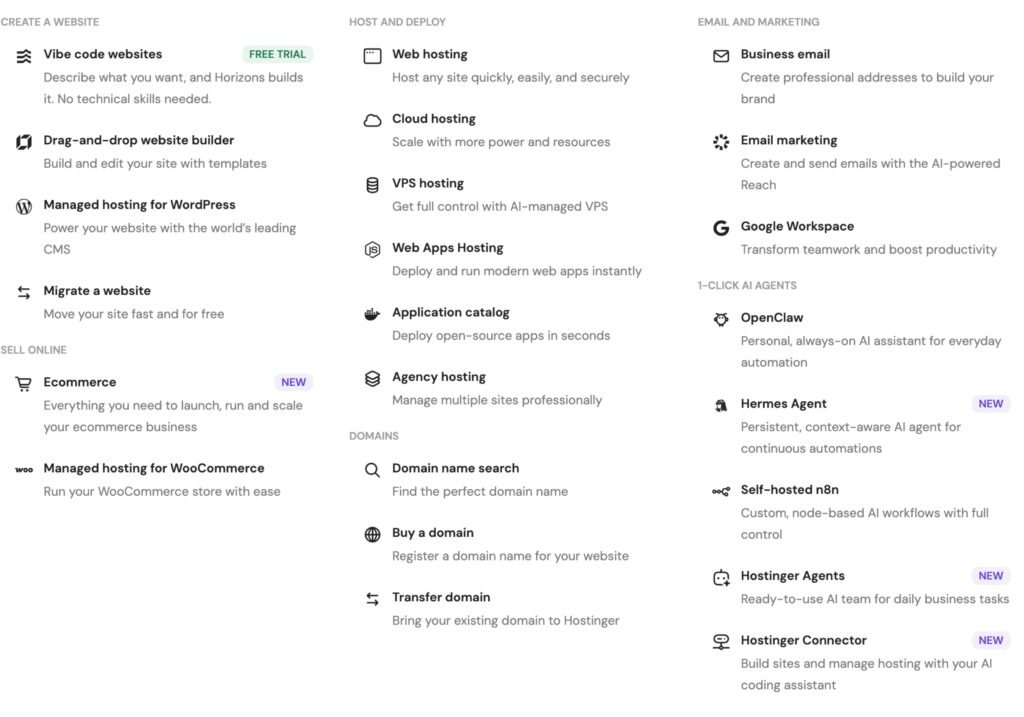
documentation behind that offer scopes it to sites arriving from another provider.
Moving a site between two Hostinger plans is a separate workflow: a paid feature
with no figure published on the page describing it, or a manual process that starts
by deleting the original site. Captured 26 July 2026.
Prepaying for years turns leaving into a separate problem from paying, and the two are governed by different documents.
Refunds and cancellation are not the same workflow. Hostinger’s refund policy allows eligible refunds within 30 days of a transaction, and states that a transaction date includes a renewal processing date. Outside that window, cancelling means switching off auto-renewal, after which the service runs to expiry. Future Stack Reviews did not execute a cancellation, a refund request or a downgrade on this account, so no claim is made here about what any of them returns.
Backups have two retention rules and one exclusion. The Hosting Agreement holds weekly backups for two weeks on a remote server, overwriting the previous copy, and where a plan includes daily backups it stores the previous week’s daily copies in addition. This account’s restore dropdown showed five daily points spanning 21 to 25 July. That was the website backup tab only; the file and database tabs were not opened, and whether the list scrolls past five entries was not checked, so five is what was visible rather than a confirmed total.
Separately, archives generated by third-party WordPress backup plugins are excluded from Hostinger’s backup routine. The exclusion covers the folders used by All-in-One WP Migration, UpdraftPlus, WPvivid and Duplicator, it cannot be switched off, and excluded folders do not return after a restore. Anyone treating a plugin archive left on the server as their safety net is relying on a file Hostinger documents that it does not keep. Downloading that archive locally is what makes it a backup.
Moving out and moving within are different products. Free migration applies to sites arriving from another provider. Transferring between Hostinger plans or accounts does not qualify: the automated internal tool is a paid feature on web and cloud hosting, and no price for it appeared on the page reviewed, where the flow ends at a payment step. The free alternative is manual, and it requires deleting the original website to release the domain before the new plan can use it, with downtime while that happens.
On termination, nothing is carried for you. The agreement states that Hostinger will not transfer or FTP site content to another provider, that content not moved before cancellation is deleted, and that free products supplied with the plan are cancelled or revoked.
Sources: Hostinger, Hosting Agreement, 2 June 2026, sections 3 and 4 · Hostinger, Refund Policy, 30 June 2026 · Hostinger Help Center, backup exclusions, 23 June 2026 · Hostinger Help Center, website migration, 9 June 2026 · Hostinger Help Center, automated internal migration, undated · FSR account observation, hPanel backups, 26 July 2026
FAQ
Does Hostinger renew at the promotional price?
Not on the account inspected. A first term bought at ¥6,948 for twelve months showed a ¥22,788 twelve-month renewal, 3.28 times the original. Promotional pricing applied to the initial term. Renewal pricing is displayed separately in each subscription’s detail panel.
Is a 48-month renewal cheaper than a 12-month renewal?
Not on the account inspected. The 12-month, 24-month and 48-month options all displayed ¥1,899 per month on 26 July 2026. The longer term held that rate for longer rather than reducing it. Only the one-month option cost more, at ¥2,099.
When does Hostinger charge before expiry?
On this account, hosting and email were scheduled 14 days before expiry and the domain 27 days before, from the same expiry date. That matches Hostinger’s published auto-renewal schedule. Set reminders against the charge date, not the expiry date shown in the subscription list.
Can I recover unused time if I cancel after the refund window?
Hostinger’s refund policy covers eligible refunds within 30 days of a transaction, including a renewal processing date. Outside that window, cancelling switches off auto-renewal and the service runs to expiry. Future Stack Reviews did not execute a cancellation, refund or downgrade on this account.
Does the free domain renew for free?
No. On this account the .COM renewed at ¥3,129 per year plus ¥29 in combined tax and fees. Hostinger’s documentation states that the free domain covers one year on new purchases of 12, 24 or 48 months, and that renewals or upgrades of existing plans do not qualify.
Can I move a site between Hostinger plans for free?
Not with the automated tool, which Hostinger documents as a paid feature on web and cloud hosting; no price appeared on the page reviewed. The free route is manual and requires deleting the original site to release the domain. Free migration covers sites arriving from other providers.
How long does Hostinger keep backups?
The Hosting Agreement holds weekly backups for two weeks and, where daily backups are included, stores the previous week’s daily copies in addition. This account showed five daily restore points on 26 July 2026. Archives created by third-party backup plugins are excluded and are not restored.
Sources: Hostinger, Hosting Agreement, 2 June 2026 · Hostinger, Refund Policy, 30 June 2026 · Hostinger Help Center, backup exclusions, 23 June 2026 · Hostinger Help Center, free domains, updated 3 April 2026 · FSR account observation, 25 to 26 July 2026
Methodology and limitations
Scope. One Hostinger account, billed in Japanese yen, purchased 12 January 2026 and held continuously. Structured inspection ran across roughly 90 minutes on 25 and 26 July 2026, covering the checkout cart, the hPanel subscription list and detail panels, billing-period dialogues, plan entitlements, backup and restore screens, and the hPanel home screen. Sample size is one account.
One change was made to the account, and it was reversed. To display a four-year total, the hosting subscription’s next billing period was changed from 12 months to 48 months, which produced the ¥91,152 figure. The setting was returned to 12 months on 26 July 2026. The subscription now shows a next charge of ¥22,788 on 29 December 2026 on a 12-month renewal term, and both states are on record: the screenshot taken during the test shows the 12-month option still carrying the “current period” badge, and the post-restoration panel confirms the account was left as it was found. Needing to make the change at all is the finding in section 04. Readers repeating this check should note that the setting governs the next invoice and should return it afterwards.
Evidence. Every account figure in this briefing comes from a screen capture taken during the inspection window and retained with its capture time. Each is identified in the text by the screen it came from and the date it was taken: the payment history, the plan details page, the individual subscription detail panels, the billing-period dialogues, the checkout cart, the subscription list in both its default and sorted states, and the restore point list. Copies retained for publication are redacted for subscription identifiers, account holder name, payment details and domain names not owned by this publication. If a figure here does not match your own account, name the screen and the date when you write in and it can be checked against the original capture.
Sources read directly. The Hosting Agreement, the affiliate agreement, the referral agreement, the refund policy, the renewal-period and auto-renewal documentation, the free-domain documentation, the backup-exclusion article, the website-migration article and the internal-migration articles. Sources located but not opened are excluded from this briefing.
Not tested, and why. Performance, TTFB and uptime, because they are not the question this briefing addresses. Cancellation, refund and downgrade, because executing them destroys the account under test and each is a distinct workflow with its own documented rules. Migration, because Future Stack Reviews is an existing customer and therefore outside the free migration offer; Hostinger documents that free migration excludes cron jobs, DNS records, custom SSL configuration, FTP accounts and email. Malware scanning, because a controlled environment would be required. US and EU checkout, because a separate account and network would be required. Support response time, because one ticket is a sample of one.
Currency and tax. Figures are in Japanese yen and exclude tax as displayed. They are not converted; see the note on currency in the opening section for why. Where a tax or fee amount appears it is reproduced under Hostinger’s combined “tax and fees” label; the split is not disclosed and is not inferred here.
Volatility. Prices, plan limits and contract terms change without notice, and Hostinger’s agreements state that amendments take effect on posting. Figures were re-checked against the JP pricing page on the publication date.
Commercial relationship. Future Stack Reviews paid for this account at standard rates and holds no affiliate account with Hostinger. This article carries no affiliate or referral links and generates no commission. Hostinger operates two separate schemes, an affiliate programme for publishers and a referral programme for personal networks, each governed by its own agreement.
Verdict
If you are buying. The long term is a real discount at the point of purchase. Comparing the January 2026 price this account paid against the July 2026 checkout offer, which are two prices from different promotional cycles, the 48-month route cost less than a 12-month start from around month 20 on a monthly-renewal path and from the first renewal on an annual one. Buy the longest term you can fund only if your expected stay clears that threshold and you can treat the prepayment as committed cash.
If you are renewing. The discount does not reappear. Twelve, 24 and 48 months carried the same monthly rate, so choose 12 months unless holding today’s price for four years is the specific thing you want. The longer term is a hedge against future repricing, purchased with cash and flexibility.
Before you commit either way. Open each subscription individually rather than reading totals in the list. Diarise the charge date, not the expiry date. Download a backup and confirm that what comes out is what you expected, particularly if you rely on a third-party backup plugin. And treat a multi-year payment as committed cash once the refund window closes.
Future Stack Reviews did not measure Hostinger against any competitor and makes no claim about whether these prices are high or low for the market. What it compared is one account’s purchase price against its own renewal quote, and how hPanel presents the two.
Tier B briefings are hands-on tested. Tier C briefings are document-first, with no hands-on testing. Comparisons are not tier-rated.
-
Comparison
Hostinger vs Namecheap: One Has a Hidden Email Deadline
The same vendor from the domain and email side, including a dated entitlement that expires without a prompt.
-
Tier B
Base44 Review (2026): You Own the Code. Not the Runtime
Worth reading before prepaying for years: what you keep when you stop paying, and what stays on the vendor’s side.
-
Tier B
Mitte AI Review: Strong Output, a Credit Meter That Is Only Sometimes Right, and a Price List That Is Not Public
Another product where a paid step has no published price, which is the position the internal migration tool is in above.
-
Tier C
Claude Fable 5 Pricing: Anthropic Tells You the Token Price, Not What Your Plan Includes
The published price and the entitlement it buys sit in different documents there too, which is the problem section 05 runs into.
If your own account shows figures that contradict anything recorded here, send a screenshot and a date to [email protected]. Corrections are published rather than quietly edited.
Future Stack Reviews is an independent publication. This briefing records what one account displayed on the dates stated and is not legal, tax or financial advice. Prices, plan limits and contract terms change without notice. Verify current figures against Hostinger before purchasing. All prices exclude tax. Last updated 26 July 2026.