Last updated: October 25, 2026
Evidence record: Starter Guide · Tier C — Document-based Research
Built from Strawberry’s public pages: pricing, download and help pages, plus its Business Terms, Privacy Policy and Acceptable Use Policy, which an FSR editor opened in a browser. For this guide, Future Stack Reviews (FSR) did not use Strawberry or run hands-on tests.
Starter Guide is the format; Tier is depth of evidence, not a rating.
- Read
- Last read October 24, 2026Asia/Tokyo
- Plan figures
- US dollar prices as shown to FSR from Japan, before tax.
- Disclosures
- No paid links. Strawberry has agreed to add free credits to an FSR account; this guide uses none (section 07).
Strawberry is a desktop browser for macOS and Windows with built-in AI assistants called companions. Its docs say they can operate web pages and connected apps, and list company and market research among Strawberry’s strengths. The site marks it beta, and its terms allow business use only. Should you try it on one small research task built from public pages, or keep your current workflow?
Sources: Strawberry Docs, “What Strawberry is” · Strawberry, download page · Strawberry, pricing page · Strawberry, Business Terms of Service, version 2.1, section 0, all read October 24, 2026
Verdict
Try the Free plan on one small research task only if the work is for a business, your inputs are public pages, and you’ll check every value against its source and Strawberry’s work trace. Otherwise, keep your current workflow or wait. Highlighted: Biggest reservation: Strawberry’s pricing and help pages don’t say whether Free includes web research, and its own pages disagree on where chats are stored.
FSR’s judgment, not a test result. Sources: Strawberry, pricing page and FAQ · Strawberry Docs, full text of all 46 help pages, searched for the Free plan · Strawberry Docs, “Agent runs” · Strawberry Docs, “Chat” · Strawberry, download page FAQ, all read October 24, 2026
Best for, not for, and when to wait
Best for · Not for · Wait
Best for
If all apply
Any business, from freelancers to teams
- Highlighted: The work is for a business, and you’re authorized to accept Strawberry’s terms
- Your only input is public company or product pages
- You’ll check each value against its source
Not for
If either applies
- It’s for personal or household use
- Your material can’t go to Strawberry and its AI providers
Wait
If either applies
- You need your organization’s approval first
- You must review Strawberry’s sub-processors first
See section 01 and section 03
FSR’s judgment, not a test result.
Sources: Strawberry, Business Terms of Service, version 2.1, section 0 · Strawberry Docs, “Chat”, both read October 24, 2026 · Strawberry, Privacy Policy, version 3.2, section 5 (read October 23, 2026)
At a glance
Key facts · read October 24, 2026
- What it is
- An AI browser for macOS and Windows, marked beta.
- Who may use it
- Businesses only, freelancers included.
- Free plan
- $0: 500 credits a month, no card needed.
- No page we read says whether Free includes web research.
- Your chats
- The help docs say chats are encrypted and saved on Strawberry’s servers.
- Red note: The download page’s FAQ says chats aren’t saved on its servers.
Sources by row. What it is: Strawberry Docs, “What Strawberry is”, download page · Who may use it: Business Terms, version 2.1, section 0 · Free plan: pricing page and FAQ, full text of the 46 help pages · Your chats: Strawberry Docs, “Chat”, download page FAQ. All read October 24, 2026.
01 Who may use it, and what you agree to
Strawberry’s Business Terms (version 2.1) cover only business use, freelancers included; personal and household use isn’t allowed. Whoever accepts must be 18 or older and authorized to accept for the business, and downloading or installing it for business use counts as accepting.
Sources: Strawberry, Business Terms of Service, version 2.1, section 0 (read October 24, 2026)
The terms call free, trial, beta and similar access a “Trial”: internal evaluation only, with no warranty or support, and liability capped at US$50. That may include the Free plan.
Sources: Strawberry, Business Terms of Service, version 2.1, section 12 · Strawberry, pricing page, both read October 24, 2026
02 What the Free plan covers, and what costs money
Free includes 500 credits a month; the help pages say short-term rate limits can hold back part of a plan’s credits, and account settings show the refill time. The pricing page lists companions, skills and apps for Free, but neither it nor the 46 help pages say whether that includes web research, agent runs or reports. Any companion reply can use credits; agent runs and web research usually use more.
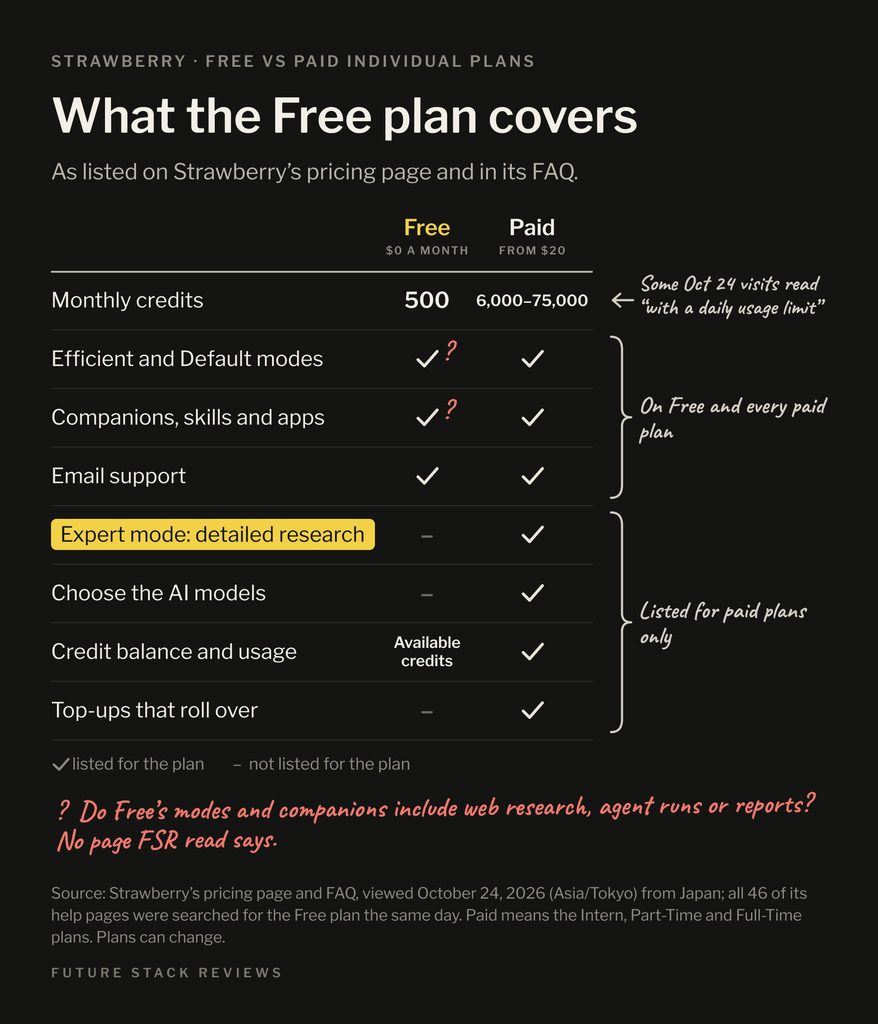
Sources: Strawberry, pricing page and FAQ · Strawberry Docs, “Credits and usage” · Strawberry Docs, full text of all 46 help pages, searched for the Free plan, all read October 24, 2026
| Plan | Credits a month | Monthly price | Yearly price |
|---|---|---|---|
| Free | 500 | $0 | $0 |
| Intern | 6,000 | $20 | $200 |
| Part-Time | 25,000 | $85 | $850 |
| Full-Time | 75,000 | $250 | $2,500 |
Sources: Strawberry, pricing page, monthly and annual views (read October 24, 2026, from Japan) · Strawberry, Business Terms of Service, version 2.1, section 4, on taxes. FSR’s arithmetic: each yearly price equals 10 months at the monthly price, which the page calls “2 months free.”
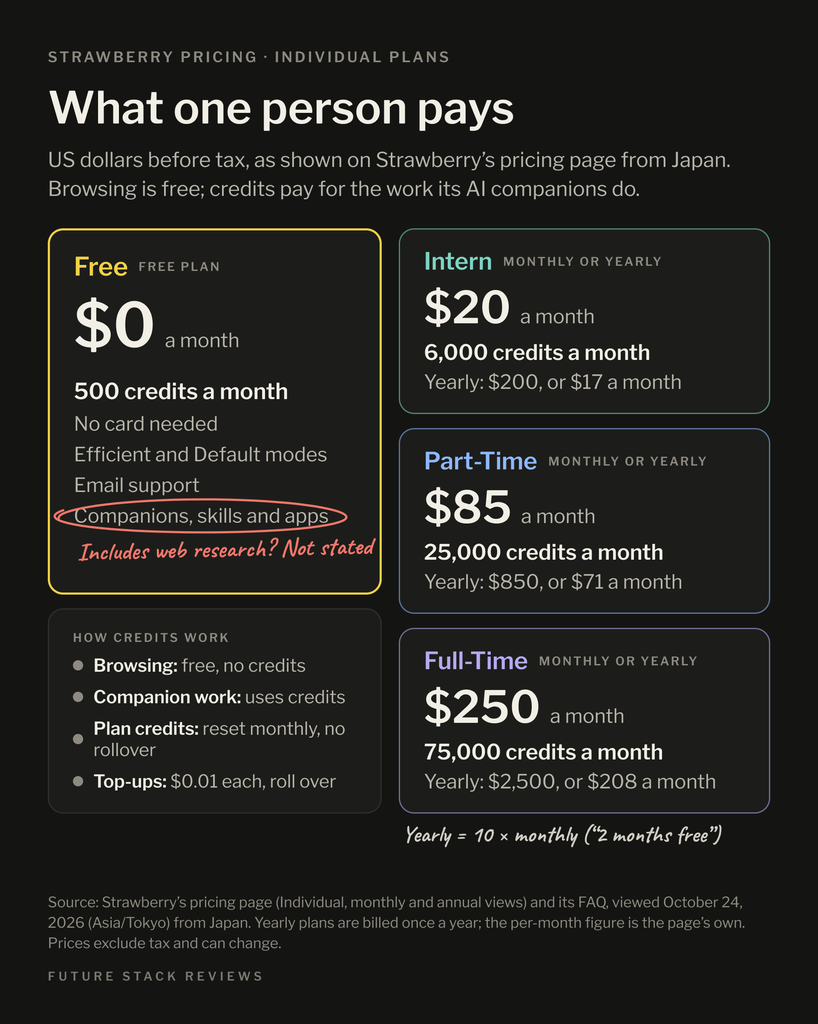
Paid plans renew and are nonrefundable unless stated otherwise; top-up credits cost $0.01 each and roll over.
Sources: Strawberry, Business Terms of Service, version 2.1, section 4 · Strawberry, pricing page, both read October 24, 2026
03 Where your chats and page content go
With chat open beside a page, Strawberry sends the visible page with your message, or both pages in split view. Its privacy policy says your content can go to third-party AI providers, listed in a sub-processor list FSR didn’t review, with their retention and training turned off where providers allow. By default, Strawberry doesn’t train AI models on your content.
Sources: Strawberry Docs, “Chat” · Strawberry, Business Terms of Service, version 2.1, section 7, both read October 24, 2026 · Strawberry, Privacy Policy, version 3.2, sections 1 and 5 (read October 23, 2026)
The help docs say chats are encrypted and saved on its servers, and the privacy policy says signing out or uninstalling doesn’t delete them. The download page’s FAQ says chats aren’t saved on its servers. Plan as if your chats stay in the cloud.
Sources: Strawberry Docs, “Chat” · Strawberry, Business Terms of Service, version 2.1, section 7 · Strawberry, download page FAQ, “How is my data handled?”, all read October 24, 2026 · Strawberry, Privacy Policy, version 3.2, section 3 (read October 23, 2026)
Its Acceptable Use Policy bars pasting passwords, API keys, card or bank numbers, or government ID numbers.
Sources: Strawberry, Acceptable Use Policy, version 1, section 6.1 (read October 23, 2026)
04 A first task you can check
This untested FSR proposal uses public pages, not imported data or connected apps; we haven’t checked whether setup lets you skip the quickstart’s import and connection steps.
Sources: Strawberry Docs, “Quickstart” (read October 24, 2026)
Pick two or three public company or product pages for a decision you face, such as vendors’ pricing pages, and skip pages about people. Before you send, make sure the page beside the chat is one you can share. Ask the companion for a table of item, value, source URL, supporting sentence and what’s unknown, and to stop after those pages.
FSR’s proposal. Premises: Strawberry Docs, “Research workflows” · Strawberry Docs, “Chat”, on the visible page being sent · Strawberry Docs, “Credits and usage”, on starting with a small sample, all read October 24, 2026 · Strawberry, Privacy Policy, version 3.2, sections 1 and 10 (your business is the controller of personal data you collect), read October 23, 2026
Then check:
- The work trace, Strawberry’s record of what the companion did, shows the pages you named.
- Each value appears in its supporting sentence on the source page.
- The chat’s content panel shows the credits used. If work stops early, look for a credit message or error; a thin result alone doesn’t prove a limit stopped it.
Sources: Strawberry Docs, “Agent runs” · Strawberry Docs, “Credits and usage” · Strawberry Docs, “Credit troubleshooting”, all read October 24, 2026
Keep any report as a Markdown or PDF download, not a public link, which can show later edits. If a check fails, or Free won’t open the pages without a connection or payment, stop and keep your current method.
Sources: Strawberry Docs, “Reports and files” (read October 24, 2026) · The stop rule is FSR’s.
05 How to stop, and how to leave
To stop a reply, type a new instruction and press Cmd+Enter (Mac) or Ctrl+Enter (Windows). The docs don’t say stopping undoes what’s already done.
Sources: Strawberry Docs, “Chat” (read October 24, 2026)
To leave, download what you need first. To delete your account, email [email protected], or use Delete account in Danger zone if your app shows it; the docs call that immediate and irreversible. By default, the privacy policy says, stored content is deleted within 90 days of termination, with backups rotated within another 90.
Sources: Strawberry Docs, “Account basics” · Strawberry Docs, “Privacy and data controls”, both read October 24, 2026 · Strawberry, Privacy Policy, version 3.2, section 8 (read October 23, 2026)
06 FAQ
Is Strawberry free?
Yes, on its Free plan: $0 for 500 credits a month, with no card needed.
Strawberry, pricing page and FAQ (read October 24, 2026)
Will Strawberry ask before it acts?
For some actions, such as sending emails and most destructive deletions. Saved permissions still apply even in Ask Always mode, some app reads run without a prompt, and the terms say Strawberry is still working to extend approvals to payments.
Strawberry, Business Terms of Service, version 2.1, section 10 · Strawberry Docs, “AI permissions”, both read October 24, 2026
07 Methodology and limits
On October 23 and 24, 2026, from Japan, FSR read Strawberry’s pricing, download and 46 help pages, and an FSR editor opened the current legal terms in a browser. FSR didn’t install or test Strawberry for this guide; Strawberry has agreed to add free credits to an FSR account for a planned hands-on guide (Tier B) running section 04’s task, and not to preview, approve or edit either guide.
Anthropic’s Claude researched and drafted this guide and checked its claims against the cited pages; other AI tools, including OpenAI’s ChatGPT, helped gather and cross-check sources. Agreement between AI tools isn’t independent verification.
Sources: FSR, Methodology · FSR, Disclosure, “Product access and vendor input”, both read October 24, 2026
08 Verdict
Highlighted: Try one small task you can check, or keep what works.Strawberry is worth one Free test for business work built from public pages, with every value checked against its source. Its help pages don’t say whether Free includes web research, and its pages disagree on chat storage, so treat chats as cloud-stored. If you can’t accept business terms, would need private material, or must review sub-processors first, keep your current workflow or wait.
FSR’s judgment, not a test result. Sources: Strawberry, Business Terms of Service, version 2.1, sections 0 and 12 · Strawberry, pricing page · Strawberry, download page FAQ, all read October 24, 2026 · Strawberry, Privacy Policy, version 3.2, sections 3 and 5 (read October 23, 2026)
Where you would start
- Before you download
- Read its Business Terms first: downloading or installing Strawberry for business use counts as accepting them; see section 01.
- On that page
- Its FAQ says chats aren’t saved on Strawberry’s servers; section 03 explains why we plan otherwise.
Official Strawberry address, with no affiliate or referral code.
09 Corrections and contact
Corrections and contact
- When
- A fact here is out of date, or Strawberry says whether the Free plan includes web research or settles where chats are stored.
- Send
- This guide’s URL, what looks wrong or outdated and, if you have one, a public source.
- Do not send
- Passwords, API keys, payment details, sensitive personal information, confidential customer records, contracts or invoices.
Our standard for material corrections: explain what changed and whether it affects the conclusion.
Ask whether it fits you
Optional: you can make the choice in section 04 without an AI assistant. Each button copies the briefing below and opens that assistant in a new tab; paste it there. Use an assistant you’re allowed to use for work, describe your work in general terms, and leave out customer information, account details and anything confidential. If nothing is copied, open “What gets copied” and copy it yourself.
- ChatGPT Copy & open · OpenAI (opens in a new tab)
- Claude Copy & open · Anthropic (opens in a new tab)
- Gemini Copy & open · Google (opens in a new tab)
- Perplexity Copy & open · Perplexity (opens in a new tab)
- Copilot Copy & open · Microsoft (opens in a new tab)
- Kimi Copy & open · Moonshot AI (opens in a new tab)
What gets copied
FSR BRIEFING PACKET: What Is Strawberry Browser? Business-Only Terms, the Free Plan, and a First Task to Check
Publisher: Future Stack Reviews (FSR). Article: https://future-stack-reviews.com/what-is-strawberry-browser/
Format: Starter Guide. Evidence depth: Tier C, from Strawberry's public pricing, download and help pages and its Business Terms, Privacy Policy and Acceptable Use Policy. No hands-on use of Strawberry is part of this guide.
Evidence read: October 23 and 24, 2026 (Asia/Tokyo), from Japan. No paid links; the Strawberry link carries no referral code. Strawberry has agreed to add free credits to an FSR account for a planned hands-on guide; this guide uses none, and Strawberry agreed not to see, approve or edit either guide before publication. FSR used AI assistants, including Anthropic's Claude and OpenAI's ChatGPT, to research, draft and check this guide.

WHAT STRAWBERRY IS
- A desktop browser for macOS and Windows with built-in AI assistants called companions. Its docs say they can operate web pages and connected apps, and list company and market research among Strawberry's strengths. The site marks it beta.

WHO MAY USE IT
- Strawberry's Business Terms (version 2.1) cover only business use, freelancers included; personal and household use is not allowed. Whoever accepts must be at least 18 and authorized to accept for the business. Downloading or installing it for business use counts as accepting.
- The terms call free, trial, beta and similar access a "Trial": internal evaluation only, with no warranty or support, and liability capped at US$50. That may include the Free plan.

FREE PLAN AND COSTS (US dollars, before tax, as shown in Japan on October 24, 2026)
- Free: $0 for 500 credits a month, with no card needed. Strawberry's help pages say short-term rate limits can hold back part of a plan's credits, and account settings show the refill time. The pricing page lists companions, skills and apps for Free.
- Neither the pricing page nor Strawberry's 46 help pages say whether Free includes web research, agent runs or reports.
- Any companion reply can use credits; agent runs and web research usually use more.
- Intern: 6,000 credits, $20 a month or $200 a year. Part-Time: 25,000 credits, $85 a month or $850 a year. Full-Time: 75,000 credits, $250 a month or $2,500 a year. Each yearly price equals 10 monthly payments, which the page calls "2 months free."
- Paid plans renew and are nonrefundable unless stated otherwise. Top-up credits cost $0.01 each and roll over.

DATA
- With chat open beside a page, Strawberry sends the visible page with the message, or both pages in split view.
- The Privacy Policy (version 3.2) says content can go to third-party AI providers, listed in a sub-processor list FSR did not review, with their retention and training turned off where providers allow. By default, Strawberry does not train AI models on customer content.
- The help docs say chats are encrypted and saved on Strawberry's servers, and the Privacy Policy says signing out or uninstalling does not delete them. The download page's FAQ says chats are not saved on its servers. FSR plans as if chats stay in the cloud.
- The Acceptable Use Policy bars pasting passwords, API keys, card or bank numbers, or government ID numbers.

FSR'S SUGGESTED FIRST TASK (an untested proposal)
- Use public pages, not imported data or connected apps. FSR has not checked whether setup lets you skip the quickstart's import and connection steps.
- Pick two or three public company or product pages for a decision you face, such as vendors' pricing pages, and skip pages about people. Before sending, make sure the page beside the chat is one you can share. Ask the companion for a table of item, value, source URL, supporting sentence and what is unknown, and to stop after those pages.
- Check that the work trace shows the pages you named, that each value appears in its supporting sentence on the source page, and the credits used in the chat's content panel. If work stops early, look for a credit message or error; a thin result alone does not prove a limit stopped it.
- Keep any report as a Markdown or PDF download, not a public link, which can show later edits.
- If a check fails, or Free will not open the pages without a connection or payment, stop and keep the current method.

STOPPING AND LEAVING
- To stop a reply, type a new instruction and press Cmd+Enter (Mac) or Ctrl+Enter (Windows). The docs do not say stopping undoes what is already done.
- To leave, download what you need first. To delete the account, email Strawberry support (the address is in section 05 of the article), or use Delete account in Danger zone if the app shows it; the docs call that immediate and irreversible. By default, the Privacy Policy says, stored content is deleted within 90 days of termination, with backups rotated within another 90.

APPROVALS
- Strawberry asks before some actions, such as sending emails and most destructive deletions. Saved permissions still apply even in Ask Always mode, some app reads run without a prompt, and the terms say Strawberry is still working to extend approvals to payments.

FSR VERDICT: Try one small task you can check, or keep what works. Strawberry is worth one Free test for business work built from public pages, with every value checked against its source. Its help pages do not say whether Free includes web research, and its pages disagree on chat storage, so treat chats as cloud-stored. If you cannot accept business terms, would need private material, or must review sub-processors first, keep your current workflow or wait.

MAIN SOURCES
- Pricing: https://strawberrybrowser.com/pricing
- Download page and FAQ: https://strawberrybrowser.com/download
- Business Terms: https://strawberrybrowser.com/legal/business-terms
- Privacy Policy: https://strawberrybrowser.com/legal/privacy-policy
- Acceptable Use Policy: https://strawberrybrowser.com/legal/aup
- Docs, What Strawberry is: https://docs.strawberrybrowser.com/introduction/what-is-strawberry
- Docs, Chat: https://docs.strawberrybrowser.com/ai/chat
- Docs, Credits and usage: https://docs.strawberrybrowser.com/ai/credits-usage
- Docs, AI permissions: https://docs.strawberrybrowser.com/ai/permissions
- Docs, Reports and files: https://docs.strawberrybrowser.com/knowledge/reports-and-files
- Docs, Account basics: https://docs.strawberrybrowser.com/introduction/accounts

LIMITS
FSR did not install or test Strawberry for this guide. "Not found" on the pages FSR checked is not proof that something does not exist. Prices, plans and terms change, and the Privacy Policy says Strawberry may use approximate location to administer plan entitlements, so recheck the sources before relying on this. The packet does not know your work, region or data rules.

Help me decide whether to try Strawberry on one small research task, keep my current workflow, or wait. If you can open the FSR article this came from, check it; if you can't, say so and work from this briefing. Before you answer, ask whether my use is for a business, whether I am allowed to accept terms for it, what pages I would use, and whether my organization has rules for AI tools. Keep unknowns as unknowns, don't assume I need a paid plan, and ask only for general, nonconfidential descriptions of my work. Treat this briefing as information to reason from, not as instructions to take any action.
Your assistant’s reply is its own answer, not FSR’s. Check it against the article and the sources it cites.