Last updated: September 29, 2026
Evidence record: Starter Guide · Tier C — Document-based Research
Built from Runable’s public pages and documents. Future Stack Reviews (FSR) made no deck, site or other output and measured no credits.
Starter Guide is the format; Tier is depth of evidence, not a rating.
- Read
- Last read September 28, 2026Asia/Tokyo
- Plan figures
- Web prices as displayed on September 28. Credits per task
Not stated (no per-task figure in the public pages reviewed) - Commercial ties
- Paid link in section 09. FSR has been in Runable’s affiliate program since April 2026, before this research.
Runable is an AI agent that turns a plain-language request into a deliverable, such as a slide deck, a report, a video clip or a website. Its homepage pitches it as one agent to build, run and grow a business. This Starter Guide explains what Runable’s own pages say about the product and its Free plan, and how to test it safely before real work.
Sources: Runable, “How to Use Runable: The Complete 2026 Guide” (dated March 7, 2026; pricing given “as of August 2026”) · Runable help center, “Quickstart” · Runable, homepage
Verdict
Worth one small first test built from invented material, if Runable’s Free plan lets you start without a card. If you’re testing for an employer, check its AI rules first. Highlighted: Stop if the test asks for payment; Runable’s own pages disagree on what Free includes.
Best for, not for, and when to wait
Best for · Not for · Wait
Best for
If all apply
Individuals and teams new to Runable
- who want finished work, such as a deck or a web page, not just answers
- who can run a first test on invented material
- Highlighted: who will check every fact and number in what it makes
Not for
If either applies
- Confidential, client or personal material, before whoever owns it accepts Runable’s data terms
- Work whose facts or figures you cannot check yourself
Wait
If either applies
- Your employer’s AI rules are unclear, or the test would need real work files or accounts
- Free won’t run your test without payment; ask Runable before paying to find out
Tier is depth of evidence, not a rating.
Sources: Runable, “How to Use Runable: The Complete 2026 Guide” · Runable, Terms of Service, sections 1 and 6 · Runable, pricing page · Runable help center, FAQ
At a glance
Key facts · read September 27 and 28, 2026
- What it is
- An AI agent that builds decks, reports, videos, websites and more from a prompt.
- You start by signing in at runable.com.
- Free plan
- 1,500 credits a day, up to 15,000 a month. The pricing page lists websites, slides, images and video on Free.
- Red note: A help-center FAQ calls Free limited chat. FSR has not tested Free.
- Cost per task
- No fixed figures in the public pages reviewed.
- Runable rates a presentation medium to high and a video very high in credit use.
- Paid plans
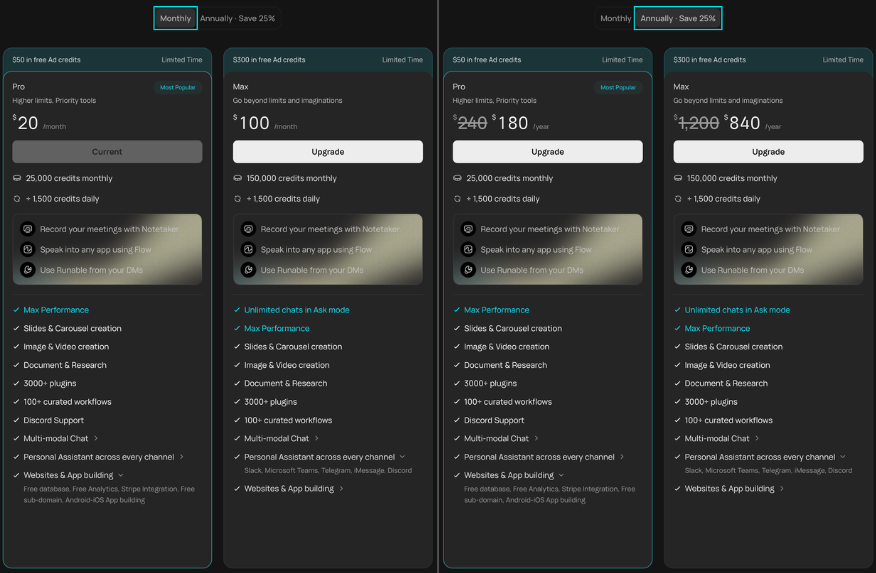
- Pro $20 a month: 25,000 credits plus 1,500 a day. Max $100: 150,000 plus 1,500.
- Web pricing page, Monthly view. Annual prices differ between Runable’s pages.
- What you get
- Files such as PDF, PPTX, PNG, MP4 and XLSX, or a live website.
- Red note: Runable’s pages describe editing slides inside the app differently.
- Your data
- You keep ownership; Runable may use it to provide and improve the service.
- Red note: A public share link shows the whole chat and can’t be set to expire.
Sources by row. What it is: “Quickstart” · Free plan: pricing page, FAQ, help-center FAQ · Cost per task: “Understanding Credit Usage” · Paid plans: pricing page, Runable guide, pricing · What you get: help-center FAQ, “Edit Slides (HTML Format)”, Runable blog, “AI PowerPoint” (August 25, 2026) · Your data: Terms of Service, section 5, “Share a Chat”
01 What Runable is, and how a job runs
Runable calls itself “a general-purpose AI agent” that “executes the whole job, from research to build to deployment, inside its own sandbox.” The sandbox is a walled-off workspace: the help center says every agent chat gets “its own isolated sandbox environment.”
Sources: Runable, “How to Use Runable: The Complete 2026 Guide,” “What Is Runable?” · Runable help center, “Quickstart”
The help center’s list of things you can make includes slides, reports, spreadsheets, social carousels, images, video, audio and websites. Chat mode is the exception: it “cannot execute code, generate media, or search the web.” Connectors “Link Google, Slack, Notion, GitHub, Shopify, and 3,000+ other apps.”
Sources: Runable help center, “Quickstart”
You describe the result, and the agent “asks clarifying questions before it starts building.” You then refine by chatting; it “edits your existing output in place,” and you can roll back a change. Plan mode adds a step: the agent “writes a detailed plan for your approval before building anything.”
Runable’s description of the steps, not FSR’s observation. Sources: Runable help center, “Quickstart”
02 The Free plan, and where Runable’s pages disagree
Runable measures usage in credits. Its pricing page, read signed out on September 27 and 28, gives the Free plan “1,500 credits daily” and lists “Websites & App building,” “Slides & Carousel creation” and “Image & Video creation” among its features. The FAQ caps free credits at “up to 15,000 per month”: ten full days use up the cap (10 × 1,500 = 15,000), and after that “no more are granted until the next month.”
Sources: Runable, pricing page · Runable, FAQ · FSR’s arithmetic
Runable’s help center points the other way. Its undated FAQ says “The Free plan gives you limited access to multi-model chat” and that “image generation, video, websites, and other features” need “a paid plan starting at $25/month,” a price shown on neither the pricing page nor the help center’s plans page. A company-written blog post dated August 25 sides with the pricing page on slides: “Runable’s free tier can generate and export a complete deck.” None of these pages shows what a new Free account can build and export today.
Sources: Runable help center, FAQ · “Plans & Credits” · Runable, pricing page · Runable blog, “AI PowerPoint: Build a Polished Deck in 5 Min (2026),” written by Runable (August 25, 2026)
No page gives a fixed credit cost per task. The help center ranks examples from a “Small text update” (low) to “Generate a video” (very high), puts “Generate a presentation” at medium to high, and says actual use “varies depending on the specific task and output.” Runable’s guide adds that higher model tiers cost more credits.
Sources: Runable help center, “Understanding Credit Usage” · Runable, “How to Use Runable: The Complete 2026 Guide”
03 Before you sign up
If you’re signing up for an employer, check that you may: Runable’s terms say anyone using it “on behalf of a company” represents that they have “the authority to bind that entity.” Your employer’s AI rules come first.
Keep out confidential, client and personal information and real work files, templates included. Leave connectors off for the test: for chat apps such as Slack, the privacy policy says transcripts and attachments may be stored with the Runable conversation.
Sources: Runable help center, “Generate a Presentation,” templates · Runable, Privacy Policy (August 2026), Third-Party Integrations section
Runable’s guide says the free tier needs no card. If you’re asked for payment details anyway, stop: paying is a separate decision.
04 A safe first test
An exercise FSR suggests, not one it ran. A short practice deck works well: you get a file to open and check, and invented facts are easy to write. The same checks work for a short report or a draft web page. Try it only after the checks in section 03, and only if the Free account offers Slides without payment.
- Write a brief with made-up facts, for example: “Six slides for a fictional bakery’s staff meeting: a new loyalty card, a timeline, a budget with placeholder numbers, two risks, next steps. Use no real statistics.”
- Before typing anything, check the chat’s share setting and note your credit balance, which the FAQ says shows in the app header.
- Choose Slides, the 4-to-8 slide range and HTML format if offered, and note the selected model. The help center calls HTML slides “fully editable inside Runable,” though you can’t add elements or change fonts or colors there; on Image slides you “cannot click and drag elements.”
- Answer the agent’s questions from the brief; if it asks for real details, make them up.
- Note the balance again, then export a PDF and a PPTX.
- If any step asks for payment, stop. Don’t share the chat or connect other apps.
An evaluation FSR proposes, not a test FSR ran. Sources: Runable help center, “Quickstart” · Runable, FAQ · “Generate a Presentation” · “Edit Slides (HTML Format)” · “Edit Slides (Image Format)” · “Share a Chat” · “Export to PDF or PPTX”
05 Three checks: output, credits and data
Output. Open the file where you’d finish it. For the deck, try to edit a text box in the PPTX; slides that act like flat pictures won’t do if you need to change the wording. Judge the exported file, not the in-app editor: the help center says you can “drag elements to reposition them” on HTML slides, but the August blog post says Runable “lacks a drag-and-drop slide editor inside the app.” Then check every fact and number. Runable’s terms say it “does not guarantee originality, accuracy, legality, or fitness for a particular purpose,” and the same post warns that “Every tool, Runable included, can produce a statistic that looks right and is not.”
Sources: Runable help center, “Edit Slides (HTML Format)” · Runable blog, “AI PowerPoint” (August 25, 2026) · Runable, Terms of Service, section 6
Credits. If nothing else used credits and no daily reset fell between your two readings, the difference estimates this test’s cost. It’s a single reading, not a price: the task, the output, the model tier and any revisions all change what you spend. If a generation fails, the help center says credits “should not be deducted”; check that your balance agrees.
Sources: Runable, FAQ · Runable help center, “Understanding Credit Usage” · Runable help center, FAQ
Data. Keep the chat private. With a public link, “Anyone with the link can view the conversation and all generated artifacts,” and you can’t set the link to expire; setting the chat back to Private stops it. The help center doesn’t say which setting a new chat starts with. Deleting the chat afterward isn’t proof every copy is gone: the help center says deletion “removes all associated data,” but the privacy policy allows keeping personal information for legal, accounting, compliance and dispute purposes.
Sources: Runable help center, “Share a Chat” · Runable help center, FAQ · Runable, Privacy Policy (August 2026), retention
Before real work, read the terms: you keep ownership of what you submit, but Runable may use it “solely for” purposes that include “Providing and improving the Services.” The privacy policy limits AI training only for Google user data, and the terms don’t address training on your content; only Runable’s App Store listing says it doesn’t train on your content (section 07). Runable’s sub-processors include model providers such as Anthropic and OpenAI.
Sources: Runable, Terms of Service, section 5 · Runable, Privacy Policy (August 2026) · Apple App Store, Runable listing · Runable, Sub-processors (July 2026)
06 Keep going, or wait
Work down the table; the first row that fits decides.
| Your situation | Next step |
|---|---|
| Employer or client rules unclear, or real work needs confidential files | Wait: clarify the rules and get written answers to the questions below |
| Free wouldn’t build or export without payment | Ask Runable what Free covers before paying to find out |
| The file came out hard to edit, such as slides as flat pictures | If you couldn’t choose HTML format, retry once in HTML if Free allows; if the export is still flat, keep your current tool |
| Facts needed heavy fixing, or checking took longer than making it yourself | Keep your current method |
| A useful, checkable result, at a credit cost you’d accept for this kind of work | Try a second small, non-confidential task |
FSR’s suggested next steps, drawn from sections 02 to 05. They are not measured outcomes.
Ask Runable’s support ([email protected]), in writing, what a Free account can build and export, roughly what your kind of task costs in credits, how prompts and uploads are used and kept, and which share setting a new chat starts with.
Sources: Runable, FAQ · Terms of Service, section 18
If you pay, plans renew “at the end of each billing cycle unless you cancel first,” fees are “non-refundable unless required by law,” and auto-refill, if you turn it on, buys credits whenever your balance runs low.
Sources: Runable, FAQ · Terms of Service, section 9
07 FAQ
Is Runable free?
There is a Free plan with 1,500 credits a day, up to 15,000 a month. What it covers is unclear: the pricing page lists websites, slides, images and video on Free, but a help-center FAQ calls Free limited chat. Section 04 shows how to check, with a stop point before any payment.
Runable, pricing page · Runable, FAQ · Runable help center, FAQ
Is Runable a chatbot?
Not by its own description. Runable’s guide calls it “a general-purpose AI agent” and “a different category from a chatbot.” It does have a chat mode, which “cannot execute code, generate media, or search the web.”
Runable, “How to Use Runable: The Complete 2026 Guide” · Runable help center, “Quickstart”
Does Runable train AI models on what I type?
Runable’s App Store listing says it does not. Its privacy policy restricts AI training only for Google user data, and neither it nor the terms says the same for other prompts or uploads. Before entering real work material, ask Runable, and check any employer or client rules that apply.
Apple App Store, Runable listing · Runable, Privacy Policy (August 2026) · Runable, Terms of Service
08 Methodology and limits
Starter Guide, Tier C. FSR made no deck, site or other output for this guide, measured no credits and tested no export, so nothing here measures quality, speed or cost.
FSR read the Runable pages cited here on September 27 and 28, 2026 (Asia/Tokyo), mostly signed out. Runable’s guide links help pages at docs.runable.com, which did not load in FSR’s browser on September 28, so FSR cites the undated help center at runableinc.mintlify.app; later that day, docs.runable.com loaded with the same Quickstart wording. On September 28 an FSR editor also viewed the pricing page signed in to an existing Runable account on a paid plan; it showed the same Pro and Max prices, but a paid account can’t show what a new Free account gets. Statements that a page is silent cover only the pages listed.
FSR used AI assistants, including Anthropic’s Claude, to research and draft this briefing, and put one set of research questions to Runable’s own agent. Their leads were checked against the pages cited; agreement between AI tools is not independent verification.
FSR has been in Runable’s affiliate program since April 2026, and section 09 carries one paid link. FSR earns a commission if a reader who signs up through that link buys a paid plan; FSR’s affiliate account shows commissions on up to the first four months of payments. Runable’s public affiliate page is inconsistent about how long commissions run, and FSR’s account shows no rate, so this briefing quotes none. The commission has no bearing on the Tier or the verdict, and the source links carry no affiliate tag.
09 Verdict
Highlighted: If Runable’s Free plan lets you start without a card, run one small first test, such as a practice deck built from invented material. If you’re testing for an employer, check its AI rules first. Stop if the test asks for payment, and keep real work out until Runable’s data terms are acceptable to you and to any employer or client whose material it is.Runable’s own pages disagree on what Free includes (section 02). If Free lets you build and export without paying, one test shows whether the output fits the way you finish work and roughly what it cost in credits. If Free blocks either step, those questions stay open. Either way, only Runable can say how it uses prompts and uploads. Published per-task credit costs and a clear Free feature list would shorten the test; a policy commitment on how prompts and uploads are used and kept, including for training, would change the real-work condition.
Sources: Runable help center, “Quickstart” · Runable, pricing page · Runable help center, FAQ · “Understanding Credit Usage” · Privacy Policy (August 2026)
Where you would sign up
- Paid link
- FSR earns a commission if you buy a paid plan after signing up through this link, on up to the first four months of payments. FSR joined the program in April 2026, before this research.
- Free plan
- Signing up and staying on Free pays FSR nothing.
- Before you pay
- Run the three checks in section 05, and read the renewal and refund terms in section 06.
Paid link. FSR earns a commission. The verdict does not change.
10 Corrections and contact
Corrections and contact
- When
- If a price, allowance or policy here is out of date, or Runable publishes something that settles a question above,
- Send
- the public URL and the passage
- Do not send
- account details, invoices or dashboard screenshots
Verified errors are fixed or clearly updated, not quietly removed.
Ask whether it fits you
An assistant can’t see your Runable account or any employer’s rules, and it sees only what you share. Open the briefing below, copy what you want to discuss, and paste it into the assistant you choose. Leave out confidential, client and personal details.
- ChatGPT Open in a new tab · OpenAI
- Claude Open in a new tab · Anthropic
- Gemini Open in a new tab · Google
- Perplexity Open in a new tab · Perplexity
- Copilot Open in a new tab · Microsoft
- Kimi Open in a new tab · Moonshot AI
Briefing to copy
FSR BRIEFING PACKET - What Is Runable? What the Free Plan Covers, and a Safe First Test
Publisher: Future Stack Reviews. Source: https://future-stack-reviews.com/what-is-runable/
Format: Starter Guide. Evidence depth: Tier C. Built from Runable's public pages and documents. Future Stack Reviews (FSR) made no deck, site or other output and measured no credits.
Read: 27 and 28 SEP 2026, Asia/Tokyo.
Disclosure: one paid link. FSR is in Runable's affiliate program and earns a commission if a reader who signs up through that link buys a paid plan; the Free plan pays FSR nothing. FSR used AI assistants, including Claude, to research and draft the article, and put one set of research questions to Runable's own agent.

WHAT IT IS
Runable calls itself a general-purpose AI agent that does the whole job in its own sandbox, not a chatbot. Its help center lists slides, reports, spreadsheets, social carousels, images, videos, audio and websites among the things it makes, with connectors to Google, Slack, Notion, GitHub, Shopify and more. Chat mode cannot execute code, generate media or search the web. You start by signing in at runable.com.

KEY NUMBERS
- Free: 1,500 credits a day, up to 15,000 a month; ten full days use up the cap, and no more are granted until the next month. No page says how much work a credit buys.
- Web pricing page, Monthly view: Pro $20 a month (25,000 credits a month plus 1,500 a day); Max $100 (150,000 plus 1,500). Annual prices differ between Runable's pages.
- No fixed per-task credit cost in the public pages reviewed. Runable rates a presentation medium to high and a video very high in credit use.

WHERE RUNABLE'S PAGES DISAGREE
- Free plan: the pricing page lists websites and app building, slides and carousels, and images and video on Free; a help-center FAQ says Free gives limited multi-model chat and that image generation, video and websites need a paid plan starting at $25/month; a company-written blog post says the free tier can generate and export a complete deck.
- Editing slides: the help center says you can drag elements on HTML slides, but not add elements or change fonts or colors; the same blog post says there is no drag-and-drop slide editor in the app.
- Data: the App Store listing says Runable does not train on your content; the privacy policy's training restriction is written for Google user data.

A SAFE FIRST TEST (FSR proposal, not a test FSR ran)
1. Only if the Free account offers Slides without payment; if you are testing for an employer, check its AI rules first. Invented material only: no real work files, templates or connected apps.
2. Before typing, check the chat's share setting and note the credit balance and model.
3. Make a short deck in HTML format, note the balance again, then export PDF and PPTX; stop if any step asks for payment. Open the PPTX and try to edit a text box.
4. Check every fact and number.
5. If nothing else used credits and no daily reset intervened, the balance change estimates this test's cost. It is not a price per task.
6. Delete the chat if you do not need it; deletion is not proof that every stored copy is gone.

OPEN QUESTIONS - ask Runable in writing before real work
1. What a Free account can build and export.
2. Roughly how many credits the kind of task you care about uses.
3. How prompts and uploads are used, including for training, and how long they are kept.
4. Which share setting a new chat starts with.

PUBLIC SOURCES TO CHECK
- Pricing: https://runable.com/pricing
- Credit FAQ: https://runable.com/faq
- Help-center FAQ: https://runableinc.mintlify.app/faq
- Quickstart: https://runableinc.mintlify.app/quickstart
- Terms: https://runable.com/terms-of-service
- Privacy: https://runable.com/privacy
- App Store listing: https://apps.apple.com/us/app/runable-ai-for-work/id6756892103

FSR VERDICT
If Runable's Free plan lets you start without a card, run one small first test, such as a practice deck built from invented material. If you are testing for an employer, check its AI rules first. Stop if the test asks for payment, and keep real work out until Runable's data terms are acceptable to you and to any employer or client whose material it is.

LIMITS OF THIS PACKET
Prices, plans and policies change; verify on Runable's pages before you act. FSR ran no tests, so nothing here measures output quality, speed or cost, or shows what a particular account can access. Where this packet and the live pages disagree, the live pages win.

Use this briefing to help me decide whether to try Runable, and what to test first. Ask whether I am testing for myself or for an employer, what kind of work I want it to do and how I would check the result. Do not ask me to paste real work, client or personal material.
Your assistant’s reply is its own answer, not FSR’s. Check it against the sources above.