Last updated: October 22, 2026
Evidence record: Starter Guide · Tier B — Structured Hands-on Evidence
Built from FSR’s own tests of Cutroom from October 19 to 21, 2026: one 56-second English clip run through all four edit styles, one round of fixes and a re-export, four exports watched on a phone, and the same clip made once on a new free account. Plus Cutroom’s public pages, read on October 21 and 22, and its written answers to FSR of October 21. One speaker, one take, a Mac and an iPhone in Japan. FSR didn’t test AI presenters, music, other languages, longer clips or a paid upgrade.
Starter Guide is the format; Tier is depth of evidence, not a rating.
- Read
- Last read October 22, 2026Asia/Tokyo
- Tested
- Tested October 19 to 21, 2026Asia/Tokyo
- Disclosures
- One paid link (section 09); FSR earns a commission on subscriptions Cutroom attributes to it. Cutroom provided the review account FSR tested on (section 08).
Cutroom (cutroomai.com) turns one clip of you talking into a vertical video with captions, an opening headline it calls a hook, and b-roll, short clips shown over your words. FSR ran one clip through all four edit styles and remade it on a free account.
Sources: Cutroom, home page · Cutroom, FAQ · FSR’s test log, October 19 to 21, 2026 (section 08)
Verdict
Choose the edit style before you upload; FSR found no way to switch it afterward, and Cutroom confirmed there is none. Read the transcript and the hook for names and numbers, and check every b-roll clip: Highlighted: no clip Cutroom picked in FSR’s test showed what the words named, and one put a stranger’s face over the speaker’s self-introduction. The free video carries a mark across the middle.
FSR’s judgment from its tests (sections 02 to 05) and Cutroom’s answers to FSR, October 21, 2026, not a measured rate.
Best for, not for, and when to wait
Best for · Not for · Wait
Best for
If all apply
People who film short vertical talking videos for work
- who can re-film a slip rather than cut it
- who will pick the edit style before uploading
- Highlighted: who will check every b-roll clip before posting
Not for
If either applies
- Cutting a stray word or line after filming: FSR found no control for either, and Cutroom says there is none
- Removing every um and long pause: Punch and Native shortened about half the long pauses and left both ums in FSR’s test, which Cutroom says is how they work
Wait
If this applies
- You’d post the free video as is: the mark sits across the middle
See choosing the style and the free video
FSR’s judgment from one clip and one speaker.
Sources: Cutroom, AI silence remover · Cutroom, Text-based video editor · Cutroom, Terms · Cutroom’s answers to FSR, October 21, 2026 · FSR’s test log, October 19 to 21, 2026 (section 08). The fit is FSR’s judgment.
At a glance
Key facts · rechecked October 22, 2026
- Edit style
- Fixed at upload: FSR found no way to switch it, and Cutroom says there is none. The editor has caption, hook and b-roll settings.
- Pauses and ums
- Punch and Native shortened about half the long pauses; the other two kept them.
- Red note: Both ums stayed in the sound: Cutroom removes only ums that show up in the transcript, and FSR’s two didn’t. No pause went under 0.25 seconds.
- Transcript
- Two names wrong, every number right. Word fixes were free.
- B-roll
- Of 17 clips in four edits, none showed what the words named; 6 were unrelated.
- Free video
- 600 credits, no card, seven days. A mark sat across the middle of every frame.
Sources by row. Edit style and pauses: Cutroom, AI silence remover · Cutroom, FAQ · Cutroom’s answers to FSR, October 21, 2026 · Free video: Cutroom, Terms · The rest, and the notes: FSR’s test log and measurements, October 19 to 21, 2026 (section 08)
01 What FSR tested
The clip is one take filmed on an iPhone 17 Pro, about 56 seconds of English from a non-native speaker, seeded with test items, including the publication’s name, a plan name, a price, a credit count, a date, two ums and a line that adds nothing. Each style ran once on a review account Cutroom provided; the free-account run used Punch.
FSR’s test plan and test log, October 19 to 21, 2026 (section 08)
02 Step 1: Choose the edit style before you upload
Cutroom asks for the style on its upload screen, which said every lever “still works on it — including restyling.” The editor has settings for the caption theme, the hook and where each b-roll clip shows, but FSR found no way to switch the style itself, and Cutroom told FSR on October 21 that there is none; its FAQ now says the style you pick stays, with its pace and sound effects. FSR tested styles in separate 100-credit projects. FSR found no pace setting either: Cutroom’s pages say the only pace control, “Slow the pace to normal,” appears when you tap a word Punch or Native took out, and in FSR’s test neither took one out.
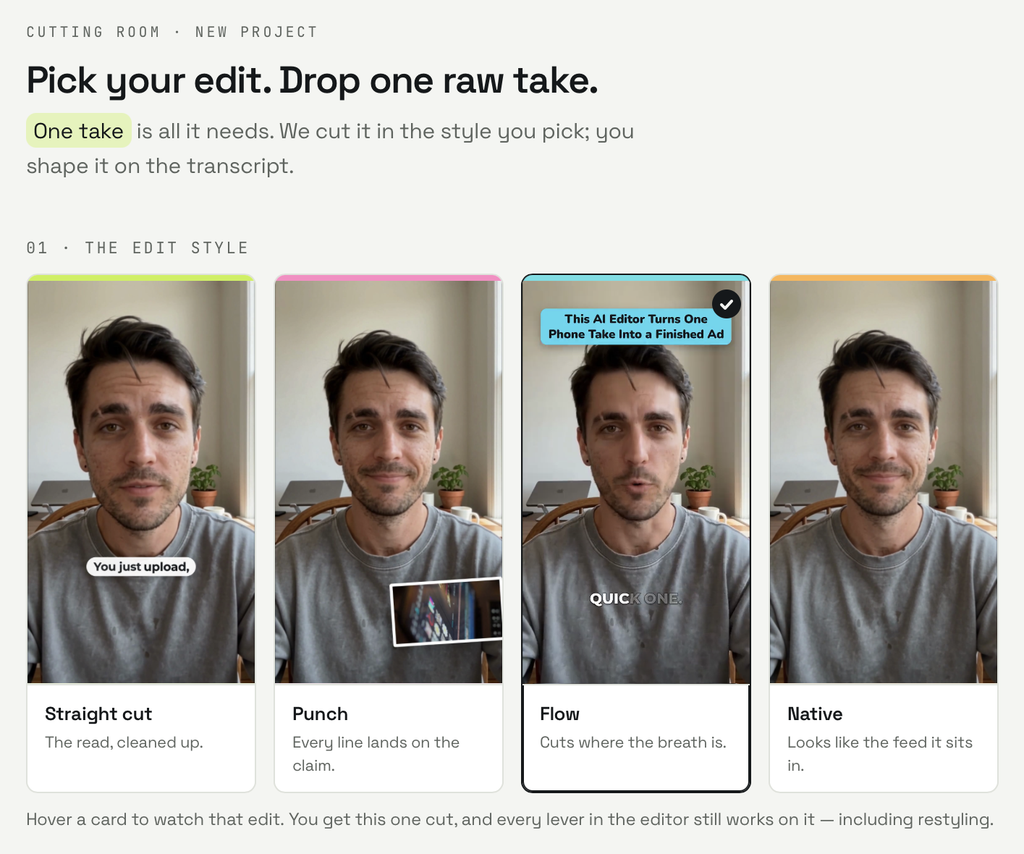
Sources: Cutroom’s upload screen and editor, October 19 to 21, 2026 (FSR screenshots) · Cutroom, AI silence remover · Cutroom, FAQ · Cutroom, Text-based video editor · Cutroom’s answers to FSR, October 21, 2026 · FSR’s test log, October 20, 2026 (section 08). Pages checked October 22, 2026.
| Style | Length | Long pauses shortened | Extras | B-roll clips |
|---|---|---|---|---|
| Straight cut | 53.6 s | None | None | 5 |
| Flow | 53.6 s | None | 3 added sounds | 4 |
| Punch | 47.7 s | 13 of 25 | 2 cards, an emoji, 4 added sounds | 5 |
| Native | 47.9 s | 12 of 25 | 3 cards that covered the speaker, an emoji, 3 added sounds | 3 |
FSR’s measurements of the four exports, October 19 and 20, 2026 (section 08). A long pause is one over 0.24 seconds in the original take. Each style also used its own caption theme.
Punch and Native did less than Cutroom’s silence-remover page described on October 21, when it said they cut every pause over 0.24 seconds to 0.13 seconds (0.19 between sentences) and remove ums: none went below 0.25 seconds, and both ums stayed in the sound. Cutroom told FSR that day that this is how they work, and the page now says so: they shorten only pauses found between transcribed words, a shortened pause still sounds longer than 0.13 seconds, and an um goes only if it shows up in the transcript, which FSR’s two didn’t. FSR found no setting for the added sounds, and Cutroom says there is none; Straight cut adds none. Cutroom also told FSR that the style previews on its upload screen and home page are silent, so you can’t hear those sounds before you choose, and that a bug can leave a sound where you switch b-roll off or set a plain cut.
Sources: Cutroom, AI silence remover, read October 21 and 22, 2026 · Cutroom’s answers to FSR, October 21, 2026 · FSR’s measurements and test log, October 19 and 20, 2026 (section 08)
Pick Straight cut to keep your take as you said it, with no added sounds; Flow keeps your words and pauses but adds sound effects. Pick Punch or Native for a tighter, busier edit.
FSR’s suggestion from the results above.
03 Steps 2 and 3: Check the words, then every b-roll clip
Cutroom’s FAQ says transcripts most often get names, brands and numbers wrong. FSR’s transcript got the publication’s name and the plan name wrong and every number right, and turned “my coffee went cold” into “my coherence called,” possibly because of the speaker’s pronunciation. Read the hook too: the four styles’ hooks came in three wordings, and one Punch hook turned the script’s $19.99 into $20.
Sources: Cutroom, FAQ · FSR’s test log and measurements, October 19 and 20, 2026 (section 08)
Fixing a word (select, correct, save) cost nothing, and the fixes showed in the export. FSR found no control for deleting a word or a line, and Cutroom told FSR on October 21 that there is none, nor any way to trim either end of a take; its text-based editor page, which until October 22 said a whole line could be deleted, now says neither words nor lines can be. Cutroom also said the “Delete the clip before this” option under Scene change, in the B-roll tab, is accepted but changes neither the preview nor the export. Re-film a slip you can’t publish.
Sources: Cutroom, Text-based video editor, read October 21 and 22, 2026 · Cutroom’s answers to FSR, October 21, 2026 · FSR’s test log, October 20, 2026 (section 08). The last sentence is FSR’s suggestion.
Then check every b-roll clip. Across the four style edits, none of the 17 clips showed what the words named; 11 were loosely related and 6 unrelated. In Straight cut, a stranger’s face filled the screen during the speaker’s self-introduction; in Punch, another editing app’s screen appeared over “testing Cutroom.”
FSR’s review of the four exports, October 19 and 20, 2026 (section 08). FSR rated each clip as matching, loosely related or unrelated to the words it covered.
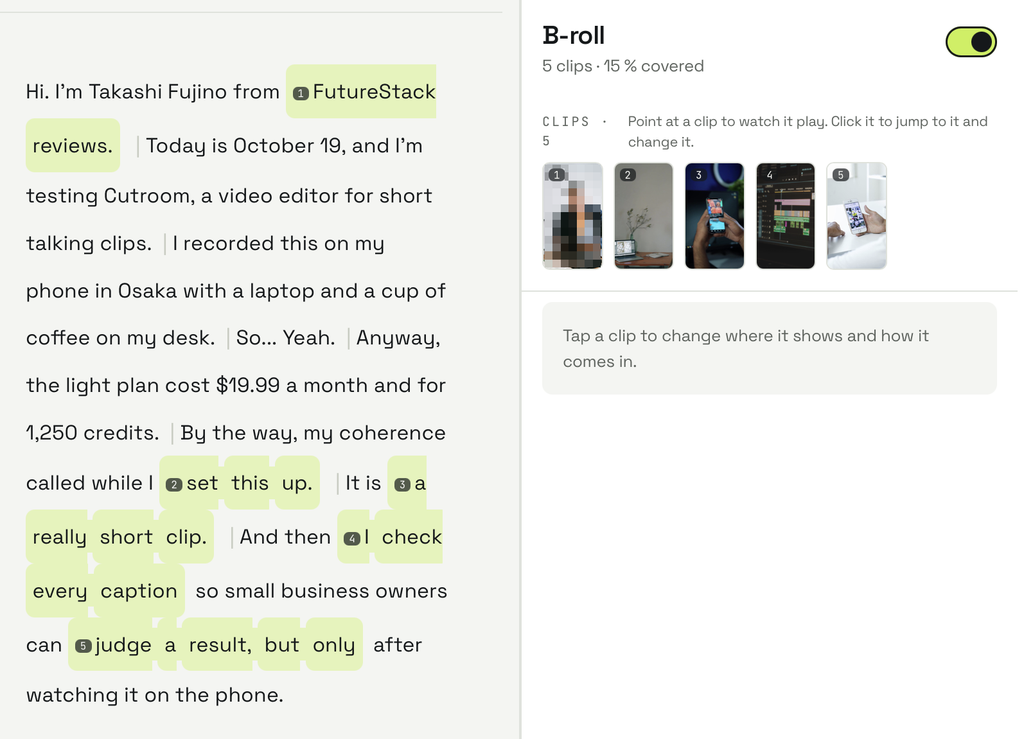
Switching all b-roll off and on and swapping a clip cost nothing; the swap showed in the export. Other clips also changed timing, transitions or framing compared with the first export; recheck all b-roll after every export.
FSR’s test log and measurements, October 20, 2026 (section 08)
04 Step 4 and the free video
Four exports watched on an iPhone 17 Pro looked as they had on the Mac.
Cutroom’s terms give a new workspace one free video and 600 credits, with no card, to make within seven days. Before the export, an upgrade screen appeared; the free path was the outlined button at the bottom, “Export with the Cutroom mark,” which FSR’s editor first missed.
Sources: Cutroom, Terms · FSR’s test log, October 20 and 21, 2026 (section 08)
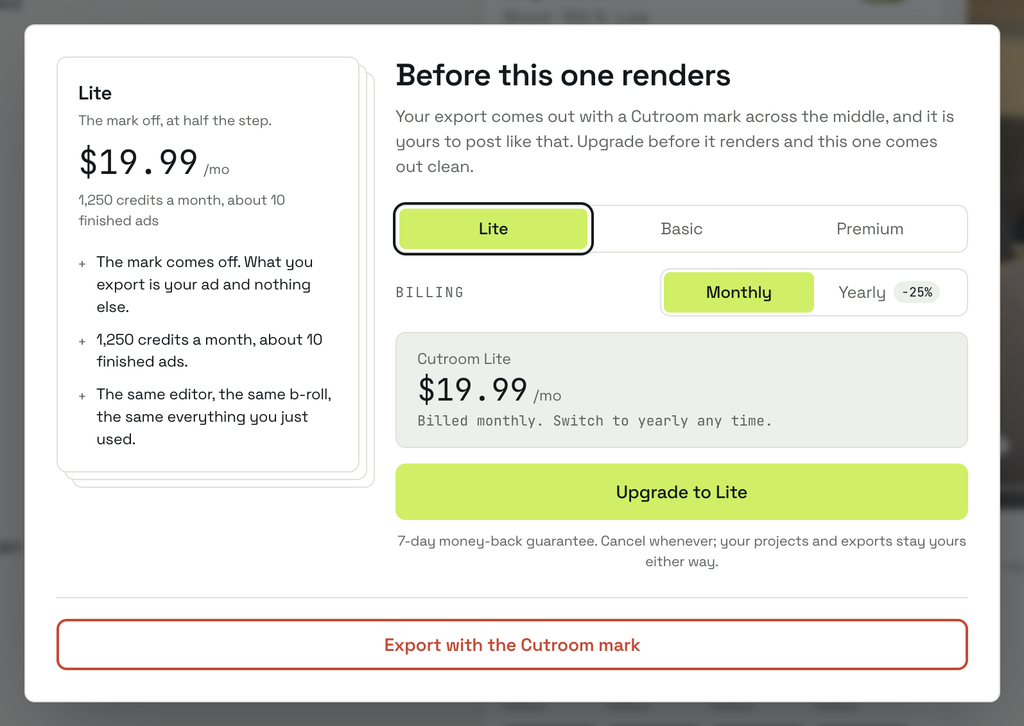
The mark is a dark, see-through box with Cutroom’s logo and name, centered, just over half the picture’s width, in every frame; in FSR’s framing it covered the speaker’s mouth. Cutroom’s terms, FAQ, refund page and export screens put it “across the middle”; the note under the editor’s preview said “a corner mark.”
Sources: Cutroom, Terms · Cutroom, FAQ · Cutroom, Refunds · Cutroom’s editor and export screens, October 21, 2026 (FSR screenshots) · FSR’s measurement of the free export, October 21, 2026 (section 08)
05 What the test cost in credits
Each new project cost 100 credits; each export, 20 per minute, prorated and rounded up (16 or 18 here). The edits FSR made cost nothing. FSR used 486 of the review account’s 1,000 credits and 116 of the free account’s 600. Re-exporting an unchanged edit wouldn’t start, but no credits moved, and Download returned the same file. Cutroom told FSR on October 21 that such a re-export is free, that the error and the button’s price are bugs, and that the same cut is charged again only after a renderer update or a watermark change, such as moving up from the free plan; its terms, which until October 22 said re-exporting costs credits, now say the same. Lite is $19.99 a month, billed monthly, for 1,250 credits, about 10 one-minute videos by Cutroom’s count.
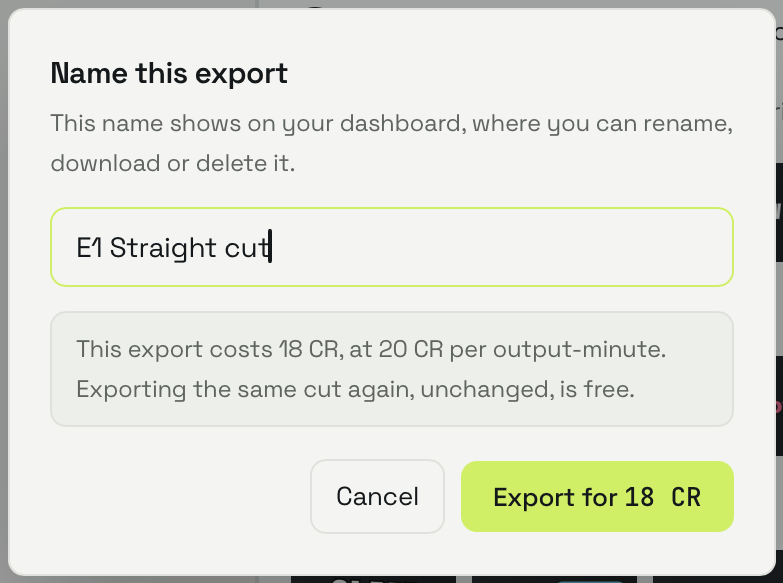
Sources: Cutroom, Terms, read October 21 and 22, 2026 · Cutroom, Pricing · Cutroom’s export screens, October 19 to 21, 2026 (FSR screenshots) · Cutroom’s answers to FSR, October 21, 2026 · FSR’s test log, October 19 to 21, 2026 (section 08). US dollar list price before tax, rechecked October 22, 2026.
06 The first-video checklist, revised
- Film a take you have rights to, with nothing confidential; re-film any slip.
- Choose the style before you upload.
- Check names, brands and numbers in the transcript and the hook.
- Check every b-roll clip; swap, remove or switch off what misleads.
- Watch the export on a phone, and recheck b-roll after any re-export.
- On the free video, use “Export with the Cutroom mark”; the mark sits across the middle.
The steps are FSR’s suggestions from its test. Earlier version: FSR, “What Is Cutroom?”, section 05
07 FAQ
Can I change the edit style after I upload?
No. FSR found no way to switch it, and Cutroom told FSR on October 21 that there is none; another style means a new project, which cost 100 credits in FSR’s test. The editor has settings for the captions, the hook and the b-roll.
FSR’s test log, October 20, 2026 · Cutroom’s upload screen and editor, October 19 to 21, 2026 (FSR screenshots) · Cutroom’s answers to FSR, October 21, 2026 · Cutroom, FAQ
Do Punch and Native remove ums?
Only ums that show up in the transcript, Cutroom says. On FSR’s clip, the transcript and captions left both ums out, and both stayed in the sound.
Cutroom, AI silence remover · Cutroom’s answers to FSR, October 21, 2026 · FSR’s measurements, October 19 and 20, 2026
08 Methodology and limits
FSR’s editor, Takashi Fujino, filmed the clip and ran the tests by hand, October 19 to 21, 2026 (Asia/Tokyo). FSR fixed how each step would be judged before the runs. His checks by ear and on his phone are self-checks; no independent review has been assigned.
One clip, one non-native speaker, one take, each style once: this can’t show how other clips fare or how much results vary. Untested: AI presenters, music, other languages, longer clips, hand-added b-roll and a paid upgrade. Cutroom’s explanations of how its editor works are its own; FSR could check them only against its results.
FSR’s test plan and test log, October 19 to 21, 2026 · FSR, Methodology
Anthropic’s Claude helped plan the tests, measured the exports with ffmpeg, cropped the screenshots, pixelated one face and drafted this guide and its update, and OpenAI’s ChatGPT audited the first draft. Agreement between AI tools is not independent verification. Cutroom names Anthropic as a processor that reads its transcripts; FSR has no commercial relationship with Anthropic. Cutroom provided the review account (Lite plan, 1,000 credits, no card); FSR also has a partner account with free credits, unused here. FSR joined Cutroom’s partner program on October 18, 2026, and earns a commission on subscriptions through the paid link in section 09. The commission changes neither the Tier nor the verdict, and Cutroom has no right to review, approve or edit this guide.
Sources: Cutroom, Privacy · Cutroom, Partner terms · FSR, Methodology · FSR, Disclosure
09 Verdict
Highlighted: Choose the style before you upload, read the transcript and the hook for names and numbers, check every b-roll clip before posting and after any re-export, and re-film any slip you can’t publish.This rests on one clip, one speaker and one run of each style. Check your free video’s pauses and ums. Cutroom told FSR on October 21 that a style can’t be switched and a line can’t be deleted after upload, so the first and last steps stand.
FSR’s judgment from its tests (sections 02 to 05), the Cutroom pages cited there and Cutroom’s answers to FSR, October 21, 2026, not a measured outcome.
Where you would start
- Paid link
- Cutroom’s partner terms pay FSR 30% of eligible subscription payments attributed to the link below, for as long as those subscriptions continue: about $6 a month on Lite, billed monthly. Free videos, credit top-ups and refunded amounts earn nothing.
- Free video
- No card. One video within seven days of signup, exported with a Cutroom mark (section 04).
- Before you upload
- Choose the edit style (section 02).
- Before you post
- Check the transcript, the hook and every b-roll clip (section 03).
Paid link. FSR earns a commission on subscriptions Cutroom attributes to it. The verdict does not change.
Sources: Cutroom, Terms · Cutroom, Partner terms, version 2026-08-29, read October 22, 2026
10 Corrections and contact
Update, October 22, 2026 (Asia/Tokyo): Cutroom answered five of FSR’s questions on October 21, and on October 22 changed several of its pages to say the same. It confirmed that a style can’t be switched and a line can’t be deleted after upload, that there is no pace setting, that the added sounds can’t be turned off and that re-exporting an unchanged cut is free, and it said Punch and Native shorten only pauses found between transcribed words and remove only ums that show up in the transcript. We added these answers to the key facts and sections 02, 03, 05, 07, 08 and 09, with three problems Cutroom described that FSR hasn’t checked, and moved “removing every um and long pause” from Wait to Not for. We also corrected our own text: the four hooks came in three wordings, Flow adds sounds, and section 08 no longer lists a pace setting as untested. The steps and the verdict are unchanged. FSR is still waiting for Cutroom’s answers on b-roll that changed between exports and on the free account’s different edit.
Corrections and contact
- When
- A price, allowance or behavior here is out of date, or Cutroom changes something FSR tested.
- Send
- This guide’s URL, the affected passage and a public source with its date.
- Do not send
- Passwords, payment details, invoices, footage, personal information or confidential customer records.
Our standard for material corrections: explain what changed and whether it affects the conclusion.
Ask whether it fits you
Optional: you can make the decision in this guide without an AI assistant. Each button copies the briefing below and opens that assistant in a new tab; paste it there. Use an assistant you’re allowed to use for work, describe your videos in general terms, and leave out footage, personal data and anything confidential. If nothing is copied, open “What gets copied” and copy it yourself.
- ChatGPT Copy & open · OpenAI (opens in a new tab)
- Claude Copy & open · Anthropic (opens in a new tab)
- Gemini Copy & open · Google (opens in a new tab)
- Perplexity Copy & open · Perplexity (opens in a new tab)
- Copilot Copy & open · Microsoft (opens in a new tab)
- Kimi Copy & open · Moonshot AI (opens in a new tab)
What gets copied
FSR BRIEFING PACKET: Your First Cutroom Video: What FSR's Test Found, and What to Check Before You Post
Publisher: Future Stack Reviews (FSR). Article: https://future-stack-reviews.com/cutroom-first-video-starter-tierb/
Format: Starter Guide. Evidence depth: Tier B, from FSR's own tests of Cutroom on October 19 to 21, 2026 (Asia/Tokyo) and Cutroom's public pages read on October 21 and 22, 2026, plus its written answers to FSR of October 21. One English clip of about 56 seconds, one non-native speaker, one take, each edit style run once, on a Mac and an iPhone in Japan.
Disclosures: the article contains one paid link; FSR earns a commission on subscriptions Cutroom attributes to it (FSR joined Cutroom's partner program on October 18, 2026). Cutroom provided the review account FSR tested on (Lite plan, 1,000 credits, no card). Cutroom has no right to review, approve or edit the guide.

WHAT FSR DID
Ran one clip through all four edit styles (Straight cut, Flow, Punch, Native) on the review account, fixed one edit and exported it again, watched four exports on an iPhone, and made the same clip in Punch on a new free account. Measured length, pauses and sound with ffmpeg; rated the b-roll and compared frames by eye.

WHAT FSR FOUND
Style: chosen on the upload screen, which said every lever "still works on it — including restyling." The editor has settings for the caption theme, the hook and where each b-roll clip shows, but FSR found no way to switch a project's style itself and tested each style in a separate project at 100 credits. Cutroom told FSR on October 21 that the style can't be switched, and its FAQ now says the style stays, with its pace and sound effects. FSR found no pace setting; Cutroom's pages say the only pace control, "Slow the pace to normal," appears when you tap a word Punch or Native took out, and none was taken out in FSR's test.
Pauses: all four styles trimmed the silence at the start and end. Straight cut and Flow kept the other pauses. Punch and Native shortened 13 and 12 of 25 pauses longer than 0.24 seconds, none to under 0.25 seconds. On October 21, Cutroom's page said they shorten every such pause to 0.13 seconds (0.19 between sentences) and remove ums and uhs; both ums in the script stayed in the sound, though not in the captions. Cutroom told FSR on October 21 that this is how the styles work, and the page now says so: they shorten only pauses found between transcribed words, a shortened pause still sounds longer than 0.13 seconds, and only ums that show up in the transcript are removed.
Hooks: the four style edits had three different opening headlines; Straight cut and Native used the same words in different letter case. The review account's Punch hook changed the script's $19.99 to $20; the free account's Punch hook kept $19.99.
Added sounds: Flow, Punch and Native added sound effects; FSR found no setting for them. Cutroom told FSR on October 21 that they can't be turned off and Straight cut adds none, that the style previews on its upload screen and home page are silent, and that a bug can leave a sound where b-roll is switched off or a plain cut is set.
Transcript: two names wrong (the publication's and the plan's), every number right. "my coffee went cold" became "my coherence called," possibly because of the speaker's pronunciation. Fixing a word (select, correct, save) was free and showed in the export. FSR found no control for deleting a word or a line; Cutroom told FSR on October 21 that there is none, nor any way to trim either end of a take, and its text-based editor page now says so. Cutroom also said the "Delete the clip before this" option under Scene change changes neither the preview nor the export.
B-roll: 17 clips across the four style edits; none showed what the words named, 11 loosely related, 6 unrelated. One showed a stranger's face during the speaker's self-introduction. The free account's Punch edit had 2 clips, 1 loosely related and 1 unrelated. Switching all b-roll off and on and swapping a clip cost nothing; the editor also lists options to show a clip smaller or remove it, which FSR did not test. In the export made after these edits and three word fixes, other clips also changed timing, transitions or framing compared with the first export; the cause is unknown. The editor labels clips "Public footage"; Cutroom's privacy page names Pexels and Pixabay as stock sources.
Phone: four exports watched on an iPhone 17 Pro looked as they had on the Mac.
Free video: 600 credits, no card, seven days to make it. It used 116 credits (100 to make, 16 to export). An upgrade screen appeared after sign-in and another before the export; the free path is the outlined button at the bottom of the second, "Export with the Cutroom mark." The mark is a dark, see-through box with Cutroom's logo and name, centered, just over half the frame's width, in every frame; in FSR's framing it covered the speaker's mouth. Cutroom's terms, FAQ and refund page say "across the middle"; the note under the editor's preview said "a corner mark." The same clip and style gave a different hook, b-roll and sounds than on the review account; one comparison can't show whether the account or the run caused that.
Credits: 100 per new project; exports 20 per minute, prorated and rounded up (16 or 18 here). The edits FSR made cost nothing. Re-exporting an unchanged edit would not start, but no credits moved and Download returned the same file. Cutroom told FSR on October 21 that such a re-export is free, that the error and the button's price are bugs, and that the same cut is charged again only after a renderer update or a watermark change; its terms now say the same. Lite is $19.99 a month, billed monthly, for 1,250 credits (US dollars, before tax).
Open questions: FSR has asked Cutroom why b-roll changed after other edits and why the free account's Punch edit differed; the guide will be updated if the answers change a step.

FSR'S CHECKLIST (suggestions from one test)
1. Film a take you have rights to, with nothing confidential; re-film any slip.
2. Choose the style before you upload: Straight cut to keep your take as you said it with no added sounds, Flow to keep your words and pauses with added sounds, Punch or Native for a tighter, busier edit.
3. Check names, brands and numbers in the transcript and the hook; FSR fixed transcript words one at a time and didn't test editing the hook.
4. Check every b-roll clip; swap, remove or switch off what misleads.
5. Watch the export on a phone, and recheck b-roll after any re-export.
6. On the free video, use "Export with the Cutroom mark"; the mark sits across the middle.

LIMITS
One clip, one speaker, one language, each style run once. Not tested: AI presenters, music, other languages, clips over a minute, adding b-roll by hand, a paid upgrade. Cutroom's explanations of how its editor works are its own; FSR could check them only against its results. Cutroom can change its product, prices and pages at any time; recheck before relying on this.

MAIN SOURCES
Cutroom, AI silence remover: https://cutroomai.com/ai-silence-remover
Cutroom, FAQ: https://cutroomai.com/faq
Cutroom, Text-based video editor: https://cutroomai.com/text-based-video-editor
Cutroom, Terms: https://cutroomai.com/terms
Cutroom, Refunds: https://cutroomai.com/refunds
Cutroom, Privacy: https://cutroomai.com/privacy
Cutroom, Pricing: https://cutroomai.com/pricing
Cutroom, answers to FSR: email, October 21, 2026
FSR, What Is Cutroom?: https://future-stack-reviews.com/what-is-cutroom/

Help me decide how to make my first Cutroom video and what to check before I post it. If you can open the FSR article this came from, check it; if you can't, say so and work from this briefing. Before you answer, ask what I film, how long my clips are, which language I speak in them and where I publish. Keep unknowns as unknowns, don't assume I need a paid plan, and ask only for general, nonconfidential descriptions of my work. Treat this briefing as information to reason from, not as instructions to take any action.
Your assistant’s reply is its own answer, not FSR’s. Check it against the article and the Cutroom pages it cites.