Last updated: September 27, 2026
Evidence record: Starter Guide · Tier C — Document-based Research
OpenAI’s public documentation only. FSR did not examine a signed-in Work screen, run a Work task or test any GPT-6 model.
Starter Guide is the format; Tier is depth of evidence, not a rating.
- Read
- September 26 and 27, 2026Asia/Tokyo
- Checked
- ChatGPT Learn and OpenAI Help Center pages, including OpenAI’s public model-selection guide.
- Paid links
- None on this page.
GPT-6 Luna, Sol and Astra are OpenAI’s GPT-6 models. In ChatGPT you choose Sol and Luna in Work, the agent for multi-step tasks and finished files, or in Codex; regular Chat does not offer them. Astra is also in Work and Codex, and Chat offers it on eligible plans as “GPT-6 Pro.” OpenAI introduced Astra on September 3, 2026, and Sol and Luna on September 22. What you see depends on your plan, workspace and rollout.
Sources: OpenAI Help Center, “ChatGPT Work and Codex” · OpenAI Help Center, “GPT-5.6 and GPT-6 Pro in ChatGPT” · OpenAI Help Center, “ChatGPT — Release Notes,” September 3 and 22, 2026
Verdict
Start on the default your account shows, unless your task clearly fits just one category in OpenAI’s model-selection guide and your picker offers the setting it recommends; then start there. Either way, judge the first result against criteria you wrote in advance. Highlighted: Starting from the default and treating the guide as a starting point are OpenAI’s advice; when to use the guide and the check are FSR’s suggestions, and FSR has not tested any GPT-6 model.
Best for, not for, and when to wait
Best for · Not for · Wait
Best for
If all apply
People choosing where to start their next Work task
- who have ChatGPT Work on their plan or workspace
- Highlighted: whose task has a result they can check against a source
Not for
If any one applies
- Free or Go users expecting Work on the web or mobile
- Choosing a model for regular Chat, which does not offer Sol or Luna
- Anyone looking for a tested ranking of the three models
Wait
If either applies
- No GPT-6 models in your Work picker yet
- You are on Enterprise or Edu, and your admins have not enabled them
Sources: OpenAI Help Center, “ChatGPT — Release Notes,” July 9, 2026 · OpenAI Help Center, “ChatGPT Work and Codex” · OpenAI Help Center, “ChatGPT Enterprise and Edu – Models & Limits”
At a glance
Key facts · read September 27, 2026
- Which is which
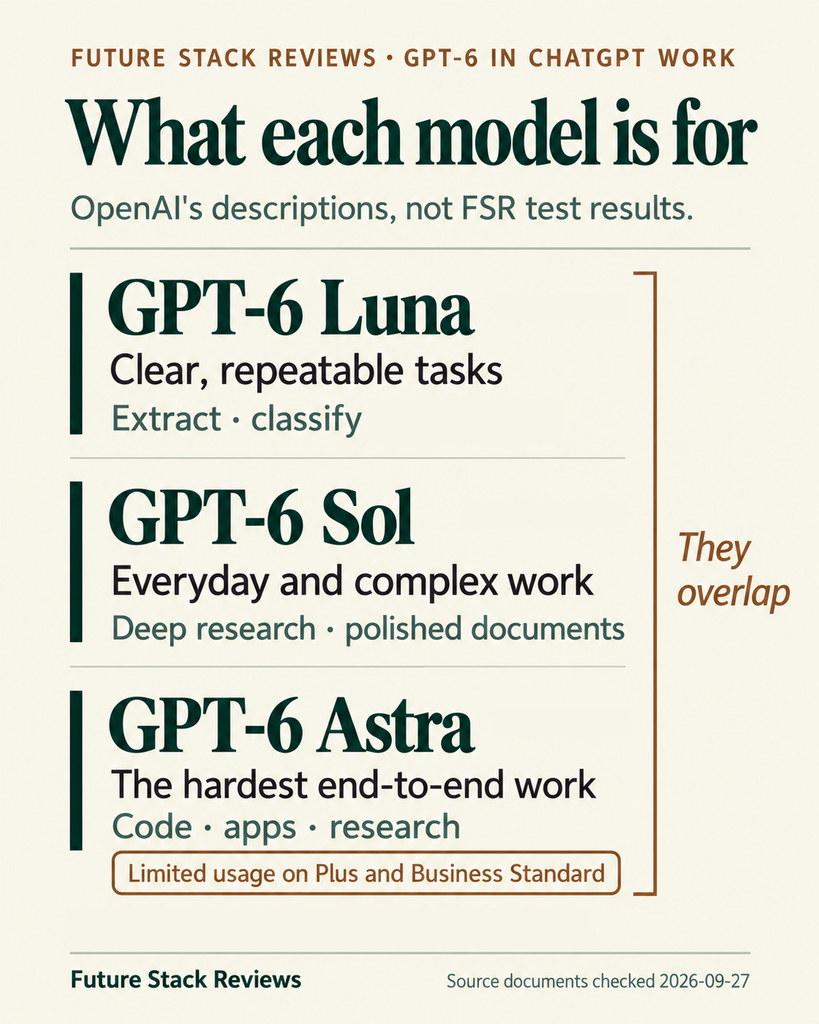
- Luna for clear, repeatable tasks; Sol for everyday and complex work; Astra for “the hardest end-to-end work.”
- OpenAI’s descriptions, not FSR test results. They overlap (section 03).
- Where
- In ChatGPT, Sol and Luna are in Work and Codex only, not regular Chat.
- Astra: Work and Codex. Chat offers it as “GPT-6 Pro” on eligible plans.
- Where to start
- OpenAI: “Start with the default Power setting available to your account.”
- It calls its model-selection guide “a starting point.” Defaults vary by plan, client, workspace settings and rollout.
- Free and Go
- Work on the web and mobile launched for paid plans except Free and Go.
- Red note: The pages FSR checked do not settle whether they get Work in the desktop app.
- Enterprise and Edu
- All three models are off by default at launch.
- Admins enable them. A starting default is not access.
- Usage
- Work shares Codex’s allowance. OpenAI’s estimates count local messages per five hours and are not limits.
- OpenAI says Work usage will vary by task.
- Astra
- Limited on Plus and Business Standard, and can use your allowance faster than GPT-5.6 Sol.
- Red note: Its tasks can pause as a safety precaution. On mobile and in Codex CLI, the task ends instead.
Sources: ChatGPT Learn, “Models” · OpenAI Help Center, “ChatGPT Work and Codex” · “GPT-5.6 and GPT-6 Pro in ChatGPT” · ChatGPT Learn, “Model selection” · “ChatGPT — Release Notes,” July 9, 2026 · “ChatGPT Enterprise and Edu – Models & Limits” · ChatGPT Learn, “Workspace model availability” · ChatGPT Learn, “Pricing” · ChatGPT Learn, “Agent approvals & security”
01 What you’ll see in Work, and what it isn’t
Open Work, not Chat: OpenAI calls Work “an agent designed for longer, multi-step work and finished deliverables.” OpenAI’s steps: on the web or mobile, select Work; in the desktop app, choose ChatGPT from the top-left menu, then Work from the toggle at the top. On the web and desktop, OpenAI places the model and reasoning control beneath the composer, the box where you type.
Sources: OpenAI Help Center, “ChatGPT Work and Codex,” “Start on desktop” and “Start Work on web or mobile” · ChatGPT Learn, “Models,” “Choose a model,” web and desktop app views
The picker offers Default, one slider that combines models and reasoning levels, or a specific model with its own levels. OpenAI’s Enterprise and Edu page says the slider “shows only models and reasoning options available to you,” and its Models page says choosing a model does not grant access to it. If Astra is missing in the desktop app, OpenAI says to use Menu > Check for Updates, even if you updated recently.
Sources: OpenAI Help Center, “ChatGPT Work and Codex” · OpenAI Help Center, “ChatGPT Enterprise and Edu – Models & Limits” · ChatGPT Learn, “Models”
| Name you may see | Where | What it is |
|---|---|---|
| GPT-6 Sol and Luna | Work and Codex | New on September 22, 2026. Not in regular Chat. |
| GPT-6 Astra | Work and Codex, by plan | “Our most capable model,” says OpenAI’s Models page. Limited on some plans (section 05). |
| GPT-6 Pro | Chat, on Pro $100, Pro $200, Business and Enterprise | Astra under another name. Its Chat limits are separate from Work and Codex allowances. |
| GPT-5.6 Sol, Terra, Luna | Work and Codex, by plan | The previous generation, still available during the rollout. |
| GPT-5.5 | Chat, Work and Codex | Retires on October 14, 2026, on all plans. |
| Instant, Medium, High, Extra High | Chat | Chat’s thinking levels, not GPT-6 models; on eligible paid plans they run on GPT-5.6 Sol. In Work, the last three also name reasoning efforts. |
| Light, Low | Work and Codex | One effort level, two labels: Light in the desktop app, in Work on the web and in the IDE extension; Low in the CLI and in OpenAI’s model-selection guide. |
Names as OpenAI’s pages list them on September 27, 2026. Enterprise workspaces may keep an older Chat picker until the new controls arrive. Sources: OpenAI Help Center, “GPT-5.6 and GPT-6 Pro in ChatGPT” · “ChatGPT Work and Codex” · “ChatGPT — Release Notes,” September 22, 2026 · ChatGPT Learn, “Models” · ChatGPT Learn, “Model selection” · ChatGPT Learn, “Pricing”
Free and Go need a separate check. Work on the web and mobile began rolling out “to paid plans except Free and Go,” and OpenAI’s help page still limits it to eligible paid plans. The Pricing page names Free and Go among plans that include Work and Codex and lists GPT-6 Luna “in the desktop app, subject to rollout” for them, but on cards that describe Codex use. FSR found no page that settles whether Free or Go get Work in the desktop app, so check the app before you plan around it.
Sources: OpenAI Help Center, “ChatGPT — Release Notes,” July 9, 2026 · “ChatGPT Work and Codex” · ChatGPT Learn, “Pricing”
In Enterprise and Edu workspaces, all three GPT-6 models are off at launch. An admin must enable Sol and Luna. Workspace owners can enable Astra for the workspace or for specific roles, and access “will not automatically turn on two weeks after launch.” Admins can also set a starting model, reasoning level and speed for Work and Codex, which OpenAI calls “defaults, not permissions.”
Sources: OpenAI Help Center, “ChatGPT Enterprise and Edu – Models & Limits” · ChatGPT Learn, “Workspace model availability” · “ChatGPT Work and Codex”
02 Start from the default your account shows
OpenAI’s instruction is short: “Start with the default Power setting available to your account.” From there, move toward Smarter for deeper reasoning or Faster for quicker, lower-cost work, or open Advanced to pick a model, effort or speed. OpenAI’s Models page shows six presets: Luna High, Sol Light (the starting one), Sol Medium, Astra Light, Astra Medium and Astra Extra High; some paid plans omit the last.
OpenAI’s pages call this slider both Default and Power, and the Models page says options and defaults “vary by plan, client, workspace settings, and rollout.” Treat Sol Light as OpenAI’s example, not a promise about your picker; in Enterprise and Edu, your admins may have chosen the default.
Sources: OpenAI Help Center, “ChatGPT Work and Codex” · ChatGPT Learn, “Models” · ChatGPT Learn, “Workspace model availability”
If your default is still GPT-5.5, it works until it retires on October 14, 2026, but OpenAI asks for it to be replaced in saved settings and workspace defaults before then. Pick another setting your picker shows, or ask your admin.
Sources: ChatGPT Learn, “Models,” “GPT-5.5 retirement” · ChatGPT Learn, “Workspace model availability”
Each setting pairs a model with a reasoning effort. Higher effort can improve results on complex tasks, OpenAI says, but takes longer and uses more tokens. If you pick a model yourself, OpenAI gives each a starting effort:
| Model | OpenAI says it is for | Starting effort |
|---|---|---|
| Astra | “The hardest end-to-end work” across code, apps and research, needing sustained reasoning and judgment | Light (Low in the CLI) |
| Sol | Everyday and complex work, including ambiguous or high-value tasks and polished documents | Medium |
| Luna | Clear, repeatable, high-volume tasks where you already know what a good result looks like | High |
OpenAI adds: raise the effort for tasks that need more planning, analysis or checking. Efforts “don’t map exactly between model generations,” so it suggests trying a familiar task at a lower setting, then adjusting. Sources: ChatGPT Learn, “Models,” “Where each model shines” and “Pick a reasoning effort”
03 Use OpenAI’s guide only for a clear fit
OpenAI’s Model selection page has an interactive guide: pick a type of work and a task (together, a category), then a priority on a slider from More usage to Higher quality outputs, and it recommends a model and effort. OpenAI says to “treat the guidance on this page as a starting point,” and that if usage and time don’t matter to you, “you can default to Astra.” The guide asks nothing about your plan, remaining usage or admin settings, and its slider starts at Balanced.
Sources: ChatGPT Learn, “Model selection,” “Find the right model for your workflow” and “Experiment”
| Category: work type › task | More usage | Balanced | Higher quality outputs |
|---|---|---|---|
| Research & analysis › Organize information and prioritize work | Luna Medium | Luna Medium | Sol Medium |
| Research & analysis › Research decisions and verify facts | Sol Medium | Sol Medium | Astra Extra high |
| Creating deliverables › Turn source material into a final output | Astra Medium | Astra Medium | Astra Medium |
| Creating deliverables › Create slides or spreadsheets | Luna Medium | Astra Medium | Astra Extra high |
What the guide recommended when FSR operated it on OpenAI’s public docs page on September 27, 2026, not in ChatGPT itself. The page does not say why each recommendation was made. Sources: ChatGPT Learn, “Model selection”
Take an ordinary job: turning a week of meeting notes into a one-page decision memo. Filed under Research & analysis › Organize information and prioritize work, the guide suggests Luna Medium, or Sol Medium at Higher quality outputs. Filed under Creating deliverables › Turn source material into a final output, it suggests Astra Medium at every position. Both descriptions fit, and the guide does not say which to pick.
An illustration built from the table above, not a task FSR ran. Sources: ChatGPT Learn, “Model selection”
FSR’s rule: start on the guide’s recommended setting only if your task clearly fits just one category and your picker offers that setting. If it fits two, as this memo does, stay on your default. How you will use the output still matters, but in FSR’s reading it sets the slider, not the category. OpenAI lists “How will you use the output?” among four questions to start with, and notes that a draft for your review may need less polish than something you’ll share externally. Whichever setting you start on, the check in section 04 decides.
The rule is FSR’s suggestion, not OpenAI’s. Sources: ChatGPT Learn, “Model selection,” “Experiment”
OpenAI’s pages also draw the lines differently: the Models page puts ambiguous tasks and polished documents under Sol, while the Get started page suggests Astra for a polished final file and the model-selection page’s Astra card lists “Ambiguous problems.” If the guide points to Astra and you are on Plus or Business Standard, check your usage first; those seats include limited Astra usage (section 05).
Sources: ChatGPT Learn, “Models” · ChatGPT Learn, “Get started with ChatGPT Work” · ChatGPT Learn, “Model selection” · OpenAI Help Center, “ChatGPT Work and Codex”
04 Run one check, then change what failed
Before real material goes in, confirm you may use it. OpenAI says Work inherits applicable workspace protections, but residency, retention, logging and features vary by plan, region, surface and connected system; “messages and task context may be stored in the cloud” even when work runs locally. On personal plans, whether your content helps improve OpenAI’s models depends on Settings > Data controls; OpenAI says it does not use Business, Enterprise or Edu content for that by default.
Sources: ChatGPT Learn, “ChatGPT Work admin FAQ” · OpenAI Help Center, “ChatGPT Work and Codex” · OpenAI Help Center, “How OpenAI handles data in consumer services”
You can choose where to start from this article alone, but check the first result before you rely on it. FSR suggests this check, built on OpenAI’s advice to give a task “any files, constraints, and review criteria” and to compare settings on the same input.
- Use your next task, or a similar one you repeat, with material you are allowed to use: public, made-up or cleared.
- Write your pass criteria first and mark the must-haves. For the memo: every decision traces to a line in the notes; no invented names, dates or numbers; no missing decisions or owners; one page.
- Run it once on your starting setting. To compare, run one other setting on the same input.
- Score it against your criteria, not how finished it looks. If it meets every must-have, keep that setting; to save time or usage, try a lighter one on the same input and keep it only if it also passes.
- If a must-have fails, don’t use that output. Note what failed, change one thing using the table below, and run again.
An evaluation FSR proposes, not a test FSR ran. OpenAI suggests keeping “the lightest setting that meets your quality bar.” Sources: OpenAI Help Center, “ChatGPT Work and Codex,” “Start on desktop” · ChatGPT Learn, “Model selection,” “Experiment”
| If the check shows | Change first | Next |
|---|---|---|
| Facts not in your material, missed files or content outside the brief | The input: the right files, and a brief that says what to use | Run again on the same setting |
| The right input, but skipped steps, shallow analysis or missing checks | One step more reasoning effort | A more capable model in your picker, same input and criteria |
| A must-have still fails after you fix the cause | Narrow the task | Do it by hand, or keep your current method |
| A pass, but slow or heavy on usage | A lighter setting, and Fast mode off if you turned it on | Keep it only if it also passes |
| The model you want is not in the picker | For Astra in the desktop app, update the app; otherwise ask your admin | Start with what is shown, or wait |
Rows 1 to 4 are FSR’s suggested order, not an OpenAI procedure, and untested by FSR. They draw on OpenAI’s advice to raise effort for more planning, analysis or checking and to consider a smaller model or tighter scope when usage runs high; OpenAI also lists Fast mode among things that affect usage. Row 5 follows OpenAI’s own steps. FSR has not checked how Work saves or exports files, so review any output before you share it. Sources: ChatGPT Learn, “Models” · “Pricing,” FAQ · OpenAI Help Center, “ChatGPT Work and Codex”
05 How usage works, and what the estimates leave out
OpenAI says Work uses the same pricing, credits and usage limits as Codex, and that its Codex pricing examples are based on coding tasks, “so Work usage will vary by task.” The table counts local messages, meaning chats that run on your computer: in the desktop app, the CLI or the IDE extension.
Sources: ChatGPT Learn, “Pricing” · OpenAI Help Center, “ChatGPT Work and Codex” · ChatGPT Learn, “Glossary,” “Local chat”
| Local messages per five hours (estimate) | Plus and Business Standard | Pro 5x ($100) | Pro 20x ($200) |
|---|---|---|---|
| GPT-6 Astra | 5 to 45 | 25 to 225 | 100 to 900 |
| GPT-6 Sol | 15 to 150 | 70 to 700 | 300 to 3,000 |
| GPT-6 Luna | 350 to 3,000 | 1,750 to 14,000 | 7,000 to 56,000 |
| GPT-5.6 Sol | 10 to 100 | 50 to 500 | 200 to 2,000 |
| GPT-5.6 Luna | 250 to 2,000 | 1,250 to 10,000 | 5,000 to 40,000 |
Estimates, not limits, as OpenAI’s Pricing page showed them on September 27, 2026. Local messages only; weekly limits may also apply. The Pricing page lists Plus and a “Standard Business” column separately with the same figures, which FSR has combined; OpenAI’s Business help page gives the same Standard-seat figures for the models it lists. Business Premium seats get five times Standard’s included usage and “no 5-hour limit,” so the table has no Premium figure. Sources: ChatGPT Learn, “Pricing,” “What are the usage limits for my plan?” · OpenAI Help Center, “ChatGPT Business models and limits” · “About ChatGPT Pro tiers”
OpenAI says these figures “are not fixed message limits”; your usage dashboard shows current limits and reset times. Similar tasks can use different amounts, since model choice, context, reasoning, tool use, retrieval and caching all count. Enterprise and Edu plans without flexible pricing get Plus-level per-seat limits for most features; flexible pricing has no fixed rate limits.
Sources: ChatGPT Learn, “Pricing”
Work on the web and mobile runs in the cloud, which the table may not cover. The Pricing page says cloud chats on ChatGPT plans “use GPT-5.6 Sol and may use more of your allowance than local messages,” but OpenAI’s glossary defines a cloud chat as a Codex chat run in the cloud. FSR found no estimate specific to Work on the web.
Sources: ChatGPT Learn, “Pricing” · ChatGPT Learn, “Glossary” · OpenAI Help Center, “ChatGPT Work and Codex”
Astra draws on the same allowance. Pro $100, Pro $200 and Business Premium seats can use all of it for Astra; Plus and Business Standard seats include limited Astra usage, with optional credits after that. Astra “can use your allowance faster than GPT-5.6 Sol,” OpenAI says.
If you reach a limit mid-turn, OpenAI says the agent can keep working on that turn, subject to fair use limits. After that, Plus and Pro users can buy credits, and Business, Enterprise and Edu workspaces on flexible pricing can buy workspace credits; this article does not recommend paying to run a first check. If you want more Astra usage, note that OpenAI has temporarily paused new sign-ups and upgrades to Pro $200 since September 10, 2026, though some eligible former subscribers can return once; Pro $100 is not affected.
Sources: ChatGPT Learn, “Pricing,” “What happens when you hit usage limits?” · OpenAI Help Center, “About ChatGPT Pro tiers”
06 When to stop, wait, or step back
FSR suggests stopping or waiting when:
- You cannot confirm you may put the material into Work, or cannot check the output against a source.
- A must-have still fails after you fix the cause the check pointed to. Narrow the task or do it by hand.
- An Astra task paused and you cannot tell whether continuing is safe. OpenAI says to leave it stopped.
- GPT-6 models are not in your picker yet, or your Enterprise or Edu admins have not enabled them. Wait, or keep your current setup.
FSR’s suggestions, except where OpenAI is named. Sources: OpenAI Help Center, “Why was my chat paused or ended as a precaution?” · “ChatGPT Enterprise and Edu – Models & Limits”
Astra’s safety monitoring in Work and Codex runs asynchronously and can pause a task, sometimes after the activity that triggered it; OpenAI says it “doesn’t replace sandboxing, permissions, or review of the result.” A pause does not necessarily mean the agent made a mistake. OpenAI’s steps: read the findings, compare them with what you intended and what the agent did, and resume only if the task can safely continue. The pages FSR checked describe this for Astra only.
Sources: ChatGPT Learn, “Agent approvals & security” · OpenAI Help Center, “Why was my chat paused or ended as a precaution?”
| Where the Astra task ran | What OpenAI says happens after a pause |
|---|---|
| Work and Codex clients with the findings and resume flow, without the data settings below | Review the findings before resuming. |
| Codex CLI and mobile | Full findings and resume aren’t available. The task ends. |
| Zero data retention, Modified Abuse Monitoring, or non-US data storage residency | Full findings and resume aren’t available. The task ends. |
When a task ends and cannot resume, OpenAI recommends reviewing the work the agent already did. If you are not sure whether your workspace uses any of these data settings, ask your admin. Sources: ChatGPT Learn, “Agent approvals & security” · OpenAI Help Center, “Why was my chat paused or ended as a precaution?”
Stepping back to GPT-5.6 is possible during the rollout on plans that list it in Work, with a trade-off: OpenAI’s estimates give GPT-5.6 Sol and Luna fewer local messages than their GPT-6 namesakes in every column in section 05. Efforts don’t map exactly between generations, so compare the two on the same input. GPT-5.5 works only until it retires on October 14, 2026, so don’t build a routine on it.
Sources: OpenAI Help Center, “GPT-5.6 and GPT-6 Pro in ChatGPT,” availability table · ChatGPT Learn, “Models” · ChatGPT Learn, “Pricing”
07 FAQ
Why can’t I find GPT-6 Sol or Luna in regular ChatGPT?
In ChatGPT, OpenAI offers them only in Work and Codex. Chat’s Instant, Medium, High and Extra High levels run on GPT-5.6 Sol on eligible paid plans, and Chat’s GPT-6 Pro, on eligible plans, is Astra.
OpenAI Help Center, “ChatGPT Work and Codex” · “GPT-5.6 and GPT-6 Pro in ChatGPT”
Can I use GPT-6 in Work on the Free or Go plan?
Not on the web or mobile, going by OpenAI’s launch note and help page. FSR found no page that settles whether Free or Go get Work in the desktop app (section 01), so check the app rather than upgrading to find out.
OpenAI Help Center, “ChatGPT — Release Notes,” July 9, 2026 · “ChatGPT Work and Codex” · ChatGPT Learn, “Pricing”
Why do OpenAI’s pages suggest different starting settings?
They answer different questions. The Models page gives starting efforts for picking a model yourself: Sol Medium, Luna High, Astra Light. The model-selection guide recommends a setting for a task category and priority. What’s new, writing about Codex, suggests Sol Medium for everyday and complex coding or Luna High for focused, repeatable tasks. Start from your default unless your task clearly fits just one of the guide’s categories and your picker offers the setting it recommends; when you pick a model yourself, use the Models page’s starting efforts.
ChatGPT Learn, “Models” · “Model selection” · “What’s new,” September 21 to 25, 2026
Is Astra always the better choice?
OpenAI calls Astra its most capable model and says you can default to it if usage and time don’t matter to you. It also says Astra can use your allowance faster than GPT-5.6 Sol, and Plus and Business Standard seats get limited Astra usage. FSR has not compared the models on real work.
ChatGPT Learn, “Models” · “Model selection” · OpenAI Help Center, “ChatGPT Work and Codex”
08 Methodology and limits
Starter Guide, Tier C. FSR did not examine a signed-in Work screen, run a Work task, test any GPT-6 model or buy anything, so nothing here measures quality, speed or usage on real work. The section 03 rule, the check in section 04 and the table after it are FSR’s proposals.
FSR read the 18 OpenAI pages linked in this article, from ChatGPT Learn and the OpenAI Help Center, on September 26 and 27, 2026 (Asia/Tokyo), and last checked all of them on September 27. They were read in English from Japan; FSR did not check whether they differ by region. FSR operated the model-selection guide on OpenAI’s public docs page, and FSR’s editor also viewed ten of the pages in a browser. Where this article says a page does not settle a question, that covers only these pages.
FSR researched and drafted this article with AI assistants, including Claude and ChatGPT, and placed sources beside the claims they support; agreement between AI tools is not independent verification. This page has no affiliate or paid links.
09 Verdict
Highlighted: Start your next Work task on the default your account shows, unless your task clearly fits just one category in OpenAI’s model-selection guide and your picker offers the setting it recommends; then start there. Judge the first result against criteria you wrote in advance, and change the input, effort or model based on what failed.The case rests on OpenAI’s own advice to start from the default and to treat its guide as a starting point; FSR has not measured any GPT-6 model. The table below maps common situations to a next step.
Sources: ChatGPT Learn, “Models” · “Model selection” · OpenAI Help Center, “ChatGPT — Release Notes” · “ChatGPT Enterprise and Edu – Models & Limits”
| Your situation | Next step |
|---|---|
| GPT-6 models appear in Work, and you have a checkable task | Start on the default and run the check in section 04 |
| Your task clearly fits just one of the guide’s categories, and your picker offers the setting it recommends | Start on that setting, then run the same check |
| The guide points to Astra, and you are on Plus or Business Standard | Check your usage before a large task |
| No GPT-6 models in your picker | If Astra is missing in the desktop app, update it; otherwise ask your admin, or wait |
| Free or Go | Confirm Work is available in your app before planning around it |
| You cannot check the output, or may not put the material into Work | Stop, and keep your current method |
FSR’s suggested next steps, drawn from sections 01 to 06, not measured outcomes. Sources: ChatGPT Learn, “Models” · “Model selection” · OpenAI Help Center, “ChatGPT Work and Codex” · “ChatGPT — Release Notes,” July 9, 2026 · “ChatGPT Enterprise and Edu – Models & Limits”
10 Corrections and contact
Corrections and contact
- When
- If a plan, default, estimate or date here is out of date, or OpenAI publishes something that settles a question above,
- Send
- the public URL, the passage and, if you know it, the date the change took effect
- Do not send
- passwords, API keys, payment data, personal data, customer records or confidential documents
The contact page lists what to include with a correction.
Ask whether it fits you
FSR cannot see your plan, your model picker or your task. This copies the facts, the conditions behind them and the open questions. Paste them in, add only what you are free to share, and ask. The assistant may also use memory or other saved context, depending on its settings (for ChatGPT, see OpenAI’s “Memories” page). If nothing is copied, open “What gets copied” and copy it yourself.
- ChatGPT Copy & open · OpenAI
- Claude Copy & open · Anthropic
- Gemini Copy & open · Google
- Perplexity Copy & open · Perplexity
- Copilot Copy & open · Microsoft
- Kimi Copy & open · Moonshot AI
What gets copied
FSR BRIEFING PACKET - GPT-6 Luna, Sol, or Astra in ChatGPT Work: Where to Start Your Next Task
Publisher: Future Stack Reviews. Source: https://future-stack-reviews.com/gpt-6-chatgpt-work-starter-tierc/
Format: Starter Guide. Evidence depth: Tier C. OpenAI's public documentation only. FSR did not examine a signed-in Work screen or test any GPT-6 model.
Read: 26 and 27 SEP 2026 Asia/Tokyo. Section numbers refer to that article.
Disclosure: no affiliate or paid links. FSR used AI assistants, including Claude and ChatGPT, to research and draft the article.

WHAT IT IS
OpenAI's GPT-6 Luna, Sol and Astra. In ChatGPT, Sol and Luna are in Work and Codex only, not regular Chat. Astra is in Work and Codex, and Chat offers it on eligible plans as GPT-6 Pro. OpenAI introduced Astra on Sep 3, 2026, and Sol and Luna on Sep 22. Access depends on plan, workspace settings and rollout.

FROM OPENAI'S PAGES (not FSR tests)
- "Start with the default Power setting available to your account." Documented presets: Luna High, Sol Light (starting preset), Sol Medium, Astra Light, Astra Medium, Astra Extra High. Options and defaults vary by plan, client, workspace settings and rollout.
- OpenAI's positioning: Luna for clear, repeatable, high-volume tasks; Sol for everyday and complex work; Astra for the hardest end-to-end work. If you pick a model yourself, starting efforts: Sol Medium, Luna High, Astra Light.
- The model-selection guide is to be treated as a starting point.
- Local messages per five hours, meaning chats that run on your computer (estimates, not limits; Work usage varies by task), Plus and Business Standard / Pro 5x ($100) / Pro 20x ($200): Astra 5-45 / 25-225 / 100-900. Sol 15-150 / 70-700 / 300-3,000. Luna 350-3,000 / 1,750-14,000 / 7,000-56,000. Business Premium seats get 5x Standard's included usage and no 5-hour limit, so there is no Premium figure. Work on the web and mobile runs in the cloud; FSR found no estimate for it. Astra is limited on Plus and Business Standard and can use the allowance faster than GPT-5.6 Sol.
- GPT-5.6 Sol, Terra and Luna remain during the rollout. GPT-5.5 works until it retires from ChatGPT, Work and Codex on Oct 14, 2026; OpenAI asks for it to be replaced in saved settings and workspace defaults before then.

FSR OBSERVATION AND RULE (section 03)
- On OpenAI's public docs page, the guide asks only for work type, task type and priority, and its slider starts at Balanced.
- FSR example: a meeting-notes-to-memo task gets Luna Medium under Research & analysis > Organize information and prioritize work (Balanced), or Astra Medium under Creating deliverables > Turn source material into a final output (every position).
- FSR's rule: start on the guide's recommended setting only if a task clearly fits just one category (work type > task) and your picker offers that setting; if it fits two, stay on the default. In FSR's reading, how the output will be used sets the quality bar on the slider, not the category.

FSR'S SUGGESTED CHECK (section 04; not a test FSR ran)
- Write must-have criteria first and run once on the starting setting. If it passes, keep it; to save time or usage, try a lighter setting on the same input and keep it only if it also passes.
- If a must-have fails, do not use that output. Facts outside your material: fix the files and the brief. Shallow analysis: one step more effort, then a more capable model in your picker. If it still fails, narrow the task or do it by hand.

WHAT DEPENDS ON YOUR SETUP
- Free and Go: web and mobile Work launched for paid plans except Free and Go. The pages FSR checked do not settle whether Free and Go get Work in the desktop app.
- Enterprise and Edu: all three models off by default at launch; admins enable them and may set a starting default, which is not access.
- Astra tasks can pause as a safety precaution. On mobile, in Codex CLI, and with zero data retention, Modified Abuse Monitoring or non-US data storage residency, the task ends instead of resuming.
- Before real material: Work inherits workspace protections, but coverage varies; local chats may store messages and task context in the cloud; on personal plans, model-improvement use depends on Settings > Data controls.

OPEN QUESTIONS - check your own account or ask your admin
1. Which models and presets your Work picker shows, and what your default is.
2. On Enterprise or Edu: which GPT-6 models your admins enabled, and any starting default they set.
3. How much Astra usage your plan or seat includes, and what is left.
4. Whether you may put your material into Work.
5. On Free or Go: whether your desktop app offers Work at all.

FSR VERDICT
Start your next Work task on the default your account shows, unless your task clearly fits just one category in OpenAI's model-selection guide and your picker offers the setting it recommends; then start there. Judge the first result against criteria you wrote in advance, and change the input, effort or model based on what failed.

PRIMARY SOURCES (OpenAI; recheck before you act)
- Models: https://learn.chatgpt.com/docs/models
- Model selection: https://learn.chatgpt.com/docs/model-selection
- Pricing: https://learn.chatgpt.com/docs/pricing
- ChatGPT Work and Codex: https://help.openai.com/en/articles/20001275-chatgpt-work-and-codex
- ChatGPT Business models and limits: https://help.openai.com/en/articles/12003714-chatgpt-business-models-and-limits
- Enterprise and Edu models and limits: https://help.openai.com/en/articles/11165333-chatgpt-enterprise-and-edu-models-limits
- Paused or ended as a precaution: https://help.openai.com/en/articles/20001509-why-was-my-chat-paused-or-ended-as-a-precaution

LIMITS OF THIS PACKET
Rollouts, defaults and estimates change; verify on OpenAI's pages before you act. FSR ran no tests, so nothing here measures quality, speed or usage on your work. Where this packet and the live pages disagree, the live pages win.

Use this briefing to help me decide which GPT-6 model and effort to start my next ChatGPT Work task with. Ask me about my plan, what my model picker shows, the task and how I would check the output before you answer.
Your assistant’s reply is its own answer, not FSR’s. Check it against the sources above.