Last updated: September 21, 2026
Evidence record: Tier C — Document-based Research
Public documents and pages only. No purchase, no account, no hands-on testing.
Tier is depth of evidence, not a rating.
- Read
- 20 and 21 September 2026Asia/Tokyo
- Checked
- OpenAI help pages and release notes. No GPT migrated, no Enterprise workspace used.
- Paid links
- None in this briefing.
OpenAI plans to retire custom GPTs on Dec 11, 2026, with a migration path to plugins. In an Enterprise workspace, the planned migration turns a GPT’s instructions into a plugin skill, copies its knowledge files into reference files, and adds its connected apps as apps. Custom actions, conversations, sharing settings and the selected model don’t carry over. This briefing is for whoever owns one GPT a team relies on and must decide its next step.
Sources: OpenAI migration FAQ, “When are custom GPTs retiring?” and “What transfers to the plugin?” · Enterprise and Edu release notes, September 11, 2026
Verdict
Start a private evaluation once this GPT’s job, published version, integrations, people, and any billing or data rules are settled, and you accept that migrating turns the original read-only. Highlighted: Moving your users is a separate, later decision.
Private does not mean reversible. OpenAI says migration makes the original GPT read-only and that its creator cannot delete it, and its FAQ describes no way to undo a migration, so the evaluation itself is a one-way step. The second caveat is timing: OpenAI’s own pages give two different migration timelines (section 01), so plan from the notice in your workspace. FSR has not run a migration; everything here comes from OpenAI’s published documentation.
Sources: OpenAI migration FAQ, “Which dates should I plan around?” · Enterprise and Edu release notes, September 11, 2026
Best for · Not for · Wait
Best for
If both apply
The person responsible
- for one Enterprise GPT that a team relies on
- Highlighted: who can get answers from a workspace admin, and from the account team on billing or data
Needs
- the GPT’s instructions, knowledge files and integrations in front of you
- a few prompts it handles today, including one hard case
Not for
If any one applies
- A workspace-wide GPT inventory or retirement program
- A GPT you only use, or one built on a personal plan
- A legal or compliance sign-off on data residency
Wait
If this applies
- Migration isn’t in your workspace yet, or your notice hasn’t confirmed the dates
Public documents and pages only. No purchase, no account, no hands-on testing.
Key facts · read 20 September 2026, rechecked 21 September
- Retirement
- Dec 11, 2026, scheduled. Custom GPTs stop running.
- Follow your workspace notice if it gives a different timeline.
- Migration opens
- Sep 22, 2026, a target in the English FAQ
- Sep 17, 2026 in the release notes and GPT access page
- Red rings: the pages disagree. Your admin or account team confirms which applies.
- New GPT creation ends
- Oct 26, 2026, planned in the English FAQ
- Sep 25, 2026 in the release notes
- Red rings: the pages disagree. Publish edits you need migrated before the cutoff that applies to you.
- What moves
- Instructions become a skill, knowledge files become reference files, connected apps become apps.
- Custom actions, conversations, sharing settings and the selected model don’t.
- Who can migrate
- The GPT’s creator or a workspace admin, once migration is available, plugins are enabled and the GPT is published.
- Cost
- The FAQ’s “no incremental cost” is conditional: Enterprise, no apps, Instant Chat.
- On token-based agreements Instant itself is billable, and editing the plugin runs through Work or Codex, where Work actions consume credits. Check your billing model (section 06).
- Data residency
- Plugins and skills aren’t on the residency feature list.
- Ask your account team before testing with data a residency rule covers.
Sources: OpenAI migration FAQ · Enterprise and Edu release notes, September 11, 2026 · Managing GPT access · Data residency
01 What is changing, and which dates apply
OpenAI’s migration FAQ says custom GPTs “are scheduled to retire on Dec 11, 2026,” when they stop running and leave the GPT directory. Until then, existing GPTs stay usable, subject to their existing access and workspace permissions. The same page tells readers to follow “the notice for your account or workspace, including any different timeline communicated to you.”
Sources: OpenAI migration FAQ, “When are custom GPTs retiring?”, “Is my GPT already gone?” and “What happens to the original GPT after migration?”
For the steps before retirement, OpenAI’s pages disagree. This is how the two main pages read on 20 September 2026:
| Milestone | English migration FAQ | Release notes, Sep 11 entry |
|---|---|---|
| Migration available | Pages disagree: Sep 22, 2026 a target | Pages disagree: Sep 17, 2026 |
| New GPT creation ends | Pages disagree: Oct 26, 2026 planned | Pages disagree: Sep 25, 2026 |
| Retirement | Dec 11, 2026 | Dec 11, 2026 |
Sources: OpenAI migration FAQ, “Which dates should I plan around?” · Enterprise and Edu release notes, entry under September 11, 2026
A notice at the top of OpenAI’s page on managing GPT access also targets Sep 17, 2026 for migration, names Dec 11 for retirement, and gives no creation cutoff. Every page hedges: the FAQ says “the dates are subject to change,” the release notes say “Dates may change,” and the GPT access page says migration may not reach every account or workspace at the same time.
Sources: Managing GPT access in Enterprise and Edu workspaces, notice at the top · OpenAI migration FAQ · Enterprise and Edu release notes
The French edition of the same FAQ, marked as machine-translated from English, gives the Sep 17 and Sep 25 dates. The pages don’t show which version came later, so this briefing calls neither date a postponement or the latest word.
Sources: Migration FAQ, French edition
Four statements in the English FAQ decide how to read that table. A target date “does not guarantee that every account can migrate on that day.” Until migration reaches your workspace, a missing option “does not by itself indicate a problem.” With several accounts or workspaces, the timeline and permissions of the one where the GPT was created apply. And your admin or account team “can help confirm the timeline that applies.” Plan from your notice, not from this table.
Sources: OpenAI migration FAQ, “When are custom GPTs retiring?”, “Does this change affect all ChatGPT plans?”, “Which dates should I plan around?” and “Who can migrate a GPT in my workspace?”
One date needs action before the others. Migration uses the GPT’s latest published version, and the FAQ tells creators to publish “any drafts you need to migrate before this cutoff,” meaning the end of new GPT creation. Publishing doesn’t require sharing the GPT publicly. The cutoff doesn’t retire existing GPTs; they keep running until retirement. Your notice sets the date that applies to you. Since Sep 25 and Oct 26 are both in circulation, finish and publish the edits you need migrated well before the earlier one rather than counting on the later one, and don’t push unreviewed changes into a live GPT to beat a date.
Sources: OpenAI migration FAQ, “How do I start migration?” and “Which dates should I plan around?”
02 What moves, what doesn’t, and what OpenAI doesn’t say
Migration copies a published GPT into a new plugin that starts private. The FAQ describes this mapping:
| Part of the GPT | After migration | What to check |
|---|---|---|
| Instructions | Become a skill in the plugin | Review them before relying on the plugin |
| Knowledge files | Copied into reference files | No limits for reference files stated in the pages read |
| Connected apps | Added to the plugin as apps | Each user still needs app access, authorization and action approvals |
| Custom actions | Don’t transfer | Dependent features stop until replaced (section 04) |
| Conversations | Not moved | The original GPT stays usable until retirement |
| Sharing settings | Not carried over | Existing users get no access automatically |
| Selected model | Doesn’t carry over | Enterprise defaults apply |
| Drafts and unpublished edits | Don’t transfer | Only the latest published version migrates |
| Conversation starters | Not mentioned in the English FAQ | The French edition says they may not be copied |
Sources: OpenAI migration FAQ, “What transfers to the plugin?”, “What happens to custom actions?”, “Will my existing conversations move to the plugin?”, “Can I keep sharing my GPT with the same people?” and “What do I need to use a migrated plugin?” · French edition
The original changes too: after migration it “remains usable until retirement, but becomes read-only after migration and its creator cannot delete it,” and future changes go into the plugin.
Sources: OpenAI migration FAQ, “What happens to the original GPT after migration?”
Several things a GPT owner would want to know are not documented in the pages FSR read:
- whether a migration can be undone or repeated, or the original restored
- what file types, counts or sizes the plugin’s reference files accept (the GPT side has documented limits, 20 files of up to 512 MB each, and the pages don’t say whether the same limits apply after migration)
- how built-in capabilities such as web search, image generation, canvas or code interpreter carry over
- what happens to GPT conversations and files after retirement
- conversation starters, in the English FAQ
Treat each as unknown rather than as a no. Before you migrate, make sure the records you would need to rebuild the GPT exist where your organization keeps them: the published instructions, the list of knowledge files and the conversation starters. Follow your own retention and access rules; copying regulated content into a personal store to make a backup creates a different problem.
Sources: OpenAI migration FAQ, whole page, read and searched on 20 September 2026 and rechecked 21 September · Creating and editing GPTs, “Knowledge” and “Capabilities”
If your organization needs past GPT conversations for its records, OpenAI’s GPT access page says conversations with GPTs are available in the Compliance Platform. The migration FAQ doesn’t say whether retirement changes that.
Sources: Managing GPT access in Enterprise and Edu workspaces, “Compliance” · OpenAI migration FAQ
03 The readiness check: six gates for one GPT
The check below is FSR’s, built from OpenAI’s documentation. It isn’t an OpenAI status or tool. For one GPT, it answers one question: start a private evaluation now, fix something first, wait on one item, or retire the use? Evaluation here means migrating and testing the plugin while it stays private. The moment you share it with anyone, even one colleague, you have started a pilot, which is a separate decision (section 08).
| Outcome | Meaning | Write down |
|---|---|---|
| A. Start a private evaluation | Migrate, keep the plugin private, test it | The test cases and who judges them |
| B. Fix first | A named gap blocks part of the evaluation | The gap, its owner, and what closes it |
| C. Wait on one item | A required confirmation hasn’t arrived | The item, who confirms it, and a recheck date |
| D. Retire the use | The job itself is no longer needed | Why, and who agreed |
One GPT can sit at B on one gate and C on another. Keep both reasons rather than collapsing them into a single letter, and keep preparing everything else while you wait.
| Gate, and who answers | Ask | If it isn’t settled |
|---|---|---|
| G0 Job Who: business owner | Is the work still needed after retirement? Can a feature or user group be dropped? | Job not needed: D. Part not needed: drop that part and continue. |
| G1 Availability and timeline Who: workspace admin | Is migration available in the workspace where the GPT was created? Are plugins enabled? Which notice applies? | Not available yet, or timeline unconfirmed: C. Plugins disabled, GPT unpublished, or you’re neither creator nor admin: B. |
| G2 Source version and people Who: creator or admin; a workspace owner for ownership | Is everything you need in the latest published version? Who migrates, and who maintains the plugin? | Unpublished fixes, or no maintainer: B. |
| G3 Integrations Who: integration and security teams, with the business owner | Does this GPT use connected apps or custom actions (OpenAI says a GPT uses one or the other, not both)? What can each connection read, change or delete? | A needed custom action with no replacement: B for that capability. Approval to test a write still pending: C. No authorized target or agreed stop conditions for that test: B. |
| G4 Audience Who: business owner and holders of the plugin permissions | Who needs it inside the workspace? Does anyone outside it? | Sharing owner undecided: B. Outside users with no confirmed path: C, or B if you’ll give them an alternative, for that branch only. |
| G5 Billing and data Who: budget owner, data governance | Credit-based or token-based billing? Use beyond Instant Chat, or with apps? A residency requirement? | A requirement not yet confirmed: C, and keep covered data out of the test. A known mismatch: B. Not applicable: note why. |
Sources: OpenAI migration FAQ · Plugins in ChatGPT and Codex · Admin controls for plugins and apps · Managing GPT access · Token-based billing · Data residency. The gates and outcomes are FSR’s framework.
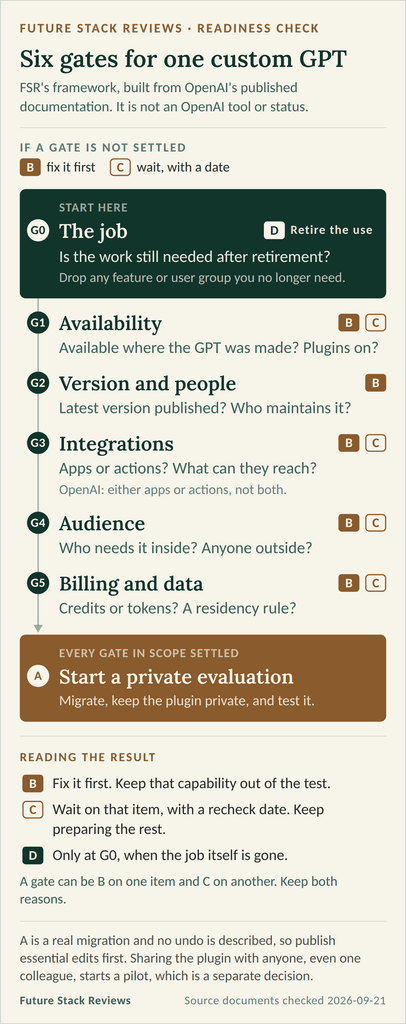
Reading the result: if G0 says D, stop there. A needs every gate inside the evaluation’s scope settled, not just migration being available. A B inside that scope means fix first, with any C confirmations running in parallel; a C with no B means wait on that item, with a date. An unanswered question is C only when it blocks this decision: a notice that hasn’t arrived stops the timeline gate, not the work on integrations, people or data. A capability stuck at B stays out of the evaluation until it’s fixed.
And remember what A costs: the evaluation is a real migration, with no undo described, so finish and publish essential edits first.
Sources: OpenAI migration FAQ, “Is my GPT already gone?” and “What happens to the original GPT after migration?”
04 Integrations: connected apps vs. custom actions
Start by naming the mechanism. OpenAI’s GPT configuration page is explicit: “A GPT can use either apps or actions, but not both at the same time.” So your GPT sits on one side of the table below, and that side decides whether the integration moves at all. Then ask what the connection can do, which decides how carefully you test it.
Sources: Creating and editing GPTs, “Capabilities” and “Actions”
| Aspect | Connected app | Custom action |
|---|---|---|
| In migration | Added to the plugin as an app | Doesn’t transfer |
| Before anyone can use it | App access, account authorization and action approvals still apply; the connection may be an individual account, a no-auth app or an administrator-managed one | A replacement first: an available app, or a custom app or MCP server |
| Controls that apply | Role access, allowed read and write actions, and when ChatGPT asks first | Custom-app permissions, plus technical and security review |
| Watch for | Prompts to reconnect or reauthorize after settings change | A Desktop only label on imported plugins that declare MCP servers |
Sources: OpenAI migration FAQ, “What happens to custom actions?” and “What do I need to use a migrated plugin?” · Admin controls for plugins and apps, “App action controls” and “Custom apps” · Plugins in ChatGPT and Codex, “Why is a plugin marked Desktop only?”
A connected app keeps its own gates after migration. The FAQ is explicit: “Installing a plugin or connecting an account does not give you additional permissions to files or data in the connected service.” In the admin settings, role access decides who can use an app, action settings decide what it can do, and the approval setting decides when ChatGPT asks first. Plugins that include required apps inherit those apps’ role and action settings, and some changes “may require a user to reconnect or reauthorize the app.” Check how the app actually authorizes before you plan the rollout: OpenAI describes setups that use an individual account, a no-auth app, or an administrator-managed connection, so not every app means a personal sign-in for every user.
Sources: OpenAI migration FAQ, “What do I need to use a migrated plugin?” · Admin controls for plugins and apps, “Role-based access control”, “App action controls” and “Custom apps” · Plugins in ChatGPT and Codex, “Find and review plugins”
Don’t assume the apps are on for the people who will use the plugin: OpenAI says new Enterprise workspaces start with a selected set of apps enabled, that those defaults “do not change existing workspace settings,” and that in general new plugins and apps are disabled by default. Your admin has the answer for your workspace.
Sources: Admin controls for plugins and apps, “Default behavior by plan” and “Role-based access control”
Then sort each connection by what it can do. Reading data, changing data, and actions that are hard to undo need different tests. Apps can do more than read: OpenAI describes plugins using a connected app to “search information, retrieve content, or complete supported actions,” and admins enable read and write actions separately. Before you test anything that writes, agree on the test data, an authorized target you control, the effects that are allowed and the point at which you stop. A private plugin is not a sandbox: the write lands in the real system behind the app. If the approval you need has not come through, that gate is C; if the safe target and stop conditions do not exist yet, it is B. Don’t fire a destructive action just to see whether a confirmation prompt appears.
Sources: Plugins in ChatGPT and Codex, “Understand how plugins use apps” · Admin controls for plugins and apps, “App action controls”
Custom actions are the hard case. They “do not transfer through the migration workflow,” and features that depend on them “will not work in the plugin until you set up a replacement.” That includes actions that only read data: they don’t become apps. The FAQ’s options are an available app that supports the tasks, or rebuilding the connection, which “may require a custom MCP server and technical setup.” It adds: “A rebuilt integration should not be assumed to provide every capability of the original action.”
Sources: OpenAI migration FAQ, “What happens to custom actions?”
Rebuilding is a separate project with its own permissions. Built-in migration doesn’t need the Upload plugins permissions, but rebuilding an integration “may require additional permissions.” Custom apps can be added by owners, admins and members granted custom-app or developer-mode permissions, subject to plan and workspace policy, and OpenAI says they “are not verified by OpenAI and are intended for developer use only.” If you rebuild as an imported plugin that declares MCP servers, check for a Desktop only label: such a plugin “cannot run in ChatGPT on the web.” Whether that label can apply to a migrated plugin isn’t stated.
Sources: OpenAI migration FAQ, “Who can migrate a GPT in my workspace?” · Admin controls for plugins and apps, “Custom apps” · Plugins in ChatGPT and Codex, “Why is a plugin marked Desktop only?”
05 People and permissions
Migrating, sharing and using the plugin are separate permissions, often held by different people.
| Task | Who | What OpenAI requires |
|---|---|---|
| Migrate the GPT | Its creator or a workspace admin | Migration available, plugins enabled, GPT published |
| Share with people or groups | The plugin’s owner | Share plugins |
| Publish to the workspace directory | The plugin’s owner | Publish plugins to workspace |
| Use the plugin | Each intended user | Use plugins, and an installation policy that allows or performs the install |
| Reassign GPT ownership | Workspace owners | A workspace-owner action |
Sources: OpenAI migration FAQ, “Who can migrate a GPT in my workspace?” and “How do we prepare and share the replacement?” · Plugins in ChatGPT and Codex, “Share and publish workspace plugins” · Managing GPT access, “Collaboration and ownership”
Two points are easy to miss. Permission to use someone else’s GPT “does not give you permission to migrate it.” And migration doesn’t carry over sharing settings or give existing users access: the plugin starts private, and OpenAI’s advice is to test and review it before sharing, then ask an intended user to install and test it.
Sources: OpenAI migration FAQ, “Who can migrate a GPT in my workspace?”, “Can I keep sharing my GPT with the same people?” and “How do we prepare and share the replacement?”
If the GPT’s creator has left, the GPT isn’t orphaned. When an owner is removed through the normal workspace flow, ownership transfers to a workspace owner and the GPT is marked unassigned; workspace owners can reassign it at any time. (“Workspace owner” is a ChatGPT role, not the business owner of the GPT.) Because a workspace admin can also migrate, a departed creator doesn’t block migration. It does leave open who maintains the plugin, which is a B until someone is named.
Sources: Managing GPT access, “Ownership continuity” · OpenAI migration FAQ, “Who can migrate a GPT in my workspace?”
People outside the workspace need their own branch of the check. Public GPTs created in affected Enterprise workspaces are included in the transition even when used from a personal account or another workspace, and access to such a GPT “does not guarantee access to its replacement plugin.” The sharing options OpenAI lists for plugins are invited people or groups, anyone in the workspace with the link, or the workspace directory, and publishing to the directory “does not publish the plugin to the public directory.” None is described as reaching people outside the workspace, and the pages FSR read don’t describe another route for an Enterprise plugin. Treat that branch as C and ask your admin or account team, or as B if you’ll give those users an alternative. Settle the internal branch on its own.
Sources: OpenAI migration FAQ, “Could a public GPT I use be affected if I am on another plan?” · Plugins in ChatGPT and Codex, “Share a plugin you own”
06 Billing: what “no incremental cost” covers
The FAQ’s cost answer is one sentence with three conditions: “In Enterprise workspaces, using a migrated GPT without apps in Instant Chat has no incremental cost.” It then says that creating and editing plugins through a conversation use Work or Codex, and that actions in Work consume credits. It doesn’t say what the cost is measured against, or how the sentence applies under each billing model.
Sources: OpenAI migration FAQ, “Will using or editing a plugin consume credits?”
Your agreement decides the billing model. OpenAI says token-based billing applies to Enterprise workspaces with an eligible agreement, and adds: “Some ChatGPT Enterprise workspaces continue to use credit-based billing.” Your account team can confirm which one yours uses.
Sources: Token-based billing for ChatGPT Enterprise, “Availability”
| Aspect | Credit-based agreement | Token-based agreement |
|---|---|---|
| Instant Chat | “Instant chat is unlimited,” within abuse guardrails and model-specific allowances | “Instant usage is billable at the applicable rates,” less any agreed discounts |
| When a request needs more reasoning | Instant may switch to Medium; that message uses GPT-5.6 Sol and is charged 10 credits | Billed in tokens; for GPT-5.6, a higher reasoning effort doesn’t raise the rate |
| Creating and editing the plugin | Uses Work or Codex; actions in Work consume credits | Work and Codex activity is billed in tokens at your agreement’s rates |
Sources: ChatGPT Rate Card, credit-based pricing · ChatGPT Rate Card, Enterprise token-based pricing · OpenAI migration FAQ
The same rate card qualifies “unlimited”: “Unlimited or virtually unlimited access is subject to abuse guardrails and any model-specific usage allowances.” And because Instant can switch to Medium, a conversation that starts in Instant Chat can still use credits on a credit-based agreement, and the FAQ doesn’t say whether “no incremental cost” covers those switched messages.
Sources: ChatGPT Rate Card, credit-based pricing, chat models
The model matters for cost as well as quality. The GPT’s selected model doesn’t carry over, and in Enterprise workspaces “Enterprise defaults apply.” OpenAI’s release notes for August 13, 2026 say owners and admins set the starting Chat model and reasoning level in Workspace settings > Models, as an admin default or the user’s last choice. Since the FAQ’s cost condition is Instant Chat, ask which one your people will land on.
Sources: OpenAI migration FAQ, “What transfers to the plugin?” · Enterprise and Edu release notes, “Chat model defaults” under August 13, 2026
On a token-based agreement, OpenAI’s rate card applies a rate to each token category and adds the results, at the rates in your agreement:
- input tokens ÷ 1,000,000 × the input rate
- cached input tokens ÷ 1,000,000 × the cached-input rate
- output tokens ÷ 1,000,000 × the output rate
The categories are separate, so count each token once. If a usage report gives you a single input figure that already includes cached tokens, splitting it wrongly is the easiest way to end up with a number that is too high. Web search, voice, image generation, long context, fast mode and regional processing can add separate charges or multipliers, and a rate that does not change with reasoning effort still leaves the number of tokens to vary. If your workspace moved from credits, OpenAI notes that “a previous credit total is not a direct estimate of the same activity’s dollar cost.” This briefing doesn’t estimate a total: that needs your rates, your usage and your integration design.
Sources: ChatGPT Rate Card, Enterprise token-based pricing, “Chat models” and “Additional fees and multipliers” · Token-based billing for ChatGPT Enterprise
Three questions settle G5’s billing half. Put them to your account team:
- Is our workspace on credit-based or token-based billing?
- Does “no incremental cost” apply to our agreement, and does it cover Instant messages that switch to Medium and the Work usage that editing the plugin takes?
- If we use data residency, does the regional processing multiplier apply to us (section 07)?
07 Data residency and sharing limits
If your workspace uses data residency, OpenAI’s residency page lists the features whose customer content is stored in the selected region: ChatGPT Memory, Code Interpreter and Data Analysis artifacts, conversations, custom GPTs with their associated prompts and outputs, files, and image generation inputs and outputs. It adds: “If OpenAI releases any new features or modalities, they will not be data residency eligible unless listed above.”
Sources: Data residency and inference residency for ChatGPT, “Customer content stored in the selected region”
Plugins and skills are not on that list, and a search of the page on 20 September 2026, repeated on 21 September, found neither word. Whether a migrated plugin’s skill and reference files are covered, for example as “files,” isn’t stated. For a workspace with a residency requirement, that makes G5 a C: get the account team’s answer before testing with data the requirement covers.
Sources: Data residency and inference residency for ChatGPT, whole page, searched for “plugin” and “skill” on 20 and 21 September 2026
Two settings sit behind the word residency, and they answer different questions: data residency covers where in-scope customer content is stored at rest, while inference residency, which builds on it, covers where the model runs on that content in supported regions. Neither keeps every processing step in the region. Information sent to an external app, MCP server or other third-party service “is handled under that provider’s own storage, processing, privacy, and data-residency terms.” Features that aren’t generally available, and third-party GPTs, aren’t eligible for residency at all, so ask whether plugins count as generally available in your workspace.
Sources: Data residency and inference residency for ChatGPT, “Overview”, “External integrations” and “Unsupported features”
Two current OpenAI pages describe residency pricing differently. The residency page says data residency “is included at no additional cost for ChatGPT Enterprise and Education plans.” The token-based rate card lists “Regional processing (data residency)” at “1.1x Standard rate.” They may cover different things, a plan feature on one side and usage charges on the other, but neither page reconciles them. If both residency and token billing apply to you, ask how they combine.
Sources: Data residency and inference residency for ChatGPT, “Pricing for data residency” · ChatGPT Rate Card, Enterprise token-based pricing, “Additional fees and multipliers”
Residency also limits sharing today. In workspaces with residency enabled, GPT sharing can’t be set to “Anyone,” and the page adds: “Only users within the same data residency region can access a shared GPT.” The page says this about GPTs and doesn’t say whether the same applies to plugins.
Sources: Data residency and inference residency for ChatGPT, FAQ, “Are there restrictions on GPT sharing?”
Workspace owners and admins can see the configured region on the web under Workspace settings > General, in the Data Residency Region field. This section reports what OpenAI’s pages state. It isn’t a compliance assessment.
Sources: Data residency and inference residency for ChatGPT, “Check your workspace’s residency settings”
08 Evaluate before you move users
OpenAI’s FAQ is direct about the risk: “A migrated plugin may respond differently. Compare familiar prompts and at least one harder case.” Built from its guidance, the work falls into three stages, and the line between the second and the third is the one people cross too early.
**1. Prepare, before you migrate.** Publish the edits you need; only the latest published version moves, and the GPT editor’s version history is the place to confirm what that version contains. Save a handful of prompts the GPT handles today, including at least one hard case, and write down what a good answer looks like for each. Note the conversation starters, the knowledge files and the one integration mechanism this GPT uses.
**2. Evaluate privately.** Migrate, leave the plugin private, and review the migrated instructions and reference files. Run the saved prompts against the FAQ’s four checks: the plugin selects the right skill and follows your instructions, uses the expected reference material, produces complete answers or files in the required format, and has the tools and integrations the workflow needs. Invoke it the ways your users will, since OpenAI lists an @ mention, or + and then More, where supported, and says ChatGPT may also pick a relevant installed skill automatically, but “the plugin will not necessarily run on every request.” Check which model the conversations start on (section 06) and judge the answers on that model. Test apps and rebuilt integrations separately, under the controls in section 04.
**3. Pilot with a few users, once sharing is authorized.** Sharing ends the private stage. Give a small group access under the workspace policy, ask an intended user to install it, and let them test their own permissions, which are not yours. Only then decide whether the rest of the users switch.
Sources: OpenAI migration FAQ, “Do I need to take action immediately?”, “Will the plugin work exactly like my GPT?”, “How do I use the replacement?” and “How do we prepare and share the replacement?” · Creating and editing GPTs, “Save, update, and versioning”
A pass means the cases you tried behaved well enough for the roles that tried them. It doesn’t show that the plugin matches the GPT on everything else, so draw test cases from the work that would hurt most if it failed, and include a case where access should be refused. The original stays usable, read-only, until retirement, so people can keep working while the evaluation runs; that is a fallback of last resort with an end date, not a tested rollback.
Sources: OpenAI migration FAQ, “Will my existing conversations move to the plugin?” and “What happens to the original GPT after migration?”
Moving everyone is its own decision. Make it after the pilot passes and the install policy is in place, and leave enough time before the retirement date in your notice to fix what the first users find.
09 How the check sorts three example GPTs
These are illustrative cases, not real deployments, and FSR hasn’t tested them.
| Example GPT | Outcome, and the gate that decides it | What moves it forward |
|---|---|---|
| Policy Q&A: instructions and knowledge files only; one internal group uses it | With the other gates settled, G1 decides: A once migration is available, C on that one item while it isn’t | A passed evaluation, sharing with the group, and one member installing and testing it |
| Support drafting: knowledge files, plus ticket creation in an outside tracker through a custom action | G3: B for ticket creation, which has no replacement yet. The drafting part can still be evaluated if that narrower scope is agreed. | A replacement app or MCP server, reviewed and tested, before the whole job switches |
| Proposal drafting: its creator has left; staff and outside contractors on personal accounts use it | G2: B until a maintainer is named. G4: the outside branch is C, or B with an alternative; the internal branch is judged on its own. | A maintainer named by a workspace owner, and an answer on the outside path from the admin or account team |
The second example has no connected app on purpose: OpenAI’s configuration page says a GPT uses either apps or actions, not both, so a GPT that files tickets through a custom action reads its material from knowledge files rather than from a connected drive. Narrowing that evaluation isn’t a partial migration either. The whole GPT migrates, the ticket step won’t work until its replacement exists, and the pages FSR read describe no way to migrate part of a GPT.
Sources: Creating and editing GPTs, “Actions” · OpenAI migration FAQ, “How do I start migration?” and “What happens to custom actions?”
10 FAQ
Will the migrated plugin cost extra to use?
Under one set of conditions, no. OpenAI’s FAQ says that in Enterprise workspaces, “using a migrated GPT without apps in Instant Chat has no incremental cost.” Creating and editing the plugin through a conversation runs through Work or Codex, and actions in Work consume credits. On token-based agreements, Instant usage itself is billable at your agreement’s rates. The FAQ doesn’t say whether the migration step itself uses credits. Ask your account team which billing model you’re on and how that sentence applies to it.
Will people who use my GPT get the plugin automatically?
No. The plugin starts private, and migration “does not automatically install it or give other people access.” Share it with people or groups, or publish it to the workspace directory; those need the Share plugins and Publish plugins to workspace permissions. Each user also needs Use plugins and an installation policy that lets them install it or installs it for them. Then ask one intended user to install and test it.
OpenAI migration FAQ, “How do I start migration?” and “How do we prepare and share the replacement?”
Can I undo a migration?
OpenAI’s FAQ doesn’t describe undoing or repeating a migration. It does say the original GPT becomes read-only after migration, stays usable until retirement, and can’t be deleted by its creator. Finish and publish essential edits before you migrate.
OpenAI migration FAQ, “What happens to the original GPT after migration?”
What happens to conversation starters?
The English FAQ doesn’t mention them. The French edition, marked as machine-translated, says conversation starters and earlier chats may not be copied. Save the starters you rely on and check the plugin after migration.
Which date should our team plan around?
The one in your workspace notice. OpenAI’s English FAQ targets Sep 22, 2026 for migration and plans Oct 26, 2026 for the end of new GPT creation, while its release notes give Sep 17 and Sep 25. Both put retirement on Dec 11, 2026. The workspace where the GPT was created sets its timeline, and your admin or account team can confirm it.
OpenAI migration FAQ · Enterprise and Edu release notes, September 11, 2026
Can people outside our workspace keep using the replacement?
Not automatically. Public GPTs created in affected Enterprise workspaces are included in the transition even when used from other accounts, and access to the GPT doesn’t guarantee access to its replacement. None of the plugin sharing options OpenAI lists is described as reaching people outside the workspace, and the pages FSR read don’t describe another path. Ask your admin or account team.
OpenAI migration FAQ, “Could a public GPT I use be affected if I am on another plan?” · Plugins in ChatGPT and Codex
11 Methodology and limits
Tier C. For this briefing FSR used no ChatGPT Enterprise workspace, migrated no GPT, installed no plugin, connected no app and bought nothing. Nothing here measures whether migration works, how a migrated plugin behaves, or what it costs a particular workspace.
The sources are OpenAI Help Center articles and OpenAI’s Enterprise and Edu release notes, read as rendered pages, logged out and in English, on 20 September 2026 (Asia/Tokyo), reread the same evening, and checked again on 21 September, when every sentence quoted here was still on the page it is attributed to. FSR’s editor reviewed four of the cited pages on 20 September (the migration FAQ, the release notes, the token-based rate card and the residency page) and reported the same dates, cost wording and residency list; the time of that review was not recorded, and this briefing does not treat it as a separate test.
AI research assistants, ChatGPT (including a Consensus search run through it) and Kimi, helped retrieve sources, and a separate AI audit of the draft proposed corrections. Their reports were treated as leads, not findings: each quoted sentence was matched against the page it cites, the summaries around those quotes were read against the same sections, and the claims that the pages did not bear out were dropped, including one from this briefing’s own earlier draft about a GPT using an app and a custom action at once.
The French edition of the migration FAQ, marked as machine-translated, differs from the English on dates, conversation starters and planned link redirects. This briefing relies on the English edition except where the French is named.
Where this briefing says a page doesn’t mention something, that is limited to the pages cited, and was checked by reading the whole page and searching it for the relevant words. Not checked: workspace notices and admin consoles, which aren’t public; other language editions; and OpenAI’s article on administrator-managed sync. Third-party guides aren’t relied on.
These pages change often; the migration FAQ was updated within hours of the last check here. Relative update labels don’t say which sentence changed, so treat the dates, billing terms and access conditions as things to recheck before you act, along with your workspace notice. This is not legal, compliance or procurement advice.
12 Verdict
Highlighted: Start a private evaluation once this GPT’s job, published version, integrations, people, and any billing or data rules are settled, and you accept that the original turns read-only. Treat moving your users as a separate decision.Most of the check is within your control: what moves, who can migrate and share, and what happens to custom actions are documented clearly enough to plan from. If a custom action your team needs has no replacement, fix that first and evaluate the rest around it. If migration hasn’t appeared, or your notice hasn’t confirmed the timeline, wait on that one item with a recheck date and keep preparing. If the job won’t be needed after retirement, retire the use instead of migrating it.
The limits are real. OpenAI’s own pages give two migration timelines (section 01). Undoing a migration, the limits on reference files, and whether a plugin’s parts fall under data residency are not described in the pages read, the English FAQ says nothing about conversation starters (sections 02 and 07), and cost depends on your agreement (section 06). FSR hasn’t run a migration, so nothing here says how well a migrated plugin performs. Plan from your workspace notice and your own tests, not from any single help-page date.
13 Corrections and contact
Corrections and contact
- When
- If a date, cost condition or residency statement cited here changes, or OpenAI publishes something that settles an open question above,
- Send
- the public URL and the passage
- Do not send
- workspace screenshots, invoices, contracts, customer data or credentials
- Note
- A request doesn’t automatically change the article.
Public documents and pages only. No purchase, no account, no hands-on testing.
Ask whether it fits you
FSR cannot see your stack, your budget, or what you can afford to get wrong. Your assistant can. This copies the figures, the places the vendor’s own pages contradict each other, and the questions still unanswered. Paste them in and ask.
- ChatGPTCopy & open · OpenAI
- ClaudeCopy & open · Anthropic
- GeminiCopy & open · Google
- PerplexityCopy & open · Perplexity
- CopilotCopy & open · Microsoft
- KimiCopy & open · Moonshot AI
What gets copied
FSR BRIEFING PACKET - Is Your Custom GPT Ready to Migrate? A One-GPT Readiness Check for ChatGPT Enterprise
Publisher: Future Stack Reviews. Source: https://future-stack-reviews.com/custom-gpt-migration-readiness-check/
Evidence depth: Tier C. Public documents and pages only. No purchase, no account, no hands-on testing.
Read: 20 · 21 SEP 2026 Asia/Tokyo
Section numbers below refer to that article.
Disclosure: this briefing carries no paid link. FSR used no ChatGPT Enterprise workspace, migrated no GPT and ran no test.

WHAT IT IS
OpenAI plans to retire custom GPTs on Dec 11, 2026 and offers a migration path to plugins. In a ChatGPT Enterprise workspace the migration turns a GPT's instructions into a plugin skill, copies its knowledge files into reference files, and adds its connected apps as apps. Custom actions, conversations, sharing settings and the selected model do not carry over. The migrated plugin starts private; the original becomes read-only after migration and its creator cannot delete it. This is a six-gate check for one GPT, not a workspace-wide retirement program.

WHAT THE OFFICIAL PAGES SAY (FSR found them in disagreement)
- Migration available: Sep 22, 2026 as a target on the English migration FAQ | Sep 17, 2026 in the Sep 11 release notes | a notice on the GPT access page also targets Sep 17 and gives no creation cutoff. Section 01.
- New GPT creation ends: Oct 26, 2026 planned on the FAQ | Sep 25, 2026 in the release notes. Both are in circulation, so publish the edits you need migrated well before the earlier one.
- Retirement: Dec 11, 2026 on both pages. Every page hedges that dates may change, and a target date does not guarantee that every account can migrate that day.
- Which timeline applies to you: the notice for your account or workspace, and with several workspaces, the one where the GPT was created. Not the table above.
- Integrations: OpenAI's GPT configuration page says "A GPT can use either apps or actions, but not both at the same time." Connected apps are added as apps; custom actions do not carry over. Sections 03 and 04.
- Cost: "In Enterprise workspaces, using a migrated GPT without apps in Instant Chat has no incremental cost." The page does not say what that is measured against. Some Enterprise workspaces are on credit-based billing and others on token-based; your agreement decides. Section 06.
- Undo: the pages FSR read describe none.

UNRESOLVED - put these to your workspace admin, account team and data governance
1. The migration and creation-cutoff dates that apply to your workspace, in writing.  [why: OpenAI's two main pages give two different timelines, and both hedge.]
2. Whether your workspace is on credit-based or token-based billing, and whether "no incremental cost" still holds when a conversation switches out of Instant.  [why: the cost sentence carries three conditions and does not say what it is measured against.]
3. Whether a migration can be undone or repeated, and where your rebuild record lives.  [why: no undo is described, the original turns read-only, and its creator cannot delete it.]
4. Whether the plugin's reference files accept the same file types, counts and sizes as the GPT's knowledge files.  [why: the GPT side documents 20 files of up to 512 MB each; the pages do not say whether that carries over.]
5. Whether data residency covers every part of a plugin, and whether anyone who needs it sits outside your region.  [why: the pages FSR read do not describe the scope for plugin parts, and residency limits who a plugin can be shared with.]
(1, 2 and 5 need someone other than you. Start those first.)

FSR VERDICT
Start a private evaluation once this GPT's job, published version, integrations, people, and any billing or data rules are settled, and you accept that migrating turns the original read-only. Moving your users is a separate, later decision.
If a custom action your team needs has no replacement, fix that first and evaluate the rest around it. If migration has not appeared, or your notice has not confirmed the timeline, wait on that one item with a recheck date and keep preparing. If the job will not be needed after retirement, retire the use instead of migrating it.

LIMITS OF THIS PACKET
These pages change often; the migration FAQ was updated within hours of the last check here. Verify at help.openai.com and against the notice in your own workspace before you act. FSR used no ChatGPT Enterprise workspace, migrated no GPT, installed no plugin, connected no app and bought nothing, so nothing here measures whether migration works or how a migrated plugin behaves. This is not legal, compliance or procurement advice. Where this packet and the live pages disagree, the live pages win.

Use this briefing to tell me whether my custom GPT is ready to migrate. Ask me about the GPT's job, its integrations, who uses it, and my workspace's billing and data rules before you answer. Do not treat the dates above as settled: this briefing records where OpenAI's own pages disagree.
FSR sends nothing and receives nothing. What comes back is your assistant’s answer, not FSR’s, and it can be wrong where this briefing is not.