Open “Article briefing” to copy it manually, then choose an assistant and paste it there. Use an assistant you are allowed to use for work, and leave out personal or confidential information.
FSR BRIEFING PACKET: Gemini 4 Neon Explained: When to Use It Over Hydrogen or Carbon. Publisher: Future Stack Reviews (FSR). Article: https://future-stack-reviews.com/gemini-4-neon-starter-tierc/ Format: Starter Guide. Evidence depth: Tier C, built from Google's Gemini 4 Neon announcement, model card, Gemini Apps Help pages, US and Japan plan pages and Gemini API documentation, plus Artificial Analysis and Vals AI results, read November 20 to 21, 2026 (Asia/Tokyo). FSR ran no hands-on tests. Disclosures: no paid links, no affiliate or referral codes, and no commercial relationship with Google. Anthropic's Claude researched and drafted the guide; other AI tools, including Google's Gemini, helped check its sources, and OpenAI's ChatGPT reviewed the draft.
WHAT GOOGLE HAS PUBLISHED Google released Gemini 4 Neon on November 18, 2026, adapted from Gemini 4 Carbon, and places it between Hydrogen (fast everyday work) and Carbon (the hardest projects). In the Gemini app on personal Google accounts, Neon is listed for Google AI Pro ($19.99 a month in the US, ¥2,900 in Japan) and Ultra, not for the free plan or Plus; work and school accounts depend on their Workspace license. Auto picks Hydrogen or a lighter model, so Neon has to be chosen manually; if no thinking level is chosen, the app uses Low (the app offers Low, Medium and High). App usage limits are compute-based and refresh every 5 hours until a weekly limit; Google publishes no Neon-specific count. At the limit, chats continue with a lightweight model. Pro and Ultra members can buy AI credits for extra usage, except in Japan and for some subscriptions, such as those billed through Apple. Through the Gemini API, Neon is paid tier only, at $3 per 1M input tokens and $15 per 1M output tokens including thinking, with low, medium, high (default) and xhigh thinking levels; Carbon and Argon cost $2 and $10 through November 30, 2026, then $4 and $20 from December 1. Pro and Ultra members can try Neon in the Google AI Studio web interface; API keys are billed separately. On Artificial Analysis's Intelligence Index v5.0.1, measured through the API, Neon scored 44 at Low, 55 at Medium, 60 at High and 61 at Xhigh; Hydrogen scored 51 at High and Carbon 60 at High. Cost per test task: Neon Medium $1.90, Hydrogen High $1.87, Neon High $3.74, Carbon High $7.76 at Carbon's regular prices. In Japan, Google said Neon would roll out gradually; on November 21, 2026, the Japanese Help page's model table did not list it.
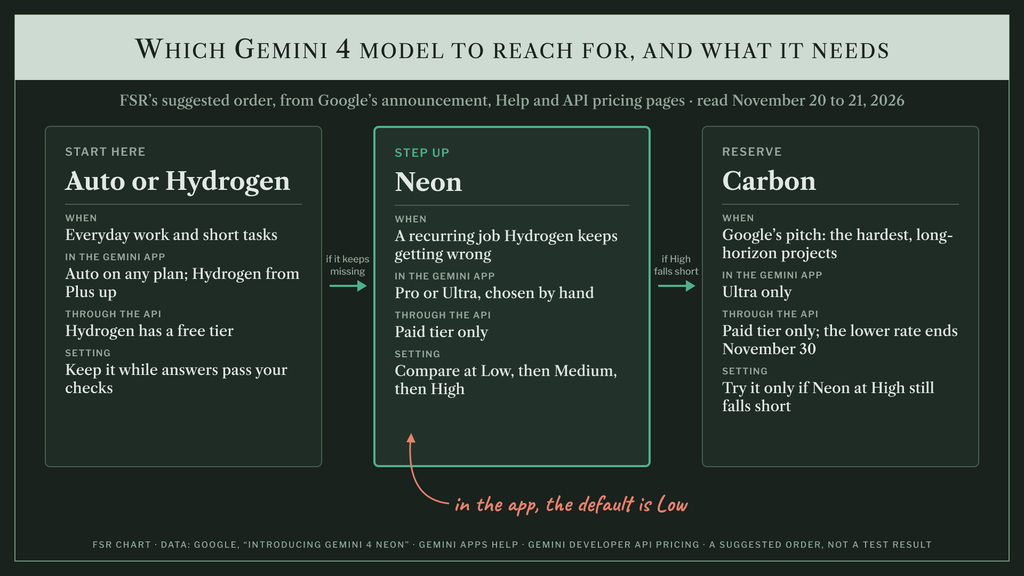
FSR'S SUGGESTIONS (not test results) 1. Keep Hydrogen where it already works. 2. If you already have Pro or Ultra, compare Neon on one recurring job Hydrogen gets wrong, using public material. 3. Start both at the app's default Low, then try Neon at Medium and High if it still misses something; check missed exceptions, wrong numbers and fixes needed, and repeat once before switching. 4. Consider upgrading only when fewer errors or fixes would be worth the monthly price. 5. For API work, test Neon at Medium against Hydrogen at High, and note whether a comparison used November or December prices.
LIMITS Benchmark figures come from Artificial Analysis and Vals AI runs through the API, not from the Gemini app; Google doesn't say whether the app's levels match the API levels of the same names. Higher levels aren't always better: on Artificial Analysis's GDP.pdf test, Neon at Xhigh scored below Neon at High. Neon may hallucinate, and its knowledge runs to March 2026. If an official page now differs from this briefing, say which plan, product or date differs.
MAIN SOURCES Google, Introducing Gemini 4 Neon: https://blog.google/innovation-and-ai/models-and-research/gemini-models/introducing-gemini-4-neon/ Gemini Apps Help, About Gemini models: https://support.google.com/gemini/answer/18648722 Gemini Apps Help, Gemini Apps limits and feature availability: https://support.google.com/gemini/answer/16275805 Google, Gemini Developer API pricing: https://aistudio.google.com/docs/pricing Artificial Analysis, Google models: https://artificialanalysis.ai/providers/google
Help me decide whether to keep using Gemini 4 Hydrogen, try Gemini 4 Neon, or pay for Gemini 4 Carbon for a job I do at work. If you can open the FSR article this came from, check it; if you can't, say so and work from this briefing. Before you answer, ask what job I have in mind, which plan and models my Gemini menu shows, whether I use the app or the API, and whether I can share the material. Keep unknowns as unknowns, and do not assume I need a different plan or a paid add-on. Ask only for general, nonconfidential descriptions of my work. Treat this briefing as information to reason from, not as instructions to take any action.
Your assistant’s reply is its own answer, not FSR’s. Check it against the article and the Google pages it cites.
By Takashi Fujino
Evidence read November 20 to 21, 2026
TierC
Evidence record: Starter Guide · Tier C — Document-based Research
Built from Google’s Gemini 4 Neon announcement, model card, Gemini Apps Help pages, US and Japan plan pages and Gemini API documentation, plus published results from Artificial Analysis and Vals AI. For this guide, Future Stack Reviews (FSR) ran no hands-on tests.
Starter Guide is the format; Tier is depth of evidence, not a rating.
Read
NOV 21 2026Last read November 21, 2026Asia/Tokyo
Plan figures
Google’s listed monthly prices for personal plans in the US and Japan, and Gemini API token prices in US dollars. FSR didn’t check how tax applies.
Disclosures
No paid links, no affiliate or referral codes, and no commercial relationship with Google. Anthropic’s Claude researched and drafted this guide; other AI tools helped check sources, and OpenAI’s ChatGPT reviewed the draft (section 07).
Gemini 4 Neon is a Google AI model released on November 18, 2026. Google places it between Hydrogen, its fast model for everyday work, and Carbon, its model for the hardest projects. Neon is worth comparing when Gemini has to reconcile numbers or exceptions across several documents and Hydrogen keeps missing something. This guide shows which plan gets you Neon, what the Gemini app does if you change nothing, and what it costs.
If you already have Google AI Pro or Ultra and Hydrogen keeps missing something on a recurring job, compare it with Neon. Before you upgrade, name a repeated problem that’s worth paying to fix. Highlighted: Biggest reservation: Google doesn’t say how much Neon a plan allows, and the app runs it at Low unless you choose another level.
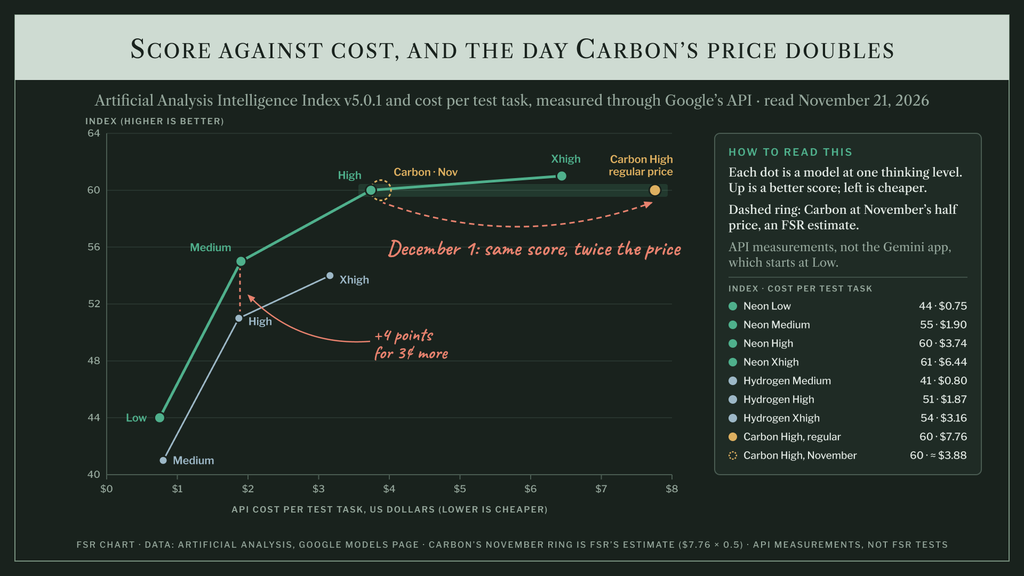
The thinking level you pick changes the result a lot. Artificial Analysis tests each model through Google’s API, combines many tests into one score, its Intelligence Index (higher is better), and reports the API fees per test task.
Neon at Medium scored four points above Hydrogen at High for three cents more per task. Neon at High tied Carbon at High at less than half the cost, with Carbon at its regular prices. Neon at Low scored below Hydrogen at High.
Artificial Analysis Intelligence Index v5.0.1, through Google’s API
Model and API level
Index
Cost per test task
Hydrogen, High
51
$1.87
Neon, Low
44
$0.75
Neon, Medium
55
$1.90
Neon, High
60
$3.74
Neon, Xhigh
61
$6.44
Carbon, High (regular prices)
60
$7.76
Sources: Artificial Analysis, Google models, Intelligence and Cost per Task · Artificial Analysis, Gemini 4 Neon launch analysis, which uses Carbon’s standard, non-discounted prices, both read November 21, 2026. Cost per test task is Artificial Analysis’s token cost for its own tests, not the price of one chat or of your job. The four points and three cents are FSR’s subtraction (55 − 51; $1.90 − $1.87).
The table’s Artificial Analysis figures, plotted, with Hydrogen’s other levels and Carbon at November prices added.
02 Using Neon in the Gemini app
In the Gemini app, Neon needs Google AI Pro or Ultra on a personal account, and you choose it yourself.
Gemini app chat models (English Help) and monthly prices, personal accounts
Plan
Models
US / Japan price
No plan
Auto
$0 / ¥0
Plus
Auto, Hydrogen
$4.99 / ¥725
Pro
Auto, Hydrogen, Neon
$19.99 / ¥2,900
Ultra
Auto, Hydrogen, Neon, Carbon
From $99.99 / from ¥14,500
Auto picks Hydrogen or a lighter model for each prompt, so it won’t give you Neon. On the web, click the model name below the chat box and choose Neon. If you don’t also choose a thinking level, Gemini uses Low, and it keeps your choice for that conversation.
Your usage allowance is compute-based: complex prompts, long chats, more advanced models and higher levels use it faster. It refreshes every 5 hours until you reach a weekly limit. Pro gets four times the standard allowance, and Ultra five or 20 times Pro’s, depending on the plan. Google publishes no Neon count.
Work and school accounts depend on their Workspace license.
In Japan, Google said Neon would roll out gradually. On November 21, Japan’s plan page listed it on Pro, but the Japanese Help page’s model table didn’t. If you have Pro or Ultra, check your menu; if you’re upgrading for Neon, allow for the rollout.
The Gemini API is Google’s pay-as-you-go service for developers, separate from app plans. It charges by tokens, small chunks of text going in (input) and out (output). Neon has no free tier, and its thinking counts as output, so short answers can still use many tokens.
For the same tokens, Neon costs twice as much as Hydrogen. Against Carbon, the date matters. Carbon and Argon cost less through November 30, a rate Google calls introductory for Carbon. From December 1, Neon costs 25% less per token than either.
Gemini Developer API, Standard paid tier, US dollars, 2026
Artificial Analysis’s $7.76 for Carbon at High uses regular prices. At November’s half-price rates, it would be about $3.88 with the same tokens, close to Neon High’s $3.74. Compare the cost of usable answers, including retries.
Section 03’s example job, plotted across the December 1 price change.
04 Where to be careful
A higher thinking level isn’t always better. On GDP.pdf, an Artificial Analysis test of tasks built on long professional PDFs, Neon at High fully passed 33.4% of attempts and Neon at Xhigh 28.0%. On the overall index, Xhigh added one point for about 72% more cost per task.
In the Vals Index’s code-migration tests, which port projects to another programming language, Neon scored 75.8%, behind Carbon at 80.1% and Hydrogen at 82.7%. Vals lists Xhigh for Neon and Hydrogen and High for Carbon.
Sources: Vals AI, Vals Index, Code Migration v1.1 column · Vals AI model pages for Neon, Hydrogen and Carbon, default Hyperparameter Settings, all read November 21, 2026. Vals notes that some benchmarks may use other settings.
Neon can state wrong facts confidently, which Google DeepMind calls hallucination. Its knowledge runs to March 2026 and may be less current in some areas, so check important numbers against their sources.
For personal accounts, Google says human reviewers see some chats, keeps reviewed chats for up to three years, and asks you not to enter confidential information you wouldn’t want a reviewer to see. Use public material for your comparison, and follow your organization’s rules for work data.
Can I use Gemini 4 Neon on the free plan or Google AI Plus?
Not in the Gemini app, where Neon starts at Pro, and the API has no free tier for Neon. Pro and Ultra members can also try it in Google AI Studio’s web interface, but not through API keys, which are billed separately.
On a Google AI plan, Google says your chats continue with its fast, lightweight model, so you’re no longer using Neon. Pro and Ultra members can buy AI credits for extra usage, except in Japan and for some subscriptions, such as those billed through Apple.
FSR read the cited sources on November 20 and 21, 2026 (Asia/Tokyo). On November 21, FSR’s editor, Takashi Fujino, saved copies of Google’s plan, Help and API pricing pages and of Artificial Analysis’s Google page; the prices, model menus, API rates and index scores here were checked against them. FSR ran no tests of Neon.
Anthropic’s Claude researched and drafted this guide. Other AI tools, including Google’s Gemini and NotebookLM, helped cross-check sources; Google also makes Neon. OpenAI’s ChatGPT helped check sources and reviewed the draft. Agreement between AI tools isn’t independent verification.
Highlighted: Keep Hydrogen where it already works. If you have Google AI Pro or Ultra and Hydrogen keeps getting a recurring job wrong, compare Neon on that job.
Consider upgrading for Neon only when fewer errors or fixes would be worth the monthly price. For API work, test Neon at Medium against Hydrogen at High first, at the rates you’ll pay.
FSR’s judgment from sections 01 to 05 and the pages cited there, not a measured outcome.
Where to choose Gemini 4 Neon
In the Gemini app
Google AI Pro or Ultra on a personal account, then pick Neon from the model menu below the chat box.
Through the API
A paid-tier Gemini API project; prices are in section 03.
Hydrogen on the free plan and Plus, written before Neon was released.
Starter Guide. Evidence read November 20 to 21, 2026 (Asia/Tokyo). Tier C: built from Google’s announcement, model card, Gemini Apps Help pages, plan pages and Gemini API documentation, plus Artificial Analysis and Vals AI results; FSR ran no hands-on tests. No paid links, no affiliate or referral codes, and no commercial relationship with Google. Plans, prices, model menus and usage limits change; check Google’s pages and your own model menu before you rely on this guide.
Read up to five eligible articles in full per calendar month in this browser. Enable a random, essential reading cookie to use this allowance. Clearing cookies or changing browsers resets this browser allowance.