
Descript sells itself as the video editor where you edit by editing text. That pitch landed like a bomb in 2020. In 2026, Adobe Premiere Pro and CapCut both do text-based editing natively, and CapCut does it for free. So why are 6 million creators still paying Descript between $24 and $65 a month?
Because the text editing was never the real product. The AI audio engine is.
Descript is not a video editor. Treat it like one and you’ll waste money. It’s an audio-first content production hub with AI tools no competitor can match. Studio Sound regenerates your voice from garbage audio, Overdub clones your voice for pickups, and Underlord executes multi-step edits from a single instruction. If you produce podcasts, talking-head video, or course content, the Creator plan at $24/mo pays for itself the first week.
[→ Try Descript Free and Test Underlord]
The Text-Editing Illusion: Descript’s Moat Evaporated
In 2020, “edit video by editing text” was a revelation. Delete a sentence from the transcript, watch it vanish from the timeline. No other tool could do it. Descript owned that category.
The problem is that the category doesn’t exist anymore as a standalone market.
Adobe added text-based editing to Premiere Pro natively. Apple baked it into Final Cut Pro. CapCut Desktop ships it for free with auto-captions on top. The feature that built Descript’s reputation is now table stakes, available in tools that cost $0 to $23/mo.
If you’re considering Descript because “I heard you can edit video like a document,” stop. You can do that in at least four other editors now. Buying Descript for text-based editing in 2026 is like buying a Tesla for the cup holders.
So what’s left?
Three things no competitor has replicated: the AI audio engine, the voice cloning system, and the agentic co-editor. Those are what you’re actually paying for when you subscribe to Descript in 2026.
What Descript Actually Does Better Than Everything Else
Studio Sound 4.0 doesn’t just remove background noise. Most noise removal tools subtract — they filter out frequencies that aren’t voice and hope for the best. Studio Sound regenerates. It isolates the voice signal, rebuilds it clean, then reconstructs the audio from scratch. The difference is dramatic on bad recordings: room echo disappears without that hollow, robotic artifact you get from Audacity or even Adobe Podcast.
The 2025-2026 update added automatic stem separation (voice/background/music as independent layers), zero-artifact reverb removal, and clipping repair for overloaded microphones. If you’ve ever recorded an interview where the guest’s mic peaked, this is the feature that saves the episode instead of the re-record.
Cost: 10 AI credits per use.
Overdub and Regenerate let you fix spoken mistakes without re-recording. Misspoke a word? Type the correction into the transcript, and Descript generates the audio in your cloned voice. The newer Video Regenerate (beta) takes it further: it re-syncs the lip movement in the video to match the regenerated audio. The consent controls are tight: you can only clone your own voice, and all Overdub audio carries an invisible watermark.
This is the feature that makes podcasters and course creators loyal. One user on X described cutting production time from 3 hours to 30 minutes because pickups no longer required reopening the mic.
Underlord launched August 2025 and represents Descript’s pivot from tool to platform. It’s an AI co-editor that sits in a sidebar and takes natural language instructions: “shorten this to 5 minutes and keep the most engaging moments” or “remove all filler words and add chapter markers.” It goes beyond suggestions and runs the full editing chain on its own. Multi-step editing chains run from a single prompt.
The catch: every interaction with Underlord consumes AI credits, including plain chat messages. The reasoning engine runs on top of whatever tool it’s calling, which means a “remove filler words” command through Underlord costs more credits than using the filler word tool directly. Users can select the underlying model, and Haiku 4.5 is the most credit-efficient option.
The internal architecture reveal is worth noting: Underlord isn’t some proprietary black box. It’s built on commercially available AI models with Descript’s editing tools exposed as functions. What Descript built is the glue between the models and the editing operations, not the models themselves.
The Pricing Trap: AI Credits Drain Faster Than You Think
Descript overhauled its entire pricing structure in September 2025, replacing transcription hours with a dual-currency system: Media Minutes (tracking uploaded/recorded media) and AI Credits (tracking AI feature usage). The pricing page buries the math that matters.
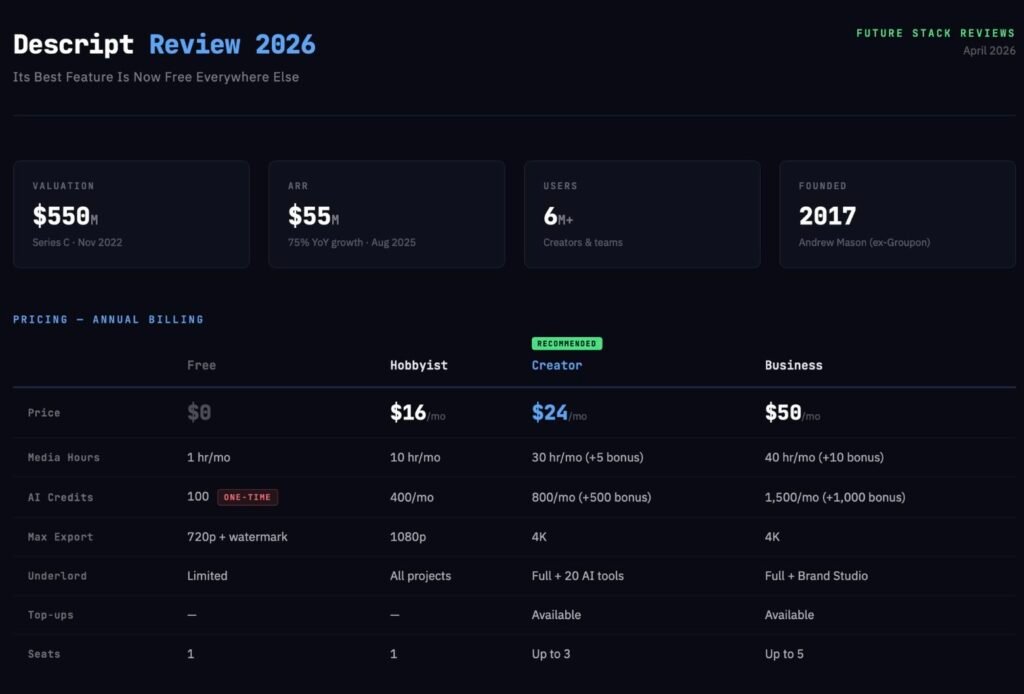
The Plans:
| Free | Hobbyist | Creator | Business | |
|---|---|---|---|---|
| Monthly price | $0 | $24/mo | $35/mo | $65/mo |
| Annual price | $0 | $16/mo | $24/mo | $50/mo |
| Media hours/mo | 1 hr | 10 hr | 30 hr (+5 bonus) | 40 hr (+10 bonus) |
| AI credits/mo | 100 (ONE TIME) | 400 | 800 (+500 bonus) | 1,500 (+1,000 bonus) |
| Max export | 720p + watermark | 1080p | 4K | 4K |
| Seats | 1 | 1 | Up to 3 | Up to 5 |
Now look at what those AI credits actually buy:
| Feature | Credit Cost |
|---|---|
| Studio Sound | 10 |
| Eye Contact correction | 10 |
| Remove Filler Words | 10 |
| Create Clips | 30 |
| Edit for Clarity | 15 |
| AI Video Maker | 25 |
| Text-to-speech | ~5/min |
| Video Regenerate | ~15/use |
| Lip sync | ~50/min |
| Avatar generation | ~20/min |
| Dubbing | ~15/min |
Do the math on the Hobbyist plan’s 400 monthly credits. You get 40 uses of Studio Sound. Or 13 clip generations. Or 8 minutes of lip sync. These aren’t “power user” features being rationed. Studio Sound and filler word removal are basic editing operations that Hobbyist users will run on every project.
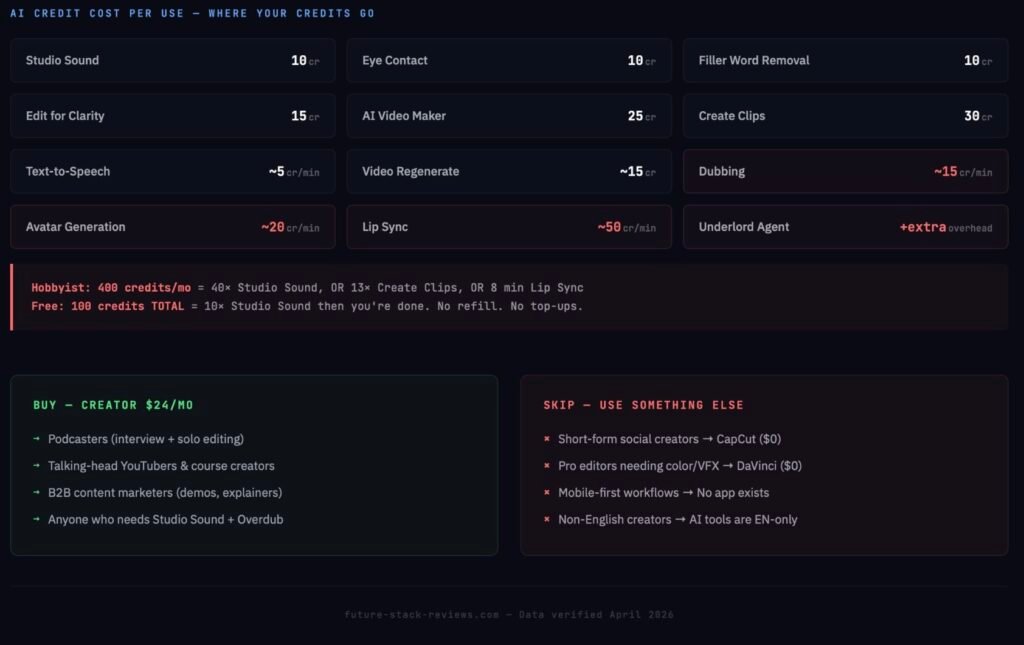
And the Free plan? Those 100 credits are a one-time welcome gift. Use Studio Sound ten times during your first exploration session and they’re gone. No monthly refill. No top-up option (top-ups are locked to Creator and above). The Free plan is a 720p-watermarked, credit-starved demo that probably shouldn’t be called a “plan” at all.
The credits don’t roll over. Miss a month and they vanish. Run out mid-project on Hobbyist and your only option is upgrading to Creator ($35/mo monthly) to unlock top-ups: $25 for 5 hours of media time, $35 for 350 credits. The whole tier structure pushes you upward whether you planned to upgrade or not.
The Founder Story Nobody Mentions
Descript’s founder is Andrew Mason. The same Andrew Mason who co-founded Groupon, took it public, then got fired as CEO in 2013 when the stock collapsed. He built Detour (an audio tour app), sold it to Bose in 2018, and spun Descript out of the internal audio editing tools his team had built for podcast production.
Total funding: over $100 million across four rounds. Series C in November 2022 valued Descript at roughly $550 million, led by OpenAI’s Startup Fund alongside Andreessen Horowitz, Redpoint, and Spark Capital. The investor roster includes Evan Williams (Twitter co-founder), Naval Ravikant, Jack Conte (Patreon CEO), and Lenny Rachitsky.
The part most review sites miss: Mason stepped down as CEO in August 2025 and moved to Executive Chairman. The current CEO is Laura Burkhauser, who joined Descript as an individual contributor product manager and rose to CEO in approximately three years. Mason announced the transition on LinkedIn the same month Underlord launched and the pricing overhaul shipped. A lot of structural change happening simultaneously.
The company reports $55 million in annual recurring revenue as of August 2025, growing 75% year-over-year. Six million creators and teams on the platform. NPR, Vox, Reuters, HubSpot, Shopify, and Stanford University are confirmed enterprise customers.
Who Descript Is For (and Who Should Walk Away)
Buy it if you are:
A podcaster editing interview or solo content. The transcript editing, filler word removal, and Studio Sound combination eliminates the most tedious parts of podcast post-production. No other single tool covers recording, editing, and publishing in one workflow.
A talking-head YouTuber or course creator who records scripted or semi-scripted content. Overdub fixes mistakes without re-recording. Underlord automates repetitive editing tasks. The value scales with volume: the more episodes you produce, the more time you recover.
A B2B content marketer producing explainers, demos, and customer stories. Descript’s screen recording plus text-based editing is faster than Camtasia for most marketing use cases, and Studio Sound cleans up conference room recordings that would otherwise be unusable.
Walk away if you are:
A short-form social creator. CapCut is faster, free, mobile-native, and has better native effects for vertical content. Descript’s strengths (audio processing, long-form transcript editing) don’t apply to 60-second Reels.
A professional filmmaker or editor who needs color grading, compositing, or deep timeline control. DaVinci Resolve is free and Hollywood-grade. Premiere Pro integrates with After Effects. Descript exports MP4 only, offers three quality presets (high/medium/low) with no manual bitrate control, and doesn’t upscale. You’ll hit the ceiling on your first real project.
A mobile-first creator. Descript has no iOS or Android app as of April 2026. The web version runs on Chromium browsers with reduced features. If your workflow lives on a phone or iPad, Descript doesn’t exist for you.
A creator who works in languages other than English. Descript transcribes 25 languages, but filler word removal, AI Speakers, the Rewrite tool, and the Transcription Glossary are all English-only. The AI features — the reason you’re paying — work fully in one language.
Descript vs. The Alternatives
Descript vs. CapCut: Different tools for different jobs. CapCut dominates short-form, mobile-first editing with free access and TikTok-native effects. Descript dominates long-form spoken-word production with AI audio tools CapCut can’t match. If you produce both, you need both, and CapCut handles the short-form side for $0.
Descript vs. DaVinci Resolve: DaVinci Resolve is free, professional-grade, and offers color grading, Fusion compositing, and Fairlight audio that Descript will never match. But DaVinci requires you to learn a professional NLE. Descript requires you to type. For the “I hate timelines” creator, DaVinci is the wrong tool regardless of its power.
Descript vs. Riverside: Riverside is the pure-play podcaster’s recording tool with lossless local capture, 4K video, and a cleaner recording workflow. But Riverside’s editing is limited. The typical pro podcaster workflow: record on Riverside, edit in Descript. They’re complements, not competitors, despite what their marketing suggests.
Descript vs. Adobe Premiere Pro: Premiere now has text-based editing built in. If you already pay for Creative Cloud, you already have Descript’s original selling point. What you don’t have: Studio Sound’s regenerative audio processing, Overdub voice cloning, or Underlord’s agentic editing. Those are the only reasons to add Descript to a Premiere workflow.
Descript vs. Opus Clip: Opus Clip automates clip selection with zero manual input: upload a long video, get short clips back. Descript’s Create Clips feature requires more guidance but gives more control over what gets extracted. Volume creators who need 20 clips from one podcast go Opus. Deliberate creators who want 3 perfect clips go Descript.
The Performance Problem Nobody Can Ignore
Every data source in this review — official documentation, G2 reviews (863 total), Trustpilot (244 reviews), Reddit threads, and X posts — flags the same issue: Descript is slow.
Users on machines with Apple M4 chips, RTX 3060 GPUs, and 32GB RAM report 3-5 second freezes on basic operations like searching for words or deleting them. One X user documented a 50-second video that took days to process. Descript’s own help documentation acknowledges that projects can be “slow, glitchy, or lagging” and recommends lowering camera resolution from 4K to 1080p as a workaround.
Large file uploads are particularly fragile. A common community workaround is uploading to YouTube (unlisted) first, then importing the YouTube URL into Descript — which is a wild detour for a paid professional tool.
Trustpilot reviewers summarize the pattern: frequent bugs, crashes, and lag, even on powerful hardware, leading to lost work. This isn’t edge-case complaining. It’s the most consistent negative signal across every review platform and social channel.
If your livelihood depends on deadlines, build a buffer into any Descript-dependent workflow. The time savings are real when the tool cooperates, but a bad crash on deadline day can eat an entire afternoon you didn’t budget for.
The Verdict: How to Buy Descript Without Getting Burned
Descript’s real product in 2026 is three things: Studio Sound, Overdub, and Underlord. Text-based editing is a nice workflow bonus, but you can get that for free elsewhere. The AI audio tools are what justify the subscription, and nothing on the market replicates them at this quality.
The correct way to buy:
Start on Free. Upload a real project — something with background noise, filler words, a few mistakes. Use Studio Sound. Use filler word removal. Try Underlord. You have 100 credits to spend, and they’ll evaporate fast, but that’s enough to know whether the AI tools solve a real problem in your workflow.
If they do: go Creator at $24/mo (annual). Not Hobbyist. The Hobbyist plan’s 400 AI credits will choke you within weeks if you’re producing regularly, and you can’t buy top-ups until Creator tier. The $8/mo difference between Hobbyist and Creator buys you 4K export, double the AI credits with 500 bonus on top, full Underlord access, and the ability to buy more credits when you run out. Descript’s pricing page steers you toward Hobbyist as the entry point, but Creator is where the tool stops fighting you.
If the AI tools don’t impress you during the Free trial: you don’t need Descript. CapCut covers text-based editing for free. DaVinci Resolve covers professional editing for free. The only defensible reason to pay for Descript is the AI audio and voice stack. Everything else is available somewhere else for less.
[→ Start Free on Descript — Test the AI Tools First]
