
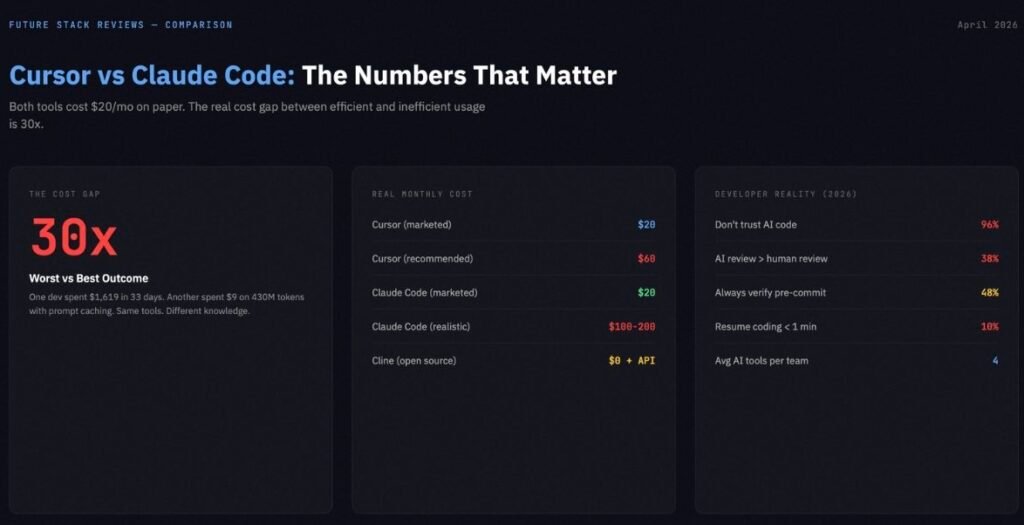
Both tools start at $20 per month. Neither tool actually costs $20 per month. One developer tracked $1,619 in Claude Code API costs over 33 days. Another watched Cursor overage charges hit $1,400 in a single billing cycle. A third spent $9 on 430 million tokens by using prompt caching correctly.
The gap between the best and worst outcomes with these tools is not 2x. It is 30x. And which side you land on has almost nothing to do with which tool you pick. It has everything to do with whether you understand what each tool is bad at.
BRIEFING SUMMARY — APRIL 2026
Cursor and Claude Code are not competing for the same job. Cursor is an AI-native IDE that accelerates your editing. Claude Code is a terminal agent that executes plans autonomously. The right question is not which one is smarter. The right question is which failure mode you can absorb.
Choose Cursor ($20/mo Pro) if:
You want inline autocomplete, visual diffs, and the ability to switch between Claude, GPT, and Gemini models inside a single editor. Your work is 70%+ editing existing code, styling, and incremental feature work.
Choose Claude Code ($20/mo Pro, realistically $100-200/mo Max) if:
You live in the terminal. Your work involves multi-file refactoring across large codebases, MCP-powered automation (GitHub PRs, Linear tickets, Datadog alerts), and tasks where you want the AI to run, fail, diagnose, fix, and verify without your hands on the keyboard.
Use both ($40/mo minimum) if:
You are willing to define a hard switching rule. Cursor for tasks you can describe in five words or fewer. Claude Code for everything that requires a plan. Without that rule, you are just paying double to interrupt yourself.
Consider Cline (free + API costs) if:
You refuse to pay a markup on the same underlying models. You are comfortable managing your own API keys, model selection, and rate limits.
Why Most Comparison Articles Get This Wrong
Open five “Cursor vs Claude Code” articles right now. Four of them will frame it as “IDE versus terminal.” That framing was accurate in 2025. It is not accurate in April 2026.
Cursor now ships cloud agents, a CLI mode, long-running background agents, and an automations system. One of Cursor’s own case studies describes agents running for over 24 hours on a single task. That is not an IDE behavior. That is an agent platform wearing an IDE skin.
Claude Code now has an official VS Code extension with inline diffs, plan review, @-mentions, and multiple conversation tabs. Anthropic’s own documentation recommends the VS Code extension as a primary entry point. That is not a terminal-only tool. That is a terminal agent that learned to dress up for the office.
The surface where you interact with each tool is converging. What is not converging is the philosophy underneath.
Cursor’s philosophy: the human drives, the AI navigates. You type, it predicts, you accept or reject in the flow of writing code. Even when Cursor’s agents run autonomously, they report back through visual diffs inside the editor. The human reviews every change before it touches the file system.
Claude Code’s philosophy: the human delegates, the AI executes. You describe what needs to happen. Claude Code reads the relevant files, formulates a multi-step plan, runs shell commands, executes tests, reads the error output, modifies the code, and iterates until the build passes. The human reviews the result, not the process.
The useful comparison axis is not where you work. It is how much control you are willing to hand over.
Feature Head-to-Head
Inline Editing and Flow State: Cursor
This is not close. Claude Code has no inline autocomplete. No ghost text. No tab-to-accept suggestions. No keystroke-by-keystroke predictions as you type. The VS Code extension adds a sidebar and diff review, but the interaction model is still prompt-then-approve. You describe what you want, Claude responds with changes, you review diffs, you accept.
Cursor was built around your editor buffer. You type, it predicts, you accept in the flow of writing. For the routine 80% of development work (renaming props, adjusting Tailwind classes, fixing import errors, writing CRUD endpoints, updating serializers), inline autocomplete is faster than an agentic conversation. Period.
Cursor also supports multi-model selection within a single session. Claude, GPT, Gemini models are all available. If one model struggles with a specific language pattern, you switch without leaving the editor.
Multi-File Autonomous Execution: Claude Code
Claude Code’s 1-million-token context window is real, but it requires a caveat that most articles skip. Anthropic’s own documentation states that long instruction files reduce model adherence, and that placing queries at the end of long-context prompts can improve quality by up to 30%. The “Lost in the Middle” phenomenon (where models struggle with information buried in the center of long contexts) applies here too.
What this means in practice: the 1M window is powerful for initial repository ingestion, cross-module exploration, and understanding how 15 interconnected services interact. It is not a magic wand that makes every query better just because more context is loaded. For a typical 50,000 LOC TypeScript project, Claude Code can hold roughly 300,000 to 500,000 tokens of effective context. Cursor’s RAG-based retrieval handles 10,000 to 50,000 tokens per query, relying on file indexing to surface relevant code.
Where Claude Code pulls away is the read-execute-fix loop. It lives in your terminal. It can run a build, read the error output, modify the code, rerun the build, and iterate until it passes. All without you touching the keyboard. Cursor can edit code. Claude Code can run, fail, diagnose, fix, and verify. That loop is the difference between a suggestion engine and an agent.
On SWE-bench Verified, the model powering Claude Code (Opus 4.6) scores 80.8%. GPT-5.4 scores 36.6%. Gemini 3.1 Pro scores 25.9%. For complex, well-defined coding problems, that gap translates to measurably better outcomes on multi-file tasks.
MCP and DevOps Automation: Claude Code
Model Context Protocol is Claude Code’s actual moat. You can connect GitHub for PR management, Linear for ticket tracking, Datadog for log analysis, Supabase for database operations, Slack for team notifications, PostgreSQL for migrations, and Docker for container management.
A concrete workflow: you tell Claude Code to review a PR. It pulls the diff from GitHub MCP, runs your test suite, checks Datadog for related errors, comments on the PR with findings, and moves the Linear ticket to “In Review.” That is not autocomplete. That is automation.
Cursor supports MCP servers as of early 2026, but the integration depth is shallower. Cursor’s strength remains its VS Code extension ecosystem (ESLint, Prettier, GitHub Copilot all work natively). The tradeoff is asymmetric. Cursor’s value concentrates in the editor experience and its extension ecosystem. Claude Code’s value concentrates in what happens after you stop typing and let the agent work.
Model Flexibility: Cursor
Cursor lets you switch between Claude, GPT, Gemini, and its own proprietary models within a single session. If Anthropic raises prices, you switch to GPT. If OpenAI degrades quality, you switch to Gemini. You have arbitrage.
Claude Code runs Claude models exclusively. Opus 4.6, Sonnet 4.6, Haiku 4.5. Enterprise customers can route through AWS Bedrock or Google Vertex for deployment flexibility, but the model family stays Claude. If Anthropic changes pricing or another model surpasses Opus on the tasks you care about, migration is painful because the tool and the model are fused.
The developer who invested months in CLAUDE.md configurations, custom MCP workflows, and permission mode setups has built an environment that only works with Claude. The more you invest in the ecosystem, the harder it becomes to leave.
Extension Ecosystem and Stability: Both Have Problems
Cursor is a proprietary fork of VS Code. The upstream merge cadence is every other mainline release, which creates a version lag. In March 2026, forum posts reported Cursor running VS Code 1.105.0 while mainstream VS Code was at 1.111.0. Multiple users reported extensions breaking or not appearing due to Cursor’s use of the OpenVSX registry instead of Microsoft’s marketplace. Docker and Remote SSH extensions can slow down Cursor’s file indexing. If a critical security extension breaks on the fork, you have a problem with no quick fix.
Claude Code’s stability issues are different in character. The permission system defaults to asking approval before every file edit and shell command. Anthropic’s own data shows users approve 93% of prompts, meaning 93 out of 100 interruptions add friction without adding safety. Five permission tiers exist (Default, AcceptEdits, Plan, Auto, BypassPermissions), but most developers never move past Default. The safety friction is not theater — Anthropic documented real cases where agents attempted to delete remote git branches and run production database commands. But the default configuration optimizes for caution at the expense of flow.
Neither tool is friction-free. The question is which friction fits your tolerance.
The Real Cost
Cursor: The Credit Trap
Cursor Pro costs $20 per month. Cursor’s own pricing page marks Pro+ at $60 as “Recommended” and describes it as providing 3x usage on all OpenAI, Claude, and Gemini models. Ultra at $200 provides 20x usage with priority access to new features.
The company recommends the $60 tier, not the $20 tier. That recommendation exists because the $20 tier’s agent credits run out fast under heavy use. Different AI models consume credits at different rates. Complex agent requests can cost an order of magnitude more than simple completions. In March 2026, reports surfaced of developers facing $1,400 in monthly overage charges on Pro.
Cursor Pricing (verified April 8, 2026):
| Tier | Price | Key Feature |
|---|---|---|
| Hobby | Free | Limited Agent requests, limited Tab completions |
| Pro | $20/mo | Extended Agent limits, frontier models, Cloud agents |
| Pro+ (Recommended) | $60/mo | 3x usage on all OpenAI, Claude, Gemini models |
| Ultra | $200/mo | 20x usage, priority access to new features |
| Teams | $40/user/mo | Shared chats, centralized billing, SAML/OIDC SSO |
| Enterprise | Custom | Pooled usage, SCIM, audit logs |
Teams cost $40 per user per month. Enterprise is custom pricing with pooled usage and invoice billing. Bugbot (automated code review) is a separate product at $40 per user per month for both Pro and Teams tiers.
Claude Code: The Rate Limit Wall
Claude Code access starts at $20 per month with the Pro plan ($17 on annual billing at $200 upfront). Max 5x costs $100. Max 20x costs $200.
Claude Code is not available on the Free tier. Opus model access requires Pro or above. All tiers allow opt-out of model training.
The Pro tier provides approximately 45 messages per 5-hour sliding window. Extended thinking (where Claude reasons through complex problems) generates thinking tokens billed at output rates. On Opus 4.6, a single 32K thinking block costs $0.80 in standard mode, $4.80 in fast mode. Stack a few of those in a session and your 5-hour window evaporates.
Claude Code Pricing (verified April 8, 2026):
| Plan | Price | Claude Code | Opus |
|---|---|---|---|
| Free | $0 | No | No |
| Pro | $20/mo ($17 annual) | Yes | Yes |
| Max 5x | $100/mo | Yes | Yes |
| Max 20x | $200/mo | Yes | Yes |
Developers on X consistently report hitting Pro rate limits within 2-3 hours of active use. One developer tracked 926 sessions over 33 days and found $1,619 in API costs, driven by Claude repeatedly opening files it did not need and calling tools it never used. The consensus among serious users is that Max 5x ($100/mo) is the realistic minimum for daily agentic work.
For a deeper breakdown of Claude Code’s token economics and the five most expensive mistakes developers make, see our Claude Code Review.
The Cost Nobody Puts on the Invoice
Subscription price is the smallest part of the real bill for both tools.
A 2026 Sonar developer survey found that 96% of developers do not fully trust AI-generated code for functional completeness. Thirty-eight percent said reviewing AI code is harder than reviewing human code. Only 48% said they always verify before committing. Every line of AI-generated code requires human review, and the minutes saved in generation return as debugging, rewrite, or incident-response time when verification is skipped.
The other hidden cost is tool switching. If you run both Cursor and Claude Code, you are interrupting yourself every time you move between them. Research on developer interruptions shows that only 10% of programmers resume coding activity within one minute of a context switch, and only 7% can resume editing without prior file navigation. A 2026 Sonar survey found development teams use an average of 4 AI tools simultaneously, with 59% rating the review and verification overhead as moderate or higher. The two-tool strategy is not free. The switching tax is real, even if it does not show up on a credit card statement.
What Developers Actually Say
Developer sentiment on X in Q1-Q2 2026 reveals a pattern that no vendor wants to acknowledge: the full-circle phenomenon.
A developer post with 209 likes captured it: developers are moving from Cursor to Claude Code to Codex and then back to Cursor. The trajectory is consistent. Someone tries Claude Code, is impressed by the raw reasoning power, hits rate limits or loses codebase context through diff-only review, and returns to Cursor for the visual feedback loop.
The highest-engagement switchback post (567 likes) identified the core structural issue with Claude Code: working only through diffs makes it too easy to lose the broader codebase context. For applications requiring precision, that becomes a serious problem quickly.
On cost, a post with 874 likes laid out the math: for every dollar spent in Cursor, the equivalent Claude Code usage would cost between $2.50 and $16, depending on task complexity and model selection. The economics favor Cursor for high-frequency, low-complexity interactions and Claude Code for low-frequency, high-complexity operations.
A separate community signal emerged from a viral post (5,351 likes) sharing an open-source Claude Code setup with 27 agents. The enthusiasm for Claude Code’s automation potential is real. But most of the engagement came from developers who admired the architecture rather than developers who ran it in production. The gap between “impressive setup” and “daily workflow” remains wide.
The developers who stay with Claude Code share a profile: terminal-native, large codebases, MCP automation, active session management, willing to spend $100-200 per month. The developers who stay with Cursor share a different one: visual-first, inline editing, multi-model flexibility, predictable monthly costs, no interest in learning a new permission system.
The developers who use both successfully share one characteristic above all others: they have a defined switching rule, not a vague preference.
The Decision Framework
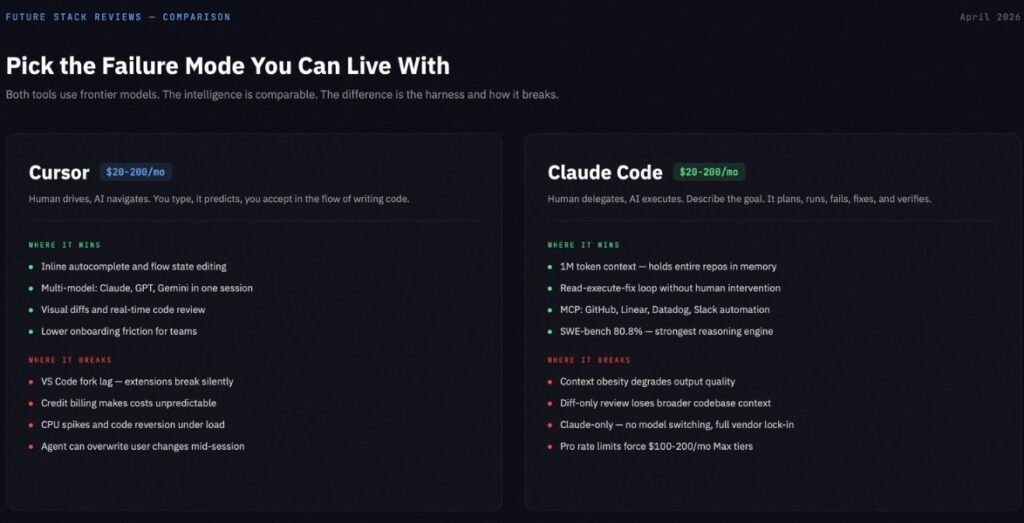
Stop asking which tool is smarter. Both tools access frontier models. Cursor can use Claude Opus 4.6. Claude Code runs Claude Opus 4.6 natively. The underlying intelligence is comparable. The difference is in the harness, the orchestration, and the failure modes.
Cursor’s failure modes: Fork lag and extension incompatibility with mainstream VS Code. Cost unpredictability from credit-based billing with model-dependent consumption rates. Stability issues under heavy agent load (CPU spikes, code reversion bugs, WSL hangs). Risk of the agent overwriting user changes during concurrent editing.
Claude Code’s failure modes: Context obesity from loading too much into the 1M window, degrading output quality. Unsupervised delegation risk on production-adjacent code. Vendor lock-in to the Claude model family with non-portable CLAUDE.md configurations. Rate limit frustration that pushes real costs to $100-200 per month.
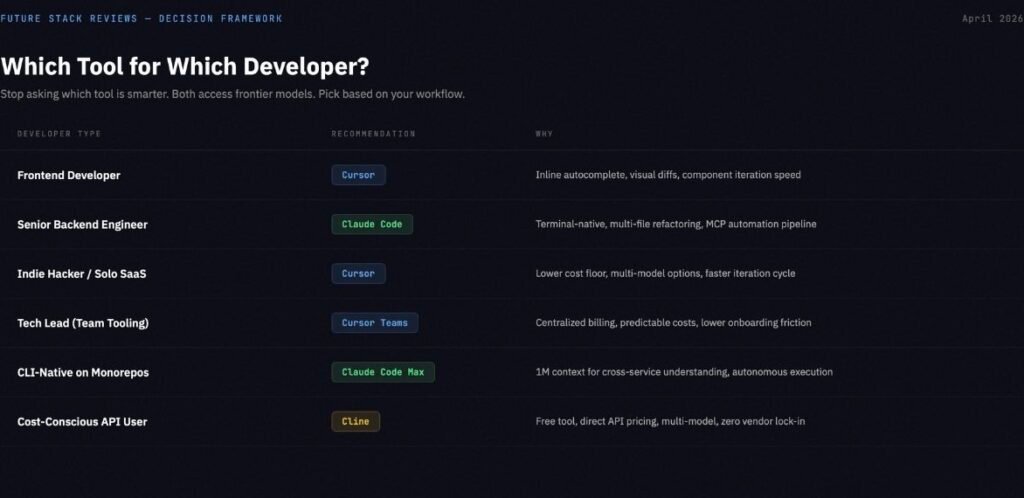
| If you are… | Choose | Because |
|---|---|---|
| Frontend developer (React/Tailwind/UI) | Cursor | Inline autocomplete, visual diffs, component iteration speed |
| Senior backend/platform engineer | Claude Code | Terminal-native, multi-file refactoring, MCP automation |
| Indie hacker building a SaaS | Cursor | Lower cost floor, broader model options, faster iteration |
| Tech lead deciding team tooling | Cursor Teams | Centralized billing, predictable costs, lower onboarding friction |
| CLI-native developer on large monorepos | Claude Code Max | 1M context for cross-service understanding, autonomous execution |
| Cost-conscious developer who manages APIs | Cline | Free tool, API-direct pricing, multi-model, no lock-in |
If your decision is between Cursor and Windsurf rather than Cursor and Claude Code, see our Cursor vs Windsurf comparison for verified pricing and security analysis.
The Third Option Nobody Mentions: Cline
If both Cursor and Claude Code ultimately depend on the same underlying models, is the shell around them worth $20 per month?
Cline is a free, open-source VS Code extension (Apache-2.0) with 60,000 GitHub stars. You bring your own API keys and pay the model provider directly. No middleman, no markup.
When Cline points at Claude Opus 4.6 through a direct API key, the raw intelligence gap versus Cursor or Claude Code shrinks dramatically. What you lose is polish: no visual diff interface as refined as Cursor’s Composer, no cloud background agents, no long-running autonomous sessions as seamless as Claude Code’s terminal loop. What you gain is absolute cost transparency, the ability to switch models mid-task across any provider (Anthropic, OpenAI, Google, local via Ollama), and first-class MCP support.
Cline is not a free replacement for both tools. It is a third philosophy. Cursor says “we manage the AI for you inside a polished editor.” Claude Code says “we manage the AI for you inside a powerful terminal agent.” Cline says “manage it yourself, and keep the savings.”
The tradeoff: API selection, rate limits, cost tracking, model switching, provider outages, and guardrail configuration are all your responsibility. Heavy Cline users report spending $50-100 per month on API calls. Routing Cline through budget models like MiniMax M2.7 ($0.30/M input tokens) instead of Claude Opus ($5.00/M) can cut that spend by 90% while retaining competitive coding performance. Local models via Ollama eliminate that cost but require 24GB+ VRAM and the intelligence gap versus frontier models remains significant.
For developers who want control, Cline is the most honest option in the market. For developers who want a product that works out of the box, it is not.
If You Use Both: The Implementation Guide
If you decide to run Cursor and Claude Code together, do not improvise. The switching cost is real, and without rules, you will burn through both budgets while being slower than someone using one tool well.
The switching rule: If you can describe the task in five words or fewer, use Cursor. “Fix the import error.” “Style the sidebar.” “Rename this prop.” If the task requires a plan with multiple steps, use Claude Code. “Refactor the auth module across these six services.” “Generate integration tests for the entire API.” “Debug why the CI pipeline fails only on the staging branch.”
File separation: Add a .cursorignore file to exclude large generated files and directories that Cursor’s indexer does not need to process. Use .claudeignore to skip files already handled in the current Claude Code session. This prevents duplicate AI processing and wasted tokens.
Session discipline: Do not switch tools mid-task. Finish the Cursor edit, commit, then open the terminal for Claude Code. Or finish the Claude Code session, review the diffs, commit, then return to Cursor. The worst pattern is having both tools open, both processing the same files, both burning tokens on overlapping context.
Cost tracking: For Claude Code, use community tools like ccusage or Claude-Code-Usage-Monitor to track token consumption per session. For Cursor, check your credit usage dashboard weekly. Overages compound fast when you are not watching.
FSR Verdict
There is no winner in this comparison. There is a better fit for your specific workflow, your tolerance for friction, and your monthly budget.
Cursor is the right choice for developers who value visual feedback, inline editing speed, multi-model flexibility, and predictable interaction patterns. Its failure modes (fork lag, cost unpredictability, stability under heavy agent load) are manageable for most daily workflows. Start at $20 per month. Budget $60 if you plan to use agent features with any regularity.
Claude Code is the right choice for terminal-native developers who work on large, complex codebases and need deep autonomous execution paired with MCP-powered automation. Its failure modes (context obesity, delegation risk, vendor lock-in, aggressive rate limits) are manageable if you invest time in CLAUDE.md configuration, permission tuning, and session cost discipline. Start at $20 per month for evaluation. Budget $100-200 for sustained daily use.
Cline is the right choice for developers who want full control over model selection, cost visibility, and workflow without paying a subscription premium on top of API costs. Its tradeoff is operational responsibility.
For five more alternatives beyond these three, see our Best Cursor Alternatives 2026 guide.
The developers who extract the most value from AI coding tools in 2026 are not the ones who found the “best” tool. They are the ones who learned what their chosen tool is bad at and built their workflow around that constraint.
For a deeper look at Claude Code’s specific failure modes and how to avoid them, read our Claude Code Review: 5 Costly Mistakes Every Developer Makes.
If neither Cursor nor Claude Code fits, we evaluated seven alternatives with verified pricing in our Best Cursor Alternatives 2026 guide.
For the full AI coding assistant landscape including 12 tools and 3 vibe coding platforms, see our Best AI Coding Assistant 2026 guide.
If you are evaluating these tools specifically as Copilot replacements, our GitHub Copilot Alternatives guide covers all seven options with verified pricing and a security matrix.
