
One developer spent $536 in four days on a tool that markets itself at $20 per month. Across X in Q1 2026, the pattern repeated at scale: enterprise teams burning through monthly credits in 48 hours, indie hackers watching $250 disappear in a week, and a growing number of developers completing what the community now calls the full circle — Cursor to Claude Code to Codex and back to Cursor, paying triple along the way.
This is a data-driven guide to the seven Cursor alternatives that matter in April 2026, evaluated on axes that most comparison articles ignore: real cost under heavy use, code quality impact, privacy posture, and who should not switch at all.
BRIEFING SUMMARY — APRIL 2026
Seven alternatives. Every price verified on the official page. Evaluated against the 19% velocity study, the 30x cost gap, and real developer sentiment from X — not marketing copy.
If Cursor’s credit billing is the problem:
GitHub Copilot ($10/mo) for flat-rate predictability. Windsurf ($20/mo) for the closest feature match with quota-based billing.
If you want deeper AI reasoning, not faster autocomplete:
Claude Code ($20/mo Pro, realistically $100–200/mo) for 1-million-token context and 80.8% SWE-bench. For more detail, read our Cursor vs Claude Code comparison.
If you refuse to pay a subscription markup on top of the same models:
Cline (free + API costs) or Aider (free, open-source CLI). Both are BYOK — you pay the model provider directly.
If raw editor performance matters more than AI features:
Zed ($0 Personal / $10/mo Pro). Rust-native, GPU-accelerated, 120fps rendering. Ten times faster startup than VS Code.
If your code cannot leave the building:
Tabnine ($39/user/mo). The only major tool offering fully air-gapped, on-premise deployment with zero data retention at every paid tier.
What Every “Cursor Alternatives” Article Gets Wrong
Open five Cursor alternatives articles right now. Four of them will list seven tools, summarize the feature pages, and tell you to “choose the one that fits your workflow.” That format helps no one. It compares marketing claims, not engineering outcomes.
The strongest piece of counter-evidence against the “AI makes you faster” narrative comes from a randomized controlled trial published in late 2025. Researchers gave experienced open-source maintainers access to AI coding tools and measured the result. The AI group completed tasks 19% slower than the control group — despite predicting they would be faster. The effect was statistically significant across multiple task types.
That study does not mean AI coding assistants are useless. It means that choosing the wrong tool for the wrong task creates friction that erases productivity gains. And Cursor’s current pricing structure has turned “choosing wrong” into an expensive monthly lesson for a growing number of developers.
GitClear analyzed 211 million changed lines across thousands of repositories and found that copy-pasted code exceeded refactored code for the first time in the dataset’s history. Duplicate-block prevalence rose to 6.66%, up from 0.45% in 2022. A separate study found a 17% reduction in measured skill formation after AI-assisted coding — with no time saved on the initial task.
This guide evaluates alternatives against those realities, not against a feature checklist.
Why Developers Leave Cursor
Cursor is a strong product. It holds roughly 25% of the AI code editor market and reached $2 billion in annualized recurring revenue by early 2026. Composer mode for multi-file editing remains unmatched. The Supermaven autocomplete engine delivers a 72% code acceptance rate.
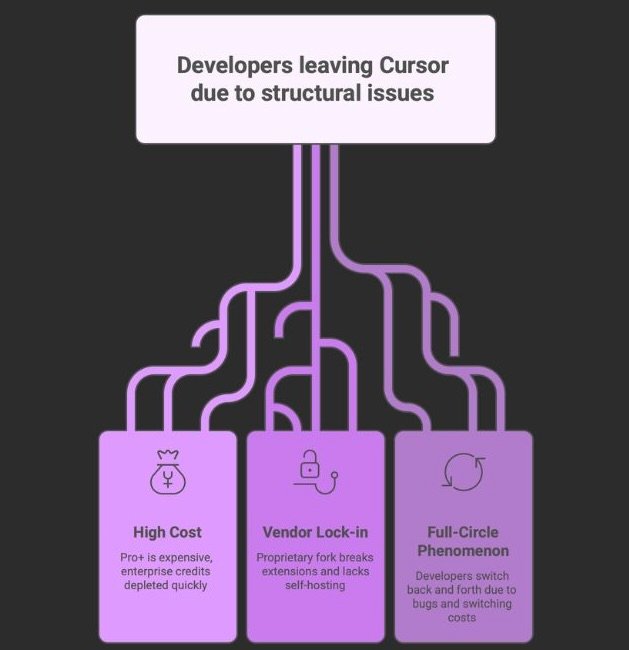
But three structural issues are pushing developers to look elsewhere.
THE COST PROBLEM
Cursor Pro costs $20 per month. The company itself recommends Pro+ at $60. In March 2026, Gergely Orosz (ex-Uber, 1,624 likes on X) reported: enterprise developers who used to spread monthly credits over a month saw them consumed in one to two days after a silent model-tier change. Another developer tracked $536 in four days with API credits enabled. A third — an indie hacker earning $24K/month — burned through $250 in seven days.
The issue is not usage-based pricing itself. It is the unpredictability. Different models consume credits at different rates. Agent requests cost an order of magnitude more than completions. The result: monthly costs that range from $20 to $500+ depending on workflow patterns that most developers cannot predict in advance.
THE LOCK-IN PROBLEM
Cursor is a proprietary fork of VS Code. The upstream merge cadence lags behind mainline VS Code by multiple releases. In March 2026, reports confirmed Cursor running VS Code 1.105.0 while mainstream VS Code was at 1.111.0. Extensions break. Docker and Remote SSH integrations slow down file indexing. All AI requests route through Cursor’s AWS backend, even with your own API key configured. If a critical VS Code security extension breaks on the fork, you have a problem with no quick fix.
THE FULL-CIRCLE PHENOMENON
A pattern emerged on X in Q1 2026: developers migrate from Cursor to Claude Code, hit rate limits or lose codebase context, and return to Cursor. A Lead Engineer at Disney+ posted (293 likes): “I am going back to Cursor today. Claude Code is super buggy.” A separate developer summarized the trajectory: “Went back to Cursor yesterday, had Code max but it was needed way too much. Still don’t like Codex.” The switching itself costs time and cognitive load — research shows only 10% of developers resume coding within one minute of a context switch.
This does not mean Cursor is the best choice. It means switching tools without understanding the tradeoffs is worse than staying.
The 7 Cursor Alternatives That Matter in April 2026
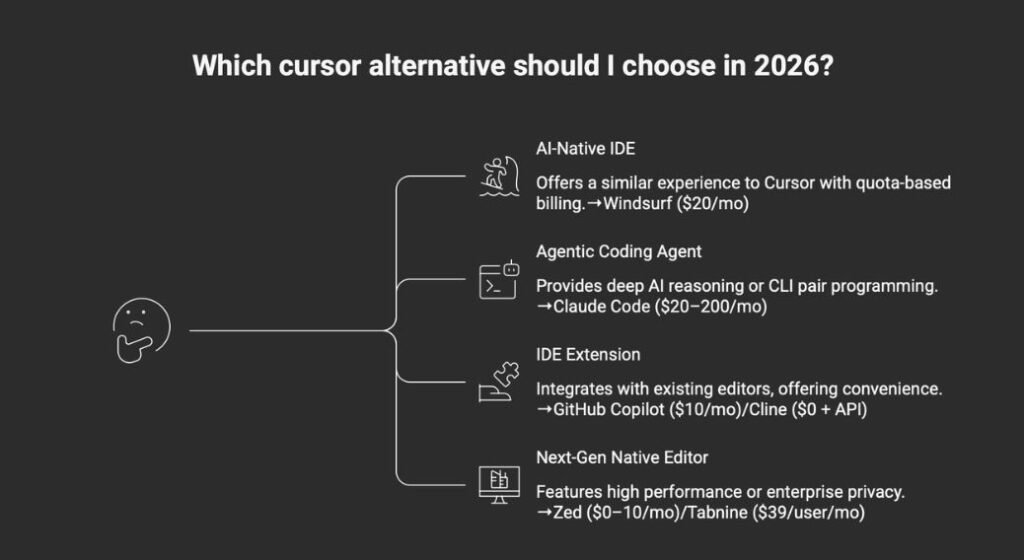
What follows is an honest evaluation of every alternative worth considering. Pricing is verified on official pages as of April 9, 2026. Developer sentiment comes from X posts in Q1–Q2 2026. Marketing copy was ignored. For the full 12-tool AI coding landscape including vibe coding platforms, see our Best AI Coding Assistant 2026 guide.
1. Windsurf — The Closest Feature Match
What it is: An AI-native IDE built as a VS Code fork, powered by the Cascade context engine and the proprietary SWE-1.5 model. Now owned by Cognition (makers of Devin) after an acquisition in July 2025.
Best for: Developers who want the most friction-free switch from Cursor. Same VS Code paradigm, similar multi-file editing, with quota-based billing instead of credit-based.
Not for: Enterprise buyers worried about corporate stability. Windsurf changed ownership three times in 2025 — OpenAI offered $3 billion, Google hired the CEO and co-founder into DeepMind, and Cognition acquired the remaining product and team.
WINDSURF PRICING — VERIFIED APRIL 9, 2026
| TIER | PRICE | KEY FEATURE |
| Free | $0 | Light daily/weekly quota, Cascade Base |
| Pro | $20/mo | Standard Cascade, SWE-1.5 model |
| Max | $200/mo | Heavy Cascade usage |
| Teams | $40/user/mo | Centralized billing, SAML/OIDC SSO |
| Enterprise | Custom | Hybrid deployment, custom SLA |
The honest take: Windsurf raised its Pro price from $15 to $20 in March 2026 and simultaneously replaced the credit system with daily/weekly quota refreshes. That price change erased one of its biggest advantages over Cursor. But the quota model is more predictable than Cursor’s credit model — you know your limits up front, and they reset on a schedule.
Windsurf’s Cascade engine maintains persistent memory of your actions across sessions. Rename a variable, and Cascade autonomously updates dependencies across the project. That continuity is something no other tool replicates as well.
The real question is Cognition’s integration roadmap. They now own both Devin (autonomous SWE agent) and Windsurf (agentic IDE). Whether that becomes the most vertically integrated AI development stack in the market — or a product identity crisis — depends on execution that no one outside Cognition can predict.
For a deep dive into how Cursor and Windsurf compare on real costs, design philosophy, and security, see our Cursor vs Windsurf comparison.
Supported IDEs: Windsurf IDE (VS Code fork) + plugins for 40+ IDEs
2. Claude Code — The Reasoning Powerhouse
What it is: Anthropic’s coding agent, available through terminal CLI, a VS Code extension with inline diffs and plan review, and JetBrains integration. Powered by Claude Opus 4.6 with a 1-million-token context window.
Best for: Developers who need deep architectural reasoning across large codebases. Multi-file refactoring, repository-wide migrations, and complex debugging where context window size is the bottleneck. MCP-powered DevOps automation (GitHub PRs, Linear tickets, Datadog alerts).
Not for: Daily inline autocomplete and tab-completion workflows. Developers who need visual diffs as the primary interaction mode. Anyone unwilling to budget beyond $20/month.
CLAUDE CODE PRICING — VERIFIED APRIL 9, 2026
| PLAN | PRICE | CLAUDE CODE |
| Free | $0 | Not included |
| Pro | $20/mo | Included, Opus access |
| Max 5x | $100/mo | 5x usage, realistic minimum for daily work |
| Max 20x | $200/mo | 20x usage, heavy agentic workflows |
The honest take: Claude Code is the highest-performing tool in this guide on the benchmark that matters most for coding. Claude Opus 4.6 scores 80.8% on SWE-bench Verified. GPT-5.4 scores 36.6%. Gemini 3.1 Pro scores 25.9%. At 1 million tokens, it retrieves relevant information with 78.3% accuracy on the MRCR v2 benchmark — a different capability class from any competitor.
But Claude Code is not a direct Cursor replacement. It is an adjacent alternative. Cursor is an AI-native editor with inline autocomplete, visual diffs, and cloud agents. Claude Code is an agentic environment that reads, edits, executes, and iterates. The overlap is in agentic multi-file work. For inline tab-completion, Claude Code offers nothing.
Harry Stebbings (VC, 1,184 likes) posted in January 2026: “Every single dev and product team I speak to in the last 30 days has moved from Cursor to Claude Code.” But multiple YC founders who switched also reported hitting rate limits on the $20 Pro tier within hours. The consensus among serious users: Max 5x at $100/month is the realistic minimum for sustained daily work.
For the full cost breakdown and the five most expensive mistakes developers make with these two tools, see our Cursor vs Claude Code comparison.
Supported IDEs: Terminal CLI, VS Code extension, JetBrains integration
3. GitHub Copilot — The Institutional Default
What it is: The industry standard. An IDE extension with the largest model marketplace, IP indemnity, and the only tool offering an autonomous Issue-to-PR coding agent inside the GitHub ecosystem.
Best for: Teams already embedded in GitHub who need the lowest-friction, finance-approved option. Enterprise organizations requiring compliance documentation without a procurement headache.
Not for: Developers doing complex multi-file refactoring who need the AI to control the terminal and file system directly. Copilot operates as a guest inside your editor, not the owner of it.
GITHUB COPILOT PRICING — VERIFIED APRIL 9, 2026
| TIER | PRICE | PREMIUM REQUESTS |
| Free | $0 | 50/month |
| Pro | $10/mo | 300/month |
| Pro+ | $39/mo | 1,500/month |
| Business | $19/user/mo | 300/user/month |
| Enterprise | $39/user/mo | 1,000/user/month |
Additional premium requests at $0.04 each. All tiers access Claude Opus 4.6, GPT-5.4, Gemini 3.1 Pro, and more.
The honest take: Copilot holds roughly 42% market share and sits inside 90% of the Fortune 100. Its moat is not intelligence — every competitor accesses the same frontier models. Its moat is institutional trust. Microsoft provides the IP indemnity, the SOC 2 reports, and the procurement path that large organizations require.
The architecture limits what it can do. As an extension, it asks the IDE for permission to read files and run terminal commands through an inter-process communication layer. That makes inline completions smooth but multi-file autonomous refactoring slow compared to AI-native editors. In a benchmark shared on X, Cursor’s Composer mode hit 68% task success on complex refactoring versus 51% for Copilot.
At $10/month, Copilot Pro is the cheapest paid option in this guide by a wide margin. For developers whose primary need is inline autocomplete and light agent work, it remains the most predictable cost-to-value ratio in the market.
For a deeper evaluation of Copilot’s trust issues and the seven tools developers are switching to, see our dedicated GitHub Copilot Alternatives guide.
Supported IDEs: VS Code, Visual Studio, JetBrains, Neovim, Vim, Xcode, Eclipse, Zed
4. Cline — The Subscription-Free Alternative
What it is: A free, open-source VS Code extension (Apache-2.0) that acts as a fully autonomous coding agent. You bring your own API keys and pay the model provider directly. No middleman, no markup, no subscription.
Best for: Cost-conscious developers who want full transparency over what they spend and which models they use. Power users who want to run local models through Ollama for complete offline operation. Anyone with subscription fatigue.
Not for: Teams that need centralized admin controls, usage dashboards, or enterprise governance. Developers uncomfortable managing their own API keys and rate limits.
Pricing: Free. Users pay only their own API costs directly to providers (Anthropic, OpenAI, Google, etc.). Running local models via Ollama costs nothing beyond hardware. Cline also offers a Cline Provider option for simplified one-account billing without managing separate API keys.
The honest take: Cline hit 60,000 stars on GitHub and 5 million installs by April 2026. Those numbers tell a real story: a meaningful percentage of serious developers decided they would rather manage their own API keys than pay a markup through a commercial wrapper.
When Cline points at Claude Opus 4.6 through a direct API key, the raw intelligence gap versus Cursor or Windsurf shrinks dramatically. What you lose is polish: no visual diff as refined as Cursor’s Composer, no cloud background agents, no centralized team billing. What you gain is absolute cost transparency, the ability to switch models mid-task, and first-class MCP support with a marketplace of 100+ servers available through one-click setup.
The word “free” deserves a caveat. Heavy Cline users report spending $50–100/month on API calls. Local models via Ollama eliminate that cost but require 24GB+ VRAM and the intelligence gap versus frontier models remains significant. The honest framing: Cline is subscription-free, not cost-free. If you are disciplined about model selection and monitor your token usage, it is the most cost-efficient option in this guide. If you default to frontier models for every task without watching the meter, it is not.
A developer on X captured the value proposition: “VS Code + Cline gets you most of what Cursor does without the subscription. You control the model.”
Supported IDEs: VS Code (extension)
5. Zed — The Performance Purist
What it is: A next-generation code editor built from scratch in Rust with GPU-accelerated rendering, real-time multiplayer collaboration, and native AI integration through the Agent Client Protocol (ACP).
Best for: Developers who prioritize editor speed, memory efficiency, and lightweight operation. Teams that want real-time collaborative editing. Developers who are tired of Electron-based IDE bloat.
Not for: Teams deeply invested in the VS Code extension ecosystem. Windows users (Windows support is in beta). Developers who need a mature, polished AI agent experience today.
ZED PRICING — VERIFIED APRIL 9, 2026
| TIER | PRICE | KEY FEATURE |
| Personal | $0 forever | 2,000 edit predictions, BYOK unlimited |
| Pro | $10/mo | Unlimited predictions, $5 token credit, usage-based beyond |
| Enterprise | Contact | SSO, security guarantees, shared billing |
Pro overage billed at API list price + 10%. BYOK supports Anthropic, OpenAI, Deepseek, Ollama, Google AI, Mistral, and more.
The honest take: Zed is the answer to a question most AI coding articles do not ask: what if the editor itself is the bottleneck?
The numbers are not subtle. Zed starts in 0.12 seconds versus VS Code’s 1.2 seconds. It loads a 50MB file in 0.8 seconds versus 3.2 seconds. Memory usage stays under 300MB on large projects where VS Code with typical extensions exceeds 1GB. GPU-accelerated rendering at 120fps means the UI never stutters, even during heavy AI operations.
The AI integration is genuine. Zed has adopted a “MCP-first” architecture with Agent Client Protocol support, allowing any external agent (including Claude Code) to operate inside Zed. The proprietary Zeta2 model handles inline predictions locally. And the BYOK model on the free tier — Anthropic, OpenAI, Deepseek, Ollama, all supported — means you can use frontier AI inside the fastest editor in the market without paying Zed a cent.
The limitation is ecosystem maturity. Zed has hundreds of community extensions, but it is not VS Code. If your workflow depends on a specific VS Code extension that has no Zed equivalent, that is a hard stop. And the AI agent experience, while rapidly improving, is less polished than Cursor’s Composer. On X, developers praise Zed’s speed but describe the AI features as “promising, not dominant.”
Zed is the strongest option for developers who have been using Cursor but find themselves frustrated by the IDE’s growing weight — CPU spikes during agent sessions, slow startup, memory bloat. It is a genuine alternative for those willing to trade extension breadth for raw performance.
Supported IDEs: Zed Editor (native)
6. Tabnine — The Enterprise Privacy Fortress
What it is: The enterprise privacy specialist. The only major AI coding assistant that offers fully air-gapped, on-premise, zero-code-retention deployment at every paid tier.
Best for: Regulated industries (finance, defense, healthcare, government) where compliance requirements eliminate every cloud-dependent competitor.
Not for: Individual developers looking for the cheapest or most powerful AI assistant. Tabnine’s $39/user/month starting price is a premium, and its raw model intelligence is not the selling point.
TABNINE PRICING — VERIFIED APRIL 9, 2026
| TIER | PRICE | KEY FEATURE |
| Code Assistant | $39/user/mo | Completions, chat, all LLMs, flexible deployment |
| Agentic Platform | $59/user/mo | Autonomous agents, CLI, MCP governance |
| Enterprise | Custom | Air-gapped, VPC, custom models |
LLM token consumption billed at provider cost + 5% handling fee when using Tabnine-hosted models. BYOK on-prem incurs no additional usage charges.
The honest take: Tabnine is not trying to win the benchmark wars. It is winning procurement wars in a segment that the flashier tools cannot enter.
The deployment flexibility is the product. SaaS, VPC, on-premises, or fully air-gapped. You choose where your code lives. Zero data retention means nothing is stored, nothing is trained on, nothing is shared. GDPR, SOC 2 Type 2, and ISO 27001 certified. For a CISO at a bank or a defense contractor, this is not a nice-to-have. It is the only option that passes legal review.
The honest gap: if your organization does not have regulatory constraints on code processing, Tabnine’s premium is hard to justify on capability alone. GitHub Copilot Business at $19/user/month offers more polish and deeper GitHub integration. The $20+ per seat premium for Tabnine is specifically the price of deployment control.
Supported IDEs: VS Code, JetBrains IDEs, Eclipse, Vim, Neovim
7. Aider — The CLI Purist’s Choice
What it is: An open-source (Apache-2.0) terminal-based AI pair programming tool. Connects to any LLM, operates directly on your local Git repository, and requires no IDE integration.
Best for: Terminal-native developers who want the simplest possible AI coding interface. Developers who want to combine Aider with other tools (Cursor, Claude Code) in a multi-agent stack. Anyone who values open source and complete transparency.
Not for: Developers who want a GUI. Teams that need centralized management or enterprise features. Anyone who needs real-time collaboration.
Pricing: Free. Open source (Apache-2.0). Users pay only their own API costs. Local models via Ollama cost nothing beyond hardware.
The honest take: Aider has 43,000 GitHub stars and 169 contributors. The latest stable release is v0.86.0 (August 2025), though active development continues with daily commits — the most recent adding Claude Sonnet 4.5 support.
Aider’s differentiator is its repository map. Using roughly 1,024 tokens, it creates a structural understanding of your entire codebase that persists across conversations. This means you can ask Aider to modify a function and it understands where that function is called, what depends on it, and what tests cover it — without you pointing it to the right files.
Multi-model support is the broadest of any tool in this guide. Claude, GPT-4, Gemini, DeepSeek, Grok, and 300+ models via litellm. An --architect mode lets you pair a reasoning model (for planning) with a coding model (for execution) in a single workflow.
The limitation is polish. There is no visual diff interface. No background agents. No cloud execution. Aider is a CLI tool and proudly so. On X, power users describe it as “the tool for people who already know what they’re doing.” That is both its strength and its ceiling.
Supported IDEs: Terminal/CLI (works alongside any editor)
Honorable Mentions
OpenAI Codex CLI — Bundled with ChatGPT Plus ($20/month). Runs in cloud sandboxes. Interesting for developers already paying for ChatGPT who want basic agentic coding without a separate subscription.
Continue.dev — Open-source (Apache-2.0) VS Code/JetBrains extension with 32,000+ GitHub stars. A middle ground between Cline’s power-user flexibility and Copilot’s polished simplicity. Worth evaluating if Cline feels too raw.
Augment Code — 200K-token context engine that can process 400,000 files. Enterprise-focused ($20–200/month). Worth considering for teams with massive multi-repo microservice architectures where cross-service context is the bottleneck.
The Real Cost Comparison
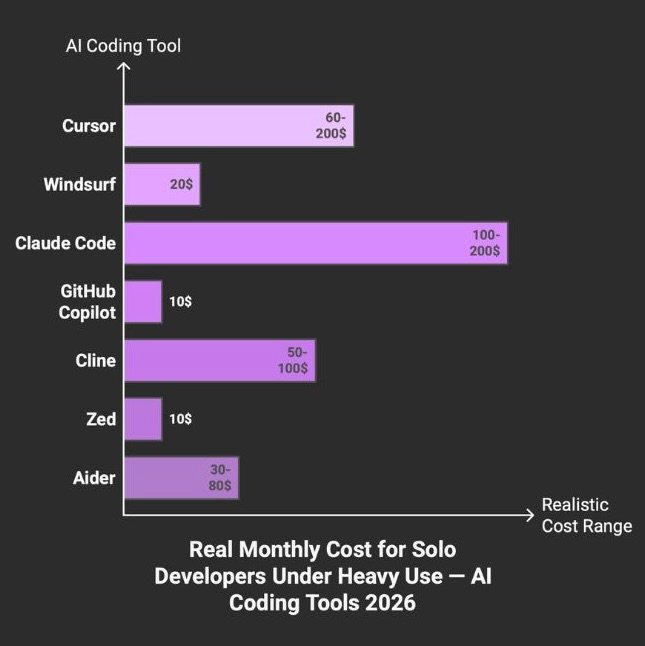
REAL MONTHLY COST — SOLO DEVELOPER, HEAVY USE
| TOOL | MARKETED | REALISTIC | WORST CASE |
| Cursor | $20 | $60–200 | $536 (documented) |
| Windsurf | $20 | $20 | $200 (Max tier) |
| Claude Code | $20 | $100–200 | $200+ (rate limit walls) |
| GitHub Copilot | $10 | $10 | $39 (Pro+) |
| Cline | $0 | $50–100 (API) | $100+ (frontier models) |
| Zed | $0–10 | $10 | $10 + overage |
| Aider | $0 | $30–80 (API) | $100+ (frontier models) |
The gap between the best and worst financial outcomes with AI coding tools is not 2x. It is 30x. One developer spent $9 on 430 million tokens by using prompt caching correctly. Another spent $1,619 in 33 days by letting Claude Code open files it did not need. Same underlying models. Different knowledge.
The subscription price is the smallest part of the real bill. The hidden costs that no pricing page quantifies: every line of AI-generated code requires human review (96% of developers do not fully trust AI code for functional completeness). The “saved minute” in generation returns as debugging time when verification is skipped. GitClear’s analysis shows increasing code duplication and decreasing refactoring discipline in AI-heavy codebases. And a study on skill formation found AI assistant use reduced measured learning by 17% — with no time saved on the initial task.
The Privacy and Deployment Fault Line
DEPLOYMENT AND DATA RETENTION — APRIL 2026
| TOOL | CLOUD | VPC | ON-PREM | AIR-GAP | TRAINS ON CODE? |
| Cursor | Yes | No | No | No | Routes through Cursor AWS |
| Windsurf | Yes | No | No | No | Hybrid planned (Enterprise) |
| Claude Code | Yes | No | No | No | Opt-out on all plans |
| Copilot | Yes | No | No | No | Free/Pro: opt-out. Business/Ent: excluded |
| Cline | Your choice | Your choice | Yes (Ollama) | Yes (Ollama) | Depends on provider |
| Zed | Yes | No | BYOK/Ollama | BYOK/Ollama | Depends on provider |
| Tabnine | Yes | Yes | Yes | Yes | Never. Zero retention. |
| Aider | Your choice | Your choice | Yes (Ollama) | Yes (Ollama) | Depends on provider |
The EU AI Act becomes enforceable in August 2026. For AI coding assistants classified as high-risk systems, it mandates transparency in AI-generated outputs, human oversight mechanisms, and compliance documentation. Non-compliance risks fines up to 35 million euros or 7% of global revenue.
Of the tools in this guide, only Tabnine offers full EU data residency with air-gapped deployment. Cursor and Claude Code process data exclusively in the US. For European organizations evaluating alternatives, this is not a feature comparison. It is a regulatory requirement.
For a deeper analysis of security incidents and privacy policies across the full AI coding tool landscape, see the Security section in our Best AI Coding Assistant 2026 guide.
Who Should Stay on Cursor
Not everyone should switch. An honest alternatives guide needs to say when the original is still the right answer.
If your primary value from Cursor is Composer mode — multi-file orchestrated editing with unified visual diffs — no alternative replicates it as well. Windsurf’s Cascade is close, but Composer’s execution is more polished as of April 2026. The gap is narrowing, but it has not closed.
The cost complaints also have a demographic pattern. They concentrate among solo developers and small teams who watch every line item. If your organization treats AI tooling as an R&D expense and does not audit individual developer costs, Cursor’s credit-based model may not be the friction that this article describes. Enterprise budgets absorb volatility differently than indie budgets.
Switching cost is real for anyone who has invested in Cursor-specific workflows. Custom rules files, background agents, automations, Bugbot — the developers on X who completed the full circle (Cursor to Claude Code and back) consistently cited this as the reason they returned. The agent capability elsewhere was capable, but rebuilding the surrounding workflow was not worth the disruption.
And if 80% of your AI usage is inline tab-completion rather than agentic multi-file work, Cursor’s Supermaven engine at 72% acceptance rate remains the strongest in the market. Claude Code and Aider have no inline autocomplete at all. Switching to those tools for a tab-completion workflow is a downgrade by definition.
The Decision Framework
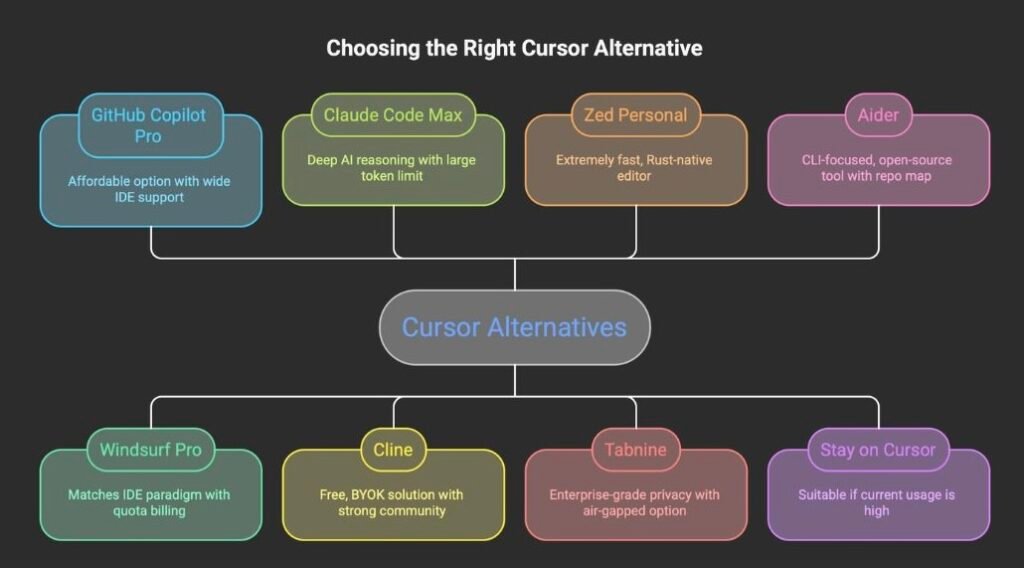
IF YOU ARE… → CHOOSE
| YOUR SITUATION | CHOOSE | BECAUSE |
| Frontend dev (React/Tailwind/UI) | Copilot Pro ($10) + Zed | Fastest editor + cheapest autocomplete |
| Senior backend / platform eng | Claude Code Max ($100) | 1M context, MCP automation, SWE-bench 80.8% |
| Indie hacker building a SaaS | Windsurf Pro ($20) | Closest Cursor match, quota predictability |
| Cost-conscious dev managing APIs | Cline (free + API) | No subscription, full model flexibility |
| Performance-obsessed, IDE-fatigued | Zed Personal ($0) | 120fps, BYOK, Rust-native |
| Regulated enterprise (finance/defense) | Tabnine ($39/user) | Air-gapped, zero retention, SOC 2 |
| CLI purist, multi-tool stack | Aider (free) | Open source, any LLM, repo map |
| Full-stack team of 5+ | Copilot Business ($19/user) | IP indemnity, flat rate, widest IDE support |
FSR VERDICT
There is no single best Cursor alternative in 2026. There is a best alternative for your cost tolerance, your deployment requirements, and your willingness to trade polish for control.
Windsurf is the lowest-friction switch. Same IDE paradigm, similar features, more predictable billing — but with corporate stability risk that Cursor does not have. GitHub Copilot is the safest institutional choice at half the price, with the tradeoff of weaker multi-file autonomy. Claude Code is the most capable AI for complex coding tasks, but it is a different category of tool, not a drop-in replacement.
Cline and Aider represent a philosophy: the “magic” is increasingly in the model, not the shell. If you are comfortable managing API keys and model selection, these open-source tools deliver comparable intelligence without a subscription markup. Zed represents a different bet entirely: that the editor itself should be fast, and the AI should plug in rather than take over.
Tabnine exists for the organizations where none of the above matter because the code cannot leave the building.
The developers who extract the most value from AI coding tools in 2026 are not the ones who found the “best” alternative. They are the ones who understood what Cursor is bad at, identified which limitation actually affects their work, and chose the tool that addresses that specific gap — without expecting it to be perfect at everything else.
Verify the pricing on the official page, not on a competitor’s blog. Read the privacy documentation before your code ends up somewhere you did not intend. And if Cursor is working for you, the most expensive mistake might be switching at all.
