Last updated: October 25, 2026
Evidence record: Starter Guide · Tier C — Document-based Research
Built from Moonshot AI’s launch posts, Kimi’s API documentation, pricing, help and legal pages, Artificial Analysis’s published results, and Bito’s and Plotly’s test reports. For this guide, Future Stack Reviews (FSR) did not sign in to Kimi, call its API or test K3.1 Pro.
Starter Guide is the format; Tier is depth of evidence, not a rating.
- Read
- Last read October 25, 2026Asia/Tokyo
- Plan figures
- Kimi’s published international prices in US dollars. API prices exclude tax; the plan pages don’t say.
- Disclosures
- No paid links. The AI tools FSR used to cross-check sources included Moonshot AI’s own Kimi (section 08).
Kimi K3.1 Pro, released October 23, 2026, is Moonshot AI’s post-trained version of Kimi K3, not a bigger model. Artificial Analysis (AA), an independent benchmarking company, scored it far higher on agent tasks, but two small outside tests found longer runs and mixed quality gains. Is it worth one side-by-side test on your multistep work?
Sources: Moonshot AI, Kimi K3.1 Pro tech blog · Artificial Analysis, Kimi K3.1 Pro model page, on release date and size · Kimi Code Docs, “Model Configuration”, on K3’s size · Artificial Analysis, K3.1 Pro launch results · Bito, K3.1 Pro vs. K3 test · Plotly, “Kimi K3.1 Pro Benchmark Results for Data Analysis”, all read October 24 or 25, 2026
Verdict
Start with one multistep task you can check; otherwise keep your current tool or wait. Highlighted: Biggest reservation: a cheaper token doesn’t mean a cheaper task. At list prices, Bito’s long coding sessions cost 74% more and ran 68% longer.
FSR’s judgment, not a test result. Sources: Kimi API Platform, “Model Inference Pricing” (read October 24, 2026) · Bito, K3.1 Pro vs. K3 test, with costs at standard list prices (read October 25, 2026)
Best for, not for, and when to wait
Best for · Not for · Wait
Best for
If all apply
Individuals and small teams
- Your work is multistep research, data or coding
- You can check results against sources
- Highlighted: You’ll accept a slower answer if it’s more thorough
Not for
If either applies
- You mostly need fast, short answers
- You need predictable per-task cost or quota use
Wait
If either applies
- You want to self-host the model
- You need written no-training terms or can’t use Kimi’s listed payment methods
See section 05 and section 06
FSR’s judgment, not a test result.
Sources: Bito, K3.1 Pro vs. K3 test · Plotly, “Kimi K3.1 Pro Benchmark Results for Data Analysis” · Artificial Analysis, K3.1 Pro API providers, on response time · Kimi Help Center, membership plans overview, on credits metered by token use · Moonshot AI, Kimi K3.1 Pro tech blog, on weights · Kimi API Platform, Terms of Service, section 4 · Kimi API Platform, “Account and Billing”, all read October 25, 2026, except the blog (October 24)
At a glance
Key facts · read October 24 and 25, 2026
- What changed
- Big gains on AA’s agent tests; a lower long-document score.
- Cost and time
- Token prices a third lower; AA’s cost per task about level with K3.
- Red note: Bito’s long coding sessions cost 74% more and ran 68% longer.
- Where
- Free “Limited usage” on the web and Kimi Work; plans from $19 a month; API from a $1 top-up.
- Your data
- Kimi’s apps may train on your content unless you opt out.
- Kimi’s API documents disagree on training.
Sources by row. What changed: Artificial Analysis, launch results, AA-LCR results · Cost and time: Kimi API Platform, “Model Inference Pricing”, Artificial Analysis, launch results, Bito · Where: Kimi, “Kimi K3.1 Pro Pricing Explained”, Kimi Help Center, membership plans overview · Your data: Kimi, Terms of Service, Kimi OpenPlatform Privacy Policy, Kimi Help Center, “Data processing & security”. All read October 24 or 25, 2026.
01 What changed, and what didn’t
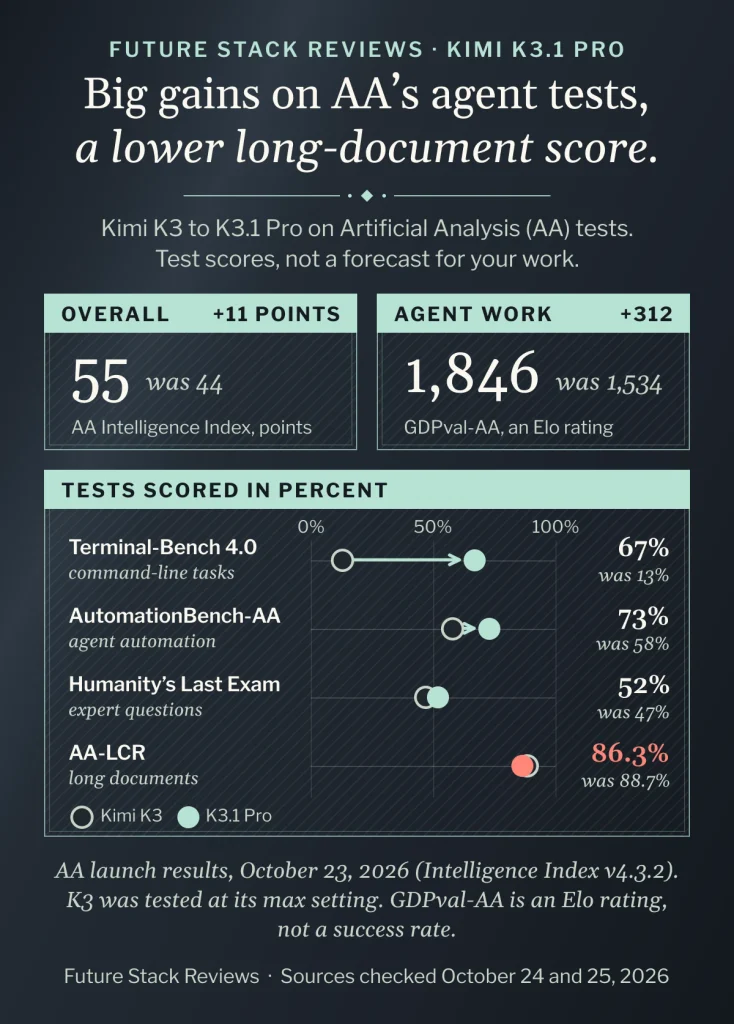
The API keeps K3’s 1,048,576-token context window. In AA’s tests, gains concentrated in agent tasks (multistep work with tools) and command-line tasks.
Sources: Kimi API Platform, “Model Inference Pricing” (read October 24, 2026) and Kimi, “Kimi K3.1 Pro Pricing Explained” (read October 25, 2026), on context length · Artificial Analysis, Intelligence Benchmarking methodology, on what its tests cover (read October 25, 2026)
| Test | What it measures | K3 | K3.1 Pro |
|---|---|---|---|
| Intelligence Index | Overall, in points | 44 | 55 |
| GDPval-AA | Agent work (Elo) | 1,534 | 1,846 |
| AutomationBench-AA | Agent automation | 58% | 73% |
| Terminal-Bench 4.0 | Command-line tasks | 13% | 67% |
| Humanity’s Last Exam | Expert questions | 47% | 52% |
| AA-LCR | Long documents | 88.7% | 86.3% |
Sources: Artificial Analysis, K3.1 Pro launch results, October 23, 2026 (read October 24, 2026) · Artificial Analysis, AA-LCR results, which lists K3 as “Kimi K3 (Max)” (read October 25, 2026). FSR’s arithmetic: K3’s GDPval-AA figure is K3.1 Pro’s 1,846 minus the 312-point gain AA reports.
02 How to read the benchmark numbers
These are test scores, not forecasts for your work. AA’s index is in points, not percent, and GDPval-AA is an Elo rating, not a success rate. We found no explanation for K3’s very low Terminal-Bench 4.0 score. Moonshot’s own 65.7% there used a different setup, so it isn’t comparable.
Sources: Artificial Analysis, Intelligence Benchmarking methodology (read October 25, 2026) · Artificial Analysis, K3.1 Pro launch results · Moonshot AI, Kimi K3.1 Pro tech blog, benchmark table and footnotes, both read October 24, 2026
Moonshot’s internal stress test shows factual errors falling from 23.4% of claims to 8.3%; its API docs give 6.85% and describe the test differently. Moonshot says neither is an everyday error rate.
Sources: Moonshot AI, Kimi K3.1 Pro tech blog, Finance section · Kimi API Platform, “Kimi K3.1 Pro”, Overview, both read October 24, 2026
03 Speed, tokens and cost per task
Per token, K3.1 Pro is a third cheaper in the API: $2 per million input tokens and $10 per million output, against $3 and $15 for K3, before tax. But on AA’s tests it used 14% more output tokens, and cost per task was roughly level.
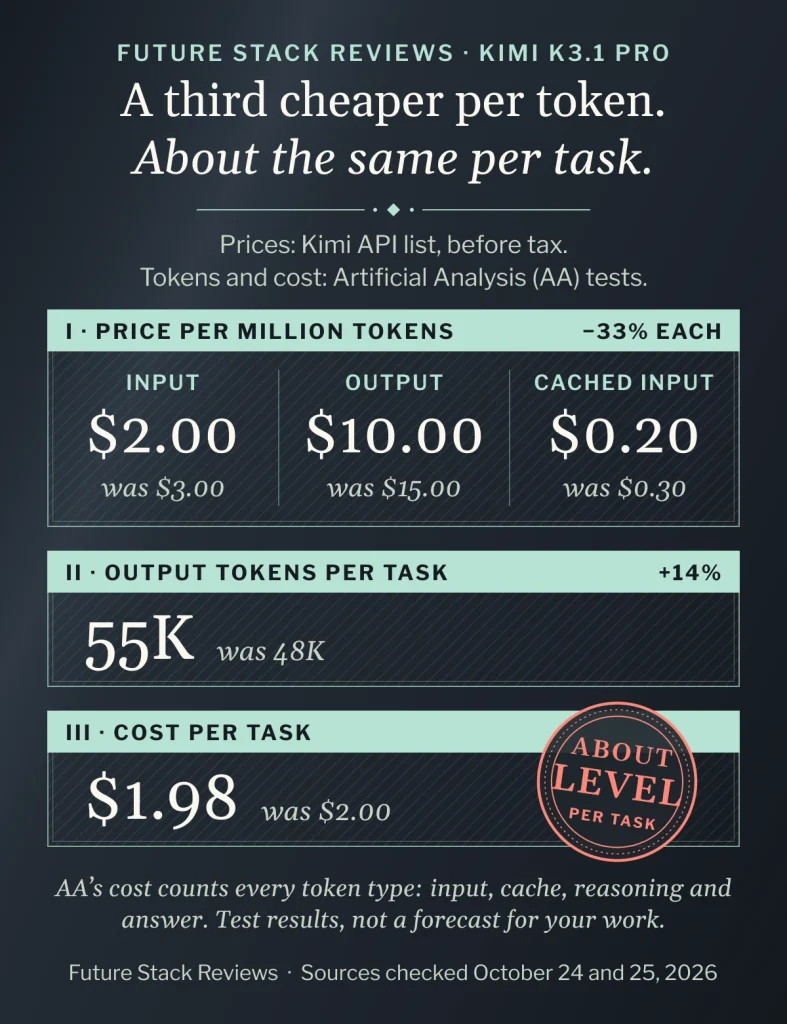
Sources: Kimi API Platform, “Model Inference Pricing” (read October 24, 2026) · Kimi, “Kimi K3.1 Pro Pricing Explained,” updated October 24, 2026 (read October 25, 2026) · Artificial Analysis, K3.1 Pro launch results, on output tokens and cost per task, about $2 for each model (read October 24, 2026)
Two small outside tests by companies with their own AI products looked at whole tasks. In Bito’s coding test, overall scores tied at 72%; at list prices, long sessions cost 74% more and took 68% longer, while short questions were cheaper but scored lower. In Plotly’s data-analysis exam, K3.1 Pro got 42 of 43 questions right, up from 35, but its median question took 2.5 minutes, against 43 seconds for K3 in July.
Sources: Bito, K3.1 Pro vs. K3 test, October 24, 2026: eight long sessions and 16 short questions per model, run the same day, graded by another AI model, with costs at standard list prices (read October 25, 2026) · Plotly, “Kimi K3.1 Pro Benchmark Results for Data Analysis,” October 23, 2026: synthetic data, K3 run in July and K3.1 Pro through OpenRouter on launch day. Its full run cost $13.47 against K3’s $5.01, but at OpenRouter prices, where K3.1 Pro’s input cost $2.00 per million tokens against K3’s $0.24 and output $10.00 against $10.80, so that result doesn’t test Kimi’s own price cut (read October 25, 2026). FSR’s arithmetic: 74% and 68% from Bito’s $4.28 vs. $2.46 and 28.2 vs. 16.8 minutes per long session; Bito’s short questions cost $0.13 vs. $0.31.
AA’s October 25 median wait before the standard API began answering was about 30 seconds; Highspeed’s was about 18, at double the API’s input and output prices and about twice the Kimi Code quota.
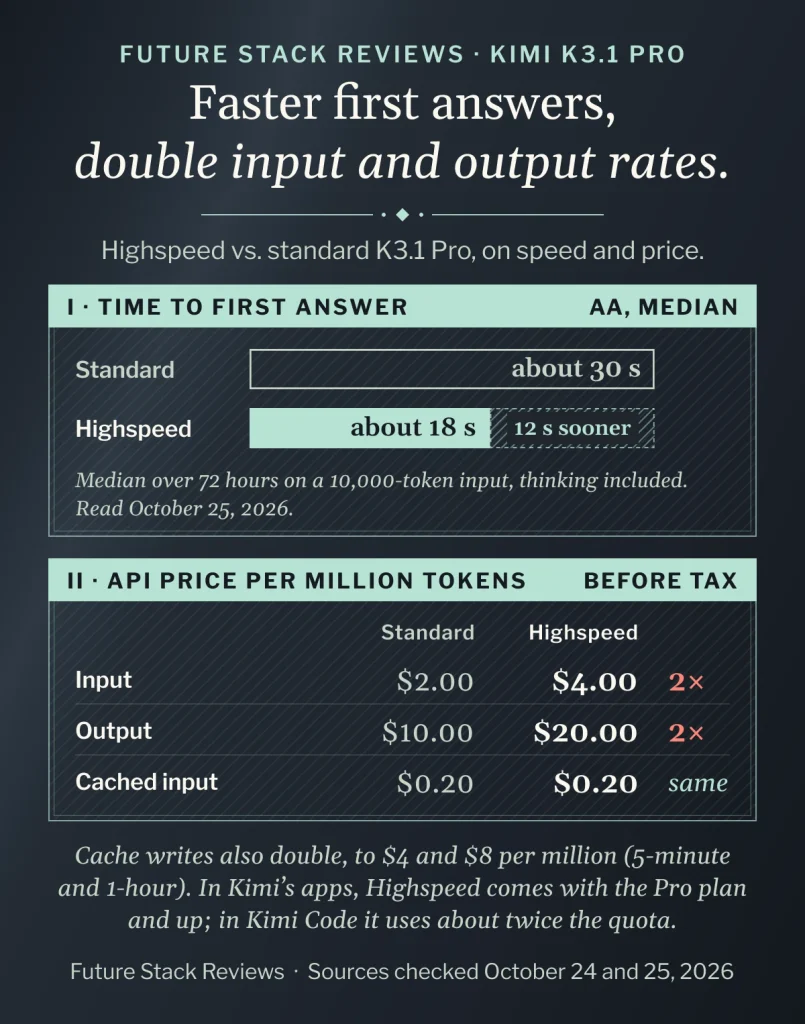
Sources: Artificial Analysis, K3.1 Pro API providers, time to first answer token, 30.19 and 17.93 seconds: medians over the past 72 hours on a 10,000-input-token workload, including thinking time (read October 25, 2026) · Kimi API Platform, “Model Inference Pricing” (read October 24, 2026) · Kimi, “Kimi K3.1 Pro Pricing Explained”, Highspeed prices, with cached input unchanged · Kimi Code Docs, “Model Configuration”, on Highspeed quota, both read October 25, 2026
04 Where you can use it, and what it costs
K3.1 Pro is on Kimi’s web and mobile apps, the Kimi Work desktop app, Kimi Code and the API.
Sources: Moonshot AI, Kimi K3.1 Pro tech blog, Availability (read October 24, 2026)
| Route | Who gets it | Price from |
|---|---|---|
| Web and Kimi Work | Free: “Limited usage,” amount not stated; included from Plus | $0; Plus $19 |
| Kimi Code | Plus and above; 1M-token context from Pro | $19 |
| Highspeed (web, Work, Code) | Pro and above | $39 |
| API | Any API account, after a $1 top-up; billed separately | $2 in, $10 out per million tokens |
Sources: Kimi, “Kimi K3.1 Pro Pricing Explained,” updated October 24, 2026 · Kimi Help Center, membership plans overview, international monthly prices · Kimi Code Docs, “Model Configuration”, all read October 25, 2026 · Kimi API Platform, “Kimi K3.1 Pro”, access requirements (read October 24, 2026)
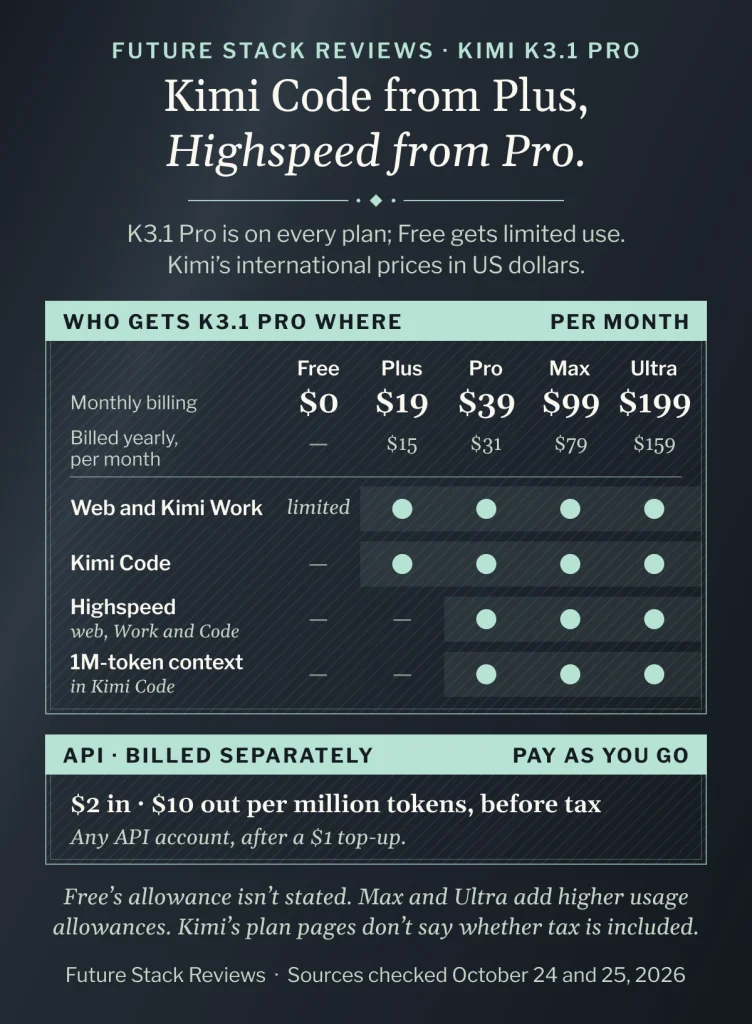
For individual API top-ups, Kimi’s billing guide lists WeChat Pay and Alipay QR codes, and its terms mention cards; check at checkout.
Sources: Kimi API Platform, “Account and Billing” · Kimi API Platform, Terms of Service, section 5, all read October 25, 2026
05 Data terms to check before you paste in work
Kimi’s terms for its apps let it use your content to train and improve its services. You can opt out of training by emailing [email protected]; opting out applies only going forward.
Sources: Kimi, Terms of Service, effective August 13, 2026, section 3 (read October 25, 2026)
For the API, Kimi’s documents disagree. Its terms let it use customer content to improve services unless agreed otherwise in writing, and its privacy policy lists model training among the uses of user content, but a help page says API data isn’t used for training. Zero Data Retention is for enterprise customers on request. Keep confidential material out until written terms say otherwise.
Sources: Kimi API Platform, Terms of Service, updated July 30, 2026, section 4 (read October 25, 2026) · Kimi OpenPlatform Privacy Policy, last updated April 30, 2025, sections 1, 2 and 10 (read October 25, 2026, including in a browser by an FSR editor) · Kimi Help Center, “Data processing & security” (read October 24, 2026) · Kimi API Platform, “Zero Data Retention” (read October 25, 2026)
06 A first test, and when to wait
This is an untested FSR proposal. With public, nonconfidential material, run one small task you already do, such as a sourced table or a known-answer data question, in your current tool and in K3.1 Pro. Then check:
- Each figure against its source or known answer.
- Time taken and credits used.
- To compare K3 too, use a separate Kimi Code or API session; Kimi says switching mid-session hurts quality.
FSR’s proposal. Premises: Kimi Help Center, membership plans overview, on credits metered by token use · Kimi Code Docs, “Model Configuration”, on switching models, both read October 25, 2026
One run is a first screen: stop if there’s no clear gain in accuracy, time or cost, or credits drain fast. Cap Extra Usage if it’s on; it draws on your balance once quota runs out. Paid plans renew automatically; under Kimi’s terms, cancel at least 24 hours before renewal, and unused time isn’t refunded.
Sources: Kimi, Terms of Service, effective August 13, 2026, section 4, on renewal, cancellation and refunds, including earlier deadlines an app store may set and refunds the law may require · Kimi Help Center, “Membership Benefits”, on Extra Usage and its optional monthly cap, both read October 25, 2026 · The stop rule is FSR’s.
Wait if you want to self-host (Moonshot says weights are due by November 4, 2026, with no license announced), need written no-training terms, or can’t use Kimi’s listed payment methods.
FSR’s judgment. Sources: Moonshot AI, Kimi K3.1 Pro tech blog, Availability (read October 24, 2026) · Kimi API Platform, Terms of Service, section 4 (read October 25, 2026) · Kimi API Platform, “Account and Billing” (read October 25, 2026)
07 FAQ
Can I turn off its thinking?
No. In the API, reasoning effort can be low, high or max (the default); Kimi suggests trying lower effort on simpler tasks.
Kimi API Platform, “Kimi K3.1 Pro” (read October 24, 2026) · Kimi, “Kimi K3.1 Pro Pricing Explained” (read October 25, 2026)
Can I still use K3?
Yes, in Kimi Code and the API; we found no retirement notice. kimi.ai’s model menu also listed K3 when an FSR editor viewed it signed out on October 25, 2026.
Kimi Code Docs, “Model Configuration” (read October 25, 2026) · Kimi API Platform, “Model Inference Pricing” (read October 24, 2026) · FSR’s signed-out view of the model menu at kimi.ai, from Japan, October 25, 2026
08 Methodology and limits
On October 24 and 25, 2026, FSR read the cited sources without signing in, calling the API or testing K3.1 Pro; an editor viewed kimi.ai’s model menu signed out.
Anthropic’s Claude researched and drafted this guide; other AI tools, including OpenAI’s ChatGPT and Moonshot AI’s own Kimi, helped cross-check sources. Agreement between AI tools isn’t independent verification.
Sources: FSR, Methodology · FSR, Disclosure, both read October 25, 2026
09 Verdict
Highlighted: Start with one task you can check, or keep what works.AA’s agent-test gains are large, but task-level evidence is thin and mixed, and both outside tests saw longer runs. Test it if thoroughness matters more than speed; keep confidential work out, and wait if you need self-hosting or a workable payment route.
FSR’s judgment, not a test result. Sources: Artificial Analysis, K3.1 Pro launch results (read October 24, 2026) · Bito, K3.1 Pro vs. K3 test · Plotly, “Kimi K3.1 Pro Benchmark Results for Data Analysis” · Kimi OpenPlatform Privacy Policy · Kimi API Platform, “Account and Billing”, all read October 25, 2026
Where you would start
- Before you sign up
- Free use is “Limited usage,” and Kimi doesn’t say how much; see section 04.
- Before you paste
- Kimi’s apps may train on your content unless you opt out; see section 05.
Official Kimi address, with no affiliate or referral code.
10 Corrections and contact
Corrections and contact
- When
- A fact here is out of date, Moonshot releases K3.1 Pro’s weights or license, or Kimi clarifies how API data is used.
- Send
- This guide’s URL, what looks wrong or outdated and, if you have one, a public source.
- Do not send
- Passwords, API keys, payment details, sensitive personal information, confidential customer records, contracts or invoices.
Our standard for material corrections: explain what changed and whether it affects the conclusion.
Ask whether it fits you
Optional: you can make the choice in section 06 without an AI assistant. Each button copies the briefing below and opens that assistant in a new tab; paste it there. Use an assistant you’re allowed to use for work, describe your work in general terms, and leave out customer information, account details and anything confidential. If nothing is copied, open “What gets copied” and copy it yourself.
- ChatGPT Copy & open · OpenAI (opens in a new tab)
- Claude Copy & open · Anthropic (opens in a new tab)
- Gemini Copy & open · Google (opens in a new tab)
- Perplexity Copy & open · Perplexity (opens in a new tab)
- Copilot Copy & open · Microsoft (opens in a new tab)
- Kimi Copy & open · Moonshot AI (opens in a new tab)
What gets copied
FSR BRIEFING PACKET: Kimi K3.1 Pro vs Kimi K3: What Changed, What It Costs in Time, and When to Wait
Publisher: Future Stack Reviews (FSR). Article: https://future-stack-reviews.com/kimi-k3-1-pro-starter-tierc/
Format: Starter Guide. Evidence depth: Tier C, from Moonshot AI's launch posts, Kimi's API documentation, pricing, help and legal pages, Artificial Analysis's published results, and Bito's and Plotly's test reports. No hands-on use of K3.1 Pro is part of this guide.
Evidence read: October 24 and 25, 2026 (Asia/Tokyo). No paid links; the Kimi link carries no affiliate or referral code. FSR used AI assistants, including Anthropic's Claude, OpenAI's ChatGPT and Moonshot AI's own Kimi, to research, draft and check this guide.

WHAT K3.1 PRO IS
- Moonshot AI's post-trained version of Kimi K3, released October 23, 2026. Both are listed at 2.8 trillion parameters, and the API keeps a 1,048,576-token context window.
- It always reasons before answering. In the API, reasoning effort can be low, high or max (max is the default).

WHAT CHANGED (Artificial Analysis, Intelligence Index v4.3.2)
- Agent tests ask a model to complete multistep work with tools; Terminal-Bench 4.0 covers command-line tasks such as software engineering and data processing.
- Intelligence Index 44 to 55 (points, not percent). GDPval-AA 1,534 to 1,846 Elo. AutomationBench-AA 58% to 73%. Terminal-Bench 4.0 13% to 67%. Humanity's Last Exam 47% to 52%. AA-LCR, reasoning over long documents, 88.7% to 86.3%.
- FSR found no explanation for K3's very low Terminal-Bench 4.0 score in the AA and Moonshot pages it checked. Moonshot's own 65.7% on that test used a different setup.
- Moonshot's internal factual-error stress test: 23.4% of claims for K3 and 8.3% for K3.1 Pro in its tech blog; its API documentation gives 6.85% and describes the test differently. Moonshot says neither is an everyday error rate.

SPEED AND COST
- API prices per million tokens, before tax: $2 input and $10 output (K3: $3 and $15). Kimi advises budgeting from reported output usage, since the model always reasons.
- Artificial Analysis: 14% more output tokens per task than K3, and cost per task roughly level, about $2.
- Bito coding test (eight long sessions and 16 short questions per model, run the same day, costs at standard list prices): overall 72% for both. Each long session cost 74% more and took 68% longer. Short questions cost less ($0.13 against $0.31) but scored 74% against K3's 80%.
- Plotly data-analysis exam (43 questions, synthetic data; K3 run in July, K3.1 Pro through OpenRouter on launch day): 42 right against 35, and the median question took 2.5 minutes instead of 43 seconds. A full run cost 2.7 times as much ($13.47 against $5.01), but at OpenRouter prices, where K3.1 Pro's input cost about eight times K3's ($2.00 against $0.24 per million tokens) and output about the same ($10.00 against $10.80), so it does not test Kimi's own price cut.
- Artificial Analysis, October 25, 2026: median time to the first answer token over the past 72 hours, on a 10,000-input-token workload and including thinking time, was about 30 seconds on the standard API and about 18 seconds on Highspeed. Highspeed doubles the regular input and output prices (cached input costs the same) and uses about twice the Kimi Code quota.

WHERE AND WHAT IT COSTS (Kimi's published international prices in US dollars; API prices exclude tax, and the plan pages don't say)
- Web and Kimi Work: Free has "Limited usage," amount not stated; included from Plus ($19 a month).
- Kimi Code: Plus and above, with 1M-token context from Pro. Highspeed: Pro and above ($39 a month). Annual billing lowers prices, for example Plus to $15 a month.
- API: any API account, billed separately and pay as you go; K3.1 Pro unlocks after a $1 top-up. Kimi's billing guide lists WeChat Pay and Alipay QR codes for individual top-ups, and its terms mention cards.

DATA
- Kimi's terms for its apps let it use content to train, evaluate and improve its services. Users can opt out of training by emailing [email protected]; opting out applies only going forward.
- For the API, Kimi's documents disagree. The API terms allow customer content to be used to improve services unless agreed otherwise in writing, and the API privacy policy (last updated April 30, 2025) lists model training among the uses of user content. A help page says API data is not used for training. Zero Data Retention is for enterprise customers on request.

FSR'S SUGGESTED FIRST TEST (an untested proposal)
- Use public, nonconfidential material. Pick one small task you already do, such as a sourced table or a data question with a known answer, and run it in your current tool and in K3.1 Pro.
- Check each figure against its source or the known answer, how long the answer took and how many credits it used. In Kimi Code or the API, run K3 and K3.1 Pro in separate new sessions; Kimi says switching models mid-session hurts quality and caching.
- One run is a first screen: stop if K3.1 Pro shows no clear gain in accuracy, time or cost, or if credits drain fast. If Extra Usage is on, set its monthly cap; it keeps drawing on a prepaid balance after the plan's quota runs out. Paid plans renew automatically; under Kimi's terms, cancel at least 24 hours before renewal (or earlier if an app store requires it), and unused time isn't refunded unless the law requires it.
- Wait if you want to run the model yourself (Moonshot says full weights will be released by November 4, 2026; no license had been announced), need written no-training terms, or cannot use the payment methods Kimi lists.

FSR VERDICT: Start with one task you can check, or keep what works. Artificial Analysis's agent-test gains are large, but task-level evidence is thin and mixed, and both outside tests saw longer runs. Test it if thoroughness matters more than speed; keep confidential work out, and wait if you need self-hosting or a workable payment route.

MAIN SOURCES
- Moonshot tech blog: https://www.kimi.ai/blog/kimi-k3-1-pro
- Kimi API, K3.1 Pro: https://platform.kimi.ai/docs/guide/kimi-k3-1-pro-quickstart
- Kimi API pricing: https://platform.kimi.ai/docs/pricing/chat
- Kimi plans: https://www.kimi.ai/resources/kimi-k3-1-pro-pricing
- Kimi membership help: https://www.kimi.ai/help/membership/membership-overview
- Kimi Extra Usage: https://www.kimi.ai/help/kimi-code/benefits
- Kimi Code models: https://www.kimi.com/code/docs/en/kimi-code/models.html
- Kimi Terms of Service: https://www.kimi.ai/user/agreement/modelUse?version=v2
- Kimi API Terms: https://platform.kimi.ai/docs/agreement/modeluse
- Kimi API Privacy Policy: https://platform.kimi.ai/docs/agreement/userprivacy
- Kimi API data help page: https://www.kimi.ai/help/kimi-api/api-data-security
- Artificial Analysis results: https://artificialanalysis.ai/articles/kimi-k3-1-pro-launch-benchmarks
- Bito test: https://bito.ai/blog/kimi-k3-1-pro-vs-kimi-k3/
- Plotly test: https://plotly.com/blog/kimi-k3-1-pro-plotly-data-analytics-bench/

LIMITS
FSR did not sign in to Kimi, call its API or test K3.1 Pro for this guide. "Not found" on the pages FSR checked is not proof that something does not exist. Prices, plans, benchmark results and terms change, so recheck the sources before relying on this. If you paste this into Kimi, note that Kimi is made by Moonshot AI, the company behind the model this guide covers. The packet does not know your work, region or data rules.

Help me decide whether to test Kimi K3.1 Pro on one task, keep my current tool, or wait. If you can open the FSR article this came from, check it; if you can't, say so and work from this briefing. Before you answer, ask what kind of work I'd test, which route I'd use (web, Kimi Work, Kimi Code or the API), whether my material is confidential, and whether my organization has rules for AI tools. Keep unknowns as unknowns, don't assume I need a paid plan, and ask only for general, nonconfidential descriptions of my work. Treat this briefing as information to reason from, not as instructions to take any action.
Your assistant’s reply is its own answer, not FSR’s. Check it against the article and the sources it cites.