Last updated: April 25, 2026
Adobe Firefly was designed to be the AI image generator nobody could sue you for using. In 2026, that pitch alone is not enough. Firefly now hosts 30+ partner models from Google, OpenAI, Black Forest Labs, and Runway inside a single subscription, ships its own video and audio tools, and lives natively inside Photoshop and Illustrator. The real question is no longer whether Firefly is safe. The question is whether the entire package justifies your money when Midjourney costs $10 and Stable Diffusion costs nothing. For the broader map of how Firefly fits alongside other Midjourney alternatives in 2026, our companion analysis covers the stack combinations working professionals actually deploy.
This briefing breaks it down.
BRIEFING SUMMARY
What Adobe Built (And What It Means for Your Wallet)
Most reviews frame Firefly as an image generator competing against Midjourney on visual quality. That framing misses the point. Firefly competes against Getty Images on licensing clarity and against Canva on workflow integration. The image generation is a feature, not the product.
Adobe published seven commitments on their Firefly Approach page that no other major AI image tool matches:
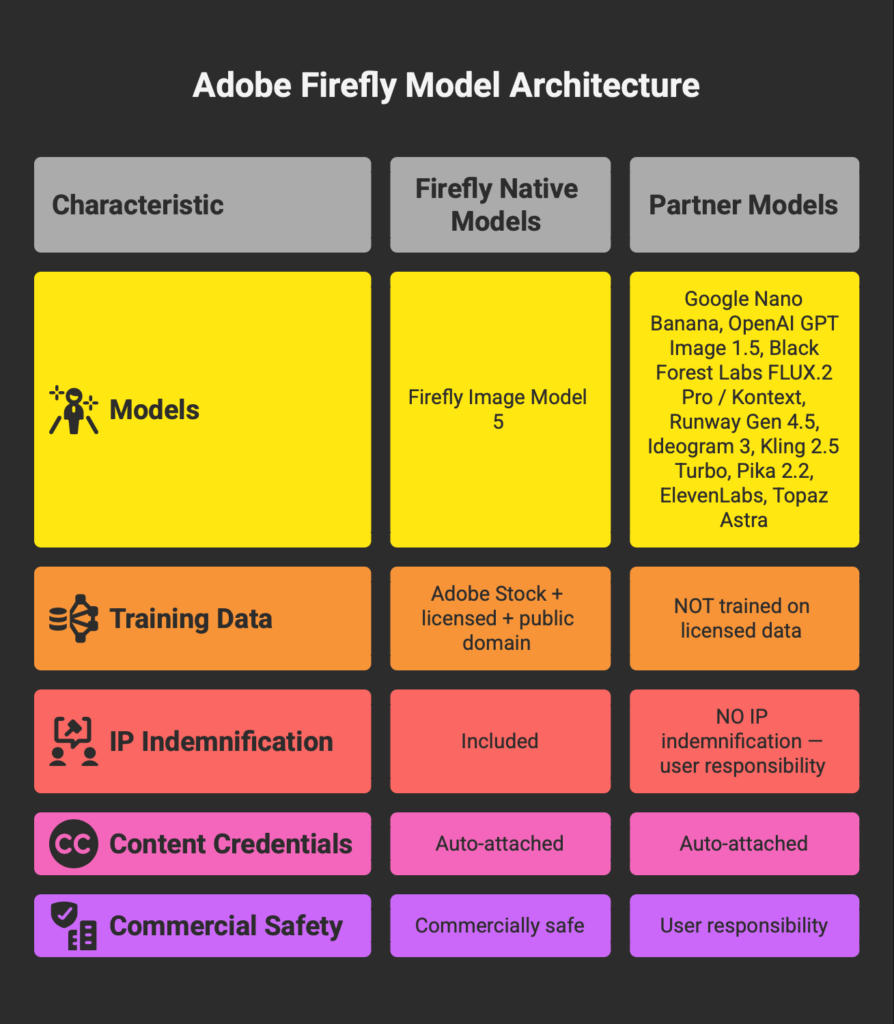
- Firefly models are trained exclusively on Adobe Stock, openly licensed content, and public domain material.
- Adobe does not scrape the web for training data.
- Adobe Stock contributors receive compensation for content used in training.
- Adobe does not train on customer content.
- Users retain ownership of their Firefly-generated outputs.
- Every Firefly output carries Content Credentials (C2PA metadata) identifying it as AI-generated.
- Adobe founded the Content Authenticity Initiative to protect creator rights across the industry.
These commitments apply to Adobe’s own Firefly models only. Partner models from Google, OpenAI, Black Forest Labs, and others follow their own training data policies. Adobe states this explicitly: the responsibility for evaluating whether a partner model is appropriate for your project falls on you. This two-layer structure matters, and most competitor reviews ignore it entirely.
The IP Indemnification Reality
Adobe offers IP indemnification for eligible outputs generated with Firefly models on qualifying paid plans. This means Adobe will defend you if someone claims your Firefly-generated image infringes their copyright.
The coverage is real but narrow. It applies to eligible Firefly model outputs only, not partner model outputs. It carries conditions around modification and combination with other materials. The per-claim ceiling sits at $10,000 per output. And the practical irony is that most commercial work involves editing, compositing, and adding text to AI-generated images, which introduces variables that could complicate eligibility.
Firefly’s indemnification is not a bulletproof shield. It is a procurement document that makes legal and compliance teams comfortable enough to approve the tool. For agencies and enterprise teams navigating internal approvals, that has real monetary value. For individual creators, it is less relevant.
| Tool | Licensed Data | IP Indemnification | Content Credentials | Provenance Trail |
|---|---|---|---|---|
| Adobe Firefly (native) | ✓ | ✓ ($10K cap) | ✓ Auto | ✓ |
| Firefly Partner Models | ✗ Varies | ✗ | ✓ Auto | Partial |
| Midjourney | ✗ | ✗ | ✗ | ✗ |
| FLUX.2 (direct API) | ✗ | ✗ | ✗ | ✗ |
| Stable Diffusion (local) | ✗ | ✗ | ✗ | ✗ |
The Model Marketplace: 30+ Engines, One Subscription
The biggest shift in Firefly’s story happened in late 2025. Adobe stopped trying to compete against every AI model on quality and started absorbing them instead. Firefly is now a model marketplace where you pick the right engine for each task without leaving Adobe’s ecosystem.
The catch: not every plan unlocks every model.
● Nano Banana (Gemini 2.5)
● Flux.2 Pro
● Flux Kontext Max
● Flux Kontext Pro
● Imagen 4
+ ChatGPT Image 1.5
+ Ideogram 3
+ Nano Banana 2 / Pro (2K)
+ Runway Gen 4 / 4.5
+ Kling 2.5 Turbo · Pika 2.2
+ Firefly Video Model
+ Topaz Gigapixel / Bloom
+ Google Veo 3.1 Fast
+ Nano Banana 2 / Pro at 4K
+ Unlimited Firefly Video
The $19.99 Pro plan gives you access to six models. If you need ChatGPT Image 1.5, Ideogram 3 for text rendering, or Runway for video generation, that requires Pro Plus at $49.99 per month. For deeper analysis of the video generation models available inside Firefly, see our Honest Runway AI Review and Pika Labs Review. The jump from Pro to Pro Plus is $30, but the model count triples from 6 to 18. For users who entered during the current 50% first-year promotion, Pro Plus drops to $24.96 per month, which makes it the highest-value tier available right now.
The Premium tier at $199.99 adds just one exclusive model (Google Veo 3.1 Fast) and 4K resolution access for Nano Banana. For most users, Premium is overkill.
The Cost of Convenience
This is where Firefly’s pitch gets complicated. Using partner models through Firefly costs more than using them directly.
| Model | Credits | Via Firefly* | Direct API | Markup |
|---|---|---|---|---|
| Firefly Image Model 5 | 1 | Unlimited† | N/A | — |
| Nano Banana (Gemini 2.5) | 10 | $0.05 | Varies | — |
| FLUX.1 Kontext [pro] | 10 | $0.05 | ~$0.04 | 1.25× |
| FLUX.2 Pro | 20 | $0.10 | $0.03 | 3.3× |
| Nano Banana Pro (Gemini 3) | 40 | $0.20 | Varies | — |
| GPT Image 1.5 (OpenAI) | ~60 est. | ~$0.30 | Token-based | — |
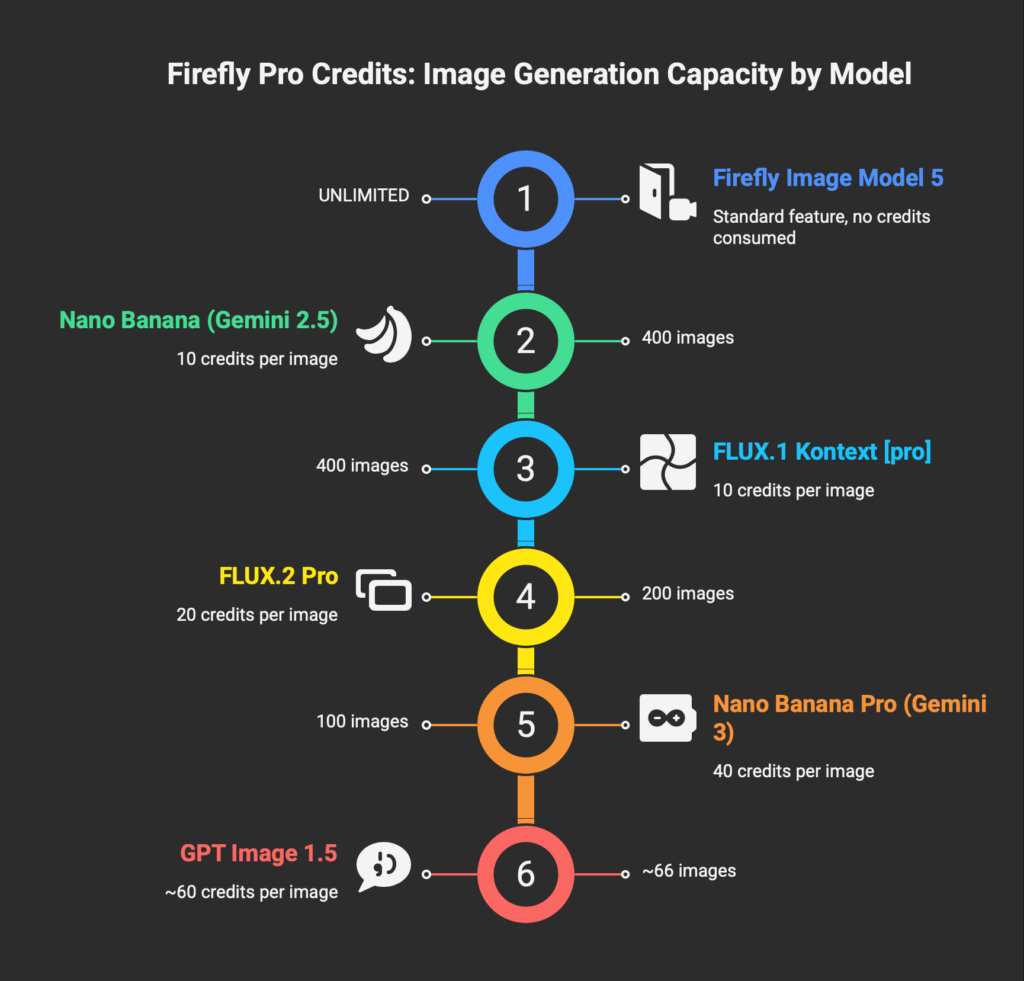
FLUX.2 Pro costs roughly $0.10 per image through Firefly at standard credit rates. The same model costs $0.03 per image through Black Forest Labs’ direct API. That is a 3.3x markup. The gap exists because you are paying for convenience: one interface, one billing account, one set of content credentials, and the ability to compare outputs across models without switching tools.
Whether that convenience justifies the markup depends on your workflow. If you generate 50 images a month and value speed over savings, Firefly’s integration is worth the premium. If you generate 500 images a month through automated pipelines, the direct API saves hundreds of dollars annually.
Firefly’s audio partner ElevenLabs consumes premium credits as well. If AI voiceover is part of your workflow, see our ElevenLabs Review for standalone pricing comparison. Credits do not roll over. Unused credits expire at the end of each monthly billing cycle. The credit system also obscures real costs because different models consume different amounts per generation. The counter in the Firefly interface shows credit cost before each generation, but you need to plan your monthly usage carefully to avoid running dry in week three.
Generation Quality: Where Firefly Wins and Where It Loses
Firefly Image Model 5 generates clean, commercially polished images at native 4-megapixel resolution. The outputs are well-lit, properly composed, and free of the artifacts that plague earlier models. For corporate marketing materials, product mockups, and social media graphics, the quality is production-ready. For AI-generated ad creatives specifically, see our AdCreative AI Review for a dedicated breakdown of that workflow.
That is not the same as saying the quality is best-in-class.
Where Firefly Image Model 5 wins:
Vector generation inside Illustrator remains unmatched. Firefly produces actual editable SVG paths with clean geometry, a capability no other mainstream AI tool offers. Generative Fill in Photoshop handles object removal, background extension, and contextual editing with precision that saves hours of manual retouching. Custom Models (now in public beta) let you train on your own reference images to maintain character and brand consistency across dozens of scenes. And Firefly Boards, the collaborative infinite canvas, lets you generate with multiple models side by side, compare results, and iterate without leaving the app.
Where Firefly Image Model 5 loses:
Cinematic and fantasy compositions lack the atmosphere that Midjourney V7 delivers. Midjourney’s lighting sells the scene. Firefly’s lighting is correct but clinical. The outputs read like high-end stock photography rather than editorial art direction. For creative directors chasing a mood, this gap is measurable.
Photorealistic human subjects hit inconsistencies in facial detail and hand anatomy. FLUX.2 Pro handles skin textures and natural depth of field with more conviction. Text rendered inside images remains unreliable on the native Firefly model. Ideogram 3.0 hits 90-95% text accuracy where Firefly struggles below 50%.
Prompt adherence on complex, multi-element scenes requires more iteration than Midjourney or FLUX. Each failed attempt on a partner model burns premium credits, compounding the cost of imprecision.
And dark, edgy, or mature creative work is filtered before it starts. Firefly’s content policy blocks graphic violence, explicit nudity, and content that could be interpreted as misleading or deceptive. Game concept artists, horror designers, fashion photographers working with skin-forward campaigns, and editorial teams creating satirical visuals will hit these walls repeatedly. Some of these restrictions apply to partner models accessed through Firefly as well.
The content filter is the flip side of commercial safety. Brand-safe output means creatively restricted output. Both statements are true at the same time.
The Content Filter Problem
Adobe’s prohibit generating pornographic content, hate speech, graphic violence, self-harm imagery, terrorism-related content, and misleading material that could cause real-world harm. These restrictions are enforced through automated and manual review of prompts and outputs.
The policies are reasonable for enterprise use. The problem is false positives. Users report that prompts involving historical conflict imagery, fashion photography with visible skin, dark fantasy themes, and editorial satire trigger refusals that block legitimate creative work. When a generation fails due to content filtering, credits may still be consumed.
Five categories where Firefly becomes functionally limited: game concept art involving combat, dark fantasy, or body horror. Editorial and political visual commentary near the “misleading content” boundary. Fashion and beauty campaigns with nudity-adjacent styling or body-forward compositions. Mature character design that falls in the gray zone between stylized and explicit. Horror, thriller, and supernatural visual development.
If your work lives in any of these categories, Firefly’s native model and several partner models will restrict your output. Stable Diffusion running locally has no such filters. Midjourney’s restrictions exist but are less aggressive. This is a deal-breaking limitation for specific professional use cases, and any review that fails to mention it is doing you a disservice.
Pricing Decoded: What You Actually Pay
| Plan | Price | Credits/mo | Models | Videos (5s) | Bundled Apps |
|---|---|---|---|---|---|
| Free | $0 | ~25 | Limited trials | — | Watermarked output |
| Standard | $9.99 | 2,000 | 6 | 20 | Firefly web/mobile |
| Pro | $19.99 | 4,000 | 6 | 40 | + PS web + Express Premium |
| Pro Plus | $49.99 $24.96* | 10,000 | 18 | 100 | + PS web + Express Premium |
| Premium | $199.99 $99.86* | 50,000 | 19 | Unlimited | + 4K models + Veo 3.1 |
Standard features (Generative Fill, text-to-image with Firefly native) = unlimited on all paid plans. Credits consumed only by premium features.
The hidden value in the Pro plan ($19.99) is that it bundles Photoshop on web and mobile plus Adobe Express Premium alongside Firefly. The Standard plan ($9.99) does not include either. If you need Photoshop access at all, Pro pays for itself compared to buying a Photoshop single-app subscription separately.
For Creative Cloud subscribers already on the All Apps plan: Creative Cloud Pro ($69.99/mo) includes 4,000 generative credits, the same allocation as the Firefly Pro plan. Your additional cost for Firefly is zero. Start there before considering any standalone Firefly purchase.
The April 22 promotional deadline matters. After that date, unlimited generations on select models revert to standard credit consumption. If you are evaluating Firefly, testing during the promotional period gives you the clearest picture of what each model can do without worrying about credit drain.
The Correct Way to Buy Adobe Firefly
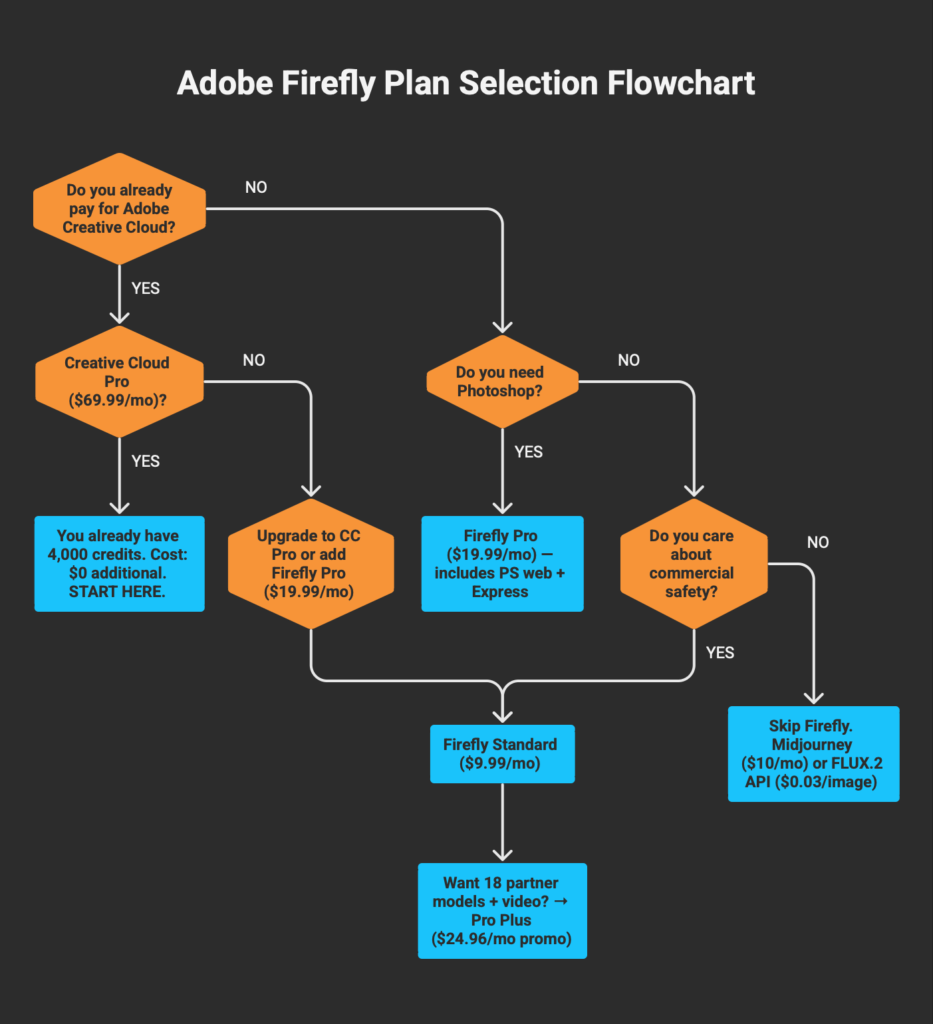
Your purchasing decision should start with one question: do you already pay for Adobe Creative Cloud?
If yes (Creative Cloud Pro / All Apps): You already have 4,000 credits per month and access to premium features. Use them. The marginal cost of Firefly for you is $0. Generate with the native model for unlimited standard work, and spend credits on partner models when the task demands it.
If you need Firefly standalone and also use Photoshop: Firefly Pro at $19.99/mo is the correct entry point. It includes Photoshop web/mobile and Express Premium, which makes the effective cost of Firefly itself less than $10 once you factor in the bundled apps.
If you want the full partner model suite: Pro Plus at $49.99/mo ($24.96 during the current promotion) unlocks 18 models including ChatGPT Image 1.5, Ideogram 3, Runway video, and Kling 2.5 Turbo. This is the tier where Firefly’s model marketplace pitch delivers on its promise.
If you do not use Adobe apps and want the best image quality for the dollar: Skip Firefly. Midjourney Basic at $10/mo produces more visually striking output. FLUX.2 via direct API at $0.03/image beats Firefly’s per-image economics. Stable Diffusion locally costs nothing if you own a capable GPU.
If you are a developer building image generation into a product: Firefly’s API requires an enterprise agreement starting at approximately $1,000/month. FLUX.2 and Recraft V4 APIs are available at pay-per-image rates with no minimums. For most development use cases, Firefly’s API is not the right choice.
Firefly is not a universal recommendation. It is the right tool for teams that operate inside Adobe’s ecosystem, need defensible commercial licensing, and value workflow integration over raw output quality. For everyone else, the market offers better options at lower prices. If you are still building your image generation stack and wondering where Firefly fits next to Midjourney, Ideogram, Leonardo, and Flux, our Midjourney alternatives breakdown maps which tool handles which gap — and why most professionals in 2026 combine two to four of them instead of choosing one.
Frequently Asked Questions
Is Adobe Firefly safe for commercial use? Outputs from Firefly’s native models are cleared for commercial use on all paid plans. Adobe provides IP indemnification for eligible outputs on qualifying plans, with conditions. Partner model outputs follow each provider’s own terms. Adobe recommends users evaluate partner model suitability independently.
Adobe Firefly vs Midjourney: which should I choose? Midjourney wins on artistic quality, atmospheric lighting, and creative composition. Firefly wins on commercial safety, Photoshop integration, and multi-model access. Agencies that need both often run Firefly Pro ($19.99) alongside Midjourney Basic ($10) for a combined $30/mo. For our full comparison, see our Best AI Image Generator 2026 briefing, or for the broader Midjourney alternatives landscape including Ideogram, Leonardo, and Flux, see our full Midjourney alternatives analysis.
If you’re weighing Firefly against broader design platforms with native AI features, our Canva vs Adobe Express comparison covers how Adobe’s ecosystem stacks up against Canva’s AI 2.0 push for marketing teams.
Can Firefly generate print-ready images? Firefly Image Model 5 generates at native 4-megapixel resolution (approximately 2048×2048). Topaz Astra integration (available on Pro Plus and above) can upscale outputs to 4K and 8K. For standard web and social media use, native resolution is sufficient. Large-format print may require upscaling.
Does Firefly work offline? No. All generation features require an active internet connection, even when accessed through Photoshop desktop. Firefly processes on Adobe’s cloud servers.
How does the credit system work? Standard features (Generative Fill, text-to-image with Firefly models) are unlimited on all paid plans. Credits are only consumed by premium features: partner models, video generation, audio translation, and similar compute-intensive tasks. Different models consume different credit amounts per generation (1 credit for Firefly native, 10-60 for partner models). Credits reset monthly and do not roll over.
Is Firefly included in Creative Cloud? Creative Cloud Pro ($69.99/mo) includes 4,000 monthly generative credits with full access to premium features, identical to the standalone Firefly Pro plan. Creative Cloud Standard ($54.99/mo) includes limited credits for standard features only.
What happens after the unlimited generation promotion ends on April 22? All plans revert to standard credit consumption. The credit counter in the Firefly interface will show the exact cost before each generation. Plan your usage accordingly, or consider purchasing credit add-ons if you need additional volume.
Prices, plans, and model availability verified against official Adobe sources on April 14, 2026. This article will be updated when material changes occur. Some links in this article are affiliate links. This does not change our recommendations. See our About page for how we fund our reviews.