Last updated: May 4, 2026
The AI image generation market hit a tipping point. DALL-E 3 is dead. OpenAI officially deprecated it in May 2026 and replaced it with GPT Image 1.5. Midjourney shipped V8.0, and V8.1 entered alpha testing on April 14, 2026. Adobe Firefly absorbed competitor models into its own platform. And FLUX.2 from Black Forest Labs is producing photographs that fool professional photographers.
None of that tells you which tool to use for your next project. This briefing does.
Why These 9, And What We Excluded
Every tool in this briefing meets three criteria: it ships a proprietary or differentiated image model, it has an active user base large enough to generate real-world feedback, and it solves a problem that no other tool on the list solves better.
Excluded and why:
Reve: Included in some competitor roundups, but user sentiment data and market adoption remain too thin to recommend with confidence. Worth monitoring.
Canva AI / Freepik AI: Workflow platforms, not image generation models. Canva uses Leonardo AI under the hood. Freepik bundles multiple models. If your priority is workflow integration over raw generation quality, both are solid options, but they belong in a separate comparison.
Microsoft Designer (MAI-Image-1): Strong free option with daily generation limits, but the model trails the leaders in photorealism and prompt adherence. Mentioned in the free tier comparison below.
How We Evaluated
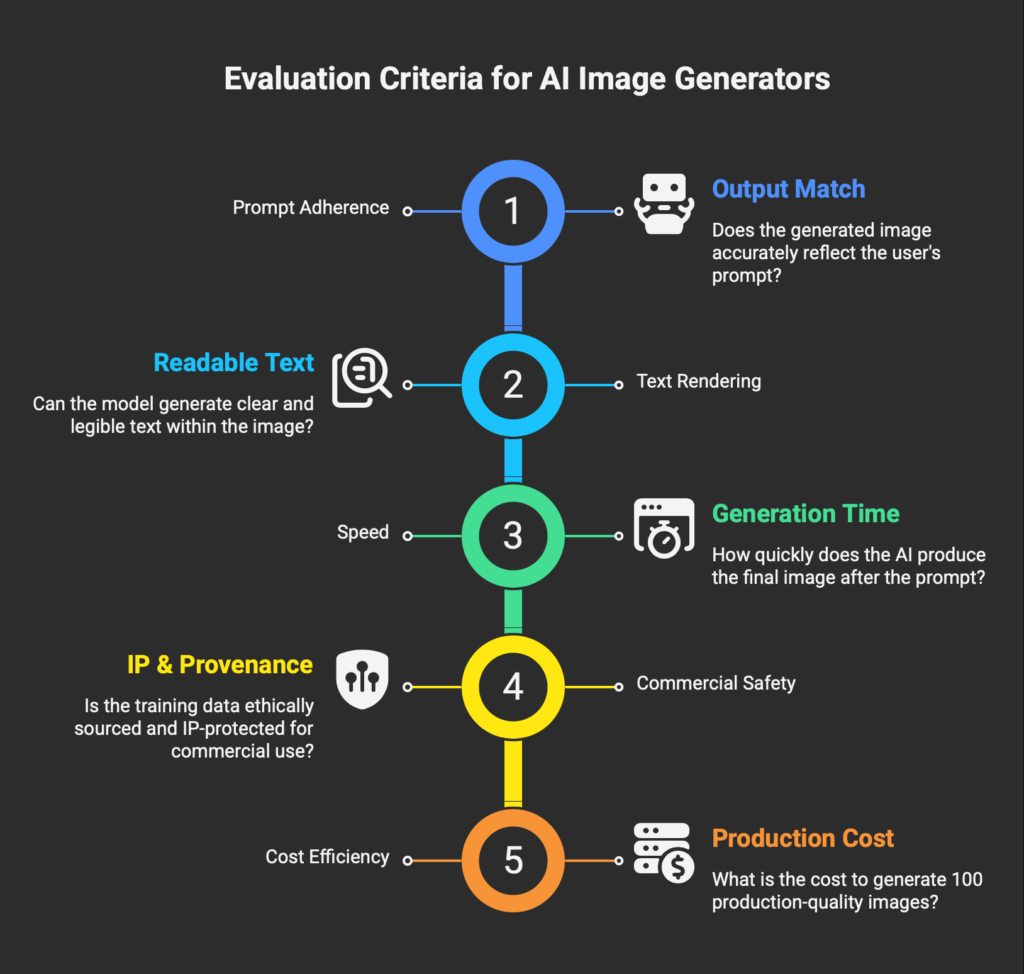
Five axes. Every tool measured against the same framework.
Prompt Adherence. Does the output match what you described? Complex scenes with multiple subjects, specific positioning, and style cues separate strong models from weak ones.
Text Rendering. Can the model place readable, correctly spelled text inside an image? Logos, posters, and marketing materials depend on this.
Speed. Time from prompt submission to finished output. Matters for iteration-heavy workflows.
Commercial Safety. Training data provenance, commercial-use licensing terms, and IP indemnification availability.
Cost Efficiency. What does it cost to produce 100 production-quality images? Subscription pricing, credit systems, and API rates compared on equal terms.
| Tool | Best For | Starting Price | Free Tier | Text Accuracy | Commercial Use | API |
|---|---|---|---|---|---|---|
| Midjourney | Artistic quality | $10/mo | niji app only | ~30-40% | All paid plans* | No official |
| Ideogram 3.0 | Text in images | $20/mo ($15 annual) | 10 slow/week | 90-95% | Paid plans | Yes |
| FLUX.2 | Photorealism | $0.03/image (API) | Playground + local | Strong | API paid | Primary access |
| Adobe Firefly | Commercial safety | $9.99/mo | 25 credits/mo | Moderate | IP indemnified | Enterprise only |
| Google Imagen | Free + ecosystem | Free (Gemini) | Yes (limits) | Strong | Paid plans | Vertex AI |
| Leonardo AI | Character consistency | $12/mo | 150 tokens/day | Moderate | Paid plans | Pay-as-you-go |
| Stable Diffusion | Open-source control | $0 (local) | Unlimited (local) | Weak | License-dependent | Stability API |
| Recraft V4 | Design + vectors | $10/mo | 30 credits/day | Strong | Paid plans | $0.04/image |
| GPT Image 1.5 | Ease of use | Free (ChatGPT) | Yes (limits) | Strong | Paid plans | gpt-image-1 |
| *Companies earning over $1M USD/year require Midjourney Pro or Mega plan. Prices verified April 2026. | ||||||
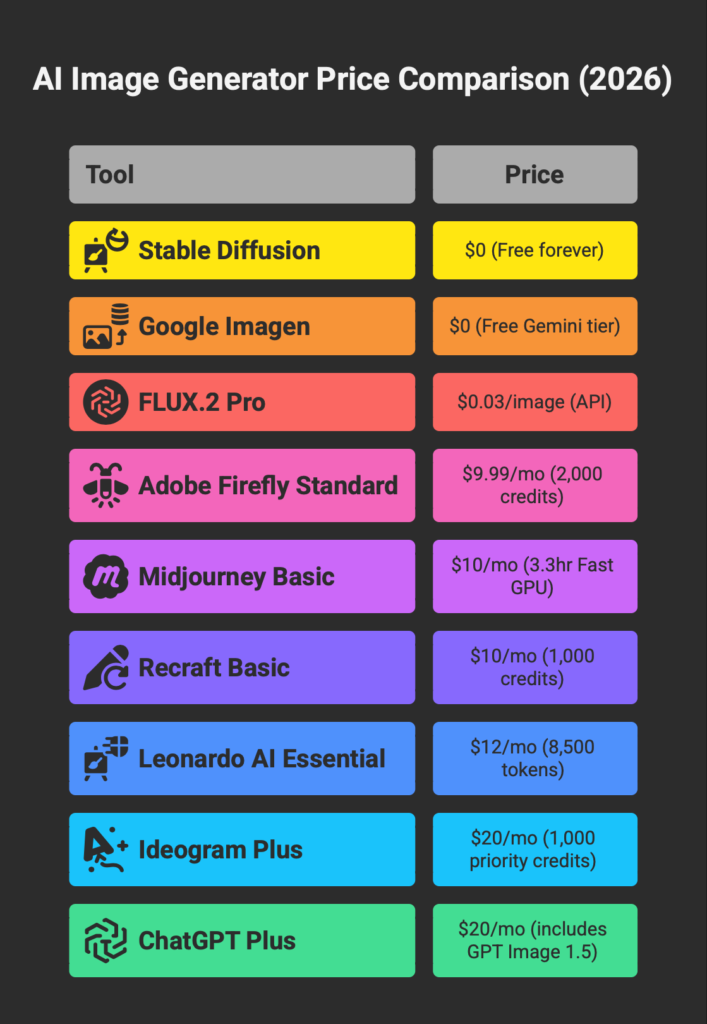
COST PER 100 IMAGES
Standard quality, 1024×1024, cheapest applicable plan or rate.
Subscription-based tools estimated at plan ceiling. API tools calculated at published per-image rate. Verified April 2026.
The 9 Tools
1. Midjourney: The Quality Benchmark
Midjourney remains the tool that makes other tools look like they are trying too hard. The compositions feel intentional. The lighting sells the scene. The textures invite a second look. V8.0 became the production-ready model in late March 2026, and V8.1 entered alpha testing on April 14, restoring much of the V7-era aesthetic stability while running HD mode three times faster than V8.0.
Pricing: Basic $10/mo (3.3hr Fast GPU), Standard $30/mo (15hr + unlimited Relax), Pro $60/mo (30hr + Stealth Mode), Mega $120/mo. Annual billing saves 20%.
Who it’s for: Creative directors, concept artists, editorial teams, anyone where visual impact is the primary metric.
Who should skip it: If you need text inside images, Midjourney’s ~30-40% text rendering accuracy will waste your time. If you need private generations on a budget, Stealth Mode requires the $60/mo Pro plan. If you need API access for automation, Midjourney offers no official API.
Commercial rights: All paid plans allow commercial use. Companies earning over $1M USD/year must subscribe to Pro or Mega. For a deeper look at the specific gaps that push professionals toward multi-tool stacks — API access, text rendering, legal exposure, character consistency — our Midjourney alternatives breakdown examines how Ideogram, Firefly, Leonardo, and Flux each fill a different hole that Midjourney leaves open.
Worth a side note: TapNow.ai is taking a similar multi-model canvas approach at a lower price point ($9/mo BASIC) and adding video models to the mix — Sora 2 Pro, VEO 3.1, Kling Omni, Seedance 2.0, plus image models including Banana Pro, MJ V7, and Niji7. The trade-off is rights paperwork: TapNow’s Hong Kong operating entity does not provide IP indemnification, and Seedance 2.0 carries the same Hollywood C&D pressure documented widely in February and March 2026. For prosumers willing to mix Western and Chinese models on a single canvas, we covered the full breakdown in our TapNow.ai review.
2. Ideogram 3.0: Text Rendering That Works
Ideogram solved the problem every other generator has ignored for years. When you need a poster with readable headlines, a logo mockup with the company name spelled correctly, or a social media graphic with layered text, Ideogram 3.0 delivers at 90-95% accuracy. Midjourney sits at 30-40% on the same test. That gap is not incremental. It is the difference between a usable asset and a regeneration loop.
Pricing: Free (10 slow credits/week, public only), Plus $20/mo (1,000 priority credits, private), Pro $60/mo (3,500 priority credits, batch generation), Team $20/user/mo.
Who it’s for: Marketers producing branded content, designers building type-heavy layouts, agencies creating ad creatives at scale.
Who should skip it: Pure photorealism work. Ideogram can trend toward stylized outputs that look polished but slightly synthetic compared to FLUX or Midjourney in naturalistic scenes.
Commercial rights: All paid plans. Free tier is public-only with no commercial license.
3. FLUX.2: Photorealism at API Economics
Black Forest Labs, founded by the team behind Stable Diffusion, built FLUX.2 as four distinct models. [max] ($0.07/image) delivers the highest quality with multi-reference support and 4MP output. [pro] ($0.03/image) hits production-grade quality at a price that makes high-volume generation viable. [flex] specializes in typography. [klein] runs locally under Apache 2.0 for prototyping.
This is not a subscription product. FLUX is API-first with a browser playground for testing. If you can integrate an API call into your workflow, the per-image economics undercut every subscription model on this list.
Pricing: API only. FLUX.2 [pro] at $0.03/image, [max] at $0.07/image, [klein] from $0.014/image. Playground free for testing.
Who it’s for: Developers building image generation into products, e-commerce teams automating product photography, anyone who needs photorealistic output at scale without a monthly subscription.
Who should skip it: If you want a visual interface with editing tools, filters, and presets, FLUX is not that product. There is no app. The playground is minimal. You are paying for raw model output.
Commercial rights: All API-generated outputs are commercial-use cleared.
4. Adobe Firefly: The Commercial Safety Play (and a Quiet Platform Shift)
Adobe Firefly made the smartest strategic bet in generative AI: train exclusively on Adobe Stock, openly licensed content, and public domain material. While every other generator faces unresolved copyright litigation, Firefly offers IP indemnification to enterprise customers. For agencies and in-house teams producing client-facing work, that legal clarity has real monetary value.
But the bigger story in 2026 is that Firefly is no longer just Adobe’s own model. The Pro plan ($19.99/mo) now includes unlimited generations on Nano Banana (Google), FLUX 2 Pro, Imagen 4, Flux Kontext Pro, and Firefly Image Model 5. The Pro Plus tier adds ChatGPT Image 1.5, Kling 2.5 Turbo, and Nano Banana Pro. Video generation through Runwayand Veo is also available on Pro plans and above. Adobe absorbed its competitors into its own platform.
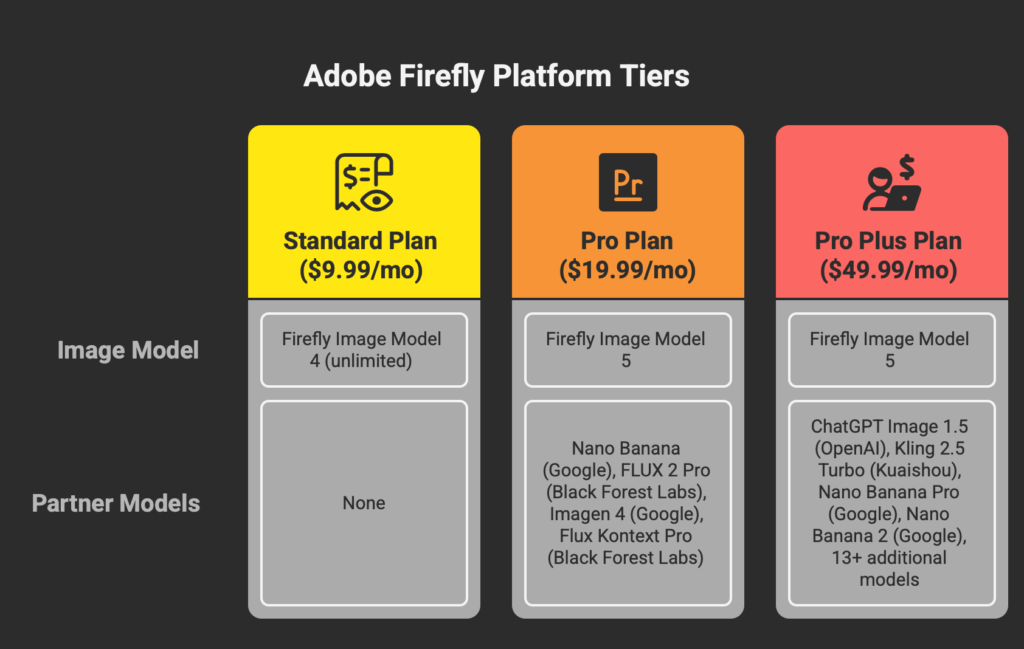
Pricing: Free (25 credits/mo), Standard $9.99/mo (2,000 credits, Firefly models only), Pro $19.99/mo (4,000 credits, 6+ partner models), Premium $199.99/mo (50,000 credits, 18+ models). Current promo: unlimited generations on select models through April 22, 2026 for Pro and above.
Who it’s for: Agencies, marketing teams, commercial designers who need legal safety. Also: anyone who wants access to multiple top-tier models under a single subscription.
Who should skip it: Edgy creative work. Firefly’s content filters reject historical violence, certain cultural references, and mature-themed prompts. If your project pushes boundaries, the guardrails will slow you down. Also, standalone Firefly is weaker value than competitors if you do not already use Adobe’s creative apps.
Commercial rights: All paid plans include commercial use. Enterprise customers get formal IP indemnification. Firefly models are trained on licensed data with Content Credentials attached to outputs. For our complete analysis of Firefly’s credit system, partner model costs, and quality trade-offs, see our full Adobe Firefly Review.
5. Google Imagen via Gemini: The Free Tier Champion
Google’s image generation lives inside the Gemini ecosystem. The models (Nano Banana and Imagen) are accessible through the Gemini app, Whisk, and the Vertex AI API for developers. The consumer access path is a Google AI subscription, not a standalone image tool.
The free Gemini tier includes limited image generation. Google AI Plus (approximately $7.99/mo in the US) adds Nano Banana Pro access with 200 AI credits per month. For users already paying for Google One storage, the upgrade cost is marginal.
Pricing: Free Gemini includes basic image gen. Google AI Plus ~$7.99/mo (200 credits), AI Pro ~$19.99/mo (1,000 credits), AI Ultra ~$249/mo (25,000 credits).
Who it’s for: Users already inside the Google ecosystem who need competent image generation without adding another subscription. Developers who want image generation through Vertex AI with Google Cloud billing integration.
Who should skip it: Anyone who needs fine-grained control over generation parameters, style references, or character consistency. Google’s image tools are conversational: you describe what you want and accept what you get. The iteration workflow is thin compared to Midjourney or Leonardo.
Commercial rights: Paid plans include commercial use.
6. Leonardo AI: Consistency Across Every Frame
Leonardo AI found its niche in character consistency. Upload one reference image and the model holds that character’s face, clothing, and proportions across multiple generations, poses, and environments. For game designers, brand creators, and social media teams building recurring visual characters, that capability saves hours of manual correction.
The platform now includes multiple proprietary models (Lucid Origin, Lucid Realism, Phoenix 1.0) alongside third-party models. Premium and Ultimate plans offer unlimited relaxed image generation on select models, which means no credit anxiety during exploration phases. Leonardo is also bundled with Canva Business subscriptions.
Pricing: Free (150 tokens/day, public only, basic quality), Essential $12/mo (8,500 tokens/mo, private), Premium $30/mo (25,000 tokens/mo, unlimited relaxed generation), Ultimate $60/mo (60,000 tokens/mo, unlimited relaxed image + video). Annual billing saves 20%.
Who it’s for: Game designers, brand creators, content teams who need the same character or product across dozens of scenes. Also a strong mid-range option for creators who want quality, consistency, and reasonable pricing in one package.
Who should skip it: If raw artistic quality is the priority above everything else, Midjourney still outperforms. Leonardo is the workhorse, not the showpiece.
Commercial rights: All paid plans include commercial use and private generations.
7. Stable Diffusion 3.5: Zero Cost, Zero Limits, Zero Hand-Holding
Stable Diffusion is not a product. It is an open-source ecosystem. Download the model weights from Hugging Face, install ComfyUI or another frontend, and run it on your own GPU with no content filters, no credit limits, no recurring cost, and no upload of your images to anyone’s server.
The tradeoff is obvious: setup requires technical knowledge, a capable GPU (8GB VRAM minimum, 12GB+ recommended), and willingness to troubleshoot. The community has built thousands of fine-tuned models, LoRA adapters, and ControlNet workflows that extend the base model into specialized directions. If you know what you are doing, the ceiling is as high as any commercial tool.
Stability AI also offers a hosted API (platform.stability.ai) for developers who want SD 3.5 without local hardware. Pricing is credit-based at $0.01 per credit, with Stable Image Ultra consuming 8 credits ($0.08) per image.
Pricing: $0 for local use. Stability API: $0.025-$0.08/image depending on model.
Who it’s for: Developers, tinkerers, researchers, NSFW creators, anyone who values total control and zero ongoing cost over convenience.
Who should skip it: If you want to type a prompt and get an image in 10 seconds with no setup, every other tool on this list is a better choice. SD’s learning curve is measured in days, not minutes.
Commercial rights: Local use governed by model license (Community License for commercial use). API outputs follow Stability AI terms.
8. Recraft V4: Where Design Meets Generation
Recraft earned its place on this list by doing something no other tool does well: generating production-ready vector graphics. Recraft V4 outputs clean, editable SVGs with structured layers and correct geometry, ready for web deployment or print production without a detour through Illustrator.
The raster output is strong too. V4 Pro generates high-resolution images with a design-forward aesthetic that feels composed rather than computed. The platform includes Nano Banana, GPT Image, and FLUX as partner models on paid plans, joining the same multi-model trend as Adobe Firefly.
Pricing: Free (30 credits/day, public, personal use only, Recraft models only), Basic $10/mo (1,000 credits, commercial rights), Pro $16/mo (2,000 credits, video generation, priority), Teams $18/seat/mo. API: V4 raster $0.04/image, V4 vector $0.08/image, V4 Pro $0.25/image.
Who it’s for: Graphic designers, brand teams, agencies producing logos, icons, illustrations, and mockups. Also developers who need API-accessible vector generation.
Who should skip it: Photorealism is not Recraft’s strength. For product photography or portrait work, FLUX or Midjourney deliver better results.
Commercial rights: Basic plan and above. Free tier is personal use only with public-only outputs.
9. GPT Image 1.5 via ChatGPT: The Most Accessible Generator
OpenAI killed DALL-E 3 and replaced it with GPT Image 1.5, a model built natively into GPT-5.4. You do not switch to a separate tool. You describe what you want in the same conversation where you drafted the copy, outlined the strategy, or analyzed the data. The model understands context across turns, allows iterative refinement, and handles text rendering better than DALL-E 3 ever did.
The free ChatGPT tier includes limited image generation. Go ($9.99/mo) adds more volume. Plus ($20/mo) expands limits and speed. Pro ($200/mo) unlocks unlimited, high-speed generation.
Pricing: Free (limited), Go ~$9.99/mo, Plus ~$20/mo (expanded generation), Pro ~$200/mo (unlimited). API: gpt-image-1 via Responses API with token-based pricing.
Who it’s for: Anyone already using ChatGPT for work who needs images generated inside the same workflow.Non-designers who want to describe what they need and get a competent result without learning a new tool.
Who should skip it: Professional creators who need fine control over style, composition, and consistency. GPT Image produces competent output, but it lacks the artistic depth of Midjourney, the text precision of Ideogram, and the photorealistic fidelity of FLUX. It is a generalist in a market where specialists win.
Commercial rights: Paid ChatGPT plans include commercial use. API outputs follow OpenAI terms.
Frequently Asked Questions
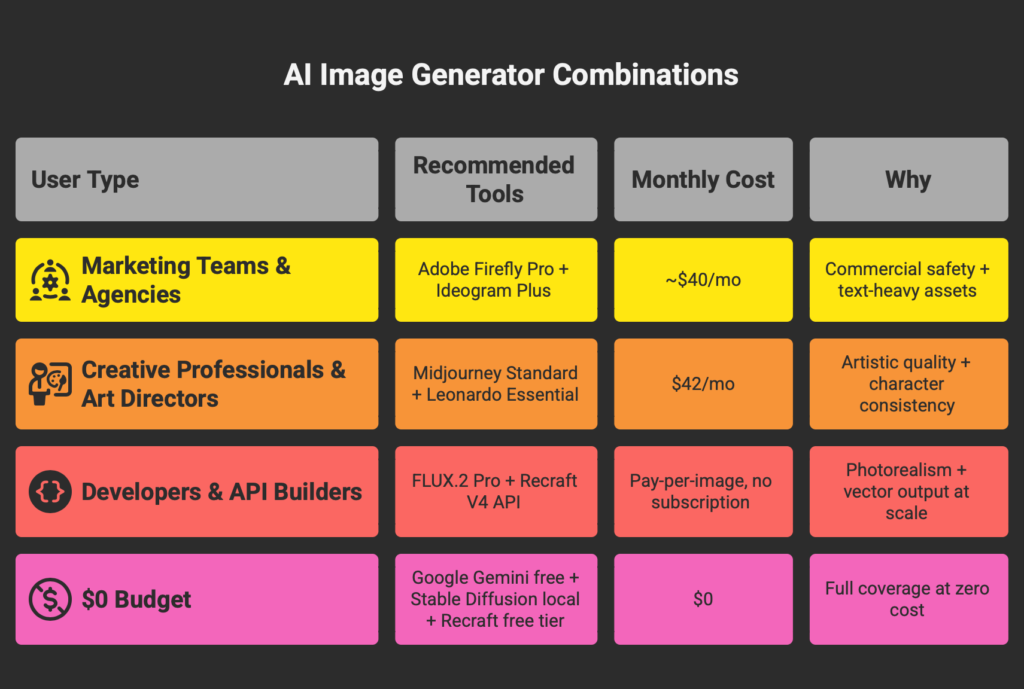
Are there real alternatives to Midjourney for professional work? Yes, and most working professionals no longer use Midjourney as a standalone tool. Ideogram handles text-in-image work, Adobe Firefly provides IP indemnification, Leonardo maintains character consistency across scenes, and Flux delivers API-accessible photorealism — each addressing specific gaps that Midjourney leaves open. Our full Midjourney alternatives analysis breaks down when to combine two to four of these tools instead of choosing one.
Is DALL-E 3 still available? No. OpenAI deprecated DALL-E 3 on May 12, 2026. It has been replaced by GPT Image 1.5, which is built natively into GPT-5.4. If you are using the OpenAI API, the model identifier is gpt-image-1.
Which generator produces the most realistic photos? FLUX.2 [pro] and [max] from Black Forest Labs. The skin textures, lighting imperfections, and natural depth of field consistently outperform competing models in photorealistic output. Midjourney V8.1 is a close second with a more cinematic aesthetic.
Can I use AI-generated images commercially? Most paid plans across these tools allow commercial use. Adobe Firefly provides the strongest legal protection through IP indemnification and Content Credentials. Midjourney requires Pro or Mega plans for companies earning over $1M/year. Check each tool’s specific terms before large-scale commercial deployment. For a deeper look at how AI training data policies differ between major design platforms specifically, see our Canva vs Adobe Express comparison. Canva trains on user content by default. Adobe doesn’t.
Which tool is best for putting text inside images? Ideogram 3.0 by a wide margin. Its text rendering accuracy hits 90-95%, compared to 30-40% for Midjourney and inconsistent results from most other generators. GPT Image 1.5 and Recraft V4 are the next strongest options.
Do I need a powerful computer to use these tools? Only for Stable Diffusion (local installation) and FLUX [klein] (self-hosted). Every other tool on this list runs in your browser or inside an existing app. A modern web browser and internet connection are the only requirements.
How often do these tools change? Constantly. Midjourney V8.1 entered alpha on April 14, 2026. Adobe Firefly’s current unlimited generation promotion expires April 22, 2026. Pricing, features, and model versions shift every few months. This briefing reflects verified data as of April 13, 2026, and will be updated quarterly.
Looking for AI coding tools instead? This briefing covers image generation. For AI-powered code editors and coding assistants, see our Best AI Coding Assistant 2026 guide.
Prices, plans, and model versions verified against official sources on April 13, 2026. This article will be updated when material changes occur. Some links in this article are affiliate links. This does not change our recommendations. See our [About page] for how we fund our reviews.