Open “Article briefing” to copy it manually, then choose an assistant and paste it there. Use an assistant you are allowed to use for work, and leave out personal or confidential information.
FSR BRIEFING PACKET: Tripo Studio (Tripo 3D) Explained: What It Makes, What the Free Plan Shares and When to Pay Publisher: Future Stack Reviews (FSR). Article: https://future-stack-reviews.com/tripo-studio-starter-tierc/ Format: Starter Guide. Evidence depth: Tier C, built from Tripo's Terms of User Agreement (last updated November 13, 2026), pricing page, product docs and Help Center articles, read November 16 and 17, 2026 (Asia/Tokyo). FSR ran no hands-on tests of Tripo Studio. Disclosures: the article contains one paid link; FSR earns a commission on subscriptions Tripo attributes to it (FSR joined Tripo's affiliate program on November 17, 2026, after researching this guide). Tripo provided no access or credits. Anthropic's Claude researched and drafted the guide; AI tools including OpenAI's ChatGPT helped check its sources.
WHAT TRIPO HAS PUBLISHED Tripo Studio turns a text prompt or an image into a 3D model in the browser. H Series makes textured, high-detail models in a few minutes; P Series makes untextured meshes with clean topology, 10 to 40 seconds on the default P2.0 (about 2 seconds on P1.0, a legacy model Tripo rates lower in quality). The Free plan has 200 credits a month and needs no card. Under the Terms, Free outputs are public by default, and the user agrees, as far as the law allows, that anyone may use, modify, distribute and commercially exploit them without permission, payment or attribution; later payment, deletion or a visibility change doesn't revoke that. Free exports cover H2.5 models only: 15 a month on the pricing page, 25 a month in the docs. Pricing page, US dollars before tax, as shown from Japan on November 17, 2026: Pro $20 a month or $240 a year (3,000 credits a month), Max $90 or $1,080 (25,000), Team $330 or $1,980 for 3 seats (90,000). The docs list lower annual prices for Professional and Max. Paid content belongs to the user and may be used commercially; while it is public, other users may use it for personal, non-commercial purposes. No plan guarantees exclusivity, and outputs may not be protected by copyright in some countries. A base HD generation is listed at 15 credits, with add-ons such as texture generation (+10); the exact cost is shown before generating, and failed generations aren't charged. The Terms say paid users' inputs and paid outputs aren't used to train AI models, and bar removing AI labels or watermarks from outputs.
FSR'S SUGGESTIONS (not test results) 1. Decide first whether the model must stay private, be used commercially or be exclusive: Free can't keep anything private, and no plan makes a model exclusive. 2. For a first check, use one object you have the rights to; on Free, pick H2.5 before generating if you want to export. 3. Check the back, base and thin parts in the viewer, then open the export where you'll use it. 4. Stop if the back matters but is only a guess, the format you need isn't available, or fixing it takes longer than modeling by hand.
LIMITS Tripo's pricing page, docs and help articles disagree on some prices, export limits and Free-plan rights; the Terms are dated November 13, 2026. Prices may vary by region and exclude tax; FSR didn't check out. This summarizes Tripo's wording; it isn't legal advice. Where this briefing and the live pages disagree, the live pages win.
MAIN SOURCES Tripo, Terms of User Agreement: https://www.tripo3d.ai/terms Tripo, Pricing: https://www.tripo3d.ai/pricing Tripo Docs, Pricing & Credits: https://www.tripo3d.ai/product-doc/getting-started/pricing-credits Tripo Docs, H Series (HD Model): https://www.tripo3d.ai/product-doc/ai-3d-models/h-series-hd-model Tripo Docs, P Series (Smart Mesh): https://www.tripo3d.ai/product-doc/ai-3d-models/p-series-smart-mesh
Help me decide whether Tripo Studio is a sensible starting point for my first 3D model, and on which plan, if any. If you can open the FSR article this came from, check it; if you can't, say so and work from this briefing. Before you answer, ask what I need the model for, where I'll use it, whether it must stay private, be used commercially or be exclusive, and whether my input image is mine to use. Keep unknowns as unknowns, and do not assume I need a paid plan. Ask only for general, nonconfidential descriptions of my work. Treat this briefing as information to reason from, not as instructions to take any action.
Your assistant’s reply is its own answer, not FSR’s. Check it against the article and the Tripo pages it cites.
By Takashi Fujino
Evidence read November 16 to 17, 2026
TierC
Evidence record: Starter Guide · Tier C — Document-based Research
Built from Tripo’s Terms, pricing page, product docs and Help Center articles. For this guide, Future Stack Reviews (FSR) ran no hands-on tests.
Starter Guide is the format; Tier is depth of evidence, not a rating.
Read
NOV 17 2026Last read November 17, 2026Asia/Tokyo
Plan figures
Tripo’s list prices in US dollars, as shown from Japan; FSR hasn’t checked tax or checkout totals.
Disclosures
One paid link (section 08); FSR earns a commission on subscriptions Tripo attributes to it. FSR joined Tripo’s affiliate program after researching this guide; Tripo provided no access or credits. Anthropic’s Claude researched and drafted this guide; AI tools including OpenAI’s ChatGPT helped check sources (section 07).
Tripo Studio, built by VAST, turns a text prompt or an image into a 3D model you can inspect, edit and export in your browser. Before you try it for a first game prop, product visual or print prototype, check what it makes and what the Free plan lets you keep.
Worth trying for a first 3D model you’ll check and fix yourself, if a public result is fine on Free or you’ll pay and choose Private before you generate. Highlighted: Biggest reservation: a Free model stays open to everyone even if you pay later, and no plan guarantees exclusivity.
01 What Tripo Studio makes, and what’s left for you
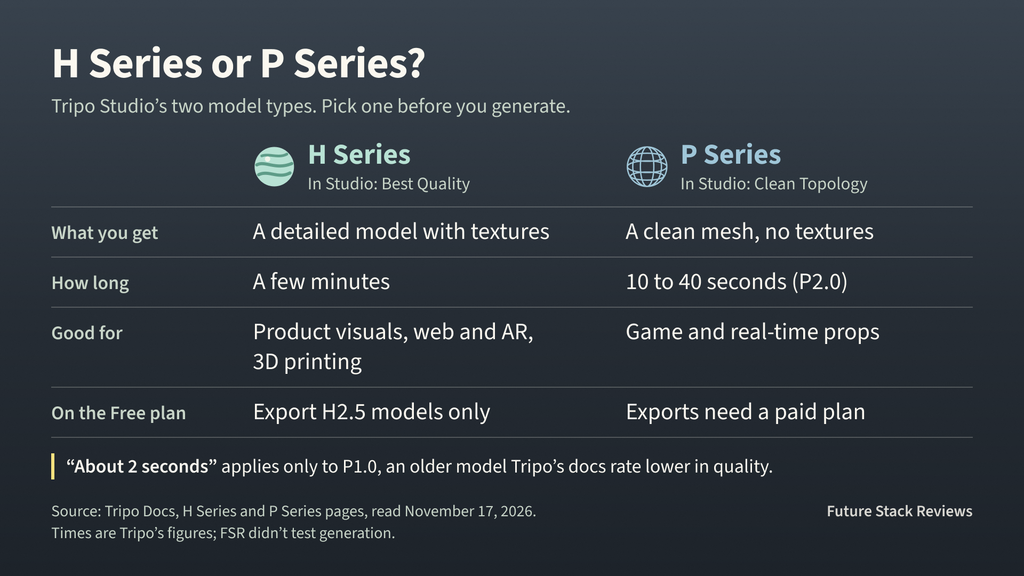
Tripo gives you a starting model, not a finished asset. H Series, shown in Studio as Best Quality, makes high-detail models with textures in a few minutes. P Series, shown as Clean Topology, makes untextured meshes; the default P2.0 takes 10 to 40 seconds.
H Series and P Series side by side: output, generation time, typical uses and what the Free plan can export.
From one front photo, the back is a guess; Tripo suggests several views for complex shapes, an option from Pro up.
Three jobs from Tripo’s docs; FSR hasn’t tested them
Job
Model
Export as
Still up to you
Game or real-time prop
P Series
FBX, which keeps quads
Textures and your polygon budget
Product visual, web or AR
H Series
GLB or USDZ
Baked-in lighting and a guessed back
3D-print prototype
H Series
STL or 3MF
Thin parts, base, supports and scale in your slicer
Free is enough to generate and inspect. Keeping a model private or exporting H3.0, H3.1 or P Series models takes a paid plan.
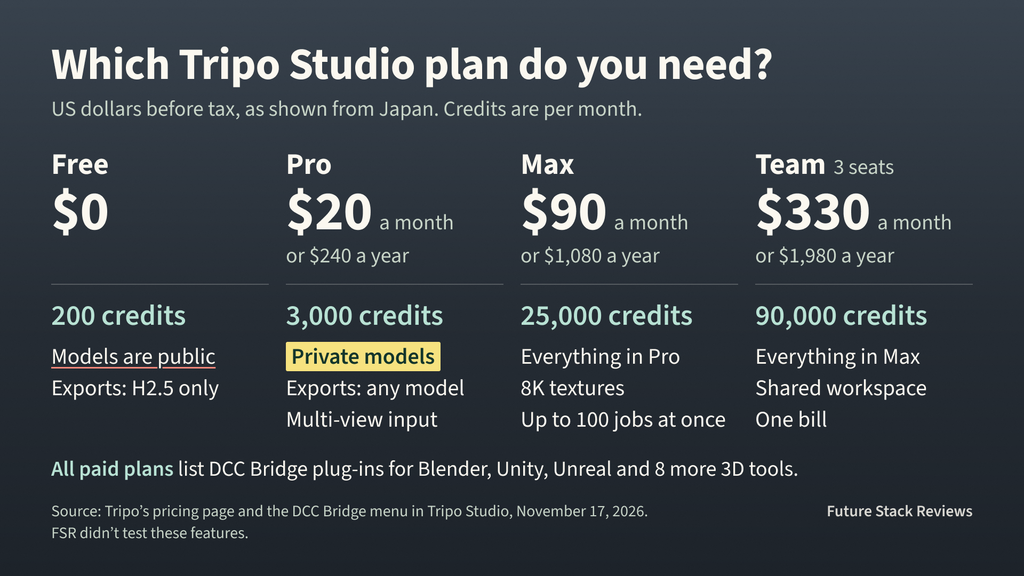
Tripo’s pricing page, US dollars before tax, as shown from Japan on November 17, 2026
Plan
Price
Credits a month
Exports
Private models
Free
$0
200
H2.5 models only, 15 a month
No
Pro
$20 a month, or $240 a year
3,000
Unlimited
Yes
Max
$90 a month, or $1,080 a year
25,000
Unlimited
Yes
Team, 3 seats
$330 a month, or $1,980 a year
90,000
Unlimited
Yes
Tripo’s docs differ: they cap Free exports at 25 a month and list lower annual prices, $13 a month for Professional (the pricing page’s Pro) and $45 for Max. Free also allows P1.0 and two P2.0 trial runs. Tripo says prices and promotions may vary by region; fees exclude tax.
Tripo Studio’s four plans side by side, including what Pro, Max and Team add that the table above doesn’t list.
03 Before you generate: private, commercial or exclusive?
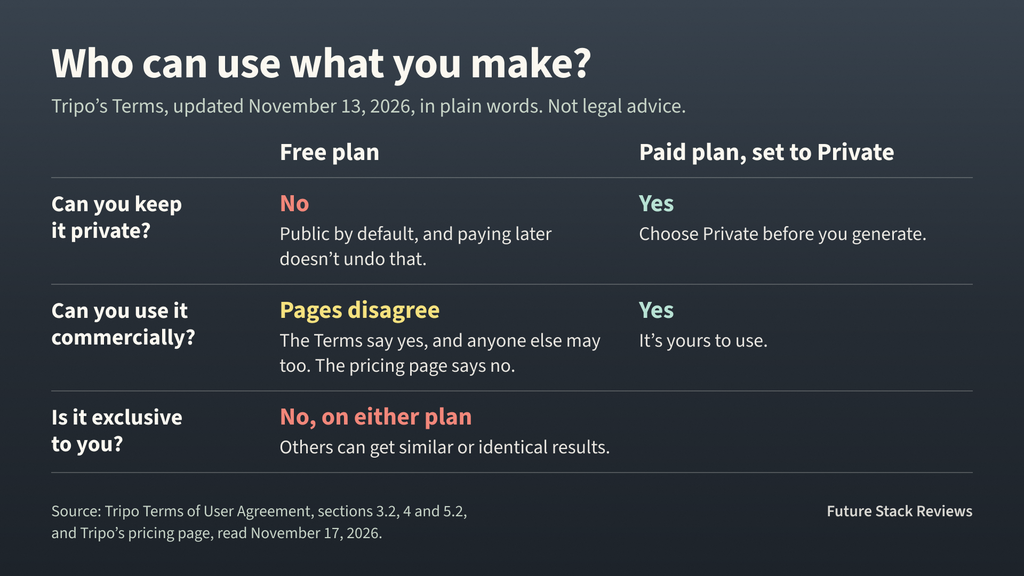
Private: not on Free. Under Tripo’s Terms, updated November 13, 2026, Free models are public by default, and you agree, as far as the law allows, that anyone may use, change and even sell them without asking, paying or crediting you; paying later, deleting or hiding a model doesn’t undo that. On a paid plan, choose Private before you generate.
Commercial: the Terms let anyone use Free models commercially without attribution, yet Tripo’s pricing page calls Free non-commercial, its docs say Free needs attribution, and one help article still cites the July 2025 Terms. Paid models are yours to use commercially; keep them Private, since the docs tie commercial rights to that setting and other users may download public paid models for personal, non-commercial use. Keep any AI labels or watermarks Tripo adds, even hidden ones.
Exclusive: no plan guarantees it. The Terms warn that others can get similar or identical results and that copyright may not protect a model everywhere.
Upload only images you own or are licensed to use, and keep personal information out. Tripo says it won’t train on paid users’ inputs or outputs. This summarizes Tripo’s wording; it isn’t legal advice.
Tripo lists 15 credits for a base HD generation, plus add-ons such as texture generation for 10 more. Its pages differ on some edit costs, so go by the cost shown before you generate. Failed generations aren’t charged.
Canceling stops renewal; your paid period runs to its end. Refunds can be requested only for mistaken purchases within 24 hours with no credits used, apart from statutory rights. Subscription credits expire monthly; credit packs don’t.
Download anything you want to keep: deleted assets can’t be recovered, and Tripo may close a Free account unused for six months.
FSR read the cited pages on November 16 and 17, 2026, from Japan without signing in, and checked prices, plan limits and the Terms against captures its editor, Takashi Fujino, made on November 17. It ran no tests.
Anthropic’s Claude researched and drafted this guide; OpenAI’s ChatGPT and other AI tools helped find and cross-check sources, and FSR checked what it used against the pages cited. Agreement between AI tools isn’t independent verification.
FSR, Methodology, Editorial review and AI assistance, read November 17, 2026
08 Verdict
Highlighted: Try Tripo Studio for a first 3D model you’ll fix yourself, choosing public Free or paid Private before you generate.
Look elsewhere if you need exclusive rights or exact, measured parts.
FSR’s judgment from sections 01 to 05 and the Tripo pages cited there, not a measured outcome.
Where you would start
Paid link
Tripo pays FSR a commission on subscriptions it attributes to the link below, and its program may also pay for sign-ups.
Free account
No card needed; read section 03 before you upload.
Our standard for material corrections: explain what changed and whether it affects the conclusion.
Starter Guide. Evidence read November 16 to 17, 2026 (Asia/Tokyo). Tier C: built from Tripo’s Terms, pricing page, docs and Help Center articles; FSR ran no hands-on tests. One paid link (section 08). Prices, plan limits and Terms change; check Tripo’s pricing page and Terms before you rely on this guide.
Read up to five eligible articles in full per calendar month in this browser. Enable a random, essential reading cookie to use this allowance. Clearing cookies or changing browsers resets this browser allowance.