
In March 2026, GitHub Copilot injected product recommendations into pull requests across thousands of repositories. The company called it a programming logic issue. Developers called it something else. That incident accelerated a shift that was already underway: the AI coding assistant market is no longer a one-tool conversation.
This guide covers seven alternatives, verified pricing for every tier, real monthly costs that go far beyond the subscription page, and a section most articles are afraid to write: who should stay on Copilot and why switching might be the wrong move.
Seven alternatives. Every price verified on the official page on April 10, 2026. No affiliate links in this article.
If you write code daily and want the most capable editor:
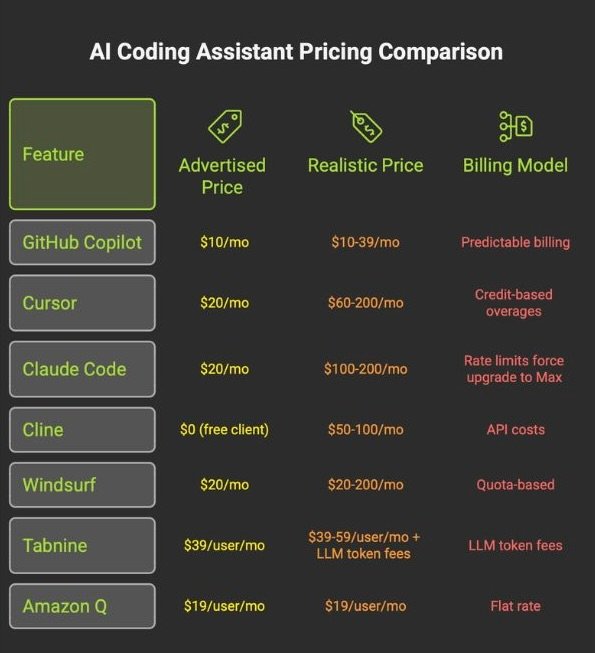
Cursor ($20/mo Pro) for multi-file editing with Composer mode. Budget $60/mo for agentic features.
If you need deep reasoning on large codebases:
Claude Code ($20/mo Pro, realistically $100-200/mo Max) for terminal-native execution with a 1M-token context window.
If you want full cost transparency with zero markup:
Cline (free client, pay-per-token) for open-source autonomy. 60K GitHub stars. You bring your own keys.
If your organization has regulatory requirements:
Tabnine ($39/user/mo) for air-gapped, on-premise, zero-code-retention deployment.
If Copilot is working and your team is on GitHub:
Stay. Read the “Who Should Stay” section before switching out of frustration.
Why Developers Are Reevaluating GitHub Copilot in 2026
Three things happened in close succession, and the combined effect was larger than any single event.
The PR ads incident. On March 30, 2026, Melbourne-based developer Zach Manson discovered that GitHub Copilot had been inserting product recommendations into pull request descriptions. A GitHub code search found the injected phrase in over 11,000 pull requests. A broader analysis by WinBuzzer estimated the total scope at over 1.5 million affected PRs. The contamination extended beyond GitHub to GitLab merge requests as well, suggesting the behavior originated at the model or API layer rather than through any platform-specific logic. GitHub’s product manager acknowledged the issue, calling the behavior “icky.” Microsoft characterized it as a programming logic issue and disabled the feature. GitHub’s VP of Developer Relations stated the company does not plan to include advertisements.
Whether you call it an ad, a tip, or a logic bug, the result was the same. Code review infrastructure, the one part of software engineering where trust is non-negotiable, was compromised by promotional content that developers did not request and could not control.
GitHub Copilot inserted product recommendations into pull request descriptions across thousands of repositories. A GitHub code search found the phrase in 11,000+ PRs. Community analysis estimated 1.5 million affected PRs across GitHub and GitLab. Microsoft called it a “programming logic issue.” GitHub disabled the feature within days.
Perceived quality inconsistency. A widely discussed GitHub Community thread titled “Is Copilot slowly getting worse?” accumulated hundreds of upvotes from developers describing declining suggestion relevance. Gergely Orosz, author of The Pragmatic Engineer, noted that GitHub kept a weaker default model as the default option, contributing to team frustration. GitHub’s own documentation confirms that model availability changes over time and that automatic model selection routes requests based on real-time system health. That architecture can make the user experience feel unstable, even if aggregate quality metrics remain flat.
This is not definitive evidence of degradation. It is evidence of inconsistency, and in a tool that interrupts your typing flow thousands of times per day, inconsistency erodes confidence faster than a clean quality drop would.
The alternatives matured. Through late 2025 and into 2026, Cursor shipped Composer 2 and version 3.0 with parallel sub-agents. Claude Code launched a VS Code extension alongside its terminal CLI. Cline crossed 60,000 GitHub stars and released multi-agent orchestration. Windsurf shipped its SWE-1.5 model under new ownership. The gap between Copilot and the field narrowed on some axes and reversed on others. Developers who tested alternatives during the PR ads backlash found products that had caught up, and in specific areas, pulled ahead.
“Developers are cycling through alternatives — Copilot to Cursor to Claude Code, sometimes circling back. But almost no one in the visible switching data is returning to Copilot.”
X sentiment analysis, Q1-Q2 2026
The X sentiment data from Q1-Q2 2026 tells a consistent story. Developers are cycling through alternatives (Copilot to Cursor to Claude Code, sometimes circling back to Cursor). But almost no one in the visible switching data is returning to Copilot. That pattern matters, even accounting for social media’s negativity bias.
The 4 Categories You Need Before Choosing
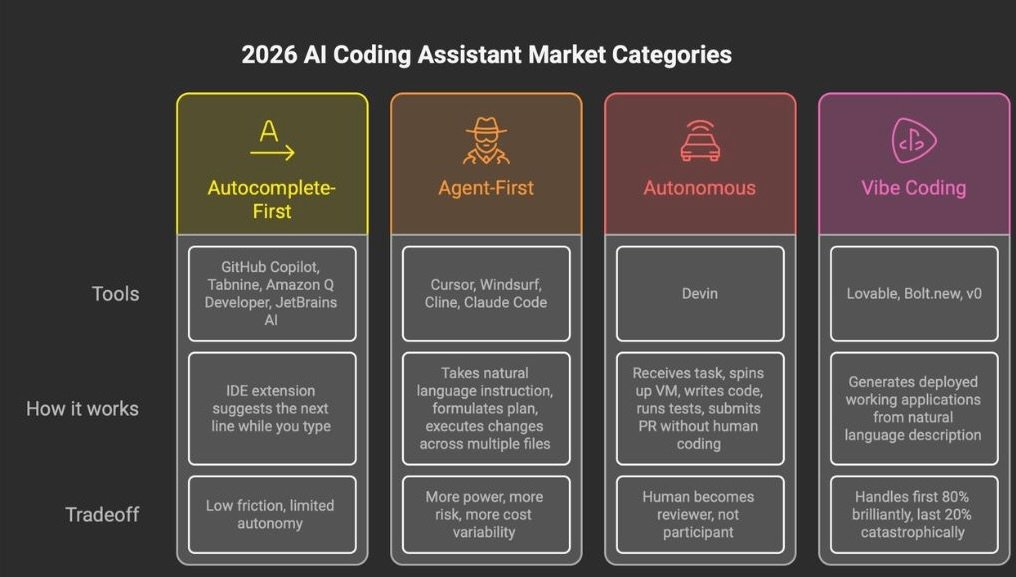
The biggest mistake in this market is comparing tools that solve different problems. A terminal CLI agent and an inline autocomplete extension are not competing for the same job. The 2026 market breaks into four segments, and understanding which one you belong in matters more than any feature table. For the full breakdown with 12 tools and 3 vibe coding platforms, see our Best AI Coding Assistant 2026 guide.
Autocomplete-First tools operate as IDE extensions. They predict your next line while you type. GitHub Copilot, Tabnine, Amazon Q Developer, JetBrains AI Assistant, and Sourcegraph Cody live here. Low friction, limited autonomy.
Agent-First tools take a natural language instruction, read your project, formulate a plan, and execute coordinated changes across multiple files. Cursor, Windsurf, Cline, and Claude Code live here. More power, more risk, more cost variability.
Autonomous tools execute entire tasks without human coding. Devin is the primary example. The human reviews the result, not the process.
Vibe Coding platforms generate deployed applications from natural language descriptions. Lovable, Bolt.new, and v0 target non-developers. Different market, different problem.
Most developers searching for Copilot alternatives are looking for either an Autocomplete-First upgrade or an Agent-First tool. The seven alternatives below cover both categories.
The 7 Alternatives That Matter in April 2026
- Cursor — The Agent-First Market Leader
What it is: A proprietary fork of VS Code with multi-model credit pools, Composer for multi-file orchestration, and cloud background agents.
Best for: Developers doing complex, multi-file work who want the AI deeply embedded in their editing experience. Power users willing to learn a new tool for a real productivity jump.
Not for: Teams locked into specific VS Code extensions that may break on the fork. Anyone who needs predictable monthly costs. Credit-based billing has caught heavy users off guard.
Pricing (verified April 10, 2026):
The honest take: Cursor raised $900 million at a $9 billion valuation. That reflects a product that changed how a lot of developers work. Composer mode, which orchestrates changes across 10+ files with unified visual diffs, remains unmatched. The Supermaven autocomplete engine delivers a 72% code acceptance rate, the highest in the industry.
The problems are also real. Cursor itself marks Pro+ at $60 as “Recommended,” which tells you the $20 tier runs dry fast under heavy use. Developers on X reported overage charges exceeding $1,400 in a single billing cycle. Others described $536 in four days on credits. CPU spikes during long agent sessions have been a recurring complaint in the Cursor forum, and version lag behind mainstream VS Code means extensions occasionally break without a quick fix.
Cursor routes all AI requests through its own AWS backend, even with your own API key configured. No self-hosted option exists.
For a detailed cost analysis and implementation guide, see our Cursor vs Claude Code comparison.
- Claude Code — The Million-Token Terminal Agent
What it is: Anthropic’s coding agent, available as a terminal CLI and VS Code extension. It reads your codebase (up to 1 million tokens), reasons about it, and executes changes directly.
Best for: Terminal-native developers working on large, complex codebases where context window size is the bottleneck. Multi-file refactoring, repository-wide migrations, and deep debugging. For a broader look at Claude’s capabilities beyond coding, see our full Claude AI review.
Not for: Daily iterative feature work where you want inline suggestions while you type. Developers who find the terminal intimidating.
Pricing (verified April 10, 2026):
The honest take: Claude Code is the best tool in this guide for a specific class of problem, and a mediocre choice for everything else.
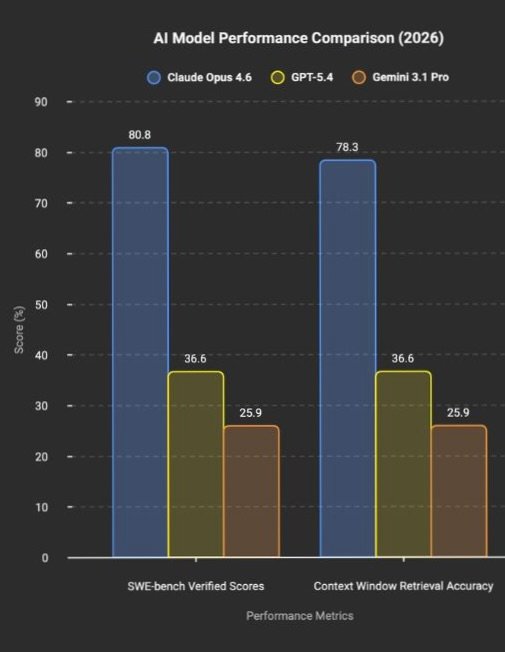
The specific class: you have a large codebase and you need the AI to hold the entire context, not chunk it through lossy retrieval, but hold the whole thing in memory. Claude Opus 4.6 scores 80.8% on SWE-bench Verified. GPT-5.4 scores 36.6%. Gemini 3.1 Pro scores 25.9%. That is not a marginal lead. On the MRCR v2 benchmark at 1 million tokens, Opus retrieves relevant information with 78.3% accuracy versus 25.9% for Gemini. Different capability class.
The MCP (Model Context Protocol) ecosystem is the actual moat. Connect GitHub for PR management, Linear for tickets, Datadog for logs, and Slack for notifications. A viral post with over 4,000 likes on X showed a developer cloning entire websites with a single prompt using Claude Code’s built-in Chrome MCP.
The rate limit complaints are persistent. At the $20/mo Pro tier, developers consistently report hitting limits within two to three hours of active use. One post with nearly 300 likes described builders cancelling Claude Code after rate limit changes and moving to GPT-5.4 and Codex. The $100/mo Max 5x tier is the realistic minimum for daily agentic work. At that price, you are spending more than Cursor Pro, Copilot Pro, and Windsurf Pro combined.
- Cline — Free Client, Real Agent, Variable Cost
What it is: A free, open-source VS Code extension (Apache-2.0) that acts as a fully autonomous coding agent. You bring your own API keys.
Best for: Cost-conscious developers who want transparency over what they spend and which models they use. Anyone with subscription fatigue.
Not for: Teams that need centralized admin controls, usage dashboards, or enterprise governance.
Pricing:
The honest take: Cline hit 60,000 GitHub stars and over 5 million developers worldwide by April 2026. In March, the project launched Cline Kanban — multi-agent orchestration, free and open source — and the announcement post pulled over 3,400 likes on X.
The logic is simple. When Cline points at Claude Opus 4.6 through a direct API key, the raw intelligence gap versus Cursor or Claude Code (which also use Opus 4.6) shrinks dramatically. What you lose is polish: no visual diff interface as refined as Cursor’s Composer, no cloud background agents, no long-running sessions as smooth as Claude Code’s terminal loop. What you gain is absolute cost transparency and the ability to switch models mid-task.
“Free” needs a caveat. Heavy users on frontier models report $50-100/mo in API costs. Local models via Ollama require 24GB+ VRAM for usable performance, and the intelligence gap versus frontier models is significant. Cline is free if you have the hardware. It is cheap if you are disciplined about model selection. It is neither if you default to Opus for every autocomplete.
- Windsurf — The Three-Times-Acquired IDE
What it is: An AI-native IDE powered by the Cascade context engine and the proprietary SWE-1.5 model. Now owned by Cognition (makers of Devin) after one of the wildest acquisition sagas in recent tech.
Best for: Developers who want an agentic IDE at a competitive price with persistent session memory across coding sessions.
Not for: Enterprise buyers who worry about corporate stability. Anyone who needs a mature plugin ecosystem.
Pricing (verified April 10, 2026):
The honest take: The Windsurf story needs telling because it explains why the price changed and why you should care. In April 2025, OpenAI offered $3 billion to acquire the company (then Codeium). The deal collapsed. Google paid $2.4 billion to hire CEO Varun Mohan and the core R&D team into Google DeepMind. Cognition acquired the remaining product, brand, and team, inheriting $82 million ARR and 350+ enterprise clients. Three disruptions in fifteen months.
Cognition now controls both Windsurf (agentic IDE) and Devin (autonomous SWE agent). Whether that leads to a vertically integrated development stack or a confused product identity is the open question.
On the product: Cascade maintains persistent memory of your actions across sessions in a way no other tool matches. The SWE-1.5 model drew praise from developers on X for speed and agent capability. The March 2026 price increase from $15 to $20 for Pro drew complaints from users who felt blindsided, though $20 remains competitive with Cursor.
For a direct comparison of these two AI-native IDEs on pricing, security, and design philosophy, see our Cursor vs Windsurf comparison.
- Tabnine — The Air-Gapped Fortress
What it is: The enterprise privacy specialist. The only major AI coding assistant that offers fully air-gapped, on-premise, zero-code-retention deployment at every paid tier.
Best for: Regulated industries (finance, defense, healthcare, government) where code leaving the building is not an option.
Not for: Individual developers looking for the cheapest or most powerful option. Tabnine starts at $39/user/mo.
Pricing (verified April 10, 2026):
The honest take: Tabnine is not trying to win benchmark wars. It is winning procurement wars in a segment that flashier tools cannot enter. SaaS, VPC, on-premises, or fully air-gapped. You choose where your code lives. Zero code retention means nothing is stored, nothing is trained on, nothing is shared. For a CISO at a bank or a defense contractor, this is the minimum viable requirement, not a feature worth debating.
If your organization does not have regulatory constraints, Tabnine’s premium is hard to justify on capability alone. Copilot Business at $19/user/mo offers more polish, a larger community, and deeper GitHub integration at less than half the per-seat cost.
- Amazon Q Developer — The AWS Garden
What it is: AWS’s coding assistant, deeply integrated with the AWS ecosystem. Specialized in Java and .NET legacy code transformation.
Best for: Teams building on AWS who want an AI that understands their cloud environment natively.
Not for: Anyone outside the AWS ecosystem. The value proposition drops sharply without AWS infrastructure.
Pricing (verified April 7, 2026):
The honest take: Amazon Q fills a clear niche. If your infrastructure is on AWS, the tool understands your cloud context in a way that Copilot, Cursor, and Claude Code do not. The Java/.NET transformation capability is a real differentiator for enterprises sitting on millions of lines of legacy code.
One detail worth flagging. On the Free tier, data collection is opt-out — your code is used for model improvement unless you actively disable it. On the Pro tier, data collection is automatically opted out. That plan-specific privacy difference is the kind of thing most articles fail to mention.
For teams already deploying self-hosted infrastructure, our Hostinger review covers the hosting side of the equation.
- JetBrains AI Assistant — The IDE Loyalist’s Last Stand
What it is: AI assistance built directly into the JetBrains ecosystem. Includes Junie, a coding agent that went GA in April 2025.
Best for: Developers who already use JetBrains IDEs and refuse to switch. Java, Kotlin, and JVM-ecosystem developers.
Not for: VS Code users. JetBrains AI is tightly coupled to the JetBrains ecosystem.
Pricing (verified April 7, 2026):
The honest take: If you have spent years configuring IntelliJ to your exact specifications (key bindings, inspection profiles, framework-specific plugins), switching to Cursor or Windsurf means abandoning all of that. JetBrains AI lets you stay. That is the entire pitch. It is pragmatic, not exciting. The limitation is ecosystem lock-in in reverse: if you ever leave JetBrains, the AI goes with it.
Honorable Mentions
OpenAI Codex is not a standalone product. It is bundled into ChatGPT Plus (¥3,000/mo, roughly $20) and above, providing a desktop app, IDE extension, and terminal CLI powered by GPT-5.2 models. If you already pay for ChatGPT, you already have Codex. The model is tightly coupled to the OpenAI ecosystem, and Codex access at the free tier does not exist. It requires Plus or higher. For teams evaluating OpenAI’s stack, Codex is the natural path. For teams that want model flexibility, it is a constraint.
Sourcegraph Cody solves a problem no other tool here addresses: cross-repository code understanding across hundreds of microservices. At $49/user/mo and enterprise-only pricing, it has decided that individual developers are not its market.
Devin by Cognition is the only fully autonomous AI software engineer. It receives a task, spins up a cloud VM, writes code, runs tests, and submits a pull request. The Team plan costs $500/mo with unlimited seats and 250 ACUs (roughly 62.5 hours of active work). The failure mode is expensive: poorly defined tasks lead to compounding incorrect fixes in unsupervised loops.
Cursor vs Copilot
This comparison exists because it is the question most developers are trying to answer. The answer depends entirely on what you do.
Inline completion speed: Copilot wins. 127ms average versus 189ms for Cursor. For pure typing-flow autocomplete, Copilot remains faster.
Multi-file editing: Cursor wins. Composer mode provides true multi-file orchestration with unified visual diffs. Copilot’s workspace features visualize but have limited execution depth.
Model flexibility: Cursor wins. Switch between Claude, GPT, Gemini, and xAI models within a single session. Copilot accesses the same models but through GitHub’s routing layer.
GitHub integration: Copilot wins. Issues, PRs, Actions, cloud agents, Spaces. Deep native integration that Cursor cannot match.
Pricing predictability: Copilot wins. Flat rate per tier. Cursor’s credit-based billing varies by model and task complexity.
Python and JavaScript/TypeScript: Cursor. Superior library understanding and multi-file type inference. Rust and Go: Copilot. Better idiomatic patterns and ownership/concurrency semantics. Java: Tie.
The trend on X is clear. Cursor is winning the agentic power-user segment. Copilot is retaining the enterprise steady-state segment. Both are losing cost-conscious individual users to Cline. For a deep dive into how Cursor compares with Claude Code specifically, including real cost data and implementation guides, see our Cursor vs Claude Code comparison.
The Free Tier Showdown
Three options exist for developers who want to spend nothing on a subscription.
GitHub Copilot Free gives you 50 premium requests per month with access to the same model lineup as paid tiers. That is roughly two productive sessions before you hit the wall. Once exhausted, you wait until next month.
Windsurf Free provides light agent quotas with unlimited inline edits and unlimited Tab completions. Limited model availability means you are restricted from frontier models, but the unlimited inline edits make it a more usable daily tool than Copilot Free for pure autocomplete.
Cline costs zero dollars for the client. You pay your model provider directly. Running local models through Ollama eliminates even that cost, but requires 24GB+ VRAM for usable performance. The self-hosting break-even versus cloud API sits around 6.8 million tokens per month. Below that threshold, cloud APIs are cheaper than the hardware investment.
The honest reality: free tiers in AI coding tools are demo modes, not daily drivers. If you code professionally, you are going to pay something. The question is whether you pay a subscription (Cursor, Copilot, Windsurf) or pay-per-token (Cline, direct API).
The Security and Privacy Fault Line
Most Copilot alternatives articles treat security as a footnote. After two major incidents in the past year, it needs its own section.
Where your code goes:
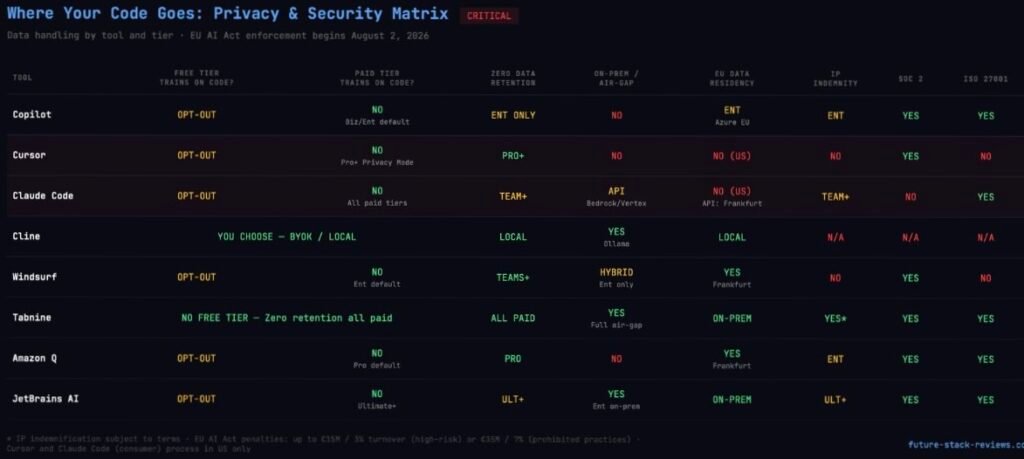
GitHub Copilot processes prompts through GitHub’s systems and model providers. On Free, Pro, and Pro+ plans, interaction data can be used for training unless the user opts out. Business and Enterprise tiers exclude data from training by default. Content exclusion is a Business/Enterprise feature only. The cloud coding agent ignores content exclusions entirely.
Cursor routes all AI requests through its own AWS backend, even with a user-configured API key. No self-hosted deployment option exists. Privacy Mode on Pro and Teams provides zero retention.
Windsurf processes AI requests on its own servers. Automated zero data retention is available starting at the Teams tier ($40/user/mo). Hybrid deployment is Enterprise-only. Windsurf operates a German GPU cluster in Frankfurt, making it one of the few tools offering EU data residency.
Claude Code is processed through Anthropic’s infrastructure. Training is opt-out on all plans. No self-hosted option for the consumer product, though Enterprise customers can route through AWS Bedrock in EU regions (Frankfurt).
Tabnine offers SaaS, VPC, on-premises, or fully air-gapped deployment. Zero code retention at every paid tier. No training on customer code. The widest deployment flexibility in the market, available starting at the $39/user/mo Code Assistant tier.
Cline sends code wherever you point it. Local models via Ollama mean nothing leaves your machine. Cloud APIs send code to the model provider under their terms. Full control, full responsibility.
No grace period. Penalties up to €15M or 3% of global turnover for high-risk non-compliance. Up to €35M or 7% for prohibited practices.
US-only processing: Cursor, Claude Code (consumer). EU residency available: Windsurf (Frankfurt), Amazon Q (Frankfurt), Tabnine (on-prem), Copilot Enterprise (Azure EU), JetBrains AI (on-prem).
The EU AI Act becomes enforceable on August 2, 2026 for high-risk systems. No grace period. For AI coding assistants used in standard development (not safety-critical, employment, or biometric contexts), the classification is likely “limited risk” with basic transparency obligations. But for tools deployed in regulated industries, compliance requirements include conformity assessments, data governance documentation, and automatic event logging.
Of the tools in this guide, Tabnine (on-prem), JetBrains AI Enterprise (on-prem), Amazon Q Developer Pro (AWS Frankfurt), Windsurf (Frankfurt GPU cluster), and GitHub Copilot Enterprise (Azure EU regions) offer EU data residency options. Cursor and Claude Code (consumer product) process data in the US, presenting compliance challenges for European organizations.
Non-compliance penalties reach up to €15 million or 3% of global turnover for high-risk system violations, and up to €35 million or 7% for prohibited practices.
The Real Cost for a 50-Developer Team
The subscription price is the smallest part of the real bill.
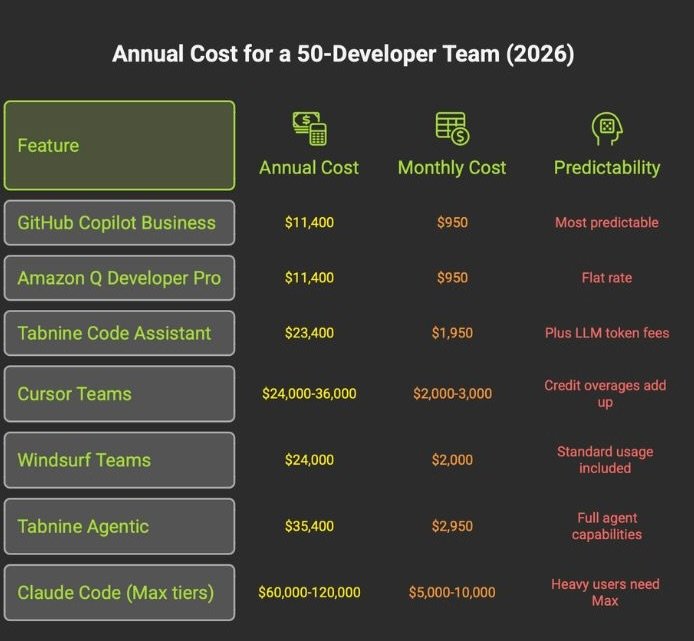
The hidden costs nobody puts on the invoice: every line of AI-generated code requires human review. A 2026 Sonar developer survey found that 96% of developers do not fully trust AI-generated code for functional completeness. Thirty-eight percent said reviewing AI code is harder than reviewing human code. The minutes saved in generation return as debugging and rewrite time when verification is skipped.
GitClear analyzed 211 million changed lines and found that copy-pasted code exceeded moved/refactored code for the first time in the dataset’s history. Duplicate-block prevalence rose from 0.45% in 2022 to 6.66% in 2024. Lines requiring revision within 30 days climbed 20-25% over baseline. Teams leaning heavily on AI generation are accumulating duplication and churn at a rate that should concern any engineering leader thinking beyond the current quarter.
And the skill cost: a study on AI-assisted coding found a 17% reduction in measured learning on follow-up assessments among developers who used AI assistants, with no meaningful time savings on the initial task. For junior developers, this is the most dangerous hidden cost in the category.
96% of devs don’t trust AI code. Every line requires review. Minutes saved in generation return as debugging time.
Copy-paste code surpassed refactored code for the first time in 2024. Duplication rose from 0.45% to 6.66% in two years.
17% reduction in learning. No time saved on initial task. Junior devs hit hardest. The most dangerous hidden cost.
Who Should STAY on GitHub Copilot
This section exists because a credible alternatives guide should tell you when not to switch.
You are deeply embedded in the GitHub ecosystem. Copilot’s native integration with Issues, PRs, Actions, cloud agents, and Spaces creates workflow advantages that no alternative can replicate. If your team’s entire development lifecycle runs through GitHub, switching your coding assistant means severing connections that compound across every developer, every day.
Your organization uses Copilot Business or Enterprise as part of a Microsoft agreement. Many large organizations get Copilot bundled into existing contracts. The marginal cost of Copilot may be zero. Switching to Cursor Teams at $40/user/mo or Tabnine at $39/user/mo means adding a new line item where none existed before.
You want low-friction, predictable assistance. Copilot at $10/mo Pro is still the lowest-cost paid option from a major vendor. It works. It suggests lines. You accept or reject. For developers whose primary need is reducing keystrokes on familiar code, the agentic power of Cursor or Claude Code is overkill.
Copilot has also improved in 2026. The terminal-native CLI went GA in February. Organization custom instructions are now generally available, addressing the historical complaint that Copilot ignored team-specific patterns. Copilot Spaces provides shared workspaces with file-level access controls. Multi-model support covers Claude, GPT, Gemini, and xAI. These are real improvements, and they specifically address the criticisms that drove early switching.
The switching cost is real. Beyond a seat swap, you are looking at policy migration, procurement review, data-processing assessment, model governance review, IDE rollout, and training. If Copilot is working for your team, not thrilling but working, the cost of disruption may exceed the benefit of switching.
The Decision Matrix
If you are a frontend developer (React, Tailwind, UI work): Cursor. Inline autocomplete, visual diffs, and component iteration speed are unmatched.
If you are a senior backend or platform engineer: Claude Code. Terminal-native workflow, multi-file refactoring, and MCP automation for the DevOps chain.
If you are an indie hacker building a SaaS: Cursor. Lower cost floor, broader model options, faster iteration cycles.
If you are a tech lead deciding team tooling: Cursor Teams. Centralized billing, predictable costs, lower onboarding friction than Claude Code’s permission system.
If you are CLI-native and work on large monorepos: Claude Code Max. The 1-million-token context window for cross-service understanding and autonomous execution.
If you are cost-conscious and comfortable managing APIs: Cline. Free client, direct API pricing, multi-model support, zero lock-in.
If your organization has strict security and compliance requirements: Tabnine Agentic Platform for air-gapped environments. GitHub Copilot Enterprise if cloud processing is acceptable within Microsoft’s compliance framework.
If your team already lives in JetBrains IDEs: JetBrains AI Ultimate. Stay in your configured environment.
If your infrastructure is AWS-native: Amazon Q Developer Pro. Cloud-context awareness that general-purpose tools lack.
FSR VERDICT
GitHub Copilot is no longer the uncontested default for AI-assisted coding. It remains the rational choice for teams embedded in the GitHub ecosystem, organizations with existing Microsoft agreements, and developers who want low-friction autocomplete at $10/mo. The March 2026 PR ads incident damaged trust, but it did not break the product.
The alternatives are real and differentiated. Cursor leads agentic editing. Claude Code leads raw reasoning depth and context scale. Cline leads cost transparency. Tabnine leads enterprise privacy. Each serves a specific developer profile, and none of them is the right tool for everyone.
The developers who extract the most value from AI coding tools in 2026 share one trait: they learned what their chosen tool is bad at and built their workflow around that constraint.
Choose based on your actual workflow, not on a benchmark screenshot. Verify pricing on the official page. And read the security documentation before your code ends up somewhere you did not intend.
All pricing in this article was verified on official product pages between April 7-10, 2026.
