
AdCreative.ai sells you a dream: paste your URL, let AI do the work, launch ads that convert. Three million users bought into it. We signed up, ran the tool, and checked the receipts. Here is what we found.
TL;DR — The Short Version
AdCreative.ai is a bulk ad creative generator built for paid media teams who need volume, not perfection. If you run $5K+ monthly ad spend across Meta and Google, the speed-to-variation ratio is real. For everyone else, you are overpaying for templated output you will need to fix by hand.
Who it is for: E-commerce operators and small agencies running heavy A/B testing on paid social. People who need 20 layout variations of the same offer in ten minutes.
Who it is not for: Solo creators, organic social managers, or anyone who expects production-ready design out of the box.
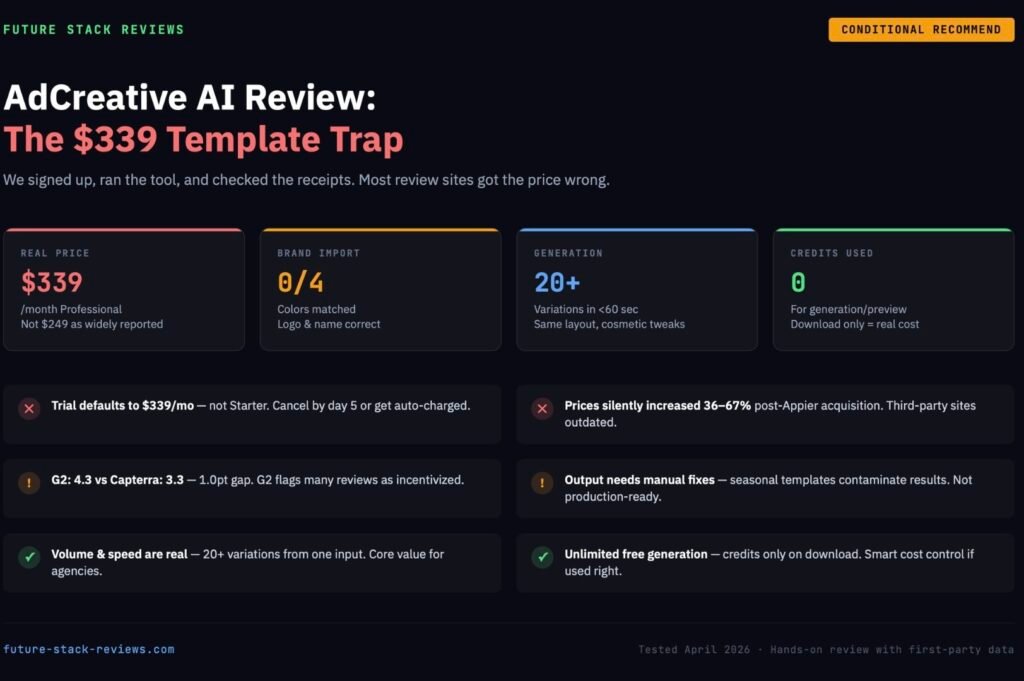
Recommended approach: Use the 7-day free trial to connect your actual ad account and test with real campaigns. Do not pick a plan until you have seen the output against your own brand assets. Set a cancellation reminder for day 5 — the default trial plan is Professional at $339/month, and it charges automatically.
The one thing other reviews will not tell you: The prices on third-party review sites are wrong. Most still list $249/month for Professional. The actual dashboard price as of April 2026 is $339/month for 75 credits.
[Try AdCreative.ai Free for 7 Days ]
Who Should Buy This (And Who Should Close This Tab)
There is a clear split in how people experience AdCreative.ai. We dug through hundreds of user reports across X, Reddit, Trustpilot, and G2 — and the pattern is consistent.
The users who stick around tend to be agency teams or e-commerce operators managing multiple brands. They spend north of $5,000 a month on ads. They do not need every creative to be perfect. They need volume. They generate 50 variations, pick the top 5, push them live, and let the ad platform’s algorithm sort out the winners. For that workflow, AdCreative.ai removes the bottleneck of waiting on a designer.
The users who cancel are almost always solopreneurs or small business owners who expected the AI to replace their entire design process. They sign up, generate a few creatives, realize the output needs manual cleanup, and feel like they got sold a magic box that does not actually work on its own. The Starter plan gives you 10 download credits a month. That is 10 images. For $39. You can get more from Canva Pro for $13.
One B2B SaaS founder put it bluntly on X in March 2026: the outputs were not production-ready regardless of branding settings, and he ended up building his ads manually with a code-based approach instead.
If your monthly ad spend is below $2,000, or if you only need a handful of creatives per month, this tool is not built for you. That is not a knock on AdCreative.ai — it is just the wrong tool for that job.
What AdCreative AI Actually Does (We Tested It)
We created a free trial account on April 1, 2026 and ran the full workflow from signup to creative generation. Here is what happened, step by step.
Brand Import: The Logo Works, The Colors Do Not
AdCreative.ai has an “Import from Website” feature that scans your URL and pulls in your brand identity. We tested it with our own site.
What it got right: Brand name (“Future Stack Reviews”) and logo — both pulled correctly.
What it got wrong: Every single color. Our actual brand palette is dark backgrounds (#0A0A14), blue (#5BA4F5), and green (#4ADE80). The AI returned #381D4D (purple), #D7B792 (beige), #55CDE5 (cyan), and #4189AD (steel blue). Zero out of four colors matched.
This matters because every creative you generate after brand setup inherits those colors. If the import gets them wrong — and in our test, it got all of them wrong — every single ad comes out off-brand. You can fix the colors manually before generating, but the tool does not warn you that the import might be inaccurate. It just moves you forward to the next step as if everything is fine.
Creative Generation: Fast, Templated, Imperfect
We set up a basic 1080×1080 post-size ad with the headline “Boost Your Ad Performance With AI” and the subline “Generate high-converting ads in seconds.” We selected a stock image from the built-in library and hit Generate.
Speed: Under 60 seconds. It generated over 20 variations from a single input. That is the core value proposition working as advertised.
Quality: Mixed. The top-scoring variations (95–100 on their Conversion Score) had clean text hierarchy and decent layout balance. The mid-range ones (84–90) started recycling the same layout patterns with minor shifts. The bottom ones included Valentine’s Day heart decorations on our tech ad — some kind of seasonal template contamination that had nothing to do with our input.
The Conversion Score: Every creative gets rated from 0 to 100 on predicted conversion potential. The scoring is trained on what AdCreative.ai claims is 450 million ads and $34 billion in ad spend data. The problem is transparency — there is no way to see why a 98 scores higher than a 96, or what specific elements drive the prediction. It feels useful for quick sorting but not for strategic decision-making.
Credit consumption: Generating and previewing creatives costs zero credits. Credits are only consumed when you download. This is a real advantage — you can generate unlimited variations and only pay for the ones you actually want. Our account showed 13 credits (we gained 3 bonus credits through onboarding steps) and the number did not drop during generation.
What We Did Not Test
Competitor Insights, Video Ads, and Connected TV features were available in our trial but require connected ad accounts and longer evaluation periods to assess meaningfully. We are not going to pretend a 30-minute trial gives us enough data to judge ad performance prediction accuracy. Other review sites do this. We will not.
The Pricing Reality: What Other Reviews Get Wrong
This is the most important section of this review.
If you search “AdCreative AI pricing” right now, most results will show you these numbers:
| Plan | Price (Widely Reported) | Credits (Widely Reported) |
|---|---|---|
| Starter | $39/month | 10 |
| Professional | $249/month | 100 |
| Ultimate | $599/month | 500 |
These numbers appear on G2, Capterra, affiliate sites, and pricing aggregators. They are out of date.
When we logged into our trial account dashboard on April 1, 2026, the actual pricing displayed was:
| Plan | Actual Price (April 2026) | Actual Credits |
|---|---|---|
| Starter | $39/month | 10 |
| Professional | $339/month | 75 |
| Ultimate | $999/month | 100 |
Professional went from $249 to $339 — a 36% increase — while credits dropped from 100 to 75. Ultimate went from $599 to $999 — a 67% increase — while credits dropped from 500 to 100.
AdCreative.ai was acquired by Appier Group (Tokyo Stock Exchange: 4180) for $38.7 million in February 2025. The price increases likely followed the acquisition, but no public announcement was made about the change. Third-party sites have not updated their data.
If you are making a purchasing decision based on a review that says Professional costs $249 for 100 credits, you are working with bad information. The actual cost per credit at the Professional tier is now $4.52, not $2.49.
Annual billing does reduce the monthly cost by roughly 40%, which brings Professional closer to the $200 range — but that requires a 12-month commitment upfront.
The Free Trial Trap (And How to Survive It)
The 7-day free trial gives you full Pro feature access and 10 credits. That part is fair. The trap is in the details.
Your trial defaults to the Professional plan at $339/month. When we checked our account settings, the “Activate (Current Plan)” button was on Professional — not Starter. If you do not cancel before day 7, you get charged $339. Not $39.
The day-5 reminder email can land in spam. AdCreative.ai sends a reminder two days before the trial ends. Multiple users on Reddit and Trustpilot report never receiving it, or finding it in their spam folder after the charge already hit.
Prepaid cards are blocked. The signup page explicitly states prepaid cards are not accepted. You must use a real credit card, which limits your ability to control exposure.
The refund window is narrow. Monthly plans get a 7-day refund window; yearly plans get 30 days. In both cases, the refund is only available if you have not used the service — meaning if you generated and downloaded creatives during your trial-turned-subscription, your refund claim gets complicated.
The Correct Way to Do the Trial
- Sign up with a real credit card — there is no way around this
- Immediately set a phone alarm for day 5 (not day 6, not day 7 — day 5 gives you a buffer)
- Connect your actual ad accounts during the trial — this is the only way to evaluate whether the tool integrates with your real workflow
- Generate creatives for a campaign you are actually running — do not test with hypothetical inputs
- Download only the creatives you genuinely plan to use — remember, credits only count on download
- On day 5, make your decision: upgrade to a paid plan or cancel
- If canceling: go to Settings → Subscription → Cancel. Screenshot the confirmation page. Check your email for a cancellation confirmation
Do not assume the reminder email will save you. Treat the trial like a countdown.
AdCreative AI vs. The Alternatives
vs. Canva Pro ($13/month)
Canva wins on design control, template variety, brand kit accuracy, and price. If you need 5–10 polished creatives a month with precise brand alignment, Canva Pro does that for a fraction of the cost.
AdCreative.ai wins on volume and speed. If you need 50 variations of the same offer for split testing, Canva requires you to manually duplicate and adjust each one. AdCreative.ai generates 20+ in under a minute.
The honest take: For most small businesses, Canva Pro is the better investment. AdCreative.ai only makes sense when your workflow demands bulk variation output that would take a human designer hours to produce.
vs. QuickAds ($9/month)
QuickAds enters at $9/month with 90 downloads — compared to AdCreative.ai’s $39 for 10. On a pure cost-per-download basis, QuickAds is roughly 16x cheaper at the entry level. QuickAds also offers a free plan with 20 watermarked downloads, giving you a risk-free way to evaluate the tool.
The trade-off is that AdCreative.ai has a deeper feature set at higher tiers: Competitor Insights, Creative Scoring AI, and Compliance Checker are features QuickAds does not match. If you are an agency spending $10K+ monthly and need competitive intelligence baked into your creative workflow, AdCreative.ai has a structural advantage there.
vs. Hiring a Freelance Designer ($200–$500/project)
A decent freelance designer on Upwork or Fiverr will produce 5–10 custom ad creatives for $200–$500, with full revision rounds and pixel-perfect output. The turnaround is 3–7 days.
AdCreative.ai produces 20+ variations in under a minute for $39–$339/month, but the output requires manual review and often manual correction. The designer gives you fewer creatives with higher individual quality; the AI gives you more creatives with lower individual quality.
If you run one or two campaigns a month, a freelancer is almost certainly better value. If you run 10+ campaigns across multiple brands simultaneously, the math starts to favor AdCreative.ai — but only at the Professional tier and above.
If you’re exploring AI creative tools beyond ads, we also compared 8 alternatives to Synthesia for video.
Real Limitations They Do Not Advertise
Template fatigue. After your first few generations, you start noticing the patterns. The AI has a finite set of layout frameworks it pulls from, and the “variations” are mostly repositioning the same elements within those frameworks. The 20 creatives it generates from one input are not 20 fundamentally different designs — they are 5–6 layout templates with cosmetic tweaks.
The editor is painful. If a text box is two pixels off center, or if the font size needs a minor adjustment, the built-in editor makes simple fixes unnecessarily difficult. Several users across platforms compare it unfavorably to Canva’s drag-and-drop editor. This is the single most consistent product complaint outside of billing.
Customer support has a reputation problem. Capterra’s aggregate gives customer support 3.2 out of 5. Trustpilot reviews cluster around billing dispute resolution — users report promised refunds that take weeks to process, or do not arrive at all. One documented case from early 2026 involved a refund promised in writing in November 2025 that was still undelivered two months later, resulting in a bank chargeback.
G2 scores do not tell the full story. AdCreative.ai scores 4.3 on G2 but 3.3 on Capterra and 3.6 on Trustpilot. That 1.0-point gap between G2 and Capterra is unusually large for SaaS products. G2 flags many of its AdCreative.ai reviews as “incentivized,” which may partially explain the discrepancy.
The Company Behind the Tool
AdCreative.ai was founded in Paris in March 2021 by Tufan Gok, Alexandre Leciel, Tarik Ince, and Yusuf Kaya. It grew to over 2 million users across 194 countries before being acquired by Appier Group (TSE: 4180) for $38.7 million in February 2025.
Appier is a Tokyo-listed AI company focused on advertising technology and marketing automation. The acquisition was Appier’s fifth since 2018 and was framed as expanding their generative AI portfolio into Europe. Alexandre Leciel remains CEO of AdCreative.ai post-acquisition.
This matters for two reasons. First, the price increases we documented likely correlate with the acquisition — new ownership typically means new revenue targets. Second, having a publicly traded parent company (Appier’s market cap is in the billions) provides some stability assurance that the platform will not disappear overnight, which is a real concern with smaller AI startups.
Final Verdict
AdCreative.ai is a specialized tool that does one thing well: it generates a high volume of ad creative variations at speed, scored by predicted conversion potential. If your business model depends on running dozens of ad variations across multiple campaigns simultaneously, and you have the ad spend to justify a $339/month Professional plan, the productivity gain is real.
But the gap between what AdCreative.ai markets and what it delivers is wider than it should be. The brand import misreads your colors. The pricing has quietly increased by 36–67% since the Appier acquisition. The free trial defaults to the most expensive non-Enterprise plan. The customer support reviews are rough. And the generated creatives, while fast, are not production-ready without manual intervention.
If you decide to try it, use the trial strategically: connect real ad accounts, generate for real campaigns, set your cancellation alarm, and make a data-driven decision before day 5. Do not let the trial convert passively into a $339 monthly charge.
For most readers of this site — people evaluating AI tools for their stack — Canva Pro at $13/month or QuickAds at $9/month will cover 80% of what you actually need at a tenth of the cost. Start there. Graduate to AdCreative.ai only when your ad volume demands it.
Building your review content stack? See how we use Surfer SEO to optimize every article on this site.
[Try AdCreative.ai Free for 7 Days ]
