Last updated: May 7, 2026
Picking between Hostinger and Namecheap is not really about which one is “better.” It is about whether you are buying a hosting plan that happens to come with a domain, or a domain that happens to come with hosting. That distinction changes everything about what you should pay attention to, and every comparison article currently ranking on Google gets it wrong.
We cross-referenced official pricing pages, dug through X threads and Reddit complaints, pulled academic research on pricing psychology and switching costs, and verified every number you see below against live screenshots taken on April 18, 2026. This is the comparison we wish existed when we set up our own site. (For the full breakdown of what we actually run and pay for, including Hostinger, see our 22-tool operational audit.)
TL;DR
Namecheap if you want the cheapest functional starter stack with strong domain economics and email that does not expire after 12 months. Hostinger if you want the smoothest first-site experience, more data center locations, and a cleaner path to scaling up. Both use LiteSpeed servers. Both include free SSL and WHOIS privacy. The real differences are in what happens after the promo period ends.
Quick Start: Just Tell Me Which One
You need a domain and basic hosting for a small site. You want to spend as little as possible for the first year and not get ambushed by hidden costs in year two.
Go with Namecheap Stellar ($1.98/mo billed annually) if any of these apply: you want 30 mailboxes included without a time limit, you want free CDN on the cheapest plan, you care about cPanel portability, or you plan to manage multiple domains long-term.
Go with Hostinger Premium ($2.99/mo billed for 48 months) if any of these apply: you want the absolute easiest setup experience for your first website, you want to pick from 12 data center locations instead of 4, or you expect to upgrade to Business tier within a year.
That is the honest split. Everything below explains why.
The Real Pricing Nobody Shows You
Every competing comparison article fixates on the promotional monthly price and stops there. That is lazy, and it costs you money. The real cost of hosting is not what you pay today. It is what you pay when the promo expires and you are too deep to switch without pain.
Here is the actual pricing from both official sites, verified April 18, 2026.
Hostinger Shared Hosting
| Plan | 48 months | 24 months | 12 months | Monthly | Renews at |
|---|---|---|---|---|---|
| Premium | $2.99/mo | $3.49/mo | $3.99/mo | $11.99/mo | $10.99/mo |
| Business | $3.99/mo | $4.49/mo | $4.99/mo | $18.99/mo | $16.99/mo |
| Cloud Startup | $7.99/mo | $8.99/mo | $9.99/mo | $27.99/mo | $25.99/mo |
Namecheap Shared Hosting
| Plan | 1st Year | Monthly Equiv. | Renews at |
|---|---|---|---|
| Stellar | $22.88/yr | $1.98/mo | $48.88/yr |
| Stellar Plus | $34.88/yr | $2.98/mo | $74.88/yr |
| Stellar Business | $58.88/yr | $4.98/mo | $112.88/yr |
Now do the math most reviews skip.
Hostinger Premium for 48 months costs you $143.52 upfront. That is the cheapest per-month rate, but you are paying for four years in advance to get it. If you pick 12 months instead, it is $47.88 for the first year, then $131.88 per year after that ($10.99/mo renewal). Your second year costs almost three times your first year.
Namecheap Stellar for 12 months is $22.88. Renewal is $48.88/yr. Your second year costs about double your first year. Still a jump, but a smaller one.
Here is what that looks like over three years if you pick the most popular billing term at each:
Hostinger Premium (48mo term): $143.52 for 48 months = $35.88/year average. Namecheap Stellar (yearly): $22.88 + $48.88 + $48.88 = $120.64 for 36 months = $40.21/year average.
Hostinger is actually cheaper over three years if you commit to the 48-month lock-in. But if you only want to commit for 12 months at a time, Namecheap wins the first year by a wide margin ($22.88 vs $47.88), and the renewal gap narrows significantly.
One more thing. Namecheap offers a 30-day free trial on all shared hosting plans. Not a money-back guarantee. An actual free trial. Hostinger offers a 30-day money-back guarantee, which means you pay first and ask for a refund if you do not like it. Small difference, real difference.
Domain pricing is a whole separate game.
| TLD | Hostinger 1st Year | Hostinger Renewal | Namecheap 1st Year | Namecheap Renewal |
|---|---|---|---|---|
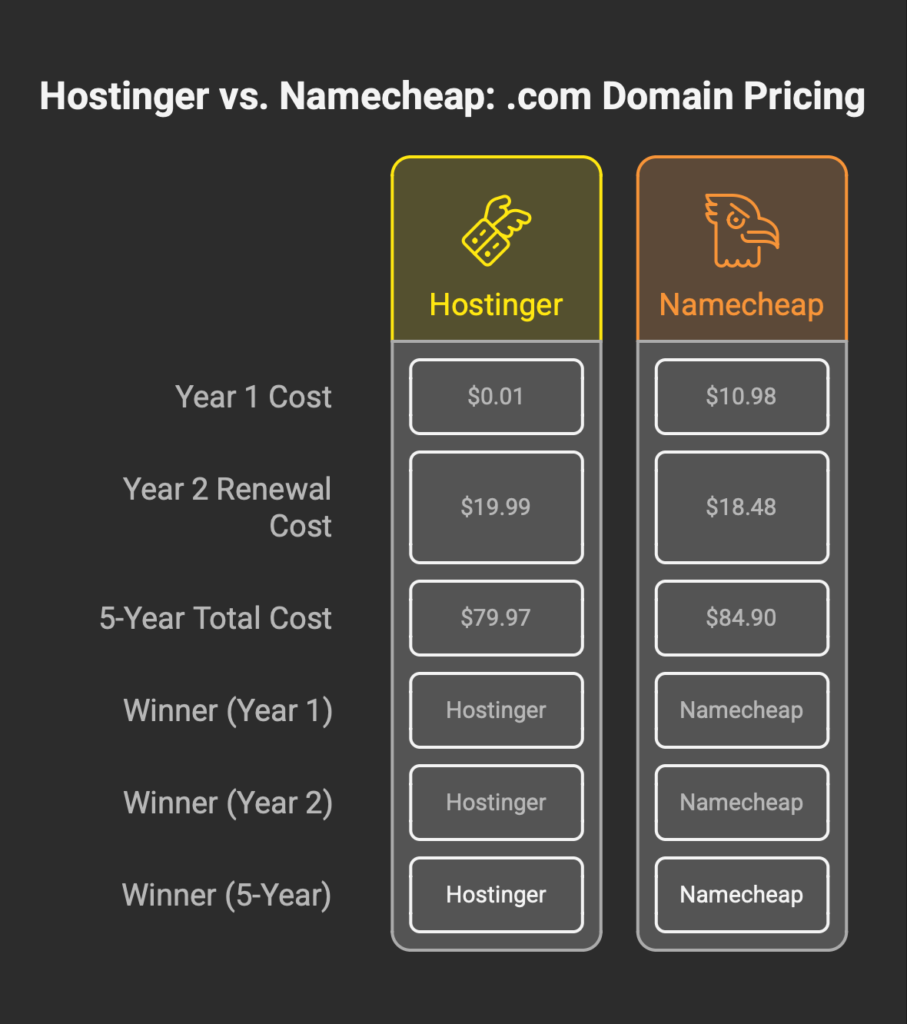
| .com | $0.01 | $19.99 | $10.98 | $18.48 |
| .net | $11.99 | $17.99 | $12.48 | $18.58 |
| .io | $31.99 | $67.99 | $34.98 | $75.98 |
| .org | $12.29 | ~$16.99 | $7.48 | $15.98 |
Hostinger’s $0.01 .com is eye-catching. It is also a loss leader designed to get you into a hosting contract. The renewal price of $19.99 is higher than Namecheap’s $18.48, which is the number that actually matters if you plan to keep the domain for more than a year. And most people do. If you are managing a portfolio of 10+ domains, the lower renewals compound into real savings over time — something Namecheap was built around from day one, since they started as a registrar, not a host.
A 2024 study in the Journal of Theoretical and Applied Electronic Commerce Research found that all-inclusive pricing produces higher perceived value and purchase willingness than partitioned pricing structures. Hostinger’s approach of bundling a “free” domain with hosting and then presenting a $19.99 renewal later is textbook partitioned pricing. Namecheap’s transparent renewal rates align more closely with what that research says consumers prefer, though whether anyone actually reads the research before buying a $10 domain is a separate question entirely.
Full Feature Comparison
Comparing the cheapest plan at each provider, Hostinger Premium vs Namecheap Stellar.
| Feature | Hostinger Premium | Namecheap Stellar | Edge |
|---|---|---|---|
| Price (annual billing) | $3.99/mo ($47.88/yr) | $1.98/mo ($22.88/yr) | Namecheap |
| Websites | 3 | 3 | Tie |
| Storage | 20 GB SSD | 20 GB SSD | Tie |
| Bandwidth | Unlimited | Unmetered | Tie |
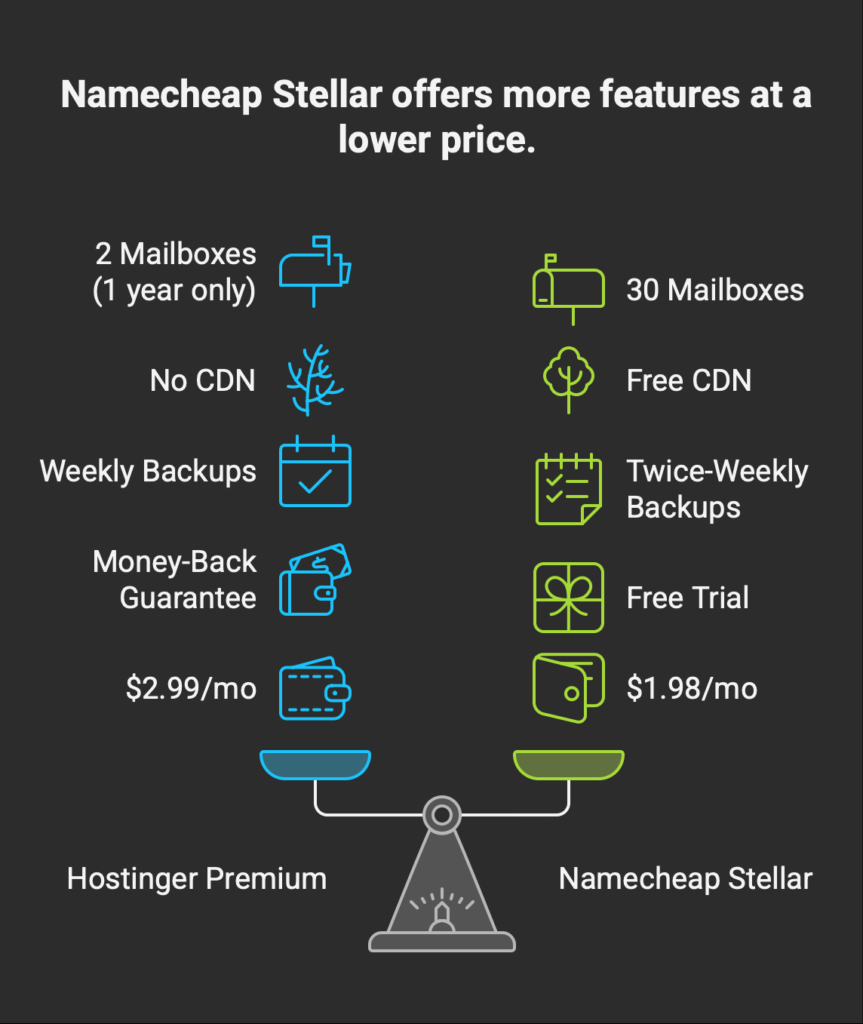
| Mailboxes | 2 per site, free for 1 year | 30, no time limit | Namecheap |
| Backups | Weekly | Twice-weekly | Namecheap |
| Free CDN | No (Business+ only) | Yes (all plans) | Namecheap |
| Free SSL | Yes | Yes | Tie |
| WHOIS Privacy | Free | Free for life | Tie |
| Control Panel | hPanel (proprietary) | cPanel (industry standard) | Depends |
| Web Server | LiteSpeed | LiteSpeed | Tie |
| Data Centers | 12 locations | 4 regions (US, UK, EU, Asia) | Hostinger |
| Uptime SLA | 99.9% | 100% | Namecheap |
| Free Trial | No (30-day refund) | 30 days free | Namecheap |
| AI Website Builder | Yes (15 credits) | Yes (Sitejet AI) | Tie |
| Daily Backups | Business+ only | Stellar Plus+ (AutoBackup) | Tie |
| Free Migration | Yes | Yes | Tie |
One thing stands out. Namecheap’s cheapest plan includes features that Hostinger reserves for its second or third tier — free CDN, more mailboxes, twice-weekly backups, and a real free trial where you pay nothing for 30 days. Hostinger’s cheapest plan counters with more data center locations and a smoother onboarding UI, which matters if you have never touched a hosting dashboard before and the thought of cPanel makes you nervous.
Side note that almost no comparison article mentions: both providers now run LiteSpeed web servers. You will find plenty of 2024 and early 2025 articles claiming Namecheap uses Apache. That was true once. It is not true anymore. The performance gap that used to exist between these two on the server side has largely closed.
The Email Trap
This is the single biggest practical difference that competing reviews either bury in a footnote or skip entirely.
Hostinger Premium includes 2 mailboxes per website, free for one year. After that first year, you either pay for email hosting separately or lose your business email addresses. The official pricing page says it in small text: “2 mailboxes per website – free for 1 year.” Namecheap Stellar includes 30 mailboxes with no expiration date, and they are part of the plan for as long as you are subscribed, which is a gap wide enough that it genuinely surprised me when I first verified it side by side.
For a solo blogger, this probably does not matter. For a small business running info@ and support@ and sales@ addresses, losing email access after 12 months unless you pay extra is not a minor inconvenience. It is a budget surprise that hits at exactly the wrong time, right when you are deciding whether to renew at the higher rate.
I have seen this play out. You set up your site, configure your email, hand out business cards with your custom domain email, build workflows around it, maybe connect it to your CRM or your invoicing tool. Twelve months later, Hostinger says pay more or lose it. If email is a core part of your stack, the hosting provider’s bundled mailboxes might not be enough anyway — we compared dedicated email platforms and their real costs here. By then, switching providers means migrating your site, your email, your DNS, and probably a weekend of downtime you did not plan for. That is not a bug in Hostinger’s pricing. It is the pricing.
This pattern of buried documentation is not specific to hosting. The Napkin AI Pro review documents a similar contradiction in the visual generation category, where the help-center plan-comparison article and the public pricing FAQ disagree on whether Plus tier users can purchase credit top-ups at all. The conflict is not flagged in any other public review of the product. The category changes. The mechanism does not. If a vendor’s documentation contradicts itself, the buyer pays for the gap.
The CDN Trap
Quick version: Hostinger’s pricing comparison page shows a dash next to “Free CDN” on the Premium plan. Business tier or higher to get it. Namecheap includes Supersonic CDN on all shared hosting plans, even Stellar at $1.98/mo.
A 2022 study on web page loading optimization demonstrated that cross-domain resource delivery techniques can cut median load times by up to 44%. If your audience is spread across multiple countries, not having a CDN means some of them are waiting longer for your pages to load. You can always add Cloudflare’s free tier manually to either provider — and honestly, if you are serious about performance, you probably should regardless of what is bundled — but the principle stands. The cheaper option includes something the more expensive option charges extra for. That is unusual enough to be worth flagging.
hPanel vs cPanel: This Is Not Cosmetic
Hostinger built its own control panel called hPanel. Namecheap uses the industry-standard cPanel. If you have never managed a website before, hPanel is genuinely easier to learn — the interface is cleaner, the terminology is simpler, and the onboarding flow holds your hand more effectively. Hostinger deserves credit for this, and it is probably the single biggest reason beginners end up there in the first place.
The cost nobody talks about is portability.
hPanel only exists inside Hostinger. Learn it, get comfortable with it, build muscle memory around it, and then try to move to SiteGround or DreamHost or literally any other host. Everything you learned is non-transferable. cPanel is used by hundreds of hosting companies. Learn it once, carry it everywhere. If you hire someone to manage your site, they almost certainly already know cPanel. I run my site on Hostinger and the hPanel lock-in is something I think about more than I expected to — not because hPanel is bad, but because knowing my hosting management skills are tied to one company feels like a dependency I did not sign up for.
A 2022 study in Production and Operations Management found that switching costs are a primary mechanism through which SaaS providers retain subscribers even when better alternatives exist. hPanel is easier to start with. cPanel is easier to leave with. That is the real trade-off, and it matters more than most feature tables suggest.
What Happens When You Want to Leave
Nobody writes about exit costs.
Every comparison is about which door to walk through. Nobody talks about what it costs to walk back out. Both Hostinger and Namecheap use the standard domain transfer process — unlock the domain, get an EPP/authorization code, initiate transfer at the new registrar, wait 5-7 days, and deal with the 60-day lock after registration during which you cannot move the domain again. Hosting migration is worse. Back up your files and databases, set up the new environment, restore everything, test it, update DNS, wait for propagation. If you have email configured on top of that, you are looking at a full weekend project at minimum.
Both providers offer free migration for incoming customers. Neither makes it particularly easy to leave.
The practical advice: whichever you choose, keep your own backups. Do not rely solely on the hosting provider’s backup system. If you ever need to leave, having a recent backup cuts the migration time from days to hours. This is one of those things that sounds obvious until the day you actually need it and realize you never set it up.
The CVC Acquisition Nobody Is Talking About
In September 2025, CVC Capital Partners acquired a majority stake in Namecheap for approximately $1.5 billion.
That sentence should probably be higher up in this article, because it is the single most important fact about Namecheap’s future. CVC also owns WebPros, the company that operates cPanel and Plesk. So the private equity fund that now controls Namecheap also controls the hosting control panel software that Namecheap and hundreds of other hosting companies depend on. Whether that is a conflict of interest, a strategic advantage, or both depends on who you ask and what happens over the next two years.
Private equity acquisitions in the hosting industry have a pattern. GoDaddy went through it. EIG (now Newfold Digital) acquired dozens of hosting brands and gradually homogenized them. The playbook is usually: increase EBITDA through price hikes, cost cuts, or both. Namecheap’s current pricing — the Stellar plan at $1.98/mo with 30 mailboxes and free CDN — is genuinely one of the best bundles in budget hosting. Whether it survives under PE ownership is the question that nobody ranking for this keyword is asking.
On the other hand, CVC’s capital could fund infrastructure investments that make Namecheap’s hosting competitive in ways it has not been before. The founder, Richard Kirkendall, is still a major shareholder. Hostinger remains more independently held, though they took PE investment from ConHostinger in 2021 and distributed roughly 11.8 million euros in employee stock options in March 2026, which at least signals they are growing without selling control.
The Support Gap: Official Claims vs X Reality
“We typically respond in under 2 minutes and our team speak 8+ languages.”
That is from Hostinger’s official site. Namecheap advertises 24/7 live chat and email support, primarily in English. On paper, Hostinger sounds better. On X, the picture flips hard.
We reviewed 90 days of X posts mentioning both companies. Namecheap users frequently described support interactions as responsive and helpful — multiple users called it one of the best customer service experiences they have had with a hosting company, and the official Namecheap account actively engages with user issues on the platform. Hostinger support drew a different kind of attention. Slow response times, unresolved issues requiring public escalation, support interactions that ended with promises but not solutions. One thread with significant engagement detailed a site suspension over what the user described as a misidentified disclaimer, with no clear explanation from Hostinger.
There were also serious allegations from users, particularly in India, about domain registration failures where paid domains were not registered or were reassigned to other parties. One user filed a consumer complaint and took the issue to ICANN. These are individual cases and do not represent every Hostinger user’s experience.
But they exist, and they are public, and no competing review mentions them. That last part is what made us decide to include them here.
The Privacy Angle Most Reviews Skip
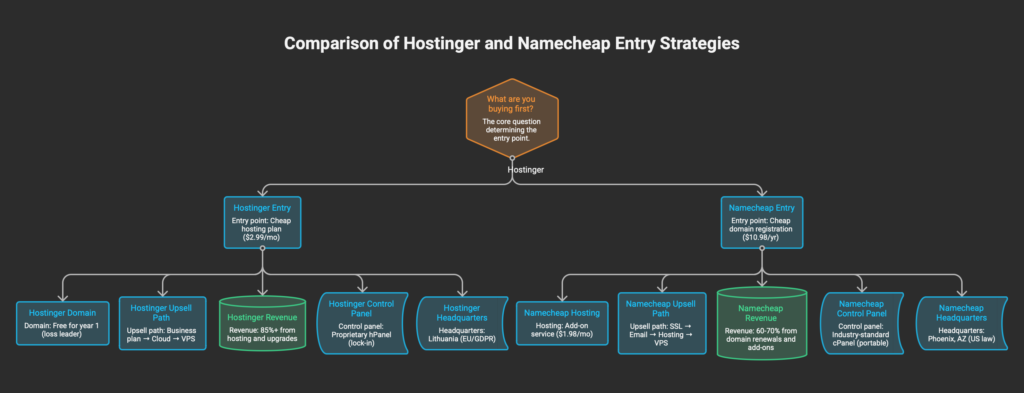
Hostinger is headquartered in Lithuania, inside the European Union, which means GDPR applies directly. Their data processing is governed by EU law, and they publish a transparent Data Processing Addendum referencing GDPR, UK GDPR, and EU Standard Contractual Clauses. Namecheap is headquartered in Phoenix, Arizona. US law applies, including FISA 702 and the CLOUD Act, which can compel data disclosure even for non-US users. For most people buying budget hosting, this distinction is academic. For anyone building a site that handles EU user data, or running a privacy-sensitive project, it is not.
Namecheap has earned its own privacy reputation though, and it is worth spelling out. In 2022, they publicly refused to comply with Russian domain seizure requests. They offer Bitcoin payments. Privacy-focused communities on Reddit and HackerNews tend to recommend Namecheap over Hostinger for anonymity-sensitive projects. These are real signals, but they operate within US legal constraints that EU-based Hostinger does not face.
One weird thing: Hostinger suffered a data breach in 2019 that affected 14 million users. Since then, they have implemented ISO 27001 certification, upgraded to SHA-2 hashing, and deployed BitNinja Security Suite across all plans. The breach happened. The response was substantial. The privacy question is not one-dimensional for either company — Namecheap has the reputation but the wrong jurisdiction, Hostinger has the right jurisdiction but a breach in its history. Make of that what you will.
Who Should Use Hostinger
First-time website builders who want the path of least resistance. hPanel is simpler than cPanel, full stop. The onboarding flow is designed for people who have never logged into a hosting dashboard, and it shows.
If your audience is in Southeast Asia, South America, or anywhere that Namecheap’s four data center regions do not cover well, Hostinger’s 12 locations give you a latency advantage that no amount of CDN configuration will fully replicate. The 48-month commitment is aggressive, but if you already know you are in this for the long run, the math works out to roughly $36/year — cheaper than Namecheap over the same period.
The 48-month commitment is aggressive, but if you already know you are in this for the long run, the math works out to roughly $36/year — cheaper than Namecheap over the same period. Just make sure you’re picking the right Hostinger plan before locking in.
One more thing that does not fit neatly into a comparison table: Hostinger’s Horizons AI builder is pushing into no-code app territory with Stripe integration and dynamic functionality. If the idea of building a small web app without writing code appeals to you, Hostinger is further along that path than Namecheap is. Whether it delivers on the promise is still early, but the direction is clear.
Who Should Use Namecheap
Domain-first people. If you manage more than a handful of domains, or if domain investing is part of what you do, Namecheap was literally built for that workflow. The newer Spaceship platform for bulk domain management makes this even more obvious.
The Stellar plan at $1.98/mo is hard to argue with on pure feature density — 30 mailboxes, free CDN, free SSL, twice-weekly backups, and a 30-day free trial where you pay nothing. No other provider at that price tier matches the bundle. If you want cPanel because portability matters to you, or because you have been burned by proprietary lock-in before, that is reason enough.
Look, if there is even a chance you might switch hosting providers in the next two to three years, learning cPanel now saves you from relearning everything later. The 30-day free trial also means you can test the entire experience — dashboard, email setup, SSL configuration, speed — before spending a dollar.
One caveat that cuts against Namecheap for a specific audience: if you are a European user who cares about GDPR compliance in your hosting provider’s jurisdiction, Hostinger actually wins that one. EU headquarters, direct GDPR applicability. Namecheap’s US base puts it under the CLOUD Act. Privacy is not one-dimensional, and this is the one place where the company with the better privacy reputation has the worse legal position.
The Question You Should Actually Be Asking
Most comparison articles ask “which is better” and then pick a winner based on whichever affiliate program pays more. Five out of five competing articles currently ranking for this keyword either declare Hostinger the winner or lean heavily toward it. All five have Hostinger affiliate links. Some have Namecheap links too, but the editorial tilt is consistent.
The more useful question is: what are you actually buying?
If you are buying a hosting plan and want a domain thrown in as a bonus, Hostinger’s $0.01 .com plus integrated hPanel makes the onboarding frictionless. You trade portability for simplicity. If you are buying a domain and want affordable hosting attached to it, Namecheap’s registrar-first DNA means the domain management experience is stronger, the email is more generous, and the pricing is more transparent. You trade beginner-friendliness for long-term flexibility.
Neither of these is the wrong choice. But they are different choices, and pretending they are the same product with different logos is how you end up surprised by a renewal bill or an expired email address 12 months from now.
We would watch Namecheap’s pricing under CVC ownership. If the private equity playbook follows the usual pattern, today’s $1.98/mo Stellar plan might look different in 18 months. Hostinger’s pricing has been stable, but that 3.7x renewal multiplier on Premium is already doing a lot of the heavy lifting their promo pages do not show you. Honestly, both companies are betting you will not do this math before you sign up — and based on the competing articles we read, they are mostly right.
Stay with the review desk
Choose a channel to keep reading.
Share this review