Last updated: April 18, 2026
GetResponse and Kit (formerly ConvertKit) show up in the same “email marketing” search results. They occupy different planets. One is a campaign suite that bolts on webinars, courses, and funnels. The other is an audience engine built around one subscriber record and creator monetization. Most comparison articles line up features in a table and tell you “it depends.” This one does the math.
BRIEFING SUMMARY — TL;DR
Kit raised prices by 120% (annual billing) in September 2025. At 10,000 subscribers, Kit Creator now costs $139/month. GetResponse Marketer costs $114/month for the same list size — $25 less — with unlimited automation workflows, abandoned cart triggers, and sales funnels included. GetResponse Creator at $134/month adds native webinar hosting on top of that.
Buy GetResponse if you run webinars, need multi-step automation, or sell through ecommerce funnels. Start with Marketer ($59/month) if you don’t need webinars. Start with Creator ($69/month) if you do.
Buy Kit if your business model is “I publish, I build trust, I sell digital products to my audience.” Kit’s native commerce (3.5% + $0.30 per transaction), paid newsletter subscriptions, and creator recommendation network have no equivalent in GetResponse. Start with Creator ($39/month).
Buy neither if you only need basic newsletters (MailerLite at $10/month), deep ecommerce analytics (Klaviyo), or complex B2B lifecycle automation (ActiveCampaign).
THE $20 QUESTION NOBODY’S ASKING
At 1,000 contacts, GetResponse Marketer costs $59/month. Kit Creator costs $39/month. That $20 gap looks like a clear win for Kit.
It’s not. That $20 buys you unlimited automation workflows, contact tagging, contact scoring, abandoned cart triggers, web event tracking, sales funnels, and promo code management. Kit Creator gives you unlimited Visual Automations and email sequences, but no ecommerce triggers, no sales funnels, no built-in promo codes, and no contact scoring.
The $20 shrinks as your list grows, then flips. At 5,000 subscribers, GetResponse Marketer is $95/month. Kit Creator is $89/month. The gap is $6. At 10,000, GetResponse Marketer is $114/month. Kit Creator is $139/month. Kit is now $25 more expensive than GetResponse, and GetResponse still includes more marketing automation features at that price.
The question was never “which is cheaper at 1,000 contacts.” The question is: what happens to the bill when your audience grows and your business needs automation that works?
KIT’S 2025 PRICE HIKE CHANGED EVERYTHING
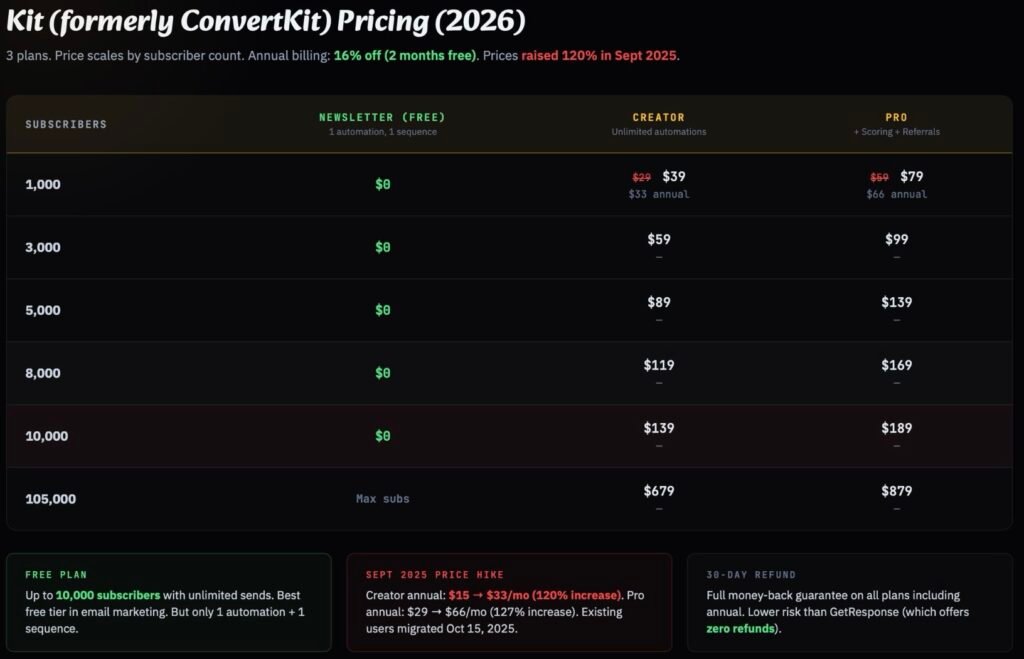
In September 2025, Kit (then still transitioning from the ConvertKit brand) raised prices across all paid tiers. The headline number (Creator going from $29 to $39 per month) sounds like a 35% bump. That’s the monthly billing number.
The annual billing number tells the real story. Creator went from $15/month to $33/month on annual plans. That’s a 120% increase. Creator Pro went from $29/month to $66/month annually. A 127% increase. These are not incremental adjustments. Kit repositioned itself from an affordable creator tool to a premium audience platform.
The price hike changed the competitive math against GetResponse at every list size above 1,000 subscribers.
MONTHLY BILLING — SIDE-BY-SIDE PRICING (2026)
| Subscribers | GR Marketer | GR Creator | Kit Creator | Kit Pro | Cheaper |
|---|---|---|---|---|---|
| 1,000 | $59 | $69 | $39 | $79 | KIT |
| 5,000 | $95 | $109 | $89 | $139 | KIT (+$6) |
| 10,000 | $114 | $134 | $139 | $189 | GR (-$25) |
| 100,000 | $599 | $690 | $679 | $879 | GR (-$80) |
Sources: getresponse.com/pricing and kit.com/pricing, accessed April 2026. Monthly billing shown. GR annual discount: 18%. Kit annual discount: 16% (2 months free). GR Marketer includes unlimited automation, tagging, scoring, abandoned cart, sales funnels. GR Creator adds webinars, website builder, course creator. Kit Creator includes unlimited automations, sequences, and digital product sales.
The crossover happens between 5,000 and 10,000 subscribers. Below 5,000, Kit is slightly cheaper. Above 5,000, GetResponse is cheaper and includes more marketing tools. At 100,000 subscribers, GetResponse Marketer costs $599/month versus Kit Creator at $679/month, an $80/month gap, or $960/year. And GetResponse at that price includes abandoned cart automation, sales funnels, contact scoring, and promo code management that Kit doesn’t offer at any price.
Kit’s free Newsletter plan complicates this picture. It supports up to 10,000 subscribers with unlimited email sends, unlimited landing pages, and audience tagging. If all you do is send broadcast emails and collect subscribers through landing pages, Kit’s free plan is the best deal in email marketing. Period. But the free plan gives you one basic Visual Automation and one email Sequence. The moment you need a second automation workflow (a welcome series and an abandoned cart flow, for example), you’re on the paid Creator plan. And at 10,000 subscribers, that plan costs $139/month.
Speaking of hidden email costs: if your web hosting provider bundles “free” email that expires after 12 months, your email marketing budget just changed. [We found exactly that in our Hostinger vs Namecheap comparison.]
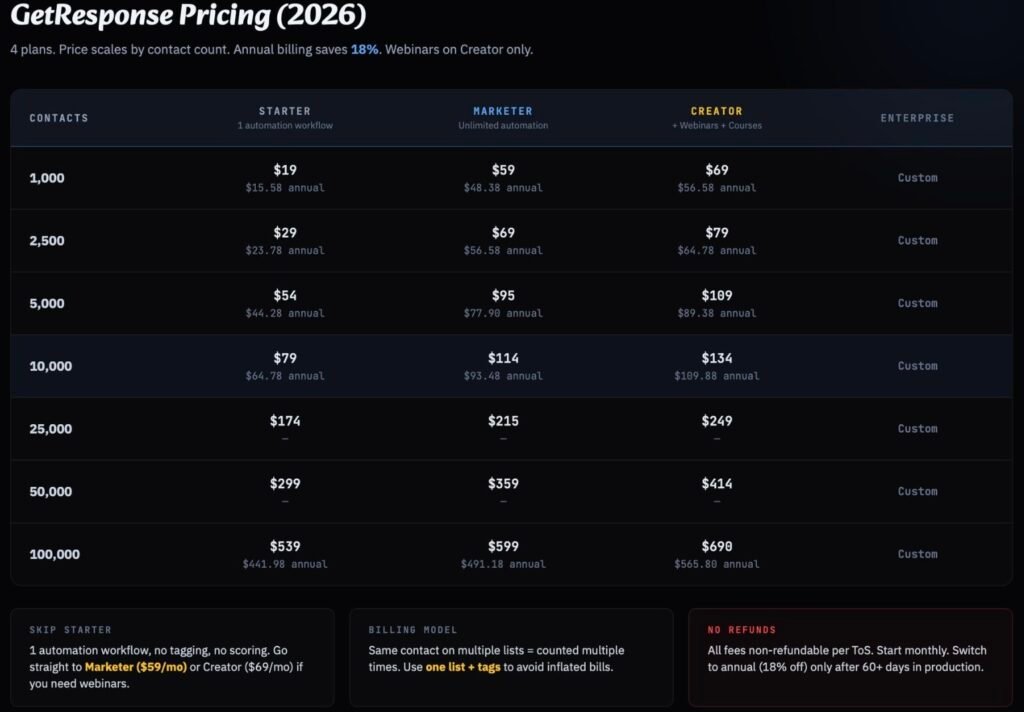
The hidden cost most comparisons miss: GetResponse counts the same email address separately across multiple lists. If you have one subscriber on three lists, that counts as three contacts toward your billing. Kit counts only unique, active subscribers. One person equals one billable subscriber regardless of tags or segments. For businesses with messy list structures or subscribers across multiple segments, GetResponse’s actual bill can be higher than the sticker price suggests. The fix is simple (use one list with tags instead of multiple lists), but many users don’t realize this until the invoice arrives.
TWO PHILOSOPHIES, ONE DECISION
This comparison keeps failing on most review sites because they treat GetResponse and Kit as competitors in the same category. They aren’t. They’re different products built on different assumptions about how your business works.
GetResponse is a campaign suite. It assumes your workflow looks like this: build a landing page, capture a lead, run an automation sequence, host a webinar or deliver a course, convert the lead to a customer, recover abandoned carts, and track revenue. The product is organized around campaigns, funnels, and conversion events. It wants to be every marketing tool you need in one login.
Kit is an audience engine. It assumes your workflow looks like this: publish content, grow your subscriber list through recommendations and landing pages, segment with tags, nurture with sequences, sell digital products or paid newsletter subscriptions directly to your audience, and use your creator profile to attract new subscribers. The product is organized around one subscriber record and every interaction that person has with your content.
What this means in daily practice: a GetResponse user thinks in campaigns. “I need to build a funnel for my new course launch.” A Kit user thinks in audience loops. “I need to tag everyone who clicked the link in Tuesday’s newsletter and send them a product pitch.”
Neither philosophy is wrong. But if you pick the wrong one for your business model, you’ll fight the tool every day.
Which philosophy ages better depends on what you’re building. For creator businesses (bloggers, newsletter writers, course creators, coaches), Kit’s subscriber-centric model keeps things simple as you scale. Your business grows around your audience, and Kit grows with that model. For small marketing teams running multi-channel campaigns with webinars, product launches, and ecommerce funnels, GetResponse’s suite model avoids the cost and complexity of stitching together five separate tools.
For companies that eventually need a real CRM with sales pipeline management, neither platform is the long-term answer. GetResponse doesn’t have deal tracking. Kit doesn’t have sales stages. At that point, the conversation shifts to HubSpot or ActiveCampaign’s CRM layer, and both GetResponse and Kit become the email execution layer underneath.
FEATURE FACE-OFF
FEATURE COMPARISON — WHAT MATTERS (2026)
| Feature | GetResponse | Kit |
|---|---|---|
| Automation Workflows | Unlimited (Marketer+). Visual builder with branching, scoring, tagging triggers | Unlimited (Creator+). Visual builder with tag/segment-based triggers |
| Native Webinars | ✓ Creator plan ($69/mo). 100 attendees, polls, Q&A, replays, automation-linked | ✗ No native webinars. Requires Zoom/WebinarNinja + integration |
| Digital Product Sales | Indirect. Ecommerce integrations (Shopify, WooCommerce) on Marketer+ | ✓ Native. Ebooks, courses, tip jars. 3.5% + $0.30/transaction |
| Paid Newsletters | Premium newsletter subscriptions on Creator plan | ✓ Native on all plans including Free. Built for recurring subscriber revenue |
| Abandoned Cart | ✓ Marketer+ ($59/mo) | ✗ Not available |
| Contact Scoring | ✓ Marketer+ ($59/mo) | Pro only ($79/mo). Called “Subscriber engagement scoring” |
| Landing Pages | Unlimited on all plans. Drag-and-drop builder with templates | Unlimited on all plans including Free. Simpler builder, 53 templates |
| Email Templates | Hundreds of predesigned templates. Rich visual editor | ~40 templates. Text-first design philosophy. Simpler editor |
| Deliverability | 88-91/100 (independent tests). Custom DKIM on all plans | Claims 99.8%. No independent test scores published. Deliverability reporting on Pro only |
| Creator Network | ✗ Not available | ✓ Cross-promotion recommendations. Paid recommendations on Creator+ |
| Course Creator | Creator plan ($69/mo). Up to 500 students. Basic builder | ✗ Not available (integrate with Teachable/Kajabi) |
| Free Plan | 14-day trial only. No permanent free tier | ✓ 10,000 subscribers. Unlimited sends. 1 automation + 1 sequence |
| Refund Policy | No refunds. All fees non-refundable per ToS | 30-day money-back guarantee on all plans |
Automation Depth
GetResponse’s automation builder on Marketer and above supports triggers including: subscriber joins, link clicked, email opened, tag assigned, contact score changed, purchase event, abandoned cart, URL visited, and custom field changes. The visual workflow builder allows complex branching with conditions, delays, and multi-path logic. You can build a workflow that tags a subscriber based on webinar attendance, scores them, and routes them into different sales sequences depending on their engagement level, all inside one platform.
Kit’s Visual Automations on Creator and above are clean and well-designed, but the trigger library is simpler. You can build tag-based sequences, segment subscribers by behavior, and create conditional paths. Kit excels at creator-style workflows: “subscriber bought Product A → wait 7 days → pitch Product B.” Where Kit falls behind is in ecommerce-specific triggers (no abandoned cart, no purchase-based automation from third-party stores) and in the total number of available trigger conditions.
If your automation needs are “welcome series, product launch sequence, re-engagement flow,” both platforms handle this well. If your automation needs are “abandoned cart recovery with product recommendations and dynamic scoring that changes follow-up timing,” GetResponse is the more capable tool.
The Webinar Gap
GetResponse is the only email marketing platform that includes native webinar hosting. On the Creator plan ($69/month for 1,000 contacts), you get live webinars for up to 100 attendees with screen sharing, polls, Q&A, whiteboards, and on-demand replays. The webinar registration page is a native landing page that feeds directly into your contact list. Attendees and no-shows can be auto-tagged and routed into different follow-up sequences.
Important clarification: webinars are included on GetResponse Creator and Enterprise only. The Marketer plan does not include webinars. If webinars are your use case, you’re looking at Creator pricing, not Marketer.
Kit has no native webinar feature. A Kit user running webinars typically uses Zoom Pro (~$14/month for meetings) or a dedicated webinar platform, then syncs registrations through Zapier or Kit’s app store integrations. The combined cost of Kit Creator ($39/month) plus Zoom Pro ($14/month) is $53/month. That’s cheaper than GetResponse Creator ($69/month). But that’s a meeting tool, not a webinar product. True webinar hosting with registration pages, attendee tracking, and replay automation requires a stack that can easily cost $100+/month when bolted onto Kit.
If webinars are a regular part of your marketing or sales process, GetResponse’s native integration is a legitimate structural advantage that no competitor at this price range matches. If you host occasional Zoom calls and don’t need webinar-specific features, the Kit + Zoom stack works fine.
The Commerce Gap
Kit was built for creators who sell directly to their audience. Digital products (ebooks, templates, courses), paid newsletter subscriptions, and tip jars are native features available on all plans including the free tier. Kit charges 3.5% + $0.30 per transaction, which includes card processing. For a $49 ebook, that’s about $2.02 in fees. Clean and transparent.
GetResponse approaches commerce differently. On Marketer and above, you get ecommerce integrations with Shopify and WooCommerce, abandoned cart recovery, product recommendation emails, and promo code management. These are marketing tools that sit on top of an external store, not a built-in checkout system. GetResponse Creator adds premium newsletter subscriptions and a course creator (capped at 500 students), but there’s no equivalent to Kit’s standalone digital product storefront.
For a solo creator selling a $49 ebook: Kit handles this natively with a product page, checkout, and automatic delivery. GetResponse requires you to set up the checkout elsewhere (Gumroad, Shopify, your own site) and use GetResponse for the marketing automation around it.
Email Design
GetResponse has hundreds of predesigned email templates and a full drag-and-drop visual editor with column layouts, product blocks, and rich media support. If your emails look like marketing campaigns (product launches, promotional blasts, visual newsletters with images and CTAs), GetResponse gives you more design flexibility out of the box.
Kit has around 40 email templates with a simpler editor that defaults to a text-forward style. Kit emails look like personal messages, not marketing collateral. This is a deliberate choice. For long-form newsletter essays, coaching emails, and trust-building content where the voice matters more than the layout, Kit’s approach produces cleaner, higher-converting emails because they feel like they came from a person, not a marketing department.
The design tools are telling you what kind of sender each company expects you to be. If you need visually rich product launch emails, GetResponse. If you write long-form content and want your emails to feel personal, Kit.
DECISION MATRIX: WHICH CAMP ARE YOU IN?
DECISION MATRIX — 3 BUYER PROFILES
PROFILE A — THE WEBINAR MARKETER
SaaS founder running demos. Coach selling high-ticket programs. Course creator launching live cohorts.
You need: landing pages → registration → live event → follow-up automation → conversion tracking.
→ BUY GETRESPONSE CREATOR ($69/month at 1,000 contacts)
PROFILE B — THE SOLO CREATOR
Newsletter writer. Blogger. YouTuber selling digital products. Podcaster building an email list.
You need: subscribe → tag → nurture → sell ebook/course/membership → grow via recommendations.
→ BUY KIT CREATOR ($39/month at 1,000 subscribers)
PROFILE C — THE ECOMMERCE MARKETER
Shopify/WooCommerce store owner who needs email automation tied to purchase behavior.
You need: abandoned cart recovery → product recommendations → purchase automation → promo codes → revenue tracking.
→ BUY GETRESPONSE MARKETER ($59/month at 1,000 contacts)
WHO SHOULD BUY NEITHER
There are four buyer profiles for whom GetResponse and Kit are both the wrong answer.
The ecommerce brand where store data is the center of the universe should buy Klaviyo instead. Klaviyo unifies customer data and automates email and SMS around real-time commerce signals: predictive purchase analytics, cohort analysis, product-level segmentation. That’s a different category of tool than either GetResponse or Kit.
The automation-heavy B2B team with complicated lifecycle logic should buy ActiveCampaign instead. ActiveCampaign has 135+ automation triggers to GetResponse’s approximately 30. It has 870+ native integrations to GetResponse’s 150+. For cross-channel orchestration and complex lead scoring, ActiveCampaign is the sharper instrument.
The budget-sensitive small business that just wants solid email and basic automation should buy MailerLite instead. At $10/month for 1,000 subscribers with a clean modern UI, MailerLite does the job at a fraction of either GetResponse or Kit’s price. No webinars, no course creator, no native commerce. But if you don’t need those, you don’t need to pay for them.
The media-style newsletter operator optimizing for growth loops and ad monetization should buy Beehiiv instead. Beehiiv is built around referrals, paid subscriptions, and advertising network monetization for publication-style newsletters. If your business model is “grow subscribers, sell ads, run paid tiers,” Beehiiv’s tooling is more focused than either GetResponse or Kit.
THE CORRECT WAY TO BUY
If You Chose GetResponse
Start with the free trial. GetResponse offers a 14-day trial on all plans. Build a test email, set up one automation workflow, create a landing page. If webinars are your use case, test the webinar tool during the trial.
Choose your plan based on whether you need webinars. If you don’t need webinars, go with Marketer ($59/month at 1,000 contacts). If you do need webinars, go with Creator ($69/month). The $10 difference between Marketer and Creator is negligible relative to the webinar unlock.
Do not start with Starter. The Starter plan ($19/month) limits you to one custom automation workflow and lacks contact tagging and contact scoring. It’s a demo tier. If all you need is basic newsletters, MailerLite at $10/month is the better option.
Start with monthly billing. GetResponse does not offer refunds. Their Terms of Service state all fees are non-refundable and non-cancellable. Do not lock into annual billing until you’ve used the platform in production for at least 60 days. The 18% annual discount is attractive, but if you commit and the platform doesn’t fit, you’re paying for 12 months regardless.
Use one list with tags. GetResponse bills per contact, and contacts on multiple lists count multiple times. One list with tag-based segmentation = lower bills and cleaner data.
For a deeper breakdown of GetResponse’s pricing traps, automation limits, and plan-by-plan analysis, read our full GetResponse review.
If You Chose Kit
Start with the free Newsletter plan. Kit’s free tier supports up to 10,000 subscribers with unlimited email sends. Use it to test the email editor, landing page builder, and the one Visual Automation allowed on free. This is not a 14-day trial. It’s a permanent free plan. Take your time.
When you’re ready for automation, upgrade to Creator ($39/month at 1,000 subscribers). Creator unlocks unlimited Visual Automations, unlimited email sequences, integrations via the Kit App Store, polls, RSS campaigns, and removes Kit branding from your emails.
Skip Pro unless you need advanced reporting. Creator Pro ($79/month at 1,000 subscribers) adds subscriber engagement scoring, deliverability reporting, advanced A/B testing (content, not just subject lines), newsletter referral system, and Facebook custom audiences. For most creators under 10,000 subscribers, Creator is sufficient.
Kit offers a 30-day money-back guarantee on all plans, including annual. This is the opposite of GetResponse’s no-refund policy. If you’re unsure, Kit is the lower-risk purchase.
Consider annual billing earlier with Kit. The 16% discount (2 months free) combined with the 30-day money-back guarantee means you can lock in the lower rate with a safety net. At 1,000 subscribers, Creator annual billing is $33/month versus $39/month, saving $72/year.
Before You Commit to Either
Both platforms create lock-in, but in different ways. GetResponse traps you in its suite: landing pages, webinar recordings, course content, and funnel designs don’t export cleanly. Kit traps you in its ecosystem: your creator profile, paid newsletter subscribers, digital product storefront, and recommendation network all live inside Kit. The more platform-specific features you use, the harder it is to leave.
Subscriber data exports from both platforms via CSV. Automation workflows need to be rebuilt manually on any new platform. This is true for every ESP migration, not unique to these two.
The refund policy difference matters. GetResponse’s no-refund stance means choosing wrong costs you money. Kit’s 30-day guarantee means choosing wrong costs you time, not money. If you’re unsure which platform fits, start with Kit and test. If Kit’s automation depth or feature set isn’t enough, you can switch to GetResponse knowing you made an informed decision rather than an expensive guess.
BEFORE YOU DECIDE: THE NUMBERS THAT MATTER
Kit’s 2025 price hike repositioned the entire competitive landscape. The old calculus (“Kit for creators, GetResponse for marketers, end of discussion”) is no longer accurate. At scale, GetResponse is now the cheaper option with more marketing infrastructure included. Kit’s value proposition shifted from “affordable email for creators” to “premium audience platform with native commerce and growth tools.”
The right choice comes down to a single question: does your business make money by selling to an audience you’ve built (Kit), or by running campaigns through marketing funnels (GetResponse)?
Answer that, and the platform picks itself.