Last updated: August 15, 2026
An earlier version of this article stated that GetResponse does not count unsubscribed contacts toward billing. Its Terms of Service state the opposite. That version also misstated the scope of the vendor’s 99 percent deliverability figure, gave two conflicting answers on Marketer webinar access, listed A/B testing as included on Starter, published 2023 company figures as current, strengthened a 2022 financing description beyond its source, and asserted a company age FSR had not established.
Those were FSR errors, not GetResponse errors. This version is a rebuild rather than an edit.
FSR reviewed public documents only. We did not open an account, make a payment, inspect an invoice, buy an add-on, or run a cancellation. Every finding establishes what a published page said on the date shown. None of them establishes how a specific account is billed or provisioned.
GetResponse is an email marketing and automation platform sold on a contact-count ladder under the plan names Starter, Marketer, Creator, and Enterprise. Its Terms of Service define the number you pay for more broadly than the contacts sitting in your account at any moment. The definition covers contacts stored, added, unsubscribed, deleted, rejected, unconfirmed, or inactive during the month, and it counts one address once for every list it appears on.
Verdict in one sentence: GetResponse’s published rule can move a customer above the 1,000-contact bracket even when the account never holds more than 900 contacts at once.
| Billing unit | Peak active subscribers plus total contacts added during the billing month |
| Deleted contacts | Remain in that month’s total after deletion |
| Repeated addresses | Counted once per list, not once per person |
| Overage mechanism | List Extension Fee equal to the gap between tiers, plus $4 per started 1,000 above the published maximum |
| Marketer webinars | Public pages do not give one answer |
| Creator webinar attendees | Official pages state both 100 and 300 |
| Contracting entities | GetResponse Inc. (Delaware law), GetResponse S.A. (Polish law), GetResponse Tecnologias Brasil (Brazilian law) |
| Enterprise precedence | The Order outranks the SLA, which outranks the Terms of Service |
| Prices quoted here | United States page state, 1,000-contact bracket, 14 August 2026, net of tax |
| Evidence tier | Tier C. Documents only. No account, invoice, or checkout tested. |
A stable single-list account well below its bracket, with no bulk imports and no webinar requirement, has lower exposure to everything in this briefing.
Confirm the contact definition once, keep the answer, and proceed if expected monthly additions stay inside the bracket you bought.
- You are migrating a list, or you re-import after cleaning.
- The same address appears on more than one of your lists.
- Your webinar launch depends on a specific plan or attendee count.
- You are considering annual prepayment.
- You are buying Enterprise, where an Order Form outranks the published terms.
- You hold one of the pre-2025 plan names.
The billing unit is not a snapshot
GetResponse’s pricing page presents the standard plans against a list-size selector running from 1,000 to 100,000 contacts. In a United States session on 14 August 2026 it displayed Starter at $19 per month, Marketer at $59, and Creator at $69 at the 1,000-contact bracket, with 18 percent off for annual prepayment and a note that the amounts are net of tax. Those figures are a dated regional page state. The same page has been reported rendering in pounds sterling, so treat any single currency as a locale reading rather than a universal quote.
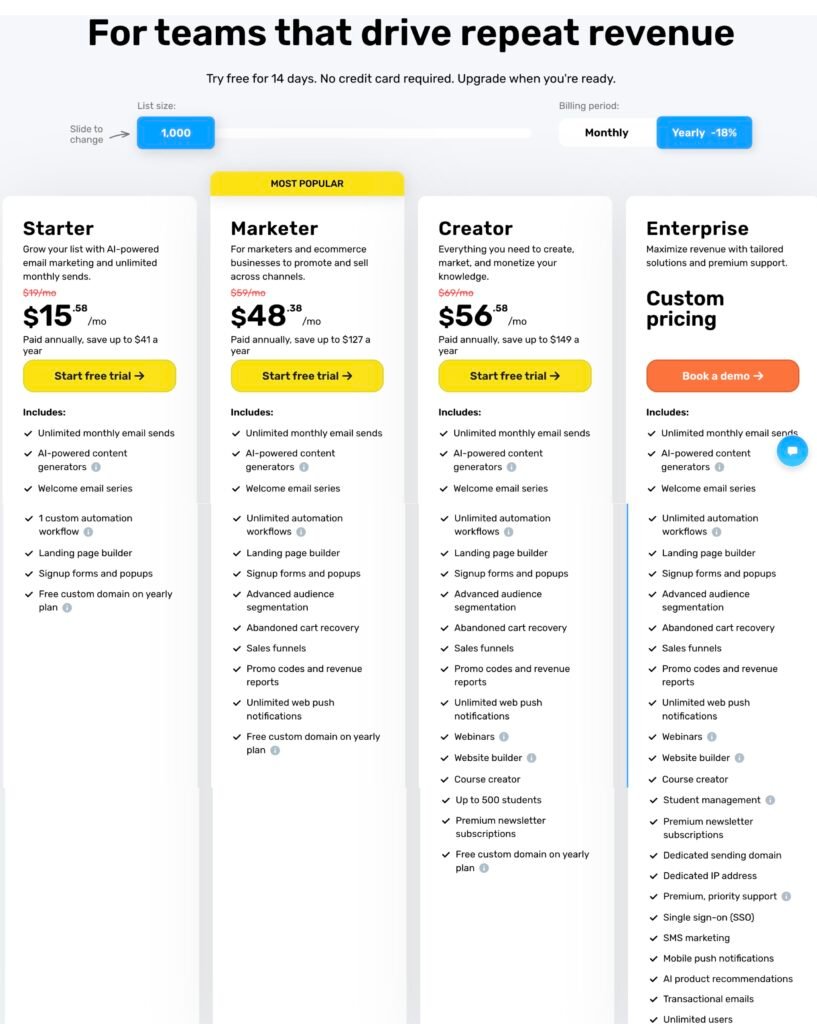
The selector describes a bracket. Section V of the Terms of Service describes what is counted against it: “the sum of Contacts that were stored, added (via import or subscribed), unsubscribed, deleted, rejected, not confirmed if double opt-in confirmation is enabled, or inactive during given month.” The same section adds that a contact on multiple lists counts toward the total once per list.
The default pricing-page state FSR inspected did not restate that definition. Whether it appears at any checkout step is outside this briefing.
Two consequences follow directly from the clause and need no interpretation. Contacts you delete during a month remain in that month’s total. An address held on three lists is three units.
Sources: GetResponse Inc., Terms of Service (US and Canada), valid 9 June 2026, Section V · GetResponse, pricing page, accessed 14 August 2026
The vendor’s own worked example
GetResponse publishes the scenario itself, which removes any need for FSR to model it.
An account is on the $19 plan for up to 1,000 subscribers. In month one the peak is 900 contacts and the charge is $19. In month two the customer deletes 900 contacts and adds a new list of 900. The charge is still $19. In month three the customer deletes 900, adds 900, deletes the newly added contacts, and adds another 900. GetResponse states this totals 1,800 contacts added and that the customer must pay for the higher plan.
The account never held more than 900 contacts at once in any of those months.
The same page gives the multi-list count. Four addresses across three lists, with one address on two lists, one copied to a second, one on all three, and one on a single list, are counted as eight subscribers. GetResponse states it charges for the total number of contacts in all lists rather than for messages sent.
The Help Center also states that list extension charges are applied every month. A prepaid annual subscriber whose list crosses a bracket is therefore looking at a recurring monthly line rather than a single adjustment at renewal.
This does not establish that any customer was billed incorrectly. FSR inspected no invoice. What it establishes is that a unique-contact snapshot is an incomplete cost model for any operation that imports, cleans, re-imports, or segments across lists.
Sources: GetResponse, How does GetResponse pricing work?, accessed 15 August 2026
Webinar entitlement needs an account-specific answer
Four official surfaces address whether the Marketer plan gets webinars. They do not resolve to one answer.
| Official surface | What it states about Marketer |
|---|---|
| Pricing page plan cards | Webinars appear under Creator and Enterprise. The Marketer card does not list them. |
| GetResponse Pricing Plans help article | “Webinars” appears under Marketer’s “Not available” list. |
| What are GetResponse Webinars help article | “Webinars are a paid add-on in the Starter/Marketer package,” priced at $40 per month for 100 attendees. |
| What is the monthly cost help article | “Webinars and Team features are available within Marketer and Creator packages.” |
Those pages may be using “available” in different senses. One may mean included. Another may mean purchasable. The opened documents do not settle which applies to a given account.
The add-on carries a regional caveat. The webinar help article states that North American accounts may not have access to purchase or enable add-ons, and directs them to upgrade the package instead. A North American buyer comparing Marketer plus an add-on against Creator should not assume the first configuration is purchasable. FSR did not test an account.
Creator’s included attendee limit is separately unresolved, and this is the conflict that matters because it compares like with like. One help article states Creator has “access to webinars (300 attendees).” The same article later states “Webinars 100 (in Creator)” and “webinars for 100 attendees are already included.” A second help article states 100. The trial cap of 10 people and the $99 add-on for 500 attendees are different scopes and do not settle the included figure.
No opened GetResponse page explains the difference between 100 and 300.
Two contract constraints sit under all of this and appear on none of the plan cards. Only one webinar may run at a time within an account. The contract also states that webinars may be unavailable in a particular location.
Sources: GetResponse, pricing page, accessed 14 August 2026 · GetResponse, GetResponse Pricing Plans, accessed 14 August 2026 · GetResponse, What are GetResponse Webinars?, accessed 15 August 2026 · GetResponse, What is the monthly cost of GetResponse?, accessed 15 August 2026 · GetResponse, How does GetResponse pricing work?, accessed 15 August 2026 · GetResponse Inc., Terms of Service, valid 9 June 2026, Section II.6
Which contract applies to you
There is no single GetResponse contract. FSR opened three published regimes and found a fourth cohort named inside one of them.
Buyers seated in the United States or Canada who subscribed after 23 October 2019 contract with GetResponse Inc., a Delaware corporation, under Delaware law, in a version valid as of 9 June 2026. That version contains binding arbitration, a class action waiver, and a jury trial waiver. The same page states that buyers in those countries who subscribed before that date are governed by a different set of terms.
Buyers on the standard plans elsewhere contract with GetResponse S.A., a Polish joint-stock company registered in Gdansk under KRS 0000942075, under Polish law, in a version valid as of 11 August 2026. That version contains none of the three dispute provisions above.
Enterprise buyers sit under a third document. The GetResponse MAX Terms of Service, valid as of 21 May 2026, state that the service is provided by GetResponse S.A. or its subsidiaries including GetResponse Inc. and GetResponse Tecnologias Brasil Ltda, and that governing law follows the entity: Polish law, Delaware law, or Brazilian law respectively.
Two provisions in the MAX Terms change how an enterprise buyer should read anything on the marketing pages.
The first is precedence. Where the Order Form, the SLA, the Terms of Service, and the Service Documents conflict, the MAX Terms resolve it in that order, with the Order first. For an enterprise purchase, the Order is the document that decides scope, and nothing on a public page overrides it.
The second is naming. The MAX Terms state they also apply to “historical versions of the MAX plan, including, inter alia, the MAX², Enterprise, and Enterprise 360 plans.” The public pricing page sells that tier under the name Enterprise. A Help Center article on transactional email states the feature is “available in MAX² accounts only.” Both names appear on live pages, and the contract classifies both as historical.
The MAX Terms also contain a provision the standard plans do not. A fee increase may be made once per calendar year, with 14 days’ notice for indefinite-term agreements and 30 days’ notice before auto-renewal for fixed-term agreements. A customer who does not accept the increase may terminate within 14 days of being informed.
Switching rights under the EU Data Act are addressed in the same document, with a two-month notice period and a 30-day transition that the customer may extend once. The clause also states that a customer exercising those rights during a fixed-term agreement remains obliged to pay all fees that would have been due until the end of the originally agreed term, as early termination fees.
Sources: GetResponse Inc., Terms of Service (US and Canada), valid 9 June 2026 · GetResponse S.A., Terms of Service, valid 11 August 2026, Section XVII · GetResponse, MAX Terms of Service, valid 21 May 2026, Sections I, VI, VIII.8 and XVIII · GetResponse, How to send transactional emails through GetResponse?, accessed 15 August 2026
Cancellation and refunds
Section IX of the standard Terms permits cancellation of a paid account at any time, subject to conditions. One condition is that at the time the request is submitted, the customer has not exceeded the List Size limit for the selected plan.
Section V separately defines the monthly contact total used for List Extension Fees. The opened terms do not expressly state which figure the Section IX check uses. FSR cannot say that deleted contacts can block a cancellation, and does not say it. The defensible finding is narrower: cancellation carries a List Size condition, and the published text does not identify the metric the cancellation screen applies. That is a question to put in writing before prepaying.
The refund position is more specific than it is usually reported. The contract states the service is pay-as-you-go and that refunds are not issued, including where an account is canceled days after a renewal charge. It then states one express exception: if GetResponse terminates the subscription without cause, it refunds a pro rata portion of the prepaid amount. The exception applies when the vendor ends the agreement.
Two timing rules are frequently conflated and should not be. A new price list applies to current accounts from the beginning of a subsequent billing period or on a plan change. A revision to the Terms themselves takes effect immediately on posting, with a stated ten-day window in which a customer may terminate. Those are different clauses with different triggers.
Account restoration windows are 30 days for a free account and 120 days for a paid account from deactivation, subject to payment of the next subscription fee, and GetResponse reserves the right to refuse restoration.
Sources: GetResponse Inc., Terms of Service (US and Canada), valid 9 June 2026, Sections V, IX, XI and XVII
Older plan names carry a contractual feature freeze
Section II.8 of the standard Terms states that no beta-test versions and no new functionalities of the service are created for accounts on the Email Marketing, Marketing Automation, Ecommerce Marketing, or Legacy subscription plans. Section V separately carves those same plans out of the published price-change mechanism, with limits and prices held inside the account instead.
FSR did not test how that clause is applied to a live legacy account. The clause is what it is.
The Help Center documents what each migration path changes. The rows are not uniform, and one is described as entirely favorable.
| Migration path | What the help page states |
|---|---|
| Email Marketing to Starter | Loses website builder, conversion funnels, chats, tagging, paid ads, promo codes |
| Email Marketing to Marketer | Loses website builder, gains ecommerce features, unlimited web push, marketing automation |
| Marketing Automation to Marketer | Loses website builder and webinars, gains ecommerce and unlimited web push |
| Content Monetization to Creator | Maximum 100 webinar attendees, up to 5 team users, 3 hours of webinar recording storage, gains ecommerce and unlimited web push |
| Ecommerce Marketing to Creator | Described as entirely beneficial, keeping ecommerce and gaining creator tools |
Compare the applicable row before switching. The table above covers only the rows FSR reviewed.
Sources: GetResponse Inc., Terms of Service, valid 9 June 2026, Sections II.8 and V · GetResponse, GetResponse Pricing Plans, accessed 14 August 2026
| Buyer question | What the documents establish | What remains untested |
|---|---|---|
| Do deleted contacts count? | The terms include deleted contacts in that month’s total. | The resulting line on a live invoice. |
| Can one address count more than once? | The terms and Help Center count it once per list. | How the interface displays that count. |
| Does Marketer include webinars? | Official pages use incompatible or ambiguous wording. | Entitlement in a specific account and region. |
| How many attendees does Creator include? | Official pages state both 100 and 300. | The current account-level ceiling. |
| Can list size block cancellation? | Section IX imposes a List Size condition. | Which metric the cancellation workflow uses. |
| Which entity do I contract with? | Three entities and three governing laws are published. | Which one applies to a buyer in a given country. |
| What does Enterprise actually include? | The Order Form outranks the published terms. | Everything, until the Order is in hand. |
Interface speed, editor quality, deliverability performance, support responsiveness, and comparison against any competitor are outside this briefing entirely. FSR ran no tests and opened no competitor’s pricing page for it.
- Which number determines my bill: contacts held at a point in time, or contacts added across the month? Ask for it against your own migration plan, not in general.
- If the same address is on three of my lists, is that one contact or three?
- Does my plan include webinars, and for how many attendees? Ask for the figure that will appear in my account, not the figure on a help page.
- If my list crosses the bracket mid-year on an annual plan, is the extension charged once or every month until renewal?
- Which entity am I contracting with, under which law, and for Enterprise, what does the Order Form say where it differs from the published terms?
Keep the reply. Where a published page and a written answer disagree, the written answer is the one you can act on.
FAQ
Does GetResponse charge for contacts I deleted?
Contacts deleted during a billing month remain in that month’s total. Section V of the Terms of Service includes stored, added, unsubscribed, deleted, rejected, unconfirmed, and inactive contacts in the monthly figure. The rule applies to that month, not indefinitely. FSR inspected no invoice.
Can I exceed my plan without my list growing?
GetResponse’s own example says yes. An account on the 1,000-contact plan that deletes and re-adds 900 contacts twice in one month has added 1,800 and must pay for the higher plan, despite never holding more than 900 at once.
Does the same email address count twice?
Once per list. The Terms state a contact on multiple lists counts per each list. The Help Center’s example places four addresses across three lists and counts eight subscribers.
Does the Marketer plan include webinars?
The public pages do not give one answer. The pricing card omits webinars from Marketer, one help article lists them as not available on Marketer, another describes a paid Starter and Marketer add-on at $40 per month, and a third says they are available within Marketer and Creator. Confirm at checkout.
How many webinar attendees does Creator include?
Official pages state both 100 and 300, and both figures appear in the same help article. A 500-attendee add-on at $99 per month and a 10-person trial cap are separate scopes. FSR did not verify the account-level ceiling.
Does GetResponse issue refunds?
The contract states the service is pay-as-you-go and refunds are not issued, including immediately after a renewal charge. One express exception applies: if GetResponse terminates the subscription without cause, it refunds a pro rata portion of the prepaid amount.
Which GetResponse entity am I contracting with?
Three are published. GetResponse Inc. under Delaware law for United States and Canada subscribers after 23 October 2019, GetResponse S.A. under Polish law, and GetResponse Tecnologias Brasil under Brazilian law. Only the Delaware version contains arbitration and a class action waiver.
Do older GetResponse plans still get new features?
Section II.8 states no beta versions and no new functionalities are created for the Email Marketing, Marketing Automation, Ecommerce Marketing, or Legacy plans. Those accounts are also carved out of the published price-change mechanism. FSR did not test a live legacy account.