Last updated: August 17, 2026
Note on this correction box, revised 18 August 2026
An earlier version of this box described two Pika figures as errors in a previous FSR article. On re-reading that article against this one, neither figure appeared in it. That box has been withdrawn rather than left standing.
What was withdrawn from the earlier FSR comparison of Runway and Pika was on the Runway side: it described testing FSR did not perform, linked no primary source, and made claims about credit rollover and commercial licensing that Runway’s own pages do not support. Those withdrawals are recorded on that article.
FSR publishes corrections rather than editing quietly, and that applies to a correction as much as to an article.
Pika is an AI video generator operated by Mellis, Inc. of Palo Alto, California. Its consumer site sells four subscriptions metered in monthly video credits; a separate developer site sells API access on a membership plus usage model. This audit covers the consumer purchase only: which plan Pika presents as eligible for commercial output, how far each credit allowance stretches on the current Pika 2.5 model, and which buying questions Pika’s public pages leave open.
Verdict in one sentence: Standard adds resolution, features, and capacity, but Pro is the first plan whose pricing matrix marks commercial use and watermark-free download as included, and moving up the ladder raises the cost per included credit rather than lowering it.
An earlier Future Stack Reviews article on Pika stated that the $8 Standard plan included commercial use, and used a figure of about six credits for a 720p five-second generation to estimate roughly 116 clips per month from a 700-credit allowance. Both statements were wrong for the model Pika currently sells.
- Anyone choosing between Standard and Pro for client work, advertising, or a monetized channel
- Anyone who sized a project using Pika’s FAQ credit table or a third-party article that quoted it
- Procurement reviewers who need to name the contracting entity and the operative terms
- Personal use with no publication and no monetization
- Readers looking for output quality, prompt adherence, or speed testing. None was performed
- Developers evaluating the Pika API, which uses a separate membership and pricing model
Standard expands capability, not entitlement
| Plan | Monthly rate, billed yearly | Month to month | Monthly credits | Pika 2.5 access | Commercial use | Watermark-free download |
|---|---|---|---|---|---|---|
| Basic | $0 | $0 | 80 | 480p only | Not included | Not included |
| Standard | $8 | $10 | 700 | All resolutions | Not included | Not included |
| Pro | $28 | $35 | 2,300 | All resolutions | Included | Included |
| Fancy | $76 | $95 | 6,000 | All resolutions | Included | Included |
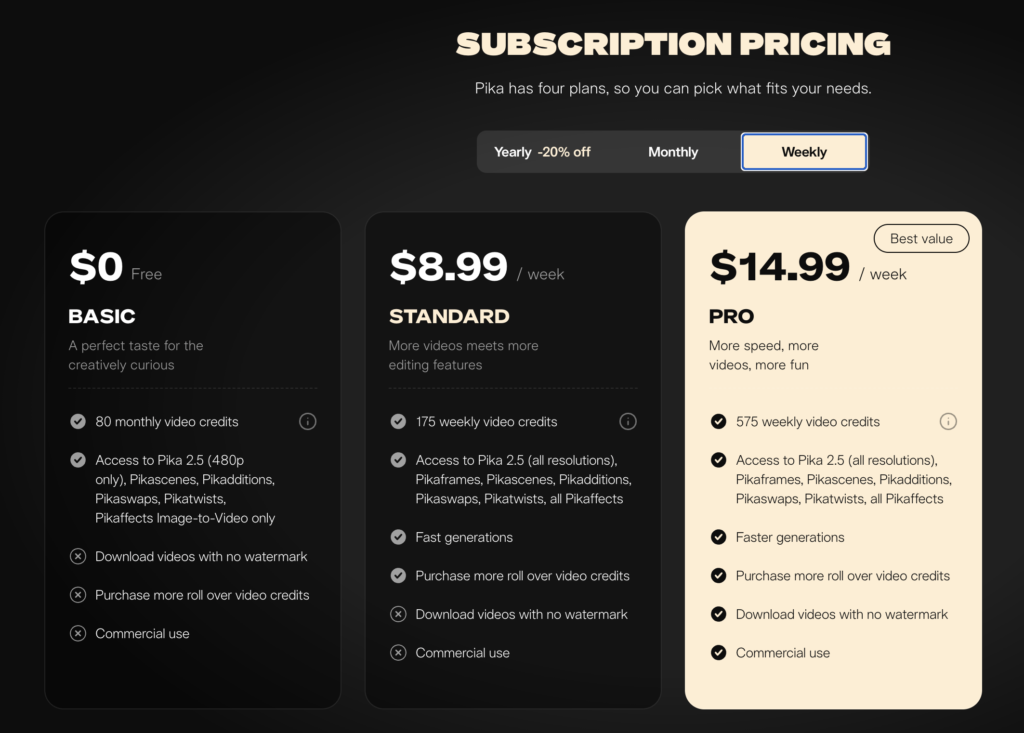
Prices and entitlement states as displayed on pika.art/pricing. Pika also offers a weekly interval at $8.99 for Standard and $14.99 for Pro; Fancy does not appear in the weekly view. Pika states that VAT may be charged depending on country of residence.
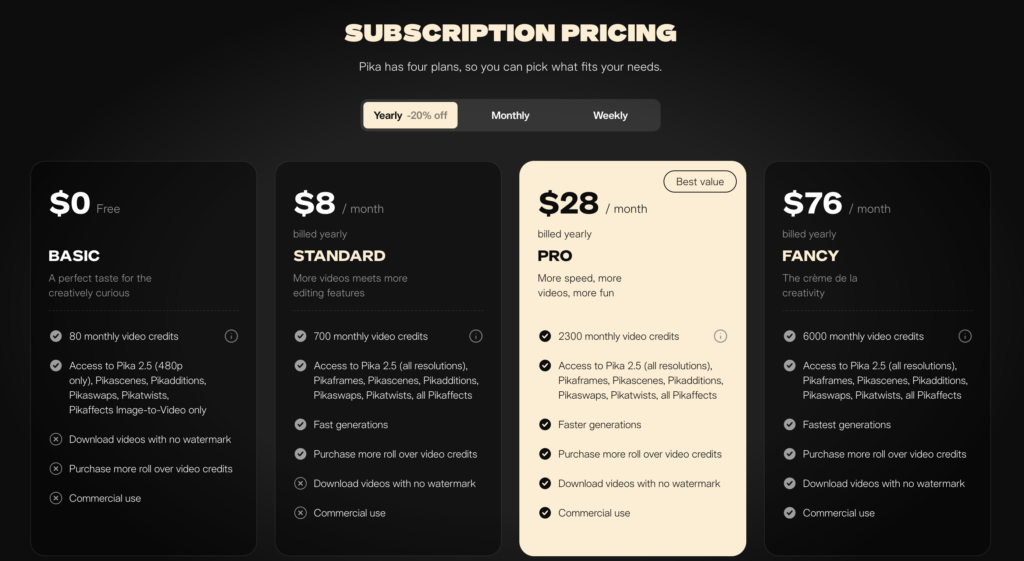
Standard is a substantial upgrade over the free plan. It raises the allowance from 80 credits to 700, unlocks Pika 2.5 at every listed resolution rather than 480p alone, adds Pikaframes and the complete Pikaffects set, moves the account into a faster generation queue, and allows the purchase of additional rollover credits.
The commercial decision sits in two rows that capability does not touch. On Pika’s plan matrix, commercial use and watermark-free download are marked as not included on Basic and Standard, and included on Pro and Fancy. Pika’s FAQ states the same boundary in text: Pro or Fancy subscribers may use their output commercially, and If you have a Basic or Standard subscription, you can’t use your content for commercial purposes.
Two qualifications belong on that sentence, and both matter more than they look.
Pika does not publish a complete definition of commercial use. Its terms make the permission plan-dependent and give advertising, marketing, and selling goods or services as examples of a commercial purpose. Whether an unpaid portfolio piece, an internal deck, a client prototype, or a channel monetized later falls inside that boundary is not answered anywhere FSR could read. The defensible claim is the narrow one: Standard is not the plan Pika’s matrix designates for commercial use. It is not that a Standard file can never lawfully be sold.
The watermark row is about downloads. Pika’s FAQ adds a second limit the pricing page omits: sharing a video directly from Pika carries a watermark on every tier, paid ones included. Pro removes the watermark from the download path, not from Pika’s own share path.
Sources: Mellis, Inc., pika.art pricing page, all three billing views, accessed 9 August 2026 · Mellis, Inc., pika.art FAQ, About Pika and Creating & Editing sections, accessed 9 August 2026 · Mellis, Inc., Pika Terms of Service, 11 February 2026, Prohibited Uses and One User Per Account
The boundary is an icon, and icons do not survive extraction
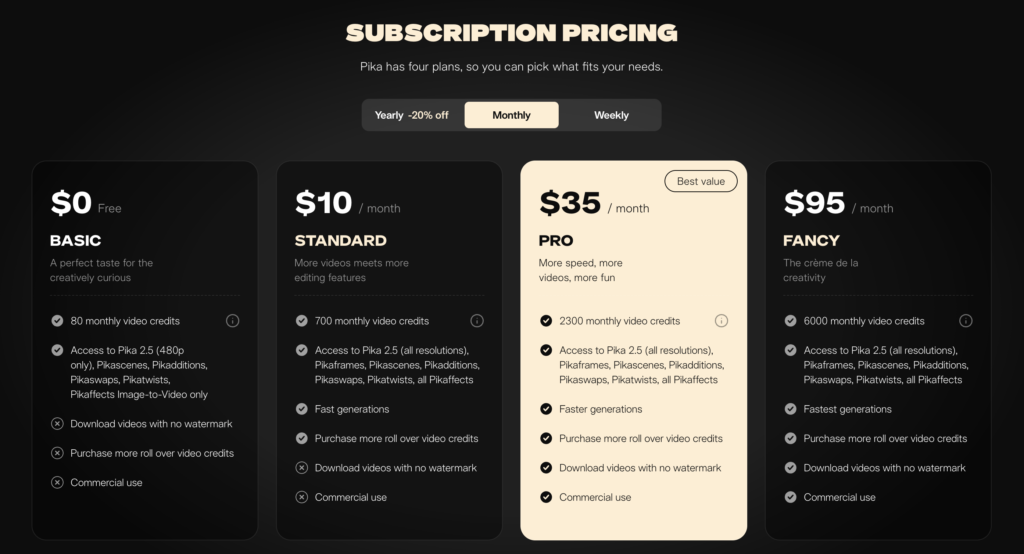
Pika encodes the two entitlement rows visually. Each plan card lists the feature name with a check mark or a cross beside it. Rendered in a browser, the state is unmistakable.
Extracted as text, it disappears. When FSR pulled pika.art/pricing programmatically, the output listed “Commercial use” and “Download videos with no watermark” beneath every plan, including the free one, with nothing attached to indicate whether either was included or excluded. A reader working from that extraction, and not from the rendered page, arrives at the opposite conclusion.
FSR reproduced that extraction result against pika.art/pricing on the same date it read the rendered page, which is why this audit records the two separately. The rendered view is the one that carries the answer.
This is not a hidden fee or an undisclosed term. Pika discloses both rows, and its FAQ states the boundary in plain language. The practical consequence is narrower and worth naming: the single fact that decides whether Pika is usable for paid work is carried, on the page where the purchase happens, by a glyph. Anyone budgeting from a summary, a scraped comparison table, or a machine-generated answer should confirm it against the rendered pricing page before paying.
Sources: Mellis, Inc., pika.art pricing page, accessed 9 August 2026, compared against FSR’s own text extraction of the same URL on the same date · Mellis, Inc., pika.art FAQ, accessed 9 August 2026
What 700 credits buy on Pika 2.5
Pika 2.5 is the model the pricing page sells on every plan and the model the composer preselects on the home page. Its credit costs are published in the detailed tables on the pricing page.
| Configuration | Credits | Standard, 700 credits | Pro, 2,300 credits | Fancy, 6,000 credits |
|---|---|---|---|---|
| 480p, 5 seconds | 12 | 58 | 191 | 500 |
| 720p, 5 seconds | 20 | 35 | 115 | 300 |
| 720p, 10 seconds | 40 | 17 | 57 | 150 |
| 1080p, 5 seconds | 40 | 17 | 57 | 150 |
| 1080p, 10 seconds | 80 | 8 | 28 | 75 |
Credit costs as published on pika.art/pricing. Generation counts calculated by FSR as the allowance divided by the credit cost, rounded down. They assume every credit is spent on that one configuration and none on Pikaffects, Pikaframes, Pikascenes, or repeat attempts. They are maximum generation counts, not forecasts of usable output.
Pika’s FAQ answers the question “How many credits do videos cost to generate?” with a breakdown covering the Turbo model, Pro Mode, the 1.0 and 1.5 models, the 2.1 model, and the 2.2 model. It contains no entry for Pika 2.5.
The gap is not academic. The FAQ’s 2.2 table prices a 720p five-second generation at 6 credits. The pricing page prices the same configuration on 2.5 at 20. A 700-credit Standard allowance reads as 116 generations against the first number and 35 against the second. The FAQ also still calls 2.2 our latest model.
The same scope gap appears inside the pricing page. Each plan card carries a short “Cost per video” summary listing 10, 60, 20, and 80 credits. Those four figures match the FAQ’s Turbo and Pro Mode values. The detailed tables printed below on the same page are Pika 2.5. The two sets are not contradictory, because they describe different models. What neither of them supplies is a direct answer to the question a buyer is actually asking: how many current-model generations does this allowance cover.
Model 2.2 has not been withdrawn. Pika’s iOS purchase screen lists plan access as Pika 2.5, 2.2, and Turbo. The web pricing page names only 2.5. Which model a given generation runs on, and therefore which credit table applies, is a question the public pages leave to the account.
Sources: Mellis, Inc., pika.art pricing page, Text-to-Video & Image-to-Video table and plan cards, accessed 9 August 2026 · Mellis, Inc., pika.art FAQ, Subscriptions & Billing and About Pika sections, accessed 9 August 2026 · Mellis, Inc., pika.art home page composer, logged out, accessed 9 August 2026
The higher tier does not lower the cost per credit
Pika expresses generation cost in credits. Converting to money requires dividing the subscription price by the included allowance, which produces an allocated cost rather than a charge collected at each generation.
| Plan, billed yearly | Monthly rate | Credits | Allocated cost per credit | 720p, 5s | 1080p, 5s |
|---|---|---|---|---|---|
| Standard | $8 | 700 | $0.0114 | $0.23 | $0.46 |
| Pro | $28 | 2,300 | $0.0122 | $0.24 | $0.49 |
| Fancy | $76 | 6,000 | $0.0127 | $0.25 | $0.51 |
FSR calculation. Cost per credit is the monthly-equivalent subscription price divided by the included monthly allowance. The two right-hand columns multiply that figure by the published Pika 2.5 credit cost. These are allocations of a fixed subscription across a full allowance, not per-generation charges, and they hold only if the entire allowance is consumed.
Pro costs 3.5 times Standard and includes about 3.29 times the credits. The cost per included credit therefore rises at each step, by roughly 11 percent from Standard to Fancy. The monthly-billed prices produce the same ordering.
That does not make Pro poor value. It relocates the argument for buying it. The case rests on commercial use, watermark-free download, queue priority, and total capacity, not on a volume discount, because there is no volume discount.
Two related figures are worth having before purchase. Additional credits are sold at $10 for 375, $20 for 750, and $30 for 1,125, which is $0.0267 per credit at all three sizes with no discount for buying more. That is roughly 2.3 times the yearly Standard rate. And on the weekly interval, Standard’s $8.99 for 175 credits works out to about $0.051 per credit, which is the most expensive cell in Pika’s published matrix and still sits on the side of the boundary without commercial use.
Sources: Mellis, Inc., pika.art pricing page, yearly, monthly, and weekly views, accessed 9 August 2026 · Mellis, Inc., pika.art FAQ, Subscriptions & Billing section, accessed 9 August 2026
Six questions Pika’s public pages do not answer
| Question | What Pika publishes | How to settle it |
|---|---|---|
| What counts as commercial use | Examples only: advertising, marketing, selling goods or services. No exhaustive definition. | Written answer from Pika support before committing a borderline workflow. |
| Do commercial rights survive cancellation | Nothing located stating whether permission attaches at generation, download, or continuing subscription. | Written answer. Archive the plan and terms in force at purchase. |
| Do purchased credits expire | Pricing page: rollover credits. FAQ: never expire. API terms: prepaid credits expire after 365 days. | Checkout screen and account billing page. |
| How many credits does the free plan carry | Pricing page: 80 per month. FAQ: 150 per month. | Account balance after signup. |
| Which terms govern the purchase | Two live documents, dated 11 February 2026 and 4 August 2026, each claiming to cover pika.art and all subdomains. The sign-in page links to the February one. | Capture the document linked at checkout on the day of purchase. |
| Can inputs be excluded from model development | Terms permit use of Content for model development. The August document names a separate enterprise agreement as the mechanism that can override it. No consumer control is listed on the pricing page. | Account settings check, or written answer for a consumer plan. |
Two of these deserve a note rather than a table row.
Pika’s Terms of Service name Mellis, Inc. as the operator. Procurement records, vendor risk registers, and invoices should carry that entity. Pika Labs is the name most coverage uses and it is not the name in the contract.
Pika’s terms state that the user retains all interest in Outputs, and that to the extent Pika acquires any interest it assigns that interest to the user. Output ownership and plan permission are separate questions, and Pika answers them differently. Owning the file does not by itself place it inside the commercial-use entitlement.
Sources: Mellis, Inc., Pika Terms of Service, 11 February 2026, sections 1, 4, 5, and 7 · Mellis, Inc., Pika API Terms of Service, 4 August 2026, sections 1, 4, and 7 · Mellis, Inc., pika.art pricing page, accessed 9 August 2026 · Mellis, Inc., pika.art FAQ, accessed 9 August 2026 · Mellis, Inc., pika.art sign-in page, accessed 9 August 2026
FAQ
Does Pika Standard allow commercial use?
No. Pika’s pricing matrix marks commercial use as not included on the $0 Basic and $8 Standard plans, and its FAQ states that Basic and Standard subscribers cannot use their content for commercial purposes. Pro at $28 a month billed yearly is the first plan where the entitlement is included.
Which Pika plan removes the watermark?
Pro and Fancy include watermark-free download. Basic and Standard do not. Pika’s FAQ adds that videos shared directly from Pika carry a watermark on every tier, so the entitlement covers the download path rather than every route out of the product.
How many videos does 700 credits make on Pika 2.5?
Thirty-five, at the published rate of 20 credits for a 720p five-second generation, or seventeen at 1080p with 20 credits left over. Those are maximum generation counts assuming every credit goes to that one configuration and none to effects, keyframes, or repeat attempts.
Why does the Pika FAQ show a lower credit cost than the pricing page?
The FAQ’s credit tables cover Models 1.0, 1.5, 2.1, 2.2, Turbo, and Pro Mode. There is no Pika 2.5 entry. A 720p five-second generation is 6 credits in the FAQ’s 2.2 table and 20 credits in the pricing page’s 2.5 table. Budget from the pricing page.
Is Pika cheaper per credit on the higher plans?
No. Dividing the yearly-billed monthly price by the included allowance gives about $0.0114 per credit on Standard, $0.0122 on Pro, and $0.0127 on Fancy. Monthly billing produces the same ordering. Higher plans add capacity, priority, and entitlements rather than a volume discount.
Do Pika top-up credits expire?
Unresolved. The pricing page calls them rollover credits, the FAQ says additional credits bought on a paid plan never expire, and the Terms of Service at dev.pika.art say prepaid credits expire 365 days after purchase. Confirm at checkout before buying a large balance.
Sources: Mellis, Inc., pika.art pricing page, accessed 9 August 2026 · Mellis, Inc., pika.art FAQ, accessed 9 August 2026 · Mellis, Inc., Pika API Terms of Service, 4 August 2026
Methodology and sources
Tier. Tier C in the Future Stack Reviews system means document-first: primary sources read, no hands-on testing. No account was created, no plan purchased, and no video generated. Nothing here evaluates output quality, prompt adherence, generation speed, or reliability.
What was read, and when. All pages were read on 9 August 2026 from a logged-out session: the pika.art pricing page in its yearly, monthly, and weekly views; the pika.art FAQ in full; the pika.art home page composer; the Terms of Service dated 11 February 2026 and the Terms of Service dated 4 August 2026, both in full; the Acceptable Use Policy dated 16 May 2025; the pika.art sign-in page; and the pika.art blog index.
Calculated, not read. Every cost-per-credit figure, every generation count, and every ratio in this audit was calculated by FSR from prices and allowances as published. None appears on a Pika surface. Cost per credit is an allocation of a fixed subscription across its full allowance, not a per-generation charge, and it holds only if the whole allowance is used.
Out of scope by choice. Pika’s iOS app sells the same plans at separately set regional prices; that pricing is not analyzed here. The Pika API Club, launched 4 August 2026, uses a membership plus usage model and is a different purchase. Both are covered separately.
Not verified. The signed-in composer, the checkout screen, the account billing page, and the behavior of entitlements after downgrade or cancellation were not inspected. Every statement about those surfaces in this audit is marked unresolved rather than answered.
Legal scope. Nothing here is legal advice. No statement characterizes any Pika document, plan, or practice as lawful, unlawful, compliant, or non-compliant. Where Pika’s own pages disagree, the disagreement is recorded and left open.
Corrections. An earlier FSR article on Pika contained two material errors, named in the correction box at the top of this page. FSR publishes corrections rather than editing quietly.
Volatility. Prices, credit values, model names, and document dates change without notice. Verify against the linked sources before spending money.
Sources: Mellis, Inc., pika.art pricing page · Mellis, Inc., pika.art FAQ · Mellis, Inc., Pika Terms of Service, 11 February 2026 · Mellis, Inc., Pika API Terms of Service, 4 August 2026 · Mellis, Inc., Pika Acceptable Use Policy, 16 May 2025 · Mellis, Inc., pika.art sign-in page · Mellis, Inc., Pika blog
Verdict by buyer type
Personal and non-commercial work. Standard at $8 a month billed yearly is a reasonable buy. All-resolution Pika 2.5 access, the full effects suite, Pikaframes, and 700 credits are a genuine step up from the free plan. Budget from the pricing page’s Pika 2.5 table, not the FAQ, and expect around 35 generations a month at 720p rather than the higher figure the FAQ’s older table implies.
Client work, advertising, or a monetized channel. Pro at $28 a month billed yearly is the floor. Standard is not the plan Pika designates for commercial output, and its files carry a watermark on download. Before the first client delivery, get a written answer on what commercial use covers in your specific workflow, and archive the pricing page and terms in force on the day you pay.
Procurement, confidential client media, or anything needing a defensible contract trail. The public record is not complete enough to sign off from. Two Terms documents are live with overlapping scope, credit expiry has three different published answers, and the mechanism for excluding inputs from model development points to a separate enterprise agreement. Ask for the operative contract in writing before approval.
Four changes would close most of this without touching the product: a credit table that names Pika 2.5, the commercial-use boundary written in text on the pricing page, one Terms document with a clear supersession clause, and a single consistent answer on credit expiry.
Sources: Mellis, Inc., pika.art pricing page, accessed 9 August 2026 · Mellis, Inc., pika.art FAQ, accessed 9 August 2026 · Mellis, Inc., Pika Terms of Service, 11 February 2026 · Mellis, Inc., Pika API Terms of Service, 4 August 2026
Six questions in this audit are open because Pika’s public pages do not answer them. If you hold a Pika account and can settle one, we will publish the answer with credit or anonymously, whichever you prefer. If you represent Mellis, Inc. and any statement here misreads a document, tell us and we will correct it in public.
| Evidence and corrections | [email protected] |
| Vendor right of reply | Same address. Replies are published in full or not at all. |
| What helps most | A dated screenshot, the exact URL, and the plan, region, and billing interval on the account. Redact billing identifiers. |
Tier B includes hands-on testing. Tier C is document-first. Every one of these turns on the same question this audit asks: what did the plan actually buy.
-
Comparison
Runway vs Pika: The Ugly Truth About AI Video PricingThe same commercial-use boundary, costed against Runway’s plans, with a per-clip figure for each platform.
-
Tier B
Soundful Review 2026: The Audio Works. The License Is the Real Test.The same shape in audio. The product performs, and the license is where the buying decision actually sits.
-
Tier B
Base44 Review (2026): You Own the Code. Not the RuntimeOwnership and operating rights come apart. Holding the asset is not the same as being permitted to run it.
-
Tier C
HeyGen Pricing and Credits: What the Official Pages PublishOne capability billed to two separate credit balances, chosen by an implementation detail, with no published rate between them.
-
Tier C
InVideo AI Review 2026: What the Credit Balance Does Not Tell YouA displayed balance that does not convert into a project cost, audited from the pages a buyer reads before paying.
-
Tier C
Claude Fable 5 Was Live for About 72 Hours. The Real Risk Was Never the Model.The safer tier bought no continuity. What a plan is chosen for and what it guarantees are separate questions.
Future Stack Reviews is an independent publication. This briefing is not legal, tax, or financial advice, and it does not assess whether any product, document, or listing complies with any law or regulation. Prices, credit values, model names, plan structures, and document dates change without notice. Verify every figure against the linked primary sources before making a purchase.
Future Stack Reviews has no commercial relationship with Mellis, Inc. This briefing contains no affiliate links.
Published 10 August 2026. Last updated 18 August 2026. All primary sources read on 9 August 2026; prices and entitlement states have not been rechecked since that date.Published by 合同会社Future Stack, Osaka, Japan.