Last updated: August 3, 2026
This is a document audit, not a performance review. Every claim below comes from Anthropic’s published pages, opened and read on 2 and 3 August 2026. Future Stack Reviews holds a paid Claude subscription and uses Claude in production; findings from that use are reserved for a separate hands-on briefing and are excluded here.
Claude’s paid plans are a commercial wrapper around several products that are administered differently. Under Anthropic’s current documentation, the governing contract, the training position, audit coverage, conversation storage, and additional billing routes each change by plan, by product surface, and by how that surface runs.
Verdict. Approving the plan is not enough for organizational use. Claude has to be evaluated at the intersection of plan, surface, and execution mode, because that is where the control boundary actually sits.
Correction notice
An earlier version of this briefing, published 16 March 2026, stated that Claude could not remember anything between conversations, could not access real-time information, and could not execute actions, and described those three limits as architectural facts. All three were inaccurate on that date. Memory reached all consumer plans on 2 March 2026, web search had been generally available across plans since 27 May 2025, and connectors, skills, and file creation had shipped to consumer plans on 17 February 2026. Those claims are withdrawn. An unsourced comparative performance statement and an undocumented first-person account have also been removed. This version replaces the original in full.
Sources: Anthropic, release notes, relative update date only · Anthropic, 20 March 2025, updated 27 May 2025 · Anthropic, 17 February 2026
Best for
- IT, security, and procurement leads approving Claude for organizational use
- Finance owners who need every route by which spend exceeds the subscription
- Anyone who has to name the governing contract in a vendor review
- Teams mapping where conversation data sits before an audit
Not for
- Output quality tests or benchmark scores
- Comparisons against another assistant’s answers
- A hands-on recommendation based on measured use
- Individuals buying for personal work with no approval step
Control boundaries by surface
As documented by Anthropic and read on 3 August 2026. Blank means the pages read do not state it.
| Surface | Included on | Where conversation data sits | Enterprise audit reach | Separate billing route |
|---|---|---|---|---|
| Chat | All plans | Claude account | Compliance API documented for Enterprise content | Usage credits at API rates |
| Claude Code | Pro and above | Not stated on pages read | Not stated on pages read | API key in environment redirects billing |
| Cowork, remote | Paid plans | Anthropic servers, tied to Claude account | Conflicting statements across current pages | Consumes more allocation than chat |
| Cowork, local | Paid plans | Member’s own device | Not centrally manageable or exportable | Same |
| Claude Science | Paid plans, off by default for Team and Enterprise | Member’s own computer | Audit log, Compliance API, org export, custom retention all marked not available | External compute provider bills the customer directly |
| Claude Design | Paid plans, beta, off by default for Enterprise | Uploaded assets stored persistently | Audit logs not supported yet; no data residency support | Draws from shared plan limits |
| Microsoft 365 add-ins | Paid plans, Outlook in beta | Browser storage on each device, no cross-device sync | Excluded from Enterprise audit logs and Compliance API; does not inherit custom retention | Gateway route works without a Claude account |
Sources: Anthropic pricing, no date displayed · Anthropic, Claude Science admin controls, no date displayed · Anthropic, Cowork, relative update date only · Anthropic, Claude Design admin guide, relative update date only · Anthropic, Claude for Excel, May 2026 · Anthropic, Claude for Word, May 2026
On this briefing
Contents
The plan is not the control boundary
Most Claude plan comparisons stop at price, seat count, and usage multiplier. For an individual that is enough. For an organization it is not, because Anthropic separates individual and commercial purchasing at the contract layer rather than the price layer.
Free, Pro, Max 5x, and Max 20x sit under the Consumer Terms. Team, Enterprise, and the first-party API sit under the Commercial Terms, which state that services governed by them are not for consumer use.
Three procurement questions change at that line.
Data processing agreement. Anthropic describes its DPA as automatically incorporated into our Commercial Terms of Service. Accepting the commercial terms accepts it, with no separate signature workflow described. Consumer plans do not sit under those terms, so a paid individual plan does not reach the DPA through Anthropic's published standard mechanism. Whether a customer-specific agreement exists elsewhere was not part of this evidence.
Training position. The Commercial Terms state that Anthropic may not train models on Customer Content from Services. The pricing comparison table carries a single row for this and labels it differently across tabs: business plans read as none by default, individual plans read as opt-out. The Consumer Terms permit training unless the account holder opts out, and the control sits under Settings, then Privacy, then Help Improve Claude. Stated exceptions apply to submitted feedback and to conversations reviewed for policy enforcement. Permission, default, exception, and setting are four separate things and Anthropic documents them separately.
Regulated-data eligibility. The published business associate agreement route covers stated Enterprise and first-party API configurations. The published exclusions include Team, Free, Pro, and Max. The pricing comparison table marks the HIPAA-ready offering as unavailable on every individual tier. This briefing reports the published scope and makes no assessment of whether any scope satisfies any obligation.
One further mechanism belongs here. The Data Processing Addendum states that a customer may object to a new subprocessor "within fifteen (15) days of the date of such notice", and that not objecting within that window is treated as consent. The subprocessor list itself was located but its contents were not extracted, so no subprocessor is named here.
The practical consequence is narrow and useful. A company that needs a published DPA or a commercial no-training term should not treat Max as a larger version of Team. Max costs more than a Team standard seat, and price does not move an individual subscription into the commercial stack.
Sources: Anthropic, Consumer Terms, effective 8 October 2025 · Anthropic, Commercial Terms, effective 17 June 2025 · Anthropic, DPA help page, 16 March 2026 · Anthropic, Data Processing Addendum, effective 24 February 2025 · Anthropic, model training, 16 March 2026 · Anthropic, BAA, relative update date only · Anthropic, pricing, no date displayed, read 3 August 2026
Where Enterprise controls stop
The pricing page lists audit logs, a Compliance API, custom data retention, and organization data export among Enterprise capabilities. Product documentation then narrows where those controls apply, surface by surface.
Claude Science is the clearest case, because Anthropic publishes the boundary as a table. Its admin documentation marks audit log, Compliance API, organization data export, custom data retention, and custom connector restrictions as not available, and marks web search and code execution as controls the application does not honor. It states that Removing a member doesn't wipe data already on their computer. It also states that a HIPAA-ready organization can enable the beta but that the usage is not covered under the business associate agreement.
The Microsoft 365 add-ins document a different architecture and a similar gap. Their pages state that add-in activity "isn't included in Enterprise audit logs or the Compliance API" at this time, that the add-ins do not inherit organization custom retention settings, and that observability and auditability are not available on Free, Pro, Max, and Team. Enterprise organizations can route telemetry to their own collector. Anthropic does not describe that telemetry as equivalent to audit logs or content retrieval, and this briefing does not treat it as a replacement.
Claude Design states that "Claude Design doesn't support audit logs yet." and that it does not currently support data residency requirements. Uploaded assets are described as stored persistently.
Cowork is where the documentation is currently moving, and the article treats it as unresolved rather than settled. The getting started page states that "Cowork activity is not captured in the Compliance API at this time." Anthropic maintains a separate page covering Cowork on Team and Enterprise plans, and the two should be read together before a buyer relies on either. See the contradictions table below.
Two defaults sit alongside these gaps and point in opposite directions. Claude Design is documented as off by default for Enterprise, and Claude Science as off by default for Team and Enterprise. The cross-application setting for the Office add-ins runs the other way: it is "default on for Pro and Max plans and default off for Team and Enterprise".
None of this says the controls are inadequate. It says coverage is published per surface, and a buyer reading only the plan comparison table will not see where it stops.
Sources: Anthropic, Claude Science admin controls, no date displayed · Anthropic, Claude for Word, May 2026 · Anthropic, Claude for Excel, May 2026 · Anthropic, Claude Design admin guide, relative update date only · Anthropic, Cowork, relative update date only · Anthropic, cross-app setting, 8 May 2026
Where Claude conversations live
Claude has no single conversation-storage architecture. The documentation describes at least three, and the differences decide who can retrieve data, which retention rule reaches it, and what survives an employee leaving.
Claude Science stores conversation data on each member's own computer rather than on Anthropic's servers. Its memory is described as local to the device and off by default. Removing the member from the organization does not remove that data.
Cowork runs both ways. Remote sessions are saved to the Claude account and can be reopened on other supported surfaces, which places them on Anthropic infrastructure. Local sessions stay on the device, and the download page says so directly.
The Microsoft 365 add-ins hold chat history in the browser's local database on each device. The pages state that conversations "aren't synced across devices or browsers", that history is scoped to the combination of add-in surface, user, and organization, and that Excel and PowerPoint histories are separate while conversations carry across files within one application. Inputs and outputs are documented as deleted from Anthropic's backend within thirty days, with stated exceptions.
Two limits on what this section establishes. Anthropic's content retrieval documentation covers Enterprise; whether a Team administrator can reach full cloud conversation content is not addressed on the pages read. And none of these pages states whether Anthropic personnel can view conversation contents, so this briefing reports the silence rather than filling it.
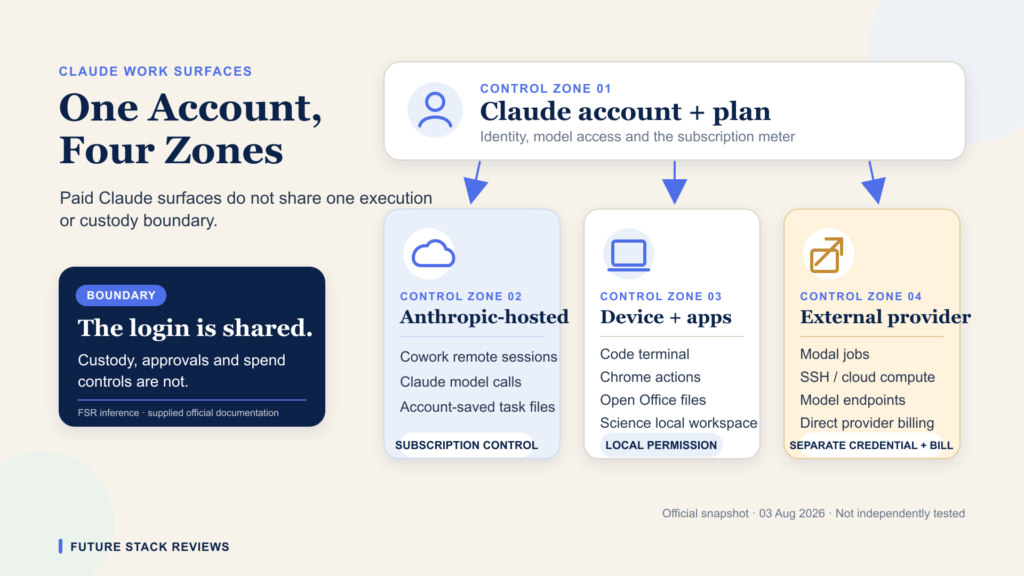
Sources: Anthropic, Claude Science admin controls, no date displayed · Anthropic, Cowork, relative update date only · Anthropic, download page, no date displayed · Anthropic, Claude for Excel, May 2026 · Anthropic, content retrieval, no date displayed
Where spend leaves the subscription
The subscription price is not the maximum amount a customer can spend. Anthropic documents three additional billing routes and one route that bypasses the subscription entirely.
Usage credits. Documented as opt-in, enabled under Settings then Usage, and billed at standard API pricing rates. The customer can set a monthly spending cap or select no restriction. There is a stated daily redemption limit of two thousand dollars. Subscribers who bought through a mobile app store can enable credits only on the web.
An environment variable. The Claude Code documentation states that an API key present in the environment is used instead of the subscription, resulting in API usage charges rather than using your subscription's included usage. The override is environment-level, not session-level, so a key set for an unrelated project applies to every session on that machine.
External compute. Claude Science can run jobs on a Modal account the customer owns. Anthropic's documentation states that Modal bills the customer directly and that Anthropic never sees a payment method, and adds that there's no spend ceiling on that route. Jobs require individual approval and show machine specification and time limits, the default container timeout is twelve hours with a maximum of twenty-three, and closing the application does not cancel a running job. That statement is scoped to Modal compute and does not describe the Claude subscription as uncapped.
A gateway that bypasses the subscription. The Excel and Word documentation states that an organization routing traffic through an internal gateway connected to a major cloud provider can use the add-in without a Claude account. The resulting price is set by that provider and is not established in Anthropic's documentation, so this route belongs on a procurement map rather than in a count of subscription overages.
Enterprise adds its own structure. Usage-based Enterprise is sold as a seat price plus usage at API rates, which is a different arrangement from a fixed subscription with an optional overage.
Sources: Anthropic, usage credits, May 2026 · Anthropic, Claude Code on Pro or Max, June 2026 · Anthropic, compute providers, no date displayed · Anthropic, Claude for Excel, May 2026 · Anthropic, pricing, no date displayed, read 3 August 2026
What capacity the documents commit to
Anthropic describes Max as five or twenty times Pro usage per five-hour session, and Pro as at least five times Free. Those figures support comparison between tiers. They do not give a buyer an absolute quantity to plan against.
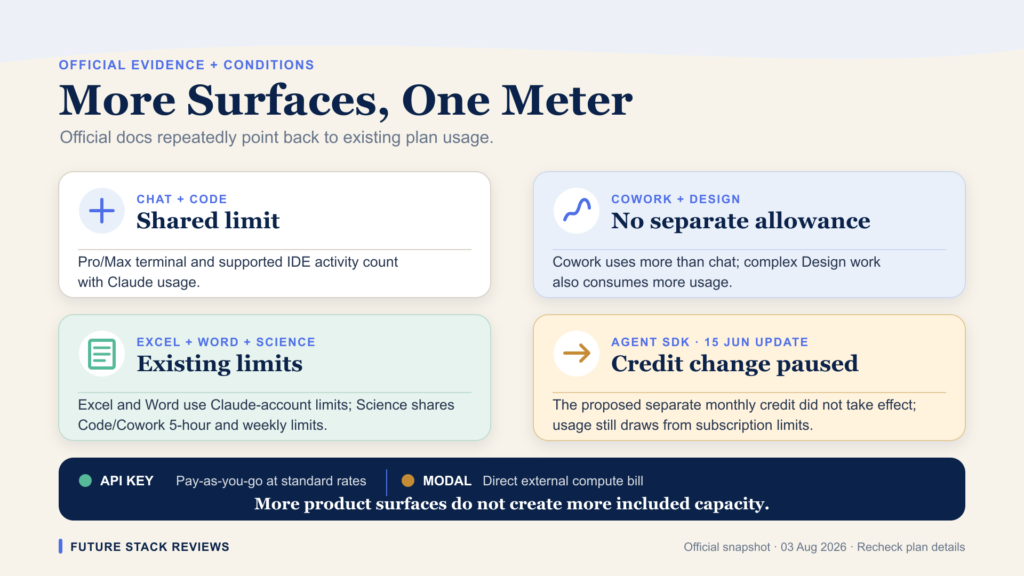
Five documents were read on this point: the Consumer Terms, the Commercial Terms, the Usage Policy, the Service Specific Terms, and the Supplemental Credit Terms. No minimum included capacity, fixed allowance, guaranteed request count, or service level for a subscription was located in them. A literal search of each document's extracted text for the strings "5x" and "20x" returned no match.
The Consumer Terms address capacity in the other direction, reserving the ability to "increase or decrease capacity limits". The Max and Pro help pages state the same discretion in their own words, noting that Anthropic may limit usage in other ways including weekly and monthly caps or model and feature usage.
The scope of that finding needs stating plainly. The Consumer Terms say the content and services of a subscription are described during the order process, and that order process was not part of this evidence. The supportable statement is that no minimum included capacity was located in the standard public terms reviewed. Whether an individual checkout record contains one is unresolved.
Sources: Anthropic, Consumer Terms, effective 8 October 2025, section 12 · Anthropic, Commercial Terms, effective 17 June 2025 · Anthropic, Usage Policy, effective 15 September 2025 · Anthropic, Service Specific Terms, effective 8 June 2026 · Anthropic, Supplemental Credit Terms, effective 4 March 2024 · Anthropic, Max plan, relative update date only
Current official contradictions
Two Anthropic pages disagreeing about the same product on the same day is a documented fact rather than an inference, and it is more useful to a buyer than a reconciliation this briefing has no basis to make.
| Question | One page says | Another page says | Status |
|---|---|---|---|
| Which model has the separate weekly cap | All models plus Sonnet only | Opus only plus all other models | Both live 3 Aug 2026 |
| Does Cowork need the computer awake | A sleeping computer stops the work; desktop app only | Sessions continue with the laptop closed; runs on web and mobile | Both live; local and remote modes not distinguished on one page |
| Is Cowork activity in the Compliance API | Not captured at this time | Team and Enterprise Cowork documentation is maintained separately and should be read alongside it | Unresolved; verify both before relying on either |
The weekly cap conflict is the cleanest of the three. The Max plan page describes two weekly limits, "one that applies across all models and another for Sonnet models only". The usage best practices page describes the settings display as showing the "weekly usage limit resets for Opus only and all other models". Neither presents itself as historical, and the Max page shows only a relative update date, so the two cannot be ordered by recency.
On Cowork, the download page states that "If your computer is asleep, Claude won't be able to work." and that Cowork runs only on the desktop app. The Cowork product page states that "Close your laptop, Claude Cowork keeps going." and that it runs on web, desktop, and mobile. The Cowork help page separates local and remote execution and scopes a desktop requirement to tasks needing local file access, browser use, or computer use. That distinction explains the behavior. It does not repair the download page, which states its restriction without the qualifier and carries no displayed date.
One documented consumption note belongs here. Anthropic states that Cowork's automatic approval mode consumes more usage than the other approval modes, because each action is reviewed before it runs.
Sources: Anthropic, Max plan, relative update date only · Anthropic, usage limit best practices, June 2026 · Anthropic, download page, no date displayed · Anthropic, Cowork product page, no date displayed · Anthropic, Cowork help, relative update date only
What the documents cannot establish
A document audit has boundaries, and naming them is part of the method.
These pages do not establish output quality, throughput, latency, or reliability. They do not establish an absolute usage quantity for any plan. They do not establish checkout terms, customer-specific agreements, or the final amount on an invoice. They do not resolve the conflicts in the previous section. Several of them carry no update date at all, and several carry a relative one, so two pages cannot always be ordered against each other.
Two observations belong here rather than in the body, because they are page-state records with narrow scope.
Pricing display carries a regional variable that Anthropic documents. The Pro plan article states that "some regions include applicable taxes in the displayed price" while others add tax at checkout. Read from Japan on 3 August 2026, the pricing page carried a line reading "Prices include 10% JCT". Anthropic's Japanese consumption tax notice separately states that "Your billing currency remains unchanged." and that Anthropic has registered as a qualified invoice issuing business, with tax applying to invoices from 1 April 2026. What this briefing does not establish is what a reader in another country sees at the same moment. That comparison requires two simultaneous captures, and it was not made. A figure copied from any single reading of the pricing page should be checked against the reader's own region before it enters a budget.
Displayed dates were not stable. Two readings of the same help center articles on 3 August 2026 returned dates one day apart. Any date cited from these pages should be treated as a display value rather than a fixed publication date.
Sources: Anthropic, Pro plan, June 2026 · Anthropic, pricing, no date displayed, read from Japan 3 August 2026 · Anthropic, JCT notice, 16 March 2026
The procurement decision
For personal use, Pro against Max is a workload question and nothing in this briefing changes it.
For organizational use the order of operations inverts. The requirement decides the contract, the contract decides the plan family, and only then does workload decide the tier.
- You need a published DPA or a commercial no-training term. Start at Team. A paid individual plan does not reach the published DPA mechanism regardless of price.
- You handle regulated health data. Read the published BAA exclusions before selecting a tier, and note that several surfaces are excluded independently of the plan.
- Every action must be retrievable through central audit tooling. Approve the plan and each surface separately. Claude Science, Claude Design, the Office add-ins, and Cowork each carry their own documented coverage boundary.
- You need a hard spending ceiling. Read the external compute page before enabling Claude Science, and check whether an API key is present in any environment running Claude Code.
- You are deploying to staff on Team or Enterprise. Check the cross-application default for the Office add-ins, which runs opposite to the defaults for Design and Science.
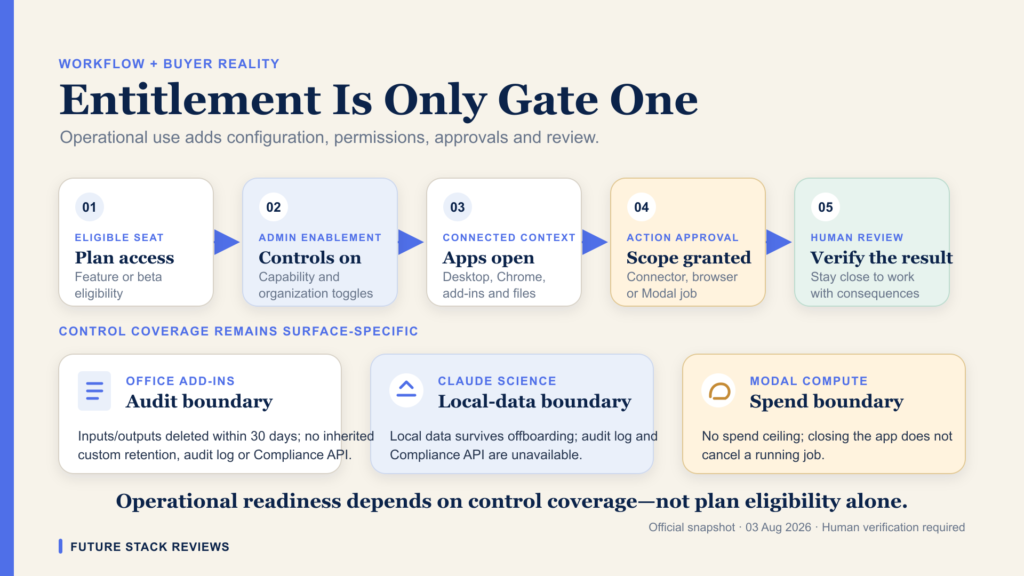
The question is not which Claude plan has the most features. It is which plan and surface combination places your data, controls, and spend inside boundaries you can administer after deployment.
Sources: Anthropic, DPA help page, 16 March 2026 · Anthropic, BAA, relative update date only · Anthropic, compute providers, no date displayed · Anthropic, cross-app setting, 8 May 2026
FAQ
Frequently asked questions
Do Claude Pro and Max include a data processing agreement?
Not through Anthropic's published standard mechanism. As documented on 3 August 2026, the DPA is automatically incorporated into the Commercial Terms of Service, which govern Team, Enterprise, and the first-party API. Free, Pro, Max 5x, and Max 20x sit under the Consumer Terms instead.
Does the Enterprise Compliance API cover every Claude surface?
No uniform answer as of 3 August 2026. Claude Science marks it as not available, the Microsoft 365 add-ins are documented as excluded, Claude Design does not support audit logs yet, and Anthropic's current Cowork pages do not describe coverage consistently.
Does Cowork require the computer to stay awake?
It depends on execution mode, and the current pages conflict. The Cowork help page says remote sessions continue with the desktop app closed, while scoping a desktop requirement to local file, browser, and computer use. The download page states, without that qualifier, that a sleeping computer stops the work.
Where is Claude for Microsoft 365 chat history stored?
In the browser's local database on each device, per Anthropic's Excel and Word documentation dated May 2026. It is not synced across devices or browsers, is scoped to the combination of add-in, user, and organization, and is not included in Enterprise audit logs or the Compliance API at this time.
Can Claude usage cost more than the subscription price?
Yes, through three documented routes as of 3 August 2026: opt-in usage credits billed at standard API rates, an API key in the environment redirecting Claude Code to API billing, and Claude Science jobs run on a customer-owned Modal account that Modal bills directly and that Anthropic documents as having no spend ceiling.
Which model has the separate weekly cap on Max?
Two current Anthropic help pages answer differently. One describes an all-model weekly limit plus a Sonnet-only limit. The other describes an Opus-only limit plus an all-other-models limit. Both were live on 3 August 2026 and neither is marked historical. This briefing does not choose between them.
Does Max publish an absolute usage allowance?
Not in the terms reviewed on 3 August 2026. Max is described as five or twenty times Pro usage per five-hour session. No minimum included capacity was located in the Consumer Terms, Commercial Terms, Usage Policy, Service Specific Terms, or Supplemental Credit Terms.
Methodology
This is a Tier C briefing, meaning document-first: the evidence is Anthropic's published material, opened and read directly, with no hands-on testing, no measurement, and no account inspection.
Anthropic-published pages were opened across 2 and 3 August 2026, covering the pricing page, the legal documents, the help center, the privacy center, and product documentation. Every claim traces to one of them. Where two pages disagree, both are quoted and neither is treated as authoritative. Quotations are capped at fifteen words and one per source; everything else is paraphrased.
Not checked, and therefore not claimed: the checkout and order process, any authenticated account screen, customer-specific agreements, the contents of the subprocessor list, underlying certification reports, and any second-region rendering of the pricing page. Consumer data storage geography is not stated on the consumer retention page read, and no claim about it appears here.
Volatility is high. Several sources carry no update date and several carry a relative one, and repeat readings on the same day returned displayed dates one day apart. Verify against the linked page before relying on anything here.
Verdict
A Claude plan is a commercial wrapper, not a complete control boundary. The contract stack, the training position, audit coverage, conversation storage, and the routes by which spending leaves the subscription all change beneath the plan name, and Anthropic documents most of those changes itself.
The practical consequence for an organizational buyer is a change in sequence. The requirement selects the contract, the contract selects the plan family, and workload selects the tier last. A company that needs a published data processing agreement will not reach it by paying more for an individual plan. A company that needs central retrieval of every action will not get it by approving Enterprise alone.
Three questions the documents leave open on 3 August 2026: no minimum included capacity appears in the standard public terms reviewed, two current pages assign the model-specific weekly cap to different model families, and two current pages give different answers on whether Cowork needs the computer awake. Those are the points at which reading stops and measurement has to begin.
Related FSR briefings
Tier B briefings are hands-on tested. Tier C briefings are document-first.
-
TIER B
Claude Science Review: what it is, and how it differs from the regular Claude app
Hands-on testing of the surface whose admin table marks audit logs, the Compliance API, and organization export as unavailable.
-
TIER B
Claude Code Review: 5 Costly Mistakes Every Developer Makes
Hands-on testing of the tool where an API key in the environment can redirect billing away from your subscription.
-
TIER C
Claude Fable 5 Pricing: Anthropic Tells You the Token Price, Not What Your Plan Includes
The same gap at model level: a published price does not establish what a plan entitles you to.
-
TIER C
Claude Fable 5 From July 20, 2026: What Happens on Each Paid Plan
Model entitlement by plan, the layer this briefing deliberately leaves out of its capacity section.
-
TIER C
Claude Pro and Max Just Lost Their Most Powerful Feature
What a subscription includes can change while the monthly price stays where it is.
-
TIER C
EU AI Act Article 50: The Law, the Code of Practice, and What a Buyer Can Verify
The same verification question applied to regulation rather than a vendor's product pages.
Future Stack Reviews is independent. This briefing is document-first and contains no hands-on testing. Statements attributed to Anthropic are the vendor's published position, not independently verified behavior. Product terms, pricing, limits, and surface availability change frequently; verify against the linked source before relying on anything here. Nothing in this briefing is legal, tax, or compliance advice. Last updated: 3 August 2026.