Intercom starts at $29 a month. At least, that’s what the pricing page says. After seat fees, AI resolution charges, Copilot add-ons, and proactive messaging costs, a five-person team typically pays north of $1,100 per month. If you’re reading this, you’ve probably already seen that invoice.
Intercom’s $0.99-per-AI-resolution pricing model makes costs unpredictable at scale. Most teams are overpaying for features they never touch. Here’s where to go instead:
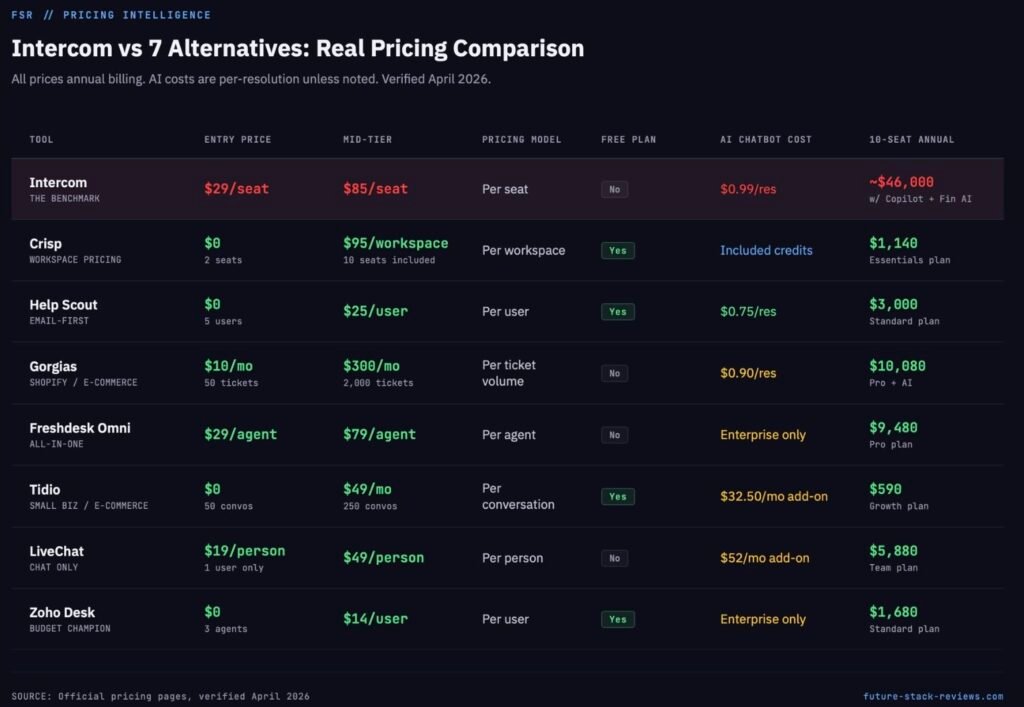
Best for cost-conscious teams → Crisp ($95/mo for 10 seats, AI included)
Best for growing SaaS teams → Freshdesk Omni ($29/agent/mo, chat + email + phone in one)
Best for email-first support → Help Scout ($25/user/mo, AI at $0.75/resolution)
Best for Shopify stores → Gorgias (AI handles refunds and order edits directly)
Why People Leave Intercom
The pricing page shows three tidy numbers. Essential at $29 per seat. Advanced at $85. Expert at $132. All billed annually. Clean enough.
But Intercom isn’t a seat-price product anymore. It’s a seat-price-plus-AI-resolution-plus-add-on product, and the math changes fast once you start using it.
Every time Intercom’s AI agent Fin resolves a customer query, you’re charged $0.99. A “resolution” happens when the customer confirms the answer worked, or (and this part matters) when the customer simply leaves the chat and the conversation auto-closes after three minutes. Intercom calls this an “assumed resolution.” Your customer might have given up and gone to a competitor. You still pay the $0.99.
Intercom does reverse charges if the customer returns to the same conversation later. That’s fair. But the 67% resolution rate they publicly report means roughly two out of every three AI-handled conversations trigger a charge.
Run those numbers on a real team:
5-person team, Advanced plan, moderate volume:
| Component | Monthly Cost |
|---|---|
| Advanced seats (5 × $85) | $425 |
| Fin AI Copilot (5 × $29) | $145 |
| Fin AI resolutions (~500) | $495 |
| Proactive Support Plus | $99 |
| Total | ~$1,164/mo |
That $29 headline just turned into $233 per person per month. And if your volume doubles next quarter, the AI costs double with it. There’s no ceiling.
This is the fundamental issue: Intercom is built for post-PMF, product-led SaaS companies that embed support into the product experience and can amortize these costs across a large customer base. If you run a smaller team, handle support primarily through email, or need predictable bills, Intercom’s pricing model works against you.
There’s nothing wrong with Intercom’s product. The messenger is best-in-class. Fin is legitimately better than most FAQ bots. Product Tours and in-app onboarding are features competitors barely touch. The problem is you’re paying for all of it whether you use it or not.
The AI Cost Breakpoint Nobody Talks About
Every “intercom alternatives” article says “Intercom is expensive.” None of them show you exactly where the cost breaks.
Here’s the math. At $0.99 per Fin resolution, with a 67% resolution rate, this is what your AI bill looks like based on monthly conversation volume:
| Monthly Conversations | Estimated Resolutions (67%) | Intercom Fin Cost | Help Scout AI ($0.75/res) | Crisp Essentials (included) |
|---|---|---|---|---|
| 200 | 134 | $133 | $101 | $0 (within $25 credit) |
| 500 | 335 | $332 | $251 | $0 (within $25 credit) |
| 1,000 | 670 | $663 | $503 | Extra credits needed |
| 2,500 | 1,675 | $1,658 | $1,256 | Extra credits needed |
| 5,000 | 3,350 | $3,317 | $2,513 | Extra credits needed |
At 500 monthly conversations, a realistic volume for a growing SaaS, Intercom’s AI costs alone exceed the entire monthly subscription of Crisp Essentials ($95) or a Help Scout Standard seat ($25). By the time you add Intercom’s seat fees on top, you’re paying four to ten times what alternatives charge.
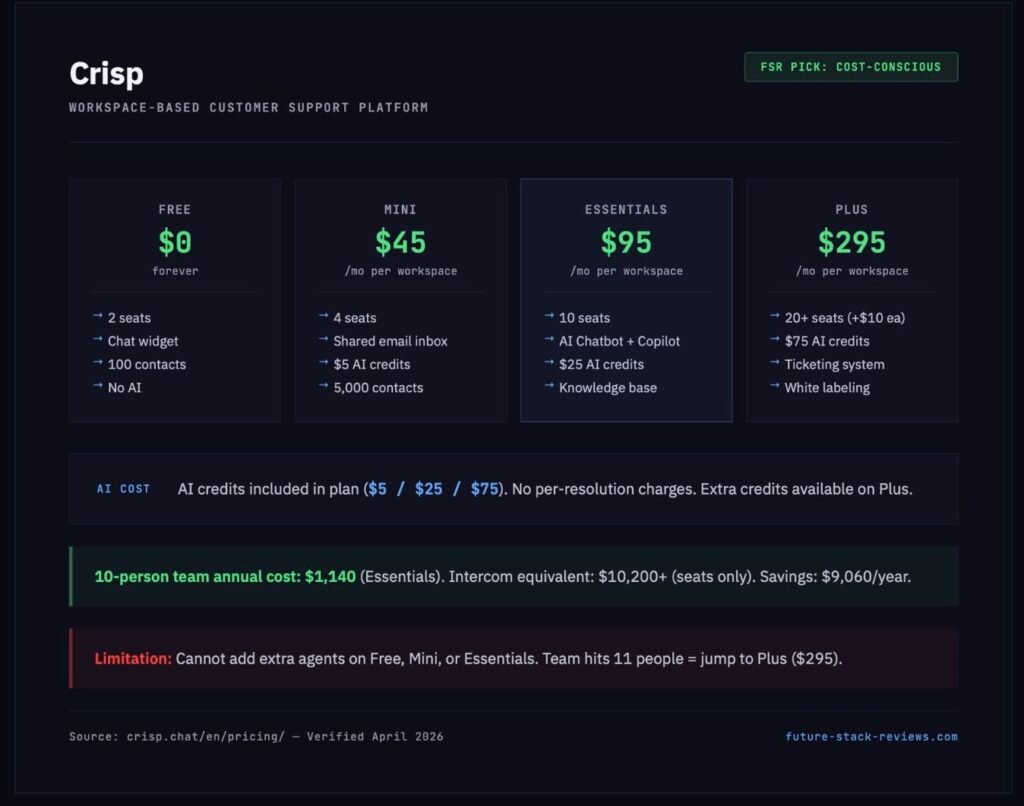
Crisp includes AI credits in every paid plan ($5 on Mini, $25 on Essentials, $75 on Plus) with no per-resolution charges. For teams under 500 conversations per month, that included allowance might cover the full workload.
Help Scout’s AI Answers bot charges $0.75 per resolution, 24% less than Intercom. It won’t save you a fortune on a per-interaction basis, but Help Scout’s lower seat prices ($25 vs $85) mean the total package is dramatically cheaper.
A Note on Drift: It’s Dead
Drift was officially sunset in March 2026. Salesloft pulled the plug after a September 2025 OAuth security breach that compromised over 700 organizations. The product no longer exists for new customers.
If you’re reading a comparison article that still lists Drift, close that tab. It hasn’t been updated in at least a month, and you should question the accuracy of everything else in it.
1. Crisp: For Teams That Want Intercom’s Vibe Without Intercom’s Invoice
Best for: Startups, small teams (under 10), bootstrapped companies, anyone who left Intercom because of cost
Pricing: Free / $45 / $95 / $295 per month (per workspace, not per seat)
Crisp is the closest thing to a budget Intercom. The chat widget looks modern. The shared inbox works across email, chat, Messenger, and Instagram. The mobile app is solid. Multiple founders on X specifically praise it as better than Intercom’s.
The pricing model is what makes Crisp stand out. Every plan is workspace-based: $95 per month gets you 10 seats, all channels, workflow automation, a knowledge base, an AI chatbot, and $25 in included AI credits. Compare that to Intercom’s Advanced plan where 10 seats alone cost $850 before any AI charges.
What you actually get at each tier:
The Free plan gives you 2 seats, a chat widget, and mobile apps. No AI, no email inbox, 100 contact profiles max. It’s enough to test the product and nothing more.
Mini ($45/month) adds 4 seats, shared email inbox, chat triggers, and $5 in AI credits. The AI Agent feature is available here, but AI Knowledge training and Internal Copilot are locked out. If AI matters to you, Mini isn’t the plan.
Essentials ($95/month) is the real starting point for serious use. 10 seats. Omnichannel inbox. Workflow automation. Knowledge base. AI chatbot with full training capability. Internal AI Copilot. LiveTranslate. Video and audio chat. Analytics. $25 in AI credits. This is the plan most teams should evaluate.
Plus ($295/month) adds 20+ seats, ticketing, white labeling, 100+ integrations (including Zapier, Make, n8n, Stripe, Salesforce), and $75 in AI credits. The only tier where you can add extra agents ($10 per additional seat).
The honest limitation: You cannot add extra agents on Free, Mini, or Essentials. If your team hits 11 people, you jump from $95 to $295. There’s no middle step. For a 15-person team, that’s still $295 total, $19.67 per person compared to Intercom’s $85 per person before add-ons. But the cliff exists, and you should know about it.
Integration caveat: HubSpot, Pipedrive, Zoho CRM, Zapier, Make, and n8n integrations require the Essentials plan ($95). Slack works from Mini up. WordPress and Shopify work on all paid plans.
10-person team annual cost comparison: Crisp Essentials: $1,140/year Intercom Advanced (seats only): $10,200/year
2. Help Scout: For Teams That Think Support Should Feel Like Email
Best for: Teams that handle support primarily via email, companies that value simplicity over bells and whistles, anyone who finds Intercom overly complex
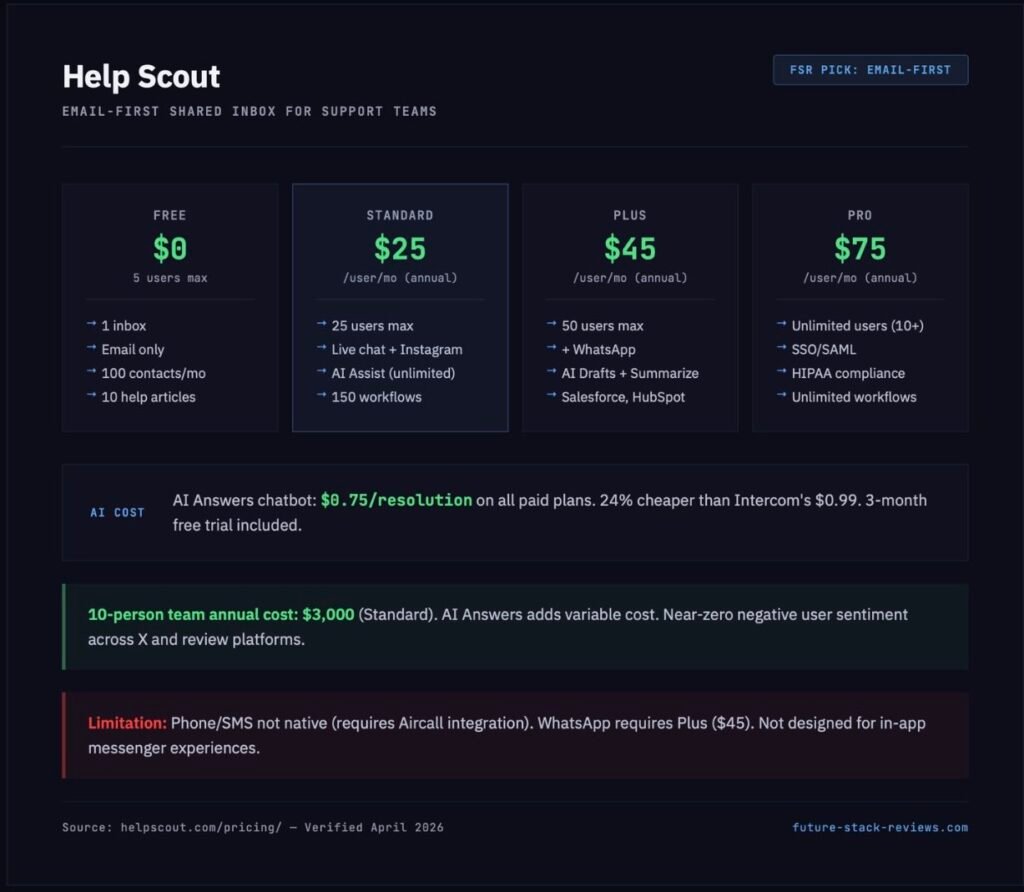
Pricing: Free / $25 / $45 / $75 per user per month (annual billing)
Help Scout is the anti-Intercom. No product tours. No in-app messaging campaigns. No proactive outbound triggered by behavioral data. What it does is manage customer conversations with unusual clarity and simplicity. The shared inbox is clean. The knowledge base is functional. The reporting is adequate without being overwhelming.
The user sentiment around Help Scout is notable: across X and review platforms, angry users are nearly nonexistent. People who switch from Intercom to Help Scout consistently describe the experience as relief.
AI at $0.75 per resolution (24% cheaper than Intercom):
Help Scout’s AI Answers chatbot is available on every paid plan (Standard and above) at $0.75 per resolution. The AI Answers product includes a three-month free trial, so you can measure real resolution rates before committing to the cost. Unlike Intercom’s Fin, there’s no minimum charge. You pay only for what you use.
The AI support tools for agents (AI Assist, Summarize, Drafts) are split across tiers. Standard gets AI Assist only. Plus ($45) unlocks AI Drafts, Summarize, and all agent-facing AI tools at no additional per-use cost.
The Free plan is real:
5 users. 1 inbox. 1 Docs site (up to 10 articles). 100 contacts per month. Email channel only, no live chat. Auto reply. Contact forms. 30-day reporting history. For a solo founder handling a handful of customer emails, this actually works.
Standard ($25/user/mo) adds live chat, Instagram, Messenger, multiple inboxes (additional at $10/mo each), up to 25 users, 150 workflows, and Beacon embeddable support hub with chat. This is the plan where Help Scout starts competing with Intercom’s core use case.
Channel limitation: WhatsApp requires Plus ($45). Phone and SMS are not native. They’re available only through third-party integration (Aircall). If omnichannel coverage across WhatsApp, phone, and SMS is a priority, Help Scout isn’t the right fit.
Where Help Scout wins over Intercom: If your support operation is email-first with chat as a secondary channel, Help Scout is not a compromise. It’s a better tool for that use case. The pricing is transparent. The AI costs are lower. The learning curve is gentle. And the interface gets out of your team’s way instead of demanding that they learn a platform.
3. Gorgias: The Only Choice for Shopify Stores
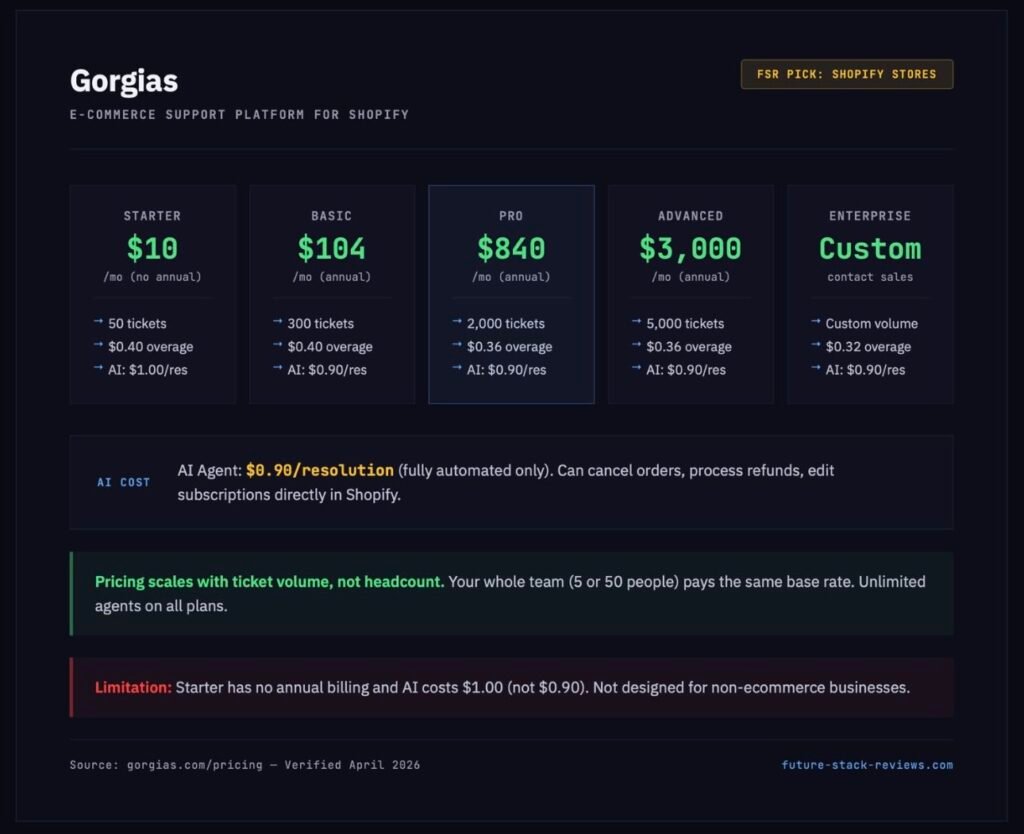
Best for: E-commerce businesses on Shopify, teams handling high volumes of “where is my order” queries
Pricing: $10 / $50 / $300 / $750 per month (based on ticket volume, not seats)
Gorgias is not a general-purpose help desk. It’s an e-commerce support machine built around Shopify, and it does things no other tool on this list can do.
The AI Agent doesn’t just answer questions about your return policy. It executes actions inside your Shopify store. Cancel an order. Change a shipping address. Process a refund. Generate a discount code. Edit a subscription. These aren’t hypothetical features. They’re the core product pitch. Gorgias integrates with Shopify at a depth that Intercom, Zendesk, and the rest don’t attempt.
The pricing model is fundamentally different:
Gorgias charges by ticket volume, not by the number of agents. Your whole team, five people or fifty, pays the same base rate. What changes the price is how many customer conversations you handle per month.
| Plan | Monthly (Annual Billing) | Tickets/Month | Overage | AI Price |
|---|---|---|---|---|
| Starter | $10 | 50 | $0.40/ticket | $1.00/resolution |
| Basic | ~$104 (annual) | 300 | $0.40/ticket | $0.90/resolution |
| Pro | ~$840 (annual) | 2,000 | $0.36/ticket | $0.90/resolution |
| Advanced | ~$3,000 (annual) | 5,000 | $0.36/ticket | $0.90/resolution |
Important nuance: Starter doesn’t offer annual billing, and its AI resolution cost is higher ($1.00 vs $0.90 on other tiers). Starter is a trial plan, not a production plan.
Gorgias isn’t cheap. The Pro plan at $840/month is comparable to an Intercom Advanced setup for a 10-person team. The cost advantage isn’t in the price tag. It comes down to two structural differences. First, adding more agents doesn’t increase the bill. Gorgias’s own tagline is “pricing that scales with your growth, not your headcount.” Second, the AI Agent charges $0.90 only for fully automated interactions, meaning conversations where no human agent touched the ticket at all. Intercom’s Fin charges $0.99 for resolved conversations including “assumed resolutions” where the customer simply left.
Who should NOT use Gorgias:
Anyone who isn’t running an e-commerce operation. Gorgias’s integrations (Klaviyo, Recharge, Loop Returns, Yotpo) are all e-commerce tools. Its AI is trained to handle e-commerce workflows. If you’re a SaaS company, an agency, or a service business, Gorgias isn’t designed for you.
4. Freshdesk Omni: The Mid-Market All-Rounder (With a Warning Label)
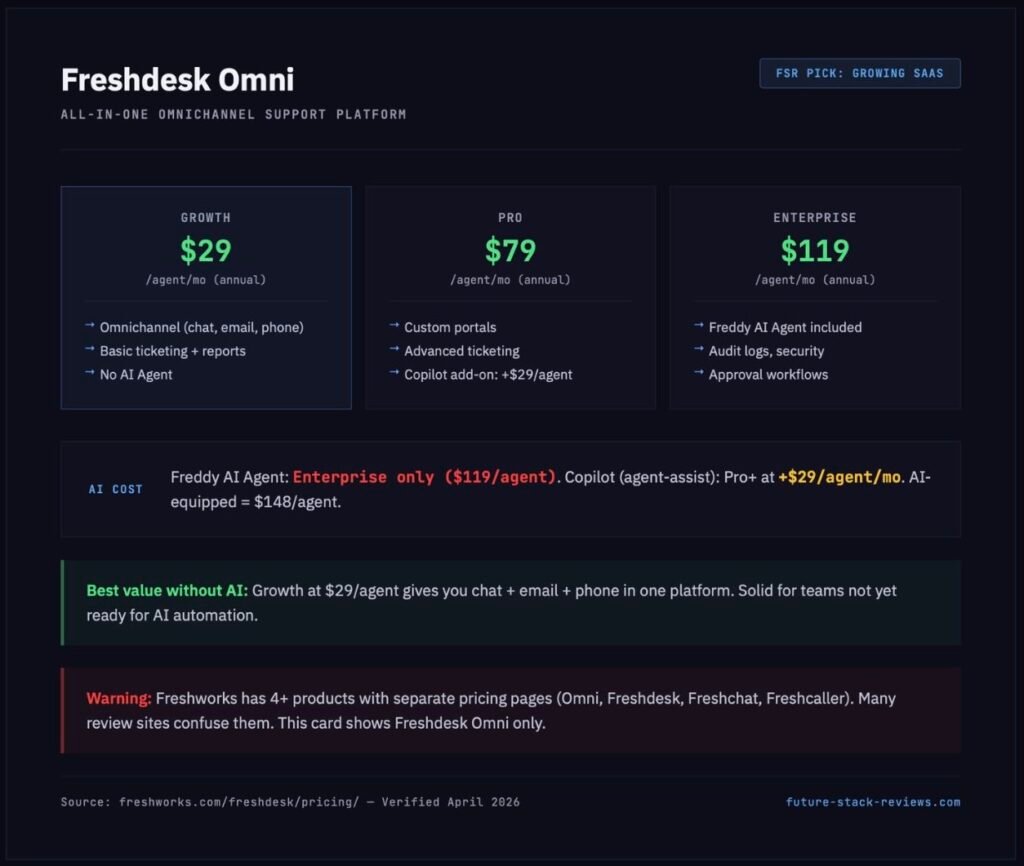
Best for: Growing companies that need ticketing, chat, email, and phone in one system without Intercom’s pricing structure
Pricing: $29 / $79 / $119 per agent per month (annual billing, Freshdesk Omni)
Freshdesk Omni is the product most articles mean when they say “Freshdesk.” It’s the omnichannel platform that combines ticketing, live chat, email, phone, and messaging into one workspace. The problem is, it lives inside a product lineup so fragmented that finding the right pricing page requires a strategy.
Freshworks sells Freshdesk Omni (all-in-one), Freshdesk (ticketing only), Freshchat (chat only), Freshcaller (phone only), and Freshservice (IT helpdesk). Each has its own pricing page, plans, and feature set. Multiple comparison articles and even some AI research tools confuse Freshservice pricing ($19/$49/$99) with Freshdesk pricing. They’re entirely different products for different use cases.
Here’s what you actually need to know:
Freshdesk Omni (the Intercom competitor):
- Growth: $29/agent/mo: omnichannel engagement, basic ticketing, AI agents (limited)
- Pro: $79/agent/mo: custom portals, advanced ticketing, custom reporting
- Enterprise: $119/agent/mo: audit logs, approval workflows, advanced security
Freshchat (standalone chat, has a free plan):
- Free: $0 for up to 10 agents: live chat, email, basic agent workspace
- Growth: $19/agent/mo: WhatsApp, Facebook Messenger, real-time dashboards
- Pro: $49/agent/mo: custom dashboards, SLA policies, advanced routing
- Enterprise: $79/agent/mo: skills-based assignments, additional security
The AI catch that most reviews miss:
Freddy AI Agent, the customer-facing AI that automatically resolves queries, is only available on the Enterprise plan ($119/agent/month). It does not exist on Growth or Pro. The Freddy AI Copilot (agent-assist tools like response suggestions, summarization, resolution assistance) requires the Pro plan or above, and costs an additional $29 per agent per month.
This means: if you want Freshdesk Omni with the same AI capabilities Intercom includes on its $29 Essential plan, you’re looking at $119 + $29 = $148 per agent per month. For a 5-person team, that’s $740/month for AI-equipped support, not dramatically different from Intercom’s $1,164 when all add-ons are included.
Where Freshdesk Omni actually shines:
If your team doesn’t need AI automation yet and wants solid ticketing plus omnichannel support at a predictable cost, the Growth plan at $29/agent is solid value. It includes the core features most mid-market support teams need without surprise charges. But don’t choose Freshdesk expecting an AI-first experience at a budget price. That’s an Enterprise-tier reality.
5. Tidio: For Small E-Commerce Sites With Simple Needs
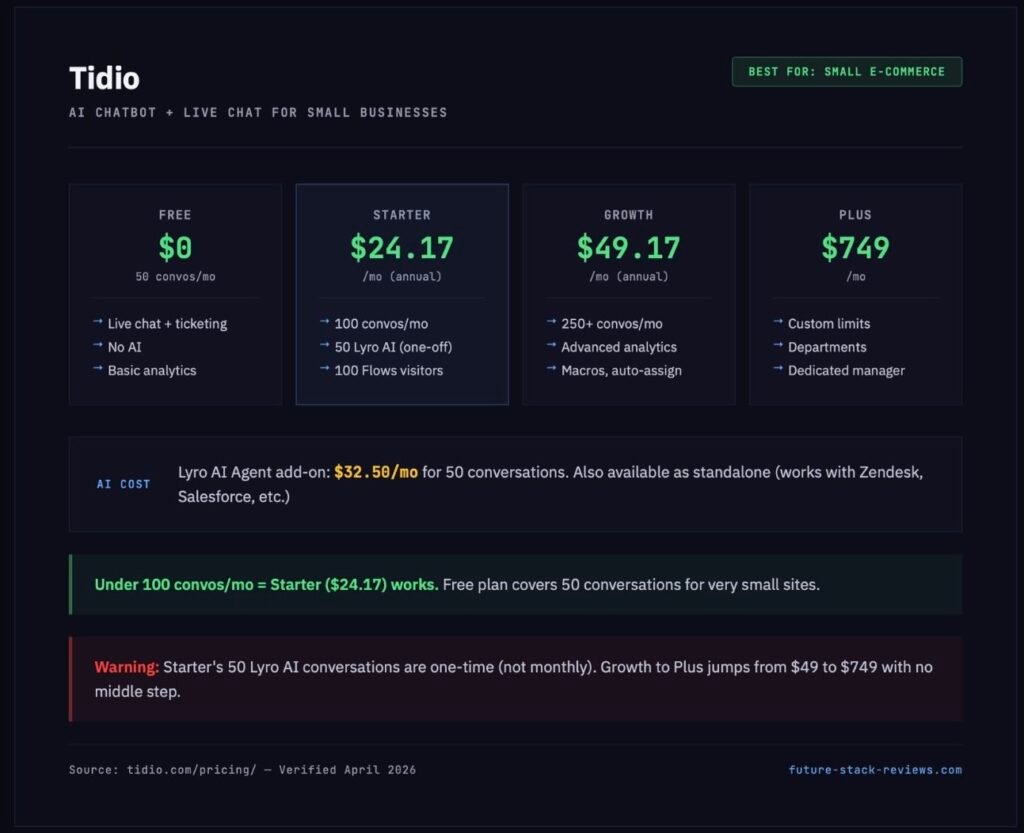
Best for: Small websites and Shopify stores handling under 100 conversations per month
Pricing: Free / $24.17 / $49.17 / $749 per month (conversation-based, annual billing)
Tidio combines a live chat widget with an AI chatbot (Lyro) in a single product. It’s positioned squarely at small businesses, particularly e-commerce operators who want a chat presence on their site without enterprise complexity.
The Free plan includes 50 billable conversations per month. That’s enough for a new store getting a handful of support requests daily. You get live chat, ticketing, a visitors list, and basic analytics. No AI.
Starter ($24.17/month annual) bumps the limit to 100 conversations and includes 50 one-time Lyro AI conversations. “One-time” is key: those 50 AI conversations don’t reset monthly. Once they’re used, you need the Lyro AI Agent add-on ($32.50/month for 50 AI conversations) to keep AI running.
Growth ($49.17/month annual) starts at 250 conversations with advanced analytics, automatic chat assignment, macros, and page view history. This is the reasonable plan for a small team that handles moderate volume.
The cliff: Growth to Plus jumps from ~$49 to $749 per month. There is no intermediate option. If you outgrow Growth’s conversation limits, you’re either paying overage charges or making a 15x price jump.
Tidio has one notable feature that no competitor matches: Lyro AI Agent is available as a standalone product that plugs into Zendesk, Salesforce, or any other help desk. Starting at $32.50/month for 50 AI conversations, you can add Tidio’s AI layer on top of your existing tools without switching platforms. No other tool on this list offers this.
The honest take: Tidio is ideal for sites handling under 100 conversations a month. Beyond that, the pricing structure starts working against you, and Crisp or Help Scout offer better long-term value.
6. LiveChat: Pure Chat, Nothing More
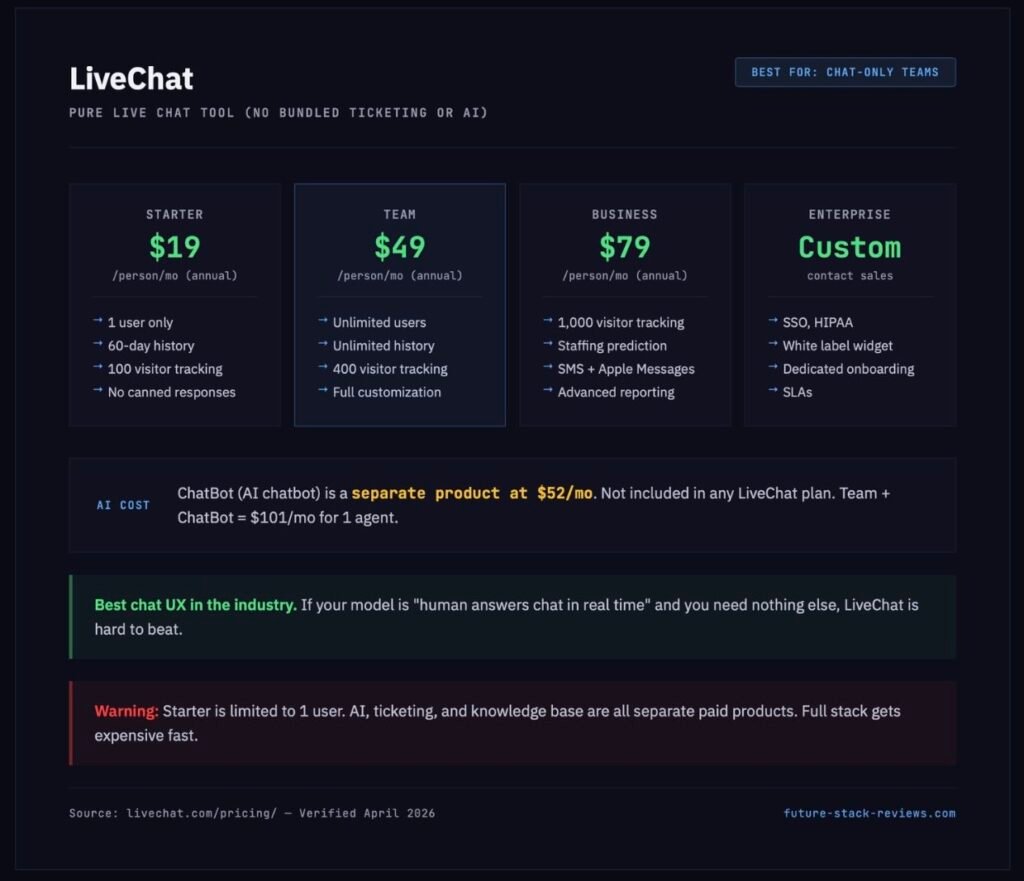
Best for: Teams that want best-in-class live chat without bundled ticketing, AI bots, or help centers
Pricing: $19 / $49 / $79 per person per month (annual billing)
LiveChat is exactly what the name says. A live chat tool. It doesn’t try to be a help desk, a knowledge base, or an AI platform. The company sells each of those as separate products (HelpDesk, KnowledgeBase, ChatBot), which means you can buy only the layer you need. But it also means assembling a full support stack requires multiple subscriptions.
Starter ($19/person/mo) is a solo plan: one user, 100 visitor tracking, 60-day chat history, one recurring campaign, basic widget customization. No canned responses. No file sharing. No chat tagging. For one person running live chat on a small site, it works.
Team ($49/person/mo) is where the product gets serious. Unlimited users, unlimited chat history, full widget customization, basic reporting, canned responses, chat tagging, file sharing, and 400 visitor tracking. Most teams should start here.
Business ($79/person/mo) adds staffing prediction, work scheduler, advanced reporting, SMS and Apple Messages, on-demand reporting, and 1,000 visitor tracking.
The AI situation: LiveChat’s AI features (“Text Intelligence”) include a Copilot on all plans, but AI chatbot capability requires a separate ChatBot subscription starting at $52/month. A Team plan with ChatBot runs $49 + $52 = $101/month for one agent. That’s starting to approach Help Scout’s $25/user plus $0.75/AI resolution pricing, and Help Scout includes ticketing and a help center that LiveChat doesn’t.
Where LiveChat wins:
The chat experience itself. The widget is fast. The agent interface is clean. The routing is smart. If your entire support model is “human answers chat in real time” and you don’t need AI bots, ticketing, or self-service documentation, LiveChat at $19/month is hard to beat on pure chat quality.
The affiliate disclosure you should know about: LiveChat offers one of the most generous affiliate programs in the SaaS industry: 20% lifetime recurring commissions with no cap. Many “best live chat” articles rank LiveChat highly because the author earns a perpetual commission on every customer they refer. That doesn’t make LiveChat a bad product. It is a good product. But it does explain why you see it recommended everywhere, and you should evaluate it on features, not on how many articles say it’s great.
7. Zoho Desk: Maximum Features, Minimum Price
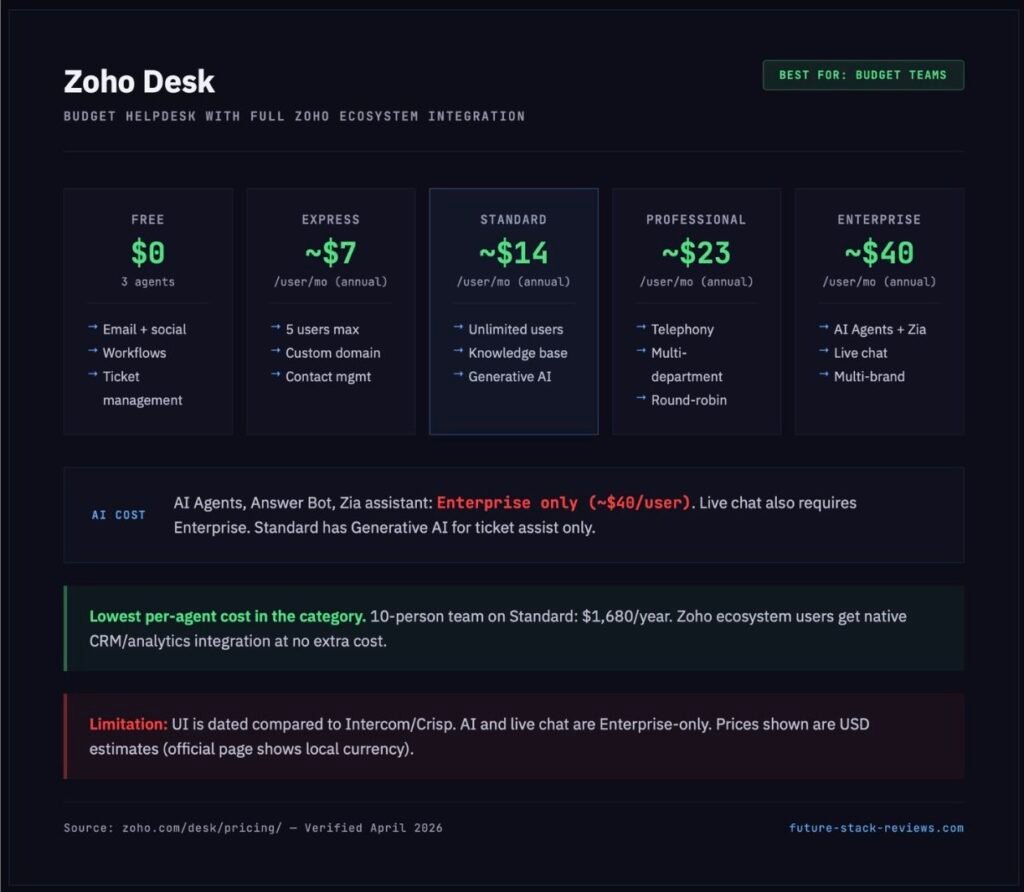
Best for: Budget-constrained teams, Zoho ecosystem users, companies that want a full-featured help desk at the lowest possible per-agent cost
Pricing: Free / ~$7 / ~$14 / ~$23 / ~$40 per user per month (annual billing, USD estimates)
Zoho Desk is the price floor of this category. The Express plan at roughly $7 per user per month delivers email support, social media channels, web forms, workflows, ticket management, and custom domains. No other tool on this list offers that feature set at that price point.
The Free plan covers 3 agents with email, social media, web forms, workflows, multi-level escalations, and ticket history. That’s more functionality at zero cost than most competitors offer on their entry-level paid plans.
Standard (~$14/user/mo) adds business messaging, instant messaging, knowledge base, ASAP self-service widget, customer happiness ratings, custom reports and dashboards, and generative AI for ticket assistance.
Professional (~$23/user/mo) adds telephony, multi-department support, round-robin assignment, multilingual help center, parent-child ticketing, and custom actions.
Enterprise (~$40/user/mo) is the AI tier. AI Agents, Answer Bot, and Zia (the AI assistant) are all Enterprise-exclusive. Live chat through Zoho SalesIQ also requires Enterprise. This mirrors the pattern we see across the industry: AI support automation is locked behind top-tier plans regardless of vendor.
The Zoho ecosystem advantage:
If your company already uses Zoho CRM, Zoho Analytics, or any other Zoho product, Desk integrates natively across the entire platform. Contact data, deal history, and support tickets live in one system without third-party connectors. For Zoho shops, this integration alone can justify choosing Desk over competitors.
The honest downside: Zoho Desk’s interface looks and feels older than Intercom, Crisp, or Help Scout. The UX is functional rather than elegant. If your support team values a modern, polished workspace, Zoho Desk will feel like a step backward. It compensates with features per dollar, not with design polish.
The Comparison Matrix
| Feature | Intercom | Crisp | Help Scout | Gorgias | Freshdesk Omni | Tidio | LiveChat | Zoho Desk |
|---|---|---|---|---|---|---|---|---|
| Entry price | $29/seat | $0 | $0 | $10/mo | $29/agent | $0 | $19/person | $0 |
| Mid-tier price | $85/seat | $95/workspace | $25/user | $300/mo | $79/agent | $49/mo | $49/person | $14/user |
| Pricing model | Per seat | Per workspace | Per user | Per ticket volume | Per agent | Per conversation | Per person | Per user |
| AI chatbot cost | $0.99/resolution | Included credits | $0.75/resolution | $0.90/resolution | Enterprise only | $32.50/mo add-on | $52/mo add-on | Enterprise only |
| Free plan | No (14-day trial) | Yes (2 seats) | Yes (5 users) | No | No (Freshchat has one) | Yes (50 convos) | No (14-day trial) | Yes (3 agents) |
| Live chat | All plans | All plans | Standard+ | All plans | All plans | All plans | All plans | Enterprise only |
| Shopify integration | Yes | Yes (all paid) | No native | Core feature | Yes | Yes | Via marketplace | Via marketplace |
| HIPAA compliance | Expert ($132+) | No | Pro ($75) | No | Enterprise ($119) | No | Enterprise | No |
The “Intercom Tax”: Annual Cost for a 10-Person Team
Scenario: 10 support agents, 5,000 tickets per month, 50% AI resolution rate (2,500 AI-resolved conversations).
| Platform | Annual Cost | vs Intercom |
|---|---|---|
| Intercom (Advanced + Copilot + Fin) | ~$46,000 | baseline |
| Zendesk Suite Professional | ~$57,900 | +$11,900 more |
| Freshdesk Omni Enterprise (with AI) | ~$21,360 | $24,640 less |
| Help Scout Standard + AI Answers | ~$25,500 | $20,500 less |
| Crisp Essentials | ~$1,140 | $44,860 less |
| Gorgias Pro (2,000 tickets + AI) | ~$10,080 | $35,920 less |
Two things jump out. First, Zendesk is not a budget Intercom alternative. It costs more. Articles that position Zendesk as a cheaper option are misleading. It’s an enterprise alternative with enterprise pricing. Second, the gap between Intercom and workspace-priced tools like Crisp is staggering. A ten-person team saves nearly $45,000 per year on Crisp Essentials. Even accounting for Crisp’s lighter AI capabilities, that’s a real number.
Migrating Out of Intercom
Switching support tools isn’t flipping a switch. Here’s what you can take with you and what you’ll rebuild.
What exports cleanly: User and company data (CSV). Conversation metadata (CSV with scheduled exports). Contact profiles and tags.
What requires API work: Full conversation histories with message content. Help center articles (the Articles API, not the UI, handles this). Attachments and rich media within conversations.
What doesn’t migrate: Workflows, automations, and routing logic. Custom bot configurations. Messenger themes and styling. Product Tour sequences. Fin training data and procedure definitions.
Migration tools by destination:
Help Scout provides an import tool for emails, tickets, customer profiles, and tags from Intercom. Knowledge base content requires manual recreation or API scripting.
Gorgias imports Help Center content from Intercom and offers partner migration tools for broader help desk migration.
Crisp supports contacts import, knowledge base import by URL, shortcut/macro import by CSV, and API-based conversation history import.
Front imports Intercom knowledge bases via URL (may take up to an hour for large libraries, with a 2–3 week estimate for full migration projects including cleanup and redirects).
The biggest migration risk isn’t data loss. It’s AI regression. Intercom’s Fin learns from your help center content, conversation history, and configured procedures. When you move to a new platform, the new AI starts cold. Resolution rates will drop before they recover. Plan for a 2–4 week overlap period where both systems run in parallel and human agents handle the volume that AI previously covered.
The Verdict
Intercom is not a bad product. It’s a product that charges you for every layer of a stack most teams don’t fully use. If you’re a post-PMF SaaS company that embeds support into the product experience, runs proactive messaging campaigns, uses Product Tours for onboarding, and needs AI to resolve thousands of conversations per month, Intercom is still the most integrated option for that specific use case.
For everyone else, here’s the decision in plain language:
You want Intercom’s vibe at a fraction of the price. Get Crisp Essentials ($95/month for 10 seats). The chat widget is modern, the inbox is solid, and the per-workspace pricing means adding teammates doesn’t blow up your budget.
Your support is email-first and you value simplicity. Get Help Scout Standard ($25/user/month). The AI Answers bot at $0.75/resolution is the cheapest AI option in the category. The interface doesn’t try to impress you. It tries to get out of your way.
You run a Shopify store. Get Gorgias. Not because it’s cheap (it isn’t). Because it’s the only tool whose AI can cancel orders, process refunds, and change addresses inside your store. That’s a capability gap, not a feature comparison.
You need maximum features at minimum cost. Get Zoho Desk. At $14/user/month for the Standard plan, you get more functionality per dollar than anywhere else. Accept that the UI won’t win design awards.
You want live chat and nothing else. Get LiveChat Team ($49/person/month). The chat experience is the best in the industry. Just know that adding AI, ticketing, or a help center means buying separate products.
You’re a growing SaaS that needs omnichannel support without AI yet. Get Freshdesk Omni Growth ($29/agent/month). Solid ticketing, email, chat, and phone in one product. But read the fine print on AI. Freddy AI Agent is Enterprise-only at $119/agent.
The right tool depends on what you’re building. If you’re still in the building phase, assembling the stack that takes you from first customer to thousandth, your support tool is one piece of a larger system. It connects to how you find customers, how you reach them, and how you keep them.
Choose the tool that fits where you are now, not where Intercom’s marketing says you should be.
