
Most beginner crypto guides hand you a list of ten platforms and wish you luck. A real starter stack has three tools. The rest can wait until your portfolio and your confidence justify the complexity.
Day 1 Essentials:
Day 1 Unnecessary: Charting software. Portfolio dashboards. Crypto news subscriptions. All three become useful later. None help you buy your first $50 of Bitcoin.
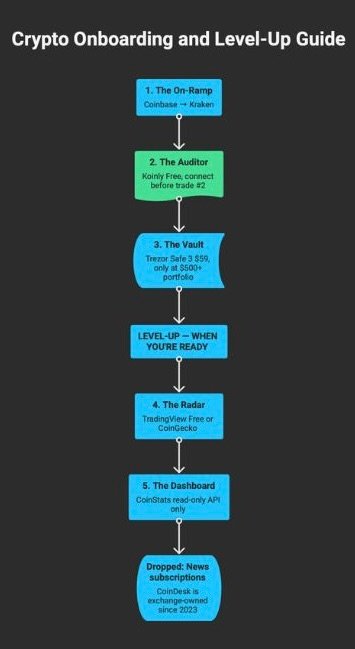
1. The On-Ramp — Where to Buy Your First Crypto
Converting dollars into digital assets costs more than most beginners expect. The fee structures across exchanges are designed to penalize users who never look past the default buy button.
Coinbase‘s Simple Buy flow charges 1.49% per transaction on purchases above $200, plus a spread of roughly 0.5%. A $500 buy immediately costs you close to $10 in fees alone. Switching to Coinbase Advanced Trade inside the same account drops the damage to a 0.60% maker fee and 0.80% taker fee. Still expensive by industry standards.
Kraken Pro charges 0.25% maker and 0.40% taker at the entry tier. On that same $500 purchase, you save roughly $2–3 compared to Coinbase Advanced — and the gap widens as your volume grows. Kraken also supports JPY deposits, EUR via SEPA, and GBP through Faster Payments, making it a stronger option for non-US buyers.
| Trade Type | Coinbase | Kraken | You Save |
|---|---|---|---|
| Simple / Instant Buy | 1.49% + spread | 1.00% + spread | ~0.49% |
| Pro Maker Fee | 0.60% | 0.25% | –58% |
| Pro Taker Fee | 0.80% | 0.40% | –50% |
| $500 Buy (Taker) | $4.00 | $2.00 | –$2.00 |
| $5,000 Buy (Taker) | $40.00 | $20.00 | –$20.00 |
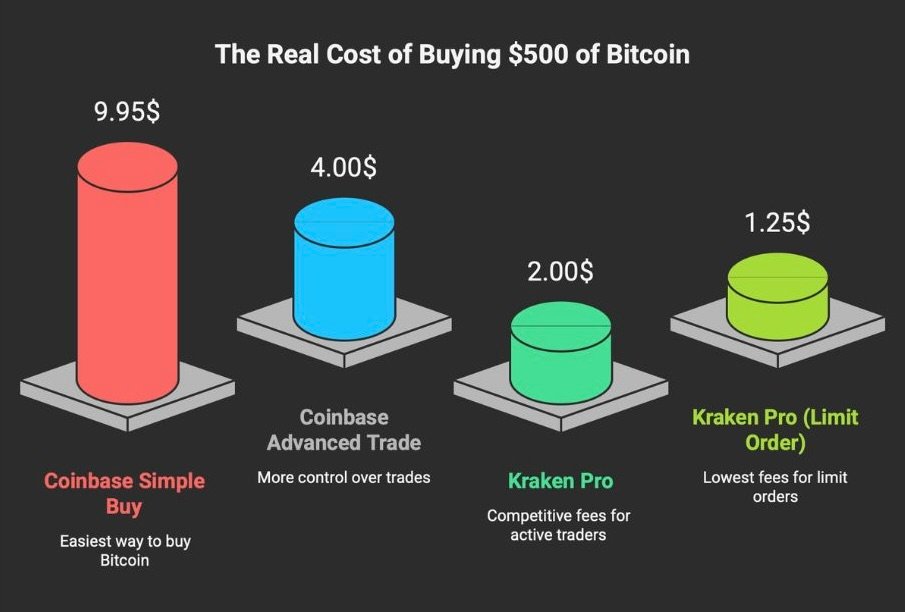
The reason Coinbase still earns the first-week recommendation is the interface. The onboarding flow is the simplest in the industry. You will make fewer mistakes buying your first Bitcoin on Coinbase than anywhere else. That matters when you are handling real money for the first time.
What you should know before signing up: In December 2024, a contractor-related insider breach at Coinbase exposed personal data for 69,461 users. Names, emails, KYC details, and partial wallet information were compromised. No funds were stolen, but the data surfaced on dark web markets and fueled targeted phishing campaigns for months afterward. Separately, customer support remains the loudest complaint across social platforms — account freezes with no explanation, automated loops that prevent escalation, and resolution timelines measured in weeks rather than hours. Coinbase also geo-blocks several countries, including Japan, from its primary onramp product.
None of this makes Coinbase unusable. It does mean you should treat it as a starting point, not a permanent home.
Verdict: Open Coinbase for your first week. Learn how orders work. Then move your activity to Kraken Pro for the 0.25% maker rate. Keep both accounts open — redundancy matters in crypto.
When you don’t need this: You already earn income in crypto or hold digital assets from a previous setup. Skip straight to custody.
2. The Auditor — Connect Your Tax Tool on Day 1
This is the section every other beginner guide skips, and the one that costs you the most money when you ignore it.
Every buy, sell, swap, and yield event creates a taxable record. The IRS requires cost-basis tracking for every disposal. The EU’s DAC8 framework, effective 2026, mandates automatic data sharing between member states for crypto transactions. Japan taxes crypto gains at up to 55% (though recent reforms are pushing toward 20%). Ignoring this on Day 1 means rebuilding months of fragmented transaction history later, often by hand, often incorrectly, and often at the cost of a $200+ tax software plan or an accountant’s hourly rate.
Connect your tax tracker before your second trade.
Koinly Free allows 10,000 transactions with full portfolio tracking, DeFi routing support, and NFT coverage — without paying anything. When tax season arrives, the Newbie plan at $49 per tax year generates reports for up to 100 transactions. Koinly produces specialized tax documents for the US, Canada, Australia, the UK, Germany, Norway, Denmark, and Sweden. It accepts payment in BTC, ETH, DAI, USDC, and standard cards.
CoinTracker takes a different approach. The free tier only shows portfolio value and a tax summary — no downloadable forms. Generating actual tax documents requires the Base plan at $59 per year for up to 100 transactions, or $199/year for the Prime plan covering 1,000 transactions with tax-loss harvesting. CoinTracker’s advantage is direct integration with TurboTax and H&R Block, plus SOC 1 and SOC 2 Type II compliance certifications. If your tax workflow already runs through TurboTax, the handoff is seamless.
Verdict: Global users should default to Koinly. The free tier is dramatically more useful, and the per-tax-year pricing model means you only pay when you actually file. US-based TurboTax users who want a single-click filing pipeline should consider CoinTracker, accepting the higher entry cost.
When you don’t need this: You live in a jurisdiction with 0% crypto tax (UAE, for example), or your strategy is strict buy-and-hold with no sales, swaps, or yield generation of any kind.
3. The Vault — Self-Custody (When You’re Ready)
A hardware wallet puts your private keys on a physical device that never touches the internet. This eliminates the risk of exchange hacks, platform insolvency, and account freezes. It also introduces the risk of losing a 24-word seed phrase that cannot be recovered by anyone, ever.
That tradeoff only makes sense when you have enough at stake.
If your crypto portfolio is under $500, a $59 hardware wallet represents more than 10% of your total holdings. The security benefit does not justify the capital drag or the operational complexity of managing seed phrases, firmware updates, and backup protocols as a complete beginner. Leave your funds on a major exchange, enable a physical security key (YubiKey) for two-factor authentication, and revisit self-custody when the numbers warrant it.
Trezor Safe 3 ($59) is the strongest entry point for 2026. The device runs on a Secure Element chip rated EAL6+ — one grade above Ledger’s EAL5+ — inside a fully open-source architecture. Security researchers can audit every line of firmware. It supports thousands of coins, offers a dedicated Bitcoin-only mode for maximalists, connects via USB-C, and pairs with Trezor Suite, a desktop app that doubles as a basic portfolio tracker. No Bluetooth, no battery. The attack surface is as small as it gets.
Ledger‘s 2026 lineup has expanded well beyond the Nano X that most articles still recommend by default. The current hierarchy: Nano Gen5 (~$200, 2.8″ screen, Recovery Key included), Flex (~$279, Gorilla Glass), Stax (~$447, curved 3.7″ display), the budget Nano S Plus (~$55, cable-only, no iOS support), and the Nano X (~$111, Bluetooth, battery). The Nano X now sits in fourth place in Ledger’s own product line. Recommending it as “the” Ledger in 2026 reveals an article that hasn’t been updated.
| Spec | Trezor Safe 3 ✦ | Ledger Nano S Plus | Ledger Nano X |
|---|---|---|---|
| Price | $59 | ~$55 | ~$111 |
| Secure Element | EAL6+ | EAL5+ | EAL5+ |
| Firmware | Open-source | Closed-source | Closed-source |
| Bluetooth | No (smaller attack surface) | No | Yes |
| iOS Support | Via web app | No | Yes (via BT) |
| Known Issues | None reported | None device-specific | Battery degradation |
Ledger hardware has never been directly compromised. But the company’s security record extends beyond the device. The 2021 customer data breach — executed through a third-party vendor — leaked names, phone numbers, and physical addresses of hundreds of thousands of buyers. Some customers were targeted in real-world robbery attempts. The 2023 Ledger Recover launch added fuel: an optional subscription service ($9.99/month) that demonstrated the firmware could export sharded fragments of a user’s seed phrase to third-party custodians. The feature is opt-in, but its existence proved the firmware had capabilities that self-custody purists considered a fundamental design violation. On X, battery degradation and device failure reports for the Nano X are a recurring topic.
None of these issues affect the cryptographic security of funds stored on Ledger devices. They do affect whether you trust the company holding your shipping address and building your firmware.
Verdict: Under $500, stay on-exchange with hardware 2FA. First hardware wallet purchase: Trezor Safe 3 ($59) if you value open-source transparency, or Ledger Nano S Plus (~$55) if you want the lowest-cost entry into the Ledger ecosystem. Both are solid. Pick the philosophy you trust.
When you don’t need this: Portfolio under $500. The cost of the device relative to your holdings creates negative expected value.
4. The Radar — Market Intelligence (Level-Up)
TradingView is the standard. Over 100 million users, 400+ technical indicators, and integrations with most major crypto exchanges. The Free tier gives you basic charting. The Essential plan at $14.95/month unlocks multiple chart layouts, more indicators, and server-side alerts.
Most beginners do not need any of this on Day 1.
The product is built for people who actively trade based on technical signals — moving averages, RSI divergences, volume profiles, support and resistance zones. If you are buying $100 of Bitcoin per month through an automatic recurring purchase, a charting platform adds nothing except the temptation to check prices too often and second-guess a strategy that works best when left alone.
Two practical notes if you do eventually subscribe: TradingView’s paid plans do not include real-time data for all exchanges. Many feeds require separate data subscriptions purchased through TradingView’s marketplace, and the costs are not obvious during signup. Users also report consistent 1–2 second delays on chart updates during periods of high volatility — minor for swing traders, meaningful for anyone attempting faster execution.
CoinGecko provides free price tracking, basic charts, and portfolio monitoring without requiring an account. For a beginner checking prices once a day, it covers everything TradingView does at the level that actually matters.
Verdict: Stay on the free tier of TradingView or use CoinGecko until you are placing limit orders based on technical levels. Paying $15/month for charts while holding $300 in Bitcoin is not a serious allocation of resources.
When you don’t need this: You are dollar-cost averaging into BTC or ETH with a multi-year horizon. The less you look at charts, the better your returns will be.
5. The Dashboard — Portfolio Tracking (Level-Up)
Once your assets are spread across two exchanges and a hardware wallet, manually checking three different apps gets tedious. A portfolio tracker consolidates everything into one view.
CoinStats offers a Free tier with 10 portfolios and 20,000 transactions. The Premium plan at $8.33/month (billed annually) expands to 100 portfolios and adds an AI-powered portfolio agent, ad-free experience, and performance analytics.
Before you connect anything, you need to know what happened in June 2024.
On June 22, 2024, attackers breached CoinStats infrastructure and drained $2.2 million from 1,590 wallets — all of which were created natively within the CoinStats app. The breach was later attributed to the Lazarus Group, a North Korean state-sponsored hacking operation. CoinStats rebuilt its entire production environment, reported the incident to the FBI, and restored full operations by July 3, 2024.
The critical distinction: wallets and exchange accounts connected to CoinStats through read-only API access were not affected. The attack targeted the app’s built-in wallet feature, not the portfolio tracking function. If you use CoinStats exclusively as a tracker — connecting exchanges via read-only API keys and wallets via public addresses — your funds were never at risk during the incident.
CoinStats’ pricing page still promotes “Military-Grade Encryption” in its security section without referencing the 2024 breach anywhere on the page. You should know about it even if they would prefer you didn’t.
Alternatives exist. CoinGecko offers free portfolio tracking. If you bought a Trezor Safe 3, the Trezor Suite desktop app includes a built-in portfolio view — no third-party connection required.
Verdict: CoinStats is a capable tracker. Use it through read-only connections only. Never store funds in its native wallet. If your setup is one exchange plus one hardware wallet, skip the tracker entirely and check your balances directly.
When you don’t need this: Your entire stack lives on a single exchange and a single wallet. Adding a third-party tracker introduces another attack surface with no practical benefit.
What We Left Out (And Why)
Crypto news sites. CoinDesk was acquired by Bullish, a crypto exchange group, in 2023 for $75 million. Editorial layoffs followed in 2024, and a controversial article removal involving a major industry figure eroded trust among longtime readers. This doesn’t mean CoinDesk publishes misinformation. It means relying on any single outlet owned by a market participant is poor media hygiene. Follow three or four sources — exchange blogs for product updates, a research outlet like The Block for industry analysis, and X for real-time sentiment. No single subscription replaces that mix.
DeFi security tools. Products like Pocket Universe and Revoke.cash simulate transactions before you sign them, catching malicious smart contracts that would drain your wallet. They become essential the moment you interact with decentralized protocols. They are irrelevant on Day 1, when your activity is limited to buying Bitcoin on a centralized exchange.
On-chain analytics. Token Terminal, DexScreener, and similar platforms provide deep data on protocol revenue, liquidity flows, and developer activity. They are powerful research tools for investors evaluating specific tokens or DeFi strategies. They offer nothing to someone learning how to initiate a bank transfer to an exchange.
These tools matter. They belong in a different article, written for a different stage of your journey.
Start Here
Buy $50 of Bitcoin. Use Coinbase or Kraken. Connect Koinly before your second purchase. When your balance crosses $500, buy a Trezor Safe 3 or a Ledger Nano S Plus and move your funds off the exchange.
Everything else comes later.
